
The short answer: Entity SEO means making your business, your people and your main topics hard to confuse with anything else, so search engines and AI tools can connect every mention of you to one clearly defined thing. It is a system, not a trick: keep one fact register of your names, address, identifiers and profiles; publish it on one About page; repeat it in Organization or LocalBusiness structured data linked by stable IDs; give every author a real Person page; keep outside profiles identical; and touch Wikidata only within its rules. Then check what Google understands, including through its Knowledge Graph Search API.
This guide is for owners, marketers and web teams at businesses anywhere in the world (the US, UK, EU, Australia and Canada, the UAE, India and elsewhere) whose name is shared with another company, whose details differ between profiles, or who want AI answers to describe them correctly. It covers a five-layer consistency system, the structured data properties that carry identity, author pages, topics as entities and how to see what Google understands. We checked Google Search Central, Google’s Knowledge Panel Help, schema.org, Wikidata’s policies and Microsoft’s Bing documentation against official sources on 25 November 2026.
What an entity is in Google’s sense
An entity is a single, identifiable thing: a company, a person, a place, a product, an idea. A string is just the letters someone types. “Mercury” is one string and several entities: a planet, an element and several companies. Search engines try to work out which one a page or query means.
Google introduced its Knowledge Graph in a May 2012 post titled “Introducing the Knowledge Graph: things, not strings”, saying it held more than 500 million objects and 3.5 billion facts at launch. Google’s Knowledge Panel Help now describes knowledge panels as “information boxes that appear on Google when you search for entities” such as people, places, organizations and things, and says the information “comes from various sources across the web”.
Three things follow for a business:
- Google decides what counts as an entity. You cannot register one. Google says knowledge panels “are created automatically by Google Search Algorithm”.
- Consistency is the raw material. When your website, profiles and independent mentions describe the same organization with the same facts, they are easier to connect. When they disagree, the connection is weaker or wrong.
- There is no published “entity score”. Google does not say how much is enough, so nobody can promise a knowledge panel or ranking from this work. The aim is to remove confusion.
To claim or correct a knowledge panel, read our guide to getting a Google knowledge panel. This guide is about the system underneath it.
The entity-consistency system: five layers
Most businesses already have the pieces, set up at different times by different people, so they disagree. This system puts one source of truth at the bottom and makes everything copy it.
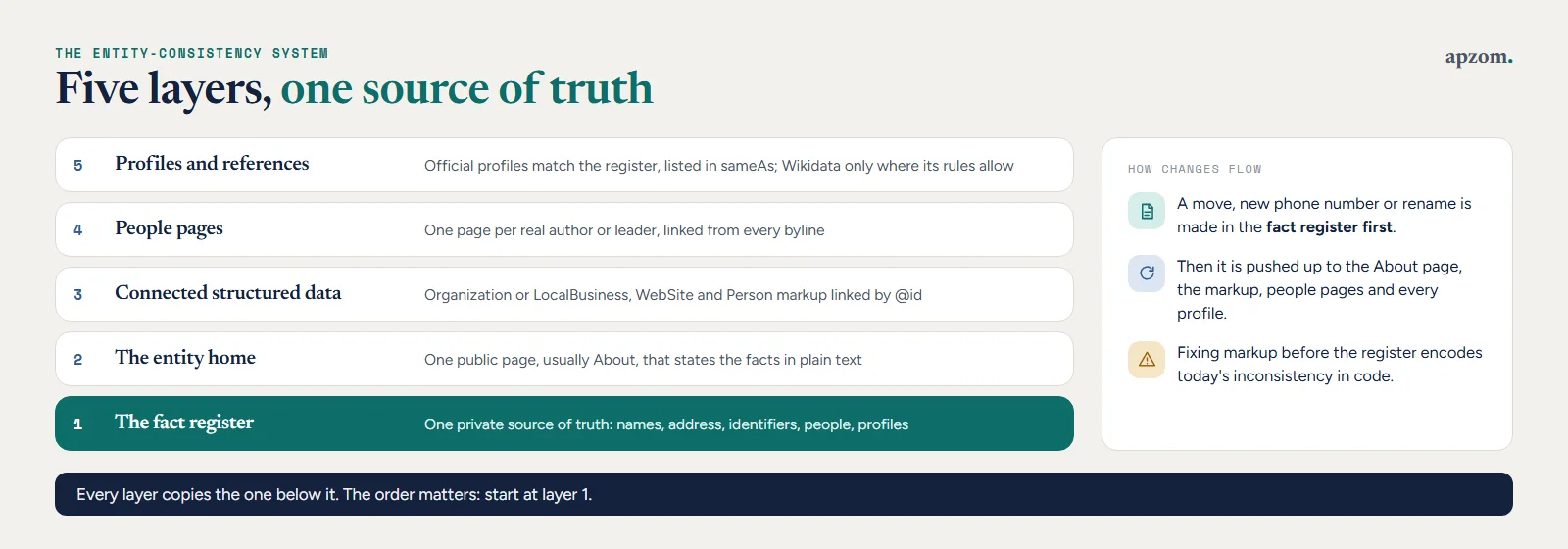
- The fact register. One private document with every official fact about the organization, its people and its locations.
- The entity home. One public page, usually About, that states those facts in plain text.
- Connected structured data. Organization (or LocalBusiness), WebSite and Person markup that repeats the register and links its parts by ID.
- People pages. One page per real author or leader, linked from every byline.
- Profiles and references. Official profiles that match the register, listed in sameAs, plus Wikidata only where its rules allow.
The order matters. If you fix the structured data before the fact register, you encode today’s inconsistency in code.
Layer 1: write the fact register
The fact register is a spreadsheet or document your team owns. Every other layer copies from it, and any change (a move, a new phone number, a rename) is made here first, then pushed out.
| Field | What to record | Watch for |
|---|---|---|
| Trading name | The name customers use, written exactly | Abbreviations, “Ltd” added in some places, old spellings |
| Legal name | The registered name, if different | Say on the About page how the two relate |
| Alternate and former names | Acronyms, previous brand names | A rebrand leaves the old name on profiles for years |
| Address or base | Registered address and any customer-facing locations | Virtual offices and old premises still listed |
| Phone, email, website | One main number with country code, one domain | Tracking numbers and duplicate domains |
| Founding date and founders | Only what you can show is true | Mixing the company’s age with the team’s experience |
| Identifiers | Registration number, VAT or tax ID, DUNS or LEI where you have them | Publishing anything personal or not already public |
| Logo | One square master file and its URL | Several versions in use |
| Official profiles | Every account you control, its URL and its owner | Accounts held by a former employee or agency |
| One-sentence description | What you do and for whom | A different pitch on every profile |
Only record facts you can prove, and mark which identifiers are public: a number from a public company register is fine to publish; a personal tax number is not. If you work in several countries, note where a customer could check each identifier, such as the company register in the UK or the business number lookup in Australia. When the name itself changes, our rebranding checklist covers retiring the old one across every profile.
Layer 2: one canonical “about” source
Pick one page as the entity home and make it the public version of the fact register. For most businesses that is the About page; for a very small site it can be the home page. Google’s Organization structured data documentation recommends placing that markup on “your home page, or a single page that describes your organization”, so the entity home and the markup should live together.
The page should state, in visible text:
- the trading name and, if different, the legal name, with one line explaining the relationship;
- what the organization does, for whom and where;
- when and where it was founded, and who leads it, with links to their Person pages;
- the address or base, phone and email, matching the fact register;
- the registration details a customer can check;
- links to every official profile.
Add a disambiguation line when another organization shares your name. A sentence such as “We are a Toronto accounting firm, not connected with the US software company of the same name” (an illustrative example) gives readers and machines explicit text that separates the two. Keep one entity home: other pages such as careers or the press kit should summarise and link to it, not restate it differently.
Layer 3: structured data, which properties and why
Structured data restates the page’s facts in a standard vocabulary, usually schema.org in JSON-LD. Google says Organization markup can help it “disambiguate your organization in search results”, that there are no required properties, and that features are not guaranteed. This section covers which properties and why; our guide to schema markup for small businesses shows how to add and test them.
The Organization properties that carry identity
| Property | Why it matters | Include when |
|---|---|---|
| name, alternateName | The name you want used; Google’s site name documentation also asks you to use your site name consistently across your home page | Always; alternateName only for names you really use |
| legalName | Google describes it as the registered, legal name “if applicable and different from the name property” | The registered name differs |
| url | Google says it “helps Google uniquely identify your organization” | Always |
| logo | Can influence which logo Google shows; Google sets a minimum of 112 x 112 pixels | Always, using the master file |
| sameAs | schema.org defines it as the URL of a page “that unambiguously indicates the item’s identity” | For official profiles you control |
| description, foundingDate, address, telephone, email | Restate the entity home | Each is true and visible |
| vatID, taxID | Google calls the VAT code “an important trust signal”; taxID must match the country in your address | The number is public and correct |
| iso6523Code, duns, leiCode | Global identifiers that point to exactly one legal entity | You have them; see below |
| founder, employee | schema.org defines founder as a person or organization “who founded this organization” | Only where true and shown on the page |
| parentOrganization, subOrganization | Link a group to its subsidiaries or brands | You have a real group structure |
On identifiers, Google’s current Organization documentation prefers iso6523Code over the older separate fields: for a Dun and Bradstreet number it suggests the 0060: prefix, and for a Legal Entity Identifier it says “We encourage using the iso6523Code field with prefix 0199: instead” of leiCode. Do not invent or borrow identifiers to look established; a wrong number is worse than none.
Google’s Organization page does not list founder or employee, so treat them as schema.org vocabulary for relationships, not a Google feature, and add them only when the entity home says the same.
When to use LocalBusiness
If customers visit your premises, Google recommends the most specific LocalBusiness subtype (for example Dentist or AccountingService). Its LocalBusiness documentation lists name and address as required and says to “Define each local business location as a” separate LocalBusiness. Our rule of thumb is to point each location to the main Organization @id with schema.org’s parentOrganization property; Google’s page does not mention it, so treat it as vocabulary, not a Google feature. Our guide to location pages covers what each page needs.
Connect the pieces with stable IDs
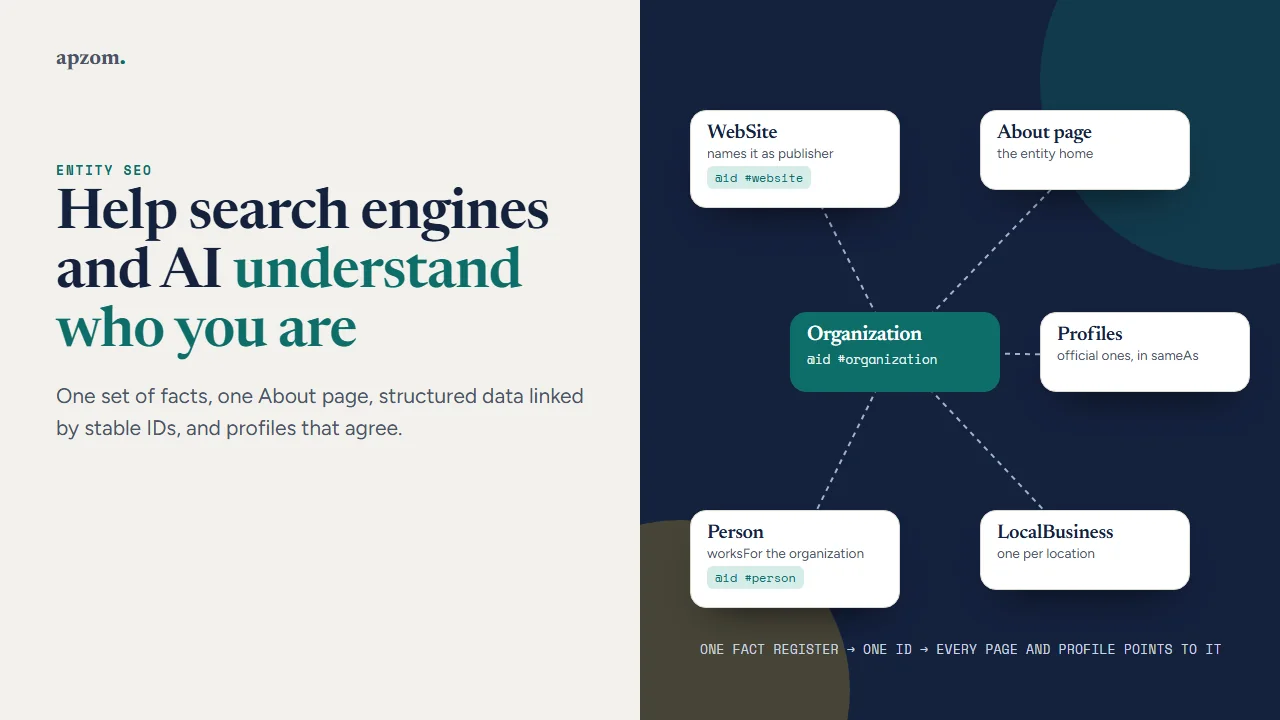
JSON-LD lets you give each thing an @id, which the W3C JSON-LD specification says is used “to uniquely identify node objects”. If your Organization has the same @id everywhere (for example https://www.example.com/#organization), other markup can point to it instead of describing a new, slightly different organization.
{"@context": "https://schema.org", "@graph": [
{"@type": "Organization", "@id": "https://www.example.com/#organization", "name": "Example Widgets", "url": "https://www.example.com/"},
{"@type": "WebSite", "@id": "https://www.example.com/#website", "name": "Example Widgets", "publisher": {"@id": "https://www.example.com/#organization"}},
{"@type": "Person", "@id": "https://www.example.com/team/#sam-lee", "name": "Sam Lee", "worksFor": {"@id": "https://www.example.com/#organization"}}
]}
The values are placeholders, shortened to show the links. The pattern is what matters: one Organization ID, a WebSite that names it as publisher, and Person IDs that point to it and that every article’s author field reuses. Many SEO plugins output a graph like this; check that the IDs stay the same on every page and the name matches your register.
Not sure your business reads as one clear entity? Ask for a Free Growth Audit. We compare your About page, Organization and Person markup, author pages and main profiles against one another, and tell you where the names, details or IDs disagree and what to fix first.
Layer 4: author and Person pages
People are entities too. Google’s guidance on creating helpful content asks, under “Who”, whether it is “self-evident to your visitors who authored your content” and whether bylines “lead to further information about the author”. It also says fabricated creator profiles, such as made-up names or AI-generated headshots, are deceptive.
Build one page (or one anchored section of a team page) per real person who writes or leads, with:
- the name used in bylines, exactly;
- the role at your organization and what the person works on;
- verifiable background you are happy to publish, only if true;
- links to that person’s own professional profiles.
Then connect it. Google’s Article structured data documentation says author.url should be “a link to a web page that uniquely identifies the author”, that sameAs can do the same job, and that author.name should hold only the name, without job titles or honorifics. If the author page is on your site, Google recommends ProfilePage structured data for it, and its ProfilePage documentation lists an employee page on a company website among the valid examples. Use the same Person @id on the page and in every article.
No invented authors and no credentials a person does not hold. Our guide to E-E-A-T explains why evidence, not adjectives, earns trust.
Layer 5: site name, profiles and sameAs
The site name
The site name Google shows above your results is chosen automatically, but Google says WebSite structured data on the home page “is most important, if you want to specify a preference”, and its Organization documentation says to use the same name and alternateName as your site name. Our guide to the site name and favicon in Google covers the setup and why Google sometimes shows something else.
Profiles that agree
Every profile in your sameAs list should show the same name, logo, website, description and, where relevant, address and phone as the fact register, and should link back to your site. Business listings have their own rules: Google’s Business Profile guidelines say your name “should reflect your business’s real-world name, as used consistently on your storefront, website, stationery” and that adding unnecessary information to the name is not permitted. Our Google Business Profile optimization checklist and our guides to Bing Places and Apple Maps cover those listings.
Put in sameAs only pages about you that you control or that officially record you. A partner’s page that mentions you, or a profile you abandoned, does not “unambiguously” indicate your identity.
Wikidata and Wikipedia: check the rules first
A Wikidata item is sometimes listed in sameAs, but only add one that already exists independently and describes you correctly. Wikidata’s Self-promotion essay says creating an item about your own organisation “is strongly discouraged”, and its Autobiography page says anyone editing for reward must declare it. Our rule of thumb: do not create a Wikidata item or Wikipedia article for your own business; if one exists, correct errors with reliable sources and declare your connection. Our knowledge panel guide covers Wikidata’s notability criteria and Wikipedia’s stricter rules.
Entities in your content, not just your brand
Every guide and service page is also about a thing: a service, a product, a standard, a problem. Pages that name and define it clearly are easier to understand and quote.
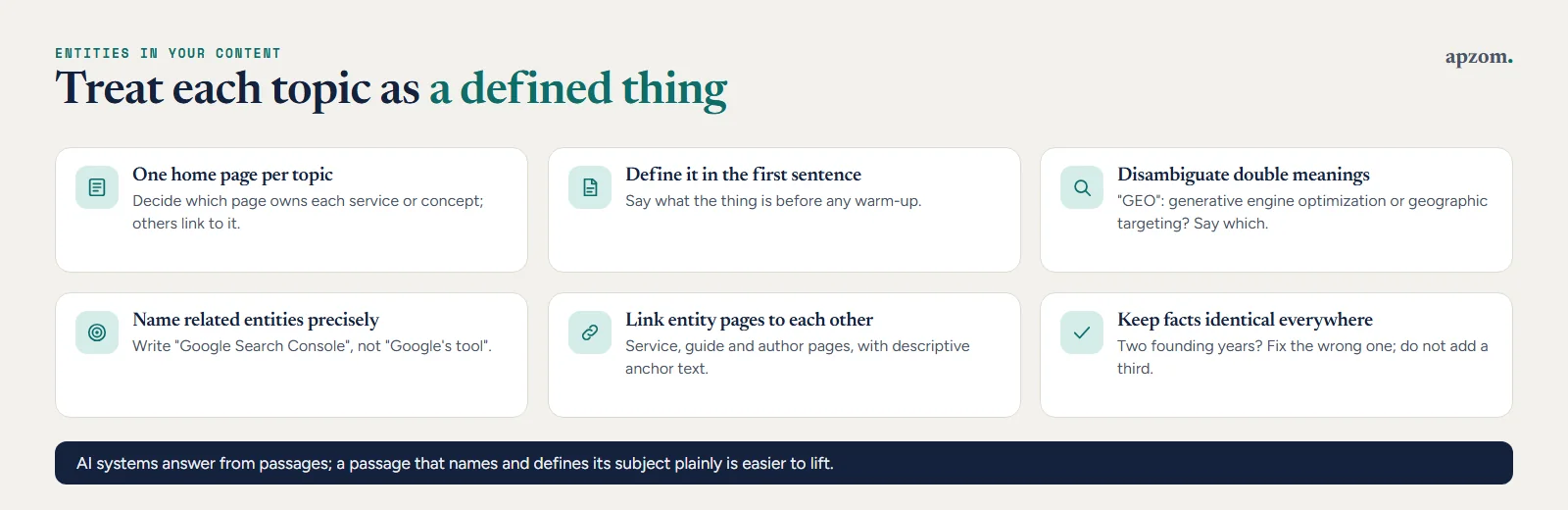
- Give each main topic one home page. Decide which page owns each service or concept, for example one page for “technical SEO audit”, and let other pages link to it rather than each half-explaining it. Our guide to content audits helps you find pages competing for the same topic.
- Define the thing in the first sentence. “A technical SEO audit is a check of whether search engines can crawl, render and index your pages” is clearer to a person and a machine than a paragraph of warm-up. Our guide to answer blocks for featured snippets and AI answers has patterns for definitions.
- Disambiguate terms with more than one meaning. “GEO” can mean generative engine optimization or geographic targeting; “conversion” can mean a sale or a form fill. Say which you mean the first time, and use the same term for the same thing throughout.
- Name related entities precisely. Write “Google Search Console”, not “Google’s tool”.
- Link entity pages to each other with descriptive anchor text. A service page links to the guide that defines its method; the guide links back to the service; both link to the author’s Person page. Our guide to internal linking explains the hub-and-spoke pattern.
- Keep facts about the same entity identical across pages. If two pages give different founding years, fix the wrong one rather than adding a third.
AI systems answer from passages, and a passage that names and defines its subject plainly is easier to lift. Our guides to what GEO is and getting recommended by ChatGPT cover the AI side.
How to check what Google understands
You cannot see inside the Knowledge Graph, but you can check its outputs. Do these checks quarterly and after any rename or move.
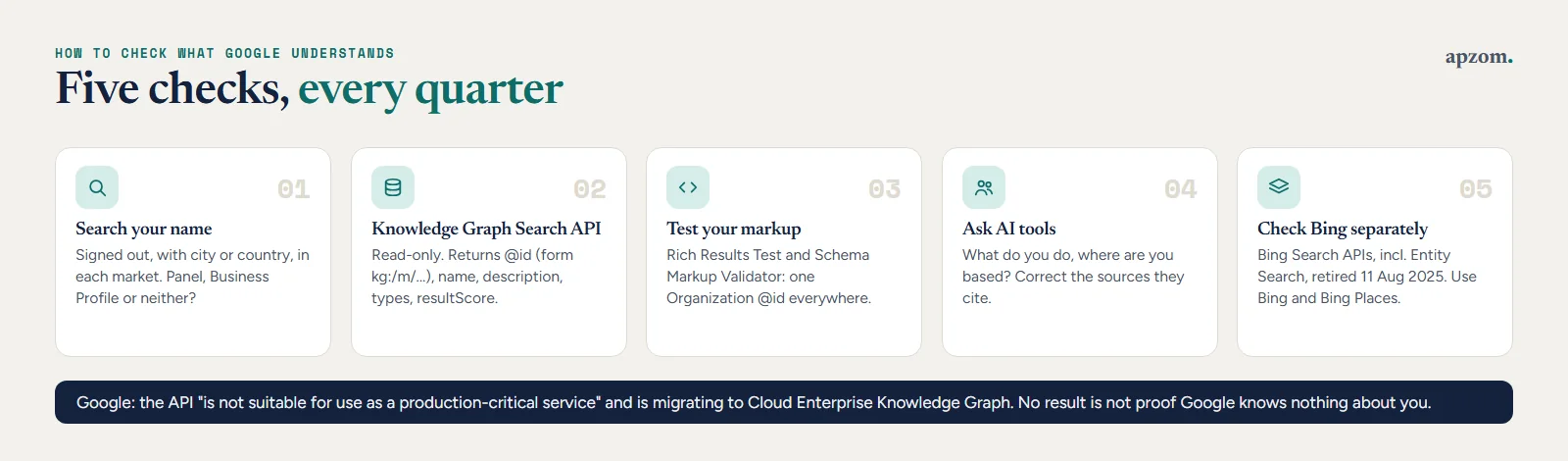
1. Search your name the way customers do
Search your exact name signed out, then with your city or country, in each market. Note whether a knowledge panel, a Business Profile (a different box, for businesses that meet customers in person) or neither appears, and whether the facts match your register.
2. Query the Knowledge Graph Search API
Google’s Knowledge Graph Search API “lets you find entities in the Google Knowledge Graph”. It is read-only: a request to the entities:search endpoint with your query and a Google Cloud API key returns matching entities with an @id (in the form kg:/m/0dl567), a name, descriptions where available, schema.org types and a resultScore, “an indicator of how well the entity matched the request constraints”. You can restrict results by type (for example Organization) and language, up to 500 results per request.
Read the results with three caveats from Google’s own documentation:
- Google says the API “is not suitable for use as a production-critical service”, so use it for checks, not to power a product.
- Google says it is migrating the API to Cloud Enterprise Knowledge Graph and tells new users to start there. The Cloud documentation says the Basic edition of the Search API “remains available, but doesn’t support new features”.
- Google’s usage-limits page gives a quota of up to 100,000 read calls per day per project at no charge, far more than an entity check needs.
If your organization appears, record its ID and description and compare them with your register each quarter. If not, that is not proof Google knows nothing about you; many businesses never get a public entity record.
3. Test your markup
Run your entity home and an article through Google’s Rich Results Test and the Schema Markup Validator. Check the Organization @id is the same on both, the author’s @id matches the author page, and no plugin outputs a second organization.
4. Ask AI tools who you are
Ask ChatGPT, Gemini, Copilot and Perplexity what your business does and where it is based. Where an answer is wrong, look at the sources it cites and correct those first.
5. Check Bing separately
Bing has no public entity lookup to use: Microsoft’s documentation says the public Bing Search APIs, whose list included the Bing Entity Search API, were retired on 11 August 2025. Search your name on Bing, check your Bing Places listing, and use Bing Webmaster Tools to confirm your pages are indexed. Our guide to Bing Webmaster Tools covers setup.
What does NOT work
Some tactics sold as “entity SEO” break platform rules or the law, and others simply add noise.
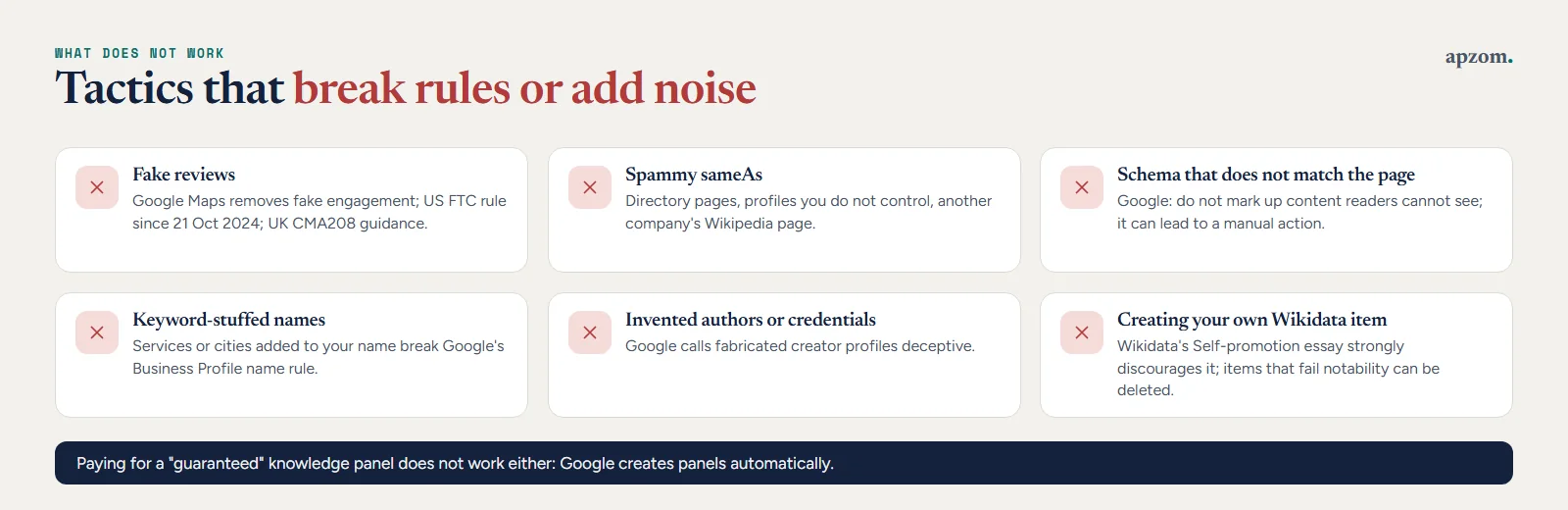
- Fake reviews. Google’s Maps contribution policy says contributions “should reflect a genuine experience” and that fake engagement “will be removed”, including reviews paid for directly or in kind, and consumer law in many countries bans them too (the US FTC rule took effect on 21 October 2024; the UK CMA published its CMA208 guidance on 4 April 2025). Google also says pages using LocalBusiness or other Organization markup are ineligible for review stars about themselves, so marking up your own reviews earns nothing. Our guide to getting more Google reviews covers the honest route.
- Spammy sameAs. Dozens of directory pages, profiles you do not control, or another company’s Wikipedia article point machines at pages that do not identify you.
- Schema that does not match the visible page. Google’s structured data guidelines say “Don’t mark up content that is not visible to readers of the page”, that markup “must be a true representation of the page content”, and that a structured data issue “can result in a manual action”. Bing’s Webmaster Guidelines (last read in full on 26 October 2026) also list misleading structured data among practices to avoid. Founders, addresses, awards and ratings that appear only in code fail this test.
- Keyword-stuffed names. Adding services or cities to your name in profiles breaks Google’s Business Profile name rule.
- Invented authors or credentials. Google calls fabricated creator profiles deceptive.
- Creating your own Wikidata item. Wikidata’s Self-promotion essay strongly discourages it, and an item that fails notability can be deleted.
- Paying for a “guaranteed” knowledge panel. Google creates panels automatically, so nobody can guarantee one.
Common mistakes
- Two organizations in the markup. A theme outputs one Organization, a plugin another, each with a different name or @id.
- The About page and the Business Profile disagree. Usually on the name, phone number or address after a move.
- The rename that never finished. The website uses the new name, while old profiles, directories and the logo file still carry the old one.
- Bylines that lead nowhere. An author name with no link, or a link to an archive page with no information about the person.
- Fixing the copies, not the source. Correcting one directory while the fact register, or the page the directory copied from, is still wrong.
How Apzom can help
Apzom Digital’s SEO and AEO work includes entity audits: we build or check your fact register, your About page, your Organization, LocalBusiness, WebSite and Person markup and its IDs, your author pages, and your profiles, then give you a fix list in priority order. We have not published an entity SEO case study yet, so we will not quote results we cannot prove, and we will not promise a knowledge panel, because Google creates those automatically. See our SEO services and AEO services. We work with clients worldwide, remotely, from our base in Ahmedabad, India.
Get a Free Growth Audit of your entity signals. Send us your website and the profiles you use. We send back a written review: the facts search engines and AI tools can confirm about you today, the contradictions we found, the markup and profile fixes in order, and a quote if you want us to do the work.
No obligation, and no promised knowledge panel or rankings. Prefer to talk first? Contact us or see our SEO services.
Frequently asked questions
What is entity SEO in simple terms?
It is making sure search engines and AI tools can tell exactly which business, person or thing you are, and connect every mention of you to the same facts.
Is entity SEO the same as schema markup?
No. Structured data is one layer of it. If the facts behind the markup are inconsistent, or the markup describes things the page does not show, schema alone will not make you clearer, and it can break Google’s structured data guidelines.
Should I create a Wikidata item for my company?
Not yourself. Wikidata’s Self-promotion essay strongly discourages it. If an item already exists, correct errors with reliable sources and declare your connection.
Is the Knowledge Graph Search API free?
Google’s usage-limits page gives a quota of up to 100,000 read calls per day per project at no charge. You need a Google Cloud project and an API key. Google is migrating the API to Cloud Enterprise Knowledge Graph and tells new users to use that instead.
How long does entity SEO take to show?
Google publishes no timeline. Pages and profiles must be recrawled, and independent coverage takes time to earn. Check quarterly and judge progress by whether descriptions of you become accurate.