
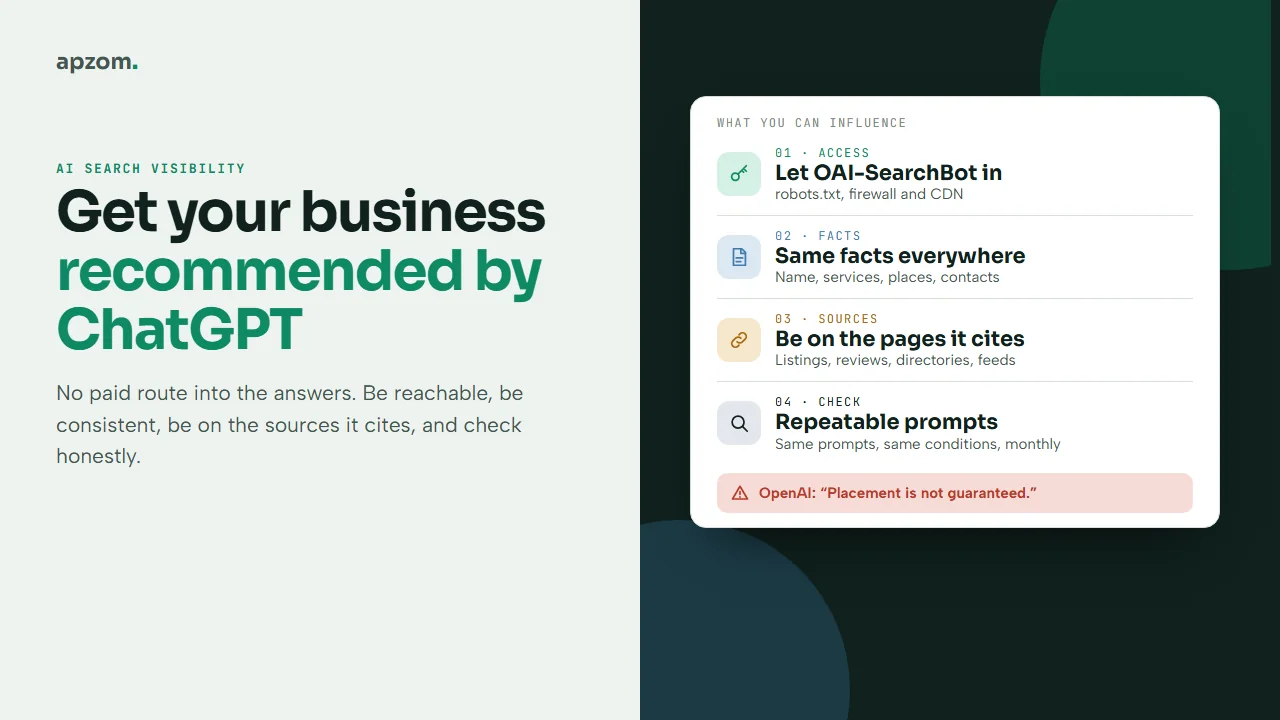
The short answer: You cannot pay, apply or submit a form to be recommended in ChatGPT’s answers, and nobody can guarantee a place. OpenAI’s help page says plainly that “Placement is not guaranteed.” What you can do is make your business easy for ChatGPT search to find and trust. Allow OpenAI’s search crawler, OAI-SearchBot, in your robots.txt and through your firewall. Publish clear pages that state what you do, where and for whom. Keep those facts the same on every profile and listing. Get accurately listed on the sites ChatGPT cites for your kind of business. If you sell products, share a product feed. Then check what ChatGPT says about you with a fixed set of prompts, run the same way each month.
This guide is for owners and marketing leads of service businesses, local firms, B2B companies and online stores anywhere in the world who want to know how ChatGPT finds businesses and what they can actually influence. It covers OpenAI’s crawlers and robots.txt, the routes ChatGPT uses to find business information, product feeds, a repeatable visibility check and the paid “ChatGPT listing” offers to avoid. For the wider principles behind AI search, read our guide to GEO (generative engine optimization) first; this article goes deeper on ChatGPT alone. We checked OpenAI’s crawler documentation, its ChatGPT search, shopping and ads help pages, its merchant and product feed documentation, and the robots.txt standard against official sources on 21 November 2026.
How ChatGPT finds businesses to mention
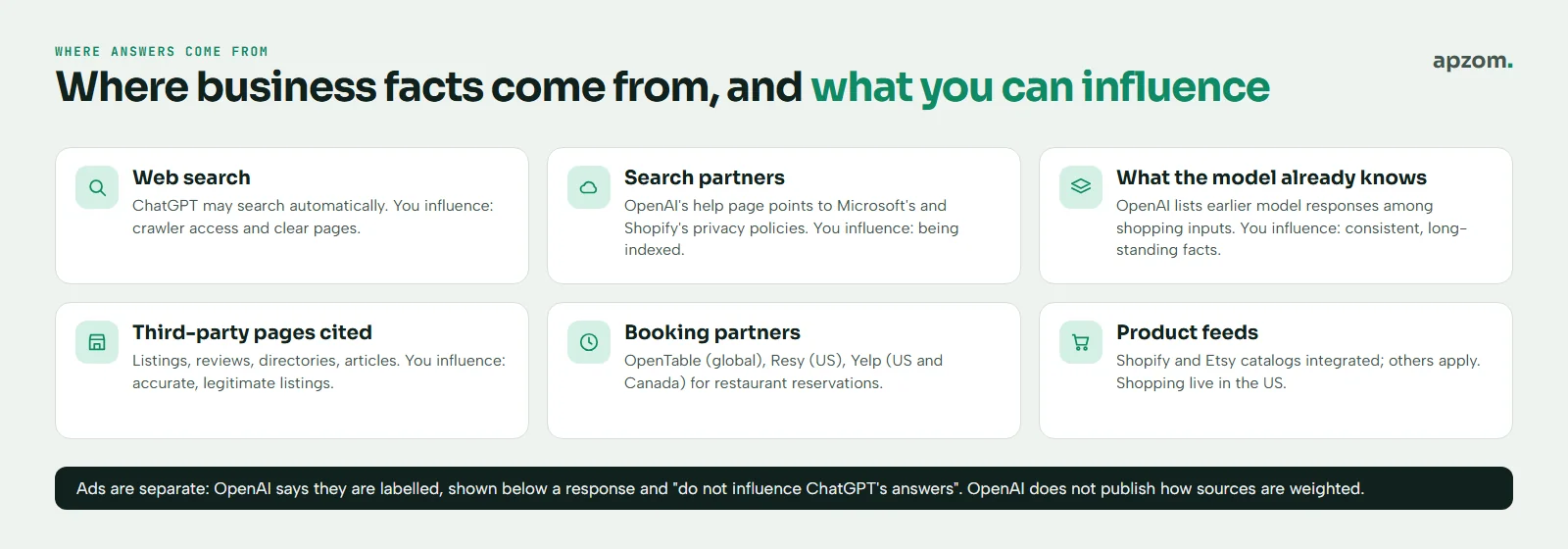
When someone asks ChatGPT “who are good commercial cleaners in Leeds?”, the answer can draw on several sources at once. Start by knowing which ones you can influence.
| Route | What OpenAI says | What you can influence |
|---|---|---|
| Web search | ChatGPT “may search the web automatically when your question would benefit from current information”, and answers can include citations and a Sources list | Crawler access, page content, the third-party pages that get cited |
| Search partners | ChatGPT search “sometimes partners with other search providers” and rewrites the question into targeted queries; its help page points to Microsoft’s and Shopify’s privacy policies | Being indexed by mainstream search engines, including Bing |
| What the model already knows | OpenAI’s shopping page lists “model responses generated by ChatGPT before it considers any new search results” among its inputs | Consistent, long-standing public facts about your business |
| Shopping data | Product results use “structured metadata from first-party and third-party providers” and merchant feeds | Your product feed or your Shopify or Etsy catalog |
| Booking partners | Restaurant results may show availability from OpenTable, Resy or Yelp | Your listing on those platforms |
OpenAI does not say which search provider handles which question, and it does not publish how the sources are weighted. Treat any claim that “ChatGPT uses Bing for everything” or “ChatGPT only uses its own index” as unverified. What OpenAI does say is enough to act on: its search help page explains that, to make a website eligible for inclusion, you allow OAI-SearchBot to crawl the site and confirm that your host or content delivery network allows traffic from OpenAI’s published searchbot IP addresses.
The same help page says ChatGPT may use an approximate location based on the user’s IP address, and saved memories when it rewrites a search query. So two people asking the same question can get different businesses, and one answer never tells you your visibility.
OpenAI’s crawlers: which one decides whether you appear
OpenAI’s “Overview of OpenAI Crawlers” page lists four user agents. Only one of them decides whether your pages can appear in ChatGPT’s search answers.
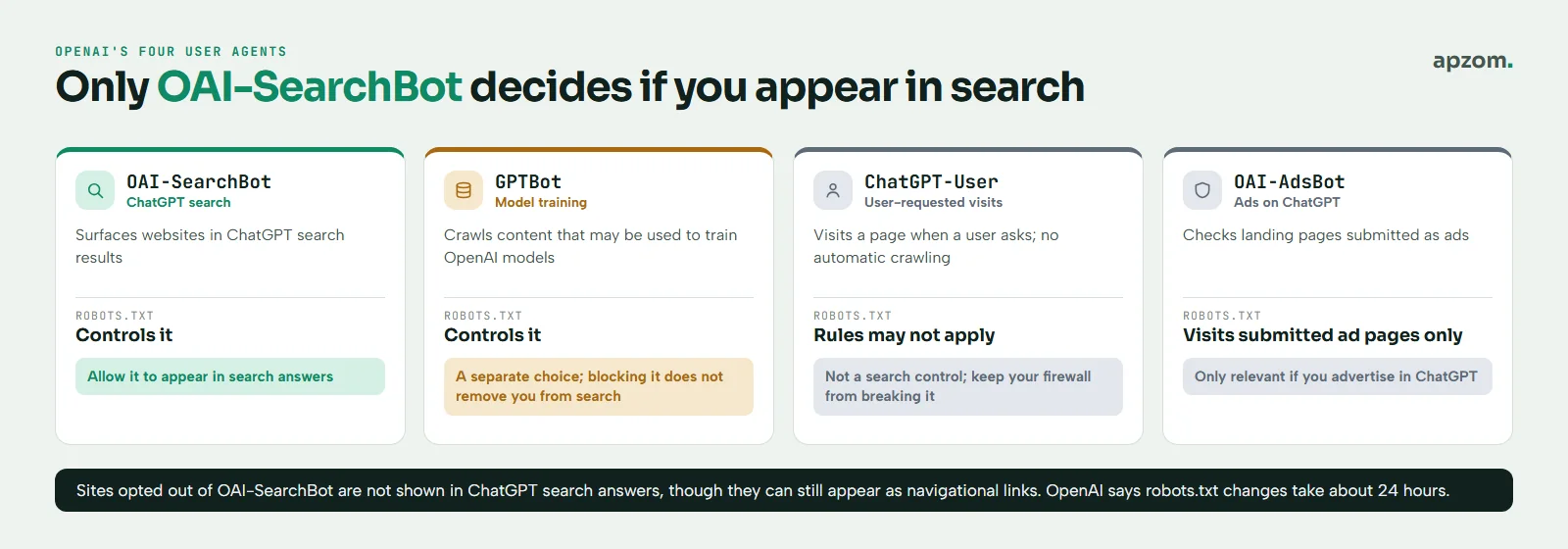
| User agent | What it is for, in OpenAI’s words | Controlled by robots.txt? | Decision for most businesses |
|---|---|---|---|
| OAI-SearchBot | “used to surface websites in search results in ChatGPT’s search features” | Yes | Allow it if you want to appear in ChatGPT search |
| GPTBot | Crawls “content that may be used in training our generative AI foundation models” | Yes | A separate choice about model training; blocking it does not remove you from search |
| ChatGPT-User | Visits a page when a user asks ChatGPT or a Custom GPT a question; “not used for crawling the web in an automatic fashion” | OpenAI says “robots.txt rules may not apply” | Not a search control; make sure your firewall does not break these visits |
| OAI-AdsBot | Checks the safety of landing pages “submitted as ads on ChatGPT” | Only visits pages submitted as ads | Only relevant if you advertise in ChatGPT |
The key sentence on OpenAI’s page is this: sites “opted out of OAI-SearchBot will not be shown in ChatGPT search answers, though can still appear as navigational links.” In other words, blocking OAI-SearchBot is the one setting that reliably keeps you out of ChatGPT’s search answers.
OpenAI also says each setting is independent: you can allow OAI-SearchBot to appear in search while disallowing GPTBot to signal that your content should not be used for training. If you allow both, OpenAI says it may use the results from one crawl for both purposes. After you change robots.txt, OpenAI says it can take about 24 hours for its search systems to adjust.
Allowing GPTBot is a business decision, not a visibility trick: OpenAI does not say training data affects which businesses ChatGPT mentions.
Check your robots.txt and firewall
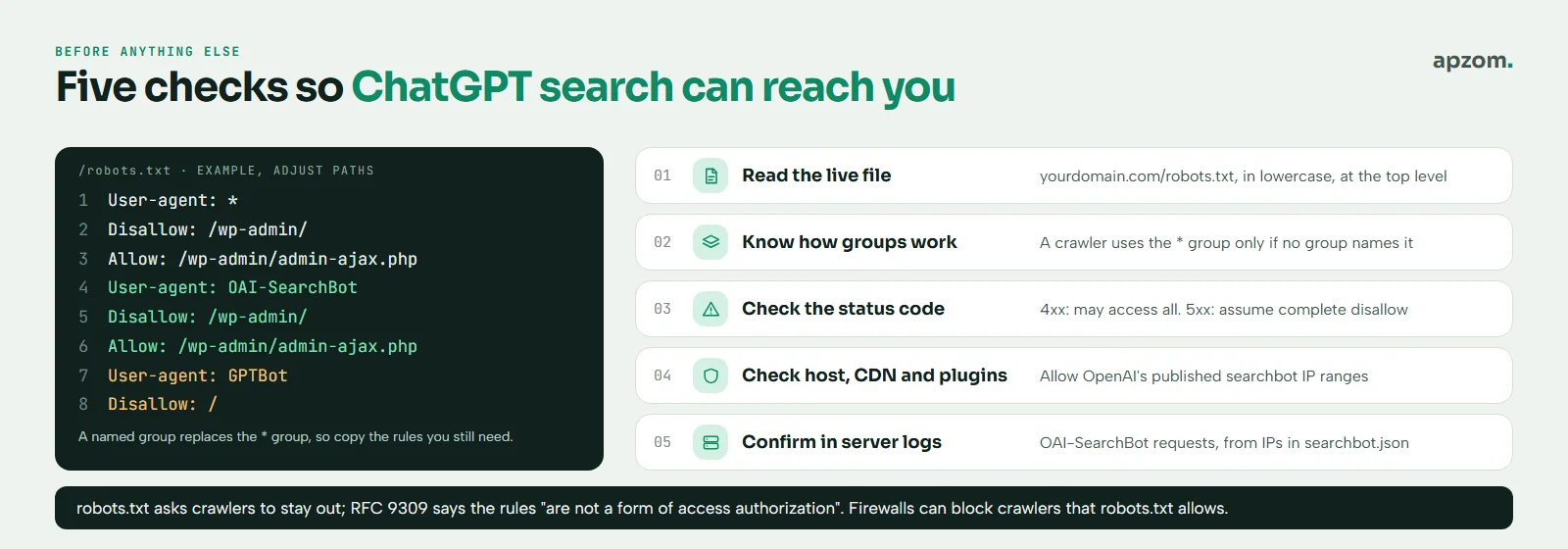
If ChatGPT search cannot reach you, the block may not be deliberate: a plugin, a security rule or a copied robots.txt can do it. Run these checks in order.
1. Read your live robots.txt
Open yourdomain.com/robots.txt in a browser. The robots.txt standard, RFC 9309 (published by the IETF in September 2022), says the file must sit at “/robots.txt” in the top-level path of the site, in lowercase. Look for any group that names OAI-SearchBot, and for a “User-agent: *” group with “Disallow: /”.
2. Know how groups work
RFC 9309 says a crawler obeys the group that names it, and uses the “*” group only “if no matching group exists”. This catches people out. If you add a group for OAI-SearchBot that only says what to allow, OAI-SearchBot stops reading your “*” group and ignores the paths you had blocked for everyone else. Copy any rules you still want into the new group.
Here is an example for a WordPress site that wants to appear in ChatGPT search, keep the admin area out and opt out of model training. Adjust the paths to your own site.
User-agent: *
Disallow: /wp-admin/
Allow: /wp-admin/admin-ajax.php
User-agent: OAI-SearchBot
Disallow: /wp-admin/
Allow: /wp-admin/admin-ajax.php
User-agent: GPTBot
Disallow: /
The OAI-SearchBot group here repeats the “*” rules, so it is optional: without it, the crawler follows the “*” group. Keeping it means a later change to the “*” group does not silently change OAI-SearchBot’s access.
3. Make sure the file itself loads
The standard treats errors differently. If robots.txt returns a 4xx status such as 404, a crawler “MAY access any resources” on the site. If it is unreachable because of a 5xx server error or a network error, the crawler “MUST assume complete disallow”. A robots.txt that times out or errors can therefore block every compliant crawler, including OAI-SearchBot. RFC 9309 also says crawlers should not use a cached copy for more than 24 hours, and that the rules “are not a form of access authorization”: robots.txt asks crawlers to stay out, it does not protect private pages.
4. Check your host, CDN and security plugin
OpenAI’s help page asks you to confirm that your host or CDN allows traffic from its published searchbot IP addresses, which it lists in a file at openai.com/searchbot.json. Firewalls, bot-protection services and security plugins can block those requests even when robots.txt allows them.
If you use Cloudflare, check its Security settings. Cloudflare’s changelog of 1 July 2026 says it groups AI traffic into Search, Agent and Training, and that domains joining Cloudflare from 15 September 2026 get new defaults: Training and Agent bots are blocked on pages that display ads, while Search stays allowed. The changelog does not name OAI-SearchBot, so check how your dashboard classifies it.
For visits made on a user’s behalf, OpenAI’s “Help ensure cloud browser access” page says Akamai, Cloudflare, HUMAN and Vercel verify ChatGPT’s request signatures automatically, and gives manual steps for other firewalls.
5. Confirm in your server logs
Search your access logs for “OAI-SearchBot”. OpenAI says its robots.txt requests may carry an extra “robots.txt” marker in the user-agent string, which helps you tell those requests apart. A user-agent string can be copied by anyone, so check that the requests come from IP ranges in OpenAI’s published file before you trust them. If you see no OAI-SearchBot requests at all over several weeks, check the firewall first.
Make your own site easy to understand and quote
Crawler access only makes you eligible. ChatGPT still has to understand what you do and find a passage worth citing. Our GEO guide covers the general principles; for ChatGPT, these matter most for a business site.
- One page per service, with plain facts. Name the service, who it is for, where you offer it, how it works, typical timelines and what affects the price. A question like “who installs commercial solar in Perth?” can only be answered from pages that say those things in words. Our guide to writing a service page shows the structure.
- Answer-first passages. Put the direct answer at the top of each section, then the detail. Our guide to featured snippets and AI answers has five answer-block patterns you can reuse here.
- Facts in HTML text. Prices “from”, service areas, opening hours and specifications should be on the page as text, not only inside images, PDFs or scripts that load after a click.
- A real About page and named people. Say who runs the business, since when, and what qualifies them, using only facts you can back up.
- Be indexed by mainstream search engines. OpenAI’s help page names Microsoft among its search providers’ privacy policies, but does not say how Bing results are used. Verifying your site in Bing Webmaster Tools and submitting a sitemap costs nothing and removes one possible gap. Our guide to Bing Webmaster Tools walks through it.
OpenAI’s crawler page and its ChatGPT search help page do not mention llms.txt. If you are deciding whether to publish one, our guide to llms.txt explains what it is and is not.
Not sure whether ChatGPT can even reach your site? Ask for a Free Growth Audit. We check your robots.txt groups, firewall and CDN settings for OpenAI’s crawlers, look for OAI-SearchBot in your logs if you can share them, and tell you what is blocking you, if anything.
Give ChatGPT one consistent picture of your business
ChatGPT builds its picture of a business from many pages at once: your site, your listings, directories, reviews and articles that mention you. When those sources disagree about your name, services, locations or founding date, the answer can blend them or pick the wrong one.
Write a one-page fact sheet and use it everywhere:
- Legal and trading name, written the same way each time.
- What you do, in one sentence, with your main services named as customers say them.
- Where you work: your address if customers visit, or the areas and countries you serve.
- Contact details: one main phone number, email and website URL.
- Hours, founding year and key people, where relevant.
Then check your website, Google Business Profile, Bing Places, Apple Business, LinkedIn, social profiles and directories, and fix anything that differs. Add Organization or LocalBusiness structured data that matches the visible page; our guide to schema markup for small businesses has the patterns. Our guide to getting a Google knowledge panel covers entity consistency in more depth, and the same work helps here.
Be present on the sources ChatGPT cites
Answers to “best” and “near me” questions can cite third-party pages as well as business websites: directories, review sites, comparison articles, marketplaces and local news. You cannot choose those sources, but you can find out which ones appear for your category and make sure you are on the legitimate ones, accurately.
- Ask ChatGPT the questions your customers ask (see the checking routine below).
- Open the Sources panel on each answer and write down every domain cited.
- Group the domains: listing platforms, review sites, industry directories, editorial articles, marketplaces.
- For each one, check whether you are listed and whether the details match your fact sheet.
- Claim and correct the listings you are entitled to. For editorial articles, earn a place by being genuinely worth including; do not pay for placement disguised as editorial.
Which sources matter depends on your business. The table below is our starting checklist, not a list OpenAI publishes; your own Sources check decides the real list.
| Business type | Start by checking |
|---|---|
| Restaurants and cafes | Your OpenTable, Resy (US) or Yelp (US and Canada) listing, which ChatGPT can use for reservations; your Business Profile and review sites |
| Local services (trades, clinics, firms) | Google Business Profile, Bing Places, Apple Business, Yelp where it is used, trade bodies and local directories |
| B2B and professional services | Industry directories, association member lists, comparison and review platforms for your sector, trade press |
| Software and SaaS | Software review and comparison sites, your documentation, integration partner pages |
| Online stores | Your product feed or Shopify or Etsy catalog, product review content, marketplace listings |
ChatGPT’s reservation feature is limited: OpenAI says OpenTable reservations are available globally, Resy in the United States and Yelp in the United States and Canada, on eligible consumer plans, and not in ChatGPT Work or on Business, Enterprise or Edu plans. Our guides to Bing Places, Apple Maps and Yelp cover the listings, and our guide to getting more Google reviews covers asking for reviews within the rules.
If you sell products: ChatGPT shopping and product feeds
Online stores have one route other businesses do not: product results. OpenAI’s “Shopping with ChatGPT Search” help page says “Product results are not ads”, and that ads are shown separately.
According to that page, ChatGPT chooses which products to show from structured metadata such as price and description, other third-party content, the model’s own earlier response and OpenAI’s policies. When several merchants sell the same item, they are ranked on factors like availability, price, quality and whether the merchant is the maker or primary seller. OpenAI says reviews and ratings shown in ChatGPT are not verified by OpenAI, and labels such as “Budget-friendly” are generated by ChatGPT.
How to get your products in:
- Shopify or Etsy: OpenAI says Shopify product data is already integrated through Shopify Catalog, and its merchants page says Shopify and Etsy catalogs need no extra setup or application.
- Other platforms: apply to share a product feed through OpenAI’s merchants page (chatgpt.com/merchants). The page says merchants who have applied are on a waitlist, and that a self-serve merchant platform is being built.
- Build the feed to the schema: OpenAI’s product feed reference lists nine required fields (item_id, title, description, url, brand, seller_name, image_url, availability and price) plus two geo fields, target_countries and store_country. It says search eligibility is on by default and that “Eligibility does not guarantee display.”
- Keep it current: OpenAI’s shopping page warns that price and shipping changes can take time to show, so sync stock and prices often.
Two limits matter for a worldwide reader. OpenAI’s merchants page says “Shopping is currently live for ChatGPT users in the U.S.”, with more regions planned. And the feed reference says the target_countries field currently represents the US, Canada and Mexico, while standard uploads are treated as US regardless. If you sell only in the UK, EU, Australia, the UAE or India, a feed may not help you yet; good product pages and accurate listings still do. The merchants page also says purchases go to your site or app by default, with no fees for purchases made there. Our guide to ecommerce SEO covers the product page side.
How to check whether ChatGPT mentions you
There is no OpenAI report that shows how often ChatGPT mentions your business. You have to look, and you have to look the same way each time, because answers change with location, memory, wording and time.
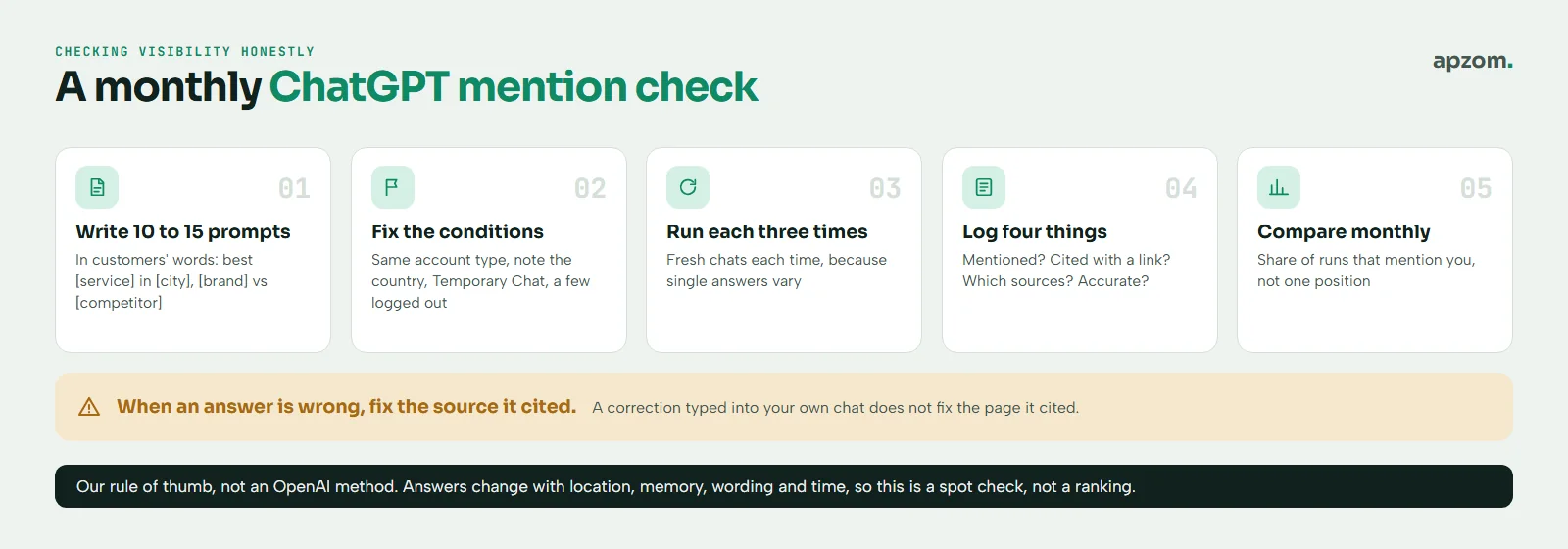
Our suggested routine (a rule of thumb, not an OpenAI method):
- Write 10 to 15 prompts in your customers’ words: “best [service] in [city]”, “[service] for [type of customer]”, “[your brand] reviews”, “[your brand] vs [competitor]”, “is [your brand] good for [need]?”.
- Fix the conditions. Use the same account type each month, and note the country you test from, because ChatGPT may use IP-based location. Use a Temporary Chat: OpenAI says temporary chats do not create or update memories, and if one offers a personalization choice, choose Unpersonalized. Also run a few prompts logged out, since OpenAI says people who are not signed in can use web search.
- Run each prompt three times in fresh chats, because single answers vary.
- Log four things for each answer: were you mentioned, were you cited with a link, which sources were cited, and was what ChatGPT said about you accurate.
- Repeat monthly and compare the share of runs that mention you, not the position in one answer.
When an answer is wrong, find the source it cited and fix that source, whether it is your own page, a listing or an outdated directory entry. A correction typed into your own chat does not fix the page ChatGPT cited.
Then measure what matters more than mentions: visits and enquiries. Our guide to tracking AI search traffic in GA4 shows where ChatGPT visits land in your analytics, and adding “an AI assistant” to your “how did you hear about us?” question catches people who read an answer and then searched your name. Our guide to zero-click searches explains how to report results when people do not click.
What not to do
Do not buy a “ChatGPT listing”
Offers to “list your business in ChatGPT” or “guarantee AI recommendations” for a fee sell something OpenAI does not offer. OpenAI’s search help page says placement is not guaranteed, and there is no submission form for organic answers. The only paid route is advertising, and OpenAI’s “Ads in ChatGPT” help page says ads “do not influence ChatGPT’s answers”, run on separate systems, are clearly labelled and appear below a response. It adds that advertisers “have no ability to shape, rank, or alter ChatGPT’s responses.”
ChatGPT ads are real and may suit some businesses. OpenAI says ad testing started in the United States on 9 February 2026, that ads may appear for Free and Go users but not on Plus, Pro, Business, Enterprise or Edu accounts, and that ads are ranked on relevance and advertiser bids. Its Ads Manager availability page, checked 21 November 2026, lists self-service access as available for advertisers based in the US, UK, Canada, Australia, the UAE, India and many EU countries, among others. Treat ads as a paid channel with its own budget and measurement, not as a way to change what ChatGPT recommends.
Do not fake reviews or mentions
Planting fake reviews, AI-written testimonials or sock-puppet posts to influence AI answers is risky and, in several countries, unlawful. In the US, the FTC’s rule on consumer reviews and testimonials, announced on 14 August 2024, bans buying or selling fake reviews, including “AI-generated fake reviews”. In the UK, the Competition and Markets Authority published fake reviews guidance (CMA208) on 4 April 2025, alongside legislative changes introduced that month. Other countries have their own consumer-protection rules, so check locally before running any review campaign.
Common mistakes
- Confusing GPTBot with OAI-SearchBot. Blocking GPTBot does not remove you from search answers; blocking OAI-SearchBot does.
- An OAI-SearchBot group with only an Allow line, so the crawler ignores the paths your “*” group keeps out.
- A firewall or CDN rule blocking OpenAI’s IP ranges while robots.txt allows the crawler.
- A robots.txt that returns a server error, which RFC 9309 treats as “complete disallow”.
- Different names, addresses or services on different profiles.
- Judging visibility from one answer on your own logged-in account.
- Expecting results the next day. The robots.txt change takes about 24 hours; the sources ChatGPT cites take far longer to change.
- Paying for guaranteed placement, which OpenAI’s own pages rule out.
How Apzom can help
Apzom Digital’s GEO services cover the work in this guide: crawler and firewall checks, robots.txt decisions, answer-first service pages, consistent business facts across profiles and directories, product feed preparation for stores, and a repeatable ChatGPT visibility check with honest reporting. We have not published a ChatGPT or GEO case study yet, so we will not show you numbers we cannot back up, and we will not promise mentions or citations, because nobody can. You can see the client work we have published on our case studies page. We work with clients worldwide, remotely, from our base in Ahmedabad, India.
Get a Free Growth Audit of your ChatGPT visibility. Send us your website, your main services and the places you work. We send back a written plan: crawler and firewall fixes, the business facts that disagree across your profiles, the sources ChatGPT cites for your category and whether you are on them, a starter prompt set for monthly checks, and a quote if you want us to do the work.
No obligation, and no promised mentions or citations. Prefer to talk first? Contact us or see our GEO services.
Frequently asked questions
Can I pay to get my business listed in ChatGPT?
Not in ChatGPT’s answers. OpenAI says placement is not guaranteed and that ads do not influence answers. ChatGPT ads exist, but they are labelled paid placements shown below a response.
Can I submit my website to ChatGPT?
There is no submission form for ChatGPT search. OpenAI says to allow OAI-SearchBot in robots.txt and in your host or CDN. Online stores can apply to share a product feed through OpenAI’s merchants page.
Does ChatGPT use Bing?
OpenAI says ChatGPT search sometimes partners with other search providers and points to Microsoft’s privacy statement, but does not say which provider handles which question. Being indexed in Bing is sensible; no official source says it guarantees anything in ChatGPT.
Does blocking GPTBot remove my site from ChatGPT?
No. OpenAI says the settings are independent: GPTBot relates to model training, and OAI-SearchBot decides whether your site can appear in ChatGPT search answers.
Is ChatGPT shopping available outside the US?
Not yet, according to OpenAI’s merchants page, which says shopping is currently live for ChatGPT users in the US and that more regions are planned. The product feed reference’s target_countries field currently represents the US, Canada and Mexico.