The short answer: internal linking means linking from one page of your website to another. Done well, it helps search engines find every page that matters, tells them what each page is about through the words you link with, and moves readers from a guide to a service page to an enquiry. A simple system for a business website has four parts: decide which pages make you money, group your other pages into topics that point to them, make sure every page you care about is linked from at least one related page with a descriptive link, and run a short two-way link routine every time you publish something new.
This guide is for business owners, marketers and content teams anywhere in the world who run a website of roughly 20 to 300 pages, such as services, locations, guides and case studies, on WordPress or a website builder. It explains what internal links do and do not do, the Hub-and-Spoke Map we use to plan them, how to find pages with no links using free tools, how to write link text, the technical traps that stop links being followed, and the routine we follow on our own site, with real numbers from a crawl of apzom.com. Google’s and Bing’s guidance was checked on 27 October 2026.
What internal links actually do
Internal links do three jobs, and only one of them is about search engines.
- They help search engines find pages. Google finds most new pages by following links from pages it already knows. Google’s link guidance (Google Search Central, “Link best practices for Google”) asks that every page you care about has a link from at least one other page on your site. A sitemap helps too, but Google says a sitemap does not guarantee that every page in it will be crawled or indexed, and that a small, well-linked site of about 500 pages or fewer may not need one at all.
- They explain what a page is about. The clickable words of a link, called the anchor text, tell both readers and search engines what to expect on the other side. A link that says “our commercial roofing service” says far more than one that says “click here”. Google’s guide to its ranking systems says it looks at how pages link to each other to work out what they are about, and that PageRank is still part of its core ranking systems.
- They move readers to the next step. A reader who finishes a guide on choosing a roofer should be one click from your roofing service page and your quote form. That is the job most business sites forget.
What internal links do not do: they do not guarantee rankings, and there is no ideal number per page. They help good pages get found and understood. A thin page with fifty links pointing at it is still a thin page.
The Hub-and-Spoke Map for business websites
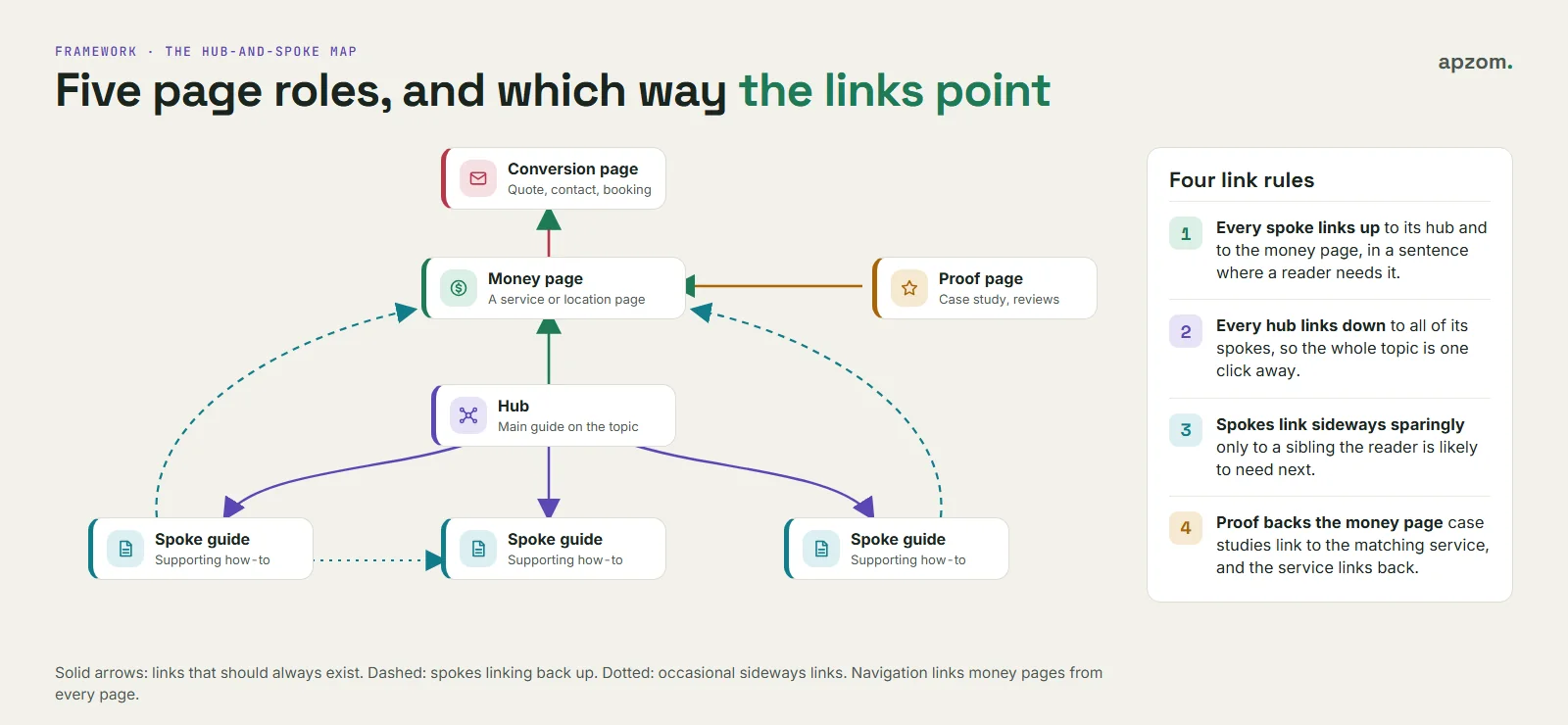
Most internal linking advice is written for big publishers and online stores. A business website is different: a small number of pages make money, and everything else should help people reach them. We plan links with a simple map of five page roles.
| Page role | Examples | Links out to | Should receive links from |
|---|---|---|---|
| Money pages | Service pages, location pages, product or pricing pages | Proof pages, the conversion page, the most useful guides | Hubs, spokes, navigation |
| Hubs | A main guide on a topic, an industry page, a category page with a real introduction | Every spoke in the topic, and the money page | Navigation, money pages, spokes |
| Spokes | Supporting guides, how-tos, FAQs that need their own page | Their hub, the money page, one or two sibling spokes | The hub, related spokes, newer posts |
| Proof pages | Case studies, reviews, team or about pages | The matching money page | Money pages and relevant guides |
| Conversion page | Contact form, quote form, booking page | Nothing essential (keep people there) | Calls to action on money pages and guides |
Four rules make the map work:
- Every spoke links up to its hub and to the money page the topic supports, in a sentence where the link makes sense to a reader.
- Every hub links down to all of its spokes, so a reader (and a crawler) can reach the whole topic from one page.
- Spokes link sideways sparingly, only to a sibling the reader is likely to need next. Linking everything to everything blurs the map.
- Proof backs the money page. Case studies link to the matching service page, and the service page links back to them.
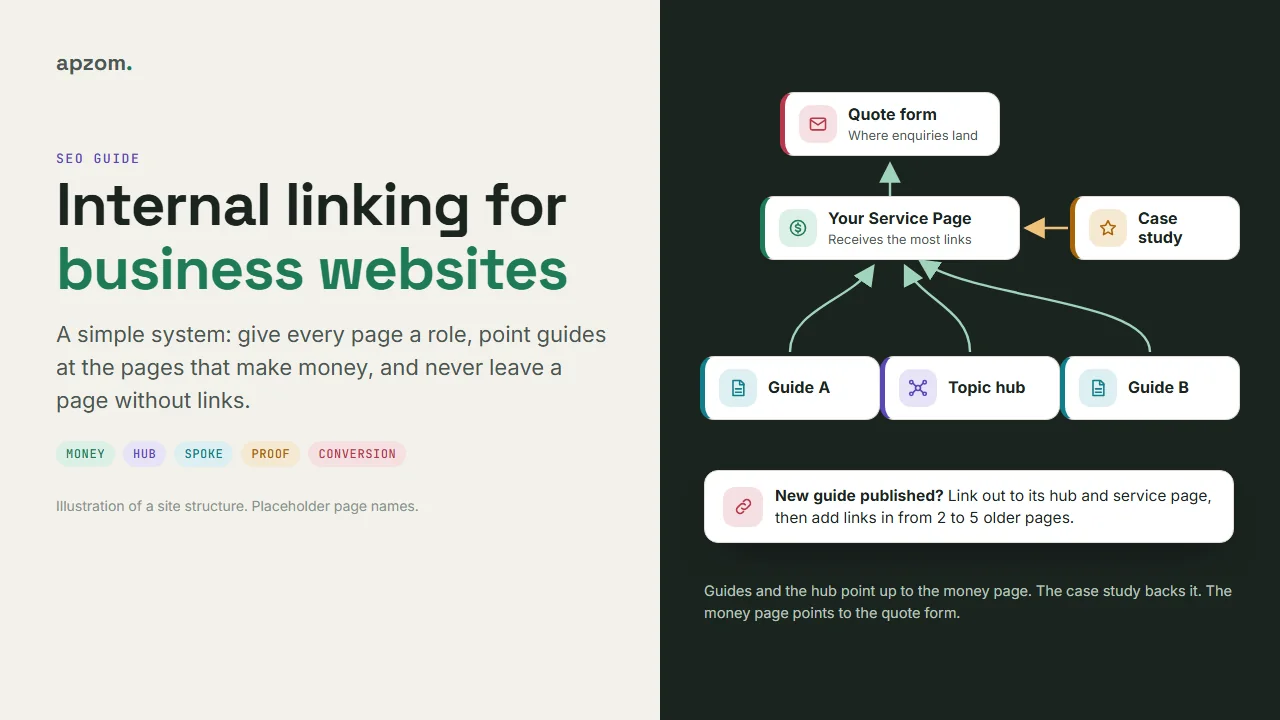
On our own site, for example, our guide for home services companies (a hub) links to its supporting SEO guide for home services (a spoke), and both link to the quote page.
How our own site is linked: real numbers
We ran a read-only crawl of apzom.com on 27 October 2026 with our own script, which follows every link from the sitemaps and the pages it finds, and counts which pages link to each URL from their main content area (not the menu or footer). It found 120 indexable HTML pages (plus one KML location file): 67 guides, the blog index, 37 pages such as services and contact, 8 category pages, 6 case-study pages and the homepage.
- No orphan pages. Every HTML page had at least one internal link pointing to it. Counting only main-content links, every guide had some; just two legal pages (the disclaimer and the terms) were linked from the footer alone.
- Every guide had at least 3 other pages linking to it from their main content. The middle guide had 9. The most linked guide had 31.
- The most-linked pages were the ones that make money: the quote page (linked from the main content of 109 pages), the contact page (96), the services overview (80) and the SEO services page (69). That is what the map above is meant to produce.
- The least-linked guides had 3 or 4 links each, and they were a mix of older and recent posts, which tells us where to add links next. Our newest guide had 5 links the day after it went live, because it went through the publishing routine later in this guide.
These are our numbers for one site, not a benchmark. A bigger site, or one with a different structure, will look different. The useful lesson is the pattern: money pages and the conversion page receive the most links, every guide receives some, and none is left alone.
Step 1: list your pages and give each one a role
Export a list of every URL. On WordPress you can copy them from the Posts and Pages screens, or from your XML sitemap. Put them in a spreadsheet with four columns: URL, role (money, hub, spoke, proof, conversion), topic, and the money page it supports. If you cannot name the money page a guide supports, that is worth knowing: it may belong to a topic you do not sell, or it may need merging with another page. Our content audit guide covers those decisions.
Step 2: find pages with no links (orphans) using free tools
An orphan page is a page that no other page on your site links to. Search engines may still find it through your sitemap, but readers never will, and it gets no help from the rest of your site.
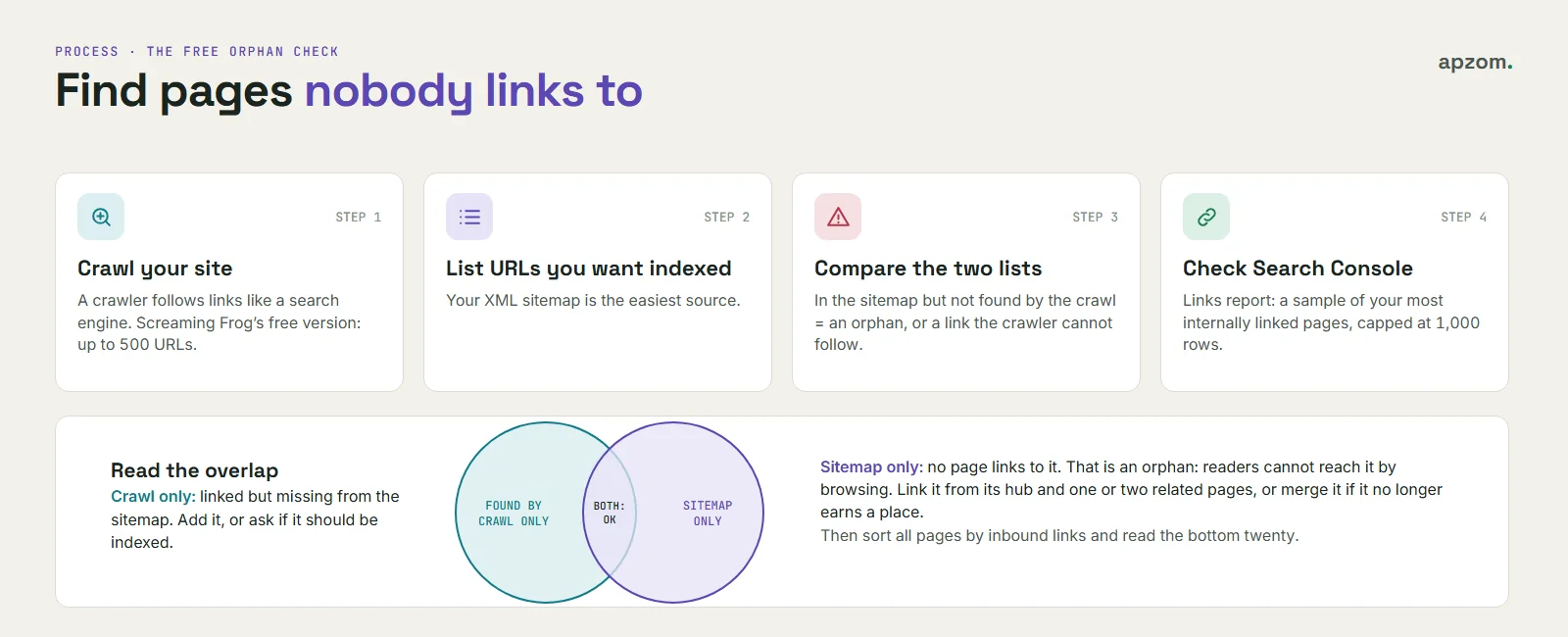
You can find orphans without paying for anything, with four free checks plus Bing:
- Crawl your site. A desktop crawler follows links the way a search engine does. Screaming Frog SEO Spider’s free version crawls up to 500 URLs (Screaming Frog’s own pricing page), which is enough for many small business websites. Note the list of URLs it found.
- List the URLs you want indexed. Your XML sitemap is the easiest source.
- Compare the two lists. A URL that is in your sitemap but was not found by the crawl is an orphan (or is only linked from somewhere the crawler cannot follow, such as a script).
- Check Search Console. The Links report has a “Top internally-linked pages” table, and clicking a URL shows which pages link to it. It is a sample, capped at 1,000 rows, so use it as a check rather than a full list. An important service page near the bottom of that table, or missing from it, needs more links. Our Search Console guide shows where to find it.
- Check Bing Webmaster Tools. Its free Site Scan crawls your site on demand and reports technical SEO errors and warnings. Bing’s Webmaster Guidelines also ask that each important page can be reached through crawlable internal links with relevant anchor text.
Then sort your spreadsheet by inbound links and read the bottom twenty rows. Those are your quickest wins.
Step 3: add contextual links where readers need them
The strongest internal links sit inside the main text, in a sentence where a reader would naturally want more. Menus and footers matter, but they repeat on every page and say little about any one page.
- Read each spoke and find the sentence where the money page or hub is the obvious next step. Link the words that describe it.
- Add a short “related guides” line at the end only when the guides are genuinely related.
- Put one clear call to action on guides that support a service, linking to your contact or quote page. We use one in the middle and one at the end, not one per section.
- Link to the final URL. If a page has moved, update the link rather than relying on the redirect.
On WordPress, the block editor’s link tool lets you search your own posts and pages by title while you type, so you rarely need to copy URLs.
Step 4: write link text people and search engines understand
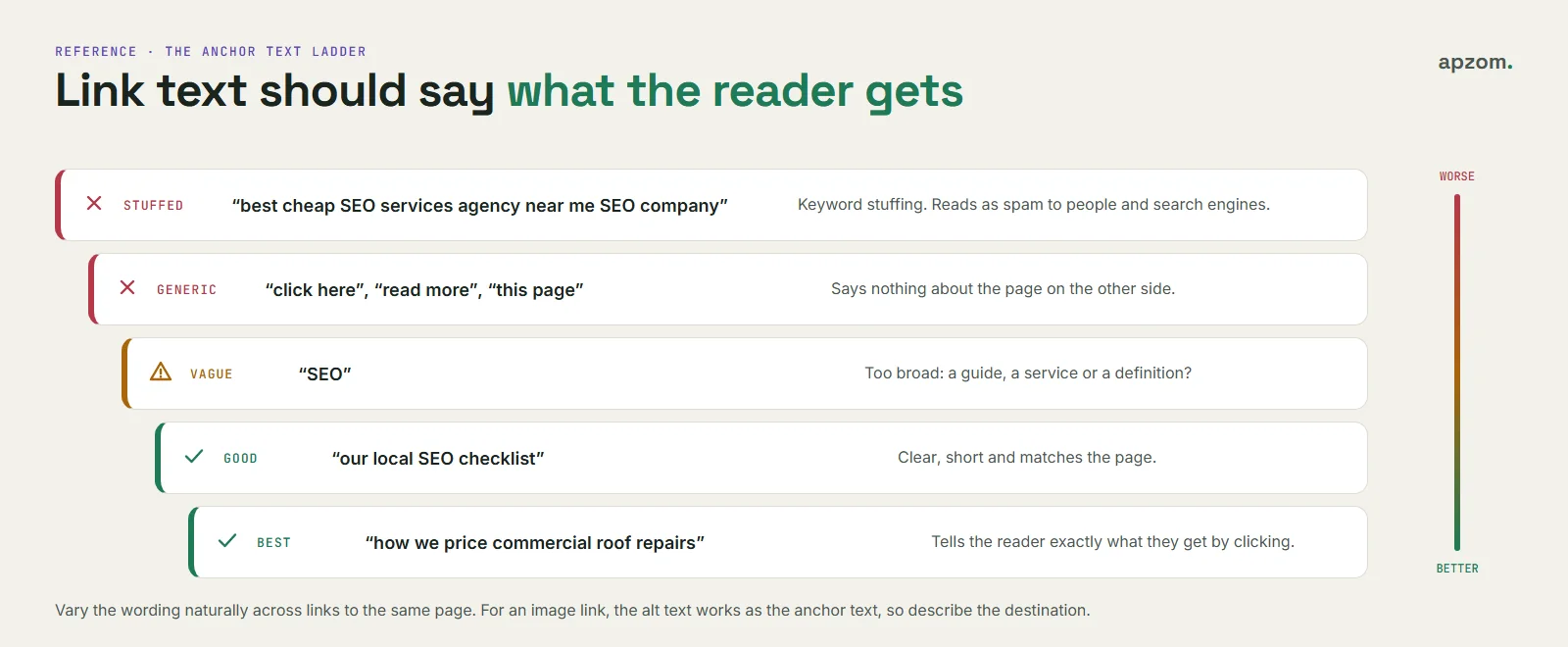
Anchor text should tell a reader what they will get by clicking. Google’s guidance is to make it descriptive, reasonably concise and relevant to the page it points to, and to avoid both generic text and keyword stuffing.
| Anchor text | Verdict | Why |
|---|---|---|
| “click here”, “read more”, “this page” | Weak | Says nothing about the page on the other side |
| “SEO” | Vague | Too broad: is it a guide, a service, a definition? |
| “our local SEO checklist” | Good | Clear, short, matches the page |
| “how we price commercial roof repairs” | Good | Describes exactly what the reader gets |
| “best cheap SEO services agency near me SEO company” | Bad | Keyword stuffing; reads as spam to people and search engines |
Vary the wording naturally. Ten links to your roofing page do not all need to say “roofing services”; “flat roof repairs”, “our roofing team” and “roof inspection” are all honest descriptions. If an image is a link, its alt text acts as the anchor text, so describe the destination.
Not sure which of your pages have no links, or whether your guides point to the pages that bring enquiries? An Internal Link Review crawls your site, finds orphan, broken and redirected links, and maps every page to the service it should support.
Step 5: check navigation, breadcrumbs and footers
Navigation is the backbone: it links your money pages from every page. Keep the main menu to the pages a new visitor needs most, and do not try to link every guide from it.
- Breadcrumbs (Home > SEO > Internal linking) show where a page sits and link it back to its hub. Google still supports breadcrumb structured data, though since January 2025 breadcrumbs appear in Google’s results on desktop only. Our schema markup guide shows the markup.
- Footers are fine for contact details, legal pages and a short list of main services. A footer with hundreds of links helps nobody.
- Category pages become useful hubs if you give them a short introduction and link to the best guide in the topic, rather than leaving them as plain lists.
Technical traps that stop links working
A link only helps if search engines can follow it. Google’s guidance is clear on the basics.
- Use real links. Google’s guidance says it can only discover links written as an HTML
<a>element with anhrefaddress. Buttons or menus that only work through JavaScript click events may not be followed. Bing asks for the same standard links. - Do not use nofollow to manage your own pages. Google treats
rel="nofollow"as a hint, meant mainly for links to pages you do not trust or vouch for, such as paid or user-generated links to other sites. It is not a reliable way to keep one of your pages out of search: Google’s advice for that is to let the page be crawled and add anoindexrule. WordPress’s link tool has a “Mark as nofollow” switch; leave it off for links to your own pages. - Fragments are not separate pages. A link to
/guide/#pricingjumps to a section of/guide/; it is still a link to the same page. If your site loads different content through#links, Google’s JavaScript guidance says not to, because Googlebot cannot reliably resolve those URLs. - Paginated lists need plain links. If your blog or category list runs over several pages, link the pages to each other with normal links and let each page have its own canonical URL.
- Fix broken and redirected links. A link to a page that returns an error wastes the reader’s click. A link through a redirect still works but adds a hop; update it to the final URL. Our technical SEO audit guide covers redirect chains and status codes in more detail.
The new-page routine: two directions, every time
Most orphan problems start on publishing day. A new guide goes live with plenty of links out and no links in, and stays that way for months. We follow a short routine for every guide we publish on apzom.com, and it is one reason our crawl found no orphans.
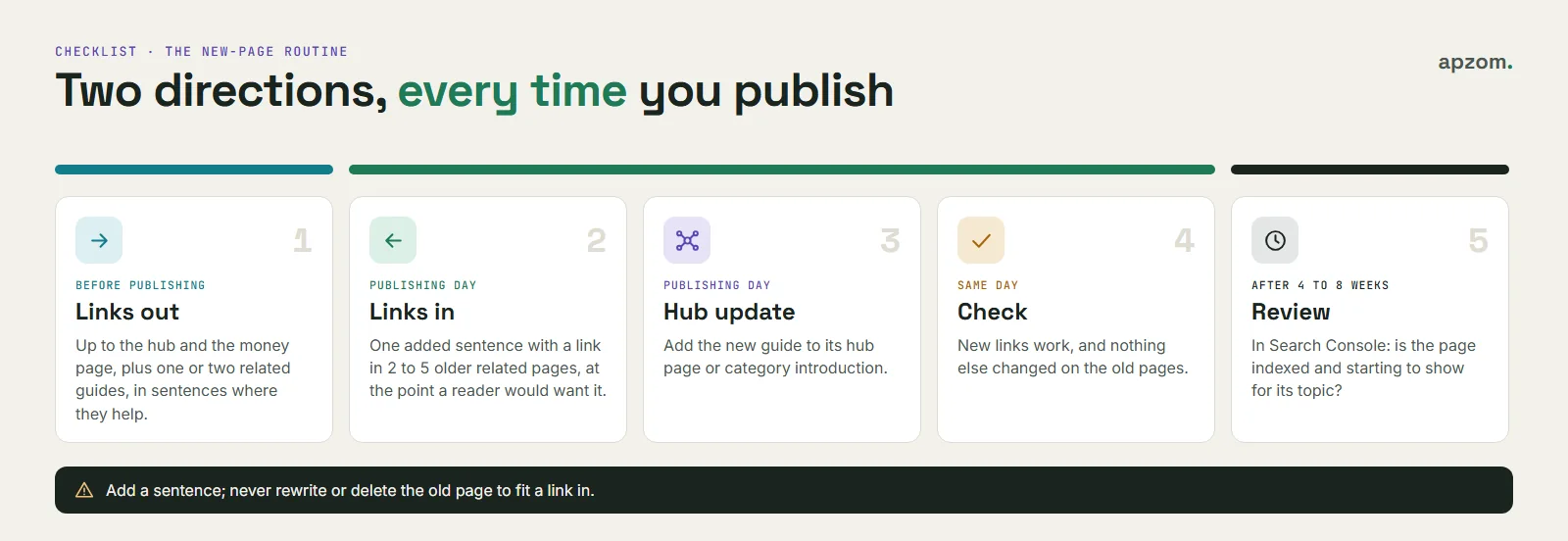
- Links out (before publishing): link up to the hub and the money page, and to one or two related guides, in sentences where they help.
- Links in (on publishing day): add one sentence with a link to the new guide in two to five older related pages, at the point where a reader of that page would want it. Add only a sentence; do not rewrite the old page.
- Hub update: add the new guide to its hub page or category introduction.
- Check: confirm the new links work and that nothing in the old pages changed apart from the added sentence.
- Review after four to eight weeks: in Search Console, check that the new page is indexed and is starting to show for its topic.
How to tell if it worked
Internal linking is slow to show in rankings, so measure the things it changes directly:
- Orphans: the number of pages with no internal links should be zero after each crawl.
- Links to money pages: your service and location pages should be near the top of the Search Console Links report and of your crawler’s inbound link count.
- Indexing: in the Search Console Pages report, pages listed as “Discovered – currently not indexed” or “Crawled – currently not indexed” that you have since linked properly may move to indexed over time. Google does not promise to index every page.
- Readers: in Google Analytics, check whether more people move from guides to service pages and to your contact or quote page.
Repeat the crawl every three months, or after any redesign. Our website redesign SEO checklist explains why menus often lose links during a redesign.
Common mistakes
- Linking to the blog, not the business. Old posts often link mostly to other posts. Make sure guides point to the service they support.
- Relying on the sitemap. A page in the sitemap with no links is still an orphan to your readers.
- Exact-match anchors everywhere. The same keyword-stuffed phrase on every link reads as spam.
- Too many “related posts” widgets. Automatic lists of loosely related posts add links without adding meaning.
- Never revisiting old pages. New pages need links from old ones. Without the routine, they rarely get them.
- Nofollowing internal links or hiding links behind scripts.
- Ignoring AI search. Google says there are no extra requirements for its AI features, such as AI Overviews and AI Mode, beyond normal SEO best practice, and it lists making content easy to find through internal links as one of those practices. There is no special internal linking trick for AI. Our guide to GEO explains what does help.
How Apzom can help
Internal linking is part of every SEO service we run. We crawl your site, map each page to a role, find orphans, broken and redirected links, rewrite weak anchor text, and set up a publishing routine your team can follow. For local businesses we connect location and service pages through our local SEO services, and if your site needs restructuring, our website development team can rebuild menus and templates without losing the links that matter.
We work with clients worldwide, remotely, from our base in Ahmedabad, India.
Request an Internal Link Review. We crawl your site, compare it with your sitemap and Search Console, list orphan pages, broken and redirected links and weak anchor text, and map your pages into hubs that point to your service pages. You get a prioritised list of fixes and a simple publishing routine your team can follow.
No obligation and no guaranteed rankings. Prefer to talk first? Contact us or see all our services.
Frequently asked questions
What is internal linking in SEO?
Internal linking means adding links from one page of your website to another. In SEO, internal links help search engines find your pages, understand what each page is about through the link text, and see how your pages relate. They also guide readers to the next useful page.
How many internal links should a page have?
There is no ideal number, and Google does not publish one. Link wherever a reader would genuinely want more, make sure every important page receives links from related pages, and avoid long lists of links that nobody would click. On our own site the middle guide links to 15 other pages from its main content, but that reflects our guides, not a rule.
Are internal links or backlinks more important?
They do different jobs. Backlinks are links from other websites and help show that others find your content useful. Internal links are fully under your control and help search engines and readers find and understand your pages. Fix internal links first, because they cost nothing and you can change them today.
What is an orphan page?
An orphan page is a page that no other page on your website links to. Search engines may still find it through your sitemap, but readers cannot reach it by browsing, and it gets no context from the rest of your site. Find orphans by comparing a crawl of your site with your sitemap.
Should internal links open in a new tab?
Usually not. Readers expect internal links to open in the same tab, and they can choose a new tab themselves. Opening every internal link in a new tab clutters the browser and makes the back button useless.
Do internal links help with AI search?
Indirectly. Google says there are no special requirements for its AI features beyond normal SEO best practice, which includes making content easy to find through internal links. Good internal linking helps your pages be found and understood; it does not guarantee that any AI tool will cite you.
How often should I check internal links?
Run a crawl every three months and after any redesign, migration or big batch of new content. Follow the new-page routine every time you publish, so new pages are never left without links.