The short answer: You cannot apply for a Google knowledge panel, buy one or create one yourself. Google generates knowledge panels automatically for entities in its Knowledge Graph, when there is enough consistent information about them on the open web. What you can do is make your organization easy to identify (one consistent name, a real About page, Organization structured data with your logo and official profiles, and genuine independent coverage), then claim the panel through Google’s “Get verified on Google” process if one appears, and suggest corrections with evidence. If customers visit your premises or you visit them, the box you are more likely to get, and can create yourself, is a Google Business Profile, which is a different thing.
This guide is for founders, owners and marketers of small and mid-sized firms anywhere in the world who have searched their brand name and wondered why a competitor has a panel and they do not. It explains the difference between a Business Profile and a knowledge panel, why most small firms have the first and not the second, a six-part entity checklist, how to claim and verify a panel, how to suggest edits, and what nobody can control. We checked Google’s Knowledge Panel Help pages, Google Search Central’s Organization structured data documentation and the Wikidata and Wikipedia policies against official sources on 19 November 2026.
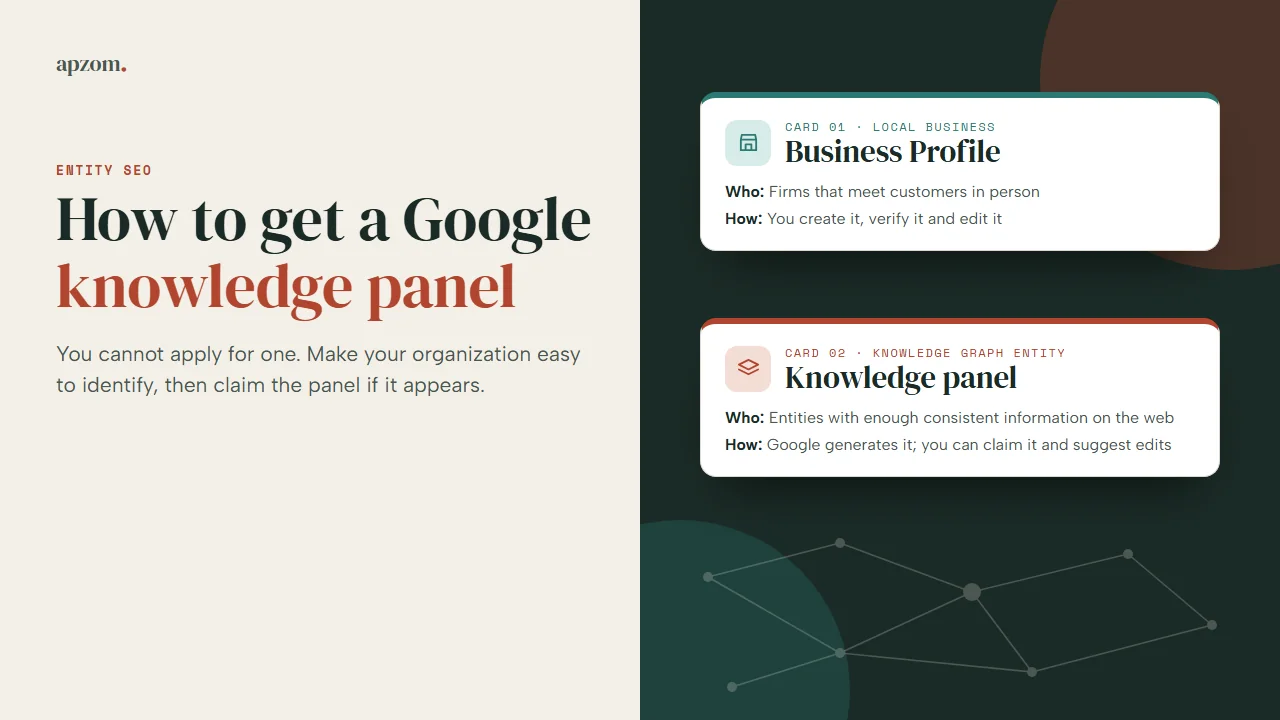
Knowledge panel or Business Profile: which box are you looking at?
The two look alike: both appear beside or above the results when someone searches a name, with a title, facts and images. They come from different systems and are created and managed in different ways.
Google’s Knowledge Panel Help describes knowledge panels as “information boxes that appear on Google when you search for entities (people, places, organizations, things) that are in the Knowledge Graph”. Google calls the Knowledge Graph its “database of billions of facts about people, places, and things”. The same help pages say Business Profiles “look similar to knowledge panels, but are specific to businesses that serve customers at a particular location or within a designated service area”, and that those businesses should use Business Profile to create, claim and edit them.
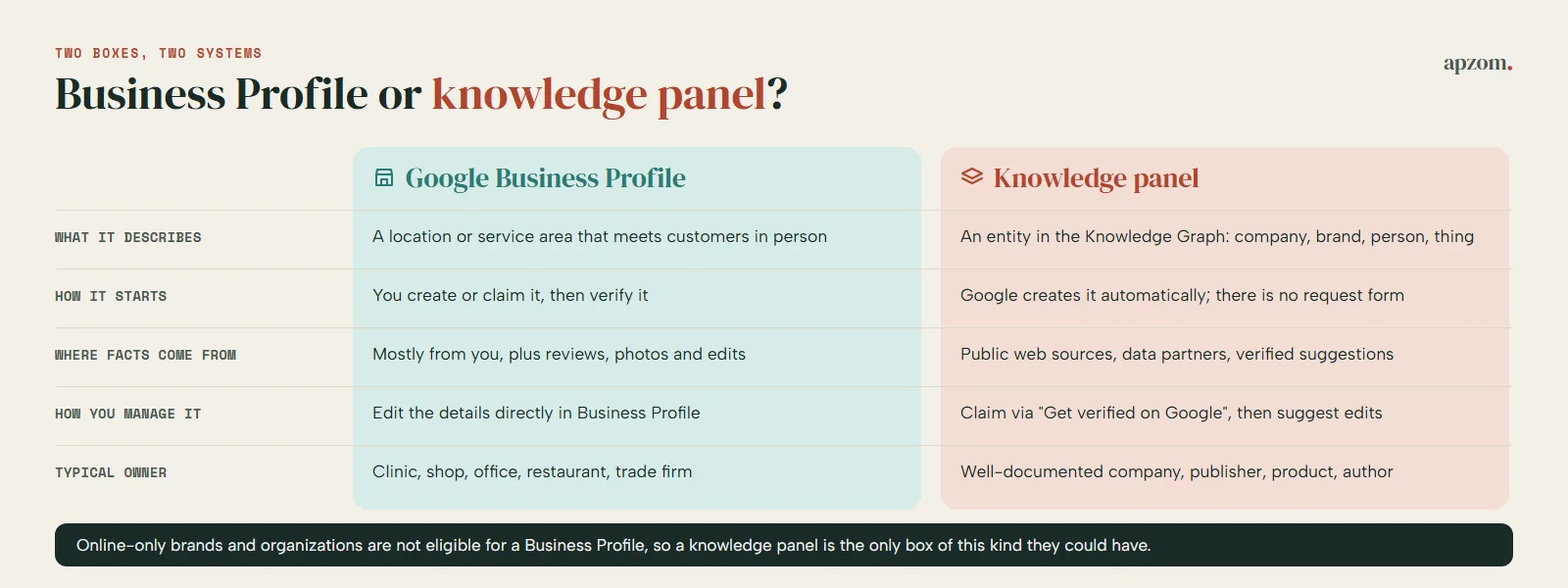
| Question | Google Business Profile | Knowledge panel |
|---|---|---|
| What it describes | A business location or service area that meets customers in person | An entity in the Knowledge Graph: a company, brand, person, organization or thing |
| How it starts | You create it (or claim an existing one) and verify it | Google creates it automatically; there is no form to request one |
| Where the facts come from | Mostly from you, plus customer reviews, photos and edits | Public sources across the web, data partners and verified entities’ suggestions |
| How you manage it | Business Profile: edit the details directly | Claim through “Get verified on Google”, then suggest edits for Google to review |
| Typical owner | A clinic, shop, office, restaurant, trade or service-area firm | A well-documented company, publisher, product, author or public figure |
A quick way to tell them apart: a Business Profile is tied to a place, so it usually shows a map, opening hours, directions and reviews. A knowledge panel for a company is tied to the entity, so it usually shows a short description, key facts and links to official profiles. If you are still not sure, look at the bottom of the box: Google’s help pages say a knowledge panel you can claim shows a “Claim this knowledge panel” option.
Why most small firms get a Business Profile, not a knowledge panel
There are two separate reasons, and they point in opposite directions.
First, a Business Profile is something you can set up. Google’s Business Profile eligibility guidelines say “a business must make in-person contact with customers during its stated hours” to qualify. If you run a clinic in Toronto, a law office in Manchester, a showroom in Dubai or a plumbing firm in Brisbane, you are likely to be eligible (Google’s guidelines list further conditions, so read them), you can create the profile yourself, and it is usually the box that shows when people search your name with a place. That is the right tool for a local business. Our Google Business Profile optimization checklist covers how to fill it in, and our guide to verifying a Business Profile covers verification.
Second, a knowledge panel depends on what the rest of the web says about you. Google’s help pages say knowledge panels “are created automatically by Google Search Algorithm when there is enough information available on the open web”. A small firm usually has its own website, a few directory listings and a social account or two. That is often not enough independent, consistent information for Google to treat the firm as a distinct entity worth a panel. Google does not publish what “enough” means: no number of articles, links, years or profiles. Anyone who quotes you a number is guessing.
The two systems also cover different businesses. The same eligibility guidelines list “Brands, organizations, artists, and other online-only businesses” among the examples that are not eligible for a Business Profile. So a software company, an online publisher or a remote agency with no customer-facing premises cannot use a Business Profile, and the knowledge panel is the only box of this kind it could ever have. For those firms, the entity work in this guide matters most.
What Google tells us about how knowledge panels are built
Google’s Knowledge Panel Help is short on mechanics, but four points are stated plainly.
- Sources are mixed. Google says Knowledge Graph facts come from public sources, licensed data (its examples are sports scores, stock prices and weather) and content owners, including people who suggest changes to panels they have claimed.
- Panels update themselves. Google says panels “are updated automatically as information changes on the web”, and that it also considers changes from the entities themselves and from general user feedback.
- Nobody creates or deletes them by hand. Google’s “Submit feedback on content about you” page says “our current policy doesn’t manually create or delete Knowledge Panels.”
- They can come and go. Google says its automated systems decide when, where and how a query shows a panel, and that a panel you saw in the past may stop showing. Google says this “isn’t something we can or would influence.”
Google does not say a Wikipedia article is required, does not list which sources it reads for a particular panel and publishes no timeline, so we will not guess. What you can do is make the information the web holds about you accurate, consistent and easy to connect to you.
The entity checklist
An entity, in this sense, is a single, clearly identifiable thing: your company, not “a company with a similar name in another country”. The checklist below makes your organization easier to identify and harder to confuse with anyone else. Each part helps customers and AI tools whether or not a panel ever appears.
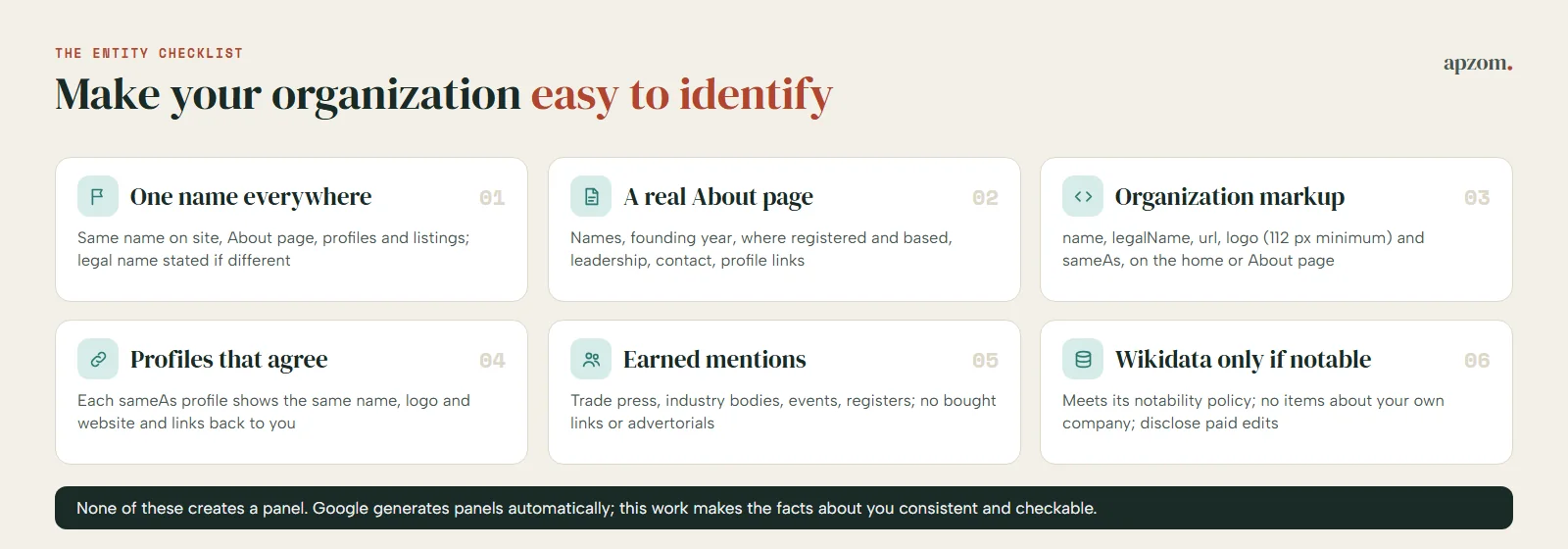
1. One name, used the same way everywhere
Use the name you want to be known by identically on your website, About page, invoices, social profiles, directory listings and press materials. If your registered company name differs (for example “Example Widgets Private Limited” or “Example Widgets Ltd” against the trading name “Example Widgets”), say so on your About page and keep both spellings consistent. Google’s Organization documentation asks you to use the same name and alternateName “that you’re using for your site name”; our guide to site names and favicons in Google explains how the site name is set.
2. A real About page
The About page is where a person, or a system, checks who you are. Make it factual: the legal and trading names, the year you were founded, where you are registered and based, what you do and for whom, who leads the company, and how to contact you. Link to your official profiles from it. Where you are listed in a public register, give the details people can check: Companies House in the UK, a state business filing in the US, the ABN Lookup in Australia, the Ministry of Corporate Affairs register in India, or a trade licence in the UAE. Avoid claims you cannot support; our guide to E-E-A-T explains why trust comes from evidence, not adjectives.
3. Organization structured data with sameAs and logo
Organization markup is a short block of code that states your organization’s details in a standard vocabulary. Google Search Central says it can help Google “disambiguate your organization in search results”, and that some properties “can influence visual elements in Search results (such as which logo is shown in Search results and your knowledge panel)”. There are no required properties. Google recommends placing it on your home page or a single page that describes your organization, such as the About page, and using the most specific subtype that fits; a local business should use the most specific LocalBusiness type.
The properties that matter most for identity:
- name and, if you use one, alternateName: the same names as your site name.
- legalName: your registered name, if it differs from name.
- url: your website, which Google says “helps Google uniquely identify your organization.”
- logo: Google says this can help it understand which logo to show in Search results and knowledge panels. The image must be at least 112 x 112 pixels, crawlable and indexable, and look right on a white background.
- sameAs: the URL of a page on another site with more information about your organization, such as your profile on a social or review site. You can list several.
- Identifiers, where they apply to you: vatID or taxID, duns, and iso6523Code (Google prefers iso6523Code with the 0199: prefix over leiCode for Legal Entity Identifiers).
A minimal illustrative example (replace every value with your own; these are placeholders):
{
"@context": "https://schema.org",
"@type": "Organization",
"name": "Example Widgets",
"legalName": "Example Widgets Ltd",
"url": "https://www.example.com/",
"logo": "https://www.example.com/images/logo-square.png",
"sameAs": ["https://example.net/profile/example-widgets", "https://example.org/@examplewidgets"]
}
Only list profiles you control and that are clearly about you, and only state facts the page also shows. Google says it does not guarantee that features using structured data will appear. Our guide to schema markup for small businesses has the testing steps and the match test, so we will not repeat them here.
4. Official profiles that agree with each other
Every profile you list in sameAs should show the same name, logo, website and description, and link back to your site. Update or close old accounts that use a former name; contradictory profiles make it harder to tell which one is really you.
5. Independent, authoritative mentions you have earned
This is the part you cannot do alone. Independent sources that describe you accurately, such as trade press, industry bodies, event organisers, registers and reputable publications in your sector, give the web something to say about you that you did not write. Earn them by doing things worth reporting: original research, talks at industry events, expert comment for journalists, recognised awards. Do not buy placements presented as editorial, and if a link is paid for, it must be marked as such; our guide to nofollow, sponsored and UGC links explains the rules. Our guide to online reputation management covers how to monitor and respond to what is said about you.
6. Wikidata only where you meet its notability rules
Wikidata is a free, open knowledge base. Its notability policy accepts an item if it meets at least one of three criteria: it links to a Wikimedia page such as a Wikipedia article; it refers to “a clearly identifiable conceptual or material entity that can be described using serious and publicly available references”; or it is needed structurally by other items. The policy says the guidelines are deliberately a little vague and “the final decision is always up to the community.”
Wikidata’s “Self-promotion” essay is blunt: “Creating an item about yourself, your organisation, or your work is a form of self-promotion and is strongly discouraged,” and such items are likely to be deleted. Its “Autobiography” page says you should not create an item about yourself unless you are sure it meets the notability criteria, that statements need reliable, verifiable sources, and that anyone editing for reward must declare it under Wikimedia Foundation policy. Wikidata has no adopted conflict-of-interest policy (a 2015 proposal closed without consensus), but the paid-editing disclosure rule still applies.
Wikipedia is stricter. English Wikipedia’s conflict-of-interest guideline says “COI editing is strongly discouraged”, asks people with a conflict to propose changes on the article’s talk page instead, and requires paid editors to disclose who is paying them; other language editions have their own rules. Our rule of thumb: if an item or article about you already exists, correct it within those rules, with sources; if none exists, wait for independent coverage to justify one. Google does not say either is required for a knowledge panel.
Not sure whether your business is set up as one clear entity? Ask for a Free Growth Audit. We check your name across your site and profiles, your About page, your Organization markup and sameAs links, and your Business Profile, and send you a prioritised fix list. We will not promise a knowledge panel; nobody can.
How to claim and verify a knowledge panel
If a knowledge panel already shows for your organization, claim it. Google’s “Get verified on Google” page sets out these steps.
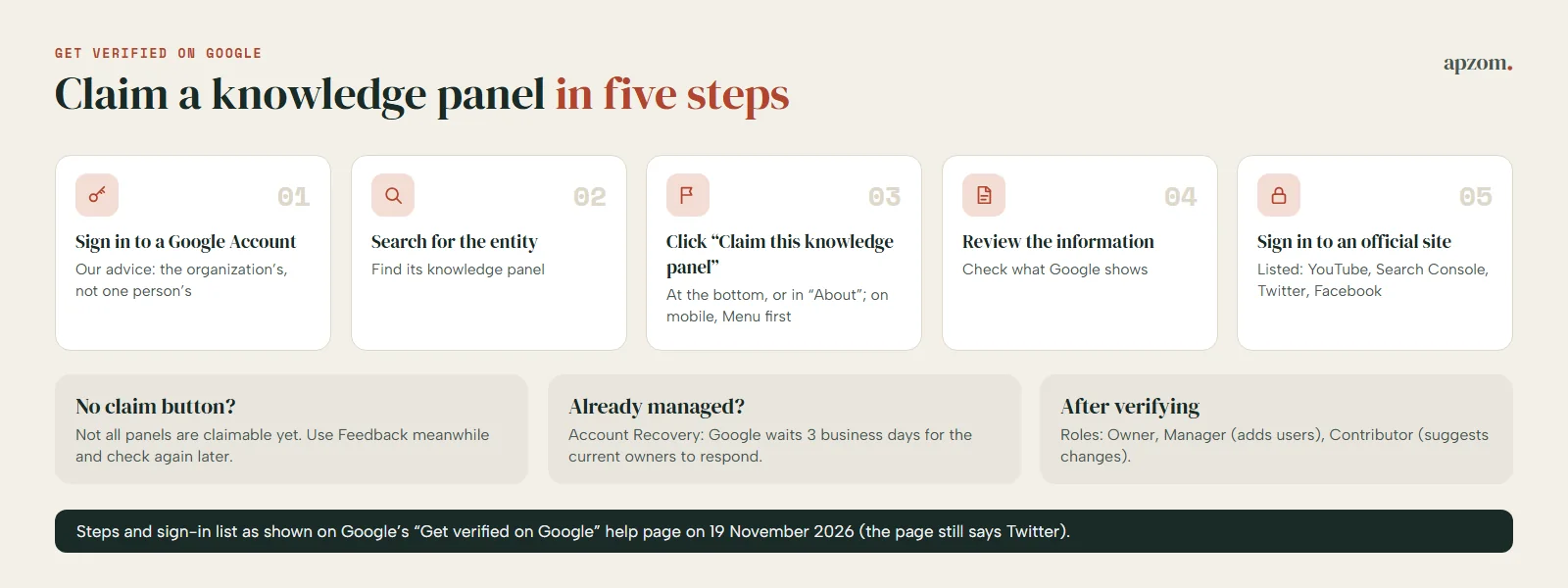
- Sign in to a Google Account. Google says to create one if you do not have one. Our advice: use an account that belongs to the organization, not one person’s personal account that may leave with them.
- Search Google for the entity you represent and find its knowledge panel.
- Click “Claim this knowledge panel” at the bottom of the panel. Google says you may find it in the “About” section; on a mobile device, tap Menu, then Claim this knowledge panel.
- Review the information Google shows.
- Sign in to one of the official sites or profiles listed. On 19 November 2026 Google’s page listed YouTube, Search Console, Twitter and Facebook (the page still uses the name Twitter). In our view, for most organizations, Search Console ownership of the official website is the most dependable route; our guide to Google Search Console shows how to verify a site. If Google cannot identify any associated sites, it asks for more information to verify you.
Three situations come up often.
- No claim button. Google says “Not all knowledge panels are claimable as of now” and advises checking periodically. Meanwhile, anyone can suggest corrections through Feedback at the bottom of the panel.
- “Someone is already managing the account.” Check with colleagues, former staff and any agency that may have claimed it for you. If you still cannot find the owner, Google’s route is Account Recovery through the Knowledge Panel Support team. Google emails the current owners or managers and waits three business days; if they do not respond, the panel becomes claimable again.
- Adding colleagues. Once verified, you can add people at google.com/search/contributions/manage. Google’s roles are Owner (the primary user), Manager (can suggest changes and add or remove users) and Contributor (can suggest changes). Our rule of thumb: keep at least two people from the organization as managers, and ask any agency to hand ownership back when the work ends.
How to suggest edits to a claimed panel
Verified suggestions follow a set path in Google’s “Submit feedback on content about you” page.
- Sign in with the Google Account you used to verify, and check that Web and App Activity is turned on.
- Search for your organization and click Suggest edits at the top of the panel.
- Click Edit next to the item you want to change. Send one suggestion per item.
- Describe what is wrong, what should be removed and give publicly accessible URLs that support the change, then click Send.
Google says it reviews feedback from verified users “within a few days” and emails a resolution, though it can take longer. It checks suggestions by “comparing it with other public information on the web”. That is why the entity checklist comes first: a suggested change that your own website, official profiles and independent sources all support stands a far better chance than one only you assert.
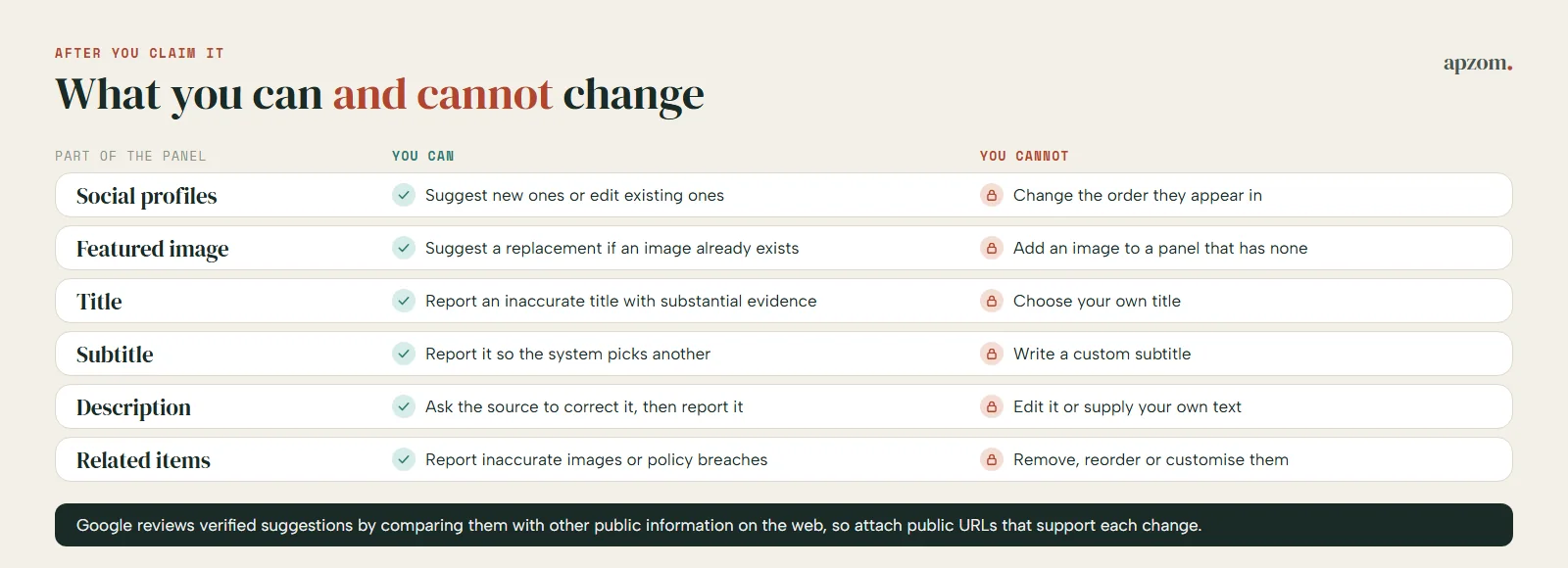
| Part of the panel | What you can do | What you cannot do |
|---|---|---|
| Social profiles | Suggest new profiles or edit existing ones | Change the order they appear in |
| Featured image | Suggest a replacement with a direct, public image URL (for example .jpeg or .png) if an image already exists | Add an image to a panel that has none |
| Title | Report an inaccurate title with substantial evidence | Choose your own title; it is generated automatically |
| Subtitle | Report an inaccurate subtitle so the system picks another | Write a custom subtitle |
| Description | Ask the source of the description to correct it, then report it with strong evidence | Edit it or supply your own text |
| Related images and “People also search for” | Report an inaccurate related image, or a “People also search for” item that breaks Google’s policies | Remove, reorder or customise them yourself |
For a description, Google’s advice is to contact the source of the information and ask for a correction, because “changing the source of the information usually causes the information in the knowledge panel to change as well.” If the description is inaccurate and the source will not change it, Google may remove it, but it will not write a custom one.
Merchants have one more lever. Google’s Organization documentation says that if you’re a merchant you can influence more details in your merchant knowledge panel and brand profile, such as return policy, address and contact information, and its Organization markup examples show how an online store can describe its shipping and return policies.
What you cannot control
Be clear about the limits before you spend money on this.
- Whether a panel appears. Google’s systems decide, and Google says it does not create panels manually.
- When it appears or disappears. A panel can show for some searches and not others, and stop showing later.
- The wording. Titles, subtitles and descriptions are generated or sourced; you can report errors, not write them.
- What independent sources say. You can ask for corrections, not edit other people’s pages.
Treat a knowledge panel as a possible result of being a well-documented, consistent organization, not a project with a delivery date.
How to check your progress honestly
A few checks every quarter tell you whether the entity work is landing.
- Search your exact name while signed out, and with your country setting changed if you work in several markets, such as the US, UK, UAE or India. Note whether a panel or a Business Profile appears and what it says.
- Look for the claim option on any panel that appears, and claim it straight away.
- Check branded searches in Search Console. Filter the Performance report for queries containing your name to see impressions and clicks over time.
- Ask AI assistants who you are and compare the answer with your About page. It is not a Google check, but it shows whether your details agree across the web. Our guide to GEO explains how AI tools choose sources, and our guide to featured snippets and AI answers covers answers that get quoted.
- Keep a log of every feedback submission, the evidence you gave and Google’s emailed resolution.
Common mistakes
- Treating a Business Profile and a knowledge panel as the same thing. They have different eligibility, different tools and different owners.
- Paying for a “guaranteed knowledge panel”. Google says it does not create panels manually, so nobody can guarantee one.
- Creating a Wikidata item or Wikipedia article about your own company. Both communities discourage it, and an item deleted for self-promotion helps nobody.
- Using several versions of your name, or listing sameAs profiles that are not yours or use an old name.
- Claiming the panel with one employee’s personal account. When that person leaves, so does your access.
- Suggesting edits without evidence. Google compares suggestions with public information; give it public URLs that support the change.
- Buying press placements or links. Google’s spam policies list buying links for ranking purposes, and advertorials whose links pass ranking credit, as link spam.
How Apzom can help
Apzom Digital’s AEO services include entity work for organizations that want search engines and AI tools to describe them accurately: an audit of your name, About page, Organization markup, sameAs profiles and Business Profile, a fix list in priority order, and help with claiming and correcting a knowledge panel if one already exists. We have not published a knowledge panel case study yet, so we will not quote results we cannot prove, and we will not promise you a panel, because Google says nobody can create one. Our GEO services cover the wider AI-search side. We work with clients worldwide, remotely, from our base in Ahmedabad, India.
Get a Free Growth Audit of your entity signals. Send us your website and the profiles you use. We send back a written review: what search engines and AI tools can confirm about your organization today, what contradicts it, the fixes in order, and a quote if you want us to do the work.
No obligation, and no promised panels or rankings. Prefer to talk first? Contact us or read our guide to schema markup for small businesses.
Frequently asked questions
Can I pay Google for a knowledge panel?
No. Google offers no paid route and says its current policy is not to create or delete knowledge panels manually.
How long does it take to get a knowledge panel?
Google publishes no timeline, and many organizations never get one. What you can control is how accurate and consistent the information about you is. Google says verified feedback on an existing panel is usually reviewed within a few days.
Does schema markup create a knowledge panel?
No. Google says Organization markup can help it understand and disambiguate your organization and can influence which logo appears in your knowledge panel, but it does not guarantee that any feature will appear.
Do I need a Wikipedia page to get a knowledge panel?
Google does not say one is required, and Wikipedia and Wikidata both discourage creating articles or items about yourself or your own organization.
Why did my knowledge panel disappear?
Google says its automated systems decide when and where a panel shows, a panel you saw before may stop showing, and this is not something Google can or would influence.
Can an agency claim our knowledge panel for us?
Google’s claim process is for the subject or an official representative of the entity, who is asked to sign in to an official site or profile (or give more information if Google cannot find one). Our rule of thumb is that the organization’s own Google Account should be the owner, with any agency added as a manager or contributor and removed when the work ends.