The short answer: Schema markup is code that describes your page in a standard vocabulary, so search engines can understand who you are and what the page contains. For a small business, the most useful markup is usually Organization or the most specific LocalBusiness type on your main pages, BreadcrumbList across the site, Article on guides and blog posts, and type-specific markup such as Product, Event or JobPosting only where a page really has that content. Use JSON-LD, mark up only what visitors can see on the page, test it, and keep it updated. Schema can make a page eligible for rich results. It does not guarantee them, and it is not a shortcut to higher rankings.
This guide is for owners and marketers of small businesses in any country, whether you run a local service, a shop, a clinic, a restaurant or a professional firm. It explains what schema markup is, what it does and does not do in 2026, which types to add first, a worked example, the rules that keep you out of trouble, and how to test and maintain it.

What schema markup is
Schema markup, also called structured data, is a set of labels added to a web page. The page might say “Open Monday to Saturday, 8 am to 6 pm” in plain text. The markup says the same thing in a form a machine can read without guessing: this is a business, these are its opening hours, this is its address.
The vocabulary is schema.org, a shared set of types and properties that Google, Microsoft and Yahoo started in 2011 and that is now maintained with a wider community. It covers thousands of things, from LocalBusiness and Product to Event and JobPosting. The current version is 30.1, released on 16 September 2026 (schema.org releases page).
Google reads three formats: JSON-LD, Microdata and RDFa. Its introduction to structured data says Google recommends JSON-LD “if your site’s setup allows it”, and also that all three formats are equally fine for Google when the markup is valid. JSON-LD sits in its own script block, separate from the visible text, which makes it easier to add and update without touching the page design. This guide uses JSON-LD.
What schema does, and what it does not do
Google says it uses structured data that it finds on the web to understand the content of the page, and to gather information about the web and the world (Google Search Central, Introduction to structured data markup). Bing reads it too: the markup card in Bing Webmaster Tools’ URL Inspection recognises JSON-LD, Microdata, Microformats and Open Graph.
What it can do:
- Make a page eligible for rich results, such as product prices and availability, review stars on product pages, event listings (in the countries where Google offers them), job listings and breadcrumbs in place of a long web address.
- Help search engines connect facts about your business, such as your name, logo, address and profiles on other sites.
- Remove guesswork about what a page is: a product, an article, an event or a job.
What it cannot do:
- Guarantee a rich result. Google’s general structured data guidelines say Google does not guarantee that your structured data will show up. Valid markup makes a page eligible; Google decides what to show.
- Make a weak page rank. Search engines rank pages on how well they answer the search. Markup describes a page; it does not improve it.
- Turn on features Google has removed. Several rich result types, including FAQ and HowTo, no longer appear, and adding their markup changes nothing in Google Search (see below).
Schema and AI search
Many owners now ask whether they need schema to appear in AI answers. Google’s answer is no special markup. Its page “Optimizing your website for generative AI features” (added May 2026) says structured data isn’t required for generative AI search and there’s no special schema.org markup to add, though it still helps a page be eligible for rich results. A separate Google page, “AI features and your website”, advises making sure your structured data matches the visible text on the page. Clear, accurate and helpful pages matter far more than any markup. Our guide on what GEO is covers AI search in more depth.
Bing’s Webmaster Guidelines, which cover Bing search and Copilot, say much the same: structured data does not guarantee visibility, it must accurately reflect visible content, and misleading markup may be ignored. Neither Google nor Microsoft has published anything saying schema markup earns citations in AI answers, so treat any promise of that with caution.
The rich results Google still shows
Google has removed or narrowed several rich result types since 2023, so older guides often recommend markup that no longer does anything visible. The main changes, from Google’s Search Central documentation and blog:
| Feature | What happened |
|---|---|
| HowTo | Limited to desktop in August 2023, then deprecated in September 2023 |
| FAQ | Limited to well-known government and health sites in August 2023; FAQ results stopped appearing from May 2026, and the documentation was removed on 15 June 2026 |
| Sitelinks search box | Removed in November 2024 |
| Course info, Estimated salary, Learning video, Special announcement, Vehicle listing | Phased out (announced June 2025; documentation removed September 2025) |
| Practice problems | Deprecated in November 2025; documentation removed January 2026 |
| Dataset | Since November 2025, used by Dataset Search only, not Google Search |
| Event | Still supported, but available only in some countries: Australia, Brazil, Canada, Germany, India, Spain, the UK, the US and Spanish-speaking Latin America |
Google’s Search Gallery, checked on 22 October 2026, still lists these features, among others: Article, Breadcrumb, Carousel, Course list, Discussion forum, Education Q&A, Employer aggregate rating, Event, Image metadata, Job posting, Local business, Math solver, Movie, Organization, Product, Profile page, Q&A, Recipe, Review snippet, Software app, Speakable (beta, US English only), Subscription and paywalled content, Vacation rental and Video. Google said its June 2025 removals won’t affect how pages are ranked: the markup can stay, it just stops producing a visible feature.
Framework 1: the schema priority ladder
Most small businesses do not need dozens of schema types. The first framework is a ladder: start at the top and stop when the markup no longer matches anything real on your site.
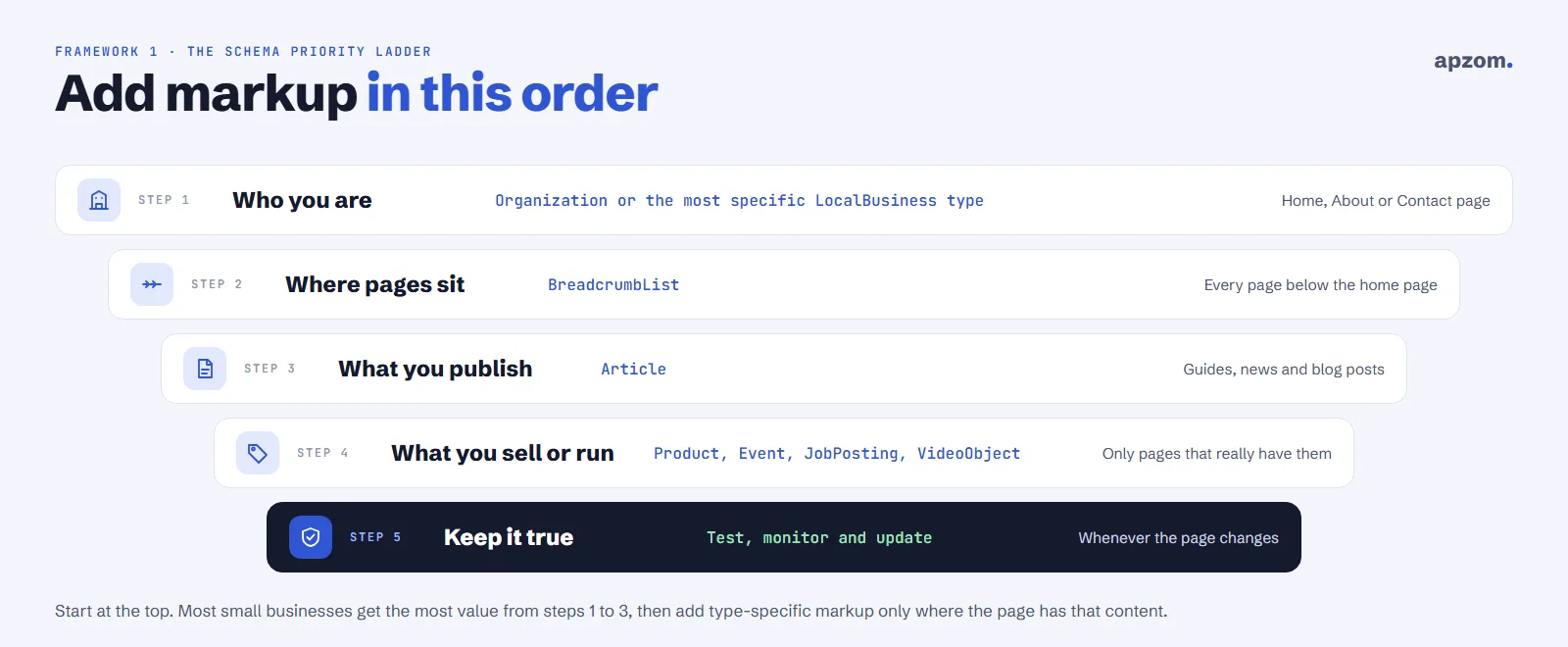
- Who you are: Organization, or the most specific LocalBusiness type that fits, such as Bakery, Dentist, Plumber or LegalService, on your home, about or contact page.
- Where pages sit: BreadcrumbList on every page below the home page.
- What you publish: Article on guides, news and blog posts, with the real author and dates.
- What you sell or run: Product, Event, JobPosting, VideoObject or another specific type, only on pages that really contain that thing.
- Keep it true: test it, monitor it in Search Console and update it whenever the page changes.
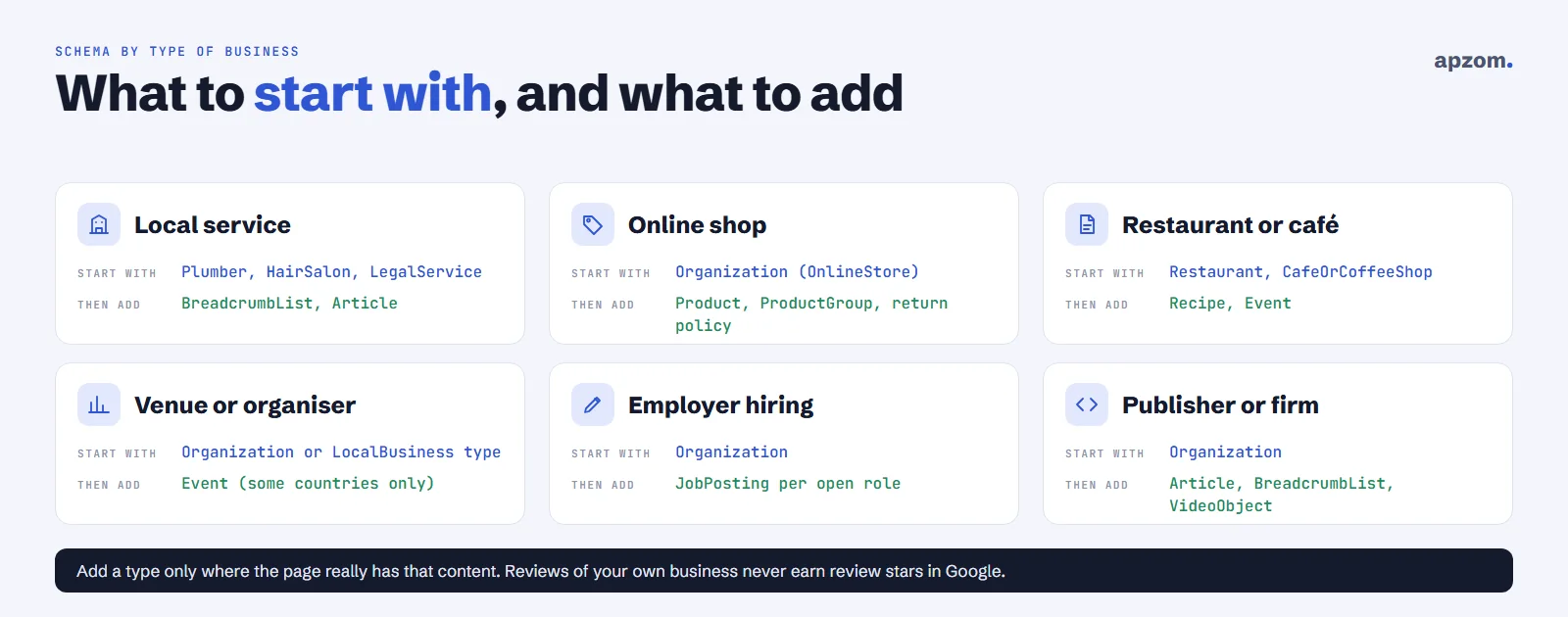
Which schema for which business
| Type of business | Start with | Add where the page has it | Watch out for |
|---|---|---|---|
| Local service (trades, salons, clinics, firms) | The most specific LocalBusiness type, such as Plumber, HairSalon or LegalService | BreadcrumbList, Article on guides | No review stars for reviews of your own business |
| Restaurant or café | Restaurant or CafeOrCoffeeShop, with menu, servesCuisine and openingHoursSpecification | Recipe if you publish recipes, Event for events | Keep holiday hours current |
| Online shop | Organization (Google suggests OnlineStore), with return and shipping policies | Product with price and availability, ProductGroup for variants, real customer reviews | Prices in the markup must match the page |
| Venue or event organiser | Organization or the right LocalBusiness type | Event for each real event | Event results only show in some countries; remove finished events |
| Employer that is hiring | Organization | JobPosting for each open role | Close or remove filled roles (see SEO for recruitment agencies) |
| Publisher, blog or professional firm | Organization | Article, BreadcrumbList, VideoObject | Use the real author and dates |
A worked example: LocalBusiness markup
Here is a simple example for a local bakery. Every value must match what the page shows, and the placeholders must be replaced with your real details.
<script type="application/ld+json">
{
  "@context": "https://schema.org",
  "@type": "Bakery",
  "name": "Your Bakery Name",
  "url": "https://www.example.com/",
  "telephone": "+00 0000 000000",
  "address": {
    "@type": "PostalAddress",
    "streetAddress": "1 Example Street",
    "addressLocality": "Your City",
    "postalCode": "00000",
    "addressCountry": "GB"
  },
  "openingHoursSpecification": [
    {
      "@type": "OpeningHoursSpecification",
      "dayOfWeek": ["Monday", "Tuesday", "Wednesday", "Thursday", "Friday", "Saturday"],
      "opens": "08:00",
      "closes": "18:00"
    }
  ],
  "priceRange": "$$",
  "sameAs": ["https://www.facebook.com/yourbakery"]
}
</script>
What each part does:
- @type is the most specific type that fits. Google’s LocalBusiness documentation asks you to use the most specific sub-type possible: Bakery rather than LocalBusiness, Plumber rather than HomeAndConstructionBusiness.
- name and address are the only properties Google requires for local business markup. Use the same name and address that appear on the page and on your Google Business Profile.
- telephone, url, openingHoursSpecification and priceRange are recommended. Opening hours can also include validFrom and validThrough dates for holiday hours.
- sameAs lists your official profiles on other sites. Google lists it as a recommended property for organizations.
- addressCountry uses the two-letter country code, such as US, GB, AE, AU or IN.
Google says local business markup can tell it about your hours, departments and reviews, and the business details may appear in the knowledge panel when people search for you.
If you have several locations, give each real location its own page with its own markup, address, phone number and hours. Do not add the same LocalBusiness markup with one address to every page of the site.
Not sure what your site’s markup says about you? A Structured Data Review checks every template on your site and shows what is missing, wrong or out of date.
Framework 2: the match test
The second framework is a simple rule. Before you mark anything up, check that it is in all three places: in the markup, visible on the page, and true today.
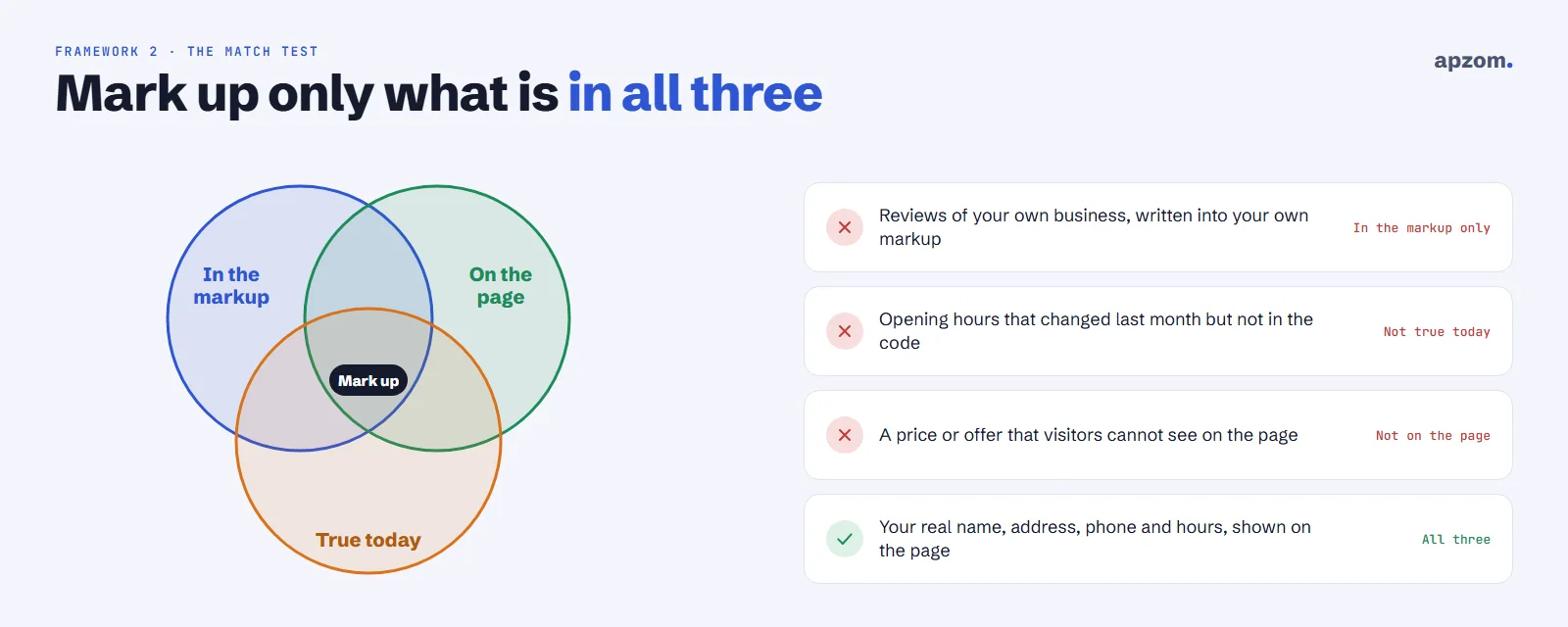
This is what Google’s general structured data guidelines ask for. Don’t mark up content that is not visible to readers of the page. Markup must describe the main content of the page it is on, and it must not mislead, for example by impersonating another business or adding fake reviews.
Three common ways small businesses fail the match test:
- Reviews of your own business in your own markup. Google’s review snippet rules say that when the business being reviewed controls the reviews about itself, pages using LocalBusiness or Organization markup are not eligible for review stars. Google added a further rule in July 2026: no fake or undisclosed incentivised reviews.
- Out-of-date facts. Opening hours, prices and events change. Markup that still shows last year’s hours or a finished event is misleading.
- Hidden content. A price, offer or FAQ that exists only in the code and not on the page.
If Google finds markup that breaks its guidelines, it can apply a manual action. The page then loses eligibility for rich results, though Google says this doesn’t affect how the page ranks. You will see it in the Manual Actions report in Search Console.
How to add schema markup
There are four common ways, and most small businesses only need the first:
- An SEO plugin or your website builder. WordPress SEO plugins such as Rank Math and Yoast add common types such as Organization, Article and BreadcrumbList, and many website builders and shop platforms add some markup of their own. Check what yours outputs before adding more, or you may end up with two conflicting versions.
- A theme or app built for your type of business, such as a restaurant menu or event booking plugin. Check its output in the same way.
- Hand-written JSON-LD in the page template, for types your tools do not cover.
- A tag manager or script. Markup added by a script is harder to check and easier to break without anyone noticing, so test the live page after every change, and put markup in the page itself where you can.
Whichever you use, connect the pieces. Give your business one consistent identity across the site, with the same name, logo and address everywhere. Many SEO plugins also give the business a single identifier (an “@id” value) that other markup, such as Article, can point to. Google’s documentation does not require this, but it keeps your markup consistent.
Framework 3: the validation loop
The third framework is a loop, not a one-off task. Markup breaks when themes, plugins or page content change.
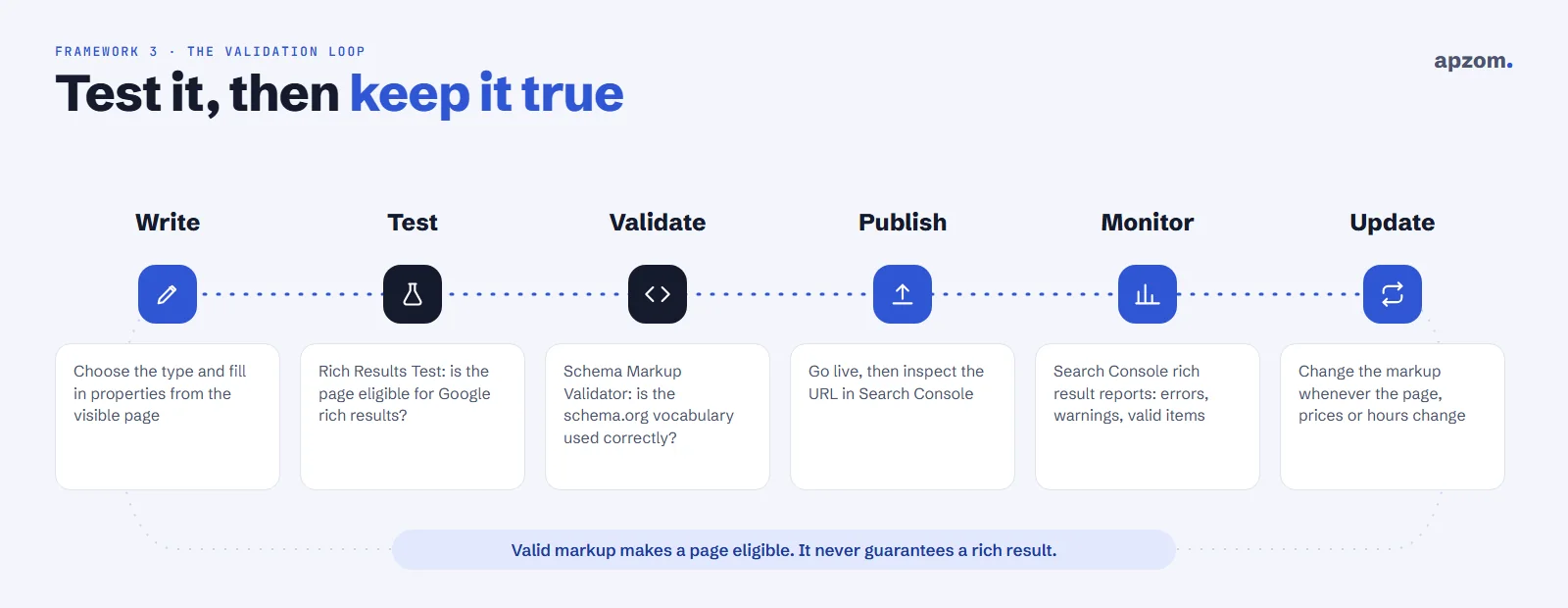
- Write the markup from the visible page: choose the type and fill in only what the page shows.
- Test it in Google’s Rich Results Test, which Google suggests starting with. It shows which Google rich results the page is eligible for and any errors.
- Validate it in the Schema Markup Validator (validator.schema.org), which checks all schema.org markup without Google-specific rules. It replaced Google’s old Structured Data Testing Tool.
- Publish, then use the URL Inspection tool in Search Console to see how Google sees the live page.
- Monitor the rich result reports in Search Console, which list valid items, warnings and errors for each type Google found.
- Update the markup whenever the page changes.
Check your markup after every theme or plugin update, every price change and every change to opening hours, and look at the Search Console reports once a month. Our guide on how to use Google Search Console shows where these reports are. For a full site check, see our guide on how to do a technical SEO audit.
Common mistakes
- Adding markup for content that is not on the page.
- Marking up reviews of your own business on your own website.
- Leaving old opening hours, prices or finished events in the markup.
- Adding markup for rich results Google no longer shows, and expecting a change.
- Two plugins adding two different versions of the same business.
- Using a generic type when a more specific one fits.
- Expecting markup to fix thin or unhelpful pages.
Industry guides on this site cover schema for specific trades: SEO for home services companies, SEO for law firms, SEO for manufacturers, SEO for travel agencies and SEO for car dealerships.
How Apzom can help
Our SEO services include a structured data review: what your site outputs now, what is missing, what is wrong or misleading, and what to fix first. We add and test markup as part of our local SEO, website development and AEO work, and our SEO methodology explains the process. We work with clients worldwide, remotely, from our base in Ahmedabad, India. If you are rebuilding your site, our website redesign SEO checklist covers markup along with everything else that should survive the move.
Request a Structured Data Review. We check what your site outputs today on your home, location, service, product, article and event pages, test it against Google’s current rich result rules, and give you a prioritised list of fixes, with the markup to add.
No obligation and no promised rich results. Prefer to talk first? Contact us or see all our services.
Frequently asked questions
What is schema markup in simple terms?
It is code that labels the facts on a page, such as your business name, address, opening hours, products or events, in a standard vocabulary that search engines read.
Does schema markup improve rankings?
Not directly. It helps search engines understand a page and can make it eligible for rich results, which may help people choose your result. Rankings still depend on how well the page answers the search.
Which schema should a small business use?
Usually Organization or the most specific LocalBusiness type, BreadcrumbList and Article, then Product, Event, JobPosting or other types only where a page has that content.
Is JSON-LD better than Microdata?
Google recommends JSON-LD where your site’s set-up allows it, though it says all three formats are equally fine when the markup is valid. JSON-LD is usually the easiest to add and maintain, so most small businesses should use it.
Can I add review stars for my own business?
Not in Google Search. Google does not show review stars for reviews a business publishes about itself on its own site using LocalBusiness or Organization markup. Product pages with genuine customer reviews are different.
Do I need schema markup for AI search?
No special markup. Google says structured data isn’t required for its generative AI features and there is no special schema.org markup to add, though any markup you use should match the visible text. Clear, accurate, helpful pages matter far more.
How do I check if my schema markup works?
Test the page in Google’s Rich Results Test and the Schema Markup Validator, then watch the rich result reports in Google Search Console after it goes live.
Can Apzom add schema markup for businesses outside India?
Yes. We work with clients worldwide, remotely, from our base in Ahmedabad, India, and set up markup that matches your pages, your country and the platforms you use.