The short answer: SEO for a recruitment agency has two jobs: win clients who search for a recruiter in their sector and area, and win candidates who search for jobs, pay and advice. Do it with evergreen sector, role and office pages for employers and candidates, one page per job with accurate job markup, and a clear plan for what happens when a job closes. Keep endless filter and search pages out of Google’s crawl, avoid duplicate copies of the same job, and make sure your applicant tracking system does not hide your jobs from search. Measure placements and repeat clients from organic search, not traffic.
This guide is for recruitment agencies, staffing firms and executive search firms in any country. It goes deeper on search than our guide to digital marketing for recruitment agencies, which covers the whole marketing mix, job page basics and Google’s job markup rules. Here we cover keyword planning for both audiences, site structure, crawl control, the job page lifecycle, applicant tracking systems, content that earns links, office pages and measurement.

Why recruitment SEO is different
Most business websites have a few dozen pages that change slowly. A recruitment website is different:
- Pages appear and disappear every day. Every job is a page with a short life. Handled badly, that leaves thousands of expired, thin or duplicate pages.
- Two audiences search in different ways. Employers search for a recruiter; candidates search for jobs, pay and advice. They need different pages.
- You compete with job boards for candidates. Large job sites and aggregators dominate broad job searches. Agencies win on specialism, location and expertise.
- The technology often fights you. Applicant tracking systems, job feeds and widgets can put your jobs on another domain, inside a frame, or behind JavaScript that search engines struggle with.
- The value is in placements. A visit is worth nothing until it becomes a client or a candidate who gets placed.
Framework 1: the two-sided keyword map
The first framework splits your keyword research into two maps, one for each audience, and gives each search its own type of page.

| Audience | Example search | Page that should answer it |
|---|---|---|
| Client | “accountancy recruitment agency manchester” | A sector and location page written for employers |
| Client | “temporary warehouse staff agency” | A temporary staffing service page |
| Client | “executive search firm for fintech” | A specialist search page with proof of your work |
| Client | “how much does a recruiter charge” | A fees and terms guide |
| Candidate | “payroll jobs in leeds” | A sector and location jobs page with live roles |
| Candidate | “payroll officer” | Individual job pages, one job per page |
| Candidate | “payroll officer salary uk” | A salary guide built from your own placement data |
| Candidate | “how to write a cv for finance roles” | A candidate advice guide |
The examples are illustrative, not keyword data. Use your own sources: the questions clients and candidates ask your consultants, your job titles and Search Console. Our guides to keyword research for small businesses and how to use Google Search Console show how. Never send employers and candidates to the same page: they want different things, and one page cannot serve both well.
Site structure: evergreen pages above the job churn
Jobs come and go; your sectors, services and offices do not. Build a stable structure of evergreen pages, and let job pages sit beneath them:
- Home links to your main sectors, services and offices.
- Sector pages for candidates list live jobs in that sector and explain what you place.
- Sector pages for employers explain how you recruit in that sector, your process, your terms and your proof.
- Role and location pages only where you have regular jobs and real knowledge of that market.
- Job pages link up to their sector page.
- Guides and salary data link to the relevant sector pages.
Be careful with location pages. Google’s spam policies treat “doorway abuse” as a violation: pages created to rank for similar searches that send people to the same place, and one of Google’s own examples is a set of pages targeting specific cities or regions that funnel users to one page. A page for each town you really recruit in, with real jobs, real knowledge and different content, is useful. Hundreds of near-identical town pages are not.
Framework 2: the crawl gate
Search engines have limited time for each site. Job sites waste it easily, because filters, sorting and search create endless versions of the same list. The second framework is a gate: open it for pages that matter, and keep the rest out of the crawl.
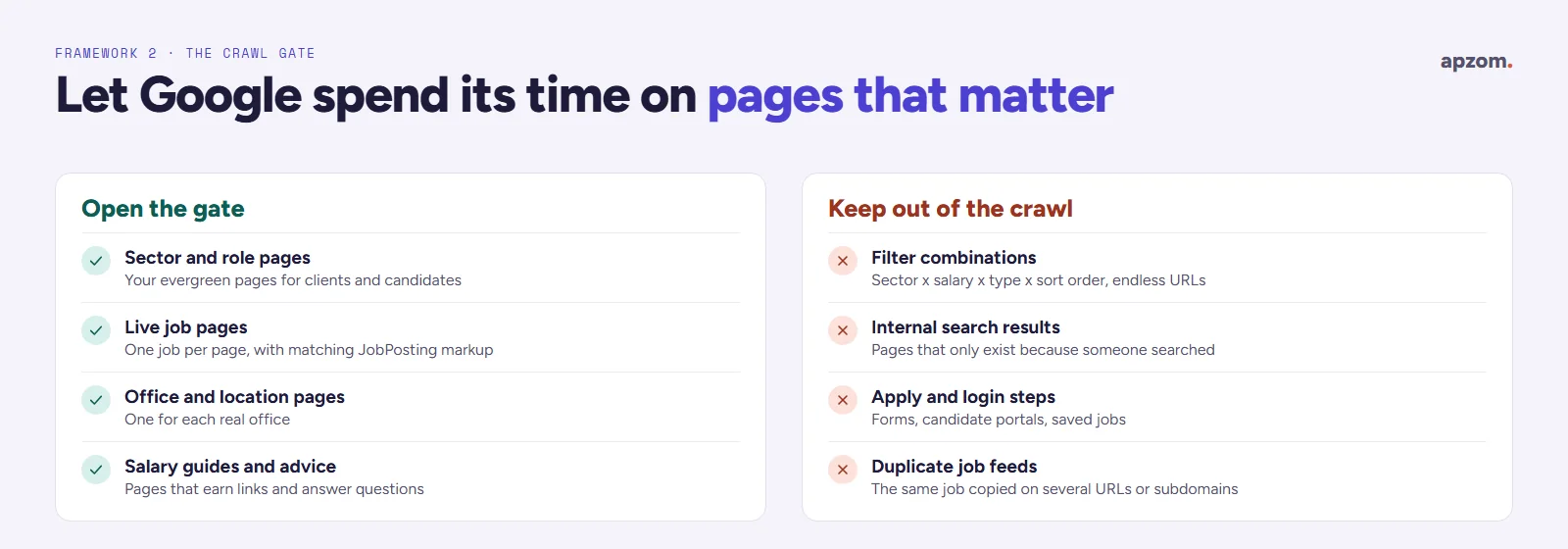
- Filters. Sector, location, salary, job type and sort order can combine into thousands of URLs that show almost the same jobs. Google’s guidance on faceted navigation (updated December 2025) prefers stopping the crawl of filter URLs with robots.txt, or using URL fragments for filters, and says canonical tags and nofollow are generally less effective in the long term. If filter pages stay crawlable, Google suggests returning a 404 for combinations with no results. Keep a small number of valuable filtered pages, such as a sector and location page, as proper evergreen pages with their own content.
- Internal search results. Pages that only exist because someone searched your job board are rarely useful in Google. Google’s URL structure guidance suggests considering blocking dynamic URLs, such as URLs that generate search results.
- Paginated job lists. Google no longer uses rel=next and rel=prev. Link the pages to each other with normal links, and give each page its own canonical URL rather than pointing page 2 and beyond at page 1.
- Apply, login and saved-job pages are for people who are already on your site. They do not need to be in search results.
- Duplicate jobs. The same job often appears at several URLs on one site: under a sector, a location and a search, or on both your site and your ATS. Google’s job posting guidelines ask you to use a canonical URL on each copy of the same job, to use job markup only on a page with a single job, and not to add it to pages that list several jobs. Google calls the canonical tag a strong signal but still a hint, so it is better to have one URL per job in the first place.
Framework 3: the job page lifecycle
Every job page has an end date. The third framework plans for it from the start.

- Posted: the page goes live, appears in your sitemap, carries job markup that matches the page and links to its sector page.
- Updated: when pay, location or dates change, update the page and the markup together.
- Filled or expired: Google’s job posting documentation gives three ways to mark a job as expired: set the validThrough date to a date that has passed, remove the page so it returns a 404 or 410 status, or remove the job markup from the page. If a job is filled before its closing date, Google says to remove the posting, and leaving expired jobs marked up as open may result in a manual action. Do not leave a closed job page looking open, and do not add markup back to it.
- The sector page keeps the value: links and visits the job earned stay with your evergreen pages.
Google recommends its Indexing API for job pages, instead of relying on sitemaps alone, so that new and removed jobs are picked up quickly. The API works only for pages with job posting markup or livestream video markup, and Google still wants a normal sitemap for the rest of your site. Many ATS and job board plugins can send these notifications for you.
If you remove an expired job page, let it return a 404 or 410. Google’s guidance says a page that is gone with no replacement should return one of these, and a page that has moved should get a 301 redirect to its new address. Redirecting thousands of expired jobs to your home page does not help: Google’s site move guidance warns that redirecting many URLs to the home page might be treated as a soft 404. Redirect only where there is a real replacement, such as the same job with a new reference.
Applicant tracking systems, subdomains and frames
Many agencies run their jobs through an applicant tracking system (ATS) or a job board plugin. Check how yours shows jobs to search engines:
- Jobs on another domain or subdomain. If job pages sit on the ATS provider’s domain, the links and visits they earn build that domain, not yours. A subdomain of your own site (such as jobs.youragency.com) is better than someone else’s domain; Google’s site diversity system generally treats subdomains as part of the root domain. Keep the most important job and sector pages on your own site where you can.
- Jobs inside a frame (iframe). Google has said informally that it tries to associate content in a frame with the page around it, but that this is not guaranteed. A job list inside a frame may not count as content on your page at all. Ask your ATS provider for a version that puts jobs in your own pages.
- Jobs loaded by JavaScript. Google can render JavaScript, but its JavaScript SEO guidance lists limits, and it describes dynamic rendering as a workaround and not a recommended solution. Jobs that appear in the page’s HTML are the safest choice.
- Job markup. Check that your ATS adds job markup, that it matches each page and that it disappears when the job closes.
The quickest test: search Google for one of your live job titles with your agency name, and inspect a live job URL in Search Console to see what Google sees.
Jobs live but not showing in Google? A Recruitment SEO Review checks your job pages, ATS set-up, crawl and markup, and shows what is holding your site back.
Content that wins clients and earns links
Job pages bring candidates. Clients are won with expertise. The content that works best for agencies:
- Salary guides built from your own placement data, by role and location, with your method explained. Other sites cite them, which earns links.
- Market updates on hiring demand in your sectors, based on what you see in your own desk.
- Hiring guides for employers: how long it takes to fill a role, what candidates expect, how to write a job ad that attracts applicants.
- A fees and terms guide that explains how you charge in plain words.
- Candidate advice for your sectors: CVs, interviews, qualifications.
Google’s guidance on helpful, reliable, people-first content puts trust at the centre of what it calls E-E-A-T (experience, expertise, authoritativeness and trust). Google says E-E-A-T itself isn’t a specific ranking factor, but the content it describes is what it tries to reward. For an agency, that means real data, named consultants and honest methods.
Pay in job ads: a search and a legal issue
Candidates search for pay, and pay is one of the details Google’s job markup recommends. In many places it is also becoming a legal duty. For example:
- United States. Several states require pay ranges in job postings, including Colorado, California, Washington, New York, Hawaii, Maryland, Illinois, Minnesota, Vermont, New Jersey, Massachusetts and, since July 2026, Virginia, plus cities such as New York City. Some laws explicitly cover postings by third parties such as agencies, including California’s and Massachusetts’. New Jersey lets temporary help and consulting firms give pay at interview or hire instead of in the posting, so check the details state by state.
- European Union. The Pay Transparency Directive (EU) 2023/970 had to be written into national law by 7 June 2026. It requires employers to tell candidates the starting pay or its range, through the vacancy notice or before the interview. Member states are implementing it at different speeds, so check the national law where you recruit.
- United Kingdom. There is no law yet. The government consulted in 2026 on a duty to publish pay in job adverts; the consultation closes on 27 October 2026.
Show pay on job pages wherever you can, in the same form in the page and in the markup.
Office pages and local search
Clients often look for a recruiter nearby, and many candidates do too.
- Google’s Business Profile guidelines allow one profile for each staffed location. A virtual office or mailing address is not eligible.
- Give each real office its own page with its address, team, sectors and live jobs nearby.
- Collect reviews from clients and placed candidates, asking everyone the same way. Our guide on how to get more Google reviews covers the rules.
Our local SEO checklist covers multi-office set-ups in more detail.
Check your site in Search Console
Search Console shows how Google sees a job site. The checks that matter most for agencies:
- The job postings report, under rich results, which lists valid job pages and errors in your markup.
- The page indexing report, especially “Soft 404”, “Not found (404)” and “Crawled – currently not indexed”. A large number of soft 404s often means expired jobs are not being handled properly.
- The URL Inspection tool, to check a live job page and what Google sees on it.
- The performance report, filtered by page type, to see which sector, job and guide pages bring clicks.
Our guide on how to use Google Search Console explains each report.
Framework 4: from search to placement
The fourth framework measures what matters. Count each step and judge SEO by placements and repeat clients, not traffic.

- Found: impressions and clicks, by page type (sector, job, guide, office).
- Engaged: applications and vacancy enquiries.
- Qualified: shortlisted candidates and client calls held.
- Placed: placements that started with an organic search.
- Repeat: clients who come back with more roles.
Record the source of every client and candidate in your ATS or CRM. Our guide on how to measure marketing ROI explains how to turn these counts into a return on spend.
Common mistakes
- One page trying to serve both employers and candidates.
- Hundreds of near-identical location pages.
- Expired jobs left live with job markup that says they are open.
- Every filter and search combination open to crawling.
- Jobs only on an ATS subdomain or inside a frame, with nothing on your own pages.
- The same job on several URLs.
- Salary guides with no method or no real data behind them.
- Measuring traffic instead of placements.
How Apzom can help
Our SEO services for recruitment agencies start with a technical review of your job pages, ATS set-up and crawl, then a two-sided keyword map and a plan for sector, office and content pages. We build and fix pages as part of our website development, local SEO and content marketing work, and our SEO methodology explains the process. We work with clients worldwide, remotely, from our base in Ahmedabad, India. We have not published a recruitment case study, and we will not promise a number of placements. If you are budgeting, our guide on how much SEO costs may help.
Request a Recruitment SEO Review. We check your sector, office and job pages, how your ATS publishes jobs, expired job handling, filter and search pages, duplicate jobs, job markup and Search Console reports, and map the searches your clients and candidates use. You get a prioritised list of fixes and pages to build.
No obligation and no promised rankings. Prefer to talk first? Contact us or see all our services.
Frequently asked questions
How do recruitment agencies rank on Google?
With evergreen sector, service and office pages that match what employers and candidates search, individual job pages with accurate job markup, a clear plan for expired jobs, and content such as salary guides that earns links. Technical problems, such as duplicate jobs and endless filter pages, often hold agencies back more than a lack of content.
What should happen to a job page when the job is filled?
Expire it in one of the ways Google describes: set the job’s validThrough date to a date that has passed, remove the job markup, or remove the page so it returns a 404 or 410. Keep the sector page it linked to, so the value the job earned stays on your site.
Should recruitment agencies create a page for every town?
Only for towns where you really recruit, with real jobs and content that is different from your other pages. Near-identical town pages can count as doorway pages under Google’s spam policies.
Does my applicant tracking system affect SEO?
Yes. If jobs sit on another domain, inside a frame or behind JavaScript, search engines may not credit them to your site or may not see them at all. Check how your ATS publishes jobs and test a live job URL in Search Console.
Can a recruitment agency compete with big job boards in Google?
Not on broad searches such as “jobs” or “accountant jobs” nationally. Agencies win on specialist and local searches, on employer searches and with expert content that job boards do not have.
Do recruitment agencies need to show salaries in job ads?
In a growing number of places, yes. Several US states require pay ranges in job postings, and under the EU Pay Transparency Directive candidates must be told the starting pay or range before the interview. Even where it is not required, showing pay helps candidates and matches what Google’s job markup recommends.
How long does SEO take for a recruitment agency?
Usually several months for sector and service pages to rank well. Job pages can appear much faster if they are technically sound, which is why most agencies combine SEO with job boards and ads.
Can Apzom do SEO for recruitment agencies outside India?
Yes. We work with clients worldwide, remotely, from our base in Ahmedabad, India, and plan SEO around the countries you recruit in, their job markup support and pay transparency rules, and the platforms your clients and candidates use.