The short answer: SEO for travel agencies and tour operators means building a website that search engines can understand and travellers can trust: a clear structure of destination, region, trip and guide pages, trip URLs that last longer than any one departure, honest structured data, and content written from your team’s own experience of the places you sell. It is slow to build, but the pages keep working for years, and they bring travellers to you directly instead of through a marketplace that charges commission.
This guide is for travel agencies, tour operators, destination management companies (DMCs) and activity operators in any country. It covers how to plan your site’s structure, what to do when trips and departures end, which structured data is worth adding, how to write destination content that stands out, how to sell to travellers in several countries, local search, and how to measure SEO in a seasonal business.
It sits beside our main guide to digital marketing for travel agencies and tour operators, which covers channels, marketplaces, enquiries and the rules on financial protection and pricing. That guide also has the trip page test: eight things every trip page needs before you send traffic to it. This page goes deeper into search.
Why SEO for travel is harder than it looks
Travel searches are crowded. On many queries you are up against online travel agencies, activity marketplaces, review sites, tourist boards and big publishers, all with more pages and more links than you. A small operator will rarely win “holidays in Italy”. It can win “small group walking tour Dolomites in September”, “Kerala backwaters houseboat 2 nights” or “family safari Tanzania with young children”, because few big sites answer those questions well.
Three things make travel SEO different from SEO for most businesses:
- Content goes out of date fast. Prices, departure dates, entry rules and opening times change. A page that was right last year can be wrong today.
- Demand is seasonal. People search for a trip months before they travel, and the peak months differ by market and hemisphere.
- Most sites have far more pages than they need. Copied hotel descriptions, thin “things to do” lists and old departures pile up and dilute the pages that matter.
Plan your site like an atlas
The first framework we use with travel clients is the atlas structure. Think of your website as a map with hubs and spokes, and with clear routes between them.
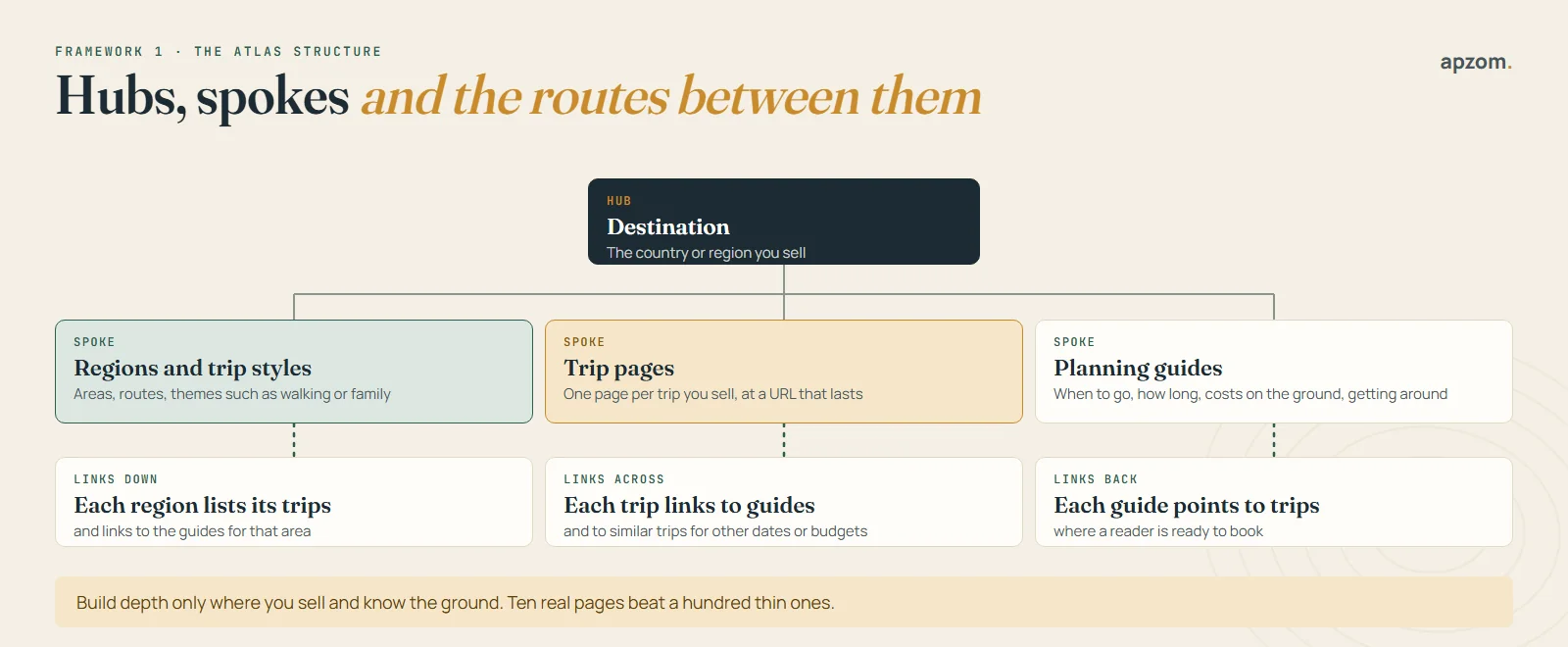
- Hub: destination pages. One page for each country or large region you sell. It gives your own view of the place: who it suits, when to go, how long to stay, and the trips you run there.
- Spokes: region and trip-style pages. Areas, routes and themes such as walking, wildlife, honeymoon or family trips. Build one only when you sell several trips in it.
- Spokes: trip pages. One page for each trip you sell, at a URL that stays the same year after year.
- Spokes: planning guides. Practical answers: when to go, how many days you need, what things cost on the ground, how to get around, sample routes.
Then link them like routes on the map. Each region page lists its trips and links to the guides for that area. Each trip page links to the guides a traveller will want before booking and to similar trips for other dates or budgets. Each guide links to the trips where a reader is ready to book. Use plain, descriptive link text, such as “our 10-day Rajasthan trip”, not “click here”.
Build depth only where you sell and know the ground. A tour operator with 15 trips in Morocco needs a strong Morocco hub, a few region pages and good trips. It does not need 200 city pages for places it never visits.
Watch out for doorway pages and mass-produced content
The quick way to build lots of pages is the one that causes trouble. Google’s spam policies describe doorway abuse with the example of “pages targeted at specific regions or cities that funnel users to one page”. Hundreds of near-identical “Tours in [city]” pages that all lead to the same booking form fit that description.
The same policies describe scaled content abuse, with the example of “using generative AI tools or other similar tools to generate many pages without adding value for users”. Google’s separate guidance on generative AI content says AI can help with research and structure, but that it is “critical to manually factcheck and review all AI-generated content for accuracy and trustworthiness before publishing”. In travel, an AI tool will happily invent a ferry that no longer runs or a visa rule that has changed. Every fact on a travel page needs a human check.
Trip URLs that outlive every departure
Trips have a life cycle. A departure fills up and leaves, a season ends, a trip is rested for a year or replaced by a better version. What you do with the page at each point decides whether the search value you built stays or disappears. The second framework is the evergreen trip URL.
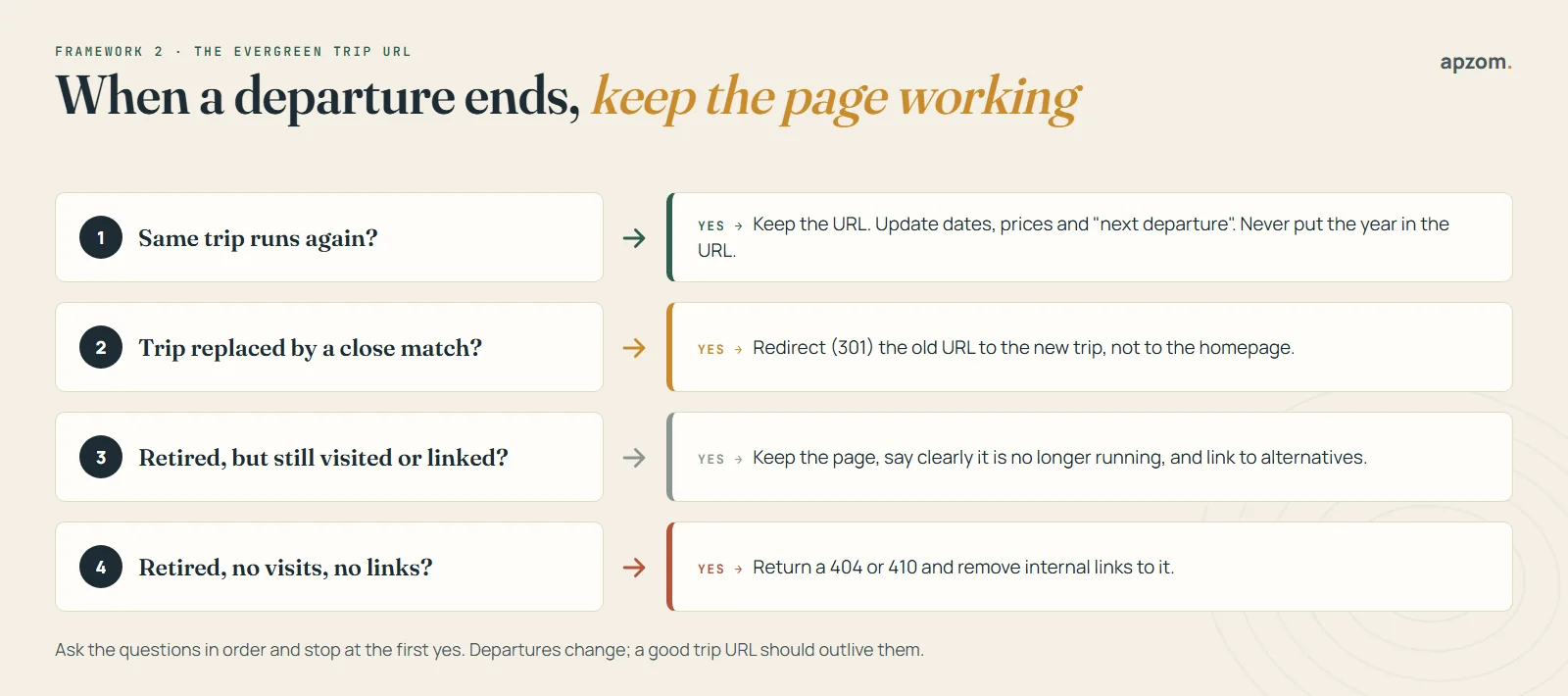
Ask these questions in order, and stop at the first yes:
- Will the same trip run again? Keep the URL and update the page: new dates, new prices, and a clear “next departure” line. Do not put the year in the URL. A page at /trips/patagonia-trek/ can rank for years; a page at /trips/patagonia-trek-2025/ starts again from zero every season.
- Has it been replaced by a close match? Redirect the old URL permanently (a 301 redirect) to the new trip. Google’s Search Console help says “If your page has moved, use a 301 redirect to the new location.”
- Is it retired, but still visited or linked to? Keeping the page with a clear note that the trip no longer runs, plus links to the closest alternatives, is common practice. It helps people who arrive from old links, bookmarks or other websites.
- Is it retired, with no visits and no links? Let it return a 404 or 410 status. Google’s help on 404 errors says that when content is removed for good with no replacement, you should “let the old URL return a 404 or 410”. Then remove your own internal links to it.
Do not redirect lots of old trips to your homepage. Google’s site move guidance says not to redirect many old URLs “to one irrelevant single URL destination, such as the home page”, and Google may treat such redirects as “soft 404” errors anyway.
The same thinking applies to departure dates. Show dates on the trip page, not as separate pages for each departure. If your booking system creates a page for every date, keep those pages out of search and point people to the main trip page.
Search filters and booking-system pages
Many travel sites let visitors filter trips by month, budget, length or style. Each filter combination can create a new URL, and search engines can waste time crawling thousands of near-empty pages. Google’s guidance on faceted navigation says you can “use robots.txt to disallow crawling of faceted navigation URLs” if you do not need them in search, and that a filter combination with no results should return a 404. If one filtered page is a real search, such as “walking holidays in Portugal”, turn it into a proper page with its own text instead.
Crawl budget itself is rarely the problem for a travel agency. Google calls its thresholds “a rough estimate” and describes the sites that need to worry as those with 1 million or more pages, or 10,000 or more pages that change daily. Most agencies and operators are far below that. The problem for most of them is thin and duplicate pages, not crawl limits.
Structured data: mark up what is true
Structured data is code that describes your page to search engines. It can help Google understand that a page is about a business, a trip or an event. In travel it is also full of myths. Schema.org has types for tours (TouristTrip, which can hold an itinerary and offers), destinations, attractions and travel agencies. But Google’s list of supported rich results, its Search Gallery, has no special result for tours or destinations. Adding TouristTrip does no harm. It is just not a shortcut to anything you can see in Google today.
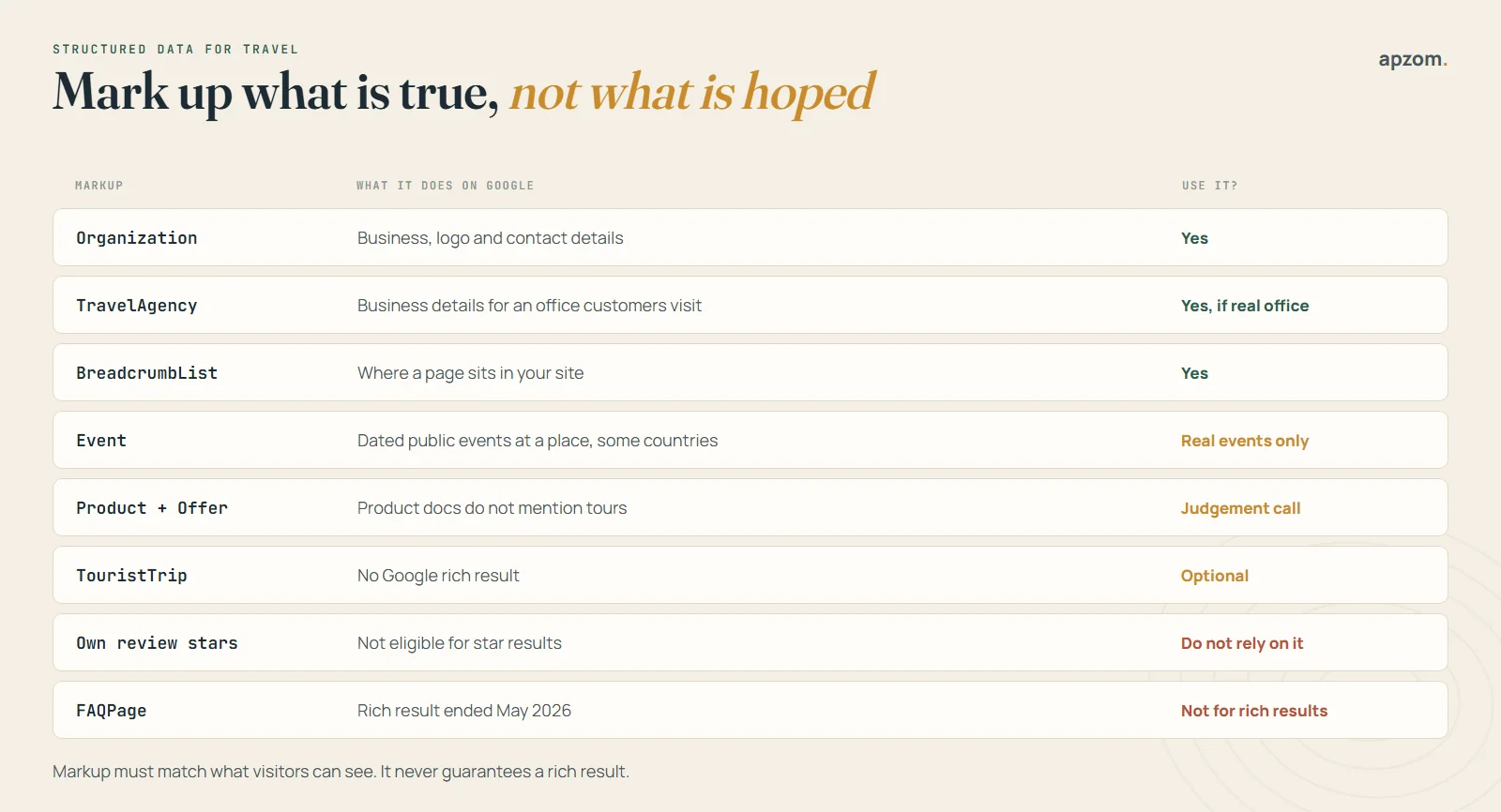
| Markup | What it does on Google | Our advice |
|---|---|---|
| Organization | Helps Google understand your business, logo and contact details | Yes, on your homepage or about page |
| TravelAgency (a LocalBusiness type) | Business details for an office customers can visit | Yes, if you have a real office open to customers |
| BreadcrumbList | Shows where a page sits in your site | Yes, on destination, region and trip pages |
| Event | Rich results for dated public events at a physical place, only in some countries | Only for a real one-off event, never for a tour package |
| Product with Offer | Google’s product guidance does not mention tours | A judgement call, on a single bookable trip page only |
| TouristTrip | No Google rich result | Optional; harmless if it matches the page |
| Review stars from your own reviews | Not eligible for star results | Do not rely on it |
| FAQPage | Google stopped showing FAQ rich results in May 2026 | Not for rich results; a visible FAQ can still help readers |
Two details from Google’s own documentation are worth knowing. First, its event guidelines use a travel example of what not to do: “Don’t promote non-event products or services such as “Trip package: San Diego/LA, 7 nights” as events.” Since June 2025, events must also be “bookable by the general public and held at a physical location”, and event results only show in some countries, listed as Australia, Brazil, Canada, Germany, India, Latin America, Spain, the UK and the US. Second, for review stars Google says that when a business controls the reviews about itself, pages using LocalBusiness or Organization markup are “ineligible for star review feature”.
Whatever you add, Google’s general rule applies: structured data “must be a true representation of the page content”, and Google “does not guarantee” that it will show. Never mark up prices, dates or ratings that visitors cannot see on the page.
In the European Economic Area, Türkiye and South Africa, Google is also testing carousels built from list markup on summary pages, and its documentation mentions travel queries. These use LocalBusiness, Product or Event types, not the tourist types.
Destination content that only you can write
Every travel site claims to know its destinations. Search engines and travellers can tell which ones really do. Google’s guidance on helpful content asks whether your content “clearly demonstrate[s] first-hand expertise and a depth of knowledge”, and gives visiting a place as an example. The third framework is the experience ladder.
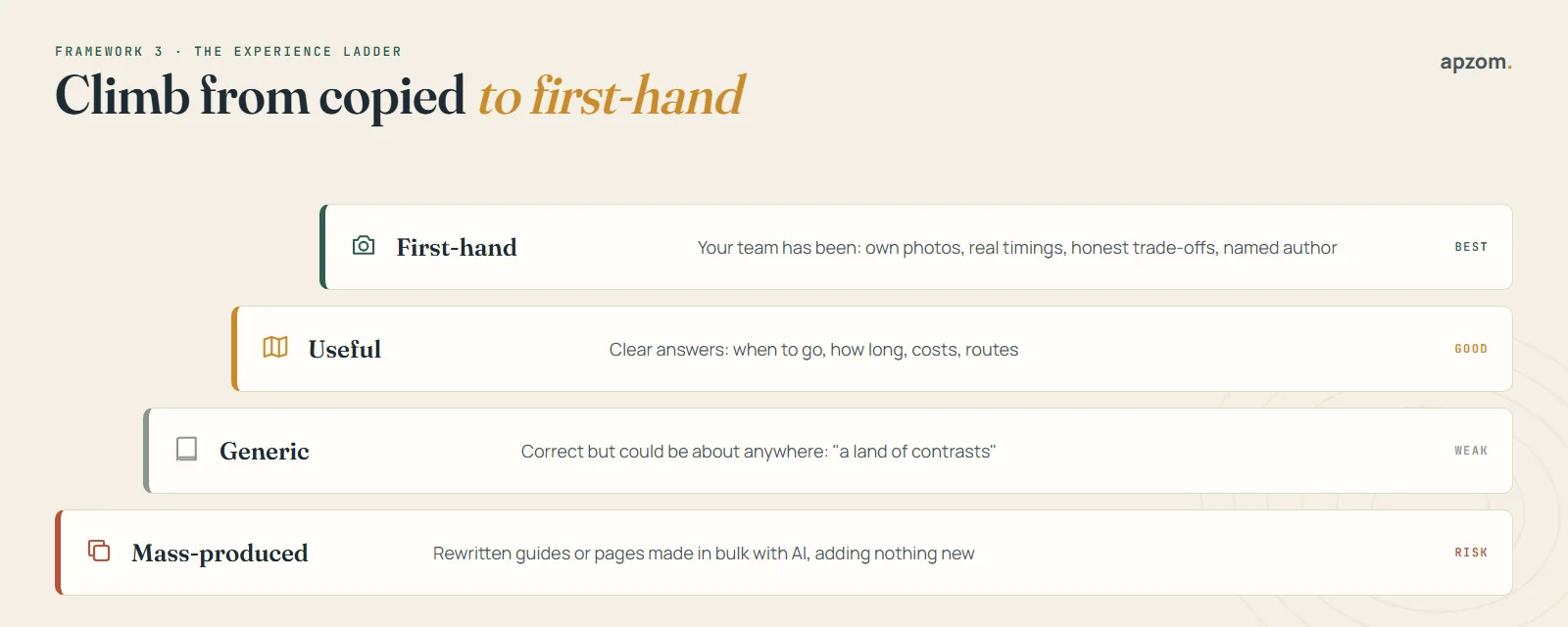
- Mass-produced: rewritten guides or pages made in bulk with AI. They add nothing new, and they are the pages Google’s spam policies warn about.
- Generic: correct, but could be about anywhere. “A land of contrasts with something for everyone.”
- Useful: clear answers to real questions. When to go, how long you need, what things cost on the ground, how to get from A to B.
- First-hand: written by someone who has been. Your own photos, real travel times between places, honest trade-offs (“the coast road is beautiful but adds three hours”), and a named author with their experience of the place.
To climb the ladder:
- Interview your own team. Tour leaders, guides and planners know things no guidebook says. Record a 20-minute call and turn it into a guide.
- Use your own photos, with descriptive file names and alt text. Google’s image guidance says the alt text is “the most important attribute” for describing an image, and to place images near the text they relate to.
- Answer the questions customers really ask. Your enquiry inbox and sales calls are the best keyword research you have.
- Name the author and say what their experience of the place is. Keep a short profile page for each writer.
- Date your updates honestly. Change the “last updated” date only when you have checked and changed the content.
- Review guides before each season, starting with prices, entry rules and transport.
Use Google Trends to see when interest in a destination rises and falls. It shows relative interest on a scale of 0 to 100, not the number of searches, so use it to compare months and places, not to count visitors. Then publish or refresh guides a few months before the peak in each market you sell to.
Selling to travellers in several countries
Many tour operators and DMCs sell to travellers in several countries, often in several languages. Getting this right avoids duplicate pages and stops the wrong version showing to the wrong people. The fourth framework is one market, one URL.
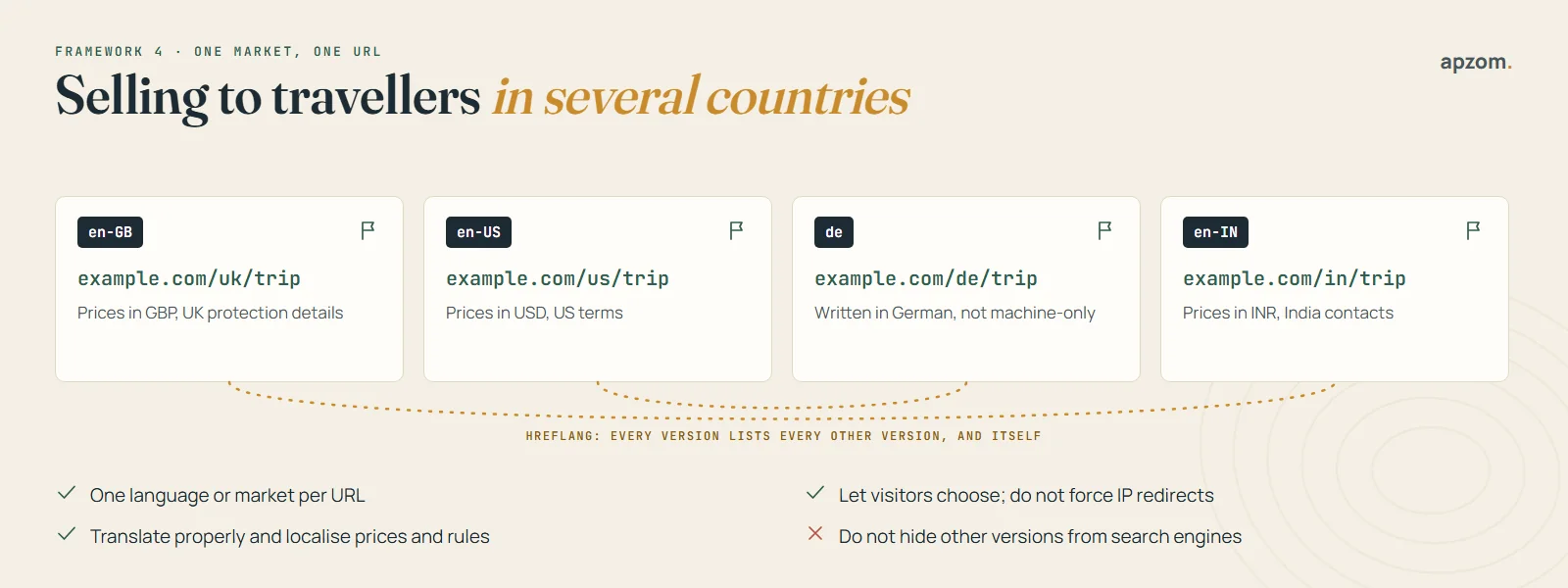
- Give each language or market its own URL, such as /uk/, /us/ or /de/. Google says it “recommends using different URLs for each language version of a page”.
- Link the versions with hreflang tags. Google’s rule is that “each language version must list itself as well as all other language versions”, and that if two pages do not point to each other, “the tags will be ignored”. Add an x-default version for everyone else.
- Write each version for its market, not just its language. Show prices in the local currency, the right booking terms and the right financial protection details. A UK page for a package with flights needs to explain ATOL protection; an Australian or Indian page will not.
- Translate properly. Google reads the visible text of a page to decide its language. It does not use hreflang or the lang attribute for that. Pages left untranslated can be treated as duplicates.
- Let visitors choose. Google advises against automatic redirects based on a visitor’s location or IP address. Offer a clear switch instead, so travellers and search engines can reach every version.
Bing also recommends hreflang for language and regional targeting. If you only sell to one country, keep things simple: one version, in one language, is better than several half-finished ones.
Local search for travel agencies and tour operators
Google Business Profile matters for agencies with an office and for operators people search for on the map. The rules depend on how you meet customers. Google says that to qualify, “a business must make in-person contact with customers during its stated hours”, and it lists online-only businesses as not eligible.
| Your business | Business Profile set-up |
|---|---|
| Travel agency with an office clients visit | Storefront profile with your address and opening hours |
| Tour or activity operator that meets guests but has no office open to the public | Service-area business, with the address hidden and the areas you serve listed |
| Online-only agency that never meets customers in person | Not eligible |
| A meeting point you do not own, such as a square or a hotel lobby | Not a valid business address, in our reading of Google’s rules |
Our Google Business Profile optimization checklist covers categories, photos and posts, and our local SEO checklist covers everything around it. Reviews matter a lot in travel: our guide on how to get more Google reviews explains how to ask without breaking Google’s rules.
Lots of pages, not many bookings from search? A Travel SEO Audit maps your destination, trip and guide pages, finds the old and duplicate pages holding you back, and shows what to fix first.
Google Things to do
Tour and activity operators can also appear in Google’s Things to do results. Google’s help pages say partners can show their inventory “via free listings and through a dynamic ad format”, and that with ads “you only pay when someone clicks”. For individual operators, Google strongly recommends connecting through one of its approved connectivity partners, which in practice usually means your booking system or a marketplace you already use. Ask your booking software provider whether it connects to Google.
Speed, mobile and booking pages
Most travellers plan on their phones, and travel sites are often heavy with large photos, maps, review widgets and booking scripts. Google’s Core Web Vitals give a useful target: the main content should load within 2.5 seconds (Largest Contentful Paint), the page should respond to taps in 200 milliseconds or less (Interaction to Next Paint), and the layout should not jump around (Cumulative Layout Shift of 0.1 or less), measured across the 75th percentile of visits.
- Compress and size photos properly, and use modern formats such as WebP.
- Load maps, videos and review widgets only when needed.
- Test your booking flow on a phone, start to finish, every few months.
- Keep the booking engine on your own domain if you can, or at least make sure your analytics follows the visitor across to it.
If you are moving to a new website or booking system, plan the redirects first. Our website redesign SEO checklist explains how to change platforms without losing your rankings.
AI search and travel planning
Travellers now ask AI assistants to suggest destinations and draft itineraries, and Google shows AI Overviews and AI Mode for many travel questions. Google’s documentation says there are “no additional requirements to appear in AI Overviews or AI Mode”: a page needs to be indexed and eligible to show a snippet. Its guide to generative AI features in Search, published in May 2026, adds that “structured data isn’t required for generative AI search” and that you do not need special AI text files.
So the work is the same as good SEO: clear, specific, first-hand facts on pages that can be crawled. Prices “from”, trip lengths, group sizes, what is included and honest answers to common questions are the details an AI tool can quote. Our guide to GEO (generative engine optimization) explains the rest.
How to measure travel SEO
SEO results in travel are seasonal, so compare each month with the same month last year, not just with the month before. Track these:
- Clicks and impressions by page and country in Google Search Console. Its Performance report lets you filter by query, page, country, device and search appearance, and Google says data from AI Mode counts towards its totals.
- Which destination hubs and trip pages bring visitors who then enquire or book.
- Enquiries and bookings from organic search, with booked revenue and margin where you can track it.
- Pages with high impressions but few clicks, which often need a better title or description.
- Old trips and guides that still get visits, so you can update them or point them to current trips.
SEO usually takes months to show results, and in travel a page published after the booking season has started may not pay off until next year. Plan content for next season now. If you need bookings sooner, pair SEO with paid search while it grows; our guide to SEO vs Google Ads explains how to split the two.
How Apzom can help
Apzom Digital helps travel businesses get found and booked directly. For SEO, that means planning your destination, region and trip structure, fixing old and duplicate pages, setting up redirects and structured data correctly, writing destination guides with your team, setting up multilingual versions, and connecting search results to enquiries and bookings. See our SEO services, local SEO, content marketing and website development. We work with clients worldwide, remotely, from our base in Ahmedabad, India.
We have not published a travel industry case study yet, so we will not show you one. Our case studies page shows the SEO and lead generation work we have done for other businesses, and our SEO methodology explains how we work. We will not promise rankings or a number of bookings. We will show you which pages are holding your site back and what to fix first. If you want to know what SEO usually costs before you talk to anyone, see how much SEO costs.
Request a Travel SEO Audit. We review your site structure, trip and departure pages, redirects, structured data, destination guides, language versions, Business Profile, speed on mobile and Search Console data. You get a prioritised list of fixes for the markets and seasons you sell.
No obligation and no guaranteed rankings. Prefer to talk first? Contact us or see all our services.
Frequently asked questions
Is SEO worth it for a small tour operator?
Usually, if you focus on the trips and places you know best. You will rarely beat big marketplaces on broad terms, but you can rank for specific trips, regions and traveller needs that they answer badly. SEO takes months, so start before you need the bookings.
How many destination pages should a travel agency have?
As many as you can make genuinely useful, and no more. Build a hub for each destination you sell, region and trip-style pages where you have several trips, and guides where your team has real knowledge. Ten strong pages beat a hundred thin ones.
What should I do with trip pages for past departures?
Keep the same trip page and update its dates. Do not create a new page for each year or departure. If the trip ends for good, redirect it to the closest replacement, keep it with alternatives if people still visit it, or let it return a 404 if nobody does.
Does schema markup help travel websites rank?
Not directly. Organization, TravelAgency (for a real office) and breadcrumb markup help Google understand your site. Google has no special rich result for tour or destination markup, it stopped showing FAQ rich results in May 2026, and it does not treat tour packages as events.
Can I use AI to write destination guides?
AI can help with research and structure, but a person with real knowledge should write or check every guide, and every fact needs checking. Google’s spam policies warn against using AI to create many pages that add no value, and travel facts change often.
Do tour operators need a Google Business Profile?
If you meet customers in person, yes. An agency with an office uses a normal profile. An operator that meets guests but has no office open to the public can list as a service-area business with the address hidden. A business that never meets customers in person is not eligible.
How do I do SEO for travellers in several countries?
Give each language or market its own URL, connect the versions with hreflang tags, show local prices and terms, translate properly, and let visitors choose their version rather than redirecting them automatically.
Can Apzom do SEO for travel businesses outside India?
Yes. We work with clients worldwide, remotely, from our base in Ahmedabad, India, and plan SEO around the markets, languages and seasons you sell to.