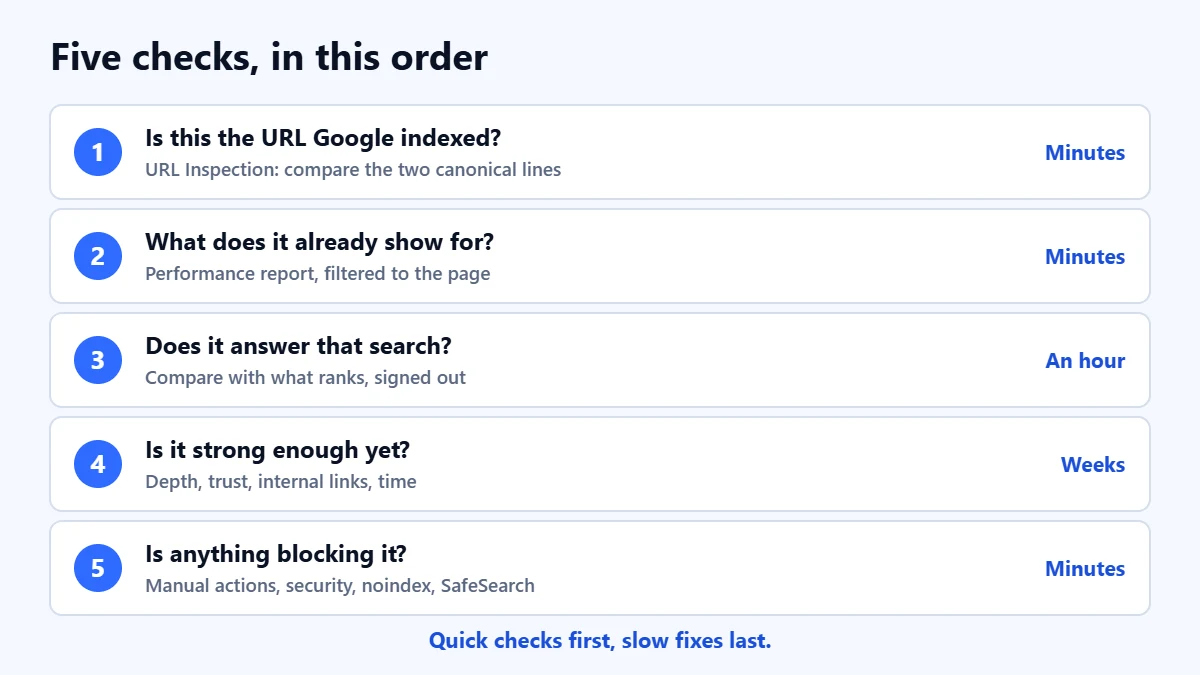
The short answer: an indexed page is only eligible to appear on Google. It is not promised a place. Google says plainly that it does not guarantee it will crawl, index or serve any page, and its own help pages describe “URL is on Google” as eligible, not guaranteed. When a page is indexed but you cannot find it, the cause is usually one of four things: Google has indexed a different URL as the main version, the page is showing but not for the searches you are trying, it is not relevant or strong enough for those searches yet, or something is stopping it being served. Check them in that order, because the first two take minutes and the last two take weeks.
This guide is for business owners and marketers whose Search Console says a page is indexed while Google search seems to say otherwise. It assumes you can open Search Console for the site. Report names follow Google’s help pages as checked in November 2026. We are an agency that sells SEO services, so read it knowing we have an interest; every check here can be done yourself, for free.
What to take from this guide
- Indexed means stored, not shown. Google’s description of how Search works names three reasons an indexed page might not appear: it is not relevant to the search, its quality is low, or robots rules prevent it being served.
- Confirm which URL Google indexed. If Google chose another version of the page as the canonical, that other version is the one it serves.
- Stop guessing searches. The Performance report, filtered to the page, shows the queries it already appears for. That list is more reliable than anything you type into Google yourself.
- Do not use a site: search as the verdict. Google says site: results are not always complete and an indexed URL is not guaranteed to appear in them.
Indexed and showing are two different stages
Google describes Search in three stages. It crawls a page, it indexes what it finds, and then, when someone searches, it serves the results it judges most relevant and useful. Indexing puts your page in the library. Serving is a separate decision taken fresh for every search, using what Google calls hundreds of factors, including the searcher’s location, language and device.
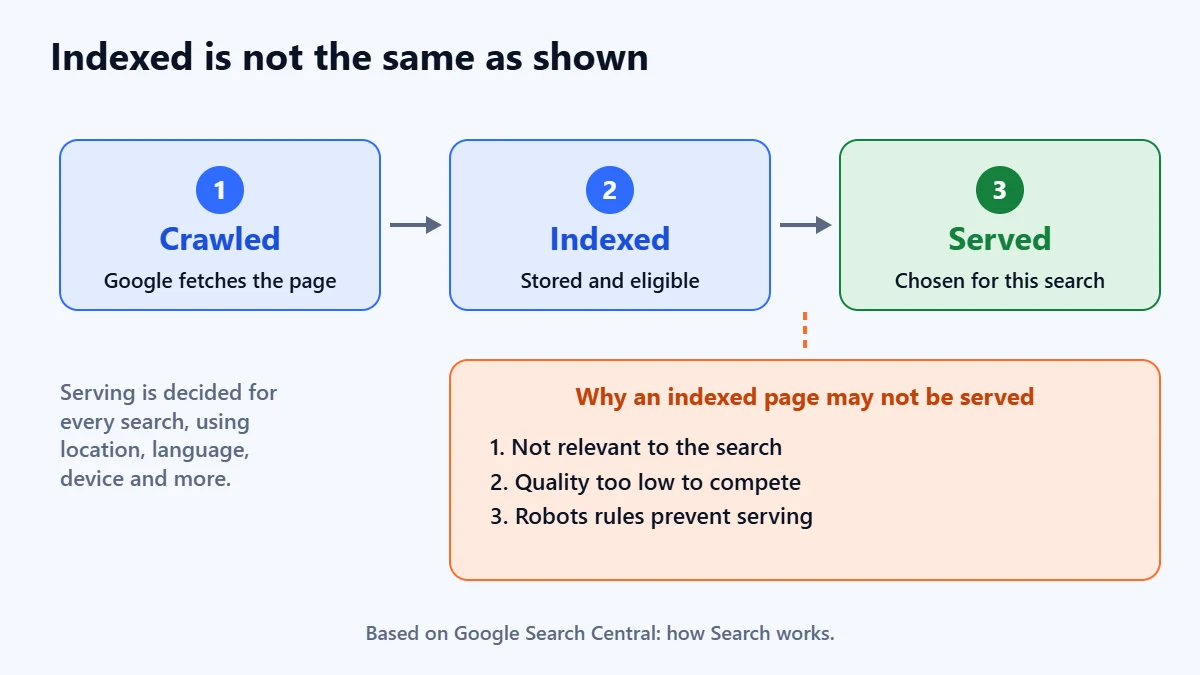
So “indexed but not showing” is not a contradiction or a bug. It means your page passed the second stage and has not yet won the third for the searches you tried. The Page indexing report in Search Console says the same thing in its own words: being indexed does not guarantee a page will show up, and results vary by user, location and query.
Before you start: how are you checking?
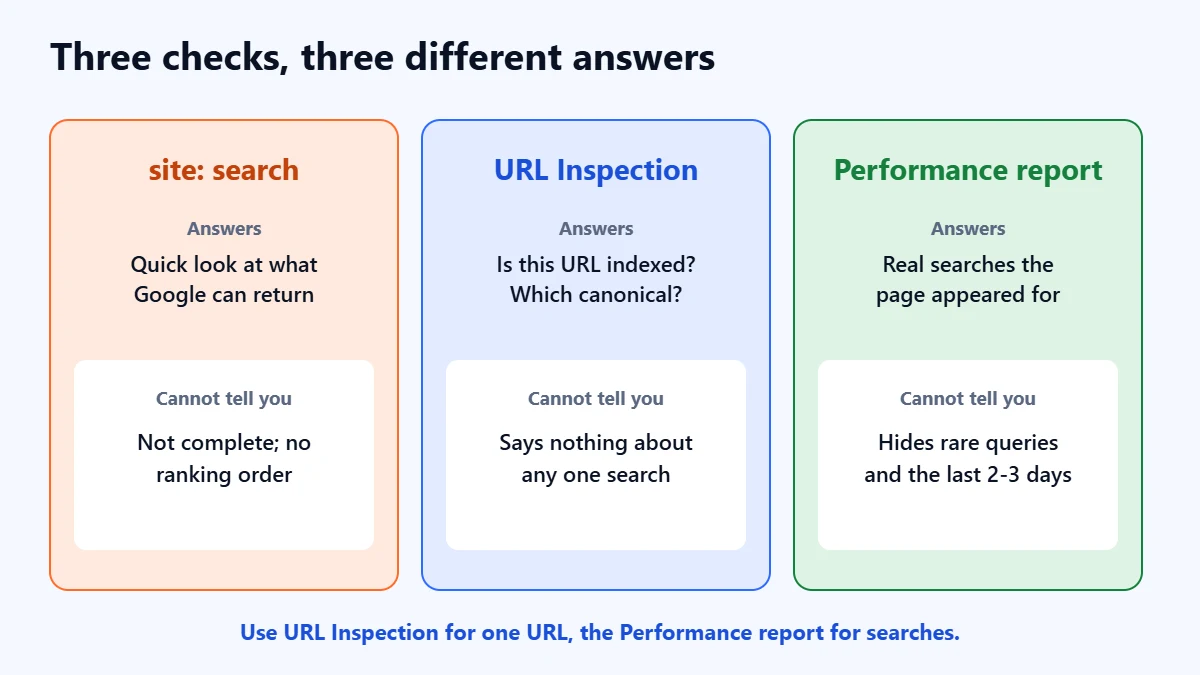
Most false alarms come from the checking method, so settle this first. Searching on your own phone shows you results for your location, your language and your device, and often your own browsing. A colleague in another city may see something different. Three tools in Search Console answer different questions, and mixing them up causes most of the confusion.
| Check | What it answers | What it cannot tell you |
|---|---|---|
| A site: search | Roughly which pages from your domain Google can return | Google says the list is not always exhaustive and an indexed URL may not appear in it. A bare site: query is not ranked, so it says nothing about position. |
| URL Inspection | Whether this exact URL is indexed, when it was last crawled, and which URL Google chose as the canonical | Whether the page appears for any particular search |
| Performance report, filtered to the page | The searches the page actually appeared for, with impressions, clicks and average position | Very rare queries, which Google leaves out of the table to protect privacy, and the last two or three days |
Check 1: is it really this URL that Google indexed?
Paste the full address into the URL Inspection box at the top of Search Console. You want to read three lines.
- The status. “URL is on Google” means the page is eligible to appear. Google’s help page adds that, for a definitive test, you should search for the URL on Google.
- The user-declared canonical and the Google-selected canonical. The first is the URL your page says is the main version. The second is the one Google picked. If they differ, Google is treating your page as a duplicate and indexing the other URL instead, and that other URL is what it will tend to serve. Google says there is no guarantee it will choose your preferred canonical.
- The last crawl date. The inspection shows the version Google last indexed, not the page as it is now. If you changed the page recently, run a live test to see what Google would find today, and remember the indexed version has not caught up yet.
A different Google-selected canonical is common on sites with near-identical pages: a service page copied for several towns, a product in several colours, the same page with and without a trailing slash, or tracking parameters on internal links. The fix is to make one version clearly the main one, with consistent internal links, a matching canonical tag and, where pages truly duplicate each other, a redirect or a merge. Our technical SEO audit guide covers canonicals and duplicates step by step.
Check 2: find the searches it already shows for
This is the check most people skip, and it often ends the investigation. Open the Performance report, click Add filter, choose Page, enter the URL and apply it, then open the Queries tab. Set the date range to the last three months so you are not judging on a quiet week.
- Impressions on searches you did not expect. The page is showing; Google has simply decided it answers different questions from the ones you had in mind. That is useful information about how the page reads.
- Impressions at a low average position. Google defines position as the topmost position a link to your site held, averaged across searches. An average of 40 means the page usually sits far below the first screen of results, where few people look. Indexed, served, and practically invisible.
- No impressions at all after several weeks. The page is not being served for anything with measurable demand. Move on to Check 3.
Two cautions. Data usually takes two to three days to appear, and a new property can take about a week. And filtering by page can change the totals, because Google truncates data and omits anonymised queries from the table. A page with a handful of impressions may be showing for searches you are not allowed to see. Our Search Console guide explains the rest of the report.
Check 3: does the page answer the search you are trying?
Relevance is the first reason Google gives for an indexed page not appearing. A common case on business sites is a page written in the business’s own vocabulary while customers search in theirs. A page titled “Integrated building envelope solutions” will struggle for “roof repair near me”, however good it is.
Put the search you care about into Google, signed out or in a private window, and look at what does rank. If the top results are guides and your page is a sales page, or they are local map results and your page has no location information, the page is a poor match for the intent behind that search, not just the words. You then have two honest options: change the page so it serves that intent, or accept that it is the wrong page for that search and create or improve the right one. Our keyword research guide shows how to read what a search is asking for.
A quick sanity check is to search for an exact sentence from the page in quotation marks. This is a common practitioner technique rather than something Google documents for the purpose, so treat the result as a hint. If the page appears for its own unique sentence, it is being served, and the question is relevance and strength for your target search rather than indexing.
Check 4: is it strong enough, and has it had enough time?
If the page is relevant and still absent, it is usually being outranked. Google’s second reason is quality, and its helpful content guidance says its systems aim to show helpful, reliable information made for people first. Compare your page honestly with the three that rank. Do they answer more of the question? Do they show who wrote them and why they can be trusted? Do other pages on their sites, and other sites, link to them?
- Thin or generic pages. A page that says what every competitor says, with less detail, gives Google little reason to prefer it.
- Few internal links. A page linked only from the sitemap looks less important than one linked from your main navigation and related pages. Our internal linking guide covers how to fix that.
- A young page. Google’s SEO Starter Guide says some changes take effect in a few hours and others take several months, and suggests waiting a few weeks before judging a change. For a full picture of timing, see how long SEO takes.
Requesting indexing again will not help a page that is already indexed. It asks Google to recrawl, not to rank.
Want a second pair of eyes on the page? Ask for a Free Growth Audit. We look at the canonical, the queries it shows for and the pages outranking it, then tell you which of these checks is the real problem.
Check 5: rule out anything stopping it being served
These causes are rarer, but they are worth five minutes because they can affect a whole site rather than one page.
- Manual actions. Open the Manual actions report. Google’s spam policies say violations can make a site rank lower or not appear at all, and a manual action means some or all of the site will not be shown. After fixing every listed issue you can request a review, which Google says takes days or weeks.
- Security issues. The Security issues report covers hacked content, malware and social engineering. Affected pages can carry warnings in results or in the browser.
- Robots rules. Check the page source and HTTP headers for a noindex in a robots meta tag or an X-Robots-Tag header, particularly after a site migration or a plugin change. If a URL shows as “Indexed, though blocked by robots.txt”, Google has indexed it without being able to read it, and its result will have little or no description.
- SafeSearch. Google’s troubleshooting page suggests searching for a term that finds the page with SafeSearch off, then again with it set to Filter. If it disappears, the page has been classified as explicit. Google says reprocessing can take two to three months after a fix.
Symptoms and where to look first
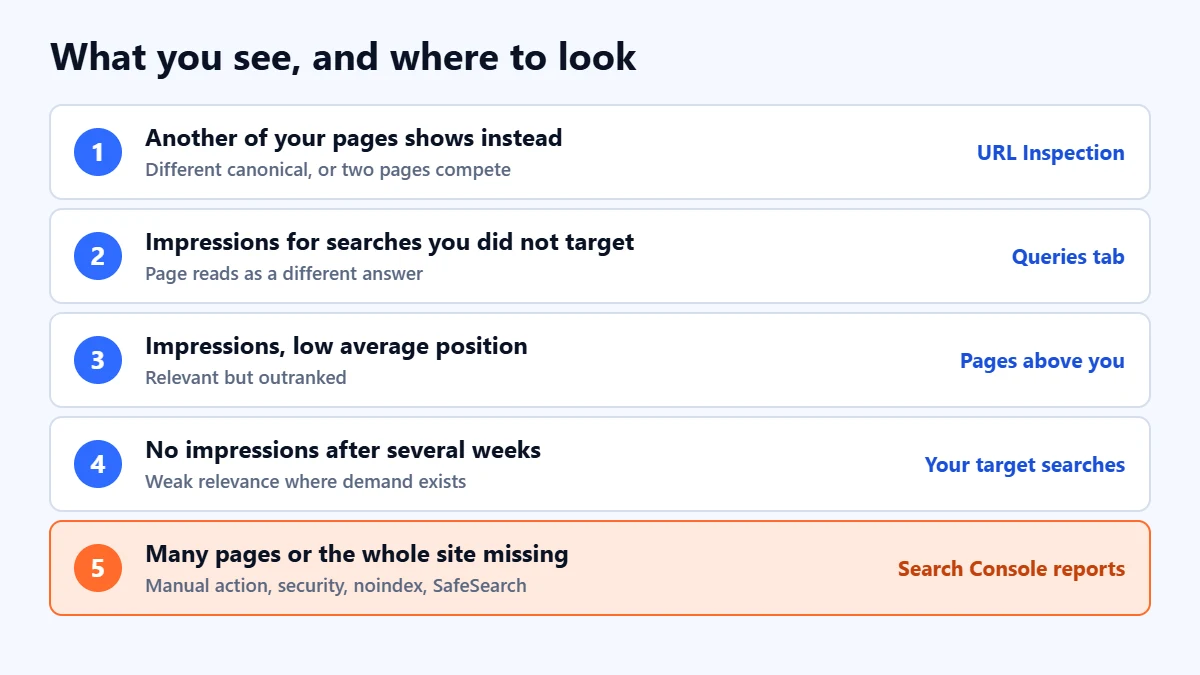
| What you see | Most likely cause | Where to look |
|---|---|---|
| Another page from your site shows instead | Google chose a different canonical, or two of your pages compete | URL Inspection canonical lines |
| Impressions, but for searches you did not target | The page reads as answering a different question | Performance report queries for the page |
| Impressions with a low average position | Relevant but outranked | The pages ranking above you |
| No impressions after several weeks | Weak relevance for searches with real demand | The searches you chose, and what ranks for them |
| Your result shows a different title | Google rewrote the title link, which it does automatically | Your title tag and main heading |
| Many pages, or the whole site, missing | Manual action, security issue, noindex or SafeSearch | Manual actions, Security issues, page source |
On titles: Google generates the title link automatically and it can differ from your title tag, and snippets are built from the page content and can change from search to search. If you have been searching for your exact title and not finding it, search for the topic instead. Our guide to title tags and meta descriptions covers how to make rewrites less likely.
A worked example (hypothetical)
This example is invented to show the order of the checks. An accountancy firm publishes a page called “Bookkeeping for contractors”. URL Inspection says “URL is on Google” and the canonical lines match, so Check 1 passes. After six weeks the Performance report shows 80 impressions, nearly all for “contractor bookkeeping software”, at an average position of 34. The page is being served, for a search about software the firm does not sell. The top results for “bookkeeping services for contractors” are service pages that list prices, the area covered and what is included, none of which the firm’s page mentions. The fix is to the page, not to indexing: add that information, link to the page from the services menu, and judge again in a month.
What not to do
- Do not keep requesting indexing. The page is already indexed.
- Do not judge from your own phone alone. Personal, local and device differences make one search an anecdote.
- Do not rewrite the whole page every week. Each change resets the comparison. Make a clear change, then give it a few weeks.
- Do not create a near-copy to target a second phrase. Two similar pages invite Google to pick one and leave the other out, which is often the problem you started with.
- Do not trust anyone who promises a ranking. Google says it does not accept payment to rank a site higher, and nobody outside Google controls where a page appears.
If the page used to show and has stopped, the question is different. Our guide to why organic traffic drops covers that order of checks.
Frequently asked questions
Why does Search Console say my page is indexed when I cannot find it on Google?
Because indexed means eligible to appear, not guaranteed to. The page is stored, but Google decides for each search whether it is relevant and useful enough to show. Filter the Performance report to the page to see the searches it does appear for.
Does a site: search show every indexed page?
No. Google says site: results are not always exhaustive and are not a reliable count of indexed pages. Use URL Inspection to check a specific URL.
How long after indexing should a page start showing?
There is no fixed time. Google says some changes take effect within hours and others take several months. A page that is relevant to searches with little competition can appear quickly; one competing with established pages may take much longer, or never rank highly without further work.
My page shows for my brand name but not for my service. Why?
That usually means indexing is fine and the page is not yet relevant or strong enough for the service search. Your brand name has almost no competition; the service search has plenty. Work through Checks 3 and 4.
Can Apzom guarantee my page will appear on Google?
No, and nobody honestly can. We can tell you why a page is not showing and what is most likely to change that, and our SEO services page explains how we work.
Get your Free Growth Audit and Quote. We check how Google sees your key pages, which searches they show for, and what is holding them back, then send a plain-English list of what to fix first. You keep ownership of your Search Console and website.
No obligation and no guaranteed rankings. Prefer to talk first? Contact us or see our SEO services.