The short answer: organic traffic usually drops for one of five reasons: a reporting or tracking problem, normal seasonality or falling demand, a technical fault that stops Google crawling or indexing your pages, a Google update that changed how your pages rank, or a change on the results page that takes clicks without moving your rankings. Rule out the first two before you touch the site. Then use Search Console to check whether you lost impressions, clicks or both, and on which pages, because each pattern points to a different cause.
This guide is for business owners and marketing leads who have seen Google traffic fall and want to find out why before paying anyone to fix it. You need access to Google Search Console for the site, and ideally Google Analytics. Report names follow Google’s documentation as checked in November 2026. We are an agency that sells SEO services, so read this knowing we have an interest. Every check here can be done yourself, for free.
Check in this order
Most advice lists the causes. The order you check them in matters more, because the cheapest explanations are also the most common reasons for a false alarm. The sequence below is our judgement, built on Google’s own guide to debugging traffic drops.
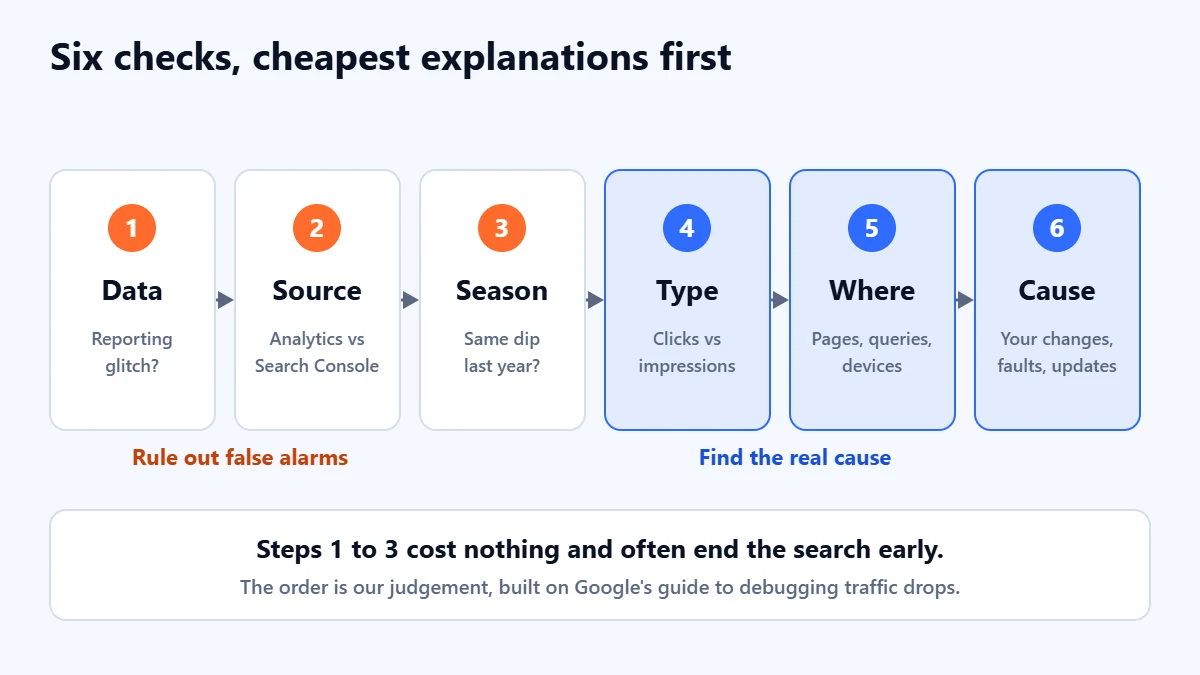
- Is the data right? Rule out reporting glitches and tracking faults.
- Is it really Google organic? Compare Analytics with Search Console.
- Is it seasonal? Compare with the same period last year.
- What kind of drop is it? Read clicks against impressions and position.
- Where is it? Find the pages, queries, countries or devices that lost the most.
- What changed? Match the timing to your own changes, technical faults and Google updates.
1. Is the data right?
Google keeps a Data anomalies page in Search Console Help listing known logging errors and reporting changes from the last 3 to 16 months. Check it before anything else, especially if the drop starts on a single date. Two entries recorded there in 2026 explain changes many sites saw:
- Impressions. Google says a logging error prevented accurate impression reporting from 13 May 2025, and that once it was corrected in April 2026, sites may see a decrease in impressions. Clicks were not affected. Only impressions and the metrics built from them, CTR and average position, were.
- FAQ results. From 7 May 2026, FAQ rich results stopped appearing in Google Search, so impressions reported for that search appearance fell. If your pages carried FAQ markup, part of an impression drop around that date may be this.
If your fall is only in impressions and lines up with one of these, you may not have lost any visitors at all. If clicks fell too, keep going.
2. Is it really Google organic?
Search Console and Google Analytics measure different things. Search Console counts clicks on your results in Google. Analytics can only count a visit when its tag runs on your page, so a missing tag, a new cookie banner, a site rebuild or a consent setting can make organic sessions fall in Analytics while Search Console clicks stay level.
- Clicks down in Search Console too: the drop is real. Continue to step 3.
- Clicks steady in Search Console, sessions down in Analytics: look at your tracking first. Check that the tag still fires on every template, and whether anything changed in your consent setup around the date. Our Google Analytics 4 setup guide covers the basics.
- Both steady, but leads down: the problem is probably on the site or in follow-up, not in search. Our guide on why a website stops generating leads covers that.
Do not expect the two numbers to match. They never will. What matters is whether they moved in the same direction at the same time.
3. Is it seasonal, or is demand falling?
In the Performance report, set the date filter to Last 16 months, the longest range Search Console keeps. Google’s own guide recommends this to see whether the same dip happened at the same time last year. Then use Compare to set the last three months against the same three months a year earlier.
If your most important queries fell, look them up in Google Trends. Trends shows interest across Google rather than on your site, so if a query fell everywhere, you did not lose ground to anyone. Fewer people searched. That is still a business problem, but it is not one an SEO fix will solve.
Would a second pair of eyes help? Ask for a Free Growth Audit. We look at your Search Console data with you and tell you which kind of drop you are dealing with before suggesting any work.
4. What kind of drop is it?
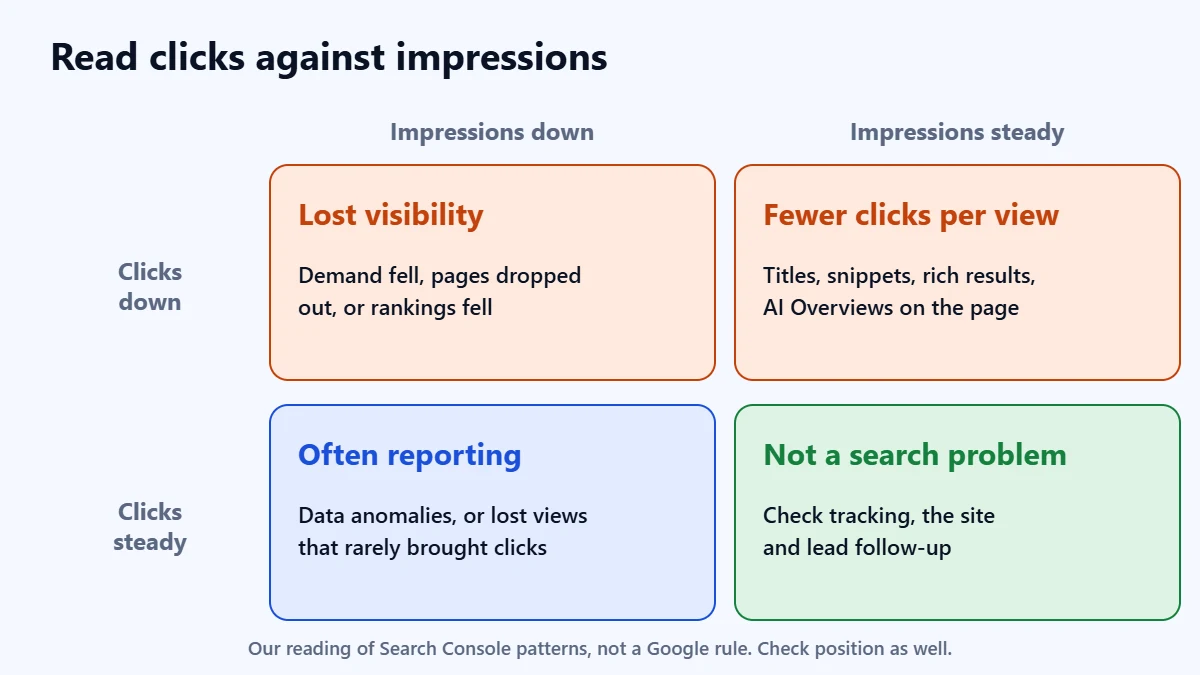
Turn on all four metrics in the Performance report: clicks, impressions, CTR and average position. Google’s guide makes one distinction clearly: if impressions held but clicks fell, your result may be less appealing than before, or other results may be drawing the click. If both fell, you have lost visibility. We extend that into four boxes, which is our own way of reading it rather than a Google rule.
| What you see | What it usually means | Look next at |
|---|---|---|
| Clicks and impressions down, position steady | Fewer people searching, or fewer of your pages showing at all | Google Trends, then the Page indexing report |
| Clicks and impressions down, position down | You lost rankings | Which pages and when; your changes and Google updates |
| Impressions steady, clicks down | Your result is less appealing, or the page around it changed | Titles and snippets, rich results, AI Overviews on your main queries |
| Impressions down, clicks steady | Often a reporting change, or lost appearances that never brought clicks | The Data anomalies page; the Search appearance tab |
Two cautions about position. The figure on the chart is the average of your site’s top result across every query, so it moves when you start appearing for new, lower-ranking queries, even if nothing got worse. And Google’s guide says not to focus too much on absolute position: clicks and impressions are the measure that matters.
A note on AI Overviews
Google says traffic from AI Overviews and AI Mode is included in Search Console’s Performance report under the Web search type, and that a click on a link inside an AI Overview counts as a click. In other words, the main Web numbers already include these features. Google’s Data anomalies page also refers to a separate Generative AI performance report, which some properties can see; if yours has it, use it. If impressions are steady and clicks are falling on informational queries, check what the results page now shows for those queries. You cannot choose whether an AI Overview appears. Snippet controls such as nosnippet limit what Google shows from your pages, but they restrict your ordinary search snippets too. We do not know of a reliable published figure for how many clicks AI Overviews take, so we will not quote one. Our guide to tracking AI search traffic in GA4 covers what you can measure.
5. Where is the drop?
With the comparison still set, open each tab below the chart in turn: Queries, Pages, Countries, Devices and Search appearance. On Pages, sort by Clicks Difference to see which URLs lost the most. Also try the Search type filter, because Web, Image, Video and News are reported separately.
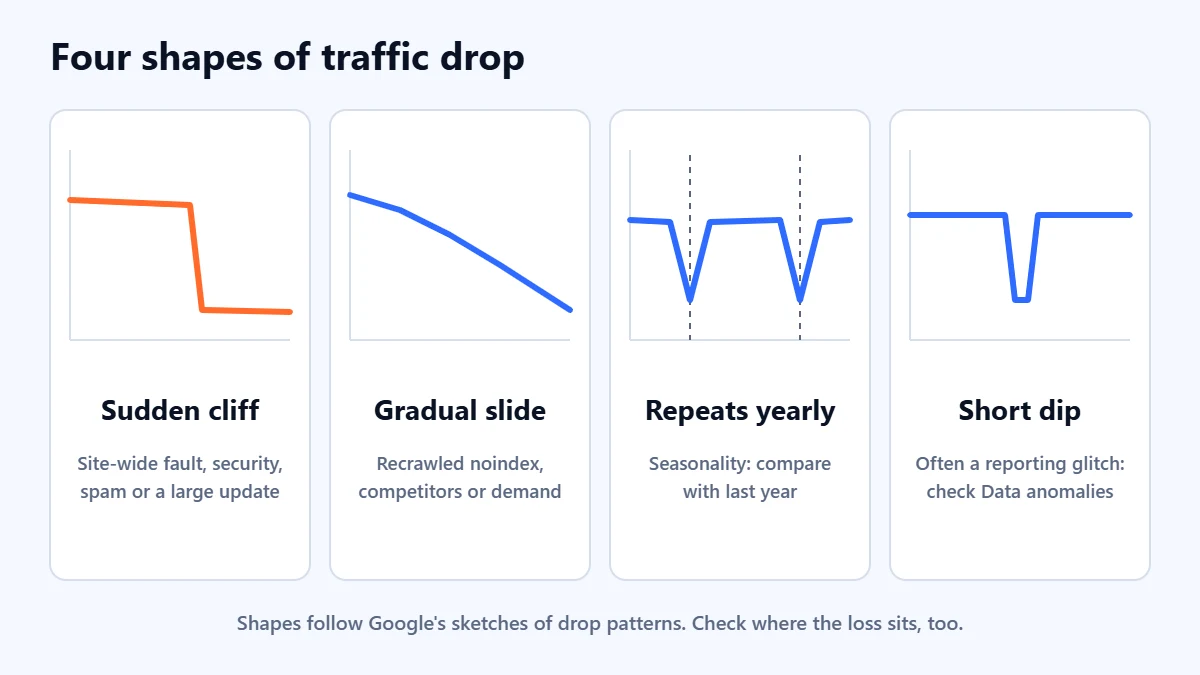
The shape of the line, and how widely the loss is spread, narrows the cause quickly:
- A sudden fall across the whole site: a site-wide technical fault, a security or spam problem, or a large Google update. Check the Page indexing report and Crawl Stats first.
- A gradual slide: a technical change that takes effect as Google recrawls pages, such as a stray noindex tag, or competitors slowly overtaking you, or interest moving away from your topic.
- The same dip every year: seasonality.
- A short dip that recovers on its own: often a reporting glitch rather than lost visitors. Google’s own sketches of drop patterns include this shape, which is another reason to check the Data anomalies page first.
- One page or one section: something specific to it. Use the URL Inspection tool on two or three affected pages to see whether they are indexed, which canonical Google chose and when they were last crawled.
6. What changed?
Now match the start of the drop to events. Write down the date first, then work through these in order.
Your own changes
Redesigns, migrations, new themes or plugins, URL changes, removed pages and changes to navigation are the most common self-inflicted causes. Google says a medium-sized site can take a few weeks to settle after URLs change, and larger sites longer. If you moved or rebuilt the site, our website redesign SEO checklist covers what to check, including redirects.
Technical faults
Open the Page indexing report. Google’s help notes that if indexed pages fall without a matching rise in errors, you may be blocking pages through robots.txt, a noindex tag or a login. Then open Crawl Stats and check the host status for server availability problems. Firewalls and bot protection can block Googlebot without anyone noticing. Our technical SEO audit guide walks through the full set of checks.
Security issues and manual actions
Both have their own reports in Search Console. If Google finds malware or phishing, it may warn people before they reach your site. If a person at Google has applied a manual action for a spam policy breach, it is listed in the Manual Actions report. Either can cause a sharp fall. Most sites will find both reports empty, and that is worth confirming in two minutes.
Google updates
Google lists its notable ranking updates, with start and end dates, on the Search Status Dashboard. Core updates since 2024 have taken between 6 and 45 days to finish rolling out, so a drop that begins mid-rollout can keep moving for weeks. Google’s guidance on checking whether an update affected you is specific:
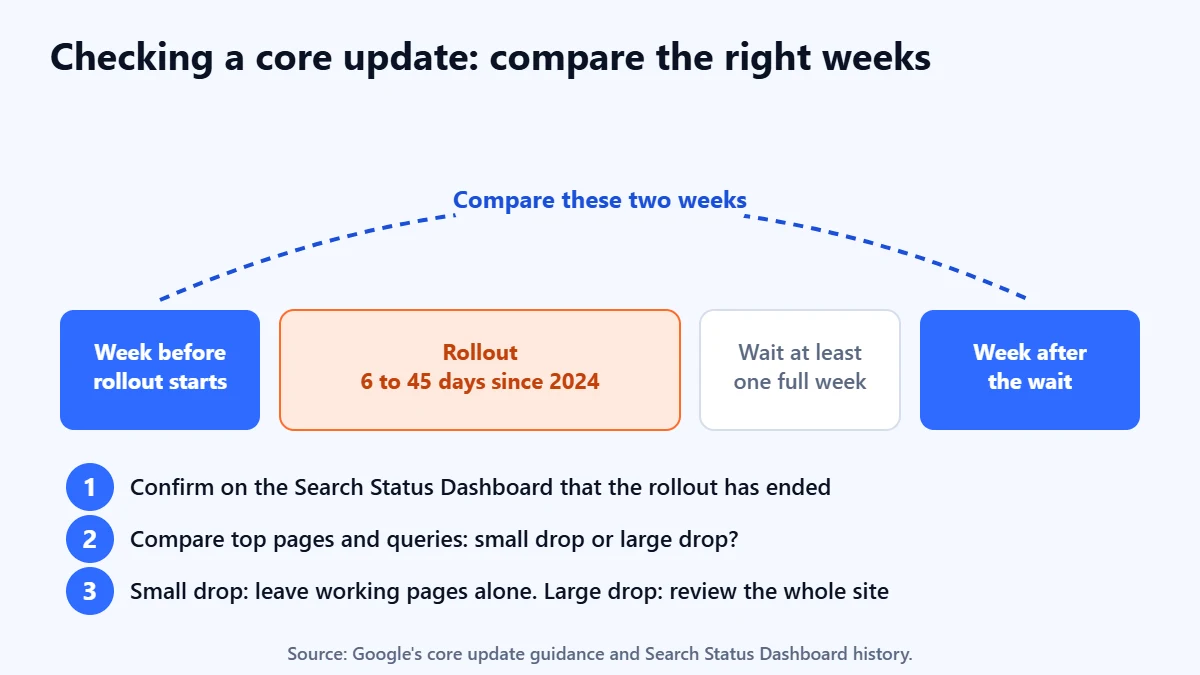
- Confirm on the dashboard that the update has finished rolling out.
- Wait at least a full week after it completes.
- Compare that week with the week before the rollout began.
- Review your top pages and queries. A small drop, such as position 2 to 4, needs no drastic action. A large drop across many terms, such as position 4 to 29, calls for an honest look at the whole site, not just the pages that fell.
Google is clear that a drop after an update does not necessarily mean something is wrong with your content. Updates also reassess other sites, and some will now be judged more useful than yours. Our guide to E-E-A-T explains the quality questions Google asks.
A worked example (hypothetical)
This example is invented to show the method. A services firm sees Google clicks fall by about 40% over three months. Last year shows no similar dip, so it is not seasonal. Search Console clicks fell as much as Analytics sessions, so the drop is real. Impressions fell with clicks and average position slipped, so they lost visibility. The Pages tab shows that almost all the loss sits in one folder of service pages, and the date matches a redesign that changed those URLs. URL Inspection shows the old URLs returning 404 instead of redirecting. The fix is a redirect map, not new content or a new agency.
Had the loss been spread evenly across the site, starting in the same week as a core update, with no technical faults, the right response would have been different: a slower, honest review of how useful the pages are.
What not to do in the first fortnight
- Do not rewrite pages that still perform. Google advises against making radical changes to a page that is doing well, and small position changes often reverse on their own.
- Do not delete content in a panic. Google calls deletion a last resort, for content that cannot be salvaged.
- Do not make quick fixes because you heard something is bad for SEO. Google’s core update guidance says the same.
- Do not judge a fix in days. Google says some changes take effect within days and others take months, and there is no guarantee any change will bring traffic back.
- Do not trust anyone who promises to restore rankings. No one controls Google’s results, and that includes us.
The one exception is a clear technical fault, such as a noindex tag on live pages, a robots.txt block or redirects that do not work. Fix those straight away, then use URL Inspection to request indexing for your most important pages.
When to ask for help
If you have worked through the six checks and found a clear cause, you may be able to fix it yourself. Ask for help when the drop is large, matters to revenue and you cannot find a cause, or when the cause is a site-wide quality judgement that is hard to see from the inside. Google itself suggests asking someone unconnected with your site to assess it. Our guides to using Google Search Console and running a content audit are good next steps if you want to keep going alone.
Frequently asked questions
How do I know if my traffic drop is because of a Google update?
Check whether the drop started during an update listed on Google’s Search Status Dashboard. Wait a full week after the update finishes, then compare that week with the week before it started. Timing alone is not proof: rule out tracking faults, seasonality and your own site changes too.
Why did my impressions drop but not my clicks?
Often because of reporting. Google says a logging error affected impression reporting from May 2025 until it was corrected in 2026, and that FAQ rich results stopped appearing from 7 May 2026. Both reduced reported impressions without affecting clicks. Check the Data anomalies page and the Search appearance tab.
Why are my clicks down when my rankings have not changed?
Fewer people may be searching, or fewer of the people who see your result are clicking it. Compare with last year and check Google Trends. Then look at the results page for your main queries: a new AI Overview, a competitor’s richer result or a weaker title can all take clicks without changing your position.
How long does it take to recover from a traffic drop?
It depends on the cause. A fixed technical fault can recover once Google recrawls the affected pages. Google says recovery from a site-wide quality issue can take months, and sometimes not until the next core update. There is no guaranteed timeline, and recovery is not guaranteed at all.
Is it normal for organic traffic to go up and down?
Yes. Google says positions are not fixed and results change as the web changes. Day-to-day and week-to-week movement is normal. Use weekly or monthly views in the Performance report and compare with the same period last year before you worry.
Get your Free Growth Audit and Quote. We review your Search Console and Analytics data, check for technical faults and tell you in plain English what kind of drop you have and what we would do first. We will ask for read-only access; you keep full control.
No obligation and no guaranteed results. Prefer to talk first? Contact us or see our SEO services.