The short answer: Ecommerce SEO is mostly page-type work, not blogging. Decide which of your store’s URLs deserve to appear in search: usually category pages, a small number of filter combinations that people really search for, and one URL per product. Make those pages genuinely useful, give each product structured data that matches the page, and keep every other filter, sort and tracking URL out of the crawl. Then set clear rules for products that go out of stock or are discontinued, so the store does not fill up with dead or duplicate pages.
This guide is for owners, marketers and developers of online stores anywhere in the world, on any platform, from a few dozen products to many thousands. It covers how to give each page type one job, how to decide which filter pages to index, what product and variant pages need, how to handle stock changes, the product-page rules that differ by country, and how to check the results. Google’s documentation and the regulators’ pages cited here were checked on 26 October 2026.
Why store SEO is different
A service business might have 30 pages. A store with 500 products, 40 categories and filters for size, colour, brand and price can produce hundreds of thousands of filter combinations without anyone deciding to create them. As an illustrative calculation: with 10 sizes, 12 colours, 20 brands and 5 price bands, and each filter either chosen once or left unset, one category has 11 × 13 × 21 × 6 = 18,018 combinations; across 40 categories that is about 720,000. Every filter click, sort order and tracking parameter can become a new address that search engines may try to crawl.
That changes the job. On a small site, SEO is mostly about making good pages. On a store, it is just as much about deciding which pages should exist in search at all, so search engines spend their time on the pages that sell.
If you want the wider picture first, including channels, product feeds, checkout and email, start with our guide to ecommerce marketing. This guide goes deeper into the search side.
Give every page type one job
The simplest way to run store SEO is to give each type of page a single job, and a single rule for whether it is indexed. We call this the Page-Type Map.
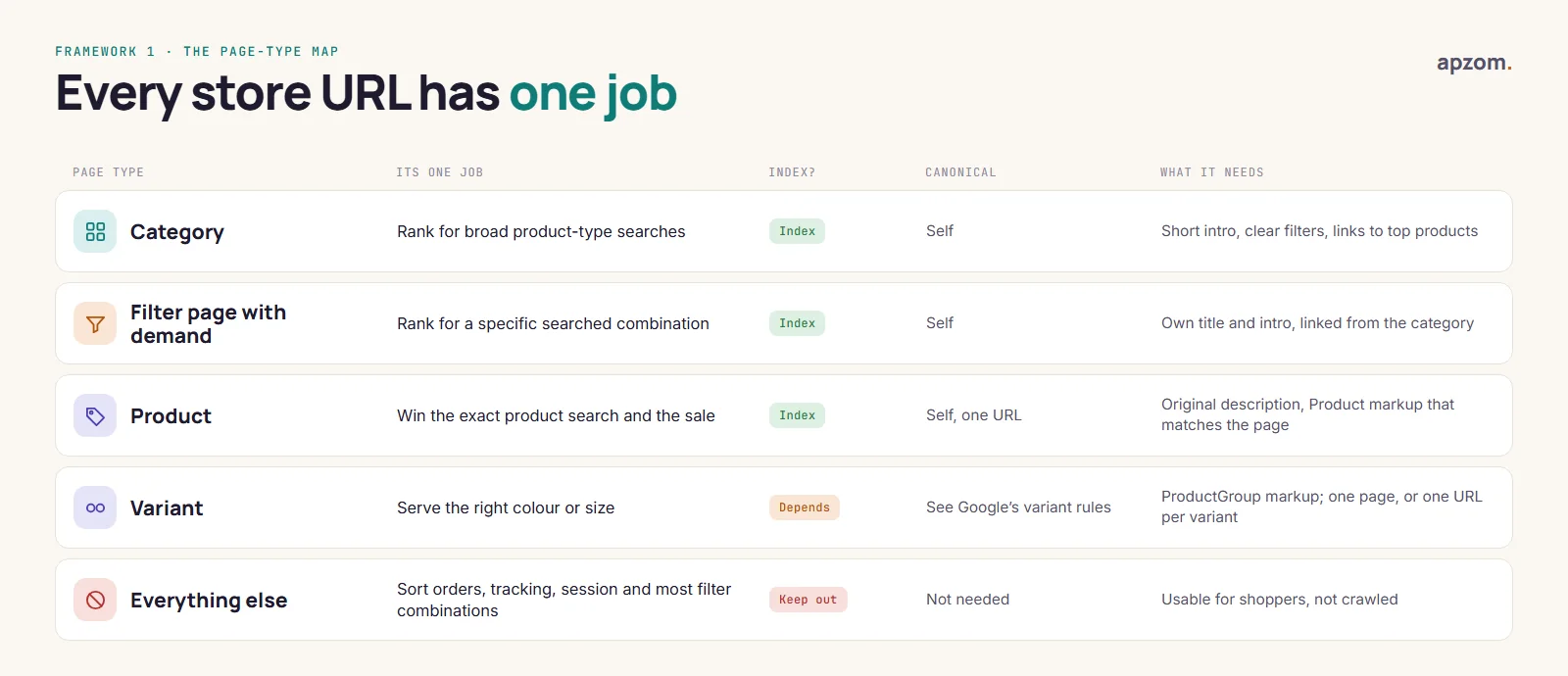
| Page type | Its one job | Indexed? | Canonical |
|---|---|---|---|
| Category | Rank for broad product-type searches, such as “running shoes” | Yes | Itself |
| Filter page with real demand | Rank for a specific combination people search for, such as “waterproof running shoes” | Yes, as a clean page | Itself |
| Product | Win the search for that exact product, and sell it | Yes | Itself, one URL per product |
| Variant (colour, size) | Show the right version | Depends on how your variants work | See the variants section |
| Everything else | Sort orders, tracking and session parameters, and most filter combinations | No, keep it out of the crawl | Not needed if it is not crawled |
If a whole category is empty for a while, Google’s ecommerce guidance suggests a noindex robots meta tag, or a 404 if the category has been removed for good. Write this map down for your store, with real URL patterns from your platform. It turns hundreds of small decisions into a handful of rules that anyone updating the store can follow.
Category pages: the pages most stores neglect
Category pages usually target the biggest searches in a store, because many shoppers start with a type of product (“oak dining tables”) rather than one exact model. Yet many category pages are just a grid of products with a heading.
A category page that can rank and sell usually has:
- A clear, specific heading and title that match how people search, not internal names (“Dining tables”, not “Collection 4”).
- A short introduction of two or three sentences that helps someone choose: what the range covers, who it suits, and the main ways the products differ. Put it where shoppers see it, usually above the products, but keep it short so the products stay near the top on a phone.
- Useful filters for the ways people actually choose in that category.
- Links to sub-categories and to the most popular or most useful products, so search engines and shoppers can reach them in a few clicks.
- Buying help where it matters, such as a short size or material guide, further down the page or linked from it.
Google’s ecommerce documentation focuses on category pages linking to all the products and sub-categories you want indexed; it says nothing about how much descriptive text a category page should have. How much to write, and where to put it, is a judgement about what helps shoppers. Our view: if a sentence would not help someone choose, leave it out.
Pagination
Large categories run across several pages. Google’s guidance on pagination (Google Search Central, checked 26 October 2026) is practical:
- Link each page in the series to the next with ordinary links (
<a href>), so search engines can follow them. - Give each page its own URL and its own canonical. Do not point page 2, 3 and so on at page 1, or the products only listed there may be missed.
- Do not put page numbers after a
#in the URL; Google ignores fragments. - “Load more” buttons and infinite scroll usually rely on JavaScript that Googlebot does not trigger, so make the same products reachable through real paginated links as well.
Google no longer uses rel=”next” and rel=”prev” for pagination, although other search engines may still read them.
Filters and faceted navigation: index few, block most
Filters (also called facets) are where most store SEO problems start. Each filter, and each combination of filters, can create a new URL. Most of these pages are near-duplicates with no search demand, and crawling them wastes the time search engines spend on your site.
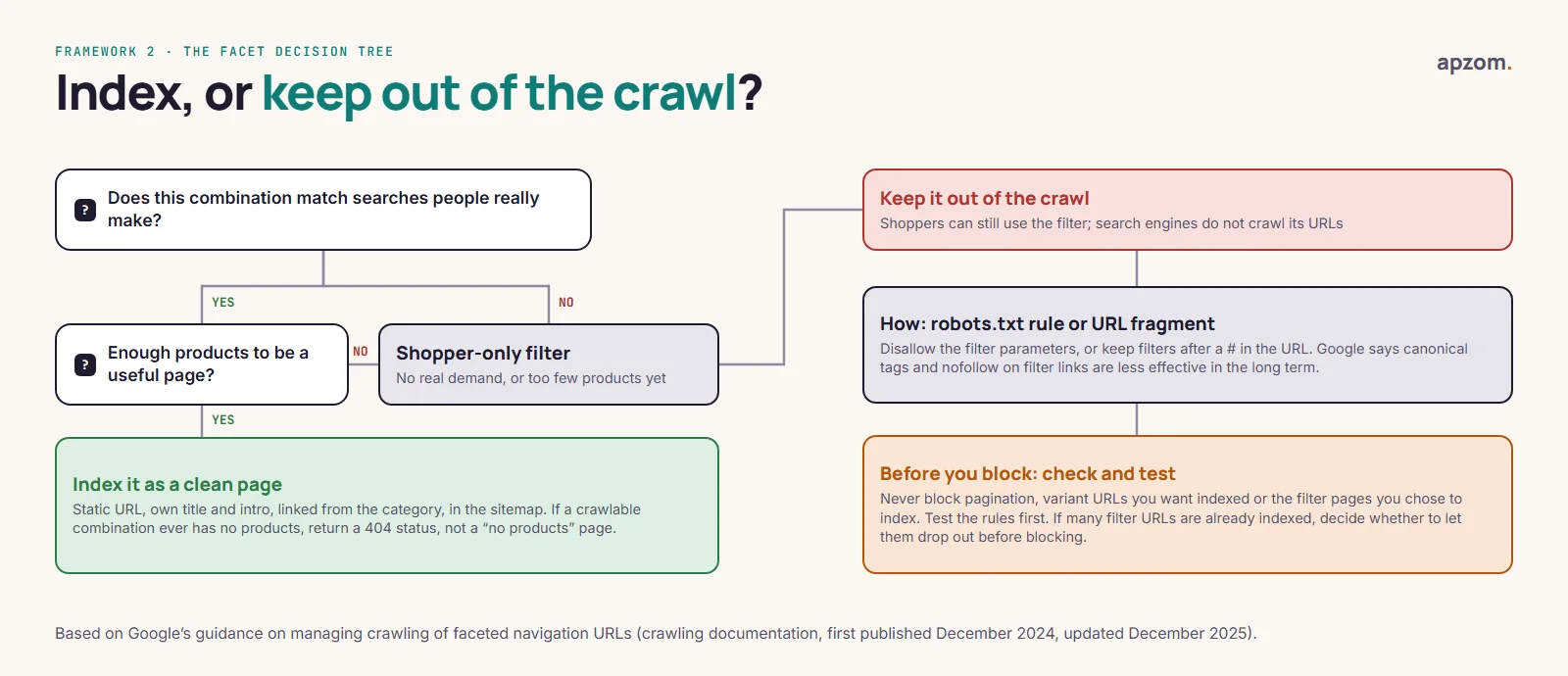
Use the Facet Decision Tree for each filter type:
- Does this combination match searches people really make? Check autocomplete, your own site search and Search Console. “Women’s waterproof hiking boots” may be a real search; “blue, size 6, under 80, sort by newest” is not.
- If yes, are there enough products to make a useful page? If so, give it a clean, static URL, its own title and introduction, a link from the parent category, and a place in your sitemap. Treat it like a small category.
- If not, keep it as a filter for shoppers only, and keep its URLs out of the crawl.
For the filters you keep out of search, Google’s guidance on managing crawling of faceted navigation URLs (Google Search Central crawling documentation, first published December 2024 and updated December 2025) gives two main routes:
- Block the filter URLs from crawling with robots.txt, for example by disallowing the parameters your filters use.
- Put filters in the URL fragment (after a
#), which Google generally ignores, so the filtered views never become separate URLs.
Google also says rel=”canonical” and rel=”nofollow” on filter links are generally less effective in the long term than these methods.
Before you block anything, check three things. First, never disallow a parameter that also serves pagination (such as ?page=), variant URLs you want indexed (such as ?color=green) or the clean filter pages you chose to index; a single broad rule can hide whole sections. Second, test new rules before you deploy them: run a list of real URLs (category, pagination, variant and chosen filter pages, plus the filter URLs you mean to block) through a robots.txt tester or an SEO crawler on a staging copy, and check that only the intended URLs are blocked. After deploying, confirm with Search Console’s robots.txt report, which shows the file Google has fetched, and URL Inspection for individual URLs. Third, if many filter URLs are already indexed, a robots.txt block alone can leave them listed as “Indexed, though blocked by robots.txt”, because Google can no longer crawl them to see any change. In our judgement (Google does not prescribe an order), it is usually better to let them drop out first, with noindex while they are still crawlable, and block them afterwards. Google’s noindex documentation confirms the rule only works if robots.txt does not block the page.
For filter pages you let Google crawl, Google asks you to use the standard & separator between parameters; if your filters sit in the URL path, keep their order consistent and avoid duplicate filters. When a crawlable combination has no products, return a 404 status rather than a “no products found” page with a normal status, and rather than redirecting to a generic “not found” page.
Two related points. Google retired the Search Console URL Parameters tool in 2022, pointing site owners to robots.txt instead, so there is no longer a setting in Search Console that tells Google how to treat your parameters. And robots.txt stops crawling, not indexing: a blocked URL that is linked from elsewhere can occasionally still appear in results without a description. Separately, internal site-search results pages are a typical URL type to keep out of the crawl: Google’s crawl-budget guidance says to block unimportant URLs with robots.txt rather than rely on noindex, and in a 2023 office-hours answer Google gave not allowing crawling of internal search results as an example.
Product pages: one URL, original content, honest markup
One product, one URL
The same product often appears at several addresses: inside each category it belongs to, with tracking parameters, or with and without a trailing slash. Pick one URL per product, link to that URL everywhere in the store, and point any other versions to it with a canonical tag. Google’s ecommerce guidance asks for the same URL in internal links, sitemaps and the canonical tag.
Platforms handle this differently. Shopify adds canonical tags automatically, but a product can also be reached inside a collection path (/collections/<collection>/products/<product>), and Shopify’s own developer documentation notes that this puts the same content at separate URLs; check what your theme outputs as the canonical and which URL your collection pages link to. WooCommerce lets you set the product category base and product permalink structure under Settings, then Permalinks; decide these before launch, because changing them later changes those product or category URLs.
Write descriptions people can use
Copying the manufacturer’s description is common. Google says duplicate content within your own site is not a violation of its spam policies, but that statement is about your own pages, and Google says nothing specific about manufacturer descriptions shared across many retailers. The practical problem is that your page then says nothing the manufacturer’s page and every other retailer’s page do not already say, so there is little reason to rank yours. Add what a shopper needs and cannot get elsewhere: measurements in both metric and imperial units if you sell internationally, what is in the box, how it compares with similar products you sell, care and compatibility notes, delivery and returns, and real questions from customers.
Product images
Put product images in standard HTML <img> elements with a src attribute, because Google does not index images set as CSS backgrounds. Use descriptive file names and alt text that says what the image shows. For merchant listings, Google recommends several high-resolution images of at least 50,000 pixels (width multiplied by height) in 16:9, 4:3 and 1:1 ratios, showing the product clearly. Keep image files light so they do not slow the page: Google’s “good” Core Web Vitals thresholds are a Largest Contentful Paint within 2.5 seconds, an Interaction to Next Paint of 200 milliseconds or less and a Cumulative Layout Shift of 0.1 or less, measured at the 75th percentile of page loads.
Product structured data
Google splits product markup into two features (Google Search Central, checked 26 October 2026):
- Merchant listings are for pages where the shopper can buy from you. They require the product’s
name, animage, and anoffersblock with apriceabove zero and apriceCurrency. - Product snippets are for pages that describe or review a product without selling it. They require
nameplus at least one ofreview,aggregateRatingoroffers.
A page that meets the merchant listing requirements is also eligible for product snippets. Whatever you mark up must match what the page shows: the same price, the same availability, the same reviews.
For shipping and returns, Google now recommends one site-wide policy in your Organization markup (return policies since June 2024, shipping since November 2025), with product-level markup only for exceptions. Settings made in Search Console’s shipping and returns feature, or in Merchant Center, take precedence over markup on the page. Our schema markup guide explains how structured data works in general, and how to test it.
Variants
Products that come in sizes, colours or materials need a deliberate set-up. Google’s guidance:
- Do not identify variants with a
#fragment. Google treats/t-shirt#blackand/t-shirt#whiteas the same page. - Choose one of two set-ups. On a single-page set-up, all variants share one page and one canonical URL. On a multi-page set-up, each variant has its own URL, as a path (
/t-shirt/green) or a parameter (/t-shirt?color=green), and each URL must open with that variant already selected. - Set canonicals to match the set-up. On a single-page set-up, where an optional parameter only preselects a variant, use the URL without the parameter as the canonical. On a multi-page set-up, each variant URL is its own canonical; pointing it at the parent page would stop that variant being indexed.
- Use variant markup. Since February 2024, Google has supported a
ProductGroupwith aproductGroupID(the parent SKU), its variants listed inhasVariant, and the attributes they differ by invariesBy.
Which set-up is right depends on whether people search for the variants. If shoppers search for “green linen shirt” as often as “linen shirt”, separate variant URLs can earn their own rankings; if not, one page is simpler to maintain.
When products go out of stock or are discontinued
Stores change every week, and how you handle stock changes decides whether your best pages keep their rankings. Decide the rule once, write it down, and apply it to every product.
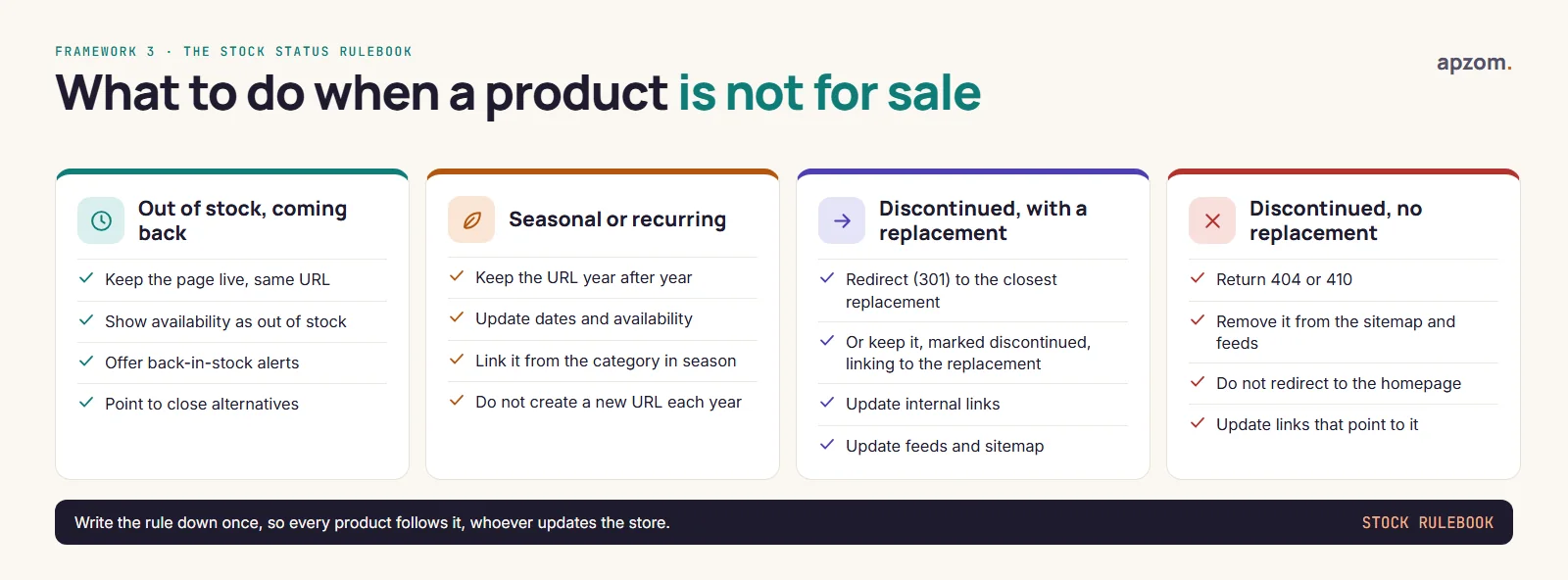
Google has no single page on this. These rules combine Google’s advice, where it exists, with our own judgement, marked as such:
- Out of stock, coming back. Google’s advice for temporarily unavailable items is to keep the page live and mark it out of stock, with structured data and Merchant Center availability kept accurate. Do not use Search Console’s Removals tool to hide it. Offering a back-in-stock alert and links to close alternatives keeps the page useful.
- Seasonal or recurring products (our view). Keep the same URL from one season to the next, so the page keeps its history and links. Creating a new URL each year starts from nothing.
- Discontinued, with a replacement (our view). A 301 redirect to a genuinely close replacement is sensible; Google gives no rule here. Alternatively, keep the page for a while with a clear “discontinued” note and a link to the replacement, because people may have bookmarked or linked to it.
- Discontinued, no replacement. Google has said it is fine, from a search perspective, to delete the page, and its crawl-budget guidance says to return a 404 or 410 for permanently removed pages. Remove the URL from your sitemap and product feeds. Avoid redirecting it to the homepage: Google’s guidance on site moves warns that redirecting many old URLs to one irrelevant destination, such as the homepage, can confuse users and might be treated as a soft 404 error.
Schema.org gives you availability values for each case, including OutOfStock, BackOrder, PreOrder, SoldOut and Discontinued.
Product pages are also legal pages
Prices, discounts and reviews on product pages are covered by consumer law in most markets, and the rules differ by country. A page that ranks well but breaks these rules is a liability. These are the main points to check; ask a lawyer about your own store.
Prices and discounts
| Market | The rule in brief (checked 26 October 2026) |
|---|---|
| EU | An announced price reduction must show the prior price: the lowest price you charged in at least the 30 days before the reduction (Price Indication Directive 98/6/EC, Article 6a) |
| UK | Since 6 April 2025, under the Digital Markets, Competition and Consumers Act 2024, the headline price must include all mandatory fees, taxes and charges; “was” prices must be genuine (CMA guidance CMA207 and the Chartered Trading Standards Institute’s guidance on pricing practices) |
| US | The FTC’s Guides Against Deceptive Pricing (16 CFR Part 233) treat a “was” price as fair only if it was the actual price offered to the public regularly for a reasonably substantial period |
| India | Under the Legal Metrology (Packaged Commodities) Rules 2011, rule 6(10), online listings of pre-packaged goods must show the mandatory declarations, including MRP, country of origin, net quantity and manufacturer or importer details. From 1 January 2027, amended Consumer Protection (E-Commerce) Rules also require the prior price (the lowest in the previous 30 days) when a reduction is announced |
| Australia | If you show part of a price, you must also show the single total price at least as prominently; “was/now” prices are risky if few or no sales happened at the “was” price (ACCC) |
| UAE | Federal Law No. 15 of 2020 on consumer protection requires prices to be shown clearly and bans misleading price advertising |
Reviews on product pages
- US: the FTC’s rule on consumer reviews (16 CFR Part 465, since 21 October 2024) bans fake reviews, bought reviews, undisclosed insider reviews and review suppression.
- UK: the DMCC Act (Schedule 20, paragraph 13, since 6 April 2025) bans fake and concealed incentivised reviews, and sites that publish reviews must take reasonable steps to prevent and remove them.
- EU: since May 2022, a trader showing consumer reviews must say whether and how it checks they come from real buyers.
- India: the BIS standard IS 19000:2022 sets out how platforms should collect and publish reviews; it is voluntary.
- Australia: the ACCC says creating fake reviews, or suppressing genuine negative ones, can break the law.
Google’s rule on self-serving reviews (no star rich results from reviews a business hosts about itself) applies to LocalBusiness and Organization markup, not to Product markup, so genuine product reviews on product pages can still show stars. Fake or undisclosed incentivised reviews are never allowed.
Environmental claims (EU): since 27 September 2026, Directive (EU) 2024/825 bans generic environmental claims such as “eco-friendly” that a trader cannot substantiate, and “climate neutral” claims based on offsetting. Check product descriptions and category introductions for them.
Shopping feeds and AI shopping surfaces
Search results are not the only place products appear. Through Google Merchant Center, products can be shown free of charge across Google, including Search, Images, Lens, YouTube, the Shopping tab and Gemini, and Merchant Center can add products automatically from the product structured data on your website. Our ecommerce marketing guide covers feeds and Shopping in more depth. The SEO point is simple: keep your product data the same everywhere. The price, availability and description in your feed should match your product page and its structured data, because mismatches cause problems in Merchant Center and confuse shoppers.
AI shopping is growing on the same foundations. Google’s AI Mode draws on its Shopping Graph, and since November 2025 Google has been rolling out agentic checkout in Search for eligible US merchants. Microsoft began rolling out Copilot Checkout in the US in January 2026, and ChatGPT also shows products. These features are US-first and changing quickly; what they share is a need for accurate, consistent product data.
Google’s “AI features and your website” page says there are no special technical requirements for its AI features: no new files or special schema are needed, and normal SEO applies. Its newer guide to generative AI features (updated July 2026) adds one condition: a site must be included in Search’s generative AI features in Search Console to be eligible, so check that setting in your Search Console.
Bing matters too. Bing’s Webmaster Guidelines, which now cover Copilot as well as search, ask for accurate sitemaps, structured data that matches the visible page and a 404 for permanently removed content. Bing recommends IndexNow, a protocol that tells participating search engines (including Bing, Yandex, Seznam, Naver and Yep, but not Google) when a page changes, which is useful when prices and stock change often.
Thousands of store URLs, but few that rank? A Store SEO Page-Type Review maps your categories, filters and products, finds the URLs wasting crawling, and lists which pages to improve first.
Links, breadcrumbs, titles and JavaScript
Four things that every store needs, and that are easy to get wrong at scale:
- Breadcrumbs. A visible trail (Home, then category, then sub-category) helps shoppers move up a level and helps search engines understand your structure. Mark it up with
BreadcrumbListstructured data so it can appear in results (Google has shown breadcrumbs only on desktop results since January 2025, not on mobile); our schema markup guide shows how. - Title and description templates. With thousands of products, titles are usually generated from a template, such as product name, a key attribute and brand. Check the template produces readable, distinct titles, and write custom titles and descriptions by hand for your top categories and best-sellers.
- JavaScript storefronts. Google can render JavaScript, but Google Search does not interact with your page the way a shopper does, so products and links that only appear after a click, a scroll or a filter interaction may never be seen. Links should be ordinary
<a>elements with anhref. Make sure product links, prices and descriptions are in the rendered page, and check important URLs with URL Inspection in Search Console. Headless and app-like storefronts need this test most. - Links from other sites. Stores earn links the same way other sites do: buying guides people want to cite, original product data, supplier and manufacturer “where to buy” pages, and coverage of genuinely new products. Buying links breaks Google’s spam policies. Build those linkable assets around categories and guides, which pass value on to products through your internal links.
International stores
If you sell in several countries or languages, give each version its own URL, connect the versions with hreflang, and let shoppers switch between them. Google advises against redirecting visitors automatically by language or adapting content by IP address. Its crawler’s IP addresses appear to be mostly in the US, so a store that changes content by visitor location may never show Google its other versions (Google Search Central, guidance on locale-adaptive pages and multi-regional sites). Show prices in the right currency for each version, and give measurements in both metric and imperial units where your buyers expect them.
A 30-day plan for an existing store
- Week 1: inventory. Combine three sources: the example URLs in Search Console’s Page indexing report, your sitemaps, and a crawl of the site with an SEO crawler. Group the URLs by page type using URL patterns, and count how many filter, sort and parameter URLs are indexed or being crawled.
- Week 2: decide. Fill in the Page-Type Map and run each filter type through the decision tree. Write your stock rules.
- Week 3: fix the structure. Apply crawl rules for filters (after the three checks in the filters section), fix canonicals and pagination, and correct product structured data. Test on a staging copy first if you can; mistakes in robots.txt can block whole sections.
- Week 4: improve the top pages. Rewrite the introductions on your ten most important categories and the descriptions on your best-selling products.
If you are changing platform or redesigning the store, follow our website redesign SEO checklist as well, because store migrations are where rankings are most often lost. For a wider site check, use our technical SEO audit guide, and for thin or overlapping pages, our content audit guide.
How to check it is working
Read your store by page type, not as one total. Most of this lives in Google Search Console; our Search Console guide explains each report.
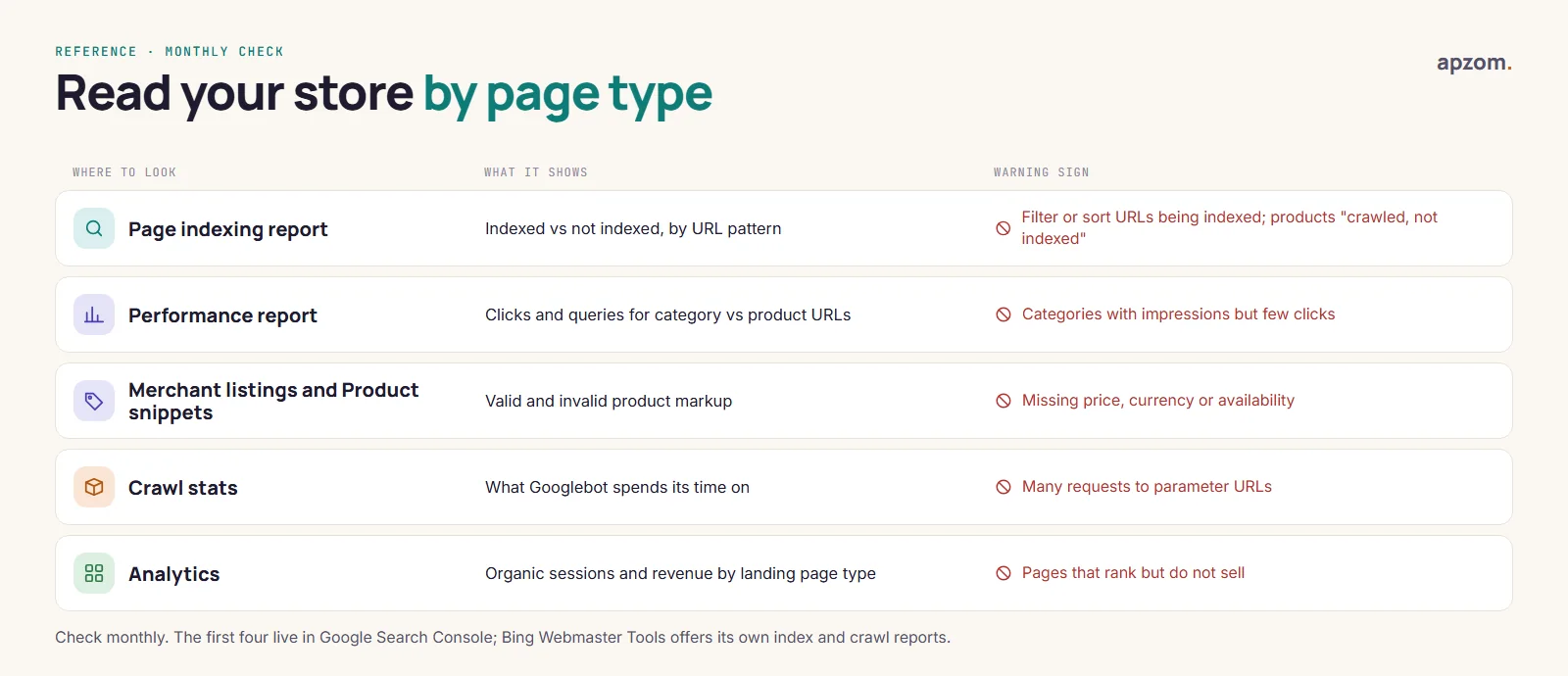
- Page indexing: are filter and sort URLs falling out of the index, and are your products being indexed?
- Performance: filter the report by URL pattern to compare categories with products. Categories with many impressions but few clicks often need better titles or introductions.
- Merchant listings and Product snippets reports: errors such as a missing price or availability.
- Crawl stats: whether Googlebot is still spending a lot of requests on parameter URLs.
- Analytics: organic revenue by landing page, so you can see which pages rank and sell, and which rank but do not.
Changes to crawling and indexing can take weeks to show, because search engines need to revisit the URLs. Keep a dated log of what you changed so you can match changes to results. To find the searches worth building pages for, see our keyword research guide, and to turn more of that traffic into orders, our guide to conversion rate optimization.
Common mistakes
- Indexing every filter combination, hoping more pages means more traffic.
- Blocking filters in robots.txt and also adding noindex, which search engines cannot see if they cannot crawl the page.
- Redirecting every discontinued product to the homepage.
- Canonicalising paginated pages to page 1, which can hide the products on later pages.
- Structured data that disagrees with the page, such as an old price or “in stock” on a sold-out product.
- Category pages with a long block of text above the products, written for search engines rather than shoppers.
- Changing URL structures without redirects during a redesign or platform move.
How Apzom can help
Apzom Digital works on store SEO as part of our SEO services and ecommerce marketing, and we build and fix stores through our ecommerce development service. An engagement would start with the page-type inventory and facet decisions in this guide, then move to category and product page improvements.
We have not published an ecommerce case study yet, so we will not show you one. You can see the work we have published on our case studies page.
We work with clients worldwide, remotely, from our base in Ahmedabad, India.
Request a Store SEO Page-Type Review. We group your store’s URLs by page type, check which filter and parameter URLs are crawled or indexed, test your product structured data against what the page shows, review how out-of-stock and discontinued products are handled, and look at your most important category pages. You get a prioritised list of fixes, or we make them for you.
No obligation and no guaranteed rankings. Prefer to talk first? Contact us or see all our services.
Frequently asked questions
What is ecommerce SEO?
Ecommerce SEO is the work of helping an online store’s category and product pages appear in search results for the searches that lead to sales. It covers which pages are indexed, the content and structured data on those pages, site structure and internal links, and how stock changes are handled.
Should I noindex or block faceted navigation URLs?
Google’s guidance favours blocking crawling with robots.txt, or keeping filters in the URL fragment. Noindex needs the page to be crawlable, so do not combine it with a robots.txt block. If filter URLs are already indexed, use noindex first while they are still crawlable, and add the robots.txt block only after they have dropped out (our judgement; see the filters section).
Is duplicate product content a penalty?
Not within your own site: Google says that is not a spam-policy violation. Copying other sites’ content wholesale can fall under its spam policies, and copied manufacturer descriptions give shoppers no reason to prefer your page.
How long does ecommerce SEO take to work?
Technical fixes such as blocking filter URLs can take weeks to be reflected, because search engines must recrawl the URLs. In our view, content improvements on categories and products usually take longer to show in rankings. Nobody can promise a timeline or a ranking.