
The short answer: A robots.txt file asks crawlers which URLs on your site they may request. It controls crawling, not indexing, and it is not security. Use it to keep crawlers out of admin areas, carts, checkouts, internal search results and filter or sort URLs, and to list your sitemap. Never use it to block the CSS and JavaScript your pages need, or to hide pages you want removed from Google: a blocked page can still be indexed, and Google cannot see a noindex tag on a page it is not allowed to crawl. For AI crawlers, decide token by token, because each one controls something different. Test every change in Search Console’s robots.txt report and the URL Inspection tool.
This guide is for business owners, marketers and web teams anywhere in the world who run a WordPress, Shopify, Wix or custom site and want to change robots.txt without breaking their search visibility. It covers the syntax, the platform defaults, what to block and never block, the “Indexed, though blocked by robots.txt” warning, AI crawler tokens and testing. We checked the robots.txt standard (RFC 9309) and the documentation from Google, Bing, WordPress, Shopify, Wix, OpenAI, Anthropic, Perplexity, Common Crawl and Apple against official sources on 23 November 2026.
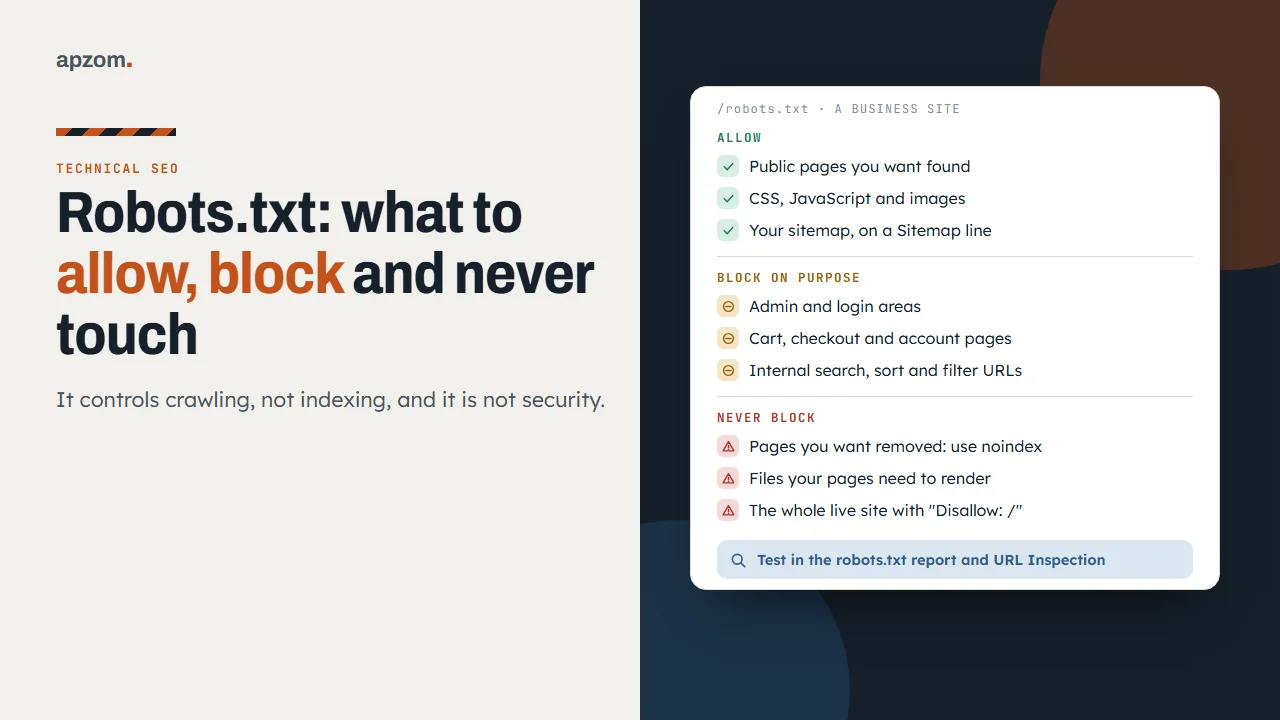
What robots.txt does, and what it does not
Google’s introduction to robots.txt says the file tells crawlers “which URLs the crawler can access on your site”, mainly to avoid overloading a site with requests, and that it “is not a mechanism for keeping a web page out of Google”. Bing’s Webmaster Guidelines agree: robots.txt “controls crawl access, not indexing”. Most robots.txt mistakes come from forgetting one of three facts.
- A blocked page can still be indexed. Google says it “might still find and index a disallowed URL if it is linked from other places on the web”.
- It is a request, not a lock. Google says robots.txt rules “cannot enforce crawler behavior”; Googlebot and other reputable crawlers obey them, others might not. RFC 9309, the internet standard for the file, says the rules “are not a form of access authorization”.
- It is public. Anyone can open yourdomain.com/robots.txt. RFC 9309’s security section warns that listing paths in the file “exposes them publicly and thus makes the paths discoverable”.
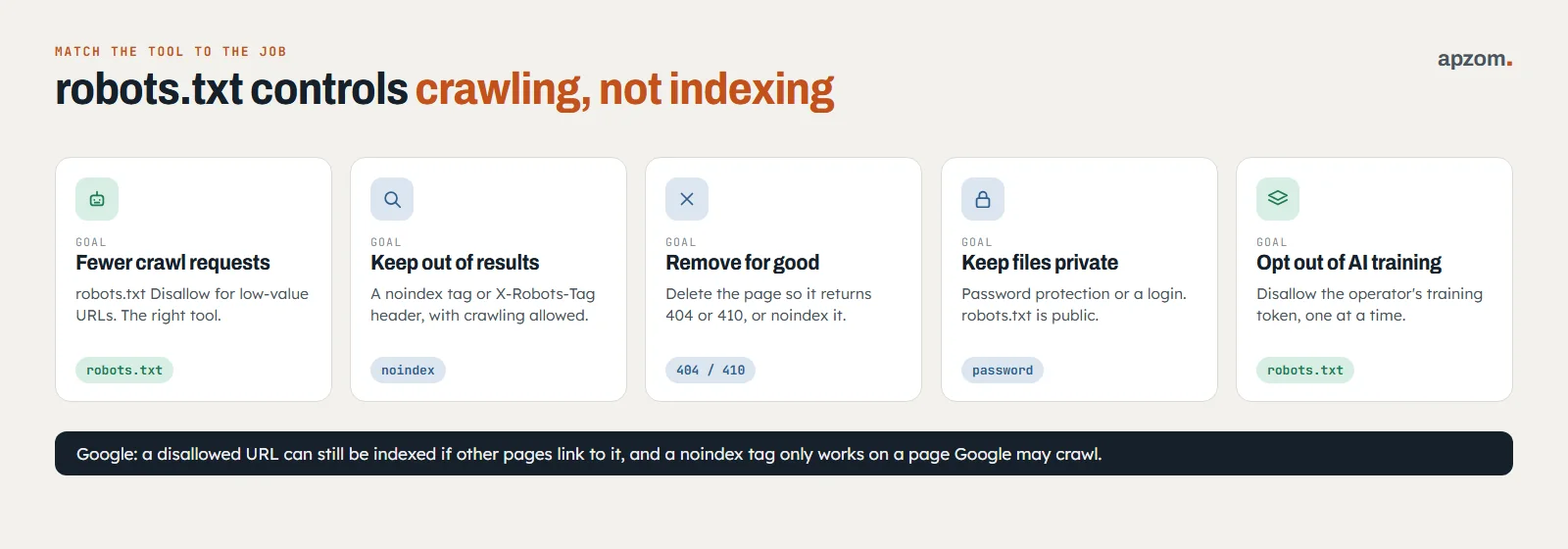
So match the tool to the job:
| What you want | Right tool | Why not robots.txt |
|---|---|---|
| Stop crawlers wasting requests on low-value URLs | robots.txt Disallow | It is the right tool |
| Keep a page out of search results | noindex meta tag or X-Robots-Tag header, with crawling allowed | A blocked page can still be indexed without its content |
| Remove a page for good | Delete it so it returns 404 or 410, or noindex it | Blocking hides the signal Google needs to drop it |
| Keep private files private | Password protection or login | robots.txt is public and voluntary |
| Opt out of AI model training | The operator’s training token, such as GPTBot or Google-Extended | It is the right tool, one token at a time |
Our guide on how to remove a page from Google covers removals in detail.
How the file works: the syntax in five minutes
robots.txt is a plain text file of groups. Each group starts with one or more User-agent lines, followed by Allow and Disallow rules. RFC 9309, published by the IETF in September 2022, standardised a format first defined in 1994; Google’s “How Google interprets the robots.txt specification” page explains how Google applies it.
Where the file lives
The file must be called robots.txt, in lowercase, at the root of the host, such as https://www.example.com/robots.txt. Google says it applies only to the protocol, host and port where it is posted, so https://shop.example.com/ needs its own file. Save it as UTF-8 plain text, not from a word processor, which can add curly quotes. Google reads up to 500 KiB of the file and ignores anything after that limit; RFC 9309 sets 500 KiB as the minimum a crawler must parse.
Groups and user agents
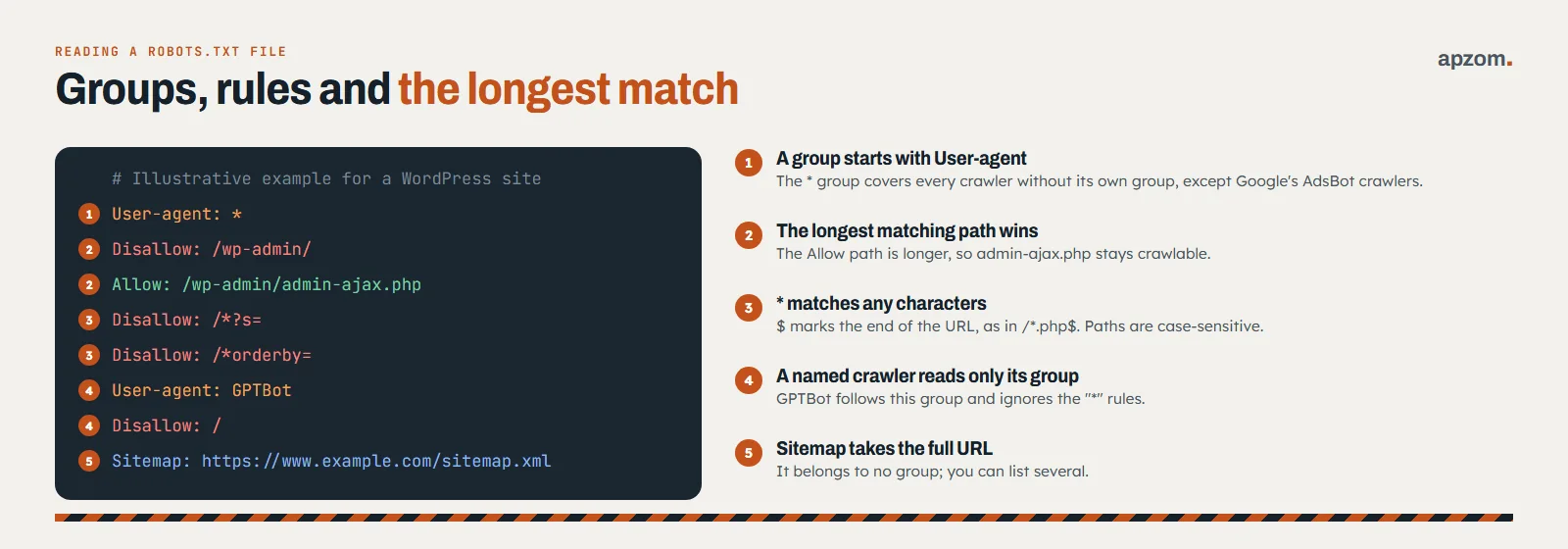
A crawler follows one group only: the one that names it most specifically. Google says the order of groups in the file does not matter, and that a specific group and the “*” group “are not combined”. RFC 9309 says a crawler uses the “*” group only “if no matching group exists”.
Add a group for Bingbot and Bingbot stops reading your “*” group: Bing’s help page says it “will ignore the directives listed in the generic section”, so repeat every general rule inside the specific group. Two more quirks:
- Google’s AdsBot crawlers ignore “*”. Google says the asterisk matches all crawlers “except the various AdsBot crawlers, which must be named explicitly”.
- Applebot borrows Googlebot’s rules. Apple’s “About Applebot” page says that if your file does not mention Applebot but does mention Googlebot, Applebot will follow the Googlebot instructions.
Allow, Disallow and the longest match
Disallow lists a path the named crawlers should not request; Allow makes an exception inside it. Paths start with “/” and are case-sensitive: Google’s “disallow: /file.asp” example covers /file.asp but not /FILE.asp. Anything not disallowed may be crawled.
When rules conflict, the most specific rule wins, measured by the length of the path. RFC 9309 defines it as the match with “the most octets”; if an Allow and a Disallow rule are equally specific, the standard says the Allow rule should be used, and Google says it uses “the least restrictive rule”. That is why this common pair works:
User-agent: *
Disallow: /wp-admin/
Allow: /wp-admin/admin-ajax.php
The Allow path is longer, so admin-ajax.php stays crawlable while the rest of /wp-admin/ is blocked.
Wildcards: * and $
RFC 9309 requires crawlers to support two wildcard characters in paths (plus # for comments), and Google supports both:
*matches zero or more of any character. “Disallow: /*orderby=” blocks any URL containing orderby=, wherever it appears.$marks the end of the URL. Google’s example: “/*.php$” matches /filename.php but not /filename.php?parameters.
From Google’s matching table: a trailing “*” does nothing, and “/fish” also matches /fishheads and /fish.html, because rules match the start of the path. Use “/fish/” for the folder only.
The Sitemap line
A Sitemap line gives the full URL of a sitemap, including https://. Google says it is not tied to any user agent and you can list several. Our Search Console guide covers submitting sitemaps to Google as well.
Rules Google ignores
Google supports four fields only: user-agent, allow, disallow and sitemap. It says “other fields such as crawl-delay aren’t supported”, and that a noindex rule in robots.txt “is not supported by Google”. Other crawlers differ. Bing’s help page shows a “Crawl-delay: 1” example for Bingbot, Anthropic says its bots support the “non-standard Crawl-delay extension”, and Apple says Applebot does not follow crawl-delay. If one crawler overloads your server, check that crawler’s own documentation.
When the file itself is the problem: status codes
The HTTP status your server returns for /robots.txt matters as much as its rules. Google’s documentation sets out how Google handles each case:
| robots.txt returns | What Google does |
|---|---|
| 200 with rules | Follows the rules it can parse and ignores invalid lines |
| 404 or another 4xx (except 429) | Treats the site as having no crawl restrictions |
| 5xx, timeout or network error | Stops crawling the site for the first 12 hours, then uses the last good copy for up to 30 days while it keeps retrying (with no cached copy, it assumes no restrictions) |
| A redirect | Follows at least five redirect hops, then treats the file as a 404 |
A missing robots.txt is fine. One that errors is not: RFC 9309 tells crawlers to “assume complete disallow” when the file is unreachable through server or network errors, so a firewall rule or overloaded server that makes /robots.txt fail can pause crawling of the whole site. Google also caches the file for up to 24 hours, so changes are not instant.
The default files on WordPress, Shopify and Wix
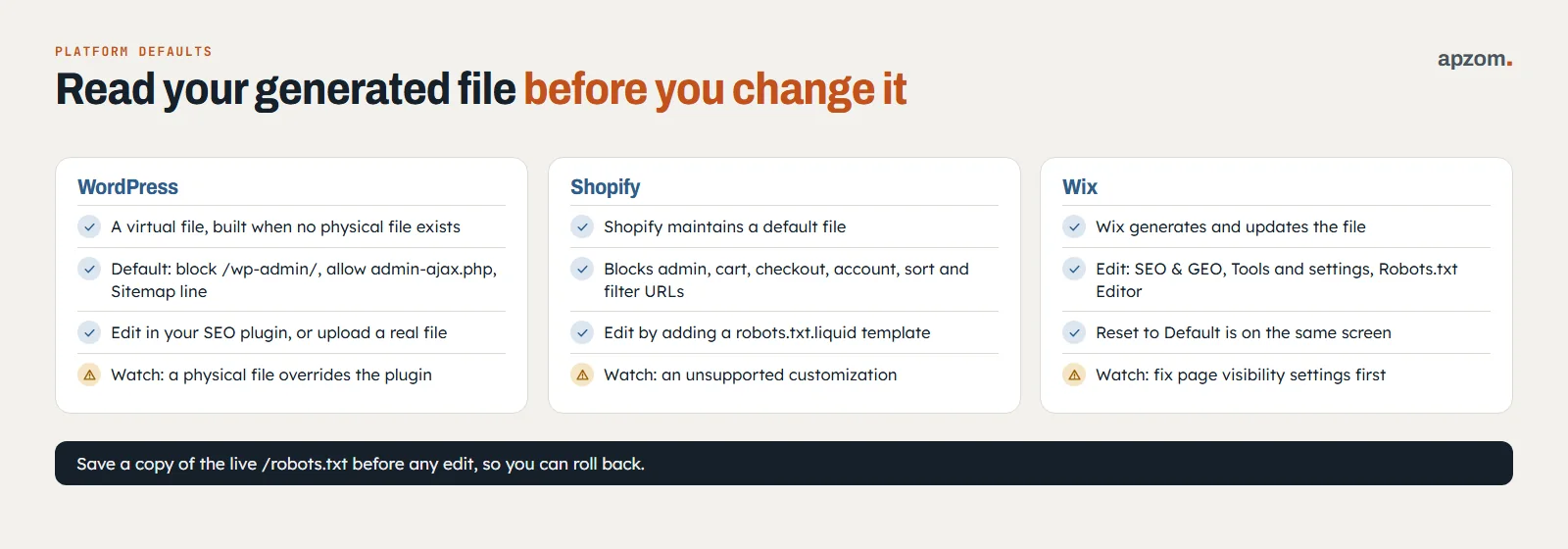
Most business sites have a platform-generated robots.txt. Read yours before changing anything.
WordPress: a virtual file
WordPress builds robots.txt on the fly when no physical file exists. The core function do_robots() outputs a “*” group that blocks the admin area and allows admin-ajax.php, and since WordPress 5.5 the core sitemap feature adds a Sitemap line when the site is public. At the domain root, the result looks like this:
User-agent: *
Disallow: /wp-admin/
Allow: /wp-admin/admin-ajax.php
Sitemap: https://www.example.com/wp-sitemap.xml- A real file wins. Yoast SEO’s help page puts it simply: WordPress generates a virtual file “if the site root does not contain a physical file”. A robots.txt uploaded by FTP years ago overrides your settings and plugins.
- “Discourage search engines” no longer touches robots.txt. Since WordPress 5.3, the Settings, Reading checkbox adds a noindex robots meta tag instead of “Disallow: /”. If a new site is invisible after launch, check that box first.
- SEO plugins edit the virtual file. Rank Math’s documentation puts its editor at Rank Math SEO, General Settings, Edit robots.txt, and Yoast SEO’s help page describes creating or editing the file from its Tools section. Rank Math’s documentation says to delete any physical file first.
- Check the Sitemap line. If an SEO plugin replaced WordPress’s sitemap, the line should point to the sitemap that actually loads.
Shopify: robots.txt.liquid
Every Shopify store gets a default robots.txt that Shopify maintains. Shopify’s help page lists its key entries: “Allow: /” for public content, and Disallow rules for /admin, /cart/, /checkout and /checkouts/, /account and /orders, filtered collection pages (/collections/*+*) and sorted collection pages (/collections/*sort_by*). Shopify says the default “works for most stores”.
To change it, you add a template: Online Store, then Edit code for your theme, Add a new template, choose robots, then Create template. Shopify’s developer documentation says the Liquid robots object provides the default rule groups, and strongly recommends keeping them rather than pasting plain text, so the defaults stay current. Save a copy of your live /robots.txt first and compare it with the template’s output. Three cautions from Shopify:
- It is an “unsupported customization”, and Shopify warns that incorrect use “can result in loss of all traffic”.
- Uploading a theme from the Themes section of the admin does not import robots.txt.liquid, so a theme change can silently drop your rules.
- An old template can keep rules the current default has dropped, such as “Disallow: /search”. Deleting the template restores the current default.
Shopify also notes that product data for agentic storefronts such as ChatGPT or Microsoft Copilot flows through Shopify Catalog “independently of /robots.txt”, so blocking an AI crawler does not stop that feed.
Wix: the Robots.txt Editor
Wix generates the file and updates it when you publish pages or change settings. Wix’s help centre says to edit it from the dashboard: SEO & GEO, then Tools and settings, Robots.txt Editor, View File. The same screen has Reset to Default. For “Blocked by robots.txt” errors, Wix says you usually do not need to edit the file: check whether the page is hidden from search engines in its SEO settings, password protected or members-only.
Not sure what your robots.txt is blocking? Ask for a Free Growth Audit. We read the live file on each of your hosts, test it against your key pages, CSS, JavaScript and sitemap, check Search Console’s robots.txt and Page indexing reports, and tell you which rules to keep, narrow or remove.
What to block, and what to never touch
Google’s introduction says robots.txt is for managing crawler traffic and avoiding “unimportant or similar pages”. For most business sites, that is a short list.
Usually worth blocking:
- Admin and login areas, such as /wp-admin/ (keep admin-ajax.php allowed on WordPress).
- Cart, checkout, account and order pages. Shopify’s default blocks all of these, and says cart links are unique to each customer.
- Internal site search results, such as WordPress’s /?s= URLs.
- Sort and filter URLs. Shopify’s default blocks sorted collection pages because they “return the same products in a different order”, and filtered ones because they duplicate the collection page.
- Staging and test hosts, as a second layer behind a password, never as the only protection.
Never block:
- The CSS, JavaScript and images your pages need to render. Google says not to block resources if their absence makes the page harder to understand, and its JavaScript guide says Google “won’t render JavaScript from blocked files or on blocked pages”. Apple says the same for Applebot.
- Pages you want removed from search. Use noindex and leave them crawlable. Google says the noindex rule only works if the page is not blocked by robots.txt.
- Duplicate pages you are consolidating. Google’s canonicalization guide says “Don’t use the robots.txt file for canonicalization purposes”, because blocked URLs can still be indexed without their content. Our technical SEO audit guide covers duplicates and canonicals.
- The whole site, after launch. Check that no development “Disallow: /” survived launch day.
- The pages your ads point to. Google’s AdsBot crawlers ignore the “*” group, so only a group that names them blocks them. Do not add one without a reason.
“Indexed, though blocked by robots.txt”: what it means and how to fix it
This status in Search Console’s Page indexing report means Google indexed a URL it was not allowed to crawl. Google’s help page explains that it “always respects robots.txt”, but that this “doesn’t necessarily prevent indexing if someone else links to your page”. Any snippet will be very limited. First decide whether the page should be in search at all.
- The page should not be in search. Remove the robots.txt rule that blocks it and add a noindex tag. Google’s next step for this status is to “remove the robots.txt block and use ‘noindex'”. Keep it crawlable until it has dropped out.
- The page should be in search. Find the rule that blocks it and remove or narrow it. Run a live test in the URL Inspection tool: the “Crawl allowed?” field shows whether robots.txt blocks the page.
- The URL is one you block on purpose and it does not matter, such as a cart or filter URL. You can leave it. Shopify’s help page calls this message “normal behavior” for pages its default file blocks.
One trap in URL Inspection: Google’s help page says that when a page is blocked by robots.txt, “Indexing allowed” will always show “Yes”, because Google cannot see a noindex rule on a page it cannot crawl. Read “Crawl allowed?” first. For indexed pages that still do not appear, see page indexed but not showing on Google.
AI crawlers: what each token controls
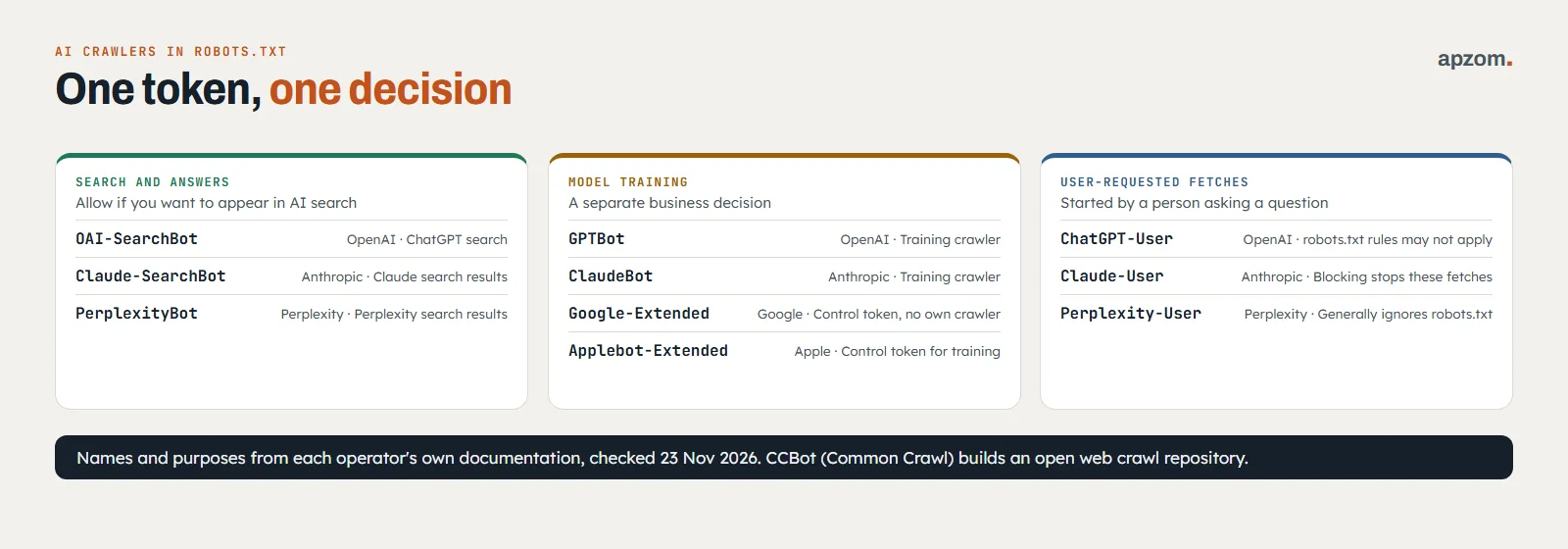
AI companies publish separate user agents for search, model training and user-requested fetches. Blocking the wrong one can remove you from an AI search product without stopping training, or the reverse. These are the operators’ own descriptions, read on 23 November 2026:
| Token | Operator | What the operator says it is for | Effect of blocking it |
|---|---|---|---|
| Google-Extended | Whether content Google crawls may be used to train future Gemini models and for grounding in Gemini Apps and Vertex AI | Google says it does not affect inclusion in Google Search and is not a ranking signal | |
| GPTBot | OpenAI | Crawls content that may be used to train its generative AI foundation models | Signals your content should not be used for training |
| OAI-SearchBot | OpenAI | Surfaces websites in ChatGPT’s search features | Your site will not be shown in ChatGPT search answers, though it can still appear as a navigational link |
| ClaudeBot | Anthropic | Collects web content that could contribute to model training | Signals your future content should be excluded from training datasets |
| Claude-SearchBot | Anthropic | Improves search result quality for Claude users | May reduce your visibility in Claude’s search results |
| PerplexityBot | Perplexity | Surfaces and links websites in Perplexity’s search results; Perplexity says it is not used for foundation model training | Perplexity recommends allowing it if you want to appear in its search results |
| CCBot | Common Crawl | Builds Common Crawl’s open repository of web crawl data, which anyone can use | Stops Common Crawl crawling your site |
| Applebot-Extended | Apple | Whether Applebot’s crawled data may be used to train Apple’s foundation models | Apple says your content stays discoverable in Spotlight, Siri and Safari through Applebot |
A few details change the decision:
- User-triggered fetchers work differently. OpenAI says that for ChatGPT-User “robots.txt rules may not apply”, because a user started the visit. Perplexity says Perplexity-User “generally ignores robots.txt rules” because a user requested the fetch, and Google says its user-triggered fetchers “generally ignore robots.txt rules”. Anthropic lists Claude-User and says blocking it stops Claude retrieving your pages when a user asks.
- Google-Extended and Applebot-Extended are control tokens, not crawlers. Google says Google-Extended has no separate user-agent string, and Apple says Applebot-Extended does not crawl webpages, so neither shows up in your logs.
- The tokens keep changing. Anthropic says that from 30 October 2026 it has begun recognising a general machine-readable “no AI training” preference based on IETF draft work, with any rule that names ClaudeBot taking priority, and says its approach may change as the standards evolve. Google says it intends to support the same AIPREF training-preference signal in early 2027. Review this part of the file regularly.
An illustrative file for a business that wants to stay in search and AI search answers but opt out of model training by four operators (an example, not a recommendation for every site):
User-agent: *
Disallow: /wp-admin/
Allow: /wp-admin/admin-ajax.php
User-agent: GPTBot
User-agent: ClaudeBot
User-agent: Google-Extended
User-agent: Applebot-Extended
Disallow: /
Sitemap: https://www.example.com/sitemap.xml
The training tokens share one group by stacking User-agent lines, which Google’s documentation allows. OAI-SearchBot, Claude-SearchBot and PerplexityBot are not named, so they follow the “*” group. For OpenAI’s crawlers, including firewall and IP checks, read our guide to getting your business recommended by ChatGPT. Our GEO guide explains the wider AI search picture, and what llms.txt is covers the separate llms.txt proposal, which does not control crawling.
Test before and after every change
- Save the current file. Copy the live /robots.txt into a dated text file so you can roll back.
- Write the change and check it against your key URLs. Confirm your home page, main service or category pages, CSS and JavaScript files and sitemap match no Disallow rule. Developers can test locally with Google’s open-source robots.txt library, which Google says Google Search also uses.
- Publish, then open yourdomain.com/robots.txt in a private browser window, as Google suggests, and check it shows the new rules with a 200 status.
- Check Search Console’s robots.txt report. It shows the files Google found for your top 20 hosts, the last fetch, its status and any parsing errors, for Domain properties or root URL-prefix properties only. After an urgent fix, use “Request a recrawl”; Google says this does not guarantee an immediate recrawl of unblocked URLs.
- Run URL Inspection’s live test on two or three key URLs and read the “Crawl allowed?” field.
- Check Bing too. Bing’s help page points to the robots.txt tester in Bing Webmaster Tools, and says you do not need to submit a new file. See our Bing Webmaster Tools guide.
- Watch the Page indexing report and server logs for a week. OpenAI says its search systems take about 24 hours to adjust.
Quick decision table
| Situation | Do this |
|---|---|
| A page should never appear in search | noindex, keep it crawlable |
| Crawlers waste requests on filters, sorts or internal search | Disallow those URL patterns |
| Stay out of AI model training | Disallow that operator’s training token |
| “Indexed, though blocked by robots.txt” on a page you want removed | Unblock it and add noindex |
| A new site will not appear in search | Check for “Disallow: /” and WordPress’s “Discourage search engines” setting |
Common mistakes
- Blocking a page to remove it from Google. It stays indexed without a description, and Google can never see the noindex tag.
- Shipping a development “Disallow: /” to the live site. Check robots.txt on every launch and migration.
- Adding a group for one crawler and forgetting the general rules. That crawler stops reading the “*” group.
- Listing secret folders in robots.txt. The file is public; use a password.
- Letting robots.txt return a server error. Crawling of the whole site can stop.
- Assuming one AI token covers everything. Training, search and user-triggered fetching are separate controls for most operators.
- Editing a plugin’s robots.txt while a physical file exists. The physical file wins.
How Apzom can help
Apzom Digital reviews and rewrites robots.txt files as part of our SEO services: checking the live file on every host against your key URLs and Search Console’s reports, fixing “Indexed, though blocked” issues, and agreeing an AI crawler policy that matches your goals. We have not published a technical SEO or robots.txt case study yet, so we will not quote results we cannot prove; the client work we have published is on our case studies page. We work with clients worldwide, remotely, from our base in Ahmedabad, India.
Get a Free Growth Audit of your robots.txt and crawl settings. Send us your website address. We send back a written review: what each rule does, anything blocking pages or resources that should be crawled, fixes for any “Indexed, though blocked” pages, an AI crawler policy to decide on, and a quote if you want us to make the changes.
No obligation, and no promised rankings. Prefer to talk first? Contact us or read our technical SEO audit guide.
Frequently asked questions
Do I need a robots.txt file?
No. Google’s robots.txt report help says not having one “is fine, and means that Google can crawl all URLs on your site”. Most sites benefit from one anyway, to keep crawlers out of admin, cart and search-result URLs and to list the sitemap. WordPress, Shopify and Wix create one for you.
How long does a robots.txt change take to work?
Google generally caches robots.txt for up to 24 hours, and OpenAI says about 24 hours for its search systems. Previously blocked pages then need to be crawled again, which can take longer.
Should I block AI crawlers?
It depends on what you want. Blocking a training token, such as GPTBot, ClaudeBot, Google-Extended or Applebot-Extended, signals that you do not want your content used for model training. Blocking a search crawler, such as OAI-SearchBot or PerplexityBot, can remove you from that AI search product’s answers. A common approach is to allow the search crawlers and decide training separately.
Can I use robots.txt to block bad bots or scrapers?
Not reliably. Google says it is up to each crawler to obey the rules, so a bot that ignores them is not stopped. Use your host’s firewall, your CDN’s bot controls or rate limiting for abusive traffic.
Does Google support crawl-delay in robots.txt?
No. Google supports only user-agent, allow, disallow and sitemap. Bing’s help page shows a Crawl-delay example for Bingbot, and Anthropic says its bots support it.