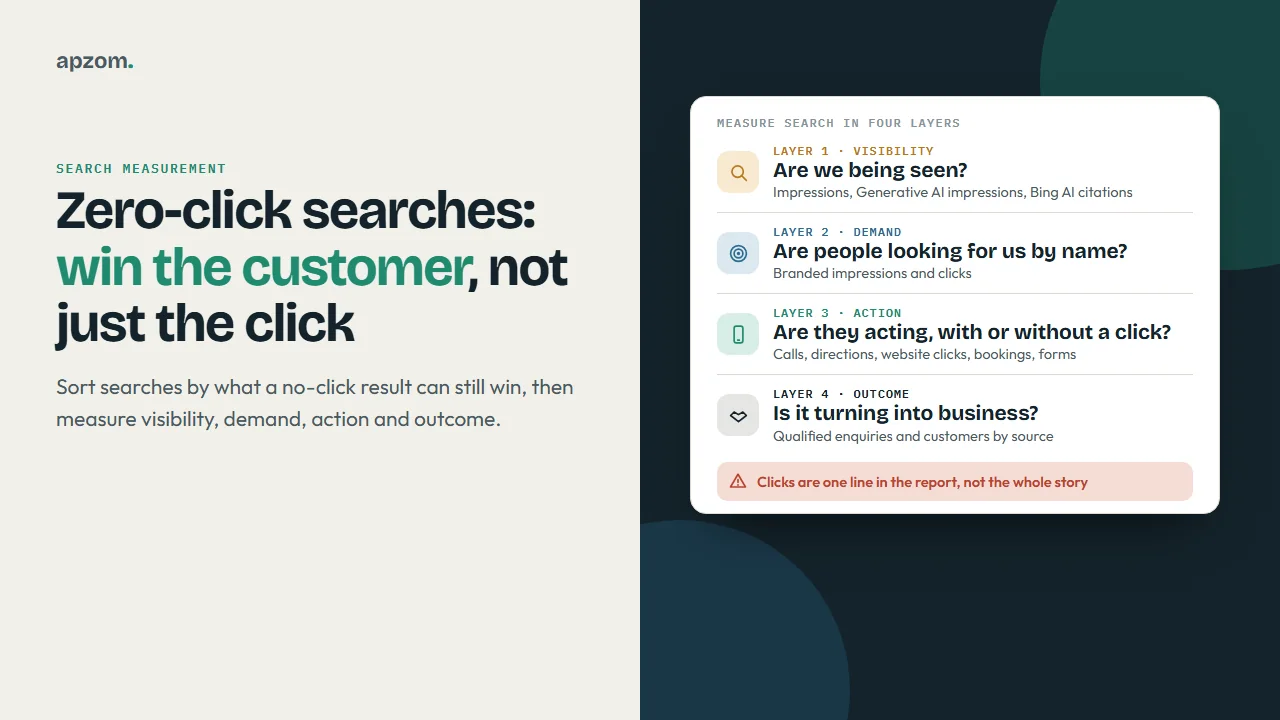
The short answer: A zero-click search is one where the searcher gets what they need on the results page and does not visit any website. You cannot stop it happening, but you can still win the customer. Sort your searches by what a no-click result can still give you (a phone call, a direction request, a name the searcher remembers, a citation in an AI answer), then stop judging search on clicks alone. Measure four layers instead: visibility (impressions, including Google’s AI features and Bing’s AI citations), demand (searches for your brand), actions (Business Profile calls, directions, website clicks, bookings and messages, plus calls and forms on your site) and outcomes (qualified enquiries and customers by source).
This guide is for business owners, marketing leads and anyone who reports on search to a boss or a client, in any country, whose clicks are flat or falling while impressions hold up. It covers which search features answer without a click, which zero-click searches matter, the metrics to use in Google Search Console and Google Business Profile, and a monthly measurement framework that runs on free tools. We checked the Google and Bing features, report names and metric definitions against official sources on 19 November 2026.
What a zero-click search is, and why it is not the same as a lost customer
A zero-click search ends without a visit to any website. The searcher reads the answer, taps a phone number, asks for directions, or remembers a name and comes back later. Some of those outcomes are lost to you; many are not.
Take three illustrative people searching on one morning. One types “convert 5 feet to cm” and reads Google’s answer: nobody’s website was ever going to win that. One searches “accountant near me”, sees three firms in the map results and taps Call on the second: a zero-click search that produced a customer. One asks AI Mode how to choose a payroll provider, reads an answer that cites your guide by name, and searches for your brand a week later: no click today, a branded visit later. A report built only on clicks treats all three the same.
You will see percentages quoted for how many searches end without a click. They come from third-party clickstream studies (SparkToro with Datos, and Similarweb, for example) that estimate behaviour from device panels, and they differ because panels, countries and definitions differ. We have not quoted one because we could not check a figure on the publisher’s own page. Your own Search Console and Business Profile data is better evidence for your business than any industry average.
Which search features answer without a click
Each feature below can satisfy a search on the results page. What matters is what you can still win, and where it shows in your data.
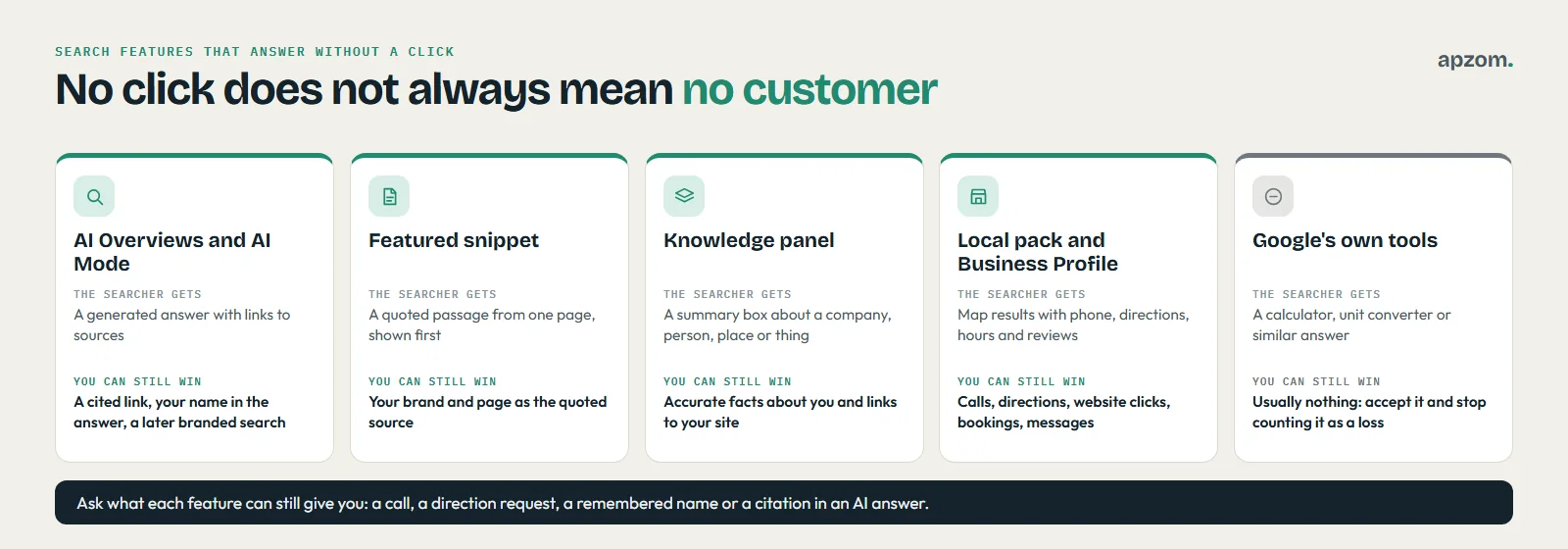
| Feature | What the searcher gets | What you can still win | Where it shows in your data |
|---|---|---|---|
| AI Overviews and AI Mode | A generated answer with links to sources | A cited link, your name in the answer, a later branded search | Search Console Performance (Web) and the Generative AI performance report |
| Featured snippet | A quoted passage from one page, shown first | Your brand and page as the quoted source | Search Console Performance, usually as position 1 |
| Knowledge panel | A summary box about an entity (a company, person, place or thing) | Accurate facts about you, links to your site and profiles | Not reported as its own feature; links count in Performance |
| Local pack and Business Profile | Map results with phone, directions, hours and reviews | Calls, direction requests, website clicks, bookings, messages | Google Business Profile performance |
| Google’s own tools | A calculator, unit converter or similar answer | Usually nothing; accept it | Nothing to measure |
A few facts from Google’s own documentation explain how these features behave:
- AI Overviews and AI Mode show links. Google’s “AI features and your website” documentation says both surface relevant links, may run several related searches across subtopics (it calls this “query fan-out”), and need no extra requirements or special structured data. Google also says clicks from pages with AI Overviews are higher quality, meaning people tend to spend more time on the site; that is Google’s statement, not something we have measured.
- Featured snippets are chosen by Google. Google’s featured snippets documentation says you cannot mark a page as a featured snippet; its systems decide. Our guide to featured snippets and AI answers shows how to write answer blocks that are easy to quote.
- Knowledge panels are generated automatically. Google’s Knowledge Panel Help says they draw on information across the web, and that the subject of a panel or its official representative can claim it and suggest changes. They are separate from Business Profiles.
Which zero-click searches matter to your business
Before you change any report, sort your top Search Console queries into four types.
- Quick facts. Conversions, definitions, dates and simple calculations. The answer is the whole need. Accept that these will not bring visits and stop counting them as a loss.
- Local intent. “Near me” searches, a service plus a town, opening hours, “open now”. The result page is where the customer acts, so the Business Profile is your shop window. Win calls, directions and bookings.
- Research and comparison. “How to choose”, “X vs Y”, “what does it cost”, “is it worth it”. AI answers and snippets often summarise these. Win the citation and the name recall, and give the reader a reason to come to you for the part a summary cannot do: a quote, an assessment, a booking.
- Branded and navigational. Your name, your name plus a service, your name plus “reviews” or “phone”. These are people who already know you. A zero-click result here (your phone number in the panel, your hours in the profile) is a success, not a loss.
The sort tells you where to spend effort. If most of your impressions are quick facts, you have a content problem, not a measurement problem. If most are local and branded, judge search on Business Profile actions and enquiries, not organic sessions.
The KPI shift: from clicks to outcomes
Clicks still matter, but they no longer measure everything search does for you. Keep them, and add metrics for what happens without them.
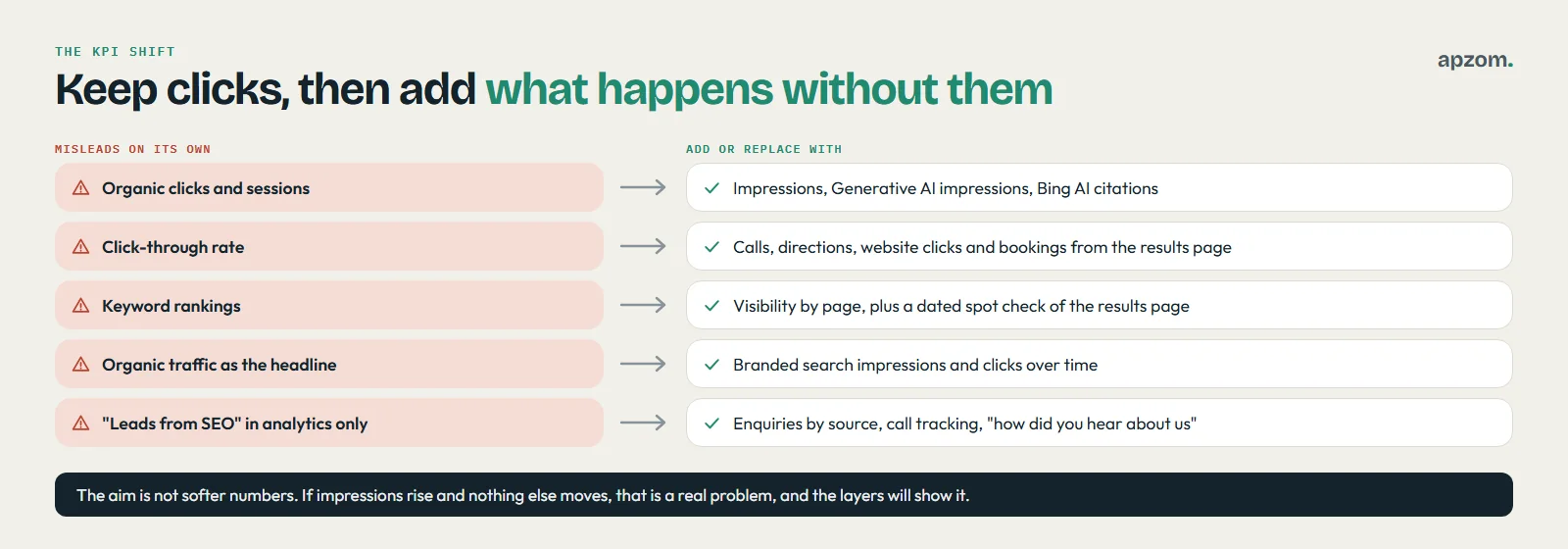
| Old KPI on its own | Why it misleads now | Add or replace with |
|---|---|---|
| Organic clicks and sessions | Falls when answers move onto the results page, even if you are seen more | Impressions, Generative AI impressions and Bing AI citations, by page group |
| Click-through rate | Drops when the page answers the question, which can mean you did well | Actions taken from the results page: calls, directions, website clicks, bookings |
| Keyword rankings | A position does not show whether you were quoted, or whether an AI answer sat above you | Visibility by page in Search Console, plus a dated spot check of the results page |
| Organic traffic as the headline | Misses people who saw you, remembered you and came back another way | Branded search impressions and clicks over time |
| “Leads from SEO” in analytics only | Calls from the map results never reach analytics, and AI-prompted return visits can arrive as Direct | Enquiries by source, including call tracking and a “how did you hear about us” answer |
The aim is not to hide falling clicks behind softer numbers. If impressions rise and nothing else moves, that is a real problem, and the framework below will show it.
What to measure in Google Search Console
Search Console is free and covers Google Search, including its AI features. Three parts matter here. Our guide on how to use Google Search Console covers setup and the other reports.
The Performance report: know what each number means
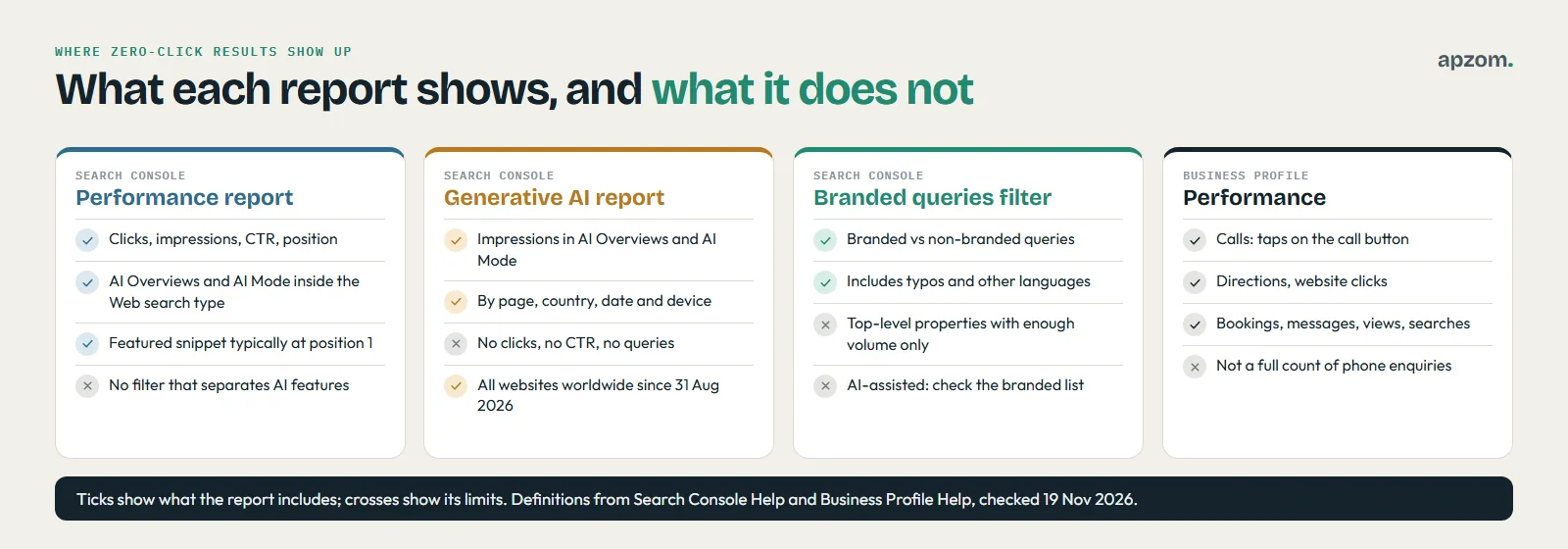
Search Console Help defines the core metrics this way. A click is a click from Google to your site. An impression means a user saw, or potentially saw, a link to your site. Click-through rate is clicks divided by impressions. Position is a relative ranking, where 1 is the top.
The same help page explains how the zero-click features are counted, which changes how you read the numbers:
- Featured snippet: it has a link to the source, so it typically occupies position 1. Standard impression rules apply, and a click on its link counts as a click.
- Knowledge panel: all links in the panel share the panel’s position, and when data is grouped by property, the whole card counts as one impression.
- AI Overview: it occupies a single position in the results. Standard impression rules apply, and a click on a link to an external page counts as a click.
- AI Mode: position follows the same method as a normal results page, standard impression rules apply, and a click on an external link counts as a click.
Google’s AI features documentation adds that clicks and impressions from AI Overviews and AI Mode are counted in the Performance report under the Web search type, mixed in with other results. Google documents no filter there that separates them, so a page cited in an AI Overview can show more impressions and a lower CTR in the same month without the report saying why. Look for that pattern rather than panic at it.
The Generative AI performance report
As of November 2026, Search Console has a Generative AI performance report for Search. Search Console Help says it shows impressions, defined as how many times links to your site were shown to a user in a generative AI feature, for AI Overviews and AI Mode, and lets you group them by page, country, date and device. Impressions are the only metric Google lists: no clicks, click-through rate or queries. Google announced the reports on 3 June 2026 and says they had rolled out to all websites worldwide as of 31 August 2026. If you do not see it, Google’s help page says the usual reason is too few impressions in these features, or that the site is excluded from them. A separate version covers Discover.
Use it to see which pages AI answers show, then pair them with the enquiries they bring.
The branded queries filter
Google added a branded queries filter to the Performance report, announced on 20 November 2025 and, according to Google’s March 2026 update, available to all eligible sites. It splits your query data into branded searches (your brand name and closely associated products, including typos and other languages) and non-branded searches. It works only for top-level properties with enough query and impression volume, and it has no effect on rankings. Google says the classification is done by an AI-assisted system, so read through the branded list once and check it matches what you would call your brand.
Branded impressions are your best free signal of demand: people who saw you in an answer and later searched your name show up here. Ads, PR and events also build it, so read the trend over months.
Clicks falling but not sure what that means for enquiries? Ask for a Free Growth Audit. We read your Search Console Performance data, the Generative AI performance report, branded searches and your Business Profile performance, and tell you which searches are lost causes, which are still winning you customers, and what to measure instead.
What to measure in Google Business Profile
For a local or service-area business, the Business Profile is where most zero-click searches turn into customers. Google Business Profile Help lists these performance metrics for owners and managers of a verified profile:
| Metric | How Google defines it | What to do with it |
|---|---|---|
| Interactions | A summary of all your total interactions | Your headline action number; track it monthly |
| Calls | The number of times a customer clicked the call button on your profile (needs a phone number on the profile) | Compare with calls your team logs; the gap shows calls from other routes |
| Directions | The number of people who asked for directions, adjusted for repeat taps, cancelled requests and spam | A strong signal for visit-based businesses |
| Website clicks | The number of times people clicked the website link on your profile | Tag the link with UTM parameters so the visits appear separately in analytics |
| Messages and Bookings | Distinct message conversations; bookings completed through a booking provider | Only if you use them |
| Views | People who viewed your profile on Search and Maps, counted once per person per day | Visibility, not action |
| Searches | The search terms people used to find you, updated at the start of each month | Check that the terms match the services you want to be found for |
Two cautions. First, Calls counts taps on the call button, so it is not a full count of phone enquiries; call tracking and a note in your CRM fill the gap. Our guide on tracking phone calls from Google Ads covers call tracking on the ad side. Second, Google warns that views, counted once per person per day, can be lower than the figures in profile notifications.
Tag the website link on the profile with a UTM campaign (for example, source google, medium organic, campaign gbp) so you can separate those visits from other Google organic visits in GA4 by campaign. Our guide to creating UTM links has a naming template, and our Google Business Profile optimisation checklist covers the profile itself.
Count what neither report shows
Neither report shows what happened next, or on other AI tools. Four more sources fill the gap.
- GA4 AI Assistant channel. Google Analytics 4’s default channel group includes an AI Assistant channel for visits from assistants such as ChatGPT, Gemini, DeepSeek, Copilot and Grok. Visits from Google’s AI Overviews and AI Mode are not in it; they arrive as Organic Search. Our guide on tracking AI search traffic in GA4 shows where each kind of AI visit lands.
- Bing Webmaster Tools AI Performance. Bing launched this report as a public preview on 10 February 2026. It shows how often your content is cited in Microsoft Copilot, AI-generated summaries in Bing and some partner integrations, which pages are cited, and a sample of grounding queries. It reports citations, not visits. Our guide to Bing Webmaster Tools covers setup.
- “How did you hear about us?” Add it as an optional question on your enquiry form or ask it on the first call, with options such as “Google search”, “Google Maps”, “an AI assistant (ChatGPT, Gemini, Copilot or similar)”, “searched your name” and “someone recommended you”. It is self-reported, but often the only place a zero-click influence shows up. Our guide to contact form best practices explains why it should stay optional.
- Dated spot checks. Once a month, search your 10 most important questions and note what the results page shows: an AI Overview or not, who is cited, whether your profile appears. AI answers vary by person, place and time, so treat these as notes, not rankings.
A zero-click measurement framework you can run monthly
Put the numbers in four layers, in this order. Each layer should feed the next; where it does not, you have found the problem to fix.
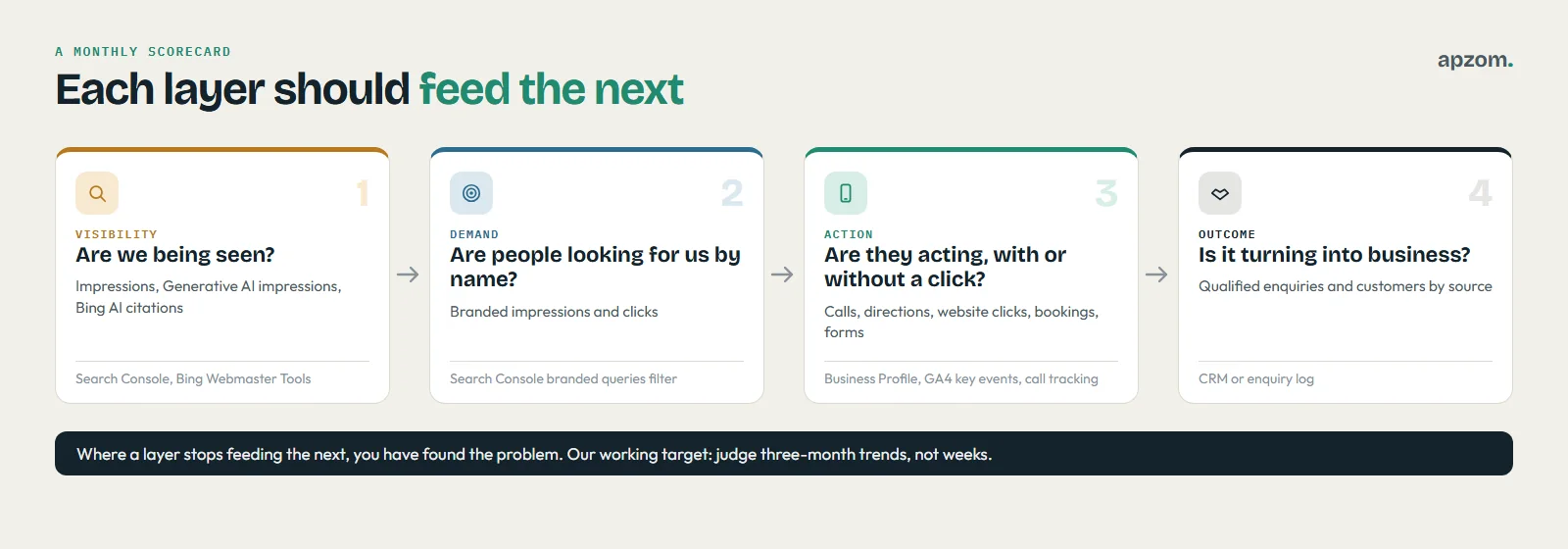
| Layer | Question it answers | Metrics | Source |
|---|---|---|---|
| 1. Visibility | Are we being seen? | Impressions by page group; Generative AI impressions by page; Bing AI citations | Search Console; Bing Webmaster Tools |
| 2. Demand | Are more people looking for us by name? | Branded impressions and clicks | Search Console branded queries filter |
| 3. Action | Are people acting, with or without a click? | Profile calls, directions, website clicks, bookings, messages; on-site calls and form submissions | Business Profile; GA4 key events; call tracking |
| 4. Outcome | Is it turning into business? | Qualified enquiries and customers by source, including “how did you hear about us” | CRM or enquiry log |
A 30-minute monthly routine
- Export last month’s Search Console Performance data by page and compare it with the same month last year if you have it, or with the previous three months if you do not.
- Open the Generative AI performance report and note the five pages with the most impressions.
- Apply the branded queries filter and record branded impressions and clicks.
- Record Business Profile calls, directions, website clicks and bookings for each profile.
- Count enquiries and customers by source from your CRM, including the “how did you hear about us” answers.
- Write three lines: what moved, what we think caused it, and what we will change next month.
Our working targets: judge three-month trends, not weeks; compare like-for-like periods; and date every change to a page or profile so you can match it to the numbers. These are house rules, not industry standards.
How to read the patterns
- Impressions up, clicks flat, actions up: zero-click results are working for you. Keep going and report it this way.
- Impressions up, clicks down, actions and enquiries flat: you are being seen but not chosen. Look at what the answer or profile shows about you, and whether your page gives a reason to take the next step.
- Generative AI impressions growing on pages that never lead to enquiries: the pages are quotable but not commercial. Add a clear next step and a link to the relevant service.
- Branded impressions flat for six months: visibility is not turning into memory; the answers quoting you may not show your name.
- Everything down: not a zero-click problem. Our guide on why organic traffic drops has the checks in order.
How to win the customer when there is no click
These are the levers that change the numbers.
- Be the source worth quoting. Put a direct, accurate answer near the top of each page, with your brand and specifics a summary would keep. Our guide to featured snippets and AI answers covers the patterns, and our guide to what GEO is explains how AI tools choose sources.
- Make your business facts the same everywhere. Name, address, phone, hours and services should match on your website, Business Profile and other listings, so the answer Google or an assistant gives about you is right. Schema markup helps describe those facts, though Google says no special markup is needed for its AI features.
- Complete the profile people act on. Categories, hours, services, photos and reviews shape whether a local searcher calls you.
- Offer what a summary cannot. A quote, an assessment, a calculator built on your own pricing, availability, a booking or a sample.
- Decide deliberately before opting out. Google’s announcement of 3 June 2026 (updated 31 August 2026) describes a Search generative AI control in Search Console: sites that opt out will not receive traffic or impressions from AI Overviews, AI Mode or AI Overviews in Discover, and Google says the setting is not used as a ranking signal outside those features. Preview controls (nosnippet, data-nosnippet, max-snippet, noindex) also limit what Google shows, but they affect normal results too. Either route can keep you out of answers your competitors appear in.
How to report zero-click results to a boss or a client
Lead with the four layers in plain words, and keep the click data underneath.
An illustrative headline, with no real figures: “We were shown more often in Google and AI answers this quarter, searches for our name rose, and profile calls and enquiries rose. Clicks fell slightly, mostly on question pages now answered on the results page. Next month we add a quote link to the three most-cited pages.” Our guide on what a marketing report should include has a one-page template, and our guide to marketing attribution models explains why a single source figure never tells the whole story.
Common mistakes
- Treating every lost click as lost revenue. Many zero-click searches were never customers, and local ones often end in a call.
- Reading the Generative AI report as traffic. It shows impressions, not visits.
- Counting Business Profile calls as all phone enquiries. The metric counts taps on the call button.
- Opting out or blocking snippets out of frustration. It can remove you from answers your competitors still appear in.
How Apzom can help
Our AEO services help businesses become the source that search features and AI answers quote, measured with the reports in this guide. We set up the four-layer scorecard, tag Business Profile links, configure GA4 key events and AI channels, connect call tracking and enquiry sources, and write the monthly report in plain words. Our GEO services, local SEO services and SEO services cover the work that moves the numbers. We have not published a zero-click or AEO case study yet, so we will not show you figures we cannot prove; our published client work is on our case studies page. We work with clients worldwide, remotely, from our base in Ahmedabad, India.
Get a Free Growth Audit of your zero-click visibility. Tell us your website, your Business Profiles and how enquiries reach you today. We send back a written plan: your queries sorted into the four types, a four-layer scorecard set up for your reports, the pages and profile fixes most likely to turn visibility into calls and enquiries, and a quote if you want us to run it.
No obligation, and no promised rankings, AI citations or call numbers. Prefer to talk first? Contact us or read our guide to featured snippets and AI answers.
Frequently asked questions
What is a zero-click search?
A search that ends without the searcher visiting any website, because the results page answered the question or let them act directly, for example by calling a business from its profile or reading an AI Overview.
Are zero-click searches bad for my business?
Not necessarily. Quick-fact searches would not have brought customers anyway, and local and branded searches often end in a call, a direction request or a booking. The harm comes from judging all of them on clicks.
Does Search Console show clicks from AI Overviews?
Yes, but mixed in: they sit in the Performance report under the Web search type, alongside other results. The Generative AI performance report shows how often links to your site appeared in those features, as impressions.
Can I stop Google using my content in AI Overviews?
Yes. Google describes a Search generative AI control in Search Console that removes your site from AI Overviews, AI Mode and AI Overviews in Discover, and says the choice is not used for ranking in normal results. The nosnippet, data-nosnippet, max-snippet and noindex controls also limit what Google shows, but in normal results as well. Weigh it first: opted-out sites get no traffic or impressions from those features.
Is SEO still worth paying for if people do not click?
It can be, if you judge it on outcomes: many searches still need a website, and zero-click features still bring calls, bookings and brand recall. If visibility rises for months and enquiries do not, change the plan.