The short answer: The best contact forms ask only for what changes your first reply: usually a name, one way to reach the person, what they need and a short message. Everything else is optional or asked later. Qualify with short choices instead of extra text boxes, stop spam with quiet checks before you ever show a puzzle, give every field a visible label and explain errors in words, link a privacy notice at the form and ask for marketing consent with a separate, unticked box. Then send people to a real thank-you page and a named person, and count that page as the lead in Google Analytics 4.
This guide is for business owners, marketers and developers anywhere in the world whose website form is where enquiries arrive. It covers each field’s reason and lead-quality trade-off, qualifying without friction, spam protection, accessibility, consent wording by country, what happens after Send, and GA4 tracking. We checked the standards, vendor documentation and legal points against official sources on 19 November 2026. None of this is legal advice; check the rules for your markets with a qualified adviser.
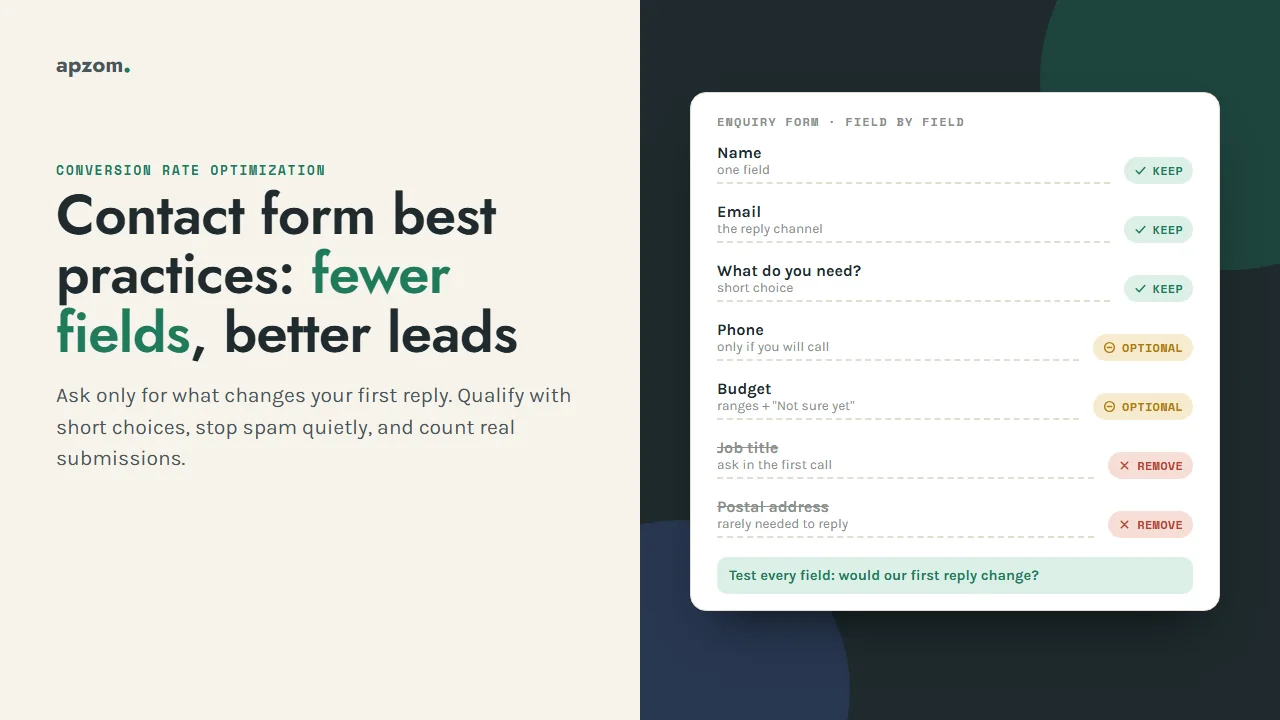
Start with one question: would our reply change?
You will see figures quoted online for how many enquiries each extra field costs. We have not found one that traces back to a study we could read, so we quote none. The principle needs no statistic: a field earns its place only if it changes what you do next.
Run each field through this test: If we knew the answer, would our first reply be different?
- If yes, and you cannot reply well without it, keep it and make it required.
- If yes, but you could still reply without it, keep it and make it optional.
- If no, remove it, or ask it in the first call or email, when the person has a reason to answer.
There is a legal reason too. The EU GDPR says personal data should be “adequate, relevant and limited to what is necessary” (Article 5(1)(c)), and the UK GDPR has the same principle.
For the page around the form (layout, offer, proof), see our guide to landing page best practices. This guide goes deeper on the form itself.
Field by field: keep, make optional or remove
The table below is our starting point for a typical service or B2B enquiry form. It is our rule of thumb, not an industry standard. Adjust it to how your sales team actually replies.
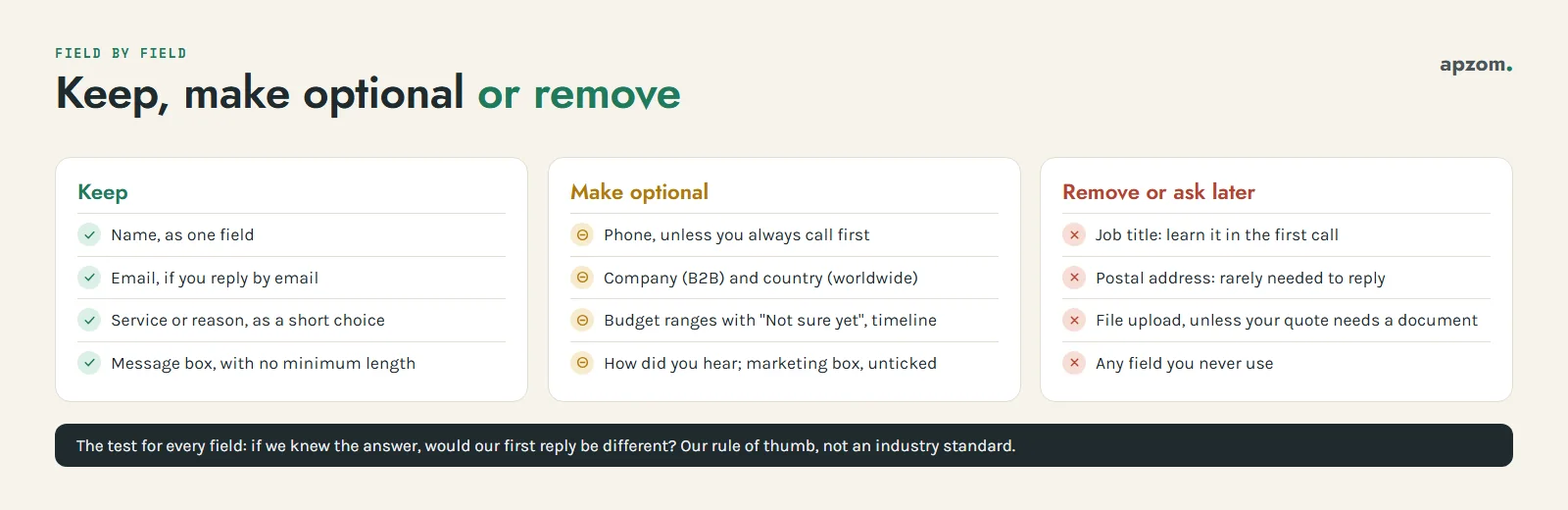
| Field | Our default | Why | Lead-quality trade-off |
|---|---|---|---|
| Name | Keep (one field) | W3C’s internationalization guidance asks whether you really need separate given and family name fields. | Two name fields add a step and confuse people whose family name comes first. |
| Keep, required if you reply by email | The reply channel for most enquiries. Use the email input type. | Requiring a work email filters out sole traders who use a personal address. | |
| Phone | Optional, unless you always call first | Ask only if you will call. Accept a full number with the country code. | Requiring it screens out the curious and also people who prefer email. |
| Company | Optional for B2B, remove for consumer services | Helps you research the account before replying. | Required company fields push freelancers and small firms to type “n/a”. |
| Job title | Remove | You can learn it in the first conversation. | Rarely changes the first reply. |
| Country or region | Optional dropdown if you sell worldwide | Tells you the time zone and which privacy and contact rules apply. | Cheap to answer as a dropdown. |
| Service or reason for contact | Keep, as a short choice | Routes the enquiry and shows wrong-fit requests. | Keep the list to what you sell, plus “Something else”. |
| Budget | Optional, as ranges with “Not sure yet” | Useful only if a budget range changes who replies or what you send. | Required, it filters hard: poor fits leave, and so do good buyers without a number yet. |
| Timeline | Optional, as a short choice | Separates “this month” from “just researching”. | Low effort to answer and often more useful than budget. |
| Message | Keep, usually optional | Room to explain. Set no minimum length. | A required long message is a barrier on phones. |
| How did you hear about us | Optional, or move to the first call | Can show what analytics misses, such as word of mouth. | Unreliable when forced. Not a substitute for tracking. |
| File upload | Remove, unless drawings or briefs are part of your quote | Useful for quotes that depend on a document. | Adds security work (see below). Offer “send it after we reply”. |
| Postal address | Remove | You rarely need it to reply. | A heavy field with little benefit at first contact. |
| Marketing consent box | Optional, unticked, separate | Only if you want to send marketing beyond the reply. | Never pre-tick it, and never make it a condition of sending the enquiry. |
Three technical notes:
- Autocomplete. MDN’s reference lists autocomplete tokens such as name, email, tel (a full number including the country code) and organization. Valid tokens let browsers fill the form and, MDN notes, satisfy WCAG 2.2 success criterion 1.3.5, Identify Input Purpose.
- Phone formats. A fixed ten-digit rule rejects many valid numbers from other countries. Accept a plus sign, the country code and spaces.
- File uploads. The OWASP File Upload Cheat Sheet recommends an allow-list of file types, checking the real type rather than trusting the browser, renaming files, a size limit, storage outside the web root and scanning where possible. If your plugin cannot do this, take files by email after the first reply.
Qualify without adding friction
Sales teams ask for more fields when too many enquiries are a poor fit. More required text boxes is rarely the best fix. Try these first.
- Turn questions into short choices. “Which service do you need?” with four options is faster than a text box and easier to route. Add “Something else” so nobody is forced into a wrong answer.
- Make qualifying fields optional and read what people leave blank. Someone who skips budget but answers timeline with “this month” is still worth a call.
- Show a field only when it matters. If a visitor chooses “Quote for a project”, show the timeline question; if they choose “Careers”, show a link to your jobs page instead of the sales form. Form plugins often call this conditional logic.
- Split forms by intent. A support question, a job application and a sales enquiry need different fields and different people. One “contact us” form for all three produces a mixed inbox.
- Let the page filter. Say who you work with, where, and what a project involves, so poor fits leave before typing.
- Use two steps only when there are many questions. A first step with the easy choices and a second step with contact details can feel shorter. Keep the step count visible, and keep what people entered if they go back (WCAG 2.2’s Redundant Entry criterion, 3.3.7, asks you not to make people type the same information twice in one process).
If your weak leads come from Meta’s instant forms rather than your website, the fixes are different (form type, SMS verification, custom questions). Our guide to low-quality leads from Meta lead ads covers those, and our guide to improving Google Ads lead quality covers the Google side.
Not sure which fields your form really needs? Ask for a Free Growth Audit. We go through your enquiry form field by field, test it on a phone and with a keyboard, check the spam set-up, the consent text and whether GA4 counts real submissions, and tell you what we would keep, change or remove.
Stop spam without blocking real people
Spam is why businesses add CAPTCHAs, and CAPTCHAs are why some real people give up. A W3C note on the inaccessibility of CAPTCHA says these tests often stop people with disabilities from finishing the task, and it lists quieter options such as hidden honeypot fields, heuristic checks and non-interactive checks. Layer the quiet checks first and keep a visible puzzle as the last resort.
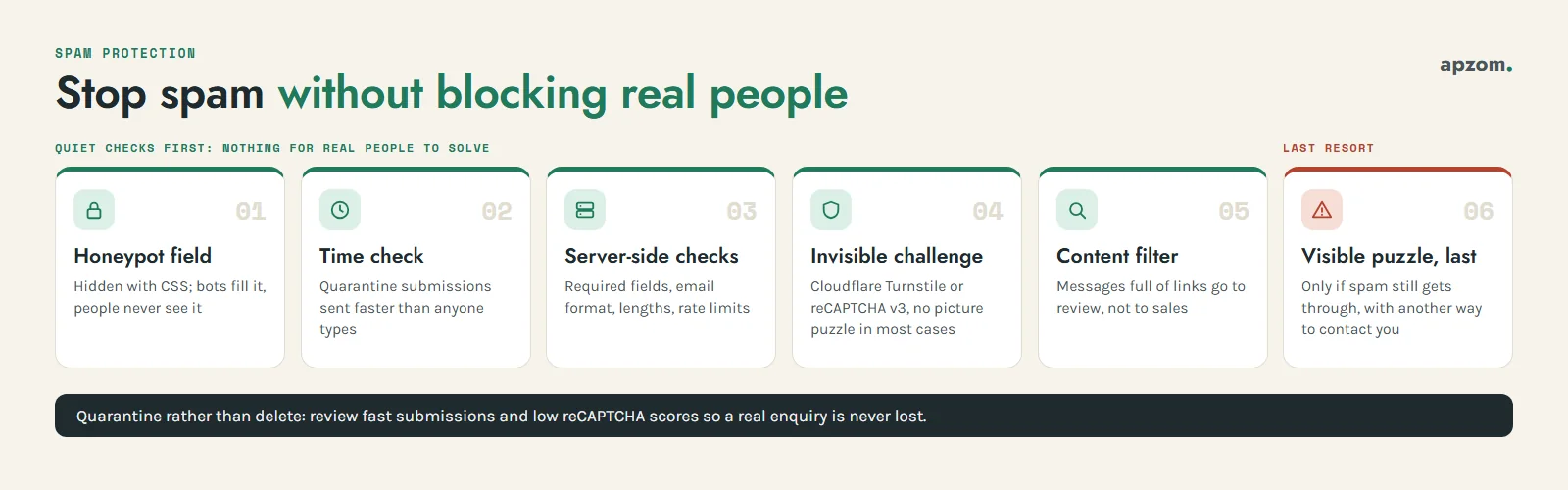
- Honeypot field. Add one extra field hidden with CSS display:none, so people never see it and screen readers skip it. Simple bots fill every field; if this one has a value, reject or quarantine the submission. Label it “Leave this empty” in case anyone reaches it, and give it autocomplete=”off” and an unusual name so browser autofill does not fill it for real visitors.
- Time check. Record when the form loaded and flag submissions sent faster than a person could type, such as within a couple of seconds. Our rule of thumb is to quarantine them rather than delete them, so you can check for false positives.
- Server-side checks. The W3C forms tutorial points out that checks in the browser can be bypassed, so validate on the server too: required fields present, a real email format, sensible lengths, and limits on how many submissions one address can send in a short time.
- An invisible or low-friction challenge. Cloudflare Turnstile and Google reCAPTCHA v3 both check visitors without a picture puzzle in most cases (details in the table below).
- Content filtering. Send messages full of links to a review folder, not to sales.
- A visible puzzle, last. Only if spam still gets through. If you use one, offer another way to get in touch next to the form, such as an email address or phone number.
| Tool | How it works | Privacy and terms notes (from the vendor’s docs) |
|---|---|---|
| Honeypot and time check | Hidden field and timestamp, checked on your server | No third party involved. Check whether your form plugin already offers them. |
| Cloudflare Turnstile | Runs small non-interactive JavaScript challenges; modes are Managed, Non-interactive and Invisible | Works on any site without sending traffic through Cloudflare. Cloudflare says it does not access, store or transmit form entries. The free plan allows up to 20 widgets with unlimited challenges. |
| Google reCAPTCHA v3 | Returns a score from 0.0 (likely a bot) to 1.0 (likely a good interaction); your server decides what to do | Google’s FAQ says you may hide the badge only if you show reCAPTCHA branding in the user flow (“This site is protected by reCAPTCHA.”). It sets a cookie (_GRECAPTCHA) that Google describes as necessary. The FAQ lists up to 10,000 assessments a month at no cost. |
A score-based tool needs a decision rule. Google’s v3 documentation suggests taking action behind the scenes rather than blocking traffic, so send low scores to review instead of discarding them. Mention any third-party script in your privacy and cookie notices.
Make the form usable for everyone
A form some visitors cannot complete loses leads. The W3C Web Accessibility Initiative (WAI) forms tutorial and WCAG 2.2 set out the basics, and most also make the form faster for everyone.
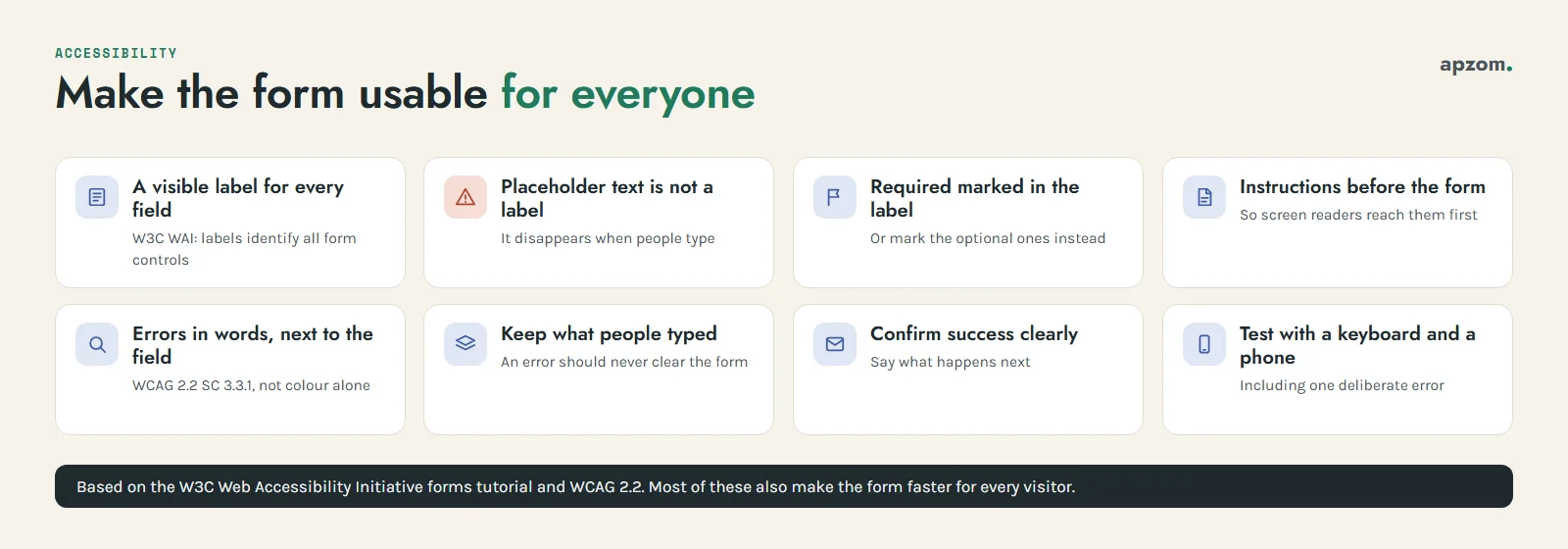
- A visible label for every field. The WAI tutorial says to “provide labels to identify all form controls”. A label can be visually hidden but must still be in the code; for a contact form, keep it visible.
- Placeholder text is not a label. The WAI tutorial warns that it disappears when people type, is not treated as a label by screen readers and is often too low in contrast.
- Mark required fields in the label. The tutorial suggests putting “required” (or the format) in the label text. If most fields are required, mark the optional ones instead and say so above the form.
- Instructions before the form. Put general instructions, such as “We reply within one working day”, above the form so screen readers reach them first.
- Errors in words, next to the field. WCAG 2.2 success criterion 3.3.1 (Error Identification) asks that the field in error is identified and the error described in text. The WAI tutorial adds that messages should say how to fix the problem, and that a list of errors at the top should link to each field. Do not rely on colour alone.
- Keep what people typed. An error that clears the whole form is one of the fastest ways to lose an enquiry.
- Confirm success clearly. The WAI tutorial notes that success messages confirm the task is complete. Say what happens next.
- Test with a keyboard and a phone. Complete and send the form without a mouse, then on a small screen with mobile data, including one deliberate error.
Our guide to why a website is not generating leads includes a 20-minute end-to-end test of the whole enquiry path, including whether the email actually arrives.
Consent text and privacy notices by country
Privacy law applies where your visitors are, not only where your business is. A good form ends with two separate things: a short notice linking your privacy policy, and, only if you want it, a separate marketing opt-in. Replying to an enquiry and sending newsletters are different purposes, and most laws treat them that way.
| Market | Notice at the form | Marketing consent |
|---|---|---|
| EU (GDPR) | Give the information in Article 13 at the time you collect the data, usually via a linked privacy notice. Replying to an enquiry can usually rely on steps taken at the person’s request before a contract (Article 6(1)(b)). | Consent must be clearly separate from other matters (Article 7(2)); Recital 32 says pre-ticked boxes do not count. Email marketing rules also come from each member state’s ePrivacy law, so they vary. |
| UK (UK GDPR, PECR) | The ICO says privacy information is due when you collect data directly, for example through a form, and suggests a just-in-time notice as people fill it in. | The ICO says consent requests should be separate from other terms and pre-ticked boxes are not valid. The ICO also describes a soft opt-in for marketing your own similar products to people whose details you got during a sale or negotiations for a sale, with a simple way to opt out when you collect the details and in every message. Check the ICO’s current guidance before relying on it for people who have only enquired. |
| United States | California’s CCPA requires a notice at or before collection for businesses that meet its thresholds, such as annual gross revenue above about $26.6 million (the California Privacy Protection Agency’s 2025 inflation-adjusted figure). Several other states have their own privacy laws and thresholds. | CAN-SPAM is opt-out: identify yourself, include a working unsubscribe and honour it within 10 business days. For calls and texts, see the TCPA notes in our landing page guide. |
| Canada (CASL) | Federal and provincial privacy laws also apply. | CASL’s regulations say a consent request must be sought separately, identify who is asking, give a mailing address and a phone, email or web contact, and say consent can be withdrawn. The CRTC says express consent cannot be obtained with opt-out mechanisms such as a pre-checked box. |
| Australia | The Privacy Act’s APP 5 requires reasonable steps to notify people at or before collection, or as soon as practicable after. Many businesses with annual turnover of A$3 million or less are exempt, with exceptions such as health service providers. | The Spam Act 2003 requires consent, clear identification and a working unsubscribe. |
| India (DPDP Act 2023) | On the timetable notified in 2025, the main notice and consent duties apply from about May 2027. The government consulted in 2026 on bringing that forward; when we checked we found no notification changing it, so confirm with India’s Ministry of Electronics and IT (MeitY). The Rules require a clear notice, separate from other information. | Build a clear notice and a specific consent step into the form now rather than redesigning it later. |
| UAE (PDPL) | Federal Decree-Law No. 45 of 2021 has been in force since January 2022 and generally requires consent. Businesses in the DIFC and ADGM free zones follow their own data protection laws. | When we checked, we could not confirm that the law’s detailed executive regulations had been issued. |
Here is an example of the wording we start from. It is illustrative only; adapt it with your adviser and link your own privacy notice.
- Under the Send button: “We use your details to reply to this enquiry. See our privacy notice for how we handle your data and your rights.”
- An optional, unticked box: “Send me occasional emails about [topic]. I can unsubscribe at any time.” Add your business name and contact details where CASL applies.
Record what each person agreed to, when, and the exact wording they saw, and keep old versions when you change it.
What happens after someone presses Send
The form is the middle of the enquiry, not the end. The image shows six steps; the first five are below, and counting the lead in GA4 has its own section after them.
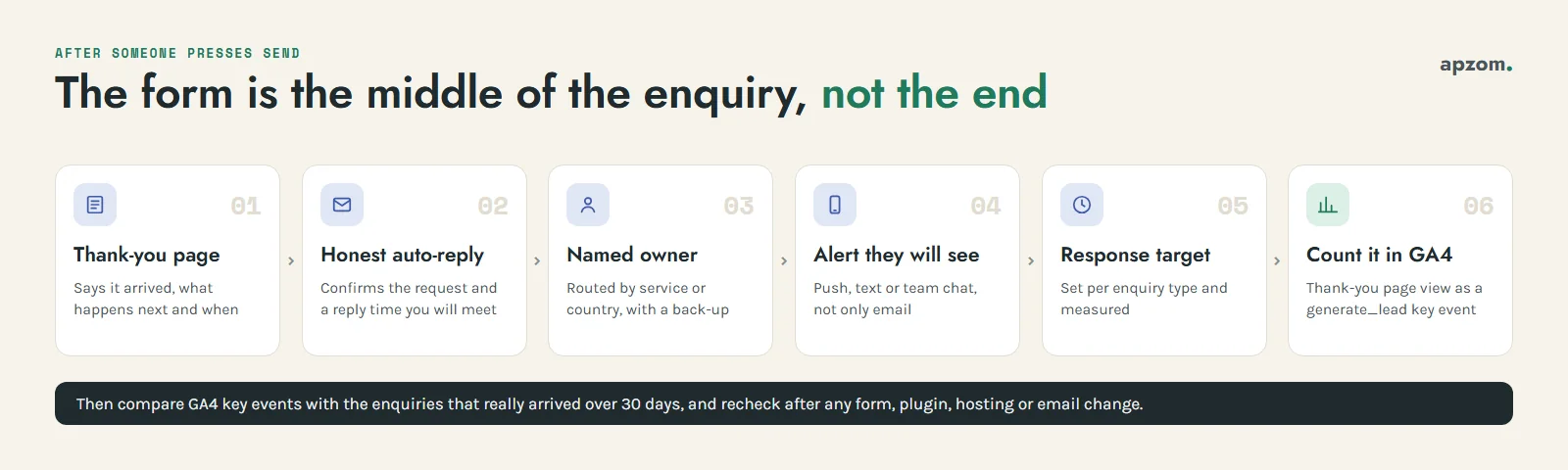
- A real thank-you page or message. Say the enquiry arrived, what happens next and when. A dedicated thank-you page is also the most reliable thing to track (see the next section). Keep it out of search results with a noindex tag if it would look thin on its own.
- An honest auto-reply. Send a short email that confirms what they asked for and when a person will reply, in their time zone if you sell worldwide. Promise only what you will deliver. Form notifications often come from your web server; our guide to SPF, DKIM and DMARC explains how to stop them landing in spam.
- Routing to a named person. Send each enquiry to one owner, based on the service or country chosen, with a back-up when that person is away. A shared inbox that “someone” checks is where enquiries wait.
- An alert they will see. A push notification, text or team chat message to the owner, not only an email.
- A response target. Decide how fast you will reply to each type of enquiry and measure it. Our guide to speed to lead has starting targets, routing rules and what the research on response time does and does not show.
For the wider view of where enquiries leak, from page message to follow-up, see our guide to what conversion rate optimization is.
Track form submissions in GA4
Google Analytics 4 offers two common ways to count submissions, and they do not measure the same thing.
| Method | What it records | When to use it |
|---|---|---|
| Thank-you page as a key event | A visit to the page people see only after a successful submission | The most reliable choice for most forms. Create an event such as generate_lead from that page view and mark it as a key event. |
| Enhanced measurement form_submit | Google describes form_submit as “when the user submits a form”; form_start records the first interaction with a form in a session | Useful for seeing where people start but do not finish. In our reading, it records the submit action, which does not prove the message passed validation or reached you, so check it against real enquiries before relying on it. |
Google’s recommended event for a lead is generate_lead, which its documentation says “measures when a lead has been generated (for example, through a form)”. To mark it as a key event, go to Admin, then Data display, then Events, and click the star, or use Create event and turn on “Mark as key event”. Key events count only from the day you mark them. To report form_start and form_submit by form, Google notes you need custom dimensions for parameters such as form_id.
Our step-by-step guides cover the set-up: how to set up Google Analytics 4 for key events, and Google Tag Manager for beginners for a thank-you page trigger that sends generate_lead. Our guide to creating UTM links shows how to see which campaign each enquiry came from.
Then compare the GA4 key event count with the enquiries that actually arrived over 30 days. Too few usually means a broken tag; too many usually means spam or a reloaded thank-you page. Repeat the check after any change to the form, plugin, hosting or email set-up.
Common mistakes
- Asking for everything on day one. Job title, address and “how did you hear about us” rarely change the first reply. Ask them later.
- Requiring phone and email together. Ask for the channel you will use. If you need both, explain why.
- Labels inside the field. Placeholder text that disappears is not a label.
- A puzzle as the first spam defence. Try the honeypot, time check and server checks first.
- Pre-ticked or bundled marketing consent. It is not valid consent in the EU, UK or Canada, and it puts people off everywhere.
- A thank-you message nobody can track. Use a thank-you page or a success event that fires only when the submission really succeeds.
- No owner for new enquiries. A good form feeding an unread inbox is still a broken form.
How Apzom can help
Apzom Digital reviews and rebuilds enquiry forms as part of our conversion rate optimization and website development work: the field list, conditional questions, spam layers, accessibility, the consent and notice text for your markets, the thank-you page, auto-reply and routing, and GA4 and Tag Manager tracking that counts real submissions. We have not published a conversion rate optimization or form redesign case study yet, so we will not show you figures we cannot prove; we will show you what we would change and why. We work with clients worldwide, remotely, from our base in Ahmedabad, India.
Get a Free Growth Audit and Quote for your enquiry form. Send us the page with your form, the markets you sell to and how enquiries reach your team today. We send back a written plan: the field list, spam layers, accessibility fixes, the notice and consent wording to check with your adviser, the thank-you and routing set-up, and the GA4 tracking, with a quote if you want us to build it.
No obligation, and no promised number of leads. Prefer to talk first? Contact us or see our conversion rate optimization service.
Frequently asked questions
How many fields should a contact form have?
There is no right number. Ask for what changes your first reply, which for most service businesses is a name, one contact method, what they need and an optional message, and test the result on your own traffic.
Is it better to use reCAPTCHA or a honeypot?
Start with a honeypot and a time check, which cost real visitors nothing. Add Cloudflare Turnstile or reCAPTCHA v3 if spam still gets through, and keep a visible puzzle as the last resort.
Do I need a consent checkbox on a contact form?
Not to reply to the enquiry itself in most markets; a clear notice linked at the form is usually the requirement for that. If you want to send marketing, such as newsletters, to people who enquire, a separate, unticked consent box is the clean way to get it, especially in the EU, UK, Canada and Australia. Some markets allow limited exceptions, such as the UK soft opt-in or Canada’s six months of implied consent after an inquiry, so check before relying on one.
How do I track contact form submissions in Google Analytics 4?
Send people to a thank-you page after a successful submission, create a generate_lead event from that page view and mark it as a key event. The form_submit event can show drop-off, but check it against real enquiries first.