The short answer: Your website needs a redesign when its foundation stops you from doing ordinary work: you cannot edit it without a developer, its theme blocks good mobile speed or accessibility however much it is tuned, it runs on software that no longer gets security fixes, its structure cannot hold the services or markets you now sell, or it still sells a business you have moved on from. If the problem is a weak page, an unclear message, a broken form or slow follow-up, you need a fix or a refresh, not a rebuild. A rebuild costs more, takes longer and carries the old problems across if the real cause was never found.
This guide is for owners and marketing leads of service businesses anywhere in the world whose site is a few years old and who keep hearing that it “needs a new website”. It gives you seven signs that justify a redesign, each with a test you can run yourself in under an hour, and three common reasons that do not justify one. It ends with a simple scorecard to decide between a fix, a refresh and a rebuild. We checked the standards, support dates and accessibility rules below against their official sources on 18 November 2026. Apzom Digital builds websites, so read this knowing we have an interest; the tests are designed so you can reach the answer without us.
Fix, refresh or rebuild: three levels of change
A “do we need a new website?” conversation can easily skip a step. There are three levels of change, and each one fits a different kind of problem.
| Level | What changes | Typical problems it solves | What stays |
|---|---|---|---|
| Fix | One page, form, tag, plugin or setting | A broken form, a slow image, a missing phone number, an outdated plugin | Design, platform, URLs and structure |
| Refresh | Content, layout of key pages, visual polish within the same theme or system | Unclear service pages, an old look, weak calls to action, new photos | Platform, most URLs and the overall structure |
| Rebuild (redesign) | Theme or platform, templates, page structure, often URLs | A site you cannot edit, cannot make fast or accessible, or cannot extend | Your domain, your best content and, with care, your search visibility |
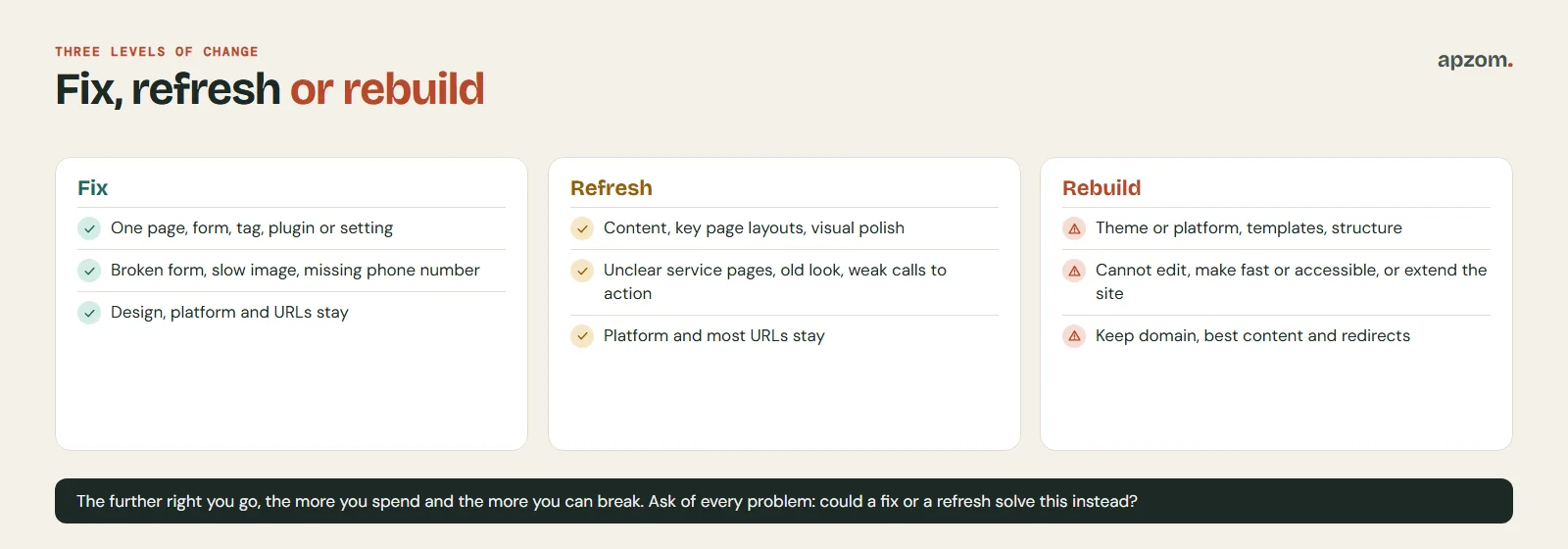
The further down the table you go, the more you spend and the more you can break. A rebuild that changes URLs also puts search traffic at risk for a while: Google’s “Site moves with URL changes” documentation warns of ranking fluctuations while it recrawls, and says a medium-sized site can take a few weeks or more before the new URLs show, and larger sites longer, so plan for possible ranking fluctuation if URLs change. That is why the rest of this guide asks one question of every sign: could a fix or a refresh solve this instead?
The seven signs your website needs a redesign
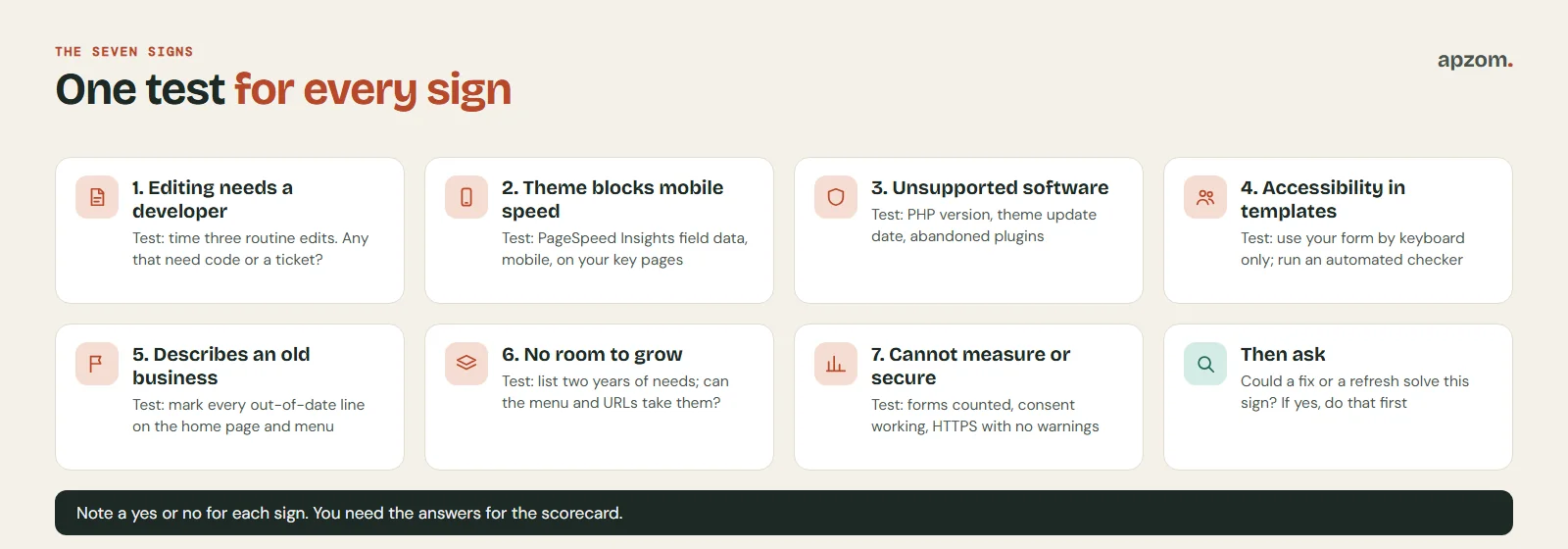
Each sign comes with a test and a threshold. Run them in order and note a “yes” or “no” for each. You will use the answers in the scorecard at the end.
1. You cannot make ordinary changes without a developer
The test: pick three routine jobs: change a price or opening time, add a new service page using the existing layout, and swap a photo on the home page. Time how long each takes the person who would normally do it.
The threshold: if any routine job needs a developer, a paid ticket or a workaround such as editing code, the site is costing you every week. Our benchmark: a trained non-developer should be able to publish a new page from an existing template in under an hour.
Could a fix solve it? Sometimes. If the content management system is fine but nobody was trained, a short handover session is the fix. If the site was hand-coded, built on a page builder nobody understands, or locked to one supplier’s private system, a rebuild onto a platform you control is the honest answer in that case. Our guide to WordPress vs website builders explains what “control” means in practice.
2. Your theme blocks a fast, stable mobile experience
The test: run your home page and your two most important service pages through Google PageSpeed Insights, on the mobile tab. Look first at the field data section at the top of the report, which comes from the Chrome User Experience Report. If it shows no field data, your site has too little Chrome traffic to be measured; use the lab results as a rough guide. Search Console’s Core Web Vitals report uses the same data, so it will also be empty.
The threshold: Google’s published “good” thresholds, measured at the 75th percentile of page visits, are a Largest Contentful Paint (LCP) of 2.5 seconds or less, an Interaction to Next Paint (INP) of 200 milliseconds or less and a Cumulative Layout Shift (CLS) of 0.1 or less (web.dev, “Web Vitals”; INP replaced First Input Delay in March 2024). If your key pages fail on mobile field data, visitors are waiting or tapping the wrong thing. Google declared mobile-first indexing complete in October 2023, and since July 2024 it crawls the remaining sites with its smartphone crawler only, so content that cannot be reached on mobile at all may not be indexed. Our guide to Core Web Vitals explains each metric and the usual fixes.
Could a fix solve it? Try that first. Oversized images, too many plugins, a slow host and render-blocking scripts are fixes. The sign that points to a rebuild is when a developer has already tried those and the theme itself is the bottleneck: heavy page-builder markup on every page, sliders and animations baked into templates, or scripts the theme cannot run without. Google’s page experience documentation says good Core Web Vitals do not guarantee top rankings and that relevance comes first, so do this for your visitors first.
3. It runs on software that no longer gets security fixes
The test: ask your developer or host three questions, or look in your dashboard. Which version of PHP (or your platform’s equivalent) does the site run on? When was the theme last updated by its maker? Are any plugins flagged as abandoned or untested with recent releases?
The threshold: PHP versions get security fixes for a limited time. According to php.net (checked 18 November 2026), PHP 8.1 has had no security fixes since 31 December 2025, PHP 8.2 stops receiving them on 31 December 2026, PHP 8.3 gets security fixes only until 31 December 2027, and PHP 8.4 and 8.5 are in active support. If you are on PHP 8.2, plan the move to 8.3 or newer now. WordPress recommends PHP 8.3 or newer (WordPress.org requirements page; the current release is 7.1). On WordPress.org, a plugin that has not kept up shows the warning “This plugin hasn’t been tested with the latest 3 major releases of WordPress.” If your site cannot run on a supported PHP version, or relies on plugins or a theme with that kind of warning, treat it as a yes.
Could a fix solve it? In many cases. Updating PHP and replacing one or two abandoned plugins is routine maintenance. It becomes a rebuild sign when the theme or custom code breaks on a supported PHP version and its maker has gone, so every update is a gamble. Keeping an unsupported site online is a security risk to your visitors, not only a technical debt.
4. Accessibility problems are built into the templates
The test: try to use your contact form with only the keyboard (Tab, Shift+Tab, Enter). Can you see where you are at every step? Then run a free automated accessibility checker on your main templates, and read your text on a phone outdoors. Automated tools find only part of the problems, so treat a clean result as a starting point, not a pass.
The threshold: the usual benchmark is WCAG (the Web Content Accessibility Guidelines) at level AA. WCAG 2.2 has been a W3C Recommendation since October 2023 (updated December 2024); WCAG 3.0 is still a draft. Many laws and standards still point to WCAG 2.0 or 2.1, so check which version applies to you. If keyboard users get trapped, form fields have no labels, or text contrast fails on every page because of the theme’s colours, the problem sits in the templates, not in one page.
Why it matters by country. Rules differ, and none of this is legal advice:
- EU: the European Accessibility Act has applied since 28 June 2025, but only to the products and services it lists, such as e-commerce, consumer banking, e-books, electronic communications and parts of passenger transport. A brochure site that sells none of these is outside it, and microenterprises providing services (fewer than 10 people and no more than EUR 2 million turnover or balance sheet) are exempt from the service requirements.
- US: the Justice Department says the ADA applies to the web but has no detailed technical rule for private businesses (guidance of March 2022). Its rule for state and local governments uses WCAG 2.1 AA; an April 2026 interim rule moved the deadlines to 26 April 2027 for state and local governments serving 50,000 or more people, and 26 April 2028 for smaller ones and special district governments.
- UK: GOV.UK guidance says all UK service providers must make reasonable adjustments under the Equality Act 2010, which covers websites. The separate 2018 accessibility regulations apply to public sector bodies only.
- Canada: in Ontario, private and non-profit organisations with 50 or more employees must make public websites conform to WCAG 2.0 AA (since 1 January 2021). The federal Accessible Canada Act covers federally regulated organisations.
- Australia: the Australian Human Rights Commission applies the Disability Discrimination Act 1992 to websites and apps; its April 2025 guidelines on equal access to digital goods and services are not legally binding and point to the latest WCAG.
- India: the Rights of Persons with Disabilities Act 2016 requires service providers to meet accessibility rules made under the Act within two years of those rules being notified, and in November 2024 the Supreme Court (Rajive Raturi) ordered the government to frame mandatory accessibility rules. The ICT rules published since are drafts; we found no final notified rule as of 18 November 2026.
- UAE: we found no federal website accessibility rule for private businesses. That does not make an inaccessible site a good idea for your customers.
Could a fix solve it? Missing alt text, a few unlabelled fields and low-contrast buttons are fixes. When the menu, forms and colour system all fail across every template, rebuilding those templates properly can be cheaper than patching each page for years.
Not sure which signs apply to your site? Ask for a Free Growth Audit and Quote. We run the seven tests on your website, check speed, accessibility basics, software versions and tracking, and tell you whether we would fix, refresh or rebuild, including when the answer is “not yet”.
5. The site no longer describes the business you are
The test: print your home page and your services menu. Mark every line that is out of date: services you no longer sell, missing ones you now lead with, old prices, old locations, team members who have left, a positioning line you would not say to a client today.
The threshold: as a rule of thumb, if more than a third of the home page or the services list is wrong, or the site is built around a customer you no longer target, the problem is bigger than copy edits. A website can be the first proof a buyer checks; when it contradicts what your sales team says, it costs you trust.
Could a refresh solve it? If the structure still fits, yes: rewrite the pages and update the photos. If you have repositioned, merged with another business or changed your brand, check sign 6 too: if the old structure cannot hold the new business, it counts as a sign a refresh cannot solve. If the brand itself is changing, start with our brand identity guide, then write a website brief before anyone designs anything.
6. The structure cannot hold what you now sell
The test: list what you need the site to do in the next two years: new services, new locations or countries, new languages, a blog or resource hub, booking, a client area. For each one, ask whether the current menu, templates and URL pattern can take it without awkward workarounds.
The threshold: as a rule of thumb, if two or more of those needs would mean bolting on pages that do not fit the navigation, duplicating templates by hand, or adding a second site, the information architecture has run out of room. Multilingual and multi-country sites in particular need a URL and template plan from the start.
Could a refresh solve it? A single new section may fit. Several, especially new languages or markets, are a rebuild sign, because the structure decides how visitors and search engines find everything else.
7. You cannot measure or secure what the site does
The test: open your analytics and check three things. Is every enquiry form and click-to-call counted as a key event? Does your cookie or consent banner actually work in the markets you sell to? Does every page load over HTTPS with no browser warning?
The threshold: every page should load over HTTPS. Google announced in October 2025 that Chrome 154 would turn on “Always Use Secure Connections” by default for public sites, which warns visitors before an unencrypted page loads; Chrome is rolling it out gradually, so not every visitor sees it yet. If tracking cannot be added because the site blocks tag managers or scripts, if consent tools cannot be installed, or if forms send enquiries to an inbox nobody controls, the site cannot support the marketing you pay for.
Could a fix solve it? Start there. Installing a tag manager, fixing a certificate or connecting forms to a CRM are fixes; our Google Analytics 4 set-up guide covers the measurement side. It points to a rebuild only when the platform will not allow those changes at all.
Three signs that do not justify a redesign
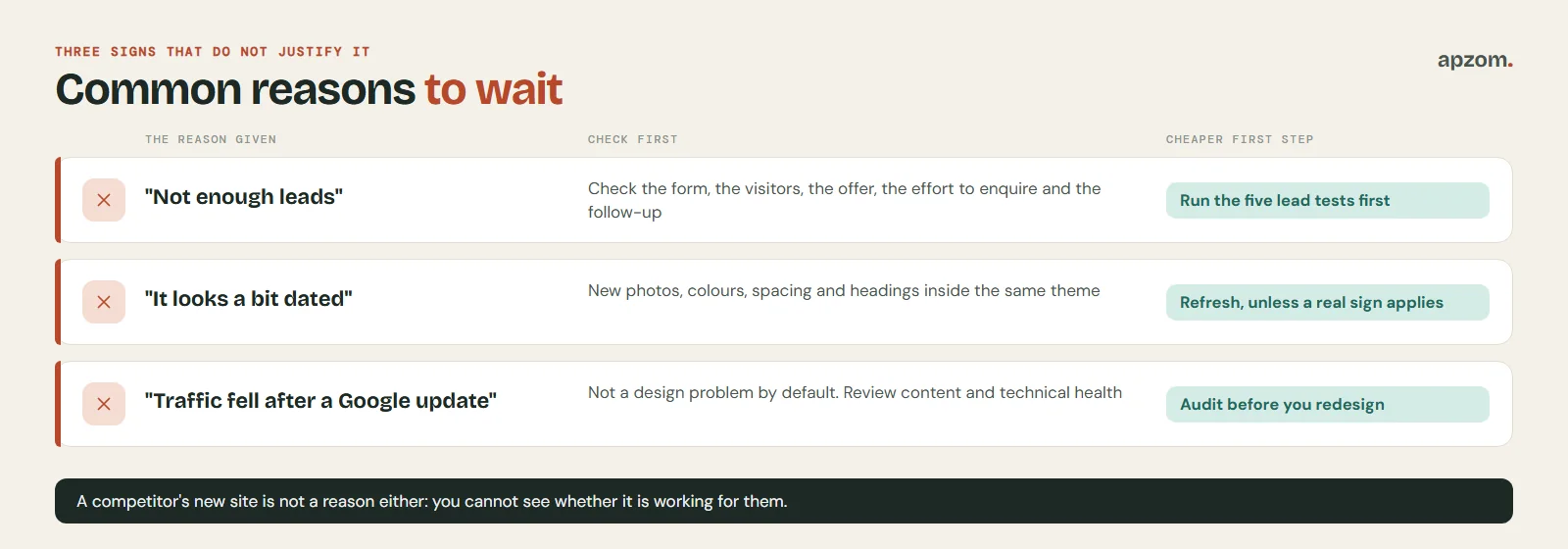
These three reasons sound convincing, but each one has a cheaper, faster first step.
1. “We are not getting enough leads”
A rebuild is a poor first answer to a lead problem. Common causes of low leads include a broken or uncounted form, the wrong visitors, a page that does not explain the offer, a form that asks too much, or slow follow-up after the enquiry. A new design carries an unclear message straight across. Work through our five tests in why is my website not generating leads first; if those tests all point back to the platform, come back to the seven signs above.
2. “It looks a bit dated”
Looking old is a refresh problem, not a rebuild problem, unless it comes with one of the seven signs. New photography, a tighter colour palette, better spacing and rewritten headings within the same theme often change how a site feels for a fraction of the cost.
3. “Our traffic dropped after a Google update” or “a competitor just redesigned”
Google’s core updates documentation says these updates are broad and “don’t target specific sites or individual web pages”. For small drops it says there is no need to take drastic action; for large ones it suggests reviewing whether the site as a whole is genuinely helpful, and recovery can take months. That is a content and quality question, not a design one. Read our technical SEO audit guide and content audit guide before you touch the design. As for a competitor’s new site, you cannot see whether it is working for them. Judge your own site against your own numbers.
Score your site: fix, refresh or rebuild
Go back to your seven answers. For each “yes”, note whether a fix or a refresh could solve it. Then apply this rule.
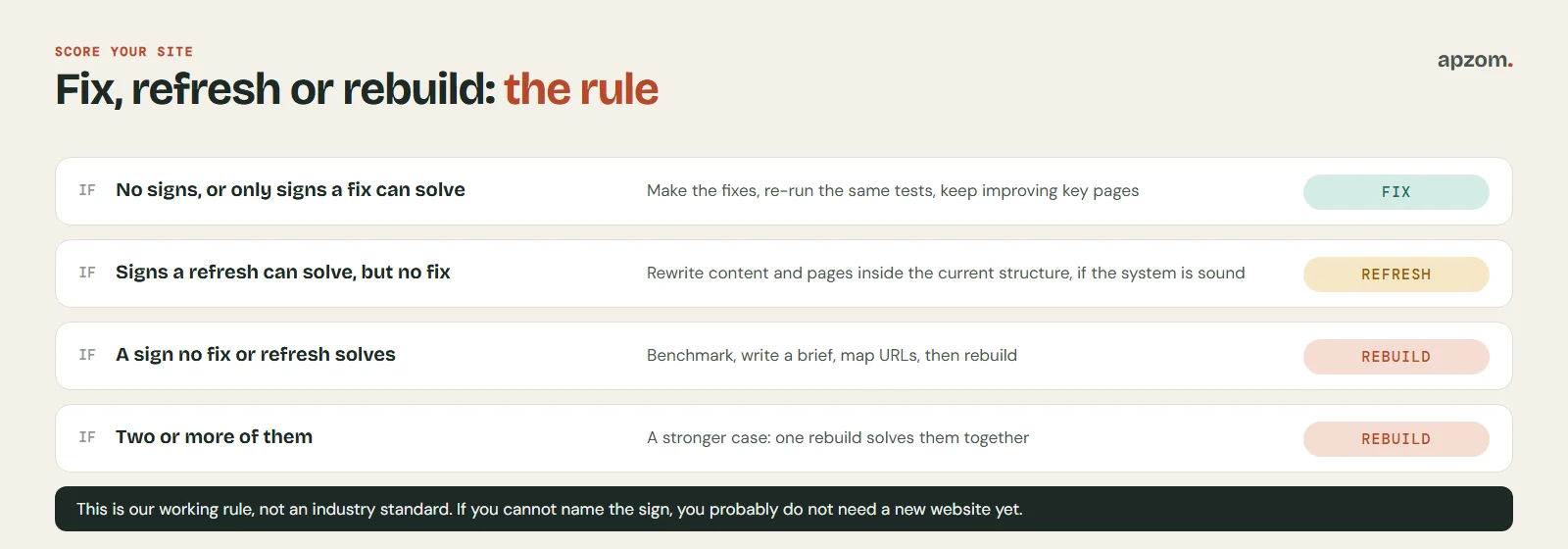
- No signs, or only signs a fix can solve: make the fixes, re-run the same tests, and keep improving the pages that bring enquiries.
- Signs a refresh can solve but a fix cannot (such as sign 5, the business has changed): refresh the content and pages inside the current structure, if the system is otherwise sound.
- Any sign that neither a fix nor a refresh can solve: plan a rebuild. Two or more of them make the case stronger, because one rebuild solves them together.
This is our working rule, not an industry standard. Its point is to make you write down the reason for a rebuild before you pay for one. If you cannot name the sign, you probably do not need a new website yet.
If you do rebuild: protect what already works
A rebuild should keep three things: your domain, the content that already earns visitors and enquiries, and your search visibility. Before anyone starts design work:
- Benchmark. Export the pages that get traffic and enquiries from Google Search Console and your analytics, and note your current monthly enquiries from the site. Without a “before” number you cannot tell whether the new site is better.
- Write the brief. Goals, audiences, pages, must-keep content, integrations and who will edit the site. Our website brief guide has a template.
- Plan the URLs. Keep URLs that rank where you can, and map every changed one to its new address with a 301 redirect. Our website redesign SEO checklist covers the redirect map, staging, launch day and the weeks after.
- Budget honestly. Our guide to how much a website costs explains what drives the price, and how to choose a web design company covers the questions to ask before you sign.
- Fix the cause, not only the look. Write down which of the seven signs you are solving, and check each one again after launch.
Common mistakes
- Rebuilding to fix a follow-up problem. If enquiries arrive but go unanswered for a day, no design will help. See our guide to speed to lead.
- Changing everything at once. New design, new URLs, new content and new hosting on the same day make it impossible to tell what caused a drop.
- Throwing away pages that work. Your best-performing pages earned their visitors; move them, improve them, and keep their URLs where possible.
- Judging the new site after a week. Search engines need time to recrawl a rebuilt site. Compare like-for-like months.
- Choosing a platform you cannot leave. Ask who owns the domain, the hosting account, the design files and the content before you start.
How Apzom can help
Apzom Digital builds and rebuilds business websites on WordPress, with speed, accessibility and editing handed over as part of the build. Our recent work includes AutoHunt and ARKS Infinity Logistics, both built from scratch on WordPress; neither was a redesign of an existing site, and we have not published a redesign case study yet, so we will not show you one. If you are unsure whether you need a fix, a refresh or a rebuild, we will run the seven tests on your site and tell you which level we would choose and why, including when the answer is “not yet”. See our website development service, or our SEO services if the main worry is keeping your rankings through a move. We work with clients worldwide, remotely, from our base in Ahmedabad, India.
Get your Free Growth Audit and Quote. Tell us about your current website and what you need it to do next. We review it against the seven signs in this guide and send you a written recommendation: fix, refresh or rebuild, what we would do first, and a quote if you want us to do the work.
No obligation and no guaranteed rankings or leads. Prefer to talk first? Contact us or see our website development service.
Frequently asked questions
How often should a website be redesigned?
There is no fixed schedule worth following. A well-built site on maintained software can run for many years with regular refreshes. Redesign when one of the seven signs appears and a fix cannot solve it, not because a set number of years has passed.
Is it better to redesign or refresh a website?
Refresh first if the platform is supported, editable and fast enough, and the structure still fits your services. Redesign when the problem sits in the foundation: the theme, the platform or the page structure.
Will a website redesign hurt my SEO?
It can, mainly when URLs change without redirects, ranking content is dropped, or the new site is slower or harder to crawl. A planned move with a redirect map, staging tests and post-launch checks keeps the risk low. Our redesign SEO checklist covers each step.
How long does a website redesign take?
It depends on the number of pages, how much content must be rewritten and how quickly decisions are made. Our website cost guide explains the main factors. Be wary of any fixed promise before the scope is written down.
Can I redesign my website without changing the URLs?
Yes, and where the URLs are clean it is the lower-risk choice. Keep the same addresses for pages that stay, and redirect only the ones you merge, rename or remove.