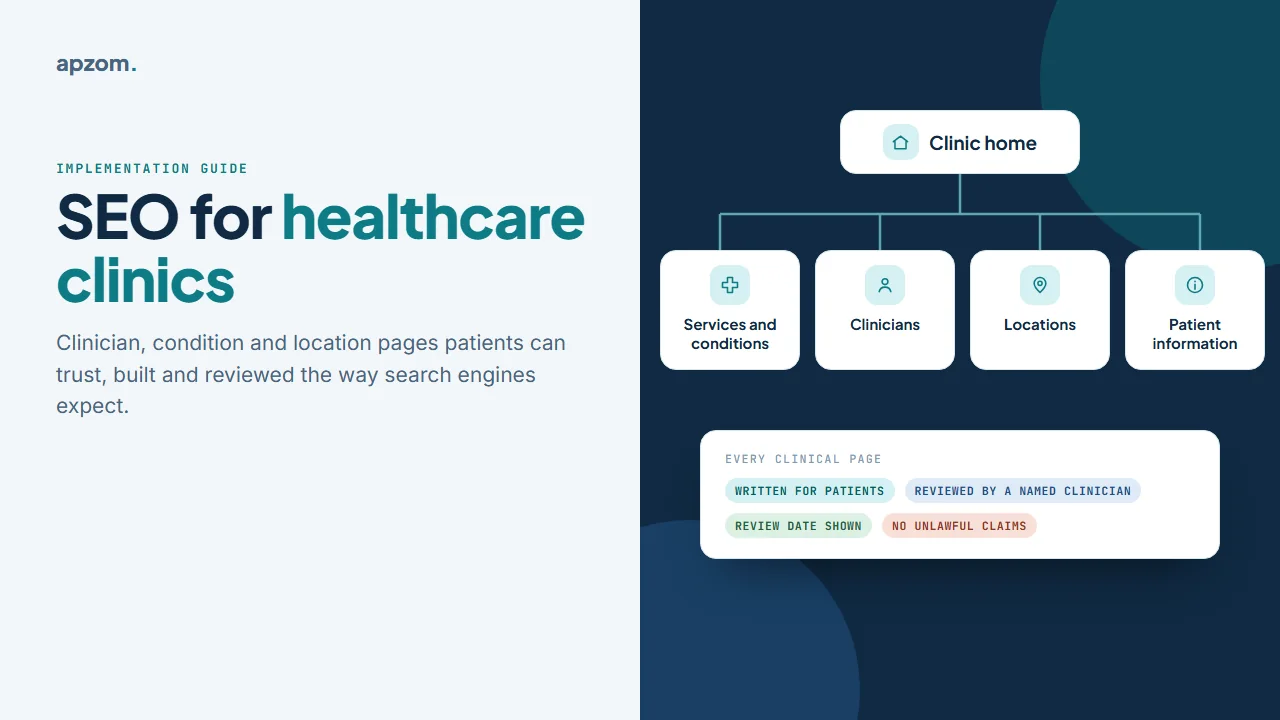
The short answer: SEO for a healthcare clinic works best when the website mirrors how patients choose care. Build four kinds of page: one for each service or condition you actually treat, one for each clinician who sees patients, one for each real location, and the practical information people need before they book. Have every clinical page written for patients and checked by a named, qualified clinician, with the review date shown. Keep each location’s Google Business Profile accurate and matched to its page, and avoid near-identical “city” pages that search engines treat as doorway pages. Health is a topic where Google holds pages to a higher standard of trust, so accuracy and clear authorship matter more than volume.
This guide is for clinic owners, practice managers and marketers anywhere in the world: primary care, physiotherapy, dermatology, diagnostics, therapy, specialist and other outpatient clinics. It is the SEO companion to our wider guide to digital marketing for healthcare clinics, which covers advertising rules by country, reviews, paid ads and privacy-safe measurement in detail. Here we focus on the pages, the review process and the technical set-up that help patients and search engines find and trust you. We have not published a healthcare case study yet, so everything here is based on Google’s own documentation and regulators’ guidance, not on client results.
Why clinic SEO is held to a higher standard
Google’s Search Quality Rater Guidelines (the edition dated 11 September 2025), the instructions given to the people who assess the quality of Google’s results, place health in a category called “Your Money or Your Life” (YMYL): topics where a poor page could harm someone’s health, finances or safety. For these topics, raters are asked to look much harder at trust: who created the content, whether they have the right expertise, and whether the information matches established medical consensus.
Google is clear that “search raters have no control over how pages rank”, and that E-E-A-T (experience, expertise, authoritativeness and trust) is not itself a specific ranking factor. But the guidelines describe what Google’s systems are designed to reward, and Google’s own guidance on “helpful, people-first content” asks similar questions about who created the content, how and why, including: “Do pages carry a byline, where one might be expected?” For a clinic, the practical answer is the same: real clinicians, real services, accurate information and no exaggerated claims.
How patients search, and what that means for your pages
Patient searches tend to fall into four groups. Each needs a different kind of page:
| What the patient searches | Example | The page that should answer it |
|---|---|---|
| A symptom or condition | “knee pain when running” | A condition page that explains it and says when to get help |
| A treatment or service | “sports physiotherapy assessment” | A service page that explains what happens and how to book |
| A place | “physiotherapist near me”, “physio in [area]” | A location page plus that location’s Business Profile |
| A person | “Dr [name] dermatologist” | A clinician profile page |
Most clinics have only a home page, a generic “services” list and a contact page. That leaves three of the four groups with nothing specific to find.
If you are starting from scratch, work in this order: fix each location’s Business Profile and location page, add clinician profiles, then build service and condition pages for the services you most want to grow.
Framework 1: the clinic site architecture
The first framework maps those four search groups onto four page types. Build only what is true for your clinic: a page for every service you offer, every clinician who sees patients and every site patients visit.
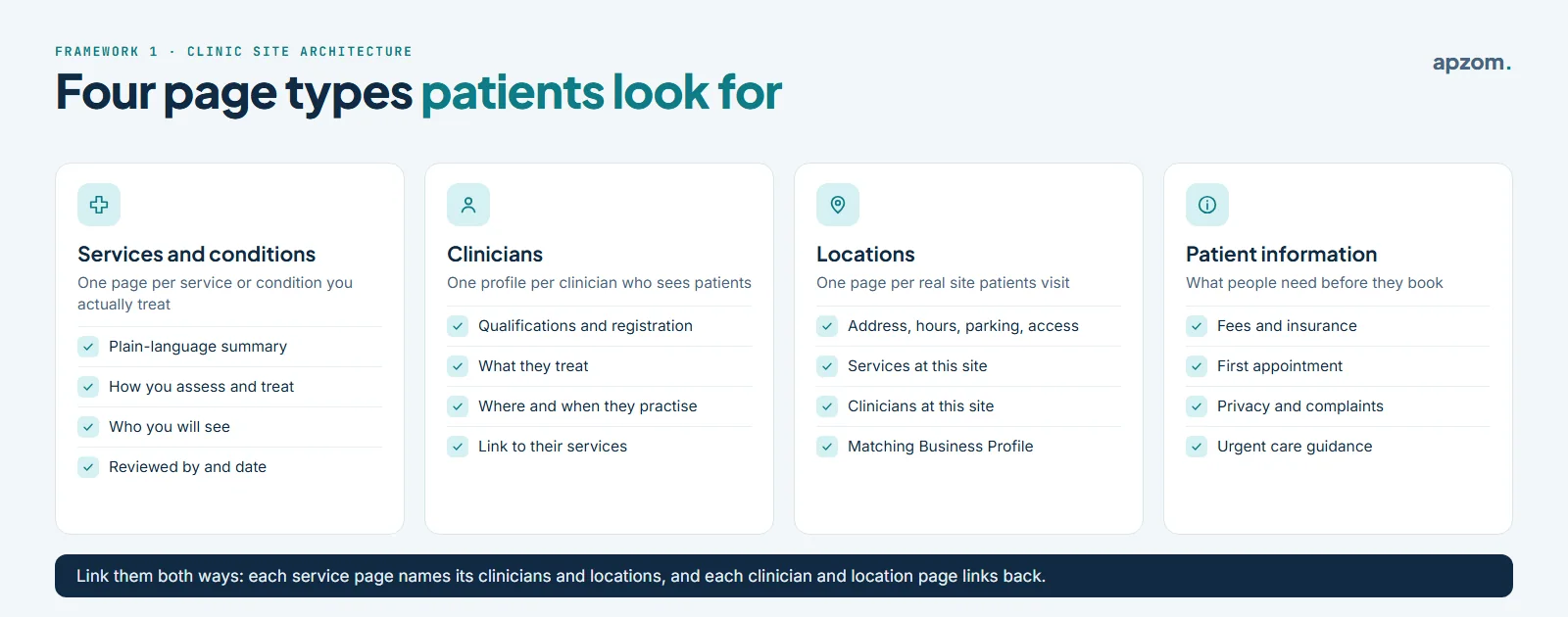
- Services and conditions. One page for each service or condition you actually treat, with a plain-language summary, how you assess and treat it, who the patient will see, what to expect and how to book.
- Clinicians. One profile for each clinician who sees patients: qualifications, registration details where your country expects them, what they treat, where and when they practise, and links to the services they provide.
- Locations. One page for each real site: address, opening hours, parking and accessibility, the services offered there and the clinicians who work there.
- Patient information. Fees and insurance, what happens at a first appointment, how to cancel, privacy and complaints, and where to go for urgent care.
The internal links matter as much as the pages. Each service page should link to the clinicians who provide it and the locations that offer it, and each clinician and location page should link back. This is how patients, and search engines, understand which person and which site to choose. Our guide to internal linking for business websites explains the method.
Framework 2: the medical review workflow
On a health website, who wrote and checked a page is part of its quality. A simple, repeatable review process protects patients, protects the clinic and makes it easy for patients, search engines and AI tools to see who is responsible for the content.
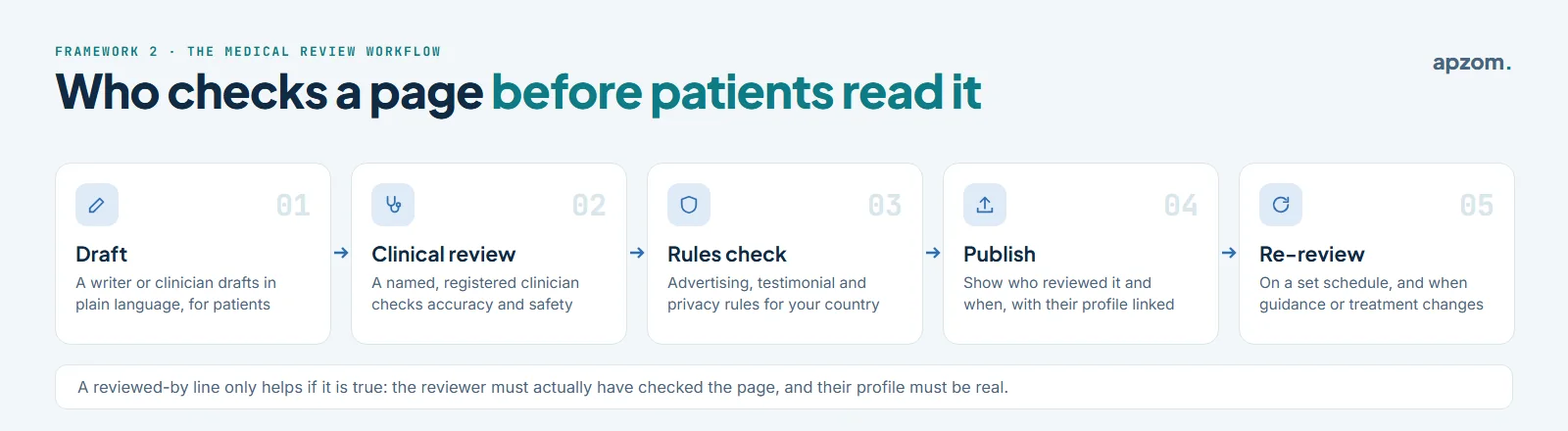
- Draft. A writer or a clinician drafts the page in plain language for patients, not for other clinicians.
- Clinical review. A named clinician, registered or licensed where your country and profession require it, with the right expertise checks it for accuracy and safety, and corrects anything that does not match current guidance.
- Rules check. Someone checks the page against the advertising, testimonial and privacy rules for your country and profession. Our healthcare marketing guide has a country-by-country table.
- Publish. Show who reviewed the page and when, and link their name to their clinician profile. No Google document requires a “medically reviewed by” label, but a true one answers the patient’s question “who checked this?” and fits Google’s own questions: “Do pages carry a byline, where one might be expected?” and “Is this content written or reviewed by an expert or enthusiast who demonstrably knows the topic well?”
- Re-review. Set a schedule for checking each page again, and review sooner when clinical guidance, your services or the law changes.
A “reviewed by” line only helps if it is true. Never name a clinician who has not actually reviewed the page, never invent credentials, and never keep an old review date on a page that has changed.
Framework 3: the condition page template
Condition and service pages are where most clinic sites are thinnest. The third framework is a seven-block template that answers patients’ questions in the order they ask them.
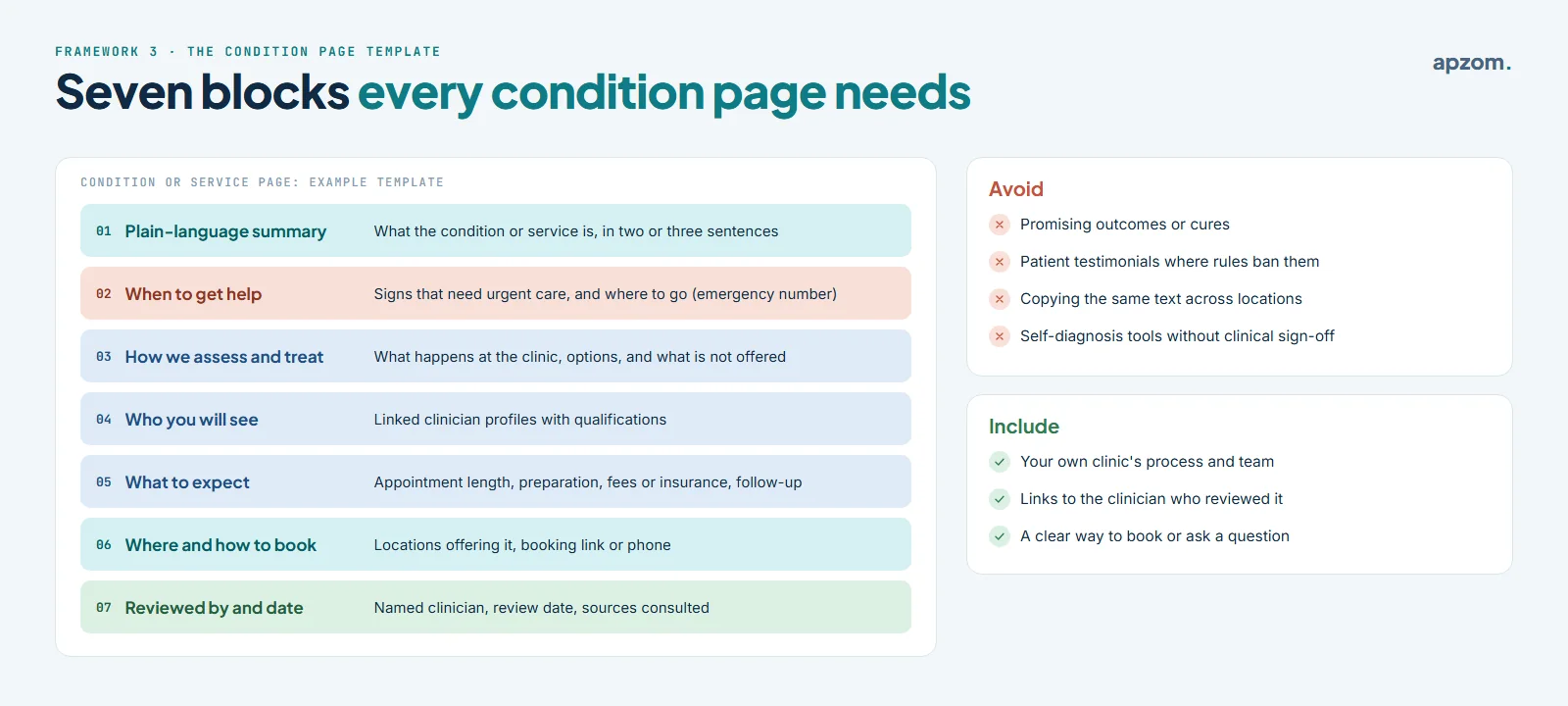
- Plain-language summary. What the condition or service is, in two or three sentences.
- When to get help. Signs that need urgent care and where to go, including your country’s emergency number. Do not encourage people to wait for an appointment when they need urgent care.
- How we assess and treat. What happens at your clinic, the options you offer, and what you do not offer.
- Who you will see. Linked profiles of the clinicians who provide it.
- What to expect. Appointment length, preparation, fees or insurance, and follow-up.
- Where and how to book. The locations that offer it and a clear booking route.
- Reviewed by and date. The reviewing clinician, the review date and, where useful, the guidance the page is based on.
Avoid promising outcomes or cures, using patient testimonials where your rules restrict them, copying the same text across locations, and offering self-diagnosis tools that no clinician has checked. Write about your own clinic’s process and team; generic health information copied from elsewhere adds nothing for the patient.
Clinician pages
Clinician profiles answer the “who will I see?” question, and they are often what people search for after a referral or recommendation. A good profile includes:
- The clinician’s name, role and professional title as your regulator allows it to be used.
- Qualifications and registration details where your country expects them, so a patient can look the clinician up on the official register.
- What they treat, in patient language, with links to those service pages.
- Where and when they practise, with links to the location pages.
- A real, professional photo, used with their consent.
If a clinician also has a Google Business Profile, keep the details consistent with the website. Google’s Business Profile guidelines set specific rules for individual practitioners and clinics; our wider healthcare marketing guide summarises them, and our Google Business Profile checklist covers every field.
Not sure which clinic pages you are missing? Ask for a Free Growth Audit. We map your service, clinician and location pages against the framework in this guide, check your Business Profiles and structured data, and tell you what to build or fix first.
Location pages, not doorway pages
If you have more than one clinic, each real site needs its own page with genuinely different details: address, hours, access, team and the services available there. Link each page to the matching Business Profile, and the profile back to that page.
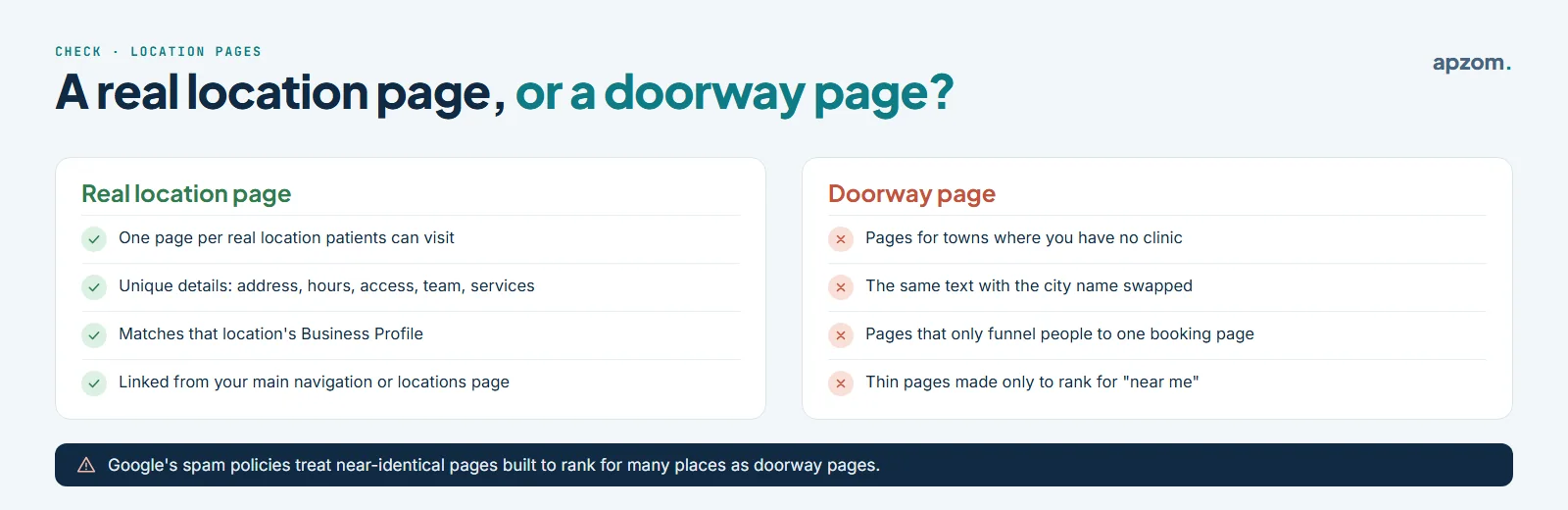
What you should not do is create pages for towns or suburbs where you have no clinic, or copy one page many times with the place name swapped. Google’s spam policies describe doorway abuse as sites or pages “created to rank for specific, similar search queries” that lead users to less useful intermediate pages, and give pages targeted at specific regions or cities that funnel users to one page as an example. Its scaled content policy separately covers generating many pages, by any method, without adding value for users. If you serve patients from a wider area, say so on your real location pages instead.
For each location’s Business Profile, Google asks for a website that “represents your individual business location”. Pointing each profile to its own location page, rather than the home page, is the simplest way to do that.
Structured data: helpful, but not a shortcut
Structured data (schema markup) is code that describes your pages to search engines. For a clinic, the useful types are the ones that describe the organisation and its places: Organization for the clinic as a whole, and the most specific LocalBusiness sub-type that fits, such as MedicalClinic, for each location (Google’s local business documentation asks for the most specific sub-type), with name, address, phone and opening hours that match your Business Profile. Breadcrumb markup helps show where a page sits in the site.
Schema.org also has types for physicians (including IndividualPhysician), medical conditions and medical web pages, and the general WebPage properties reviewedBy and lastReviewed can record who reviewed a page and when. These can describe your content accurately, but Google has no medical-specific rich result, so treat them as a description, not a ranking tool. FAQ rich results no longer appear in Google Search (Google stopped showing them from 7 May 2026), so write FAQs for patients, not for search features. Never mark up reviews or ratings of your own clinic that you collected yourself expecting star ratings in search; Google’s review snippet guidelines exclude self-serving reviews for local businesses and organisations. Mark up only what is visible on the page, then check it with Google’s Rich Results Test and the Schema Markup Validator before and after publishing. Our guide to schema markup for small businesses explains the basics.
Technical basics that matter more for clinics
- Booking that works on a phone. Many patients book from a phone. Test the full booking journey on one, including any third-party booking system.
- Speed and stability. Slow pages and layouts that jump while loading frustrate patients. Our guide to doing a technical SEO audit covers Core Web Vitals and other checks.
- Privacy-safe tracking. Clinic websites handle sensitive information. Be careful with advertising pixels and session recording on pages about conditions, booking or patient portals. A pixel on a page about a specific condition can reveal someone’s health interest. In the US, HHS guidance on online tracking technologies applies to clinics covered by HIPAA; a 2024 court ruling narrowed part of it for logged-out pages, but HIPAA still applies to patient portals and booking flows. In the UK and EU, data concerning health is special category data under the GDPR (the UK GDPR in the UK), and tracking pixels also fall under the rules on cookies and similar technologies. Elsewhere, check your national privacy and health-records law before adding any tracker. Our healthcare marketing guide has a privacy-safe measurement framework.
- Accessibility. Patients include people with disabilities and older people. Clear headings, readable text, good contrast and forms that work with a keyboard help everyone.
Measuring clinic SEO
Measure what matters to the clinic, not just traffic:
- Search Console shows which searches bring people to which pages; group them into the four search types above. Our guide to how to use Google Search Console explains the reports.
- Business Profile performance shows how people interact with each location’s profile, such as calls, direction requests and website clicks.
- Bookings and enquiries by page and location, tracked without sending health information to advertising platforms.
SEO for a clinic is slow, steady work. New pages can take weeks or months to settle, and results depend on competition in your area and specialty.
Common clinic SEO mistakes
| Mistake | Why it hurts | Fix |
|---|---|---|
| One “Services” page listing everything | Nothing specific for patients to find | One page per service or condition you treat |
| No clinician profiles | Patients cannot see who they will see | A profile for each patient-facing clinician |
| Copied city pages | Can be treated as doorway abuse; no value to patients | One page per real location with unique details |
| Health content with no author or review | Weak trust for a YMYL topic | Named clinical reviewer and review date |
| Outcome promises and banned testimonials | Can break advertising and professional rules | Follow your country’s rules; describe process, not promises |
| Advertising pixels on condition and booking pages | Privacy and legal risk | Review tracking with your privacy adviser |
How Apzom can help
Apzom Digital offers SEO services to clinics and other local businesses: planning the service, clinician and location pages, building a review workflow your clinicians can keep up with, setting up structured data and Business Profiles correctly, and measuring bookings without unsafe tracking. We do not provide medical advice or clinical review; your own clinicians review clinical content. We have not published a healthcare case study yet.
We work with clients worldwide, remotely, from our base in Ahmedabad, India.
Frequently asked questions
Does a clinic really need a page for every condition?
A page for every condition or service you actually treat and want patients to find, yes. Not for conditions you do not treat. A smaller set of genuinely useful pages is better than many thin ones.
Who should review clinic web pages?
A registered clinician with the right expertise for that topic, named on the page with the review date. Marketing staff or an agency can write and edit, but clinical accuracy should be checked by a clinician.
Can AI write content for a clinic website?
Google’s guidance does not ban AI-assisted content, but its spam policies cover using AI to generate many pages without adding value, and its guidance on generative AI says “it is critical to manually factcheck and review all AI-generated content for accuracy and trustworthiness before publishing”. For health topics, any draft, however it was produced, needs checking by a qualified clinician, and some professional rules restrict AI in promotion; India’s National Medical Commission guidelines of October 2026, for example, prohibit AI promotional campaigns by doctors and hospitals and require permitted AI content to be labelled.
Should each clinician have a Google Business Profile?
Not always. Google’s guidelines allow profiles for public-facing practitioners in some situations and set rules for clinics with one or several practitioners. Check the current guidelines before creating profiles; our healthcare marketing guide summarises them.
Can we put patient reviews on our website?
It depends on your country and profession. Australia bans testimonials about clinical aspects in health advertising, India’s 2026 NMC guidelines restrict them, and in the US a clinic covered by HIPAA needs a patient’s written authorization before using their details in marketing. Where they are allowed, they must be genuine and not edited to change their meaning (the US FTC rule on consumer reviews bans fake reviews). Do not add review markup to reviews you collected yourself. Our healthcare marketing guide covers testimonial rules by country.
How do we know if new clinic pages are working?
Check them in Search Console with the URL Inspection tool to confirm they are indexed. Then watch which searches they appear for, and the bookings that come from them, over the following weeks to months. Results take longer in competitive areas and specialties.
Get your Free Growth Audit and Quote. We review your clinic website’s page structure, clinical review process, location pages, Business Profiles, structured data and tracking, and send a plain-English plan. Clinical content stays with your clinicians; we do not give medical advice.
No obligation and no guaranteed rankings. Prefer to talk first? Contact us or see our SEO services.