The short answer: SEO for a home services company means building pages that match how urgent each search is, in the places your vans really reach. That usually means one strong page for each service you want more of, town or area pages only where you have real jobs and local detail to show, proof pages built from finished jobs, and plain answers to the questions customers ask before they call. Then track organic search all the way to booked and completed jobs, not just rankings.
This guide is for plumbers, heating and HVAC companies, electricians, cleaners, pest control firms, locksmiths, roofers, garage door and appliance repair companies, in any country. It goes deeper than the search section of our guide to digital marketing for home services companies, which covers the wider picture of ads, lead platforms, reviews and advertising rules. Here we focus on the website: which pages to build, how to handle many towns without thin pages, structured data, speed, content and measurement.
How home services searches are different
Most SEO advice is written for businesses that sell the same thing to everyone, everywhere. Home services are different in four ways:
- Urgency changes everything. Someone with a burst pipe at 10 pm wants a phone number, not an article. Someone planning a new boiler next spring will read three pages and compare prices. The same company needs pages for both.
- Location is part of almost every search. Even when people do not type a town name, search engines use their location. Google says local results are based mainly on relevance, distance and prominence, and that there is no way to pay for a better local ranking.
- Trust is checked fast. People are letting a stranger into their home. They look for licences, registrations, insurance, reviews and real photos before they call.
- The map and the website work together. Your Google Business Profile often gets the first look, and your website has to back it up. Our Google Business Profile checklist covers the profile. This guide covers the website.
Framework 1: the urgency map
The first framework matches each kind of search to the page that should win it. Before you write anything, sort your services into these four groups.
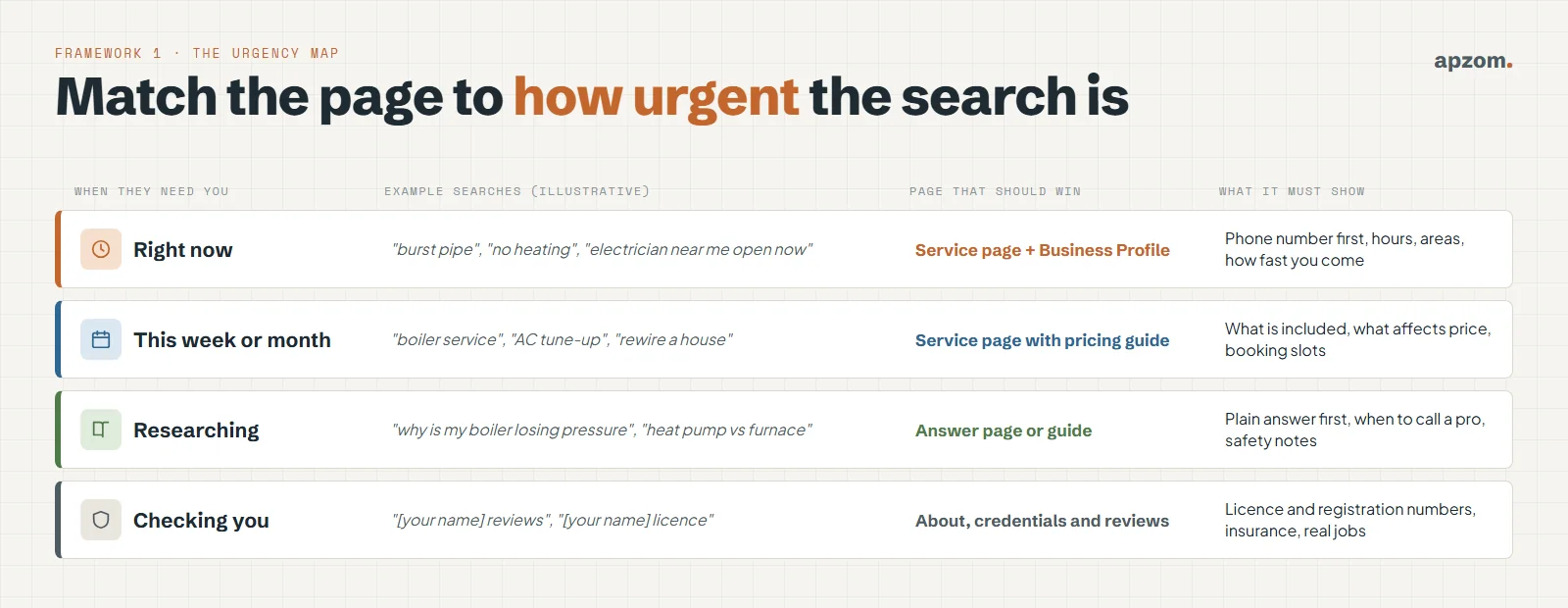
| When they need you | Example searches (illustrative) | Page that should win | What the page must show |
|---|---|---|---|
| Right now | “burst pipe”, “no heating”, “emergency electrician” | Service page, backed by your Business Profile | Phone number at the top, real opening hours, areas covered, how fast you can usually come |
| This week or month | “boiler service”, “AC tune-up”, “rewire a house” | Service page with a pricing guide | What is included, what affects the price, how to book |
| Researching | “why is my boiler losing pressure”, “heat pump vs furnace” | Answer page or guide | A plain answer first, safety notes, when to call a professional |
| Checking you | “[your name] reviews”, “[your name] licence” | About, credentials and reviews pages | Licence or registration numbers, insurance, real jobs, real reviews |
Most home services websites only have the first row, and often only on the home page. The other three rows are where calmer, better-paid work and trust come from.
Service pages: one job, one page
A service page is the most important page type for a home services company. Build one for each service you want more of. Not one page called “Plumbing services” that lists twenty jobs.
A good service page answers what a caller would ask:
- What the job is, in the customer’s words as well as the trade’s. People search for “no hot water”, not “diverter valve replacement”.
- Signs you need it, and when it is an emergency.
- What affects the price. You do not have to publish a fixed price. A short list of what changes the cost (access, parts, time of day, size of the job) helps people and filters out poor-fit calls.
- How fast you come and the hours you really work. Do not say 24/7 if nobody answers at 3 am.
- The areas you cover for this service, which may differ from your other services.
- Proof: two or three related finished jobs (see Framework 3), reviews that mention this service, and the licences or registrations that apply.
- One clear next step: a phone number that can be tapped on a phone, and a short booking form.
Write each page for the service, not for a keyword. If two services are really the same job (“blocked drain” and “drain unblocking”), make one page and use both phrases naturally on it. Our guide to keyword research for small businesses shows how to find the words customers use.
Framework 2: earn every area page
Area pages (also called town, city or location pages) cause more trouble for home services websites than anything else. Many companies publish one page for every town within reach, with the same text and only the town name changed. Google’s spam policies describe doorway abuse as pages created to rank for specific, similar searches, and give pages targeted at specific regions or cities that funnel users to one page as an example. Google has no separate guidance on area pages beyond this and its advice on helpful content.
The second framework is the earned area page rule. Build a page for a town only when you can fill it with three true things:
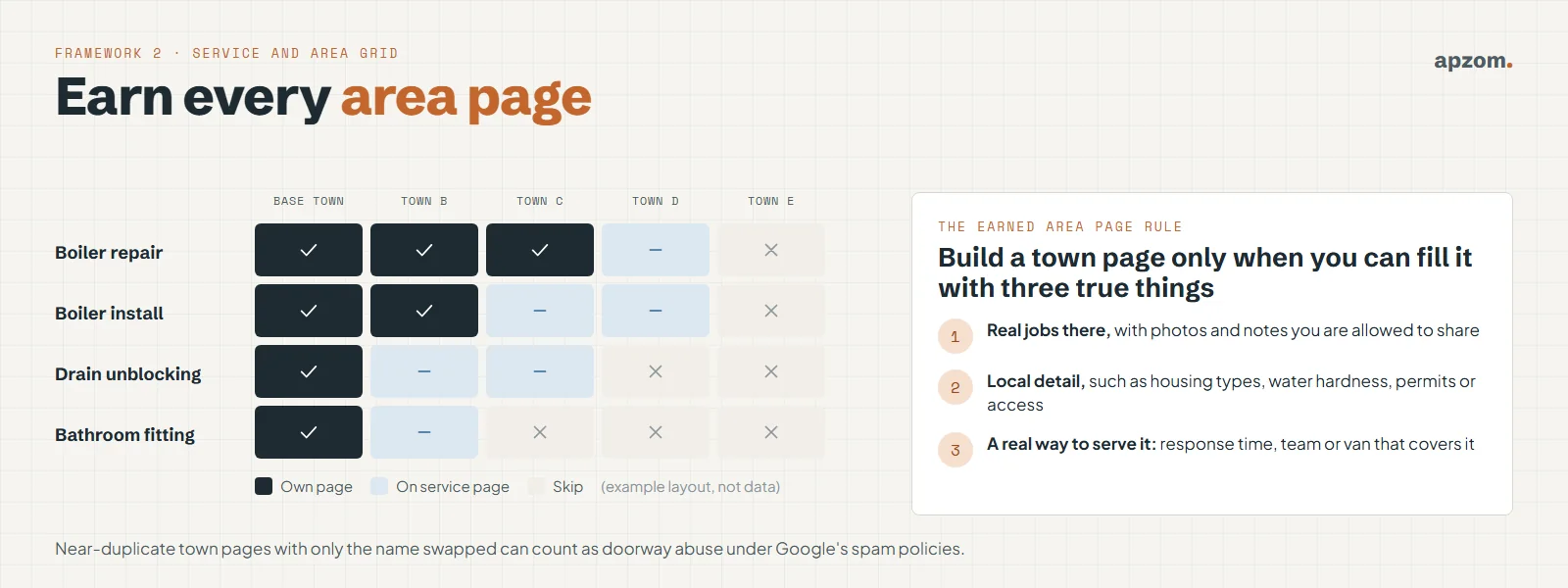
- Real jobs there, with photos and notes you are allowed to share.
- Local detail that changes the work, such as common house types, hard water, older wiring, local permit steps, parking or access.
- A real way to serve it: your usual response time there, and the team or van that covers it.
Then use a simple grid. List your services down the side and your towns across the top. Mark each square “own page”, “covered on the service page” or “skip”. Your base town and your best services will earn their own pages first. Smaller towns are usually better listed on the service page (“we cover A, B and C, usually within the same day”) than given a thin page of their own.
This keeps the site small, useful and honest. It also gives you a plan: when you have done enough jobs in a new town to fill a page truthfully, build it. Our local SEO checklist covers the difference between single-location, multi-location and service-area businesses in more detail.
Framework 3: the job log page
Most home services companies finish hundreds of jobs a year and publish none of them. A job log is a short page about one finished job. Done well, it is the best proof you can put on a website, and it gives search engines real, local, specific content that nobody else has.
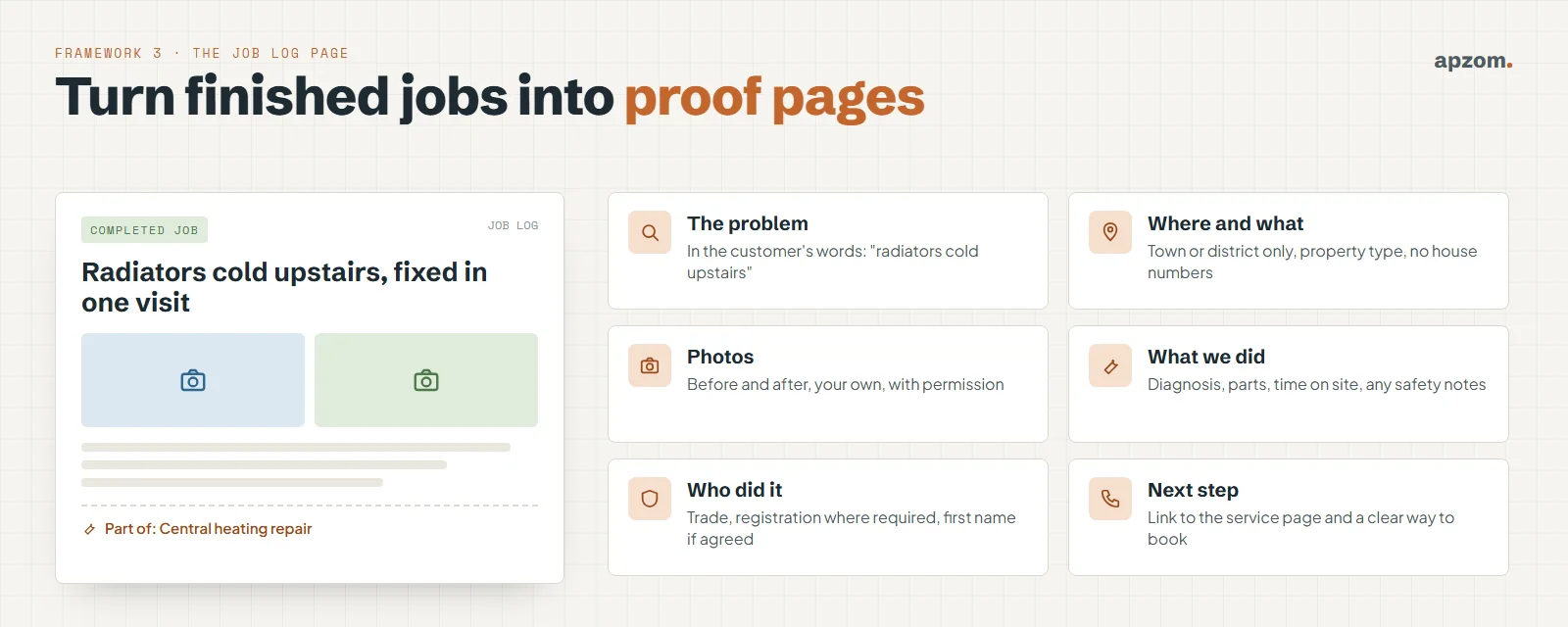
Each job log should have:
- The problem in the customer’s words, such as “radiators cold upstairs”.
- Where and what: the town or district and the type of property. Never the house number or anything that identifies the customer, unless they agree in writing.
- Your own photos, before and after, taken with the customer’s permission. Not stock images.
- What you did: the cause you found, the parts used, time on site and any safety notes.
- Who did it: the trade, and the registration or licence that applies. Use a first name only if the technician agrees.
- A link to the matching service page and a clear way to book.
Link each job log from its service page and, where you have one, its area page. Five good job logs for “boiler repair” do more for trust than a paragraph that says “we are the best boiler engineers in town”.
Keep job logs real. Do not invent jobs, combine several jobs into one story, or publish reviews or photos without permission.
Answer content: win the research searches
Before people call, they search for the problem. “Why is my circuit breaker tripping?” “How often should a furnace be serviced?” “Are ant baits safe with pets?” Clear, honest answers to these questions bring visitors who may call you later, and they are the kind of passages that AI search features and assistants quote.
Good answer pages for trades follow a simple pattern:
- Answer first, in two or three plain sentences.
- Say what is safe to check yourself and what is not. For gas, electrics and anything structural, say clearly when to stop and call a qualified professional. Never give instructions that need a licence or registration to do safely.
- Explain the likely causes and costs in ranges, with what affects them.
- Link to the service page that fixes the problem.
Write about the problems your team sees every week, in your own climate and housing stock. A plumber in a hard-water area and one in a cold climate will answer the same question differently, and that local knowledge is what makes the page worth reading.
Google says it rewards helpful, reliable content made for people, and asks writers to think about who wrote it, how it was made and why. Put the author’s name and trade on answer pages, and have someone qualified check them. Google’s own guide to its generative AI features says this is still SEO, and that no special markup or llms.txt file is needed to appear in them. Our guide to what GEO is explains more.
Lots of town pages, not many calls? A Home Services SEO Audit maps your services and areas, finds thin or competing pages, and shows which pages to build, merge or fix first.
Trust pages: licences, registrations and reviews
People searching “[company name] reviews” or “[company name] licence” are close to calling. Make it easy for them.
- A credentials page listing each licence, registration and insurance you hold, with the number and the body that issued it, so people can check it. In some places this is the law, not just good practice. For example, California requires a contractor’s licence number in all advertising, and New South Wales requires licence numbers in advertising by licensed tradespeople. Our home services guide has a table of these rules by country.
- Only claim what you hold. In Great Britain, anyone doing gas work must by law be on the Gas Safe Register. Never imply a registration, licence or accreditation that your business or the technician doing the work does not have.
- A reviews page that shows real reviews from several platforms, recent and older, good and less good. Google does not show review stars for reviews a business collects about itself on its own site, so do not add self-serving review markup in the hope of stars. Our guide on how to get more Google reviews covers how to ask for them within the rules.
- An about page with real facts: when you started, who runs the company, the area you cover and what you do not do.
Structured data for trades
Structured data helps search engines understand who you are, what you do and where. It does not guarantee rich results or better rankings, but it removes guesswork.
schema.org has specific types for several trades, all under HomeAndConstructionBusiness:
| Trade | schema.org type to use |
|---|---|
| Plumbing | Plumber |
| Electrical | Electrician |
| Heating, ventilation and air conditioning | HVACBusiness |
| Locksmiths | Locksmith |
| Roofing | RoofingContractor |
| Painting and decorating | HousePainter |
| Building and renovation | GeneralContractor |
| Removals | MovingCompany |
| Pest control, cleaning, appliance repair, garage doors | No specific type: use HomeAndConstructionBusiness or LocalBusiness |
Use the most specific type that is true, with your real business name, phone number, address (or only your area, if customers do not visit you) and opening hours. The schema.org areaServed property can list the places you cover; Google does not use it for any rich result, but it keeps your markup consistent with the page. Everything in the markup must also be visible on the page. If you run several trades from one company, describe the business once and the services on their own pages, rather than claiming several business types on every page.
Technical basics that matter most for trades
You do not need a perfect technical score. You need a site that works on a phone, in a hurry, sometimes with a poor signal. Google has used the mobile version of sites for indexing and ranking since July 2024, so check everything on a phone first.
- Speed on mobile. Google’s Core Web Vitals give targets for loading (Largest Contentful Paint within 2.5 seconds), responsiveness (Interaction to Next Paint within 200 milliseconds) and visual stability (Cumulative Layout Shift under 0.1). Large uncompressed photos are the most common problem on trade sites.
- Tap-to-call everywhere. The phone number should be text, not part of an image, and tappable on every page.
- One phone number per location, used consistently. Google asks businesses to use a local number under their direct control, instead of a central call centre number where possible, and does not allow numbers that redirect somewhere else. If you use call tracking on the website, keep your main local number visible on every page and on your profile, so your details stay consistent across the web.
- Descriptive image file names and alt text. “boiler-repair-before.webp” with alt text that describes the photo helps image search and people using screen readers. Google uses the page around an image to understand it.
- No thin or duplicate pages. Old campaign pages, near-copies of service pages and empty tag pages dilute the site. Merge or remove them, with redirects.
- Plan any redesign carefully. Trade sites often lose rankings in a redesign because old service and area URLs disappear. Our website redesign SEO checklist covers how to avoid that.
Multi-trade and multi-location companies
If you offer several trades, such as plumbing, heating and electrical, give each trade its own section with its own service pages. A clear structure is easier for people and search engines to follow: home, trade, service, and then job logs and area pages that link back up.
If you have several branches, give each real branch its own location page with its own address, phone number, team, opening hours and jobs, and its own Business Profile. Do not create branches that do not exist. Google does not allow PO boxes as Business Profile addresses, or a virtual office unless it is staffed during business hours.
Franchise networks have an extra question: who owns the website and the pages for each territory? Agree it in writing before you build, so that a franchisee leaving does not take rankings or reviews with them, and so that territory pages do not compete with each other.
The rules differ by country
SEO itself works in much the same way everywhere, but what you can say on the page does not. A quick guide:
| Market | What to check on your pages |
|---|---|
| US | State contractor licence rules (some states require the licence number in all advertising), the FTC rule on fake and bought reviews, and Bing as a second search engine |
| UK | Gas Safe registration for gas work, competent person schemes for notifiable electrical work in England, and the ban on fake and concealed-incentive reviews |
| EU | National trade and consumer rules, which vary by country; and search in the local language for each market you serve |
| Australia and Canada | State and provincial licensing, such as licence numbers in advertising in New South Wales |
| UAE | The licensing rules in your emirate, and pages in both English and Arabic where your customers expect it |
| India | Consumer protection rules on misleading claims (the Consumer Protection Act 2019 and the 2022 guidelines), and pages in the local languages your customers search in |
This is a starting point, not legal advice. Check the rules for your trade and your area, and keep a dated note of what you checked.
Do not forget the other maps. Bing Places for Business and Apple Business (formerly Apple Business Connect) let you manage how you appear in Bing and Apple Maps. Bing Places can import your details from Google Business Profile, though you should check the categories afterwards.
Framework 4: track SEO to the completed job
Rankings are a means, not the goal. The fourth framework follows organic search all the way to a completed, paid job.
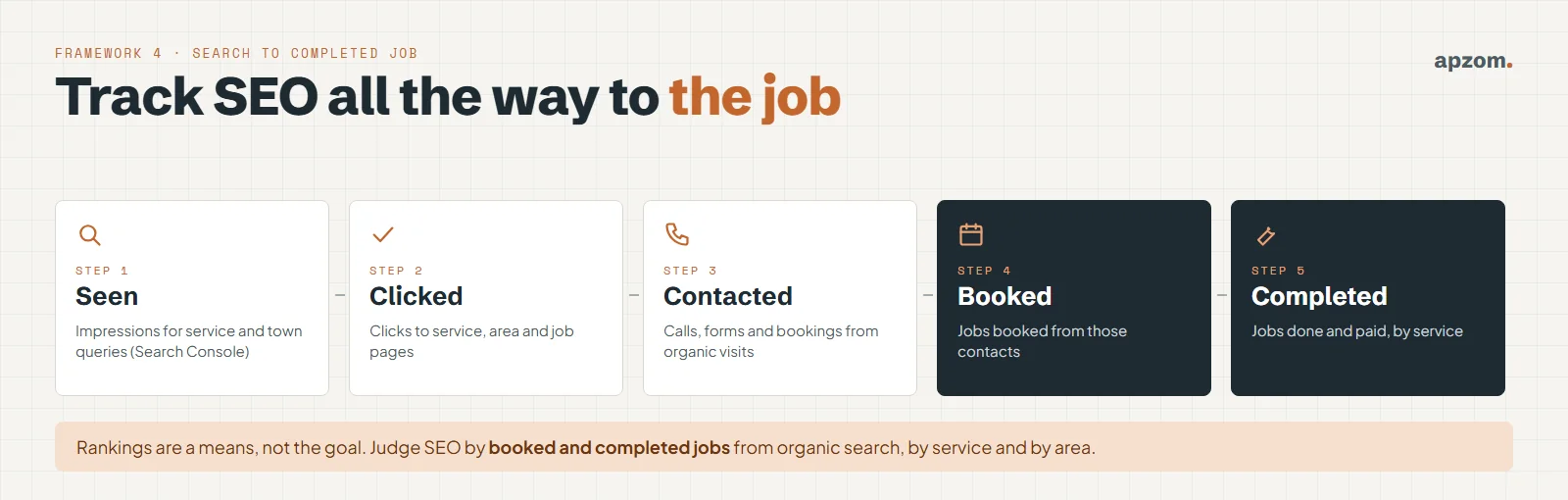
- Seen: impressions for service and town searches, in Google Search Console. Our guide on how to use Google Search Console shows how to read them.
- Clicked: clicks to service, area and job log pages.
- Contacted: calls, forms and bookings from organic visits. Use call tracking on the website, set up properly, and mark forms and calls as key events in your analytics.
- Booked: jobs booked from those contacts. Ask your office or job software to record the source of every booking.
- Completed: jobs done and paid, by service and by area.
Look at it monthly, by service. You may find that “boiler repair” brings many calls but small jobs, while “boiler installation” brings few calls but most of the profit. That tells you which pages to improve next. If you are weighing SEO against paid search, our comparison of SEO vs Google Ads explains how the two work together, and our guide to how much SEO costs covers budgets.
Common mistakes
- One “services” page for everything, so no page is the best answer for any search.
- Hundreds of town pages with the same text and a different name.
- Saying 24/7 or “same day” when it is not true. People remember, and they leave reviews.
- Stock photos of smiling technicians who do not work for you.
- Claiming licences, registrations or awards you do not hold, or using a body’s logo without permission.
- DIY instructions for dangerous work, such as gas or electrical repairs that need a qualified professional.
- Judging SEO by rankings alone, instead of by calls, bookings and completed jobs.
How Apzom can help
Apzom Digital helps service businesses get found by the right customers and measure what matters. For home services companies, that means SEO and local SEO built around service, area and job log pages, website development that loads fast on a phone and makes calling easy, and content marketing that answers the questions your customers ask. We work with clients worldwide, remotely, from our base in Ahmedabad, India.
We have not published a home services case study yet, so we will not show you one. Our case studies page shows the search work we have done for other businesses. We will not promise rankings or a number of calls. We will show you which pages to build, merge or fix first, and how to track organic search to booked jobs.
Request a Home Services SEO Audit. We review your service and area pages, job proof, answer content, credentials and reviews pages, structured data, mobile speed, call tracking and Search Console data. You get a prioritised list of what to fix first, for the towns and countries you serve.
No obligation and no guaranteed rankings. Prefer to talk first? Contact us or see all our services.
Frequently asked questions
What is SEO for home services?
It is the work of making your website and online profiles show up when people nearby search for the services you offer, and making those pages good enough that people call you. For trades, it centres on service pages, honest area pages, proof from real jobs, plain answers to common problems, and a site that works well on a phone.
Do plumbers and electricians need SEO if they have a Google Business Profile?
Usually, yes. The profile often gets the first look, but people then check your website before they call, and the website is what ranks for many service, problem and research searches. The two work best together.
Should I make a page for every town I cover?
No. Build a town page only when you have real jobs, local detail and a real way to serve that town. Thin pages with only the town name changed can count as doorway abuse under Google’s spam policies. List smaller towns on your service pages instead.
What is a job log page?
A short page about one finished job: the problem, the area and type of property, your own before and after photos, what you did and who did it, with the customer’s permission. It is strong proof for people and unique content for search engines.
Which schema type should a home services company use?
The most specific schema.org type that is true, such as Plumber, Electrician, HVACBusiness, Locksmith or RoofingContractor. Pest control, cleaning and appliance repair companies have no specific type, so they use HomeAndConstructionBusiness or LocalBusiness.
How long does SEO take for a home services company?
It depends on your competition, your current site and how much you publish. Fixing service pages and technical problems can show results within a few months, while area and answer content usually takes longer to build up. Paid search can bring calls while SEO grows.
Should my website show prices?
Showing a price guide, or what affects the price, usually helps. It answers a question every caller has and filters out poor-fit enquiries. Check the price display rules where you work, and keep prices up to date.
Can Apzom work with home services companies outside India?
Yes. We work with clients worldwide, remotely, from our base in Ahmedabad, India, and plan SEO around the countries and towns you serve, their trade and advertising rules, and the search engines your customers use.