
The short answer: Google Ads for B2B works when the account filters people out as carefully as it brings them in. Sort every search into buying, comparing, learning, career, education, DIY and consumer intent; bid on the first two; block the rest with negative-keyword families whose match types you choose on purpose; read the search terms report every week; make the form ask one qualifying question; and send qualified and won opportunities back to Google Ads so bidding learns what a decision-maker looks like. Then set conversion windows and bid targets for a sales cycle measured in months, not days.
This guide is for marketing managers, founders and sales leaders at B2B firms anywhere in the world whose Google Ads keep bringing job applicants, students, consumers and people looking for free templates. It covers search intent, negative-keyword families, the search terms report, location, language and schedule settings, Customer Match, forms, CRM feedback, bidding and Performance Max. We checked every Google Ads feature, limit and menu name here against official sources on 23 November 2026. Google changes these often, so check the help page named next to each one before you rely on it.
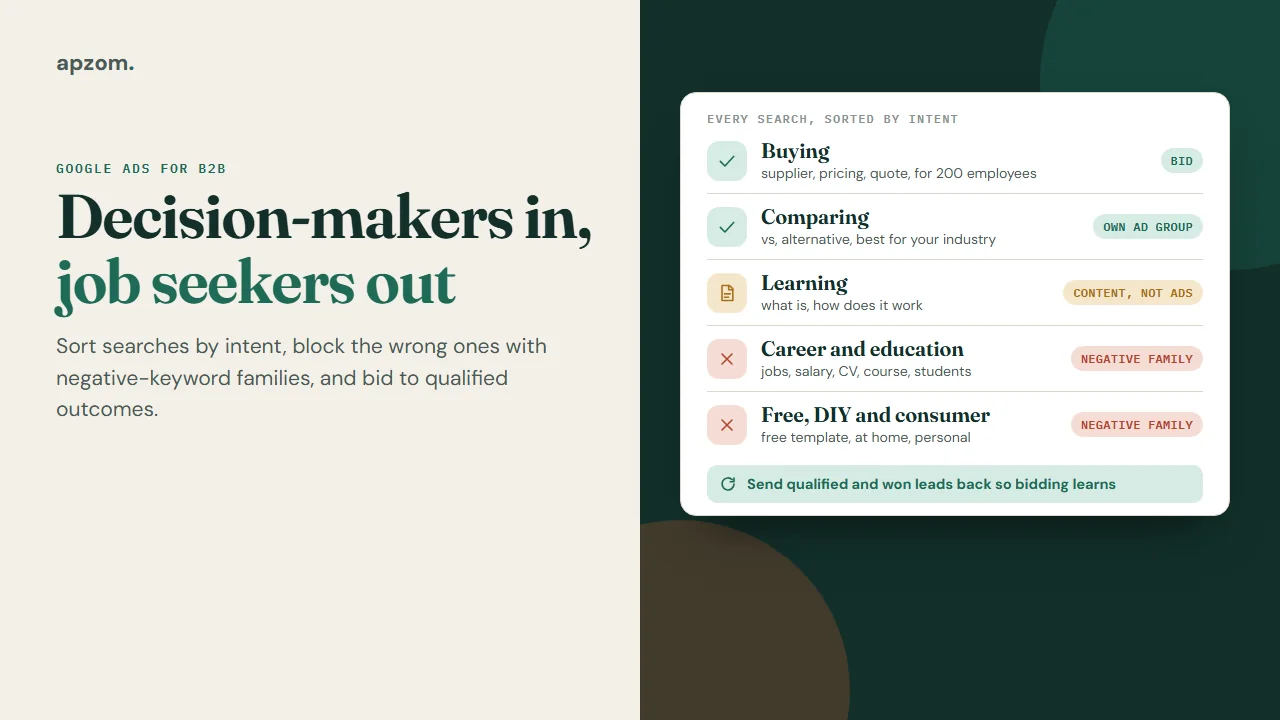
Why B2B accounts attract the wrong people
Most B2B services share their vocabulary with three groups who will never buy: people who want a job in the field, people studying it, and people who want to do it themselves. A search for “industrial automation” can come from a plant manager with a budget, a graduate engineer looking for work or a student writing a project. Google cannot see the searcher’s job title, so the words in the query, your settings and your conversion data are the only filters you have.
Getting this wrong costs more in B2B. Buyers are fewer, searches are rarer, and if every form submission counts as a conversion, a student’s enquiry teaches automated bidding to find more students. New to Google Ads? Start with our guide to Google Ads for small businesses for the basic setup. Choosing between channels? Our B2B lead generation guide covers how search fits alongside LinkedIn, outbound and referrals.
Sort every search by intent before you bid on it
Decide what you will do with each kind of search before you choose keywords. The examples below are illustrative, for two hypothetical firms: a packaging supplier and a payroll software company. Your own search terms report is the real source.
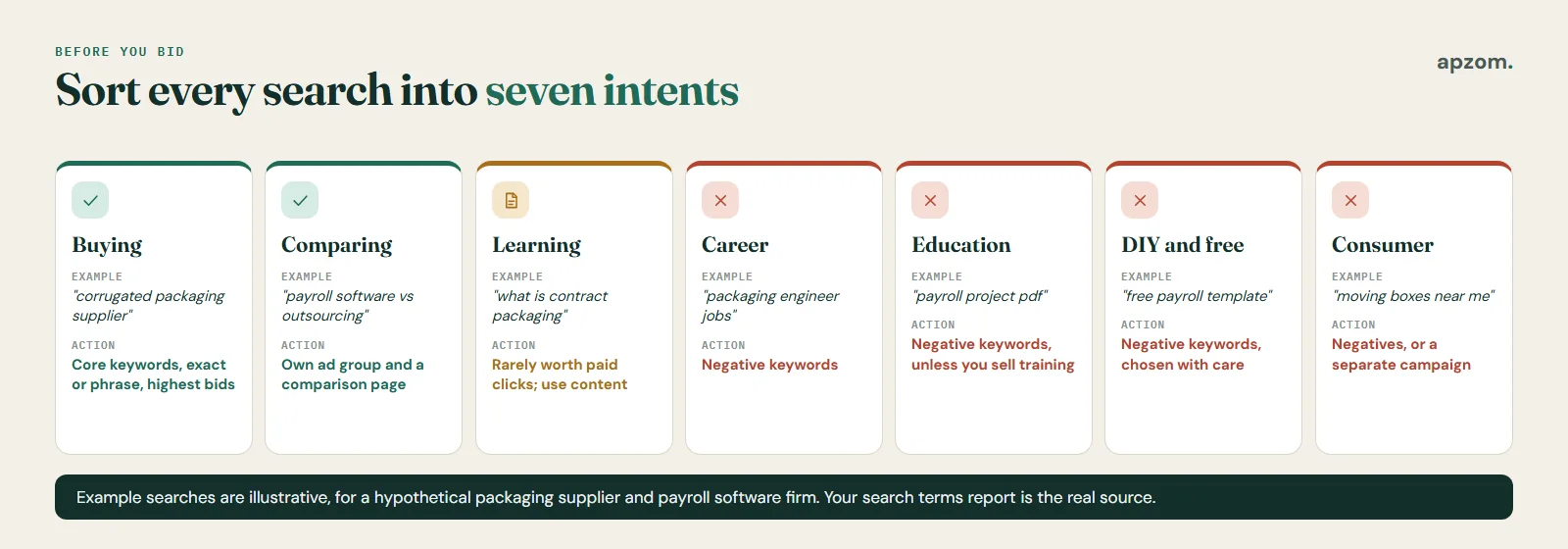
| Intent | Example searches (illustrative) | What to do |
|---|---|---|
| Buying | “corrugated packaging supplier”, “payroll software for 200 employees” | Core keywords, usually exact or phrase match, highest bids |
| Comparing | “payroll software vs outsourcing”, “[competitor] alternative” | Own ad group or campaign, a comparison page, a budget you watch |
| Learning | “what is contract packaging”, “how does payroll software work” | Rarely worth paid clicks; answer with content and SEO |
| Career | “packaging engineer jobs”, “payroll specialist salary” | Negative keywords |
| Education | “packaging technology course”, “payroll project pdf” | Negative keywords, unless you sell training |
| DIY and free | “free payroll template”, “make shipping boxes at home” | Negative keywords, chosen with care |
| Consumer | “moving boxes near me”, “payroll for my nanny” | Negative keywords, or a separate campaign if you also sell to consumers |
Two kinds of words tend to mark a business buyer. Commercial modifiers: supplier, manufacturer, vendor, company, contractor, wholesale, bulk, pricing, quote, RFQ. And qualifiers only a buyer adds: a volume (“for 200 employees”), an industry (“for food manufacturers”), a standard your buyers ask for, or an integration (“works with SAP”). Keywords built on these get fewer searches, which is the point.
Vocabulary also changes by country, so build lists for each market. Buyers may write “supplier”, “vendor” or “distributor” for the same thing, so check which your search terms show in each market. Job seekers write “resume” in the US and Canada but “CV” in the UK, India, Australia and much of Europe. “Vacancy” is common in the UK and India, “openings” in the US, “fresher” in India for graduate roles, and “graduate scheme” or “apprenticeship” in the UK. A negative list written in one country’s English misses the others.
Build negative-keyword families, with the right match type
Negative keywords follow different rules from normal keywords. Google’s “About negative keywords” help page makes four points that matter here:
- No close variants. Google says “negative keywords won’t match to close variants or other expansions”, so blocking “job” does not block “jobs”. Add singular and plural forms yourself.
- Negative broad is the default. The ad will not show if the search contains all your negative terms, in any order.
- Negative phrase blocks searches containing the terms in the same order, even with extra words.
- Negative exact blocks only that exact search, with no extra words.
Our guide to Google Ads match types explains how these interact with your positive keywords. For B2B, group negatives into families, one shared list each, so every family can be reviewed and reused.
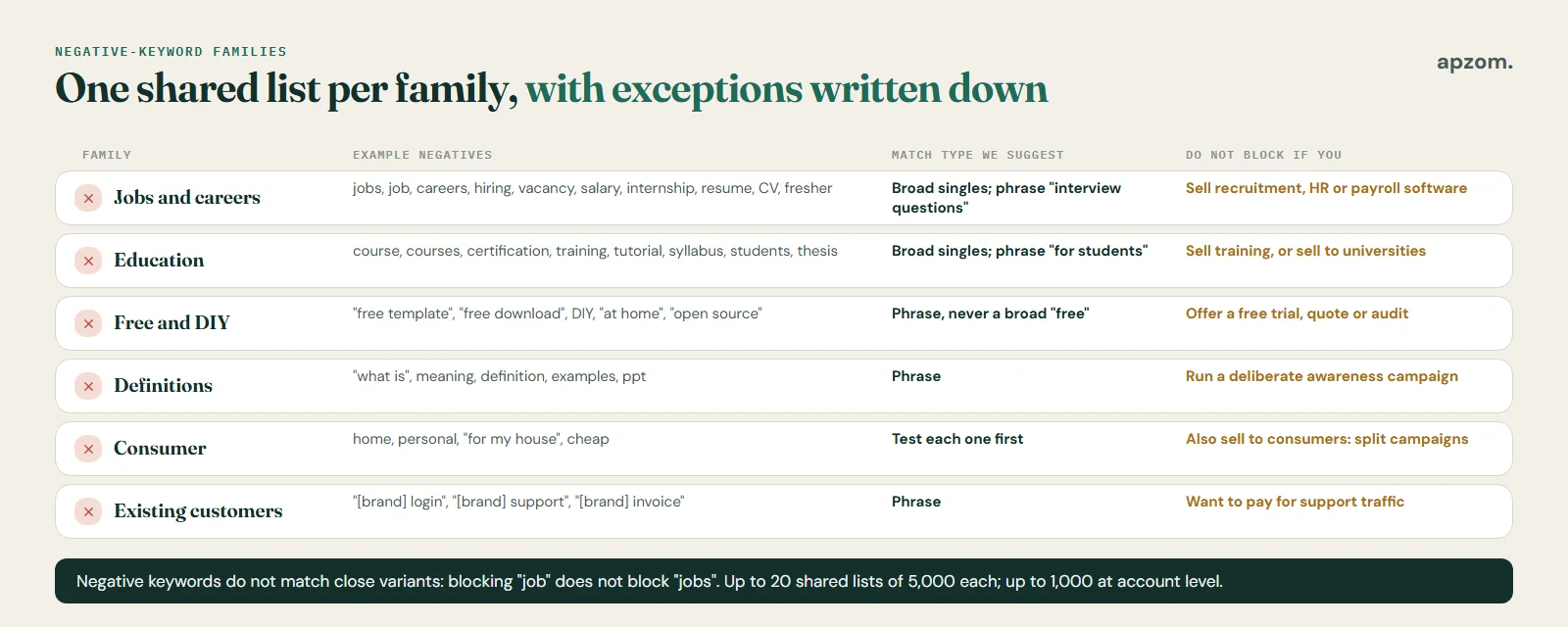
| Family | Example negatives | Match type we suggest | Do not block if you |
|---|---|---|---|
| Jobs and careers | jobs, job, careers, hiring, vacancy, vacancies, salary, internship, resume, CV, fresher | Broad for single words; phrase for “interview questions” | Sell recruitment or HR software (“hiring” can be a buying word) or payroll software (“salary” can be one too) |
| Education | course, courses, certification, training, tutorial, syllabus, students, thesis | Broad for single words; phrase for “for students” | Sell training, or sell to universities and schools |
| Free and DIY | “free template”, “free download”, DIY, “at home”, “open source” | Phrase, never a broad “free” | Offer a free trial, quote or audit you want people to find |
| Definitions | “what is”, meaning, definition, examples, ppt | Phrase | Run a deliberate awareness campaign |
| Consumer | home, personal, “for my house”, cheap | Test each one first | Also sell to consumers; split those campaigns instead |
| Existing customers | “[your brand] login”, “[your brand] support”, “[your brand] invoice” | Phrase | Want to pay for support traffic |
The “free” row catches people out. A broad negative “free” also blocks “free quote” and “free trial”, which may be your best searches. Check every new negative against your positive keywords before adding it, as our guide to Google Ads not getting impressions warns.
Where the lists live matters too. Google’s “About negative keyword lists” page allows up to 20 lists of up to 5,000 negatives each, attached to the campaigns you choose. Account-level negatives, in Account settings, are limited to 1,000, and Google’s “Negative keywords in Performance Max campaigns” page says they “automatically apply to all Search and Shopping inventory, including in your Performance Max campaigns”. Our rule of thumb: put only families you never want anywhere, usually jobs and careers, at account level, and keep families with exceptions as shared lists.
Read the search terms report as a buyer would
The search terms report shows the searches that actually triggered your ads. Google’s help page places it under Campaigns, then “Insights and reports”, then “Search terms”, and says terms “that don’t have enough query activity are omitted” for privacy. Read it as a sample, not a full list.
A general review asks whether a search is relevant. A B2B review asks whether the searcher could be a buyer. Our rule of thumb is to look for these patterns weekly at first, then fortnightly:
- A job title on its own or with a city. “Procurement manager Dubai” is far more likely a job search than a buyer.
- Student signals. Project, report, ppt, pdf, thesis, syllabus or a university name.
- Wrong scale. “Small”, “single” or “for home” when you sell in volume.
- Your brand plus support words. Existing customers looking for a login page cost clicks and add no pipeline.
- Competitor names. Decide on purpose whether you want them, and give them their own ad group if you do.
Add good searches as exact or phrase keywords, add bad ones to the right family, and note which keyword triggered each poor search. If one broad keyword causes most of the junk, tighten it instead of chasing every search it finds. Google’s August 2025 Performance Max announcement says search terms reporting is now available for all Performance Max campaigns, so review those in the same session. For a check of the whole account, use our Google Ads audit checklist.
Getting job seekers, students or free-template hunters from Google Ads? Ask for a Free Growth Audit. We read your search terms, negative keyword lists, location and schedule settings and conversion goals, and tell you which leaks to close first for a B2B account.
Location, language and schedule settings for B2B
Location
Google’s “About advanced location options” page calls “Presence or interest” the “default and recommended option”: it reaches people in, regularly in, or interested in your locations. “Presence” limits ads to people likely to be located, or regularly located, there. Exclusions use Presence by default. In our judgement:
- Use Presence when you can only serve buyers physically in an area, for example because of licensing, on-site work or delivery limits.
- Keep Presence or interest when the decision-maker may sit elsewhere. A head office in London may buy for a plant in Poland; a buyer in Dubai may source from suppliers in India.
- Exclude countries you cannot serve with location exclusions, not negative keywords. People rarely type their own country.
Language
Google’s “About language targeting” page says Google Ads uses “search term language, the user’s language settings, and preferences” to judge which languages someone understands. It also says that from September 2026 “the campaign-level language targeting setting will be removed” for Search campaigns, with ads matched by the language of the ads themselves; in Performance Max the setting still applies to channels other than Search. So write ads in the languages your buyers actually search in. Many technical buyers outside English-speaking countries search in English, and a buyer in Germany may search in German or English for the same part.
Ad schedule
Google’s “Set up an ad schedule” page says schedules “are set based on your account’s time zone”, with up to six per day per campaign. If your account runs on India time and your buyers are on US Eastern time, a “9 to 6” schedule set without converting the hours runs while they sleep. Do not cut hours on assumption either: check qualified leads by hour and day first. Google’s “About bid adjustments” page says Smart Bidding strictly follows your schedule but does not use manual schedule bid adjustments.
Customer Match and audience signals
Customer Match has two levels of access
Customer Match lets you upload customer details, such as email addresses, and use them in campaigns. Google’s “Customer Match policy” page sets two levels, and many B2B advertisers qualify only for the first:
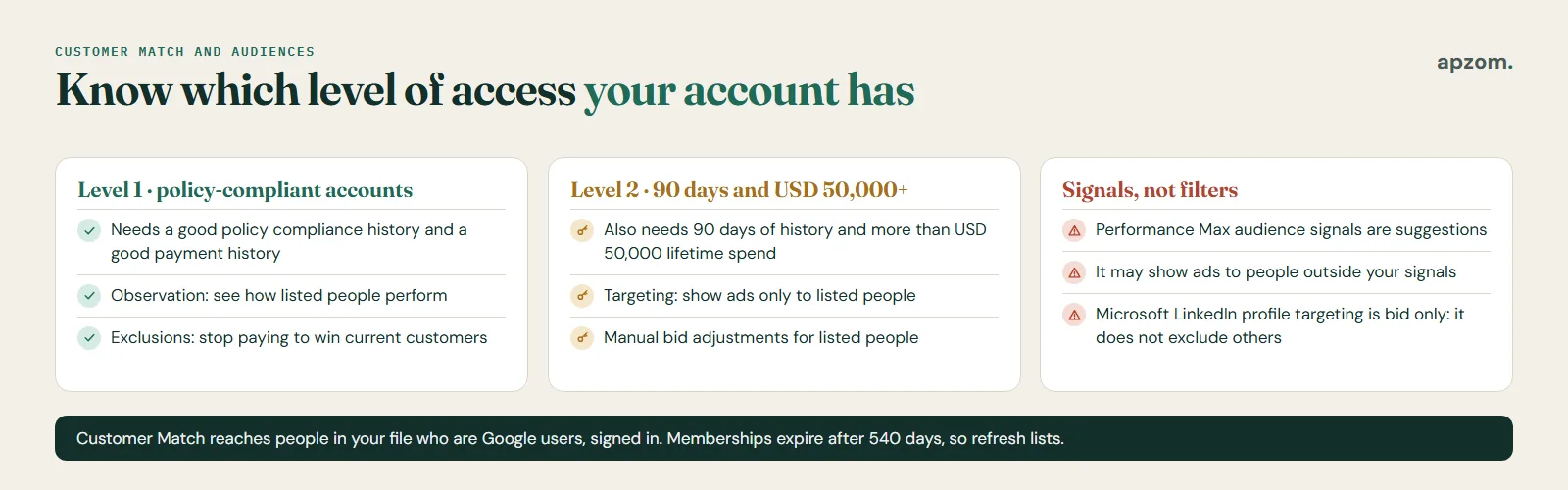
| What you can do | Who can use it |
|---|---|
| Observation and exclusions | Accounts with a good policy compliance history and a good payment history |
| Targeting and manual bid adjustments | Accounts that also have 90 days of Google Ads history and more than USD 50,000 total lifetime spend |
Google converts other currencies to US dollars at the average monthly rate and may remove access from any advertiser. At the first level, three B2B uses work: exclude current customers from acquisition campaigns, observe how open opportunities or target-account contacts behave, and use your customer list as a Performance Max signal.
Know the limits. Google’s “About Customer Match” page says it reaches people in your file “who are Google users” while “signed in to their Google account”, so a list of mostly work addresses may match fewer people than you expect. We have not found a Google figure for B2B match rates. The same page says memberships expire after 540 days, so refresh lists through a CRM connection or regular uploads. Uploading customer data brings consent duties, including Google’s EU user consent policy for users in the EEA and the UK; our guide to importing offline conversions covers the consent fields.
Audience signals are not targeting
Google’s “About audience signals for Performance Max campaigns” page calls signals suggestions that “help Google AI optimize”, and says “Performance Max may show ads to relevant audiences outside of your signals”. A customer list is a reasonable starting signal, but it will not keep students or job seekers out. Only your conversion data and exclusions do that.
Microsoft Advertising’s LinkedIn option
Microsoft’s “LinkedIn profile targeting” help page says advertisers can target by company, industry and job function in Search, Audience and Performance Max campaigns, among others, though not every advertiser has it for Performance Max yet. It works as “bid only”: targeting a company adjusts bids for people there but does not exclude everyone else. It is offered only in some markets. In our judgement, for a B2B firm already on Google Ads, it is a reasonable second search channel to test.
Make the form do some of the qualifying
On your own landing page, ask for what sales needs to judge fit: name, work email, company, role and one required question that separates buyers, such as volume, headcount, timing or product line. Our guide to contact form best practices shows how to keep it short. Our rule of thumb on personal email addresses: flag them, do not block them, because many owners of smaller firms use one for business.
Say who you are for before the click. “For manufacturers”, “minimum order 500 units” or “for companies with 50+ staff” in the ad and on the page puts the wrong people off for free. Keep a visible link to your careers page, so job seekers find it instead of your quote form.
If you use Google’s lead form assets:
- Qualifying questions. Google’s “Create lead form assets” page says a multiple-choice question can become a qualifying question, so submissions with the answers you choose are tagged as qualified leads. Qualifying questions cannot be optional.
- Contact details. The same page says that if you make contact questions optional, users “must provide either their email or phone number” for measurement.
- Storage. Google’s “About lead form assets” page says leads are stored for 60 days and CSV downloads cover the last 30. Connect a webhook or CRM so sales sees leads the same day.
If many of your leads are fake rather than wrong-fit, start with our guide to improving Google Ads lead quality.
Send qualified and won opportunities back to Google Ads
Without this step, Google Ads treats a student’s enquiry and a signed contract as the same conversion. Map CRM stages to conversion actions (lead, qualified lead, meeting held, opportunity, won), record a stage on every lead and upload the outcomes. Google now recommends enhanced conversions for leads, which matches a hashed email or phone number captured at form submission; its “Set up enhanced conversions for web using the Google tag” page says the web and leads versions were combined into a single setting in April 2026. Our guide to importing offline conversions into Google Ads covers setup, upload routes and errors.
The B2B problem is time. Google’s “Guidelines for importing offline conversions” page says conversions uploaded more than 90 days after the last click are not imported when matched by click ID (GCLID), and more than 63 days after it for enhanced conversions for leads. Many B2B deals close later than that.
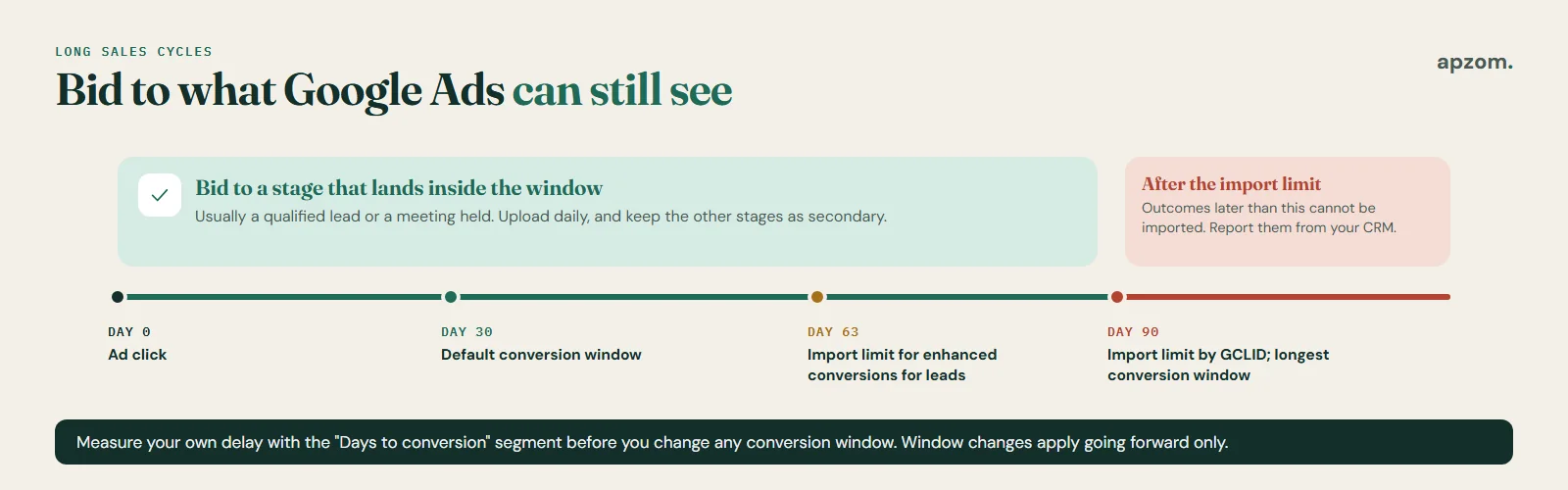
- Bid to a stage that happens inside the window. For most B2B firms that is a qualified lead or a meeting held, not a won deal.
- Still upload won deals that fall inside the window, for reporting and for values.
- Upload daily, so conversions are not lost and bidding learns sooner.
- Bid to one stage. Google’s “Best practices for generating high-quality leads” page says to “avoid selecting goals from multiple stages” for optimisation. Keep the others secondary.
Bidding when the sale takes months
Fit the conversion window to your cycle
Google’s “About conversion windows” page says the click-through window defaults to 30 days, can be set from 1 to 90 days depending on the source, and changes “apply to all conversions going forward”. If your qualified stage usually comes five or six weeks after the click, a 30-day window drops many of them. Measure it: Google’s “Find out how long it takes for your customers to convert” page says to open the segment menu in Campaigns, Ad groups or Search keywords and choose Conversions, then “Days to conversion”, with a date range ending at least 30 days ago. The same page explains why recent weeks look worse: conversions can arrive up to 90 days after the click, while spend shows in full at once.
Target CPA: useful, with cautions
Google’s “About Target CPA bidding” page says you can start with no conversion history, suggests judging it over 30 days with at least 30 conversions, and warns that “setting a target that’s too low” may lose clicks that would convert. Google’s lead generation best practices add that the bidding goal should ideally have at least 15 conversions in 30 days at account level and happen within 7 days of the ad interaction. Few B2B accounts meet that with a deep stage, so in our judgement: bid to the deepest stage that reaches about 15 a month, set the target from cost per qualified lead rather than your old cost per lead, and change targets in small steps with time between them. Our guide to reducing cost per lead explains why a lower target does not reliably lower real cost.
Value-based bidding when deals differ in size
Google’s lead generation guidance says: “If you can assign different values to your leads, use value-based bidding strategies”, such as Maximize conversion value, with or without a target ROAS. Where real deal values cannot be imported, its “Value-based bidding best practices” page suggests proxy values that “align with your business priorities”. Our working method: multiply your average won deal value by the share of leads at that stage that go on to win, from your own CRM history, and give a product line or company size that wins more often its own value. Google recommends uploading values consistently “for at least 4 weeks or 3 conversion cycles” before switching, and generally advises against zero-value conversions.
Performance Max or Search for B2B?
Start with Search for most B2B firms. Your core buying searches are few and worth controlling, and Google’s “How Performance Max interacts with other campaigns” page says a Search keyword that exactly matches the query, or is spell-corrected to it, is favoured over Performance Max. Our guide to Performance Max vs Search explains how the two share traffic.
Add Performance Max when your conversions are qualified leads or later stages, volume is steady and you can supply good images and video. Set its controls before launch:
- Negative keywords. Google’s August 2025 announcement says campaign-level negatives reached all Performance Max campaigns earlier in 2025 and that shared negative keyword lists can now be applied, so your B2B families can be attached. They cover Search and Shopping inventory only.
- Brand exclusions. Google’s “Apply brand exclusions” page says that in Performance Max they cover Search, Shopping and YouTube search inventory. For Search campaigns, brand exclusions began moving into AI Max settings from 27 May 2025.
Performance Max also reaches channels such as YouTube, Display and Gmail, where negative keywords do not apply. That is why the qualified-lead signal matters more there than any setting.
Common mistakes
- Adding “free” as a broad negative. It blocks “free quote” and “free trial” with the templates.
- Expecting “job” to block “jobs”. Negatives do not match close variants.
- Writing negatives in one country’s English. “Resume” misses “CV”; “openings” misses “vacancies”.
- Bidding to every form fill. Bidding then finds whoever fills in forms most cheaply.
- Bidding to won deals that close after the import limit. Past 63 or 90 days, they cannot be imported.
- Leaving the conversion window at 30 days unchecked. Slow but real conversions disappear.
- Treating audience signals as targeting. Performance Max can reach people outside them.
- Planning around Customer Match targeting. Many accounts can observe and exclude, but not target.
How Apzom can help
Apzom Digital provides Google Ads management for B2B firms: intent mapping, negative-keyword families by market, search terms reviews, forms that qualify, CRM stage mapping, offline conversion uploads and bidding set to your sales cycle. We have not published a Google Ads B2B case study yet, so we will not show you figures we cannot prove. Our closest published B2B work is the 51-page website we built from scratch for ARKS Infinity Logistics, a freight forwarding and customs advisory company whose site had to stand up to scrutiny from corporate procurement teams; that was a website project, not a Google Ads result. We work with clients worldwide, remotely, from our base in Ahmedabad, India.
Get a Free Growth Audit and Quote for your B2B Google Ads. Tell us what you sell, who buys it, how long a deal usually takes and how leads reach your CRM today. We send back a written plan covering intent groups, negative-keyword families for your markets, the stage to bid to, conversion windows and whether Performance Max fits yet. We will ask for read-only or standard access; you stay the owner of the account.
No obligation, and no promised number of leads or deals. Prefer to talk first? Contact us or see our guide to improving Google Ads lead quality.
Frequently asked questions
Is Google Ads good for B2B?
It can be when buyers search for what you sell in recognisable terms and the account filters out job seekers, students and consumers. When hardly anyone searches for your category, LinkedIn, outbound or partnerships may reach buyers sooner. Our B2B lead generation guide compares the channels.
What negative keywords should a B2B company use?
Start with families: jobs and careers, education, free and DIY, definitions, consumer terms, and your brand with support words such as login. Write each in the English of every market you target, add singular and plural forms, and use phrase negatives such as “free template” rather than a broad “free”.
Can I target job titles in Google Ads?
Not the way LinkedIn allows. Google Ads works mainly by keyword, with audiences built from your own data. Microsoft Advertising offers LinkedIn profile targeting by company, industry and job function in some markets, as a bid adjustment rather than a strict filter.
What conversion window should I use for a long B2B sales cycle?
Measure it with the “Days to conversion” segment, then set the window a little longer than most conversions take, up to the 90-day maximum. If deals close later than that, bid to an earlier stage, such as a qualified lead.
Should a B2B company use Performance Max?
Usually not first. Start with Search for core buying terms and get qualified-lead tracking working, then test Performance Max with negative-keyword lists, brand exclusions and customer list signals in place, and judge it on cost per qualified lead.