The short answer: Google Ads lets a small business appear at the top of Google when people search for exactly what it sells, and you pay mainly when someone clicks. It works best with a small number of tightly focused campaigns, keywords chosen for buying intent, negative keywords to block wasted searches, ads that send people to a matching page, and conversion tracking set up before you spend. It works badly when you let Google spend on vague searches, send everyone to your homepage, or judge success by clicks. This guide walks through setting up Google Ads step by step, what to spend, and how to tell whether it is working.
This guide is for owners and marketers at small businesses in any country, whether you serve a local area or sell online. It covers when Google Ads makes sense, choosing a campaign type, structuring your account, choosing keywords and negatives, writing ads, setting location and budget, tracking conversions, bidding, and the first 90 days. If you are still deciding between search ads and SEO, read our guide to SEO vs Google Ads first. For social ads, see our guide to Facebook and Instagram ads for local businesses.
Is Google Ads right for your business?
Google Ads works best when people already search for what you offer. Ask yourself:
| Question | Good sign | Warning sign |
|---|---|---|
| Do people search for what you sell? | Yes, with clear phrases such as a service plus a place | Your product is new and nobody knows to search for it yet |
| Is a customer worth enough? | One customer covers several clicks’ worth of cost | Low-value, one-off sales with thin margins |
| Is your landing page ready? | A fast, clear page for each main service or product | Only a homepage, or a slow page that does not work on phones |
| Can you answer enquiries quickly? | Someone answers calls and forms the same day | Leads wait days for a reply |
| Can you track results? | You can count calls, forms or sales from the site | No way to know which enquiries came from ads |
If you have more warning signs than good signs, fix those first. Ads magnify whatever is already there, good or bad.
Step 1: choose the right campaign type
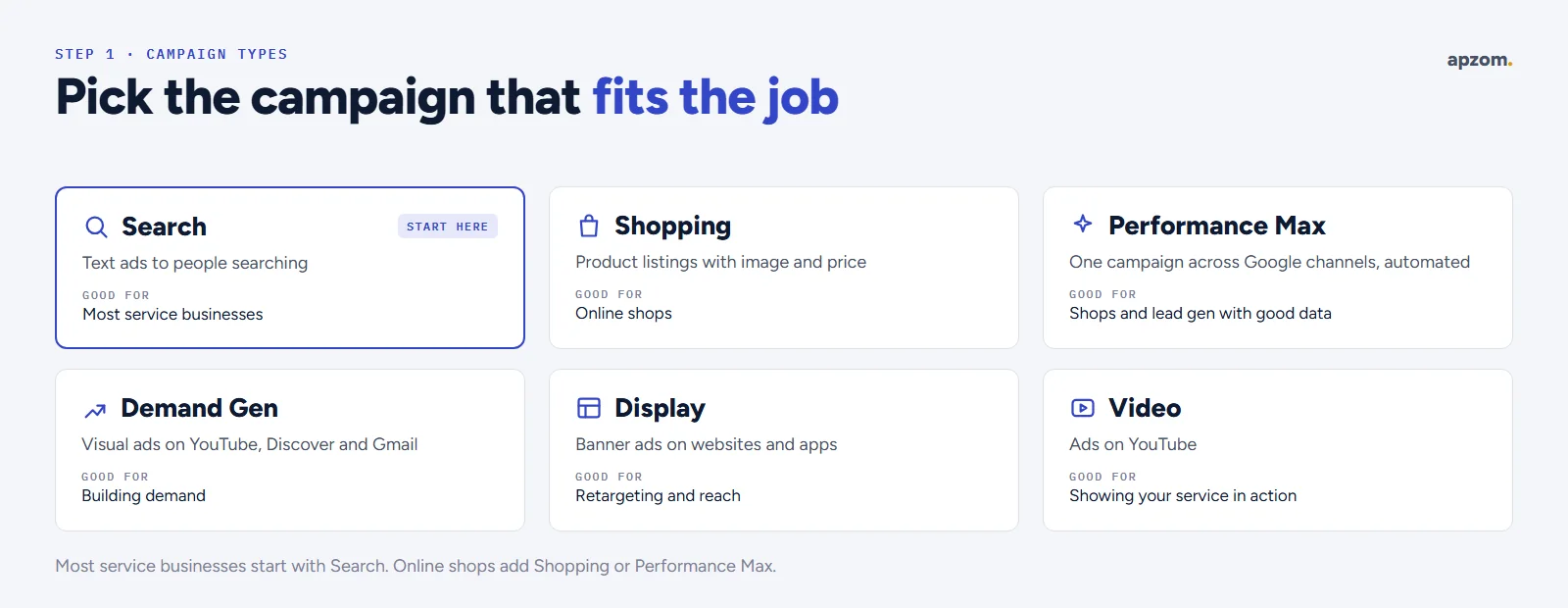
Google Ads offers several campaign types. Here is how Google describes the main ones, and when each suits a small business.
| Campaign type | What it is | Good for |
|---|---|---|
| Search | Text ads on search results | Most service businesses, and anyone whose customers search for what they sell |
| Shopping | Product listings, ideal for retailers selling their product inventory | Online shops with a product feed |
| Performance Max | A goal-based campaign that runs across Google’s channels from one campaign | Shops and lead generation with good conversion data and creative assets |
| Demand Gen | Ads across YouTube (including Shorts), Discover and Gmail | Building demand with visual ads |
| Display | Visual ads shown to a relevant audience across websites and apps | Reach and retargeting |
| Video | Video ads on YouTube and other websites | Showing your service or product in action |
| Smart | A simplified campaign that highlights your selling points, created in Smart Mode | Owners who want very little set-up, accepting less control |
Google has also added AI Max for Search, which it describes as a one-click feature suite you can switch on inside a Search campaign. It widens which searches your ads can match and lets Google tailor ad text and landing pages. Google says its benefits are limited if you use manual bidding. It can help once tracking is solid, but it is not a substitute for careful keywords and negatives.
Local Services Ads are a different product: they have their own sign-up and account, and you pay only for leads related to your business and services. They are available only in certain countries and business categories, so check eligibility for yours.
For most small service businesses, a Search campaign is the best place to start, because it shows text ads to people actively searching. Online shops usually start with Shopping or Performance Max alongside a Search campaign for brand and product terms.
Step 2: structure your account simply
The first framework is a simple account structure. Small budgets are wasted when they are spread across too many campaigns.
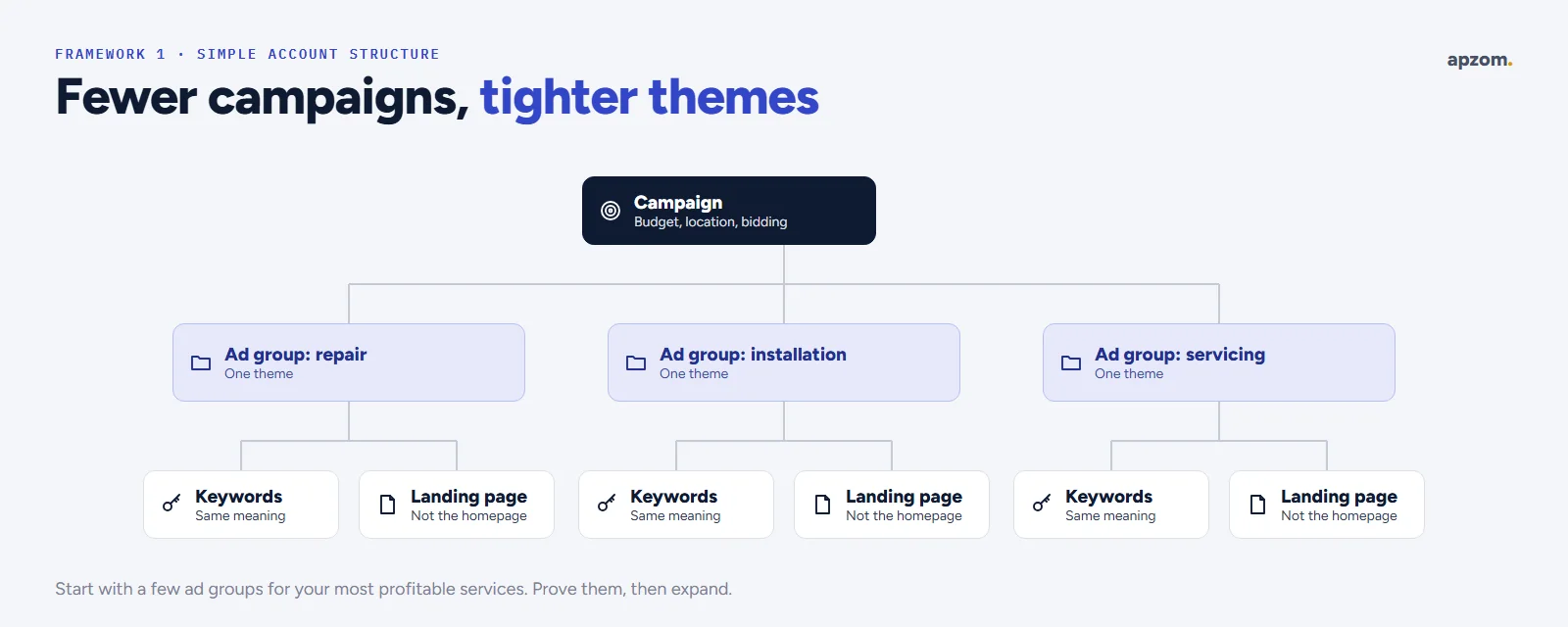
- Campaigns set the budget, location and bidding. Create one per main goal or location, not one per keyword.
- Ad groups hold closely related keywords and the ads for them. One ad group per service or product theme, such as “boiler repair” and “boiler installation”.
- Keywords in each ad group should share the same meaning, so the ad and the landing page can match them closely.
- Landing pages: each ad group should send people to the page that best matches the search, not your homepage.
Start with a handful of ad groups for your most profitable services or products, prove they work, then expand.
Step 3: choose keywords and negative keywords
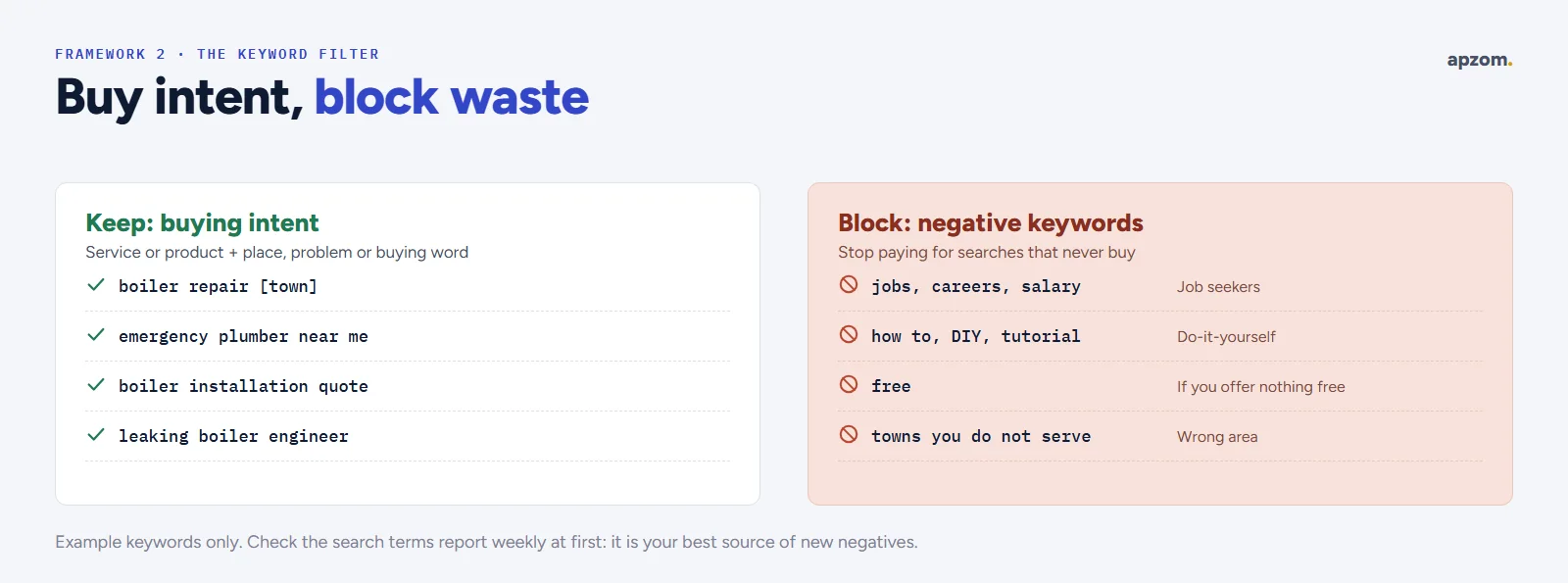
The second framework is the keyword filter: choose keywords for buying intent, then block the searches you do not want.
Each keyword has a match type, which controls how closely a search must match it. Google’s current definitions:
| Match type | Google’s definition | How we use it for small budgets |
|---|---|---|
| Broad match (the default) | Ads may show on searches related to your keyword | Only with conversion tracking and Smart Bidding; Google says it is critical to use Smart Bidding with broad match |
| Phrase match | Ads may show on searches that include the meaning of your keyword | A good starting point for most service keywords |
| Exact match | Ads may show on searches with the same meaning or same intent as your keyword | For your most valuable, proven searches |
Because broad match is the default, check every new keyword’s match type. On a small budget, we usually start with phrase and exact match, then test broad match once conversion tracking and bidding are working.
Good keywords for small businesses usually combine a service or product with a sign of intent, such as a place (“near me” or a town name), a problem (“leaking”, “broken”, “emergency”) or a buying word (“price”, “quote”, “book”). You can research ideas with Keyword Planner, which Google describes as a free resource for building keyword lists. It sits under the Tools menu in your Google Ads account, and you need to finish setting up the account, including billing details, to use it.
Negative keywords stop your ads showing for searches you do not want. Common examples for small businesses:
- Jobs and training: “jobs”, “careers”, “salary”, “course”, “training”.
- Do-it-yourself: “how to”, “DIY”, “tutorial”, if you only sell the service.
- Free and cheap: “free”, if you do not offer anything free.
- Wrong places or services: towns you do not serve and services you do not offer.
Check the search terms report every week at first. It shows the actual searches that triggered your ads, and it is the best source of new negative keywords.
Step 4: write ads that match the search
Google’s standard text ad is the responsive search ad. You write up to 15 headlines of up to 30 characters each, and up to 4 descriptions of up to 90 characters each. Google needs at least 3 headlines and 2 descriptions, and it mixes and matches them to find the best combinations.
What makes a good ad for a small business:
- Use the searcher’s words. If someone searches “emergency electrician”, the ad should say “emergency electrician”.
- Give a reason to choose you: years in business, response time, guarantees you really offer, reviews, prices or free quotes.
- Be specific about the action: “Call now”, “Book online”, “Get a quote”.
- Add assets. Assets (previously called ad extensions) add useful details to your ad. Google lists location, call, sitelink, callout, structured snippet, price and promotion assets, among others. For most small businesses, sitelinks, callouts, a call asset and a location asset are the place to start.
Step 5: set your location and schedule
Choose the areas you serve: countries, regions, cities, postcodes or a radius around your address. Then check the advanced location setting. Google’s default, and its recommendation, is “Presence or interest”, which can include people searching about your area from elsewhere. For a local service business that only serves people nearby, we usually switch to “Presence”, so ads show to people who are in or regularly in your area. That is our advice, not Google’s, so judge it against your own results. Exclude areas you do not serve.
Also set an ad schedule if you can only answer calls at certain times. There is little point paying for a call that goes to voicemail at midnight.
Step 6: set up conversion tracking before you spend
The third framework is track-first: if you cannot see which clicks become enquiries or sales, you cannot improve.
Google Ads can track conversions on your website, in apps, from phone calls and from offline sales. Set it up with the Google tag or by importing conversions from Google Analytics. Enhanced conversions improve measurement by sending first-party data, such as an email address from a form, which Google hashes with a secure one-way algorithm (SHA256). If your sales happen later by phone or in person, importing offline conversions lets Google learn which clicks became real customers.
Track what matters to your business: phone calls from ads, calls from your website, contact form submissions, bookings and purchases. Then go one step further and record which of those enquiries became customers, so you can judge cost per customer, not just cost per lead.
Step 7: set a budget and choose a bidding strategy
You set an average daily budget for each campaign. Google says a campaign might spend up to twice your average daily budget on a given day, but no more than 30.4 times your average daily budget in a month. So set the daily budget from the monthly amount you are comfortable spending, divided by about 30.
Next, choose how Google bids. Smart Bidding is Google’s set of automated bid strategies that use Google AI to optimise for conversions: Maximize conversions, Target CPA (a target cost per action), Maximize conversion value and Target ROAS (a target return on ad spend). Other options include Maximize clicks and manual bidding. Google says you can start Target CPA with no conversion history, and that Smart Bidding has a standard learning period of about 7 to 14 days. During that time, avoid big changes.
A practical approach for small businesses: start with a budget you are comfortable testing for at least two to three months, focus it on your best few services, and judge it by cost per customer.
You will also see a Quality Score from 1 to 10 for each keyword. It is based on expected click-through rate, ad relevance and landing page experience. Google says Quality Score is not an input in the ad auction: treat it as a diagnostic tool that shows where your ads or landing pages could match searches better.
Already running Google Ads? A Google Ads Review checks your campaigns, keywords, negatives, search terms, location settings and conversion tracking, and shows where budget is being wasted.
Your first 90 days
The fourth framework is a 90-day launch plan.
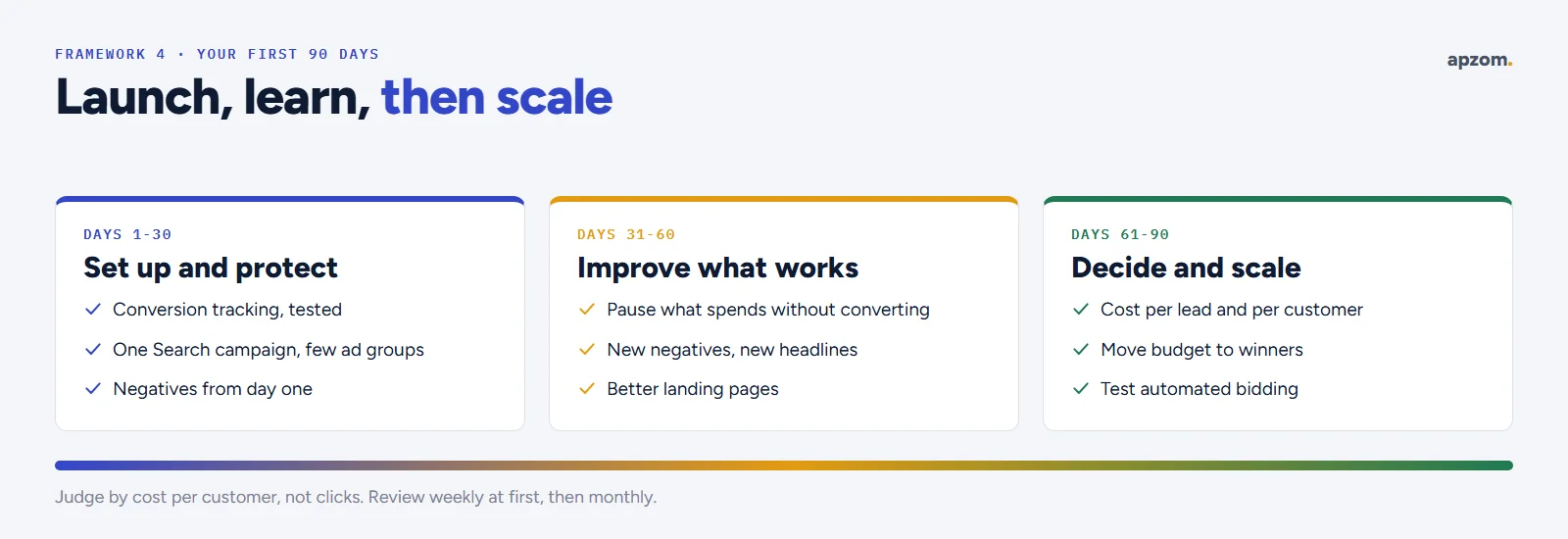
Days 1 to 30: set up and protect the budget
- Set up conversion tracking and test it.
- Launch one Search campaign with a few tightly themed ad groups and matching landing pages.
- Add negative keywords from day one and check search terms every few days.
Days 31 to 60: improve what is working
- Pause keywords and ads that spend without converting.
- Add new negative keywords and test new ad headlines.
- Improve landing pages for the ad groups that get clicks but few enquiries.
Days 61 to 90: decide and scale
- Compare cost per lead and cost per customer by ad group.
- Move budget to what works and consider new services, locations or campaign types.
- Once you have steady conversion data, test automated bidding strategies.
Rules and account basics
- Advertiser verification. Google says all advertisers will eventually be required to complete advertiser verification of their identity or business operations, and it may pause an account until verification is done. Keep your business details ready and accurate.
- Own your account. Your Google Ads account, billing and data should be in your business’s name, with your agency given access. If an agency manages your ads, Google’s transparency requirements say it must tell new customers its management fees in writing before the first purchase, show them on invoices, and give you your customer ID when you ask.
- Landing pages must work. Google requires ad destinations to work on common browsers and devices, and to be crawlable by Google Ads.
- Some industries have extra rules. Google’s restricted categories include alcohol, gambling and games, healthcare and medicines, and financial products and services. Check Google’s policy pages before advertising.
Common mistakes to avoid
- Sending all ads to your homepage.
- Using broad keywords with no negative keywords and no conversion tracking.
- Spreading a small budget across too many campaigns.
- Accepting every automated recommendation without checking it.
- Judging success by clicks, impressions or click-through rate alone.
- Leaving the account untouched for months.
How Apzom can help
Our Google Ads management follows four steps: audit your account, rebuild it around buying intent and margin, test ad copy, audiences, bidding and assets, and scale only where cost per qualified lead holds. That includes keyword and negative keyword strategy, ongoing search term reviews, conversion tracking (including offline conversions) and a landing page review. You keep your account, its history and its data.
We publish client results only once the client has confirmed the numbers, and we have not published Google Ads client results yet. Our published paid media results come from Meta ads, which you can see on our case studies page.
We work with clients worldwide, remotely, from our base in Ahmedabad, India. Our Google Ads management works alongside SEO, local SEO and conversion rate optimisation, so your ads send people to pages that turn them into customers. We will not promise a number of leads, because results depend on your market, offer and follow-up. If you are comparing agencies, our guide on how to choose a digital marketing agency may help.
Request a Google Ads Review. We look at your account or your plan: campaign types, structure, match types and negatives, ads and assets, location settings, conversion tracking and bidding. You get a prioritised list of what to fix first, and you keep full ownership of your account.
No obligation and no guaranteed lead numbers. Prefer to talk first? Contact us or see all our services.
Frequently asked questions
Is Google Ads worth it for a small business?
It can be, when people search for what you sell, a customer is worth enough to cover several clicks, and you have a good landing page and quick follow-up. Track conversions from day one and judge it by cost per customer.
How much should a small business spend on Google Ads?
It depends on how competitive your searches are and what a customer is worth to you. Start with an amount you are comfortable testing for two to three months, focused on your best services, and adjust based on cost per customer.
What is the best Google Ads campaign type for a small business?
For most service businesses, a Search campaign is the best place to start. Online shops often start with Shopping or Performance Max, plus Search for brand and product terms.
What are negative keywords?
Negative keywords stop your ads from showing for searches you do not want, such as job searches, do-it-yourself searches or services you do not offer. They are one of the best ways to stop wasted spend.
Why are my Google Ads not getting conversions?
Common reasons are untracked conversions, vague keywords, missing negative keywords, ads sent to the homepage, slow or unclear landing pages, and slow follow-up. Check the search terms report and your landing page first.
Should I use Smart campaigns or expert mode?
Smart campaigns are simpler but give you less control. Most businesses that want to manage costs closely use a standard Search campaign, with keywords, negatives and conversion tracking set up properly.
Do I need a website to run Google Ads?
You need somewhere for people to go. A clear landing page for each main service or product works best. Some campaign types can drive calls directly, but a good page still helps people decide.
Can Apzom manage Google Ads outside India?
Yes. We work with clients worldwide, remotely, from our base in Ahmedabad, India, and set up campaigns for your market, language, currency and the policies that apply where you advertise.