
The short answer: Show a price, or at least a “from” price or a range, whenever most of your jobs fall into a predictable band; keep “request a quote” only for work that genuinely varies so much that any number would mislead. Whichever you choose, the pricing page should still explain what drives the cost, what each package includes, what a typical project looks like and what happens after someone gets in touch. Showing prices tends to trade some enquiry volume for better-fitting enquiries; hiding them does the opposite. If you sell to consumers in the UK, the EU or Australia, any price you show should normally be the total the customer will pay, including VAT or GST and unavoidable fees.
This guide is for owners and marketers of service businesses anywhere in the world: agencies, trades and home services, clinics, consultants, and B2B service firms. It covers the five display options, a four-question framework for choosing, how to write a pricing page without exact prices, the price-display rules in the UK, US, EU, Australia and India, pricing structured data, and how to test your choice with low traffic. We checked the legal and technical points against official sources on 25 November 2026. This is general information, not legal advice.
Why the price question decides who contacts you
Price is one of the first filters many buyers apply. A visitor who finds no indication of cost can guess, ask, or leave for a competitor who answers the question. Some will ask, which is why hiding prices can produce more enquiries, but some of those come from people who would not have contacted you had they seen a number, and the call ends at the price.
Showing a price works the other way round. Visitors who cannot afford you filter themselves out, and those who get in touch have already accepted the rough cost, so the first conversation is about the job, not the budget. You may receive fewer enquiries, but more of them fit.
Neither outcome is automatically better: a firm with a large sales team may be happy to talk to everyone, while a small practice where the owner answers every enquiry usually is not. There is no universal figure for how much showing prices changes enquiry volume or quality: it depends on your market, competitors and buyers, so this guide gives you the reasoning and a way to test it on your own site rather than a promised result.
The five ways to show price
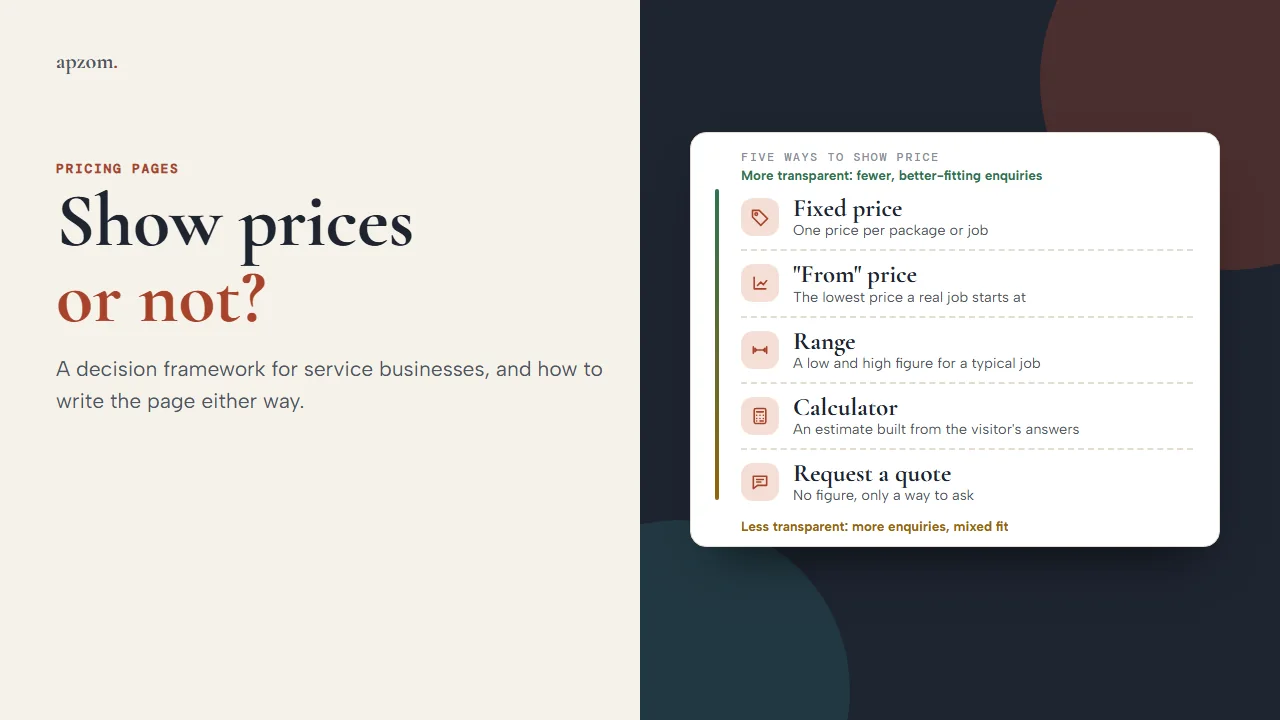
There are five practical options, not just “price list” or “nothing”, and many firms use two or three for different services.
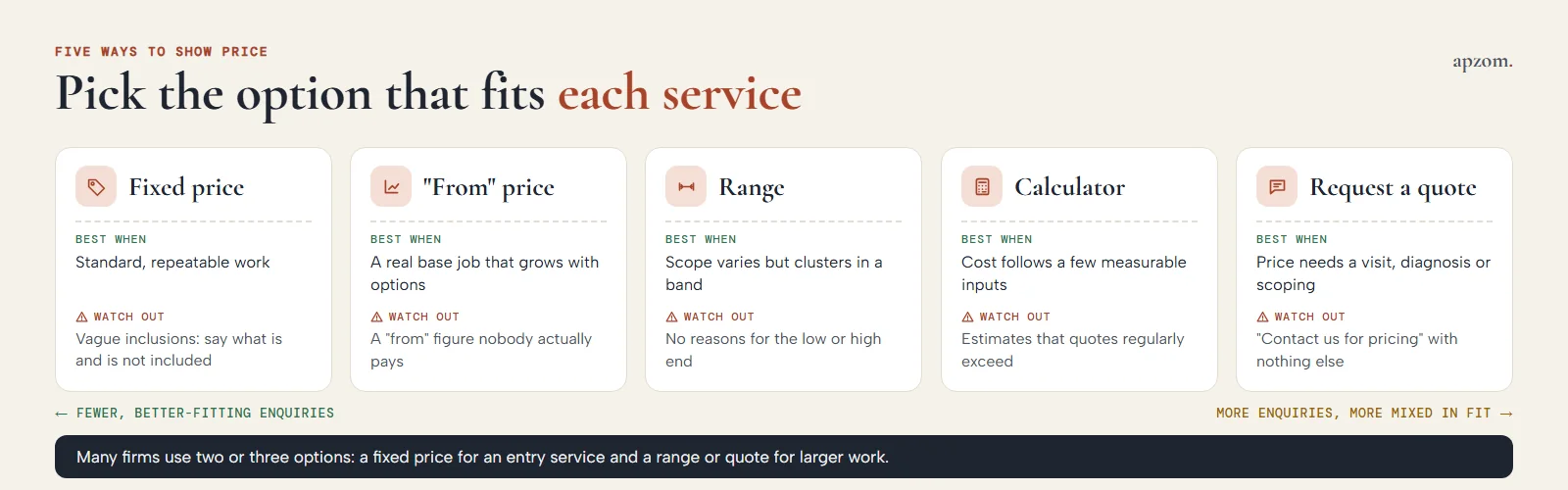
| Option | What the visitor sees | Best when | Likely effect on enquiries |
|---|---|---|---|
| Fixed price | One price per package or job | The work is standard and repeatable | Fewer but better-fitting enquiries; some buyers book without talking to you |
| “From” price | The lowest price a real job starts at | Jobs share a base but grow with options | Filters out the lowest budgets while leaving room for larger jobs |
| Range | A low and high figure for a typical job | Scope varies, but most jobs land in a known band | Sets expectations; the visitor places themselves in the range |
| Calculator or estimator | A price built from the visitor’s answers | Cost depends on a few measurable inputs | Can produce well-qualified leads, but only if the inputs are honest and the result is stated as an estimate |
| Request a quote | No figure, only a way to ask | Every job is different, or the price depends on a site visit or diagnosis | More enquiries, more mixed in fit, and more work for your team |
Fixed prices
Fixed prices suit work you can describe completely in advance: a defined audit, a set number of sessions, a standard installation, a support plan with clear limits. Some buyers will book without a call. The risk is scope: if the description is vague, the buyer assumes more is included than you do, so write what is included, what is not, and what extras cost.
“From” prices
A “from” price says where a real job starts. It works when there is a genuine base job and the price grows with size, options or urgency. The important word is real: the “from” price should be one that customers can actually buy, not a stripped-down version nobody chooses. In the UK, the CMA’s price transparency guidance gives “from £X” for photography services as an example and says an indicative or “from” price is acceptable “as long as it includes all applicable mandatory charges”.
Ranges
A range (“most projects of this type cost between X and Y”) is often the most honest choice for work that varies but not wildly. Explain what puts a job at the low or high end, otherwise visitors assume they will be at the bottom.
Calculators and estimators
A calculator asks a few questions (floor area, number of pages, team size, sessions per month) and returns an estimate, and you get the details you need to qualify the enquiry. It is also the easiest option to get wrong. Label the result as an estimate, say what it excludes, and make sure the final quote is rarely far above it.
Request a quote
“Request a quote” is right when you genuinely cannot price without seeing the job: a repair that needs diagnosis, a clinical treatment that depends on an assessment, a complex B2B project with procurement requirements. Even then, the page can still say what the price depends on, what a typical engagement includes and how quickly you send the quote. “Contact us for pricing” on its own leaves the buyer with nothing to work with, as our guide to writing a service page explains.
The decision framework: four questions
Answer these four questions for each service, not for the business as a whole: a clinic might show a fixed price for a consultation and a range for treatment plans.
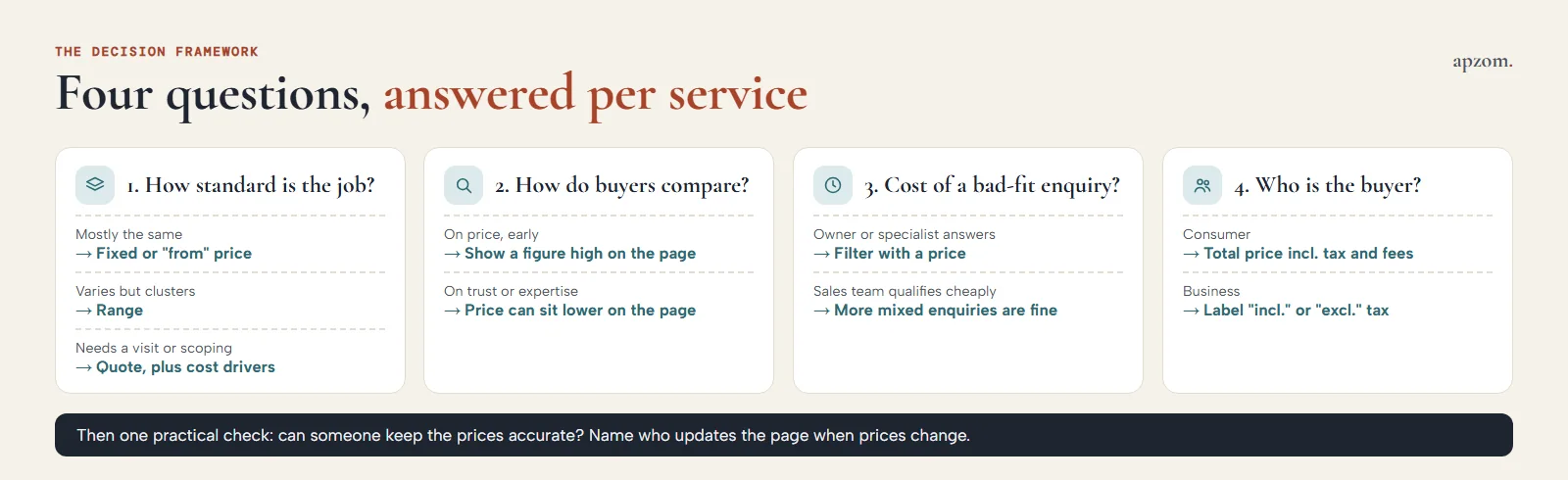
- How standard is the job? If most jobs of this type cost about the same, show a fixed or “from” price. If they vary but cluster, show a range. If they genuinely cannot be priced without a visit, an assessment or a scoping call, use a quote, and say why.
- How do your buyers compare options? If competitors in your market publish prices and buyers shortlist on cost, a page with no figure is at a disadvantage. If buyers choose on expertise, availability or trust first, the price can sit lower on the page.
- What does a bad-fit enquiry cost you? If the owner or a senior specialist handles every first call, filtering by price saves real time. If an inside sales team qualifies leads cheaply, you can afford more enquiries of mixed fit.
- Who is the buyer? Consumers are protected by price-display rules in many countries (see below), and those rules require the total price, including tax, wherever you show one. Business buyers are usually covered by fewer display rules, but they still expect to know whether a figure includes tax.
Add one practical check: can you keep the prices accurate? A price a year out of date creates awkward calls and, for consumers, possible legal problems, so name the person who updates the page.
A starting point by type of business
These are our rules of thumb for a first version, not industry data. Test them against your own enquiries.
| Business type | Typical starting choice | Why |
|---|---|---|
| Marketing and creative agencies | Fixed price for defined entry products (audits, set-up), ranges or “from” prices for retainers | Entry products are standard; ongoing work depends on scope and competition |
| Trades and home services | Fixed prices for standard jobs (callout, common installs), “from” prices or a calculator for larger work | Many jobs repeat; bigger jobs depend on size and materials |
| Clinics and practices | Fixed prices for consultations and standard appointments, ranges for treatment plans after assessment | The first appointment is predictable; the plan depends on what the clinician finds |
| Consultants and advisers | Day rate or fixed-fee packages, ranges for projects | Buyers want to know the order of magnitude before a call |
| B2B services (IT, logistics, facilities, professional services) | Ranges, typical engagement examples or a calculator; quote for complex contracts | Scope varies widely, and procurement usually needs a formal quote anyway |
Our guides to SEO costs, Google Ads management fees and website costs show how a service whose price genuinely depends on scope can still be explained in detail.
How to write a pricing page without exact prices
If you choose ranges, estimates or quotes, the page has to give the buyer enough to decide whether to contact you. A good pricing page for a service business usually has six parts.
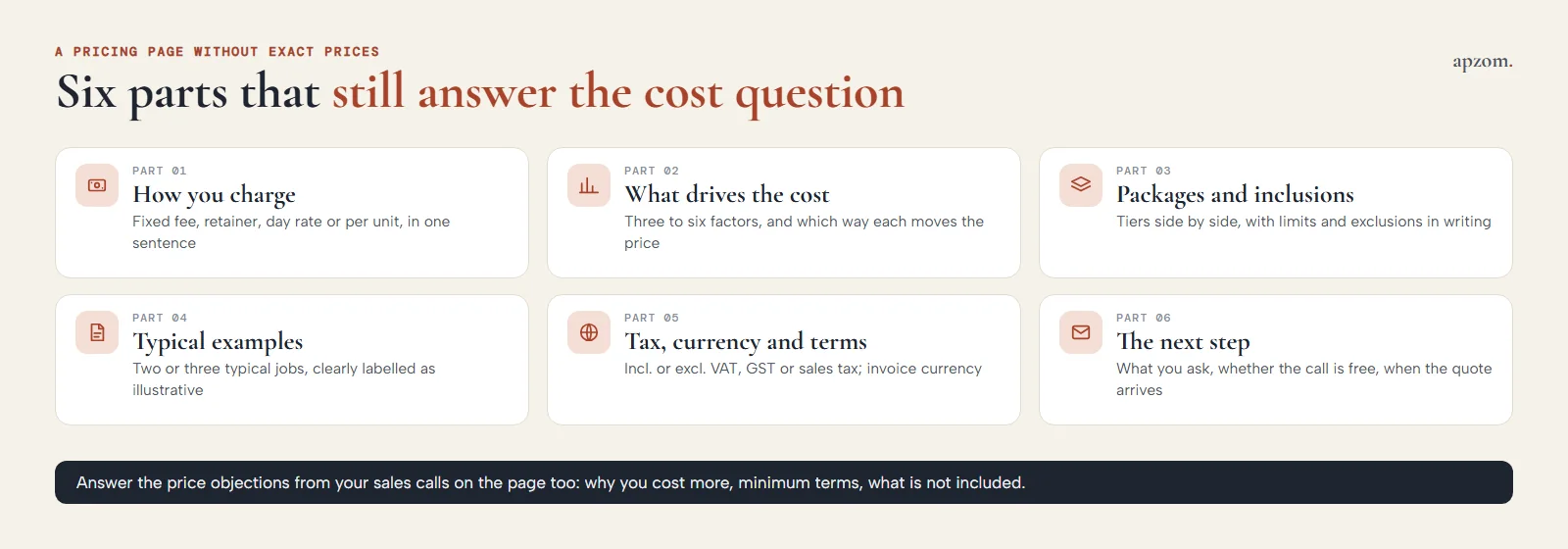
- How you charge. State the pricing model in one sentence: a fixed fee per project, a monthly retainer, a day or hourly rate, a per-unit price, or a mix. Buyers comparing quotes need to know whether they are comparing like with like.
- What drives the cost. List the three to six factors that move the price, in the buyer’s language: size, complexity, urgency, location, materials, number of people or sites, how much the client supplies. Say which way each one pushes the price.
- Packages and inclusions. If you offer tiers, show them side by side with what each includes and excludes. Give each tier a plain name that says who it suits, and put limits (hours, revisions, visits, sites) in writing.
- Typical examples, labelled as illustrative. Describe two or three typical jobs and where each would sit: “A small office with one site and no out-of-hours work would usually fall in the lower part of the range.” If you give figures, use your real price ranges and label the examples clearly as illustrative, not as quotes for a specific client.
- Tax, currency and terms. Say whether figures include VAT, GST or sales tax, which currency they are in, and when payment is due. For international buyers, say which currency you invoice in.
- The next step. Say exactly what happens when someone gets in touch: what you will ask, whether the first call is free, how long the quote takes and what it will contain. Our guide to speed to lead explains why the reply time matters as much as the form.
Put the pricing information where buyers look for it: a pricing page linked from the main navigation, plus a short price block on each service page. Our guide to contact form best practices covers which fields to ask for, including whether a budget question helps or hurts, and our landing page best practices covers campaign pages.
Answer the price objections on the page
The questions people ask on sales calls belong on the page: why you cost more than a cheaper option, what happens if the job grows, minimum terms, exclusions and cancellation fees. Answering them in writing saves your team time and gives buyers who never call a reason to trust you.
Not sure whether to show prices, ranges or a quote form? Ask for a Free Growth Audit. We review your pricing and service pages service by service, flag price wording to check against the consumer rules in the countries you sell to, and tell you which display option we would test first and how to measure it.
Price display rules by country
If you sell to consumers, price display is not only a marketing decision. These are the main rules for service businesses in five markets, as we checked them on 25 November 2026. Rules change and vary by sector, so check with a qualified adviser for each country you sell to. Our CRO guide covers the wider rules on fake urgency and other manipulative tactics.
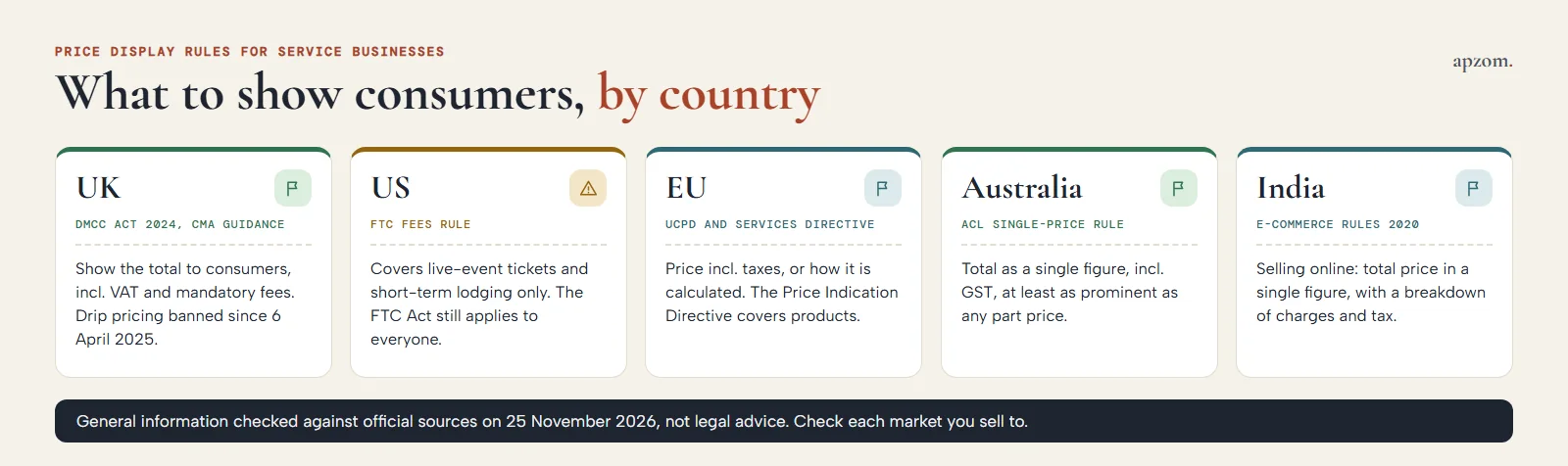
UK: total price, including VAT and mandatory fees
The Digital Markets, Competition and Consumers Act 2024 bans drip pricing, and the CMA’s price transparency guidance (CMA209) explains what that means. The guidance says it is “illegal to hide additional fees, taxes or other charges” that a customer must pay later, which it calls drip pricing. The total price must be shown in the “invitation to purchase”, which the CMA explains does not need to let the customer buy: an advert, an email, a social media post or a web page can be one. The total should normally include unavoidable charges, such as booking fees, and VAT. Where it cannot be calculated in advance, give customers the information to work it out, as prominently as the part you can price. Since the Act’s consumer provisions came into force on 6 April 2025, the CMA can decide breaches itself and fine up to 10% of global turnover.
US: the fees rule is narrow, the general law is not
The FTC’s Rule on Unfair or Deceptive Fees, in force since 12 May 2025, requires businesses that offer, display or advertise live-event tickets or short-term lodging to show the total price upfront. It does not cover agencies, trades, clinics or consultants. The FTC said in the rule’s statement of basis and purpose that it will address unfair and deceptive pricing practices in other industries “using its existing section 5 authority”. A misleading “from” price or a hidden mandatory fee can still be a problem for any business, and some states have their own pricing laws, which we have not covered here.
EU: three directives, and which one applies to services
The Price Indication Directive (98/6/EC) requires consumer prices to be shown including VAT and all other taxes, but it applies to products. The European Commission’s 2006 report on how the Directive was implemented reads “products” as movable goods and says the Directive does not apply to services. For services, two other laws matter. The Unfair Commercial Practices Directive treats an invitation to purchase as misleading if it omits “the price inclusive of taxes”, or, where the price cannot reasonably be calculated in advance, the manner in which it is calculated; its definition of “product” includes services. The Services Directive (Article 22) requires a provider to make available the price “where a price is pre-determined”, and, on request, the price, “the method for calculating the price” or “a sufficiently detailed estimate”. National laws implement these directives, and some countries extend their price-indication rules to services, so details vary.
Australia: one total figure, at least as prominent
The ACCC says businesses must display “the total price of a product or service as a single figure”, including taxes, duties and unavoidable fees, and that if a partial price is shown, “the total price must be at least as prominent as the partial price”. Optional extras need not be included unless you pre-select them. A charge that cannot be worked out when you state the price, such as a per-person fee before the group size is known, can be left out, but you must give the full total during booking, once it is known. Separately, the Competition and Consumer Amendment (Unfair Trading Practices) Act 2026 adds specific drip-pricing rules for consumer offers from 1 July 2027.
India: when you sell services online
India’s Consumer Protection (E-Commerce) Rules, 2020 apply to “all goods and services bought or sold over digital or electronic network”. Inventory e-commerce entities (rule 7(1)) must display the “total price in single figure of any good or service along with the breakup price”, showing compulsory and voluntary charges and the applicable tax, and sellers on a marketplace (rule 6(5)) must give the marketplace the same information to display. How far these rules reach a service firm that only takes enquiries on its own website, rather than selling online, is a question for a lawyer. Showing the total and the tax is the safe default either way.
Tax-inclusive prices by region
For consumers in the UK, the EU and Australia, a displayed price should include VAT or GST. A price shown “+ VAT” to consumers risks breaching the rules above, because the tax is a mandatory part of the price.
For business buyers, practice differs. The ACCC says prices displayed only to businesses do not need to include GST. In the UK and the EU, the consumer price rules above are about consumers, and B2B prices are commonly quoted excluding VAT. If your page serves both audiences, show both figures or a clear toggle, and label every figure “including VAT” or “excluding VAT”. In the US, whether sales tax applies to a service depends on the state and the type of service, so say whether tax may be added. Our guide to website costs lists the standard VAT and GST rates in several countries.
Pricing structured data: what Google actually supports
Schema.org has a full vocabulary for prices. An Offer is defined as an offer “to transfer some rights to an item or to provide a service”, and its itemOffered can be a Service. Inside it, priceSpecification holds the detail: price and priceCurrency for a fixed price, minPrice and maxPrice for a range, and valueAddedTaxIncluded to say whether VAT is included.
| What you want to describe | Schema.org pattern | Does Google show a price rich result? |
|---|---|---|
| A fixed-price service | Service with offers as an Offer with price and priceCurrency | No price rich result for services |
| A price range for a service | Offer with priceSpecification using minPrice and maxPrice | No price rich result for services |
| The general cost level of a local business | priceRange on LocalBusiness, such as “$$” or a short range | Google lists it as a recommended local business property; it must be under 100 characters |
| A physical product you sell | Product with offers | Yes, product rich results can show price, for pages focused on a single product |
Google’s product structured data documentation says “product rich results only support pages that focus on a single product”. Google’s Search gallery has no feature for service prices. So marking up your services with Service and Offer is valid and helps describe the page, but it will not produce price snippets in Google Search, and marking a service up as a Product to try to get them would misrepresent the page. Google’s structured data policies say markup “must be a true representation of the page content” and that you should not mark up content that is not visible on the page. Our guide to schema markup for small businesses covers the testing steps.
How to test your choice with little traffic
Most service businesses do not have the traffic for a classic A/B test on a pricing page. Our guide to A/B testing with low traffic explains how to run a before-and-after change with a written log instead. For a pricing change, measure fit as well as volume.
- Write down the change and your prediction first. For example: “Add a range to the renovation page; we expect fewer enquiries but more that reach a site visit.”
- Count quality, not only volume. Track enquiries, enquiries that fit your minimum budget, quotes sent, and quotes won. A drop in enquiries with a rise in won jobs is a good result.
- Track the time your team spends. Note how many first calls ended because of price before and after the change.
- Ask new clients. One question at the start of the first call, “Did you see our prices before you contacted us?”, tells you more than a heatmap.
- Give it time. Service sales cycles can be long, so judge on enquiries that have had time to become quotes and decisions, not on the first fortnight.
Our CRO audit checklist covers the rest of the enquiry path, from trust signals to forms.
Common mistakes
- A “from” price nobody pays. If almost no real job costs the “from” figure, it misleads buyers, and misleading prices can breach the consumer rules above.
- Mandatory fees revealed later. Booking, callout, admin or set-up fees that every customer pays belong in the price you show.
- A calculator that always lowballs. If quotes regularly land far above the estimate, buyers stop trusting both.
- Packages without limits. “Unlimited support” or “full service” without boundaries invites disputes.
- Hiding the pricing page. If buyers must hunt for it, many will assume the answer is “expensive” and leave.
How Apzom can help
Apzom Digital reviews and rewrites pricing and service pages as part of our conversion rate optimization work: choosing the price display for each service, writing the cost drivers, packages and next steps, flagging price wording to check against the consumer rules in the markets you sell to (we do not give legal advice), and setting up the tracking that tells you whether the change brought better-fitting enquiries. We have not published a pricing-page case study yet, so we will not quote results we cannot prove. We work with clients worldwide, remotely, from our base in Ahmedabad, India.
Get a Free Growth Audit and Quote for your pricing page. Send us your website, the services you sell and the countries your buyers are in. We send back a written review: the price display we would use for each service, what the page should explain, any tax or fee wording to review, and a quote if you want us to rewrite and test it.
No obligation and no promised conversion rates. Prefer to talk first? Contact us or read our CRO audit checklist.
Frequently asked questions
Should I show prices on my website?
Yes, if most of your jobs fall into a predictable band: a fixed price, a “from” price or a range helps buyers decide and filters out poor fits. If every job is genuinely different, explain what drives the price, give illustrative examples and say how quickly you quote.
Will showing prices reduce my enquiries?
It may reduce the number, mainly from people who would not have bought at your price. Whether that is good depends on how much time poor-fit enquiries cost you. Measure quotes and won jobs, not only enquiries.
Do prices on my website have to include VAT or GST?
For consumers in the UK, the EU and Australia, yes: the displayed price should be the total, including tax and unavoidable fees. For prices aimed only at businesses, showing them excluding tax is common, as long as each figure is clearly labelled.
Can I get price rich results in Google for my services?
No. Google has no rich result that shows prices for services; product rich results, which can show a price, only support pages focused on a single product. You can still describe your services with Service and Offer markup, as long as it matches what the page shows.
Is “contact us for pricing” always a bad idea?
Not always, but on its own it gives the buyer nothing. Pair it with the cost drivers, typical examples and when the quote will arrive.