The short answer: A landing page that generates leads does one job for one audience. It repeats the promise of the ad or link that brought the visitor, says who it is for and what they get, asks for one action, puts real proof next to that action, and uses a short form that asks only for what you need to reply. It loads quickly on a phone, tells people what happens after they submit, and is tracked so you can see which ads produce enquiries. Before you spend on traffic, run the message-match test in this guide: if the page does not keep the ad’s promise, fix that first.
This guide is for business owners and marketers anywhere in the world who send paid or email traffic to a page and want more of those visitors to become enquiries. It gives you three tools: an annotated anatomy of a lead-generation landing page (eight parts), a five-row message-match test you can run on any ad and page, and a launch checklist. It covers what the ad platforms themselves require from a landing page and the privacy and review rules that apply to lead forms in several countries. It does not promise a conversion rate, because no honest guide can.
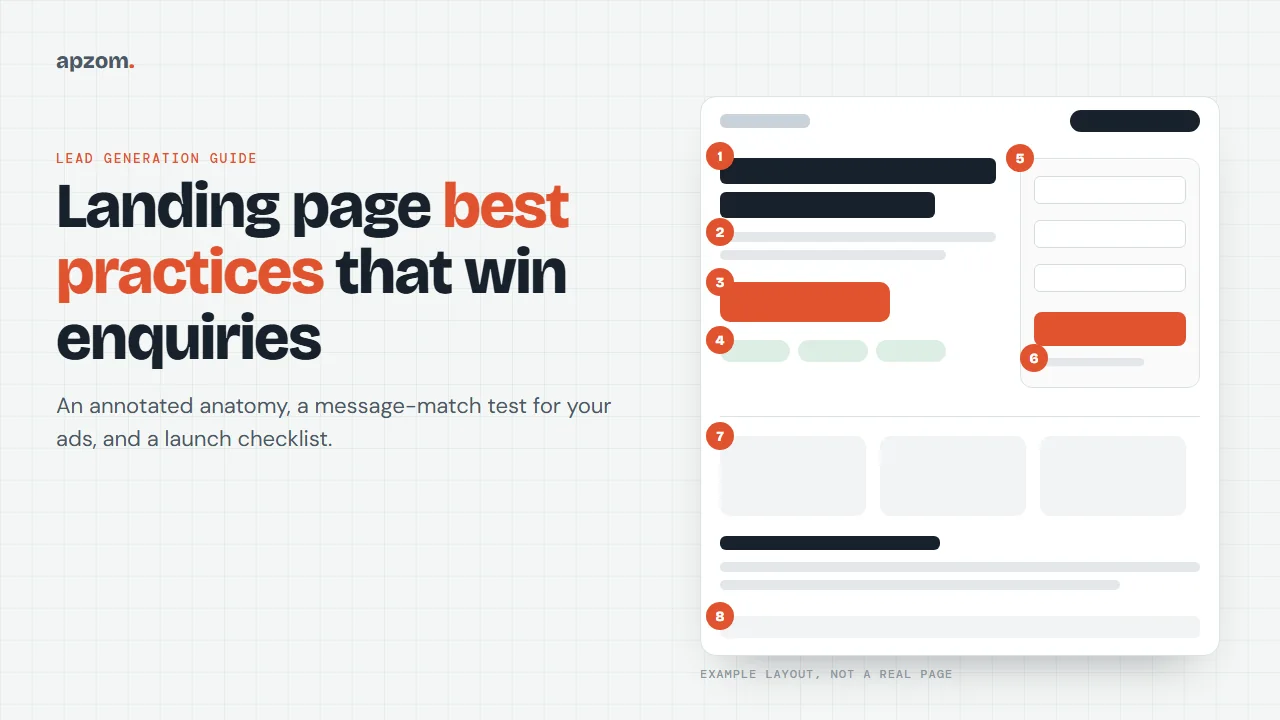
What makes a landing page different from a normal page
A normal web page, such as your home page or a service page, serves many visitors with many goals. It has navigation, several links and room to explore. A landing page is built for visitors arriving from one specific source, usually an ad, an email or a social post, with one specific goal in mind. Everything on it either helps that visitor take one action or answers a question that stops them.
That does not mean a landing page must be a separate, stripped-down page. A well-built service page can work as a landing page for search ads that target that service. What matters is that the page answers what this visitor came for. If you are not sure whether your problem is the page or something else, such as the offer or the follow-up, our guide to what conversion rate optimization is explains how to find where enquiries are being lost. This guide is about building the page itself.
Framework 1: the eight-part landing page anatomy
Most good lead-generation pages share the same eight parts. The order can change, and a short page for a simple offer may combine some of them, but if one is missing, visitors usually notice.
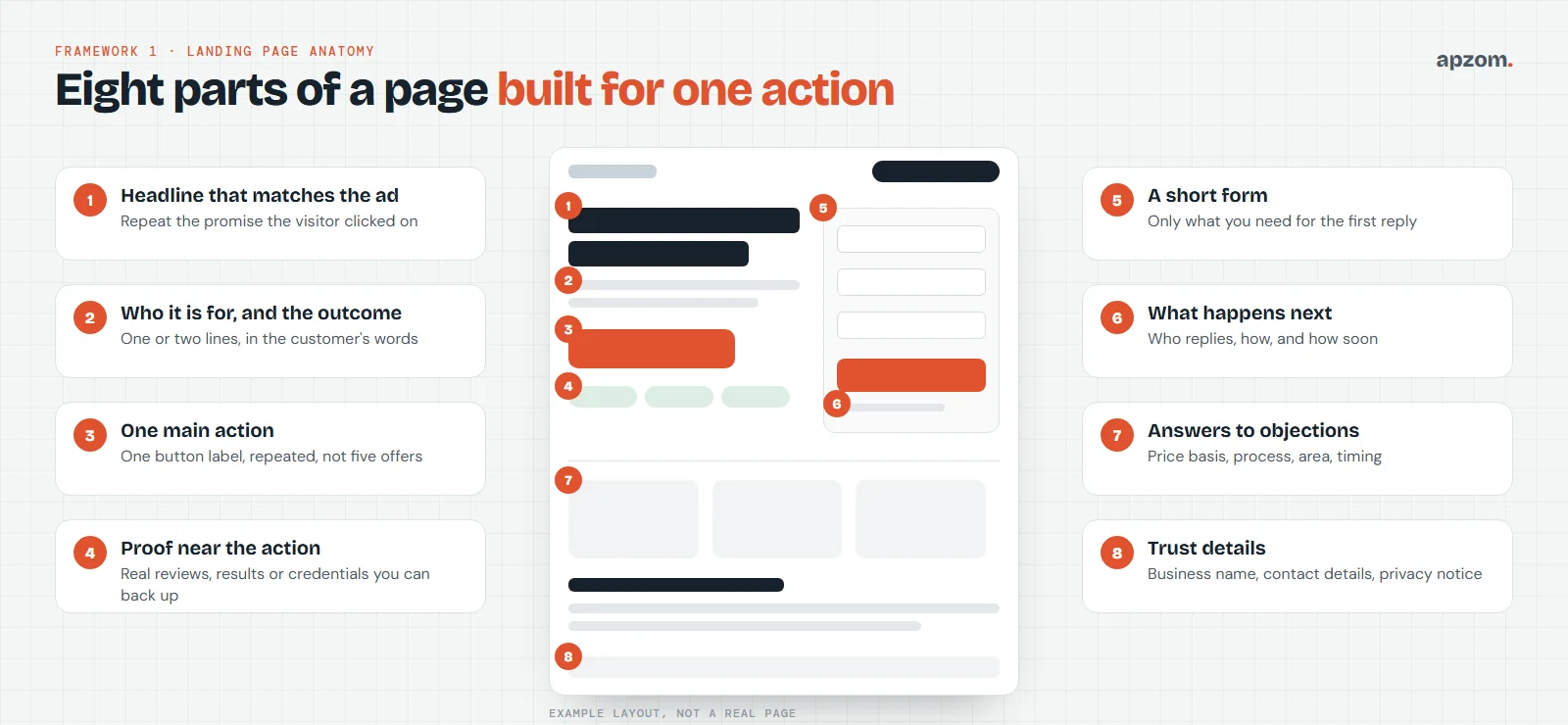
- A headline that matches the ad. The first thing a visitor reads should repeat the promise they clicked on, in similar words. If the ad says, for example, “Same-day boiler repair in Leeds”, the headline should not say “Welcome to our website”.
- Who it is for, and the outcome. One or two lines that confirm the visitor is in the right place: the kind of customer you serve, the area, and what changes for them. Use the words your customers use, not internal jargon.
- One main action. Decide what you want the visitor to do: request a quote, book a call, download a guide. Use one button label for it and repeat that same action down the page. Several competing offers on one page make the choice harder.
- Proof near the action. Reviews, ratings, client names, certifications, guarantees or results, placed next to the form or button. Only use proof you can back up; the rules on this are getting stricter, and we cover them below.
- A short form. Ask for what you need to reply, and no more. The lead form checklist below shows what to ask now and what to leave for later.
- What happens next. A line under the button that says who will reply, how, and roughly when. “We will call you within one working day to arrange a visit” removes a common reason people hesitate.
- Answers to objections. The questions that stop people: how pricing works, what the process involves, which areas you cover, how long it takes, what if they are not happy. A short FAQ section works well here.
- Trust details. Your business name, a way to contact you other than the form, a physical address if you have one, and a link to your privacy notice. These matter to visitors and, as we explain below, to the ad platforms.
Navigation: remove it or keep it?
You will often read that removing the menu from a landing page always increases conversions. We have not found a primary source that proves this as a general rule, so we do not quote a number. The sensible approach is to remove links that pull visitors away from the action (blog, careers, unrelated services) while keeping what builds trust: your logo, a way to contact you, and your privacy and terms links. If you have enough traffic, test it.
Framework 2: the message-match test
Message match means the landing page keeps the promise the ad made. It is an industry term, but the platforms say the same thing in their own words: Google Ads Help asks advertisers to keep messaging consistent from ad to landing page and to mirror the ad’s call to action, and Meta’s advertising standards require the products and services in an ad to match those on the landing page. It is the quickest landing page check there is, and it costs nothing. Put the ad and the page side by side and answer five questions.
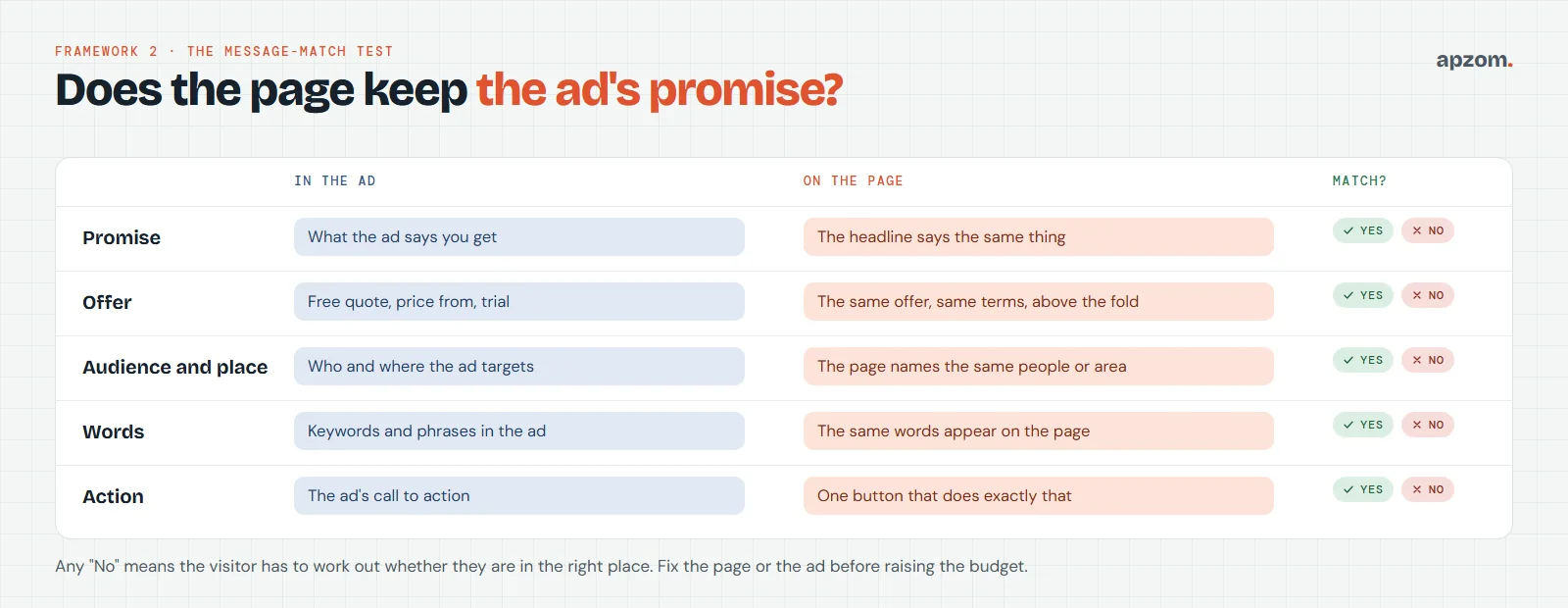
| Check | In the ad | On the page | Pass if |
|---|---|---|---|
| Promise | What the ad says the visitor gets | The headline | The headline says the same thing in similar words |
| Offer | Free quote, a “from” price, a trial, a discount | The area above the fold | The same offer appears with the same terms |
| Audience and place | Who and where the ad targets | Headline, subheading or first section | The page names the same type of customer or area |
| Words | The keywords and phrases in the ad | Headings and body text | The visitor sees the words they searched for or read |
| Action | The ad’s call to action | The main button | One button does exactly what the ad said |
Any “No” means the visitor has to work out whether they are in the right place. Fix the page or change the ad before you raise the budget. If you run several ad groups that make different promises, they usually need different pages, or at least different headlines.
Framework 3: the lead form checklist
The form is where the visitor gives you something, so it is where most hesitation happens. You will see figures quoted for how much each extra field costs you; we have not found one that traces back to a published study, so we do not repeat them. The principle holds anyway: ask for what you need to send a useful first reply, collect the rest in that first conversation, and test on your own traffic.
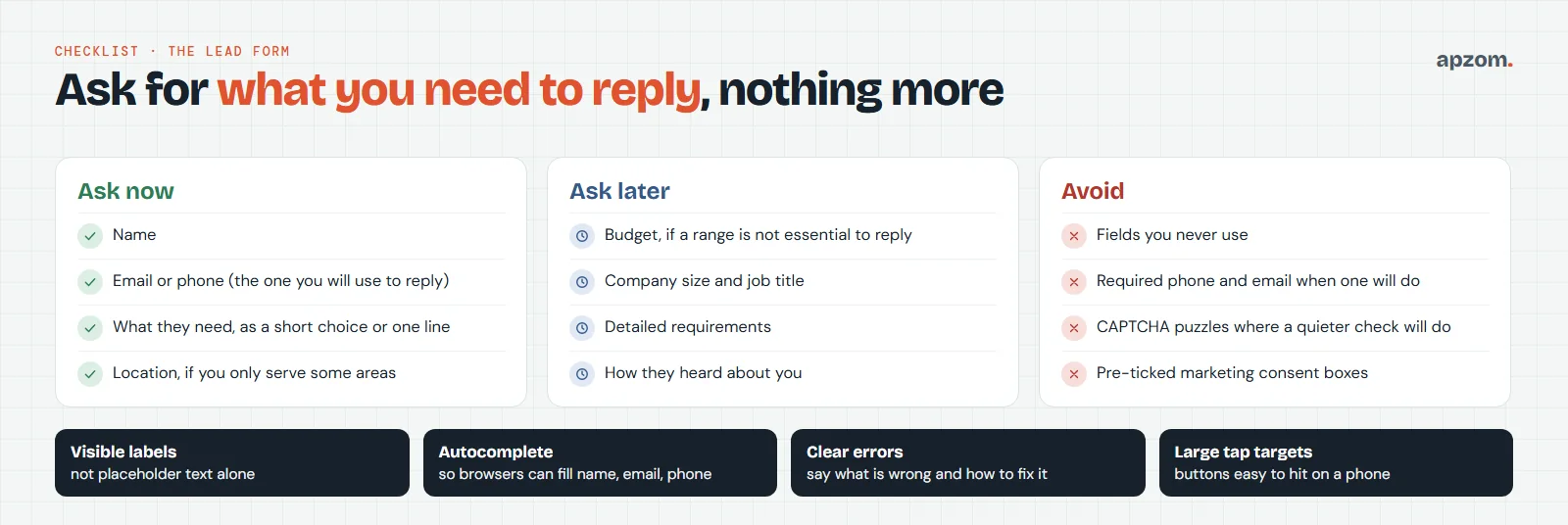
Ask now:
- Name.
- One contact method: the email address or phone number you will actually use to reply. If you will call, ask for the phone number; do not require both by default.
- What they need, as a short choice (a dropdown or buttons) or one line of text.
- Location, if you only serve some areas, so you can filter out enquiries you cannot help.
Ask later, in the first reply or call: budget (unless a range is essential to reply), company size, job title, detailed requirements and how they heard about you.
Avoid: fields you never use, required fields that are not needed, puzzles that frustrate real people where a quieter spam check will do, and pre-ticked boxes for marketing consent.
Make the form usable for everyone
A form that some visitors cannot complete is losing leads. The W3C’s Web Content Accessibility Guidelines (WCAG) and its forms tutorial set out a few basics:
- Visible labels for every field, not placeholder text that disappears when someone starts typing.
- Autocomplete on name, email, phone and address fields, so browsers can fill them and assistive technology can identify what each field is for (WCAG 2.2 success criterion 1.3.5).
- Format hints before the field, not only after an error (for example, “Phone number, including country code”).
- Clear error messages that say which field is wrong and how to fix it, in text, not colour alone.
- Buttons and controls large enough to tap on a phone. WCAG 2.2’s target size rule (2.5.8) asks for at least 24 by 24 CSS pixels, or enough space around smaller targets.
Speed and mobile: get the basics right
Many visitors from ads and social posts arrive on a phone, so test the page on a phone first. Run it through Google’s free PageSpeed Insights. Google’s web.dev guidance describes a good experience in terms of three Core Web Vitals, measured at the 75th percentile of page loads: Largest Contentful Paint within 2.5 seconds (how quickly the main content appears), Interaction to Next Paint of 200 milliseconds or less (how quickly the page responds when someone taps) and Cumulative Layout Shift of 0.1 or less (how much the layout jumps while loading). For organic search, Google says Core Web Vitals are used by its ranking systems but relevance comes first. For paid search, Google Ads recommends faster landing pages but does not publish speed as a separate landing page experience score.
Practical fixes that usually help a landing page:
- Compress and correctly size the main image, and do not lazy-load it.
- Remove scripts and widgets you do not need, such as chat tools, sliders and extra tracking tags.
- Reserve space for images and embeds so the form does not jump.
- Skip the full-screen pop-up. Google Search Central’s guidance on intrusive interstitials advises against covering the whole page and suggests a small banner instead, Microsoft Advertising bans disruptive pop-ups on landing pages, and Meta bans irrelevant pop-ups that appear when people try to leave. Your form is already the offer; it does not need a pop-up on top.
What the ad platforms expect from your landing page
The page also has to satisfy the platforms you pay. Each has its own rules, and they change, so check the current versions before a campaign.
- Google Ads rates landing page experience by how relevant and useful the page is to people who click your ad, how easy it is to navigate, and whether it gives them what the ad led them to expect. That rating feeds the Quality Score you see, but Google says Quality Score is a diagnostic tool, not an input in the ad auction; Ad Rank uses Google’s auction-time assessment of expected clickthrough rate, ad relevance and landing page experience. Google’s destination requirements also mean the page must work, be crawlable, match the ad’s display domain and be easy to navigate, and its misrepresentation policy covers being honest about your business.
- Meta (Facebook and Instagram) ads: Meta’s advertising standards say the products and services promoted in an ad must match those promoted on the landing page, and its spam rules ban “trapping”, where irrelevant pop-ups appear when someone tries to leave the landing page.
- Microsoft Advertising has some of the most explicit rules: ads must closely align with the landing page, and it bans disruptive pop-ups, pop-ups that stop people leaving, fake close buttons, and asking for sensitive data the service does not need.
If an ad is disapproved for a “destination” reason, the problem is usually the page or the URL the ad points to, not the ad text.
Paying for clicks that do not turn into enquiries? Send us your ad and its landing page. A Landing Page Review from Apzom runs the message-match test and the launch checks in this guide and gives you a short, prioritised fix list.
Proof, reviews and claims: the rules are tighter now
Proof is one of the most persuasive parts of a landing page and one of the most regulated. Use only reviews, ratings, results and logos you can back up, and never write or buy reviews. Rules differ by country, and our CRO guide has a fuller country-by-country section on honest persuasion. In short:
- United States: the Federal Trade Commission’s rule on consumer reviews and testimonials, in effect since 21 October 2024, bans fake reviews and testimonials, and the FTC’s Endorsement Guides say advertisers should clearly disclose of material connections, such as a discount or free service given to the reviewer. If a testimonial shows an unusually good result, make clear what clients generally get.
- United Kingdom: since April 2025, the Digital Markets, Competition and Consumers Act 2024 has banned fake reviews and concealed incentivised reviews, enforced by the Competition and Markets Authority.
- European Union: since 28 May 2022, businesses that show consumer reviews must say whether and how they check that reviews come from people who actually used the product or service.
- Everywhere: use real testimonials with the client’s permission, do not edit them to change their meaning, and if you show a result, such as “leads per month”, make sure it is true and that you can back it up.
Privacy and consent on lead forms
A lead form collects personal data, so privacy law applies wherever your visitors are. This is a summary, not legal advice; check the rules in each market you advertise to, including countries not listed here, such as the UAE:
- EU and UK: under the GDPR and UK GDPR, you must tell people at the time you collect their data who you are, why you want their details, the legal basis and their rights, usually through a privacy notice linked next to the form. Using their details to reply to the enquiry they sent can usually rely on taking steps at their request before a contract (Article 6(1)(b)); sending them marketing emails afterwards is a separate question. In the UK, the “soft opt-in” for marketing emails applies only to people who bought, or negotiated to buy, something similar from you, and only if you offered a simple way to opt out when you collected their details; do not assume a bare enquiry qualifies, and the ICO says its guidance on electronic marketing is under review after the Data (Use and Access) Act 2025.
- United States: the CAN-SPAM Act works on an opt-out basis for commercial email: you must identify yourself, include a working unsubscribe and honour it. For calls and texts, the Telephone Consumer Protection Act requires prior express written consent for autodialled or prerecorded telemarketing. The FCC’s stricter “one-to-one consent” rule never took effect: a federal appeals court vacated it in January 2025 and the FCC formally removed it in July 2025.
- Canada: Canada’s anti-spam legislation generally requires consent before sending commercial electronic messages.
- Australia: the Spam Act 2003 requires consent, clear identification and a working unsubscribe option for commercial messages.
- India: the Digital Personal Data Protection Act, 2023 requires a clear notice when you ask for consent to process personal data; the DPDP Rules notified in November 2025 phase in most obligations through 2027.
Two practical rules work in most places: link a plain-English privacy notice at the form, and if you want to send marketing beyond replying to the enquiry, ask with a separate, unticked box, and keep a record of who agreed, when and how. In the UK, Canada and Australia in particular, an unticked opt-in box is the clean way to get consent for marketing emails.
Track it, or you cannot improve it
A landing page is only as good as the leads it produces, and you can only see that if it is tracked. At minimum:
- Send people to a thank-you page, or fire a success event only when the form is really submitted.
- Mark that event as a key event in Google Analytics 4 (the name Google adopted for conversions in GA4 in March 2024) and import it, or track it directly, as a conversion in your ad platform. Our guide to setting up Google Analytics 4 covers key events step by step.
- If your team closes leads offline, Google Ads’ enhanced conversions for leads can match closed deals back to the ad click using hashed form data such as the email address.
- Use UTM parameters or auto-tagging on ad links so you can see which campaign each lead came from. Our guide to creating UTM links shows how to tag them consistently.
- Compare the platform’s lead count with the enquiries that actually arrived for a couple of weeks. If they do not match, fix the tracking before you judge the page.
To turn leads into a view of what your ads return, see how to measure marketing ROI.
The launch checklist
Before you send paid traffic to a new or changed page, check these eight things.
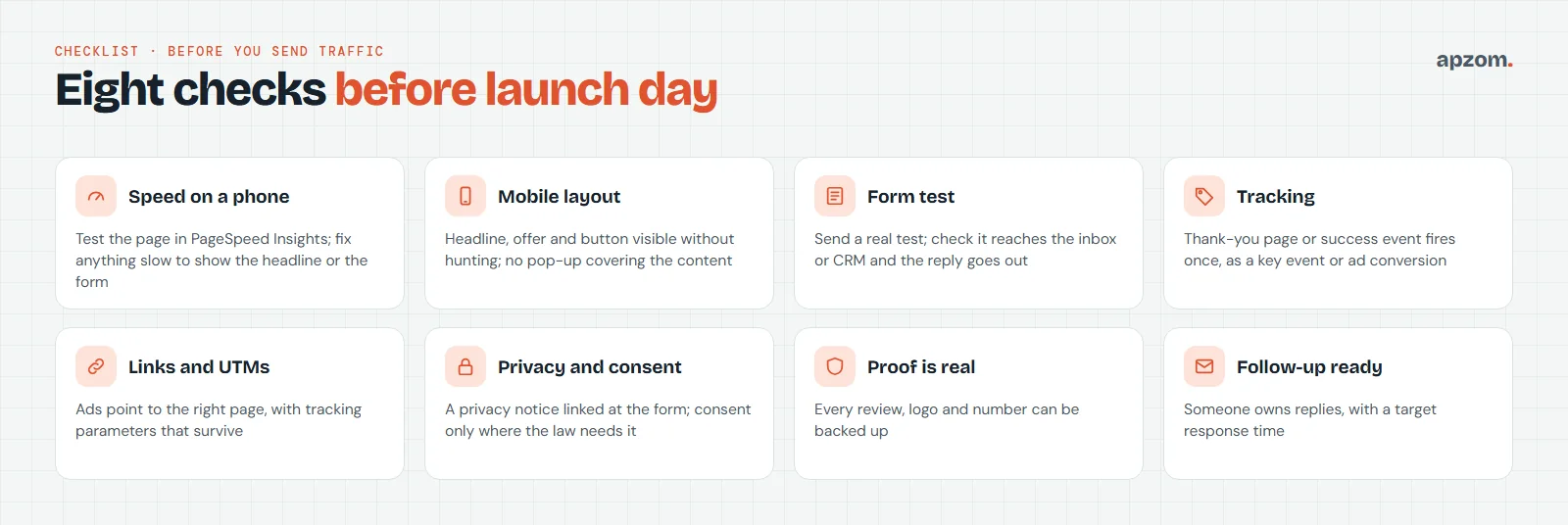
- Speed on a phone. Run PageSpeed Insights and fix anything that delays the headline or form.
- Mobile layout. Headline, offer and button visible without hunting; nothing covering the content.
- Form test. Submit a real test and check it reaches the inbox or CRM, and that any automatic reply goes out.
- Tracking. The thank-you page or success event fires once per real submission.
- Links and UTMs. Every ad points to the right page, with tracking parameters intact.
- Privacy and consent. A privacy notice is linked at the form, and any marketing consent box is unticked.
- Proof is real. Every review, rating, logo and number can be backed up.
- Follow-up ready. Someone owns the replies, with a target response time. A fast reply often matters as much as the page.
Common landing page mistakes
| Mistake | Why it hurts | Fix |
|---|---|---|
| Sending all ads to the home page | Visitors have to find the offer themselves | Send each ad group to the page that matches its promise |
| Several offers on one page | Choice slows people down | One main action, repeated |
| Long form with every possible field | More effort before any reply | Ask only what you need to reply |
| Stock claims (“best in town”, “world-class”) | Easy to ignore, hard to prove | Specific, provable proof near the button |
| No “what happens next” | People hesitate when they cannot picture the reply | One line under the button |
| Untracked form | You cannot tell which ads produce leads | Thank-you page or success event as a key event |
| Slow, heavy page | Visitors leave before the form appears | Compress images, remove unneeded scripts |
How Apzom can help
Apzom Digital builds and reviews landing pages for paid campaigns as part of our conversion rate optimization and Google Ads management services. A Landing Page Review compares each ad with its page using the message-match test, checks the anatomy, form, mobile speed, tracking and follow-up, and gives you a short, prioritised fix list. If you are choosing where to advertise in the first place, our comparison of Google Ads vs Facebook ads can help.
We work with clients worldwide, remotely, from our base in Ahmedabad, India.
Frequently asked questions
How long should a landing page be?
As long as it takes to answer the questions that stop people acting, and no longer. A simple, low-commitment offer can work on a short page. A high-value service usually needs more explanation, proof and answers to objections. Put the headline, offer and action at the top either way.
Should every ad have its own landing page?
Not every ad, but every different promise. Ads in the same group that make the same promise can share a page. Ad groups that target different services, audiences or areas usually need different pages or headlines.
What is a good landing page conversion rate?
It depends on the offer, the traffic source and the industry, and published averages mix very different businesses. Our CRO guide explains how to set a baseline you trust. Compare a page with its own past results, and judge it by qualified leads and sales, not only by form fills.
Should I put a phone number on a lead-generation landing page?
If you can answer calls when your ads run, yes; some people prefer to call. Track calls as well as forms, or the page will look worse than it is.
Do I need a separate landing page builder?
No. Most content management systems, including WordPress, can build a good landing page. A builder can be faster for marketers, but check that it loads quickly and lets you add tracking properly.
Can I A/B test my landing page?
If the page gets enough traffic and conversions, yes. Many small business pages do not get enough for a reliable test; our CRO guide explains what to do instead.
Request a Landing Page Review. We compare each ad with its landing page, check the anatomy, form, speed on a phone, tracking and follow-up, and tell you plainly what to fix first. If you need a new page built, we will quote for that separately.
No obligation and no guaranteed results. Prefer to talk first? Contact us or see our conversion rate optimization service.