The short answer: A website brief is a short document, usually one to three pages, that tells a web designer or agency what your website must achieve, who it is for, what it needs to include, what you already have, and your budget, deadline and decision-maker. Write it before you ask for quotes. Lead with outcomes (“get 20 quote requests a month from homeowners in our area”) rather than features, list the pages and functions you know you need, say who will supply the words and photos, and state that the domain, hosting and logins must be in your business’s name. Send the same brief to every company you approach, so that the quotes you get back describe the same job.
This guide is for business owners and marketing managers anywhere in the world who are about to commission a new website or a redesign. It explains what each part of a brief is for, shows the questions that change a quote the most, and ends with a free template you can copy into a document and fill in. You do not need technical knowledge to write a good brief; you need to know your business, your customers and what you want the website to do for them.
Why a brief matters more than the design
A quote is only as precise as the description it prices. If three companies each guess at your project, you get three prices for three different websites, and the differences surface later as change requests. A brief closes that gap in three ways:
- It makes quotes comparable. If three companies quote against the same written brief, you can compare them line by line. Without one, a low quote may simply describe a smaller website.
- It protects your budget. A written scope is the reference point when someone later asks whether a change is included.
- It makes the result measurable. If the brief says what the site is for and how you will judge it, you can tell at launch, and six months later, whether it worked.
A brief is not a contract, and it does not need to be perfect. It is your best description of the job today. A good company will ask questions about it, and those questions are a useful test of how carefully it reads.
Framework 1: the ten parts of a website brief
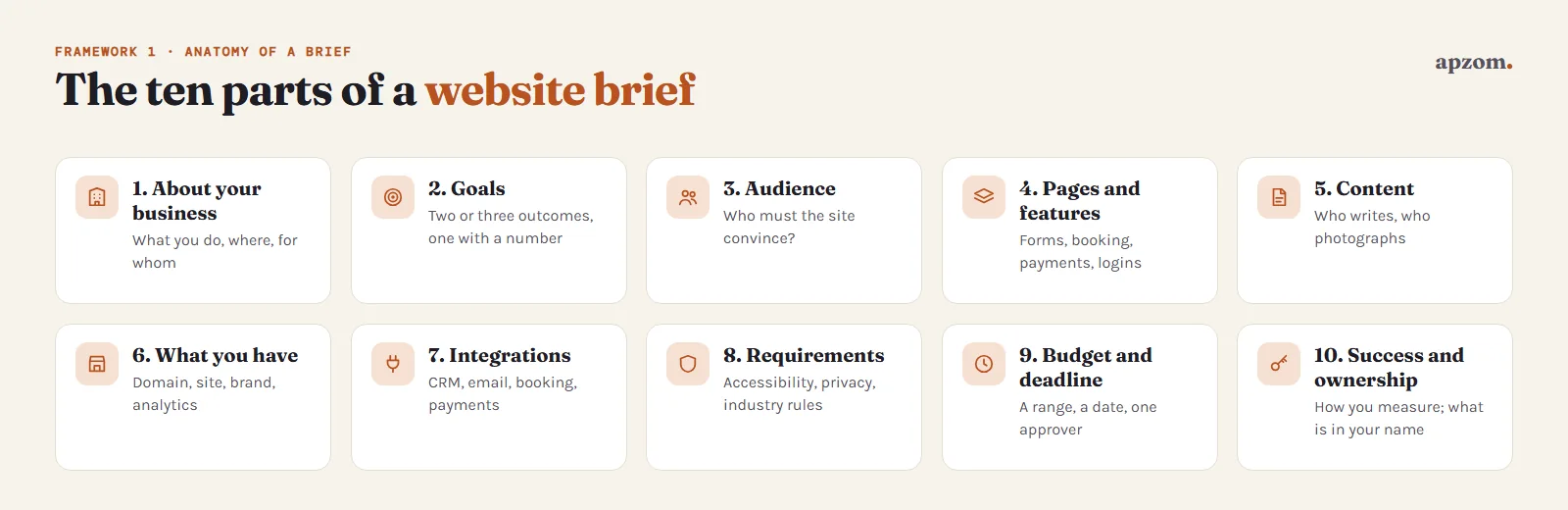
| Part | What to write | Why the company needs it |
|---|---|---|
| 1. About your business | What you do, where, for whom, and what makes you different | It shapes the words, the structure and the tone |
| 2. Goals | The two or three things the site must achieve, with a number where you can | It decides what the pages and calls to action are built around |
| 3. Audience | Your main customer types, their location, and the questions each one asks before buying | It decides the content and the languages |
| 4. Pages and features | The pages you expect, and every function: forms, booking, payments, logins, listings | Features are often the biggest variable in the cost |
| 5. Content | Who writes the words, who supplies photos and video, what already exists | Content is a frequent cause of delays |
| 6. What you already have | Domain, current website, hosting, logo and brand guidelines, Google Business Profile, analytics | It avoids rebuilding or losing what works |
| 7. Integrations | Your CRM, email platform, booking system, payment provider, WhatsApp, accounting software | Each connection is work that needs quoting |
| 8. Requirements | Accessibility, privacy and cookies, languages, any rules in your industry | Some are legal duties; all of them affect the build |
| 9. Budget, deadline and decision-maker | A budget range, a launch date and what drives it, one person who approves work | It lets a company propose what fits the budget and what to phase |
| 10. Success and ownership | How you will measure the site, and which accounts must be in your name | It sets the finish line and protects you if you part ways |
The sections below explain the parts that cause the most confusion.
Goals: write outcomes, not features
“We need a new website with a blog and a slider” describes features. “We want more quote requests from commercial clients, and fewer phone calls asking about prices we could answer on the site” describes outcomes. Outcomes are more useful, because a good designer can then suggest the features that serve them, and may tell you that the slider does not. Government digital teams work the same way: the GOV.UK Service Manual says user needs should “focus on the user’s problem rather than possible solutions”, and US federal procurement rules (FAR 37.602) ask for work to be described in terms of the required results rather than how to do it.
Write two or three goals and make at least one measurable, for example:
- Increase quote requests from the website from about 10 to 25 a month within six months of launch.
- Let customers book and pay for an appointment without calling.
- Reduce “what do you charge?” calls by publishing price ranges.
- Show a new market (for example, export buyers) that you are an established, credible supplier.
Here is what a filled-in goals block might look like for an illustrative business (a commercial cleaning company; the numbers are an example, not data):
2. GOALS
Goal 1: More quote requests from office managers in our city: from about 8 a month (our estimate) to 20 within six months.
Goal 2: Fewer calls asking whether we cover a postcode: publish our service areas.
Goal 3: Win tenders: give procurement teams our insurance and certifications as a download.
Current numbers: about 1,200 visits a month (analytics); enquiries not tracked yet.
If you do not know your current numbers, say so. “We do not track enquiries yet” is useful information, because it means tracking needs to be part of the project. Our guide to setting up Google Analytics 4 explains what to measure.
Audience: who must the site convince?
List your main customer types in plain words, with what each one needs to see before they contact you. A homeowner might need prices, photos of past work and reviews. A procurement manager might need certifications, delivery areas and a company profile to download. Mention where they are and which languages they read, because a second language changes the structure and adds a lot of content work.
Pages and features: list what you know
You do not need a finished sitemap. List the pages you think you need (home, services, about, contact, case studies, blog) and every feature that does a job. Be specific about the features, because they change the price the most:
- Forms: how many, what they ask, and where the submissions should go (email, CRM, both).
- Booking or appointments: your current booking tool, or whether you need one.
- Payments or a shop: how many products, which payment provider, delivery and tax rules.
- Accounts and logins: members’ areas, client portals, downloads.
- Search, filters or listings: property listings, job vacancies, a product catalogue.
- Multiple languages or countries.
If you are unsure whether you need a feature, write it as a question: “Do we need online booking, or is a form enough?” That invites advice rather than a guess. Our guide to how much a website costs shows how these features move the price.
Content: the part most briefs leave out
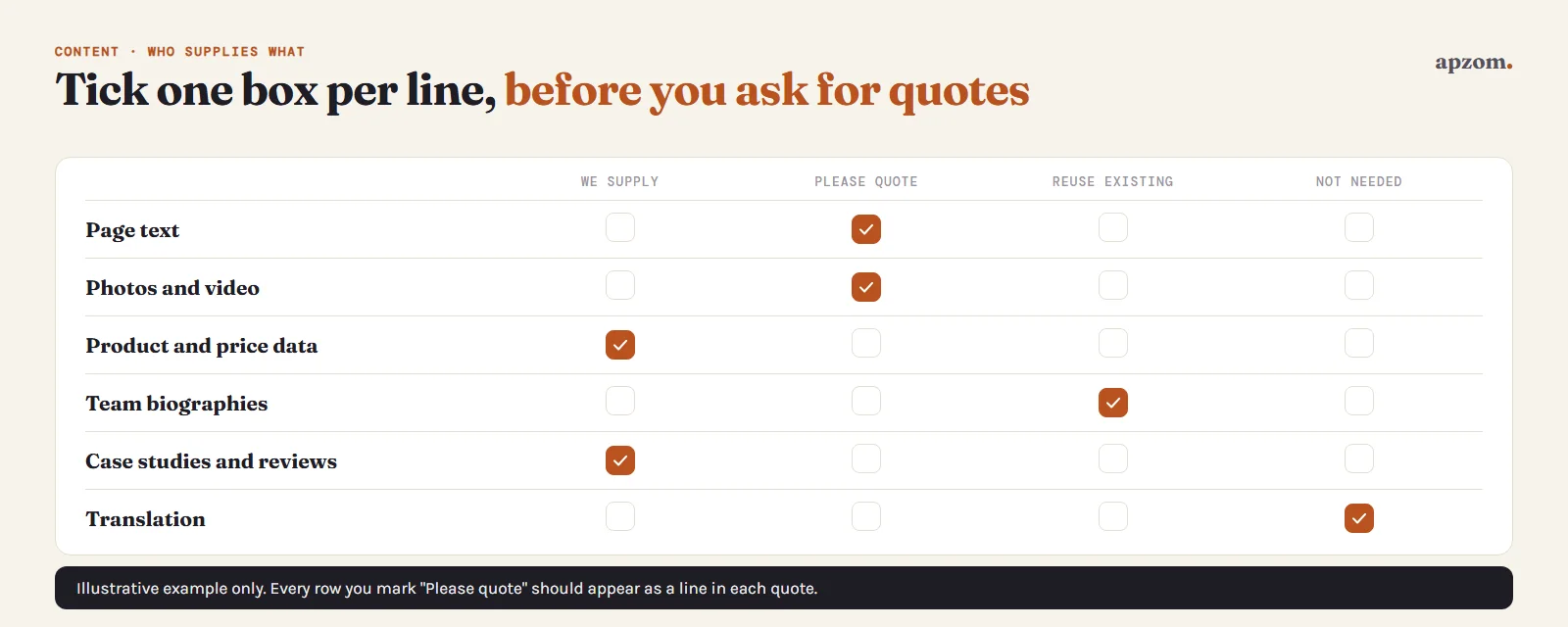
Who writes the words? Who supplies the photos? A five-page site with finished text is a different job from a five-page site where the company writes everything, and the difference shows up in both the price and the launch date. For each type of content, say whether you will provide it, want it quoted, will reuse what exists, or do not need it:
- Page text (copywriting), and whether existing text can be reused.
- Photography or video, and whether stock images are acceptable.
- Product data, prices, team biographies, case studies and reviews.
- Translation, if the site has more than one language.
If you are redesigning an existing site, say which pages get traffic or enquiries today. Those pages, and their addresses, need protecting during the rebuild. Our website redesign SEO checklist explains why.
Not sure your brief is complete? Ask for a Free Growth Audit and Quote. Send us your brief, or your current website, and we will point out what is missing before you ask anyone to quote.
Requirements: accessibility, privacy and industry rules
This part of the brief is where you list the rules the site must meet. You do not need to be an expert; you need to ask for them in writing so that they are quoted, not discovered later.
- Accessibility. Ask for the site to meet the Web Content Accessibility Guidelines (WCAG) 2.2 at level AA. WCAG 2.2 has been a W3C Recommendation since 5 October 2023 (W3C, WCAG 2.2, updated 12 December 2024) and is the current version. In some places this is also law: in the EU, the European Accessibility Act (Directive (EU) 2019/882) has applied since 28 June 2025 and covers e-commerce services provided to consumers, including by businesses outside the EU selling to EU consumers, with an exemption for service microenterprises (fewer than 10 staff and annual turnover or balance sheet of no more than €2 million). In the US, the Department of Justice’s ADA rule for state and local governments uses WCAG 2.1 AA, and for private businesses it says it has no regulation setting out detailed standards, though the ADA still applies. In the UK, the Equality Act 2010 requires service providers to make reasonable adjustments for disabled people. Asking for WCAG 2.2 AA in writing gives the company a clear, testable target that meets or exceeds the technical benchmarks these laws point to. It is not legal advice, so also ask how conformance will be tested before launch.
- Privacy and cookies. If the site collects personal data (a contact form is enough), it needs a privacy notice that explains what you collect and why; in the EU and UK this is required by Article 13 of the GDPR and UK GDPR. Cookie rules differ by country. In the EU, non-essential cookies, including analytics and advertising cookies, generally need consent first. In the UK, the rules changed on 5 February 2026: some analytics cookies used only to improve the site, and site-preference cookies, can now be used without consent (Data (Use and Access) Act 2025), provided visitors get clear information and a simple, free way to object, while advertising cookies are not covered by these exceptions and still need consent. In the US, several states, including California, have their own privacy laws with thresholds; in India, the Digital Personal Data Protection Rules, notified in November 2025, are being phased in over 18 months. List the countries you serve, and ask the company how the site will handle consent and privacy in each.
- Card payments. If you take card payments, say so. Using a hosted payment page or payment provider means many of the card industry’s security requirements (PCI DSS) may not apply to your site directly, but you still have to validate compliance, usually with a self-assessment questionnaire, and keep the page that hands off to the payment provider secure; most such merchants also need quarterly external scans by an approved vendor (PCI Security Standards Council). Ask which payment provider the company recommends and how the payment page will be connected.
- Speed and mobile. Ask for the site to be built and tested for phones first: since 5 July 2024 Google crawls and indexes sites for Search with its smartphone crawler, and content that does not work on mobile may not be indexed (Google Search Central). Ask for Google’s Core Web Vitals targets at the 75th percentile of visits (web.dev, Web Vitals): largest contentful paint within 2.5 seconds, interaction to next paint within 200 milliseconds, and cumulative layout shift of 0.1 or less. A new site has no real-visitor data at launch, so ask for lab test results (for example Lighthouse) on the main page templates; field data at the 75th percentile builds up once the site has traffic. Our guide to Core Web Vitals explains what these mean.
- Your industry’s rules. Financial services, healthcare, legal services and some other sectors have their own advertising and disclosure rules. Name the regulator and any wording you must include.
Budget, deadline and decision-maker
Many owners leave the budget out, worried that a company will simply quote to it. A range is better than silence: it lets a good company say what fits, and what could wait for a second phase. If you genuinely have no idea, read a cost guide first and give a range anyway.
For the deadline, say what drives it (a trade show, a product launch, a lease ending) and whether it is fixed. Say who has the final say on design and content, and how quickly they can reply. When several people approve every page, feedback rounds tend to multiply.
Success and ownership
Say how you will judge the site, for example: enquiries per month, booking completions, pages loading quickly on phones, and the site appearing for your business name and main services in search. Then say which accounts must be in your business’s name from day one. Our ownership keyring lists the eight to check.
Paying for the work does not by itself make you the copyright owner in the US or the UK (US Copyright Office, Circular 30; UK Intellectual Property Office), so the brief should ask for the design, code and content written for you to be assigned to your business in writing on final payment, with licensed parts (themes, plugins, fonts, stock photos) listed separately. For the domain, your business should be the registrant (ICANN’s “Registered Name Holder”).
Framework 2: outcome brief vs feature brief
Most weak briefs are feature lists. Most strong ones start with outcomes and use features only where they are certain.
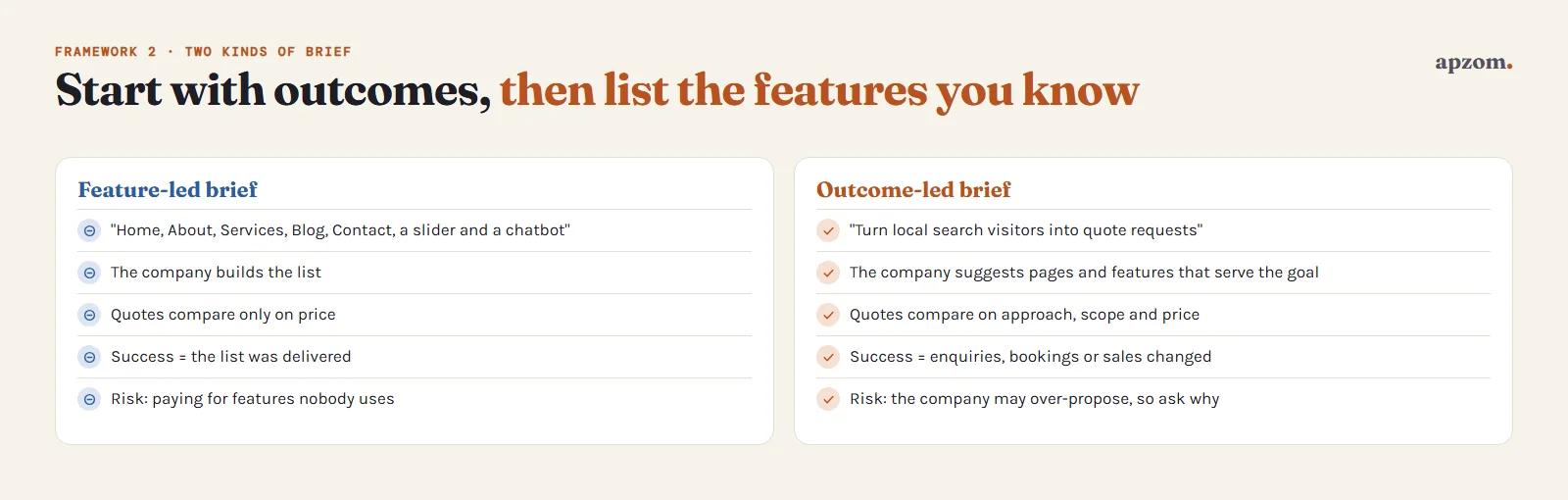
| Question | Feature-led brief | Outcome-led brief |
|---|---|---|
| Example | “Home, About, Services, Blog, Contact, with a slider and a chatbot” | “Turn local search visitors into quote requests; answer price questions on the site” |
| What the company does | Builds the list | Suggests the pages and features that serve the goal |
| How quotes compare | Only on price | On approach, scope and price |
| How you judge success | Whether the list was delivered | Whether enquiries, bookings or sales changed |
| Risk | You pay for features nobody uses | The company may propose more than you need, so ask why for each item |
The best briefs combine both: outcomes first, then the features you already know you need, then open questions.
The free website brief template
Copy the template below into a document, delete the hints in brackets and fill in each line. One to three pages is enough. If a section does not apply, write “Not needed” rather than deleting it, so the company knows you considered it.
WEBSITE BRIEF
Business name:
Contact and decision-maker (name, role, email):
Date:
1. ABOUT US
What we do, where, and for whom:
What makes us different from competitors:
Two or three competitor or reference websites, and what we like or dislike about each:
2. GOALS (two or three, at least one with a number)
Goal 1:
Goal 2:
Goal 3:
Current numbers, if known (visitors, enquiries, bookings, sales per month):
3. AUDIENCE
Main customer types, and what each needs to see before contacting us:
Countries, regions and languages:
4. PAGES AND FEATURES
Pages we think we need:
Forms (how many, what they ask, where submissions go):
Booking, payments or shop (provider, number of products):
Logins, listings, search or other functions:
Open questions (features we are unsure about):
Things we do not want:
5. CONTENT
Page text: we supply / please quote / reuse existing / not needed
Photos and video: we supply / please quote / stock is acceptable / not needed
Other content (products, prices, team, case studies, reviews):
Translation: needed (languages) / not needed
Content to move from the current site (pages, posts, products, users):
6. WHAT WE ALREADY HAVE
Domain name and where it is registered:
Current website and platform, and pages that get the most traffic or enquiries:
Hosting:
Email on our domain (provider) and who controls DNS:
Logo, brand colours, fonts, brand guidelines:
Google Business Profile, analytics, Search Console, social accounts:
7. INTEGRATIONS
CRM, email marketing, booking, payments, WhatsApp, accounting, other:
8. REQUIREMENTS
Accessibility: WCAG 2.2 level AA
Privacy notice and cookie consent for the countries we serve:
Industry rules and required wording:
Card payments (yes/no), current or preferred provider, hosted or embedded payment page:
Other (speed, security, hosting location):
9. BUDGET, DEADLINE AND APPROVAL
Budget range for the build:
Ongoing budget for hosting, licences and maintenance:
Launch date, what drives it, and whether it is fixed:
Who approves work, and how quickly we can give feedback:
10. SUCCESS AND OWNERSHIP
How we will measure success after launch:
In our business's name: domain, DNS, hosting, admin login, analytics, Search Console, licences, design files
Copyright in the design, code and content to be assigned to us in writing on final payment
Support needed after launch (updates, backups, changes):
WHAT WE WOULD LIKE IN YOUR REPLY
A quote broken down by item, a timeline, what is not included, who will work on the project, and examples of similar live websites.
Framework 3: before you send the brief
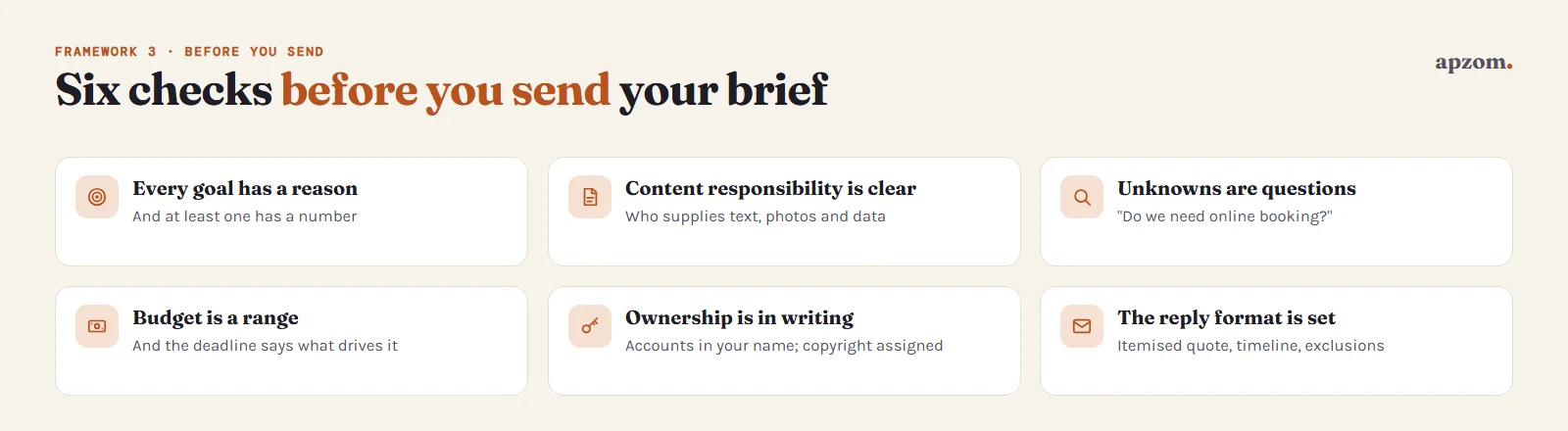
Before you send the brief, check six things:
- Every goal has a reason and at least one has a number.
- Content responsibility is clear: for each type of content, it says who supplies it.
- Unknowns are written as questions, not left out.
- The budget is a range, and the deadline says what drives it.
- Ownership is in writing: the accounts that must be in your name, and the assignment of copyright.
- The reply you want is specified, so that every company answers in the same format.
Then send the same brief to two or three companies, no more. Compare their replies against the brief, not against each other’s totals. Our guide to choosing a web design company covers the questions to ask, the contract terms to check and the red flags to watch for. If you have not chosen a platform yet, read our comparison of WordPress vs website builders first.
Common mistakes
- Writing a design wish-list instead of goals. Colours and sliders matter less than what the site must achieve.
- Leaving out the budget. Companies then guess, and the quotes are not comparable.
- Forgetting content. “We will send the text later” is a common cause of a late launch.
- Not mentioning what already works. A redesign can lose pages that bring in enquiries today.
- Sending different information to different companies. You then compare different jobs.
- Leaving ownership to the end. It is far easier to agree before work starts than after a dispute.
How Apzom can help
Apzom Digital’s website development service starts from your brief. If you have one, send it with your quote request and we will use it to scope and quote the project. If you do not have one yet, the template above covers what any company, including us, needs to quote accurately, and we can go through it with you. We recommend that the domain, hosting, logins and analytics are in your business’s name from the start.
We work with clients worldwide, remotely, from our base in Ahmedabad, India.
Frequently asked questions
How long should a website brief be?
One to three pages for most small and medium business websites. Longer is fine for complex projects, but a short, clear brief that answers every section is more useful than a long one that leaves out the budget or content.
Should I include my budget in a website brief?
Yes, as a range. A budget range lets a company propose what fits, and suggest phasing or cutting features, rather than quoting for an imagined project. Without one, quotes are hard to compare.
What is the difference between a website brief and a request for proposal (RFP)?
A brief describes the project. An RFP is a formal procurement document that usually includes a brief plus rules for how to respond, evaluation criteria and contract terms. Small businesses rarely need a full RFP; a brief plus the “What we would like in your reply” section of the template above does the same job.
Do I need a sitemap before writing a brief?
No. List the pages you think you need. Planning the final structure is part of the company’s work, and a good one will propose a sitemap based on your goals and audience.
Who should write the website brief?
Someone in your business who understands the customers and can make decisions, usually the owner or marketing lead. Ask colleagues who handle sales and customer questions what they want the site to answer.
Can the web design company write the brief for me?
It can help you, often through a discovery call or workshop, and that is a good sign. But write your own first draft: it forces you to agree internally on goals and budget, and it lets you send the same brief to more than one company.
Get your Free Growth Audit and Quote. Send your website brief, or the template above filled in as far as you can, and we will review your goals, current site and accounts and send a quote broken down by item, with ownership of the domain, hosting and logins in your business’s name.
No obligation. Prefer to talk first? Contact us or see our website development service.