The short answer: Shopify is usually simpler to run, and often cheaper in year one once set-up and maintenance time are counted, because the plan includes hosting, security and updates. WooCommerce is free software, but you pay for hosting, extensions and the developer time to look after it, and in return you control the code, the server and the data. Whether one costs less over three years depends mostly on two numbers you can work out yourself: what you will pay in payment and platform transaction fees at your sales volume, and how many hours of developer time each option will need. Use the worksheet in this guide with your own figures. Choose Shopify if you want a store that someone else hosts and secures; choose WooCommerce if you need control of checkout, URLs, hosting and data, and you have someone to maintain it.
This guide is for owners and ecommerce managers anywhere in the world who are choosing a platform for a new store, or wondering whether to move an existing one. It covers what you pay for on each platform, how payment fees stack up by country, a three-year cost worksheet, who controls what, the signs that it is time to switch, and how to migrate in either direction without losing orders, customers or search traffic. We checked the fees, export limits and migration rules below against official sources on 19 November 2026. Apzom Digital builds online stores on WordPress with WooCommerce, so read this knowing we have an interest; the worksheet is designed so you can reach the answer without us.
The difference in one paragraph
Shopify is a hosted platform: you pay a monthly or yearly plan, and Shopify runs the servers, the software, the security and the checkout. WooCommerce is a free, open-source plugin for WordPress: you install it on hosting you choose, add the extensions you need, and you (or your developer) keep it updated. If you are still choosing between WordPress and website builders in general, our guide to WordPress vs website builders covers ownership and exit options for every major platform; this guide goes deeper on the two most common choices for a shop.
What you pay for on each platform
Both platforms have the same kinds of cost. They just sit in different places, and some are fixed while others grow with your sales.
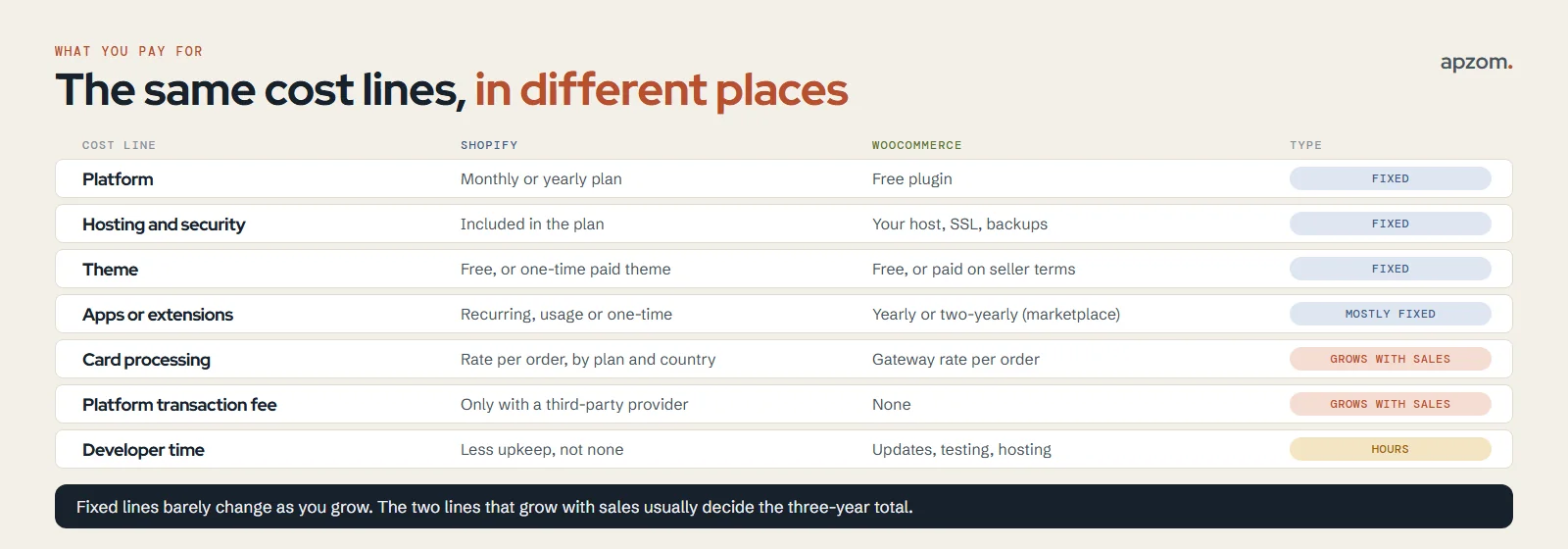
| Cost line | Shopify | WooCommerce |
|---|---|---|
| Platform | Monthly or yearly plan | Free plugin |
| Hosting and security | Included in the plan | Your hosting plan, SSL, backups and security tools |
| Theme | Free themes, or a paid theme with a one-time price | Free themes, or a paid theme on its seller’s terms |
| Add-on features | Apps: recurring, usage-based or one-time charges, mostly on your Shopify bill | Extensions: WooCommerce.com marketplace ones are billed yearly or every two years |
| Card processing | Shopify Payments or another provider, a percentage plus a fixed fee per order | WooPayments, Stripe, PayPal or another gateway, a percentage plus a fixed fee per order |
| Platform transaction fee | Only if you use a third-party payment provider | None |
| Developer time | Theme changes, app set-up, occasional custom work | Updates, testing, hosting issues, custom work |
Shopify: plan, apps, theme, fees
Shopify’s pricing page lists four main plans: Basic, Grow, Advanced and Plus. It shows prices in the currency of the country you view it from, so a visitor in the US, the UK and India will each see a different figure. We viewed it from India on 19 November 2026 and could only see local-currency prices, so we do not quote a dollar figure here: open shopify.com/pricing yourself and note the price for your country and billing period. On the version we saw, paying yearly cut the monthly price of Basic, Grow and Advanced by about a quarter compared with paying month to month, and Plus was listed as “starts at” a price with one-year and three-year terms. That version offered new stores a 3-day free trial and a reduced price for the first 3 months; offers can differ by country.
Apps are where Shopify costs often grow. Shopify’s help centre says recurring app charges are “included in your regular Shopify subscription bill”, usage-based charges vary with how much you use the app, and one-time charges come on separate invoices. Some apps bill you directly, outside Shopify. Uninstalling an app stops future billing cycles but might not remove a charge already on your next invoice.
Themes are a one-off cost. The Shopify Theme Store lists free themes and paid ones; a paid theme page we checked on 19 November 2026, Impulse, showed “$500 USD” and described a “One-time payment, lifetime license for your store”. You can try a paid theme first and only pay when you publish it.
WooCommerce: hosting, extensions, maintenance
The WooCommerce plugin itself is free. Its WordPress.org listing says the core platform is free and that the plugin “offers additional paid commercial upgrades or support”. You pay for three things around it.
- Hosting. WooCommerce’s server requirements for current versions ask for PHP 8.3 or greater, MySQL 8.0 or greater (or MariaDB 10.6 or greater), HTTPS support and a WordPress memory limit of 256 MB or more. Cheap shared hosting that cannot meet those will cost you more in problems than it saves.
- Extensions. Features such as subscriptions, bookings or advanced shipping usually come from paid extensions. WooCommerce.com says its marketplace subscriptions “are billed on an annual or biennial basis” and come with a 30-day money-back guarantee. Extensions from other sellers have their own terms.
- Maintenance. WordPress, WooCommerce, the theme and every extension need updating and testing. This is real cost even if you do it yourself, and it belongs in your worksheet as hours.
For the cost of the build itself (design, content and development) rather than the platform, see our guide to how much a website costs.
Payment fees: the line that grows with your sales
Plans and hosting are fixed. Payment fees are a percentage of every sale, so for most stores they become the largest platform-related cost as sales grow. There are two layers.
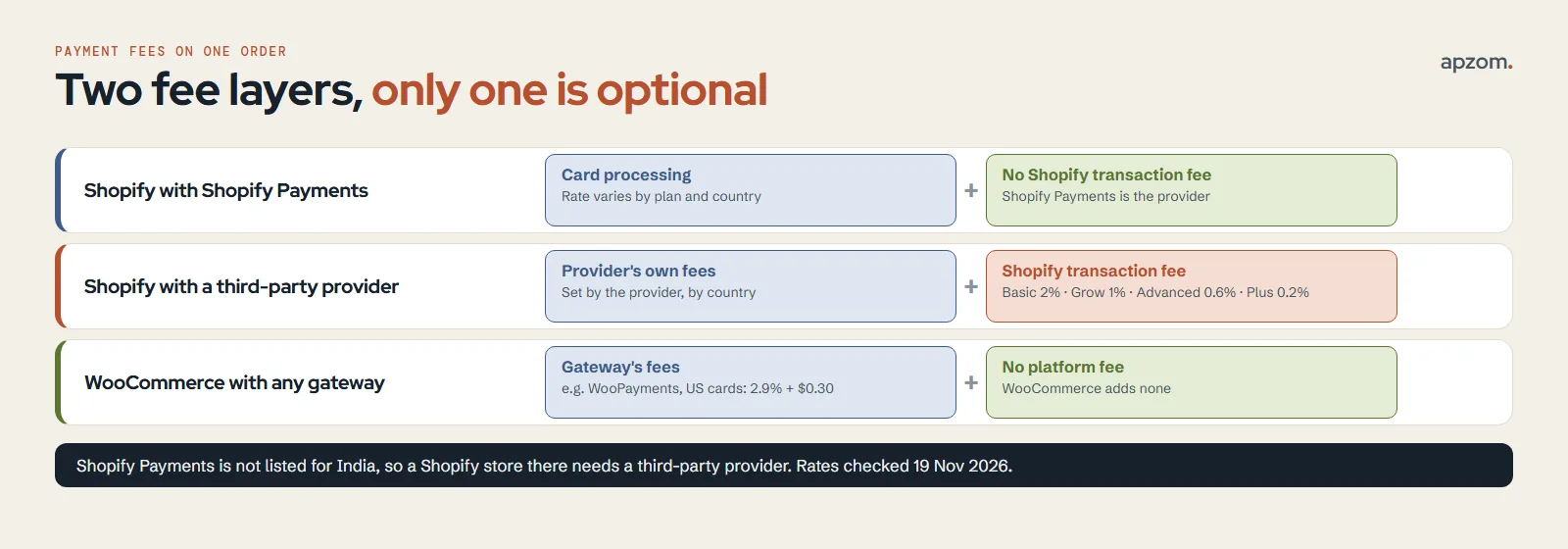
Layer 1: card processing. Every store pays this, on either platform: the payment provider takes a percentage of each order plus, usually, a fixed amount. On Shopify, if you use Shopify Payments, this is the only layer. Shopify’s pricing page says card rates vary with the plan you choose, and they also vary by country; check the rate shown for your country and plan. On WooCommerce, the gateway sets the rate. For example, WooPayments lists 2.9% + $0.30 per transaction for US cards, plus 1.5% for cards from outside your account country and 1% for currency conversion. Stripe and PayPal publish their own rates by country on their pricing pages. We could not read the US versions from India on 19 November 2026 (Stripe showed its India page and PayPal refused the request), so check the page for your country.
Layer 2: Shopify’s transaction fee for third-party providers. If you take payments on Shopify through a provider other than Shopify Payments, Shopify adds its own fee on top of that provider’s charges. On the pricing page we checked, the rate was 2% on Basic, 1% on Grow, 0.6% on Advanced and 0.2% on Plus. Shopify’s help centre says these fees apply to all transactions processed through third-party and alternate gateways, even when Shopify Payments is also active, with one exception: if Shopify Payments is your primary provider, PayPal transactions are exempt. WooCommerce has no equivalent platform fee.
Where you are based decides which layer applies, because neither Shopify Payments nor WooPayments works everywhere.
| Store based in | Shopify Payments available? | WooPayments available? |
|---|---|---|
| United States | Yes | Yes |
| United Kingdom | Yes | Yes |
| EU | Yes, in 26 EU countries (Slovakia is not listed) | Yes, all 27 EU countries are listed |
| Australia and Canada | Yes | Yes |
| UAE | Yes | Yes, Business accounts only |
| India | Not listed, so a third-party provider is needed | Not listed |
So a store based in India that sells through Shopify pays the provider’s fee and Shopify’s transaction fee on every order, while a WooCommerce store in India pays only its gateway’s fee. A store in the US, UK, EU, Australia, Canada or the UAE can avoid Shopify’s transaction fee by using Shopify Payments. Check both lists for your own country before you decide; they change.
Build your three-year cost model
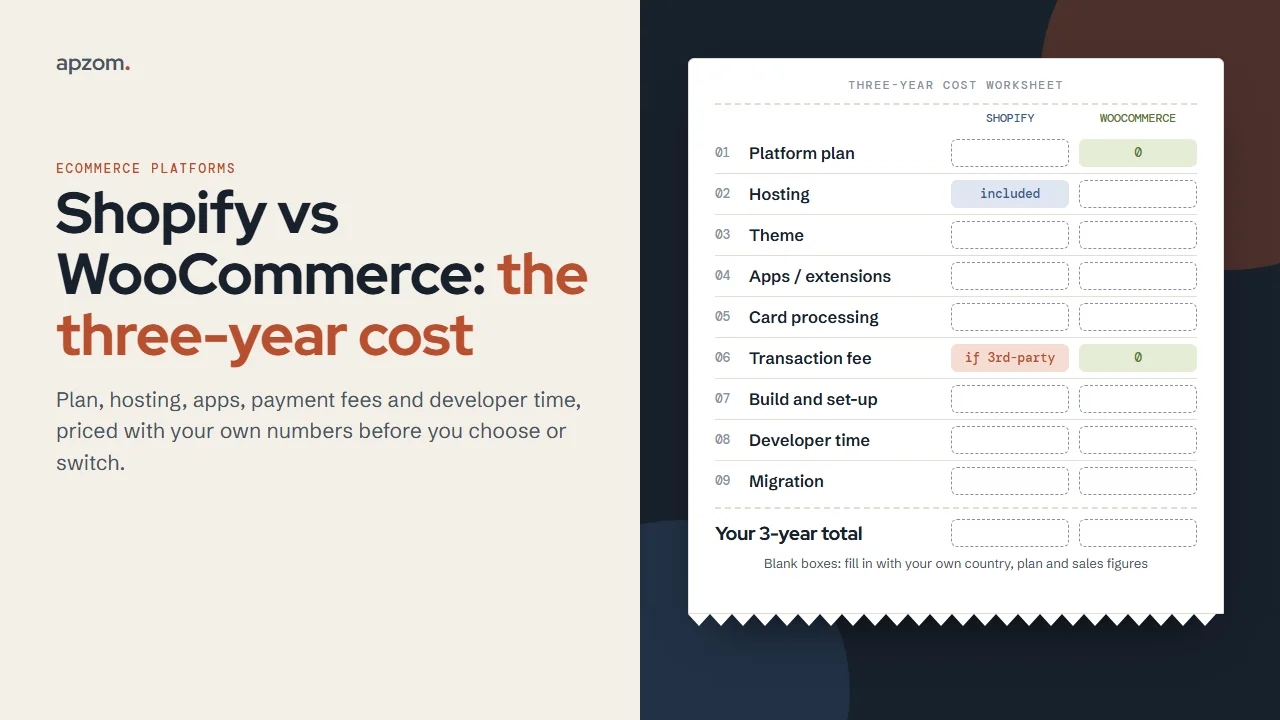
Three years is long enough to include renewals and growth, and short enough to estimate honestly. Copy these lines into a spreadsheet and fill them with your own numbers. Leave a line blank rather than guess.
| Line | Shopify: where the number comes from | WooCommerce: where the number comes from |
|---|---|---|
| 1. Platform | Plan price for your country x 36 months (or yearly price x 3) | 0 |
| 2. Hosting | 0 (included) | Your hosting quote x 36 months, plus SSL and backups if extra |
| 3. Theme | Theme price (one-time), plus any rebuild you expect | Theme price, plus any renewals on the seller’s terms |
| 4. Apps or extensions | Each app’s monthly price x 36, plus expected usage-based and one-time charges | Each extension’s yearly price x 3 (or its two-yearly price, spread over 3 years) |
| 5. Card processing | Your provider’s rate x expected sales, plus fixed fee x expected orders | Your gateway’s rate x expected sales, plus fixed fee x expected orders |
| 6. Transaction fee | Third-party rate x expected sales (0 with Shopify Payments) | 0 |
| 7. Build and set-up | Quote for the build | Quote for the build |
| 8. Developer time | Hours per month x 36 x hourly rate | Hours per month x 36 x hourly rate |
| 9. Migration | Cost of moving in or out, if you expect to | Cost of moving in or out, if you expect to |
Four rules make the model honest:
- Use expected sales for each year, not this year three times. Lines 5 and 6 grow with revenue; lines 1 to 4 mostly do not.
- Count apps and extensions you will really need, from a written feature list, not the ones a demo store uses.
- Price developer time on both sides. Shopify needs less maintenance, not none. WooCommerce needs regular updates and testing. Our rule of thumb: agree the monthly hours in writing with whoever will do the work.
- Add the exit cost. If there is a real chance you will move in three years, line 9 belongs in the model now.
Here is how the transaction fee line behaves, as an illustration only, not a forecast. A store using a third-party provider on Shopify with $200,000 of online sales a year would pay Shopify $4,000 a year on Basic (2%), $2,000 on Grow (1%) or $1,200 on Advanced (0.6%), on top of the provider’s own fees. Over three years with flat sales, that is $12,000, $6,000 or $3,600. On card processing, $200,000 of US card sales through WooPayments at an average order of $80 means 2,500 orders: 2.9% of sales is $5,800, plus 2,500 x $0.30 = $750, so $6,550 a year before any international or currency fees. Run the same sums with your own sales, average order value and rates.
Want a second pair of eyes on your numbers? Ask for a Free Growth Audit. Send us your country, expected sales, average order value and the features you need, and we check your three-year worksheet line by line: plan or hosting, apps or extensions, payment and transaction fees, and developer time.
Control and ownership: who decides what
Cost is only half the decision. The other half is what you can change, what you can take with you, and who you depend on.
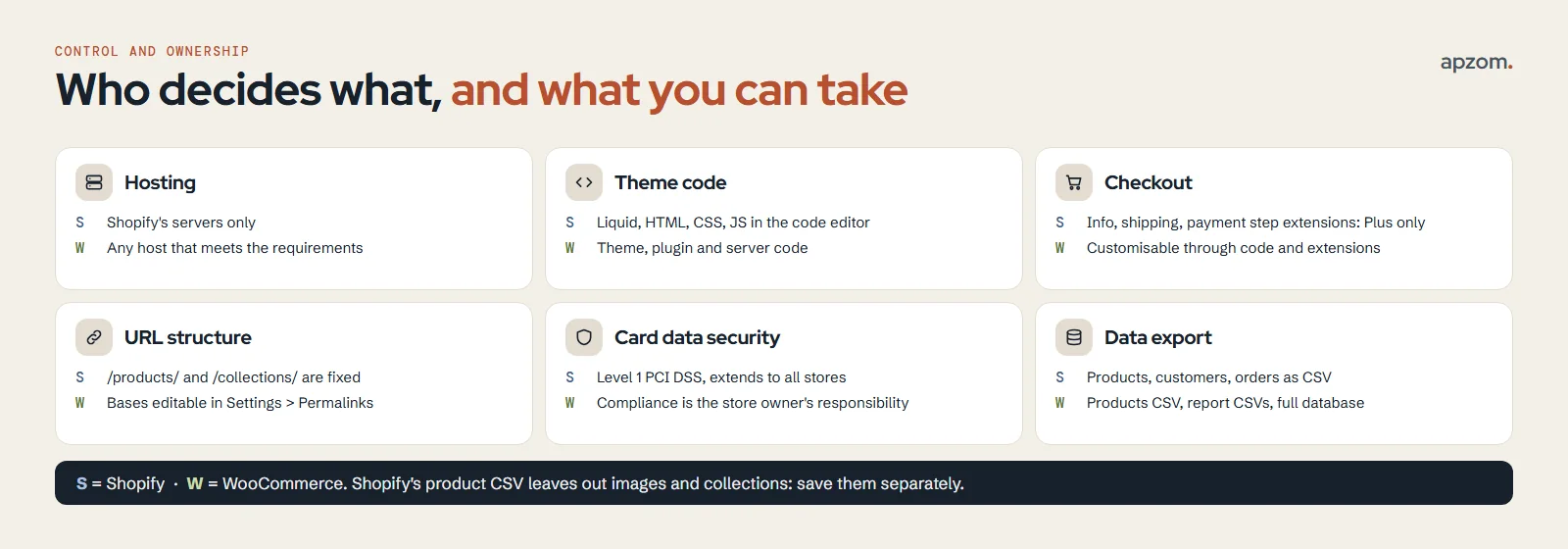
| Area | Shopify | WooCommerce |
|---|---|---|
| Hosting | Shopify’s servers only | Any host that meets the requirements; you can move |
| Theme code | Editable in the code editor (Liquid, HTML, CSS, JavaScript) | Fully editable, plus the plugin and server |
| Checkout | Checkout UI extensions for the information, shipping and payment steps are Shopify Plus only | Customisable through code and extensions on your own site |
| URL structure | /products/ and /collections/ are fixed paths | Product and category bases can be changed in Settings > Permalinks |
| Card data security | Shopify says it is certified Level 1 PCI DSS compliant, extending to all stores | WooCommerce says PCI DSS compliance is ultimately the store owner’s responsibility |
| Data export | Products, customers and orders as CSV files | Products as CSV built in; report tables as CSV; full database access |
Some details matter when you plan an exit. Shopify’s product export does not include product images or the collections each product belongs to, and larger order exports are emailed to you rather than downloaded. Customer exports are limited to 15 MB per file. On WooCommerce, the built-in CSV tool covers products and the Analytics report tables can be downloaded as CSV; for moving orders, WooCommerce’s own migration guide points to an order import and export plugin. Because you control the server, the whole database and the media files are always yours to copy.
Neither model is better for everyone: Shopify removes hosting, update and security work a small team may not do well, and WooCommerce’s control only helps if someone will use it and keep the site secure.
Which one fits your store
Answer these in order. The first clear “yes” is usually your answer.
- Do you have no one to maintain a website, and no budget for monthly developer hours? Shopify fits better: hosting, updates and checkout security are handled for you.
- Must you own the checkout, the URL structure, the hosting or the data model, for example for custom pricing, complex B2B rules or an integration with your own systems? WooCommerce fits better.
- Are you based where Shopify Payments is not available, with high sales volume? Fill in line 6 of the worksheet carefully; the transaction fee may decide it.
- Does content and search traffic drive most of your sales? Both can rank well. WooCommerce gives you WordPress’s publishing tools and full URL control; Shopify has a built-in blog and fixed product and collection folders. Our guide to ecommerce SEO covers category, product and filter pages on either platform.
- Mixed answers? Choose the one with the lower three-year total in the worksheet for the features you need.
When to switch, and when not to
Switch only for a reason you can write down and price.
Signs a Shopify store may be better on WooCommerce:
- Transaction and app fees have grown to the point where the worksheet shows a clear three-year saving, after migration and maintenance costs.
- You need checkout or data changes that your Shopify plan does not allow.
- You want to own the hosting or keep the store and its content on your own server for business or legal reasons.
Signs a WooCommerce store may be better on Shopify:
- Maintenance keeps failing: updates are skipped, plugins conflict, or the site goes down at busy times.
- Security and compliance work is more than your team can manage.
- Your developer time line is larger than the plan and app costs would be on Shopify.
Do not switch to fix problems the platform did not cause. Slow product pages, weak product photos, poor category pages and low conversion rates can usually be fixed on the platform you already have, at a fraction of the cost of a move. Our guide to signs your website needs a redesign has tests that separate a platform problem from a content or design one, and our guide for ecommerce brands covers growing sales after launch.
How to migrate in either direction
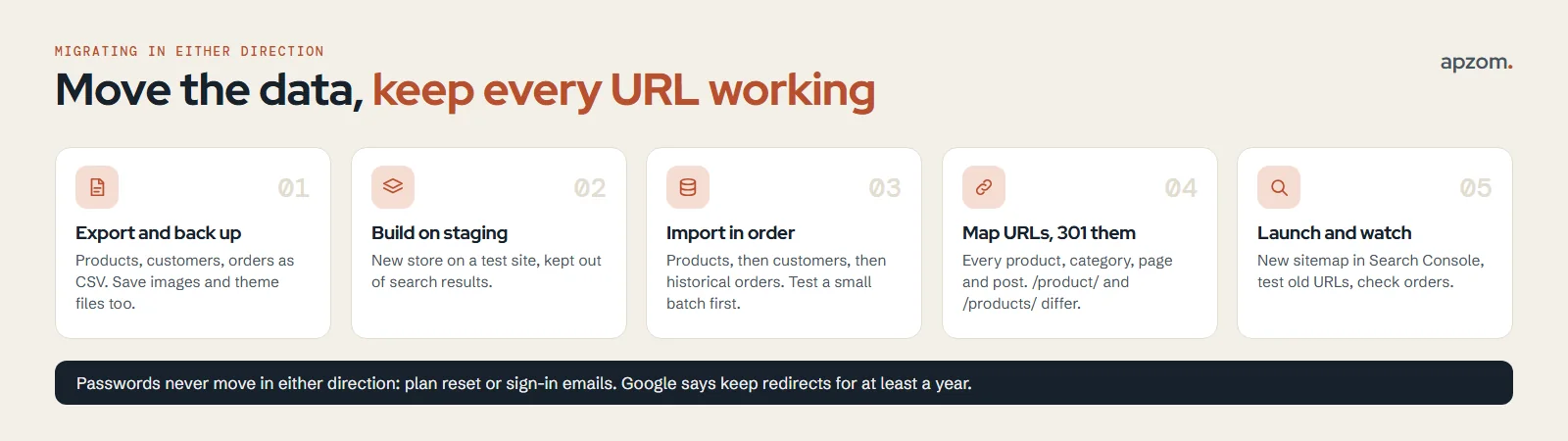
A migration has three jobs: move the data, keep customers able to buy, and keep search engines able to find every page. Plan all three before you start.
Moving from Shopify to WooCommerce
- Export and back up everything. Export products, customers and orders as CSV from the Shopify admin. Save product images, theme files and any blog content separately, because the product CSV does not include the images.
- Build the new store on a staging site. Install WordPress and WooCommerce on hosting that meets the server requirements, and keep the staging copy out of search results.
- Import in order. WooCommerce’s own migration guide suggests the built-in Product CSV Importer for products, a user-import plugin for customers and an order-import plugin for orders, or its paid Migrate and Import Shopify to WooCommerce extension for a full move. Run a small test import first and check product counts, variations and order totals against your Shopify exports.
- Plan for passwords. Passwords cannot be exported from Shopify, so customers will need to reset theirs. Tell them before launch.
Moving from WooCommerce to Shopify
- Export products and customers as CSV and edit them to match Shopify’s templates. Shopify’s free Store Migration app imports products and customers from CSV files.
- Use an app for what CSV cannot carry. Shopify says orders “can’t be imported to Shopify by using a CSV file”, and product reviews are not in the WooCommerce product export; its WooCommerce guide points to third-party apps for historical orders and other data a CSV cannot carry.
- Check product options. Shopify products can have a maximum of 3 options. Restructure any product with more than 3 variation attributes before you import it. Imported products arrive as drafts.
- Import in the right order: products first, then customers, then historical orders, so each order links to the right product and customer. Turn off new-order staff notifications first, or staff get an email for every imported order.
- Keep WooCommerce online until the import is complete, as Shopify’s migration guide advises. Customer passwords cannot be migrated; customers sign in with their email and a one-time code, or are invited to set a new password.
Protect your search traffic, both ways
The two platforms use different URL patterns. WooCommerce’s default product address is /product/name and its default category base is /product-category/; Shopify uses /products/name and /collections/name. So almost every product and category URL changes, even if the domain stays the same.
- Map every old URL to its new one before launch: products, categories or collections, pages, blog posts and images that get traffic. Google’s site move guidance says to map old URLs to new ones and to use permanent redirects such as 301.
- Keep the redirects for as long as possible, at least a year in Google’s guidance. Our guide to 301 vs 302 redirects explains which to use.
- On Shopify, set up redirects before you move the domain. Shopify’s help centre says you can redirect only from broken URLs, that the bare /products and /collections paths are fixed and cannot themselves be redirected, and that stores outside Plus can have up to 100,000 redirects. You can import redirects as a CSV file.
- On WooCommerce, add the redirects with a redirect plugin or at server level, and test each old URL in a browser.
- Carry over titles, meta descriptions and product descriptions, update internal links and submit the new sitemap in Google Search Console. Shopify generates a sitemap.xml file automatically. Google says the Change of Address tool is only needed when the domain or subdomain changes, and that rankings may fluctuate while it recrawls the site.
Our website redesign SEO checklist has the full benchmark, redirect map and launch-day checks, and they apply to a platform move just as they do to a redesign.
Common mistakes
- Comparing plan prices only. The plan is often the smallest line once payment fees, apps and developer time are counted.
- Using another country’s prices. Shopify shows local prices and Shopify Payments is not available everywhere; work from the page for your own country.
- Forgetting Shopify’s transaction fee when a store uses a third-party payment provider.
- Treating WooCommerce as free. The plugin is; hosting, extensions and maintenance are not.
- Migrating without a redirect map. Product and category URLs change between the two platforms even when the domain does not.
- Switching platforms to fix a conversion problem. Check product pages, checkout and speed first.
How Apzom can help
Apzom Digital builds and migrates online stores on WordPress with WooCommerce: catalogue structure, product templates, checkout, payments and shipping set-up, tracking, and migrations with a full redirect map so search traffic is protected. We do not build on Shopify, and we will tell you if the worksheet points to Shopify for your store. We have not published an ecommerce case study yet, so we will not quote results we cannot prove; our published work is on our case studies page. See our ecommerce development and website development services. We work with clients worldwide, remotely, from our base in Ahmedabad, India.
Get a Free Growth Audit and Quote for your store. Tell us your current platform, catalogue size, country and what is not working. We send back a written view of whether to stay or switch, the redirect map a move would need, and a quote if WooCommerce is the right fit.
No obligation, and no promised rankings or sales. Prefer to talk first? Contact us or read our website redesign SEO checklist.
Frequently asked questions
Is Shopify or WooCommerce cheaper?
It depends on your sales, your country and who maintains the store. Shopify is usually simpler to set up and run, and often costs less in year one once set-up and maintenance time are counted, because hosting and security are included. WooCommerce can cost less over time when payment fees, app costs or the need for custom features grow, but only if hosting and maintenance are planned and priced. Fill in the three-year worksheet above with your own numbers.
Does Shopify charge transaction fees?
Only when you use a third-party payment provider instead of Shopify Payments. On the pricing page we checked on 19 November 2026, the rate was 2% on Basic, 1% on Grow, 0.6% on Advanced and 0.2% on Plus, on top of the provider’s own fees. Card processing fees apply on every plan whichever provider you use.
Is WooCommerce really free?
The plugin is free to download and use. You still pay for hosting, a domain, any paid theme or extensions, card processing, and the time to keep WordPress, WooCommerce and the extensions updated.
Which is better for SEO, Shopify or WooCommerce?
Both can rank well. Shopify handles technical basics for you, but its product and collection folders are fixed. WooCommerce gives you full control of URLs, templates and structured data, which also means more to get right. Page quality, category structure and product content matter more than the platform; our guide to ecommerce SEO covers them.
Can I move from Shopify to WooCommerce without losing my rankings?
You can keep the loss small and temporary by mapping every old URL to its new one, using 301 redirects, carrying over titles and descriptions, and submitting the new sitemap. Google says rankings may fluctuate while it recrawls the site, so no one can promise none.
Can I move my customers’ passwords when I switch?
No, not in either direction. Shopify does not export passwords, and Shopify does not import them from WooCommerce. Plan a password reset or sign-in email for customers at launch.