The short answer: You cannot mark up, request or buy a featured snippet or a place in an AI answer. Google and the other answer engines choose the text themselves. What you can do is make your answer the easiest one to lift: put the question in a heading, answer it completely in the first 40 to 60 words underneath, then give the detail. Use a numbered list when the answer is a process and a table when it is a comparison. Keep the page indexable and allowed to show a snippet, leave the site included in Google’s Search generative AI control in Search Console, and check that the answer still makes sense when it is read on its own, away from your page.
This guide is for content writers, marketers and business owners anywhere in the world who write service pages, guides and FAQs and want their answers to be the ones quoted. It covers how featured snippets and AI answers pick text, five answer-block patterns matched to the kind of question being asked, the snippet controls Google gives you, and how to measure what happens. It is the practical writing companion to our answer engine optimization guide for real estate and our GEO guide, which explain the wider strategy. We checked every platform rule below against Google’s, Microsoft’s, OpenAI’s and Perplexity’s own documentation on 18 November 2026.
What featured snippets and AI answers are
A featured snippet is a highlighted extract from one web page, shown above or among the normal results when Google thinks a short passage answers the search directly. Google’s own documentation, “Featured snippets and your website” (Google Search Central, updated December 2025), says Google’s systems decide whether a page would make a good featured snippet, and that you cannot mark a page as one. A featured snippet shows the extract first and the link second, the reverse of a normal result.
People Also Ask is the box of related questions that expand to show a short extract and a link. Google has no dedicated guide to it, but the same featured snippets page says featured snippets can also appear inside “a related questions group (also known as ‘People Also Ask’)”. Google documents no separate way to target it or opt out of it.
AI answers are written summaries generated in response to a question, with links to the pages they drew from: Google’s AI Overviews and AI Mode, Microsoft Copilot in Bing, ChatGPT search and others. In May 2026 Google merged AI Overviews and AI Mode into one AI Search experience, now live worldwide, though its documentation still names both. Google’s “AI features and your website” page (updated December 2025) says a page must be indexed and eligible to be shown with a snippet to be a supporting link, and that there are no additional technical requirements (that page predates Google’s 2026 Search Console control, covered below).
The three work differently, but they reward the same thing on the page: a clear question, a direct answer close to it, and facts that hold up on their own.
What you can and cannot control
Before writing anything, be clear about where your influence ends.
| You can control | You cannot control |
|---|---|
| Whether the page is crawlable and indexable | Whether Google shows a featured snippet for a query at all |
| Whether a snippet may be shown, and how long it may be | Which page or passage Google or an AI system picks |
| Which parts of the page are excluded from snippets | How an AI answer paraphrases or combines your text |
| How clearly the answer is written and placed | How often the results change for the same query |
| Whether AI search crawlers such as OAI-SearchBot may visit | Whether a quote leads to a click |
| Whether the site is included in Google’s AI features | How AI answers are ranked against each other |
Google added one more control in 2026. The “Search generative AI control” in Search Console lets a site opt out of AI Overviews, AI Mode and Discover’s AI features. Sites are included by default, and Search Console Help (article 16908024) says the setting is not a ranking or inclusion signal for the rest of Search. Google’s guide “Optimizing your website for generative AI features on Google Search” (May 2026, updated July 2026) now lists being included in that control as a condition for appearing in AI features, alongside being indexed with a snippet.
There is no special markup for any of this. Asked how to mark a page as a featured snippet, Google’s documentation answers “You can’t.” Its AI features page says you do not need new machine-readable files, AI text files or special schema, and the May 2026 guide adds that Google Search ignores llms.txt and that you do not need to break content into tiny pieces or write in a special way for AI. FAQ markup is not a shortcut either: Google stopped showing FAQ rich results on 7 May 2026 and removed their documentation on 15 June 2026; HowTo rich results went in September 2023 (Google Search Central, “Latest documentation updates”). Our schema markup guide explains where structured data still helps.
Find the questions worth answering
Answer blocks work only on questions people actually ask. Start with evidence, not guesses.
- Your own Search Console queries. In the Performance report, filter queries containing who, what, why, how, can, does, is, best, vs and cost. Questions where your page already has impressions are the best starting point: impressions suggest Google already connects the page to the question. Our Search Console guide shows how to filter queries.
- The results page itself. Search the question in a private window. Note whether a featured snippet, People Also Ask box or AI Overview appears, which format it uses (paragraph, list or table) and which page is quoted. Write the date down: results change.
- Sales and support. The questions clients ask before buying may be ones nobody has answered well online.
- Bing Webmaster Tools. Its AI Performance report (public preview since February 2026, according to the Bing Webmaster blog) shows how often your pages are cited in Microsoft Copilot, Bing’s AI summaries and select partner integrations, and a sample of the queries behind those citations. It reports citations; Bing describes no click data. Our Bing Webmaster Tools guide covers set-up.
Group questions that mean the same thing (“how much does X cost” and “X price”) under one heading rather than writing a block for each wording.
Five answer-block patterns
Match the pattern to the kind of question. The word counts below are our working guidance from writing these blocks, not a rule any search engine publishes.
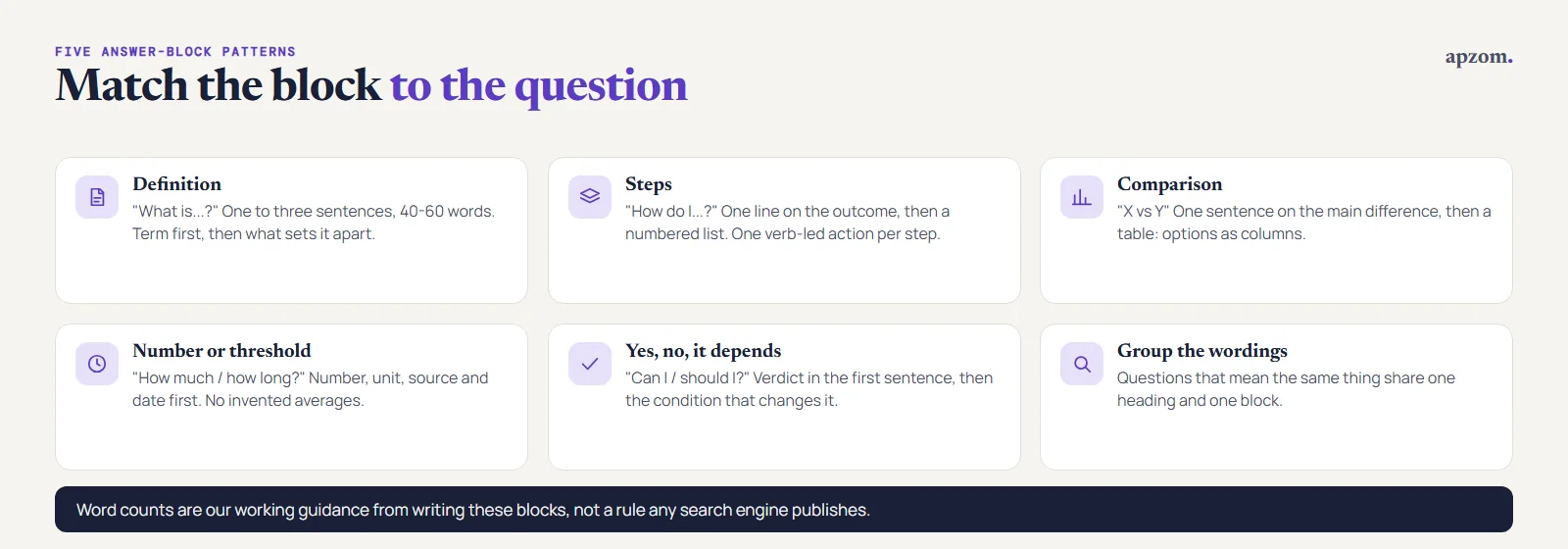
1. Definition: “What is…?”
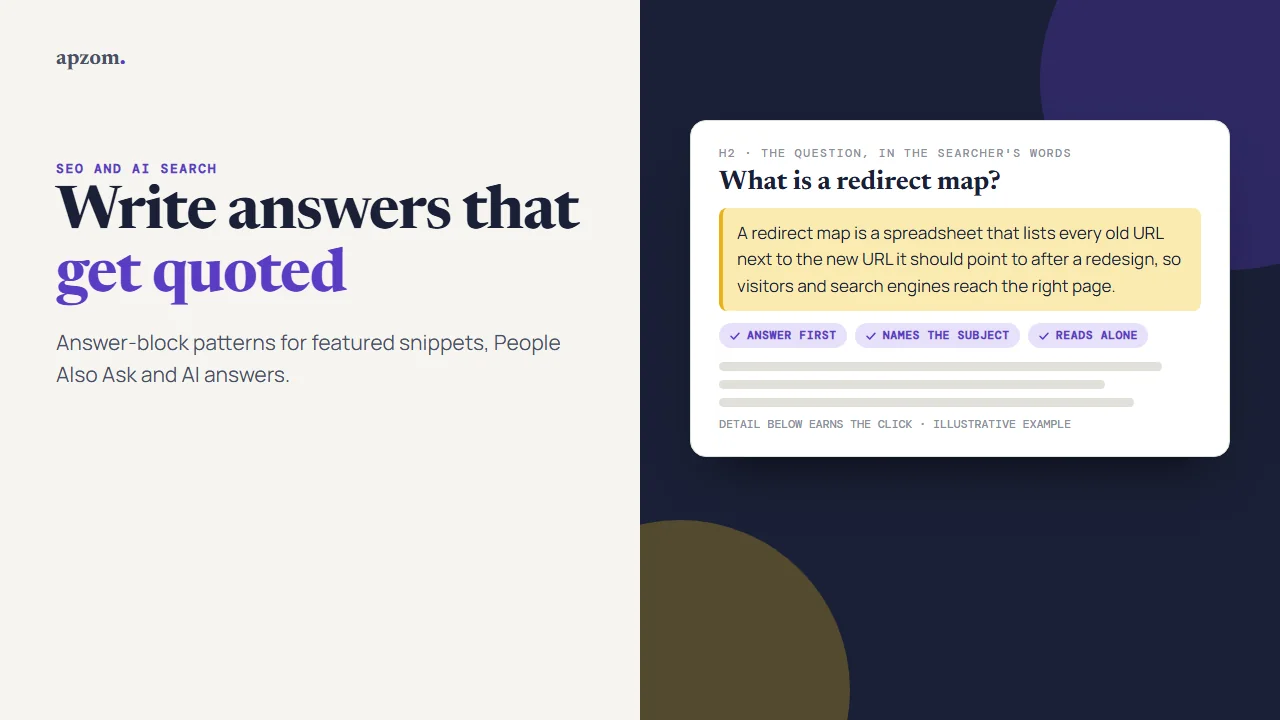
Heading: the question, in the searcher’s words. Answer: one to three sentences, 40 to 60 words. Start with the term, say what it is in plain words, then the one detail that separates it from things it is confused with.
Example (illustrative), under the heading “What is a redirect map?”: *”A redirect map is a spreadsheet that lists every old URL on a website next to the new URL it should point to after a redesign. Developers use it to set up 301 redirects, so visitors and search engines reach the right page instead of an error.”*
2. Steps: “How do I…?”
Heading: “How to [task]”. Answer: one sentence saying what the process achieves (and how long it takes, if you know), then a numbered list. Start each step with a verb, keep each to one action, and use the button and menu names the reader will see on screen. Our working guidance is five to eight steps; link to detail for the long version.
Example (illustrative), under the heading “How to run the lift test”: *”The lift test checks whether an answer block makes sense on its own. 1. Copy the heading and the answer block. 2. Paste them into a blank document. 3. Read them as a stranger would. 4. Check that the subject is named and every number has a source and date. 5. Rewrite the block if any check fails.”*
3. Comparison: “X vs Y” or “Which is best…?”
Heading: the comparison. Answer: one sentence that states the main difference and who each option suits, then a table with the options as columns and the deciding factors as rows. Use the same row names a buyer would use: cost, time, control, risk. Avoid empty cells and marketing language inside tables.
Example (illustrative): *”nosnippet vs data-nosnippet: nosnippet blocks every text snippet for the whole page; data-nosnippet hides only the passage it wraps.”* Then a table:
| Question | nosnippet | data-nosnippet |
|---|---|---|
| Scope | The whole page | One passage |
| Where it is set | Robots meta tag or X-Robots-Tag header | An attribute on a span, div or section |
| Applies to AI Overviews and AI Mode | Yes, per Google’s robots meta tag documentation | Listed as a control on Google’s “AI features and your website” page; the robots meta tag documentation names AI Overviews and AI Mode only for nosnippet and max-snippet |
4. Number or threshold: “How much…?”, “How long…?”, “What is a good…?”
Heading: the question. Answer: the number or range first, with its unit, source and date, then what it depends on. If no reliable number exists, say so in the first sentence and explain what drives the answer instead. That honest answer is still quotable; an invented average is not.
Example (illustrative): *”How long does a robots.txt change take to reach OAI-SearchBot? About 24 hours, according to OpenAI’s “Overview of OpenAI Crawlers” page, checked 18 November 2026. Until then, the change may not have taken effect.”*
5. “Yes, no or it depends”: “Can I…?”, “Should I…?”, “Does…?”
Heading: the question. Answer: start with “Yes”, “No” or “It depends on…”, then the one condition that changes the answer. A verdict in the first sentence is easy for a reader, or a system quoting the passage, to find, so do not bury it behind a warm-up.
Example (illustrative): *”Does blocking Google-Extended remove my site from Google Search? No. Google’s common crawlers documentation (updated October 2026) says Google-Extended does not affect inclusion in Google Search and is not used as a ranking signal.”*
Want to know which of your pages could be quoted? Ask for a Free Growth Audit and Quote. With read access to your Search Console, we look at the questions your pages already get impressions for, check your snippet and crawler settings, and show you which answers to rewrite first.
Write the block: rules that apply to every pattern
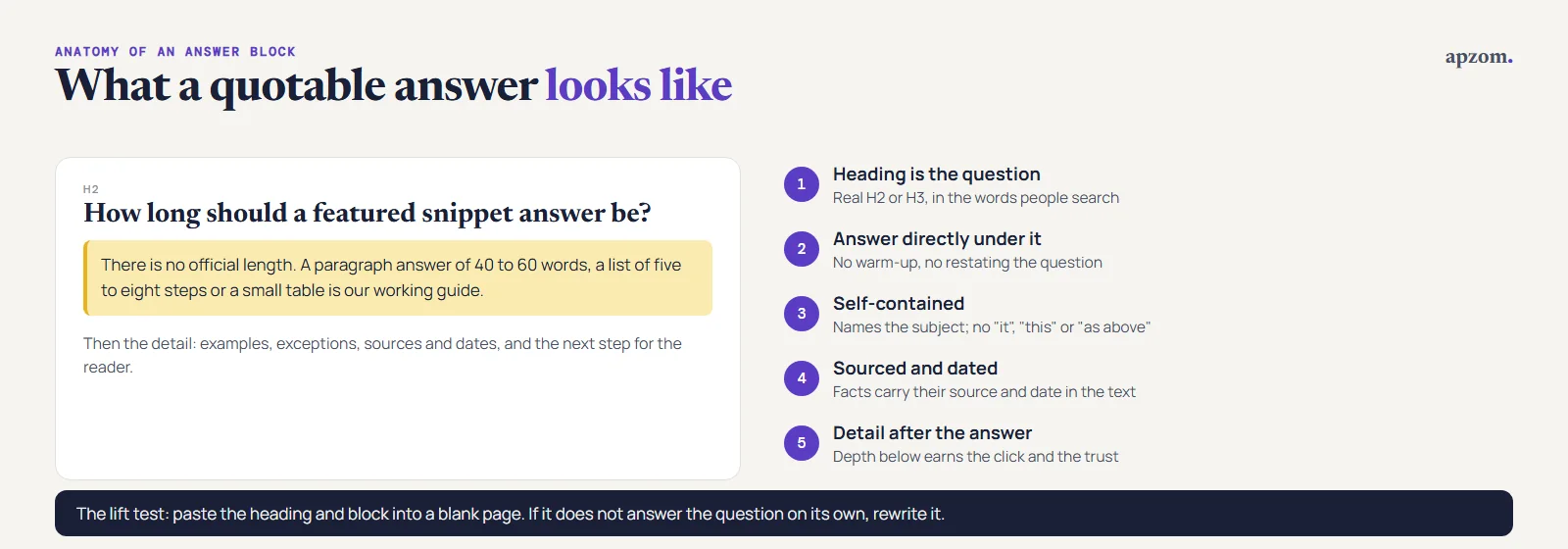
- Put the answer directly under the heading. No introduction, no restating the question, no “great question”.
- Make it self-contained. Name the subject instead of writing “it” or “this”, and avoid “as mentioned above”. The block may be read on its own.
- One idea per block. If the honest answer has two parts, use two headings.
- Use plain HTML structure. Real headings (H2, H3), real lists and real tables, not images of text or tables built from divs.
- State sources and dates in the text. “Google’s documentation, checked November 2026, says…” travels with the quote.
- Keep the detail after the answer. The short block earns the quote; the depth below it earns the click and the reader’s trust.
Run the lift test
Copy the heading and the block into a blank document. Read them as a stranger would. Does the block answer the question completely? Does it name the subject? Is every number dated and sourced? Would you be happy to see it quoted under your brand without the rest of the page? If any answer is no, rewrite the block before publishing.
Check your snippet controls
Google gives you page-level and passage-level controls. They are mainly for limiting what is shown, so check that none is set by accident.
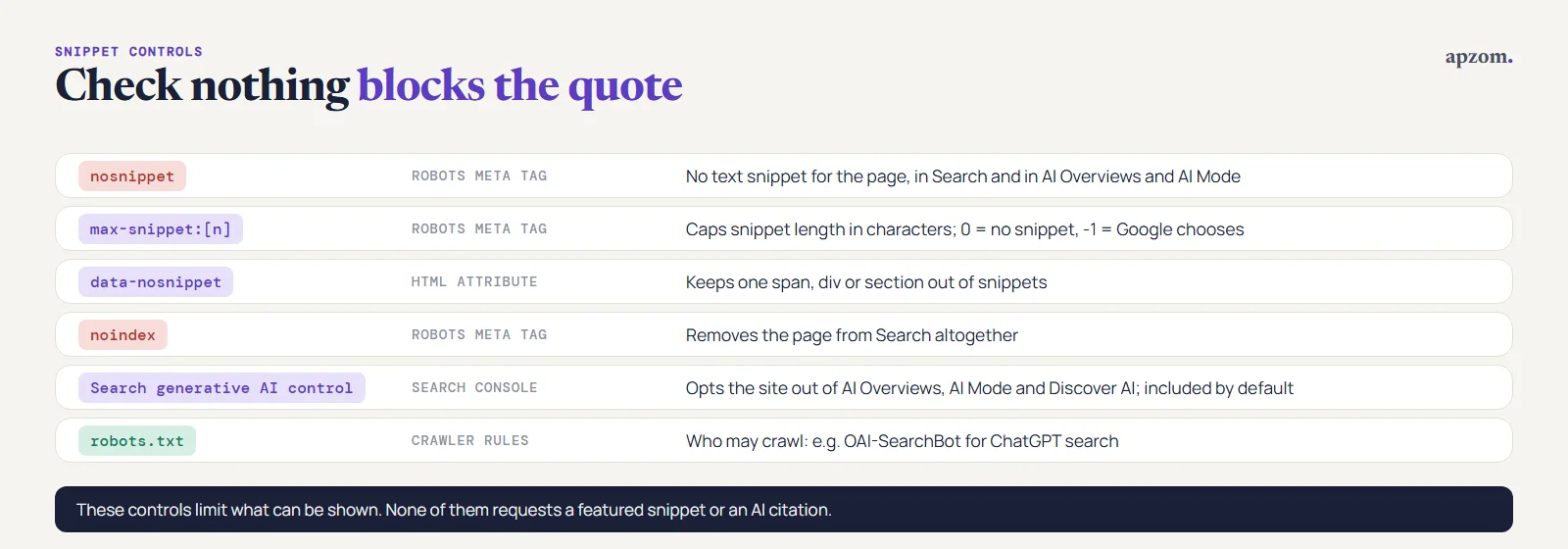
| Control | Where | What it does |
|---|---|---|
nosnippet | Robots meta tag | No text snippet for the page. Google’s robots meta tag documentation (updated March 2026) says it applies to web search, Discover, AI Overviews and AI Mode, and stops the content being a direct input for AI Overviews and AI Mode |
max-snippet:[number] | Robots meta tag | Limits the snippet to that many characters, including in AI Overviews and AI Mode. 0 means no snippet; -1 lets Google choose the length |
data-nosnippet | HTML attribute on a span, div or section | Keeps that passage out of featured snippets and regular snippets |
noindex | Robots meta tag | Removes the page from Search altogether |
| Search generative AI control | Search Console setting | Opts the whole site out of AI Overviews, AI Mode and Discover AI features, without affecting the rest of Search |
Two cautions. Google’s featured snippets documentation says a low max-snippet value can stop featured snippets while keeping regular ones, but Google says it does not guarantee that; only nosnippet does. And Google-Extended, the robots.txt token for Gemini training and grounding, does not affect whether your site appears in Google Search (Google’s common crawlers documentation, updated October 2026).
For other answer engines, crawler access matters as much as markup. OpenAI’s “Overview of OpenAI Crawlers” page says OAI-SearchBot is used to show websites in ChatGPT’s search features and recommends allowing it in robots.txt; sites that block it will not be shown in ChatGPT search answers, though they can still appear as navigational links. GPTBot, used for model training, is a separate setting. Perplexity’s crawler documentation likewise says to allow PerplexityBot in robots.txt, and its published IP ranges, for a site to appear in Perplexity’s search results. Bing is changing its controls: a Bing blog post of 30 October 2026 introduced separate “AI Training” and “AI Grounding” preferences that apply from 1 February 2027; after 1 March 2027 Bing will no longer read the older NOCACHE and NOARCHIVE tags as AI preferences. Neither preference affects whether a page can appear in Bing search. Our guide to llms.txt explains why that file is not a control for any of this, and our guide to title tags and meta descriptions covers the ordinary snippet under every result.
Measure what happens
Search Console now has two places to look. The main Performance report includes AI Overviews and AI Mode within the “Web” search type, and counts a featured snippet as a normal result position; there is no featured snippet filter in Google’s documentation. Since 31 August 2026 there is also a “Generative AI performance report (Search)”, which shows how often links to your site were shown in AI Overviews and AI Mode, by page, country, date and device. It shows impressions only: no clicks, no click-through rate and no queries (Search Console Help, checked 18 November 2026). For Bing and Copilot, use the AI Performance report in Bing Webmaster Tools.
A simple routine that works with free tools:
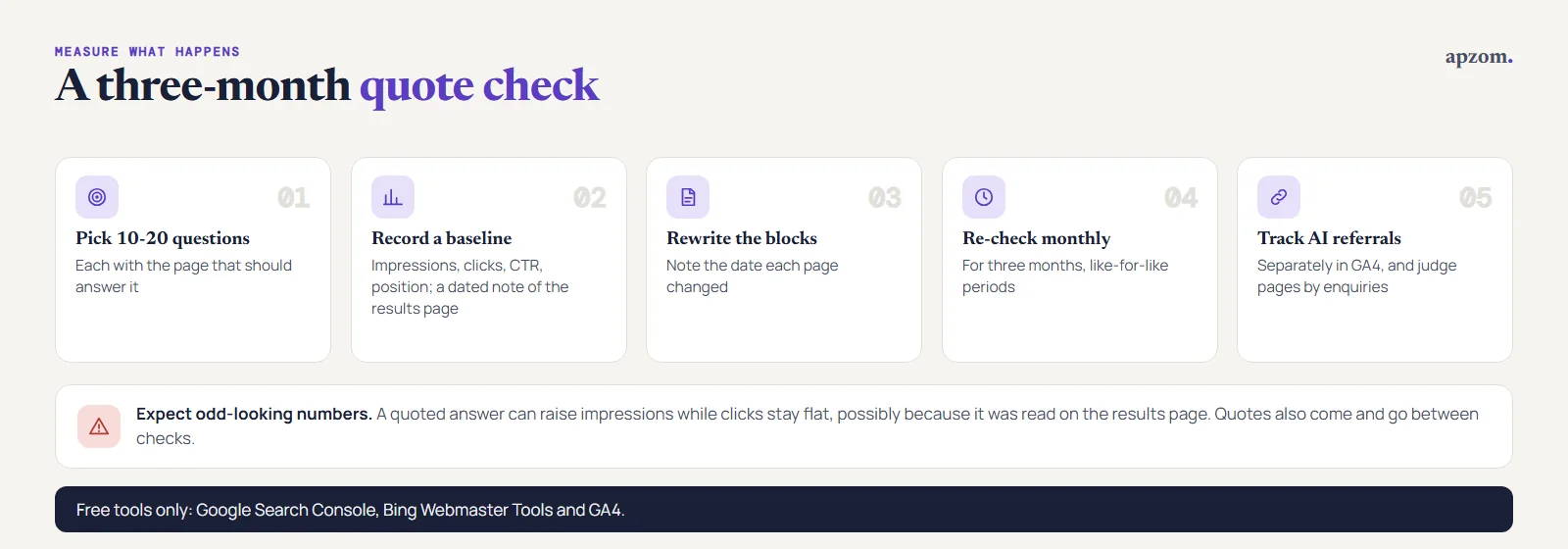
- Pick 10 to 20 target questions and the page that should answer each.
- Record a baseline: impressions, clicks, CTR and average position for each query and page in Search Console, plus a dated note of what the results page shows.
- Rewrite the blocks and write down the date each page changed.
- Re-check monthly for three months. Compare like-for-like periods, not week-on-week noise.
- Track AI referrals separately in GA4. Our guide to tracking AI search traffic in GA4 shows how.
Expect two effects that look odd at first. A featured snippet or AI answer can raise impressions while clicks stay flat, possibly because the reader got the answer on the results page. And a quote can come and go between checks, because results change. Judge the trend over months, and judge the pages by the enquiries they bring, not only by quotes.
Common mistakes
- Writing a warm-up before the answer. “In this section we will look at…” pushes the answer out of the passage that gets lifted.
- Answer blocks on every paragraph. Use them for real questions; a page of 40-word fragments reads badly and helps nobody.
- Adding FAQ markup to win snippets. It no longer produces FAQ rich results on Google, and markup that does not match visible content breaks Google’s structured data guidelines.
- Copying the current snippet. Rewriting a competitor’s quoted passage adds nothing a search engine needs. Add the detail, example or date they lack.
- Blocking a snippet by accident. A leftover nosnippet or max-snippet:0 from a template or plugin setting can remove the page from snippets entirely.
- Treating a quote as the goal. A quoted answer with no clear next step brings visibility and no business. Make sure the page below the block helps the reader act.
How Apzom can help
Apzom Digital’s AEO services cover the work in this guide: finding the questions your buyers ask, rewriting service pages and guides into clear answer blocks, checking crawler and snippet settings, and setting up measurement in Search Console and GA4. For the wider AI visibility strategy, see our GEO services and SEO services. We cannot promise featured snippets or AI citations, because no one controls which page is quoted. We can make your answers the clearest ones available and show you honestly what changes. We work with clients worldwide, remotely, from our base in Ahmedabad, India.
Get your Free Growth Audit and Quote. We review your key service pages and guides for answer-ready structure, snippet controls, crawler access and measurement, and send you a prioritised list of the questions to answer and the blocks to rewrite, with a quote if you want us to do it.
No obligation, and no promised snippets or AI citations: nobody controls which page gets quoted. Prefer to talk first? Contact us or see our AEO services.
Frequently asked questions
How long should a featured snippet answer be?
There is no official length. Our working guidance is 40 to 60 words for a paragraph answer, five to eight steps for a list, and a small table for a comparison. Write the shortest block that answers the question completely, then add detail below it.
Do I need schema markup to get a featured snippet?
No. Google’s documentation says there is no special markup for featured snippets or for appearing in AI features. Structured data still helps search engines understand some page types, but it does not make a passage quotable.
How do I stop Google from using my page in a featured snippet?
Use the nosnippet robots meta tag to block all snippets for the page, the data-nosnippet attribute to exclude a specific passage, or max-snippet to limit snippet length. Google’s documentation says nosnippet and max-snippet also apply to AI Overviews and AI Mode. To opt out of Google’s AI features only, while staying in the rest of Search, use the Search generative AI control in Search Console.
Can I see featured snippet or AI Overview traffic in Search Console?
Partly. Featured snippets are counted inside the normal Performance report, with no separate featured snippet filter listed in Google’s documentation. AI Overviews and AI Mode are included in the “Web” search type, and since August 2026 the Generative AI performance report shows how often links to your pages appeared in them, as impressions only, without clicks or queries.
Why did my featured snippet disappear?
Results change often. Another page may answer the question more clearly, Google may have stopped showing a snippet for that query, the layout of the results page for that query may have changed, or a change on your page may have moved or weakened the answer. Check the page first, then the results page, and compare over several weeks before reacting.