
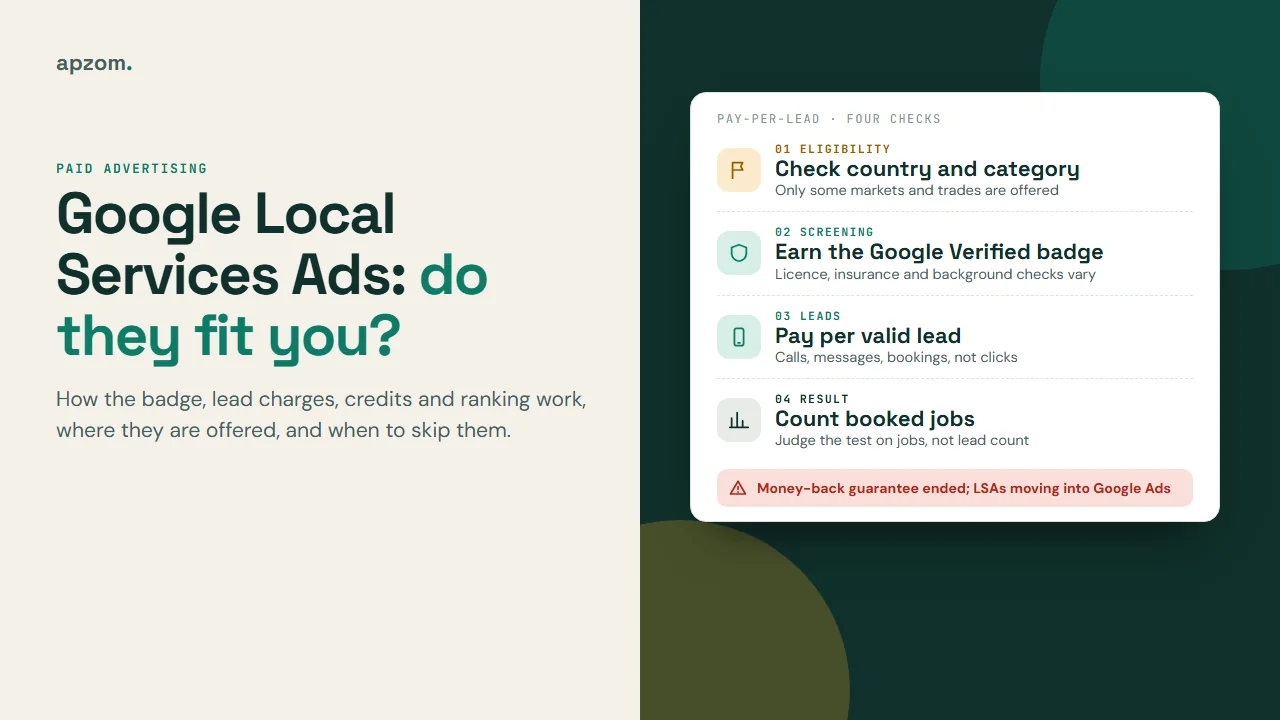
The short answer: Google Local Services Ads (LSAs) are pay-per-lead ads for local service businesses. They appear in Google Search and Maps with a “Google Verified” badge once your business passes Google’s screening, and you pay for leads such as calls, messages and booking requests rather than for clicks. They are only offered in some countries and categories: Google’s help pages name the US, Canada, the UK and eight other European countries, and we found no Google source showing them in Australia, India or the UAE. They tend to fit when your trade and country are eligible, you can pass screening, you answer the phone quickly and a booked job is worth much more than a lead. If any one of those is missing, start with Search ads and your Google Business Profile.
This guide is for owners and marketing leads of local service businesses anywhere in the world, such as trades, home services, law firms and other licensed local services, who want to decide whether Local Services Ads deserve a place in their marketing. It covers the 2025 and 2026 changes, availability, screening, lead charges and credits, ranking, bidding, how LSAs compare with Search ads and a Business Profile, and when to skip them. We checked every platform rule against official sources, Google’s own help pages, on 21 November 2026.
What Local Services Ads are, and what changed in 2025 and 2026
A Local Services Ad is a short listing with your business name, rating, reviews, hours and service area, not a text ad with a headline and a landing page. A searcher who taps it can call you, send a message or, in some markets, request a booking, and you pay only for those leads.
Much of what is written about LSAs is now out of date. Three changes matter.
- One badge for everyone. Google used to show different badges, such as “Google Guaranteed” or “Google Screened”, depending on the category. Google’s help page on the Google Guarantee now says it is “launching a single badge for all advertisers”: the Google Verified badge. It shows that your business passed Google’s screening. Google says the badge is currently unavailable in the auto, beauty and dining categories.
- The money-back guarantee has ended. The Google Guarantee used to reimburse customers in some cases. Google’s page says it is discontinuing that Money Back Guarantee, and only bookings made before 7 December 2025 could be claimed, within 30 days of the service being completed. Any agency or article that still sells LSAs on the promise of a Google money-back guarantee is out of date.
- LSAs are moving into Google Ads. Google’s help page on the transition says Local Services Ads campaigns are becoming Performance Max campaigns with pay-per-lead goals inside Google Ads. The pay-per-lead model and the ad placements stay the same, but the dashboard, the bidding and the dispute process change. Google gives this timeline: the first phase began in August 2026 for select home and storefront service advertisers in the US; broader groups, including service-area businesses without storefronts, and accounts with custom bidding or booking set-ups, follow in late 2026; non-US accounts and the remaining categories follow in 2027.
If you already run LSAs, Google says the account administrator gets an email 14 days before the migration and a reminder 7 days before. Download your historical lead reports before then: Google says performance reports do not carry over and the old dashboard is no longer accessible after the move. Google says your verified status and badge transfer automatically, and that performance can take up to two weeks to stabilise after migration.
Where Local Services Ads are available
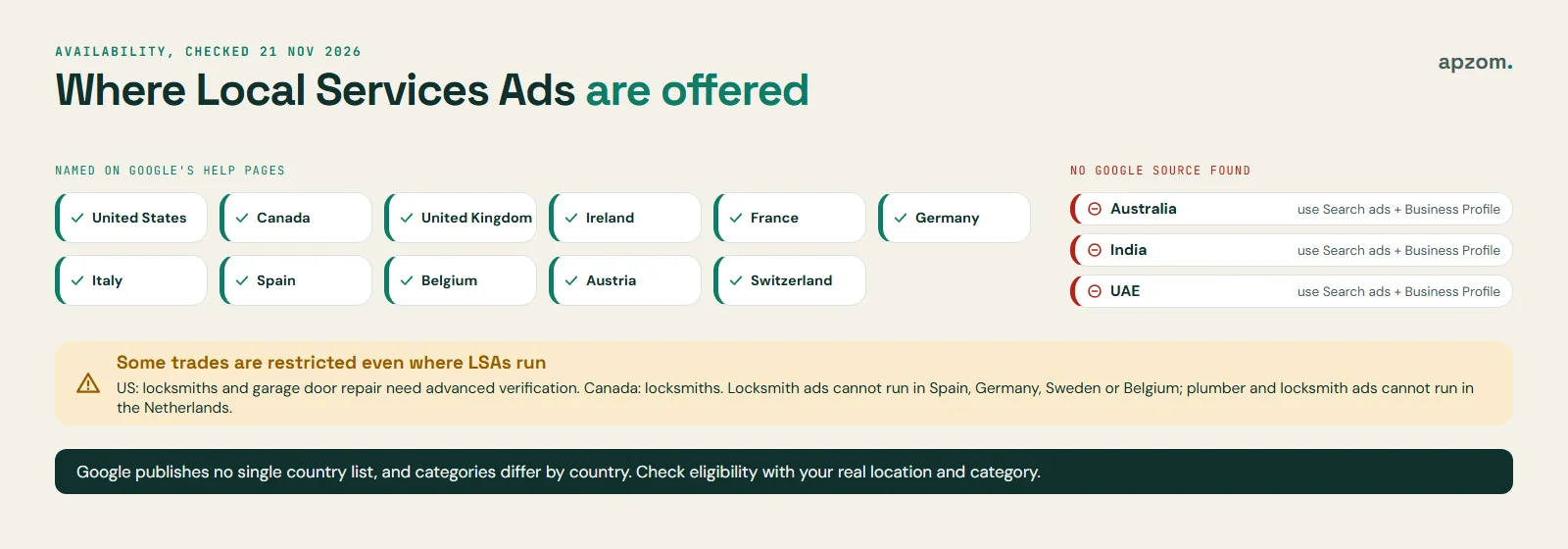
Google does not publish one list of countries. Its Local Services help pages name 11 countries, and Google’s 2023 announcement on The Keyword names the nine European markets where LSAs run for home services. Category coverage varies a lot between them.
| Market | Status we could verify (21 Nov 2026) | What that means for you |
|---|---|---|
| United States | Available; the widest category list, more than 200 service categories, some limited to California and Florida | The pay-per-lead Performance Max version is US-only for now |
| Canada | Available | Booking leads are offered in the US and Canada only |
| United Kingdom | Available; home services, plus legal and estate agency firms in the London area since 2023 | Lead credits are not offered to advertisers in EMEA |
| EU and Switzerland | Named: Ireland, France, Germany, Italy, Spain, Belgium, Austria, Switzerland | Mainly home services; some trades cannot advertise at all in some countries |
| Australia | Not verified: no Google source found | Treat as unavailable unless Google’s sign-up flow says otherwise |
| UAE | Not verified: no Google source found | Use Search ads and a Business Profile |
| India | Not verified: no Google source found | Use Search ads and a Business Profile |
Two more restrictions apply on top of availability. First, Google Ads’ advertising policy on local services says locksmith and garage door repair ads in the US, and locksmith ads in Canada, need advanced verification, while locksmith ads cannot run in Spain, Germany, Sweden or Belgium, and neither plumber nor locksmith ads can run in the Netherlands. Second, Google’s new pay-per-lead campaigns in Google Ads do not yet take categories that need advanced verification; Google says locksmiths and garage door services stay on the Local Services platform for now and are expected to move in 2027, with professional services expected in late 2026.
The practical test: Google’s getting-started page tells you to check business eligibility for your area, so enter your real business location and category on Google’s Local Services sign-up page. If your category is not offered there, no agency can change that.
What Google checks before your ads can run
Every LSA advertiser goes through screening, and what it involves depends on your category and location.
Google’s page on business screening and verification requirements lists these checks:
- Background checks, for select users only: a business check, an owner check and a business representative check. Health care categories have their own provider and practice checks.
- Licences, where local law requires them: Google lists a business licence and an owner licence at state level for the US.
- Insurance, for select users only, depending on the category.
- Extra screening for urgent trades. Electricians, garage door, HVAC, locksmith and plumbing providers face additional checks, and locksmiths and garage door providers also go through Google’s Advanced Verification.
- Lighter checks for some categories. Food and beverage businesses only need a verified Google Business Profile.
Google says the process takes three to four weeks on average after you submit your documents. Plan your start date around that.
A practical order that avoids most delays:
- Make sure your Google Business Profile is verified and its name, address or service area, phone number and hours match your real business. Our guide on how to verify your Google Business Profile covers the video verification step. Google’s new pay-per-lead campaigns require at least one verified Business Profile.
- Collect your licence numbers, insurance certificates and registration documents before you start the sign-up, using the exact legal names that appear on them.
- Tell anyone named as an owner or representative that a background check may be requested, so the emails are not ignored.
- Check the account each week until every check shows as complete.
Google also offers “pre-badge ads”, which let you receive leads once you pass preliminary checks, while you finish the rest; Google places those listings below providers who have finished onboarding. Pre-badge ads are not available for garage door services, health care or locksmiths. After the move into Google Ads, Google says insurance and licence reverification are no longer required.
For trade-specific detail (which home service trades get extra checks, how state bar checks work for lawyers, what contractors need), see our guides for home services companies, law firms and construction companies.
How you are charged for leads
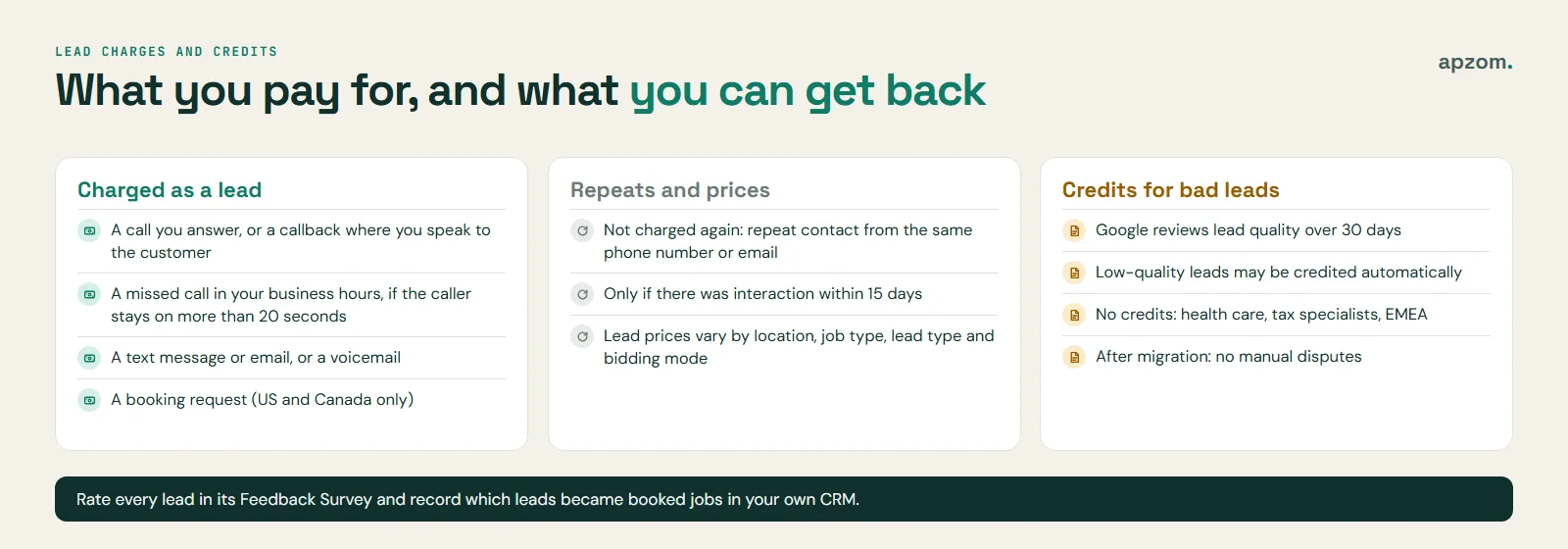
Google’s “How leads work” page lists what counts as a charged lead:
- a phone call you answer, or a callback where you speak with the customer;
- a missed call during your business hours, but only if the customer stays on the line for more than 20 seconds;
- a text message or email from the customer;
- a voicemail from the customer;
- a booking request, in the US and Canada only.
The same customer contacting you again is not charged again, provided there was interaction within 15 days and the contact comes from the same phone number or email address.
Google does not publish a price list. Its page says lead prices vary with your location, the job type, the type of lead and your bidding mode. Message leads are priced on how likely the customer is to book, and are typically, though not always, priced below the matching phone lead. In the new pay-per-lead campaigns, phone calls are a required lead type, while message and booking leads are optional; Google’s best-practice page suggests turning those on only if you can reply within 24 hours.
Two things follow. A call you miss during your business hours can still cost you if the caller waits, so someone must answer during your scheduled hours. And because Google charges for the contact, not the job, what matters is how many leads become booked jobs. Our guide to tracking phone calls from Google Ads explains how to record call outcomes, and speed to lead covers why response time decides who wins the enquiry.
Bad leads: credits, ratings and the end of manual disputes
Older guides tell you to “dispute” a bad lead within a set number of days. Google’s current pages describe no such process. Here is what they say.
- Credits are automatic. Google says it continuously assesses lead quality over a 30-day period, and charged leads may be credited automatically if they are judged to be low quality. The credit goes to your account balance.
- You can still flag a lead. Google says it may occasionally credit leads you report as poor quality in each lead’s Feedback Survey. There is no promise.
- Some advertisers get no credits. Google says lead credits are not available for health care verticals, tax specialists or advertisers in EMEA, and automatic credits are not available for accounts in European Economic Area countries.
- After migration, manual disputes are not supported. Google’s transition page says: “Manual lead disputes are no longer supported.” We found no Google page explaining whether the 30-day automatic review carries over to the new campaigns. Check your billing in Google Ads after you move.
What to do about it: rate every lead in the survey, keep job types and service areas tight, and keep your own record of which leads became booked jobs, because you cannot audit Google’s credit decisions. If you advertise from the UK, the EU or Switzerland, budget on the basis that you will pay for every valid lead, good or bad. See also how to improve Google Ads lead quality.
Not sure Local Services Ads are open to you? Ask for a Free Growth Audit. We check whether your country and category are eligible, review your Business Profile and call handling, and tell you whether LSAs, Search ads or both make sense, including when the answer is neither for now.
What decides where your ad shows
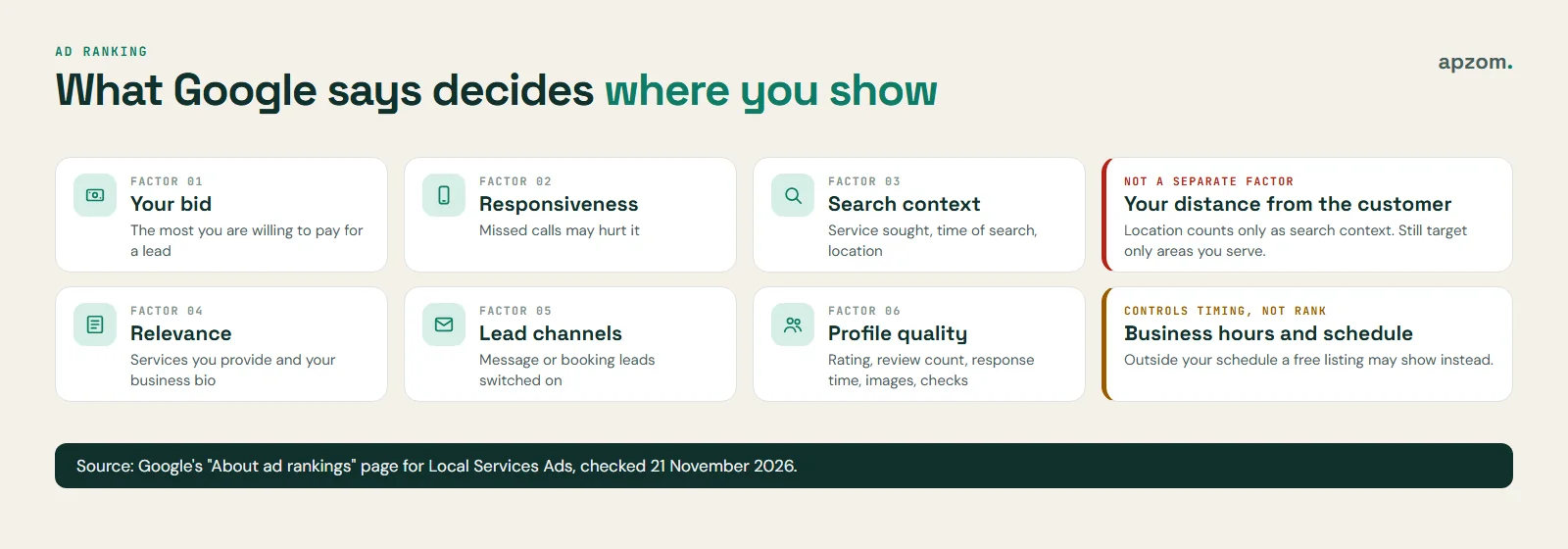
LSAs are ranked in an auction, but money is only one part of it. Google’s “About ad rankings” page lists these factors:
- Your bid, the most you are willing to pay for a lead;
- Responsiveness: Google says missed calls may hurt it;
- The context of the search, such as the service sought, the time of the search and the location;
- Relevance: the services you provide and your business bio;
- Lead channels: turning on message or booking leads gives customers more ways to reach you;
- Profile quality: your rating, number of reviews, average response time, high-quality images and the verification checks.
Google adds that higher-quality profiles, including those with images, may rank higher and may pay less per lead. Its best-practice page for the new campaigns says missed calls and slow response times can lower your ranking and visibility, and suggests aiming for five or more reviews on your Business Profile. For honest ways to get them, see how to get more Google reviews.
Two points that many guides get wrong:
- Distance is not a separate factor on Google’s current list. Many guides still name “proximity” as a ranking factor. Google’s current page mentions location only as part of the search context, not your distance from the customer. You still have to target only areas you can actually serve.
- Business hours control when the ad runs; they are not a listed ranking factor. Google’s ad scheduling page says you can run the ad only during your business hours or on a custom schedule, and that outside your schedule, or when paused, a free version of your listing may be shown. Keep your hours accurate, including holiday hours; our guide on changing business hours on Google covers how.
Budget and bidding
How you set the budget depends on whether your account has moved into Google Ads yet.
On the Local Services platform. You set a weekly budget. Google’s bidding page offers three modes: Maximize leads, where Google sets the bid to get the most leads for your budget, which Google recommends; an optional target cost per lead inside that automated mode; and Max per lead, where you set the most you would pay for one lead. Google says results take about two weeks to settle while the model learns your business.
After migration to Google Ads. Google’s transition page says:
- your weekly budget becomes an average daily budget, worked out as the weekly budget divided by 7, and monthly spend will not exceed that daily average times 30.4;
- manual bidding, including a maximum cost per lead, is no longer supported;
- vertical-level Target CPA is not supported, so you need separate campaigns if you want different targets for different services.
Google’s best-practice page says the campaign defaults to Maximize conversions, and adds a useful threshold: only set a Target CPA if the campaign consistently receives more than 15 leads a month, because a target can restrict delivery. It also notes that daily spend can fluctuate with demand, since you pay per lead rather than per click. Google says new pay-per-lead campaigns cannot yet be created in Google Ads, so new advertisers still sign up through the Local Services page.
Google publishes no typical lead prices, so work out what you can afford from your own numbers:
- Estimate the gross profit from an average booked job.
- Estimate how many leads you need for one booked job, from your own history with calls and enquiries.
- The most you can afford per lead is the profit per job divided by the leads per job, before any other costs.
As an illustrative example only: if a typical job leaves 400 in gross profit and you book one job for every four leads, a lead is worth no more than 100 to you before overheads. Our rule of thumb is to run the test for at least a few weeks beyond Google’s two-week learning period and judge it on booked jobs. For agency fees, our guide on Google Ads management cost explains what agencies charge to run campaigns.
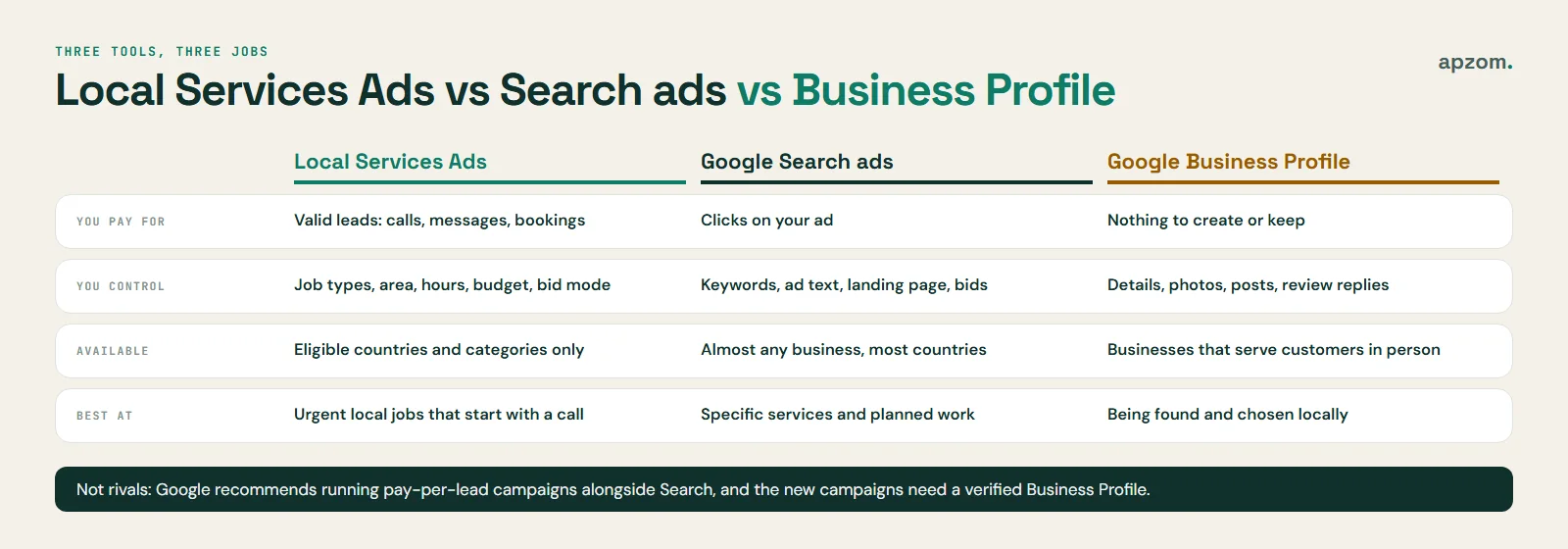
Local Services Ads vs Search ads vs Google Business Profile
| Question | Local Services Ads | Google Search ads | Google Business Profile |
|---|---|---|---|
| What you pay for | Valid leads: calls, messages, bookings | Clicks on your ad | Nothing to create or keep |
| Where it shows | Search and Maps, in its own ad unit | Search results, plus partner placements you allow | Maps and local results, unpaid |
| Who can use it | Eligible countries and categories, after screening | Almost any business, in almost any country | Businesses that serve customers in person |
| What you control | Job types, service area, hours, budget, bid mode | Keywords, ad text, landing page, bids, audiences | Profile details, photos, posts, reviews replies |
| Where the customer lands | Your listing, then a call or message | Your own page | Your profile, then a call, visit or website |
| Best at | Urgent, high-value local jobs that start with a call | Specific services, wider areas, campaigns you want to shape | Being found and chosen locally, at no cost |
Google’s page on pay-per-lead goals recommends running the new campaigns alongside Search and other campaigns, not instead of them. Search ads give you what LSAs cannot: your own landing page, your own wording and keywords that reach research-stage work. See Performance Max vs Search campaigns and our Google Ads setup guide for small businesses. The Business Profile underpins both; start with our Google Business Profile optimization checklist.
When Local Services Ads are not worth it
LSAs suit urgent local jobs where the customer wants to call someone trustworthy today. They are a poor fit when:
- Your country or category is not offered. In Australia, India or the UAE we found no Google source showing LSAs at all. Put the budget into Search ads and your Business Profile.
- Nobody answers the phone. Google ranks responsiveness and charges for missed calls in your business hours where the caller waits more than 20 seconds. Fix call handling first.
- The job is small. If a booked job barely covers the cost of one or two leads, the maths will not work, however good the ranking.
- Your work starts with research, not a call. Planned projects and complex B2B services start with comparison. Search ads and SEO content often fit better.
- Your offer needs explaining. LSAs have no headline, landing page or keywords.
- You cannot pass screening yet. Sort out licences, insurance and a verified Business Profile first.
- You are in EMEA and lead quality is poor in your trade. With no lead credits, every valid lead is paid for.
A 30-day test plan
If LSAs pass the tests above, run a measured test before you commit.
- Before launch: check eligibility, complete verification and confirm your Business Profile details. Set your schedule to the hours someone will answer.
- Set-up: tick only the job types you want, set a service area you can actually serve, turn on message leads if you can reply quickly, and write down your affordable lead cost using the calculation above.
- Weeks 1 and 2: let Google’s learning period run. Answer every call, rate every lead in the survey, and record each lead’s outcome in your CRM or a spreadsheet: booked, quoted, not a fit, spam.
- Weeks 3 and 4: compare booked jobs and gross profit from LSAs with Search ads and organic enquiries over the same weeks. Check charged leads against credits on your billing.
- Day 30: decide to keep, adjust job types and budget, or stop. If you keep going, review again at 90 days, because some jobs from the first month will only close later.
To send lead outcomes back to Google Ads, see importing offline conversions from your CRM; we found no Google page saying whether that data affects pay-per-lead campaigns.
Common mistakes
- Believing out-of-date advice. The Google Guaranteed badge, the money-back guarantee, manual disputes and Max per lead bidding after migration are all gone or going.
- Trusting an agency on eligibility. Check it yourself with your real location and category.
- Ticking every job type. Each one can send paid leads for work you do not want.
- Scheduling hours nobody covers. Missed calls in your scheduled hours can be charged and hurt ranking.
- Ignoring the Business Profile. Reviews and accurate details matter, and the new campaigns need a verified profile.
- Not downloading reports before migration. They do not carry over.
How Apzom can help
Apzom Digital sets up and manages Google Ads for service businesses: checking whether LSAs are open for your country and category, preparing the verification paperwork, Business Profile clean-up, job types and schedules, call tracking, Search campaigns alongside LSAs, and a monthly report on booked jobs rather than lead counts. We have not published a Local Services Ads case study yet, so we will not show you figures we cannot prove, and we will tell you plainly if LSAs are not available or not worth it for your business. See our Google Ads management service and our local SEO services for how we work. We work with clients worldwide, remotely, from our base in Ahmedabad, India.
Get a Free Growth Audit and Quote for local lead generation. Tell us your trade, the areas you serve and how calls are answered today. We send back a written view on Local Services Ads eligibility, the verification documents you will need, a starting set-up for job types, schedule and bidding, and how Search ads and your Business Profile should support it, with a quote if you want us to run it.
No obligation, and no promised number of leads or jobs. Prefer to talk first? Contact us or see our Google Ads management service.
Frequently asked questions
Are Local Services Ads the same as Google Ads?
They started as a separate product. Google is now moving them into Google Ads as Performance Max campaigns with pay-per-lead goals, starting with select US advertisers in August 2026 and reaching non-US accounts in 2027. You still pay per lead, not per click.
Is the Google Guaranteed badge still available?
No. Google now shows a single Google Verified badge for businesses that pass its screening, and the money-back guarantee has ended. Google’s page says only bookings made before 7 December 2025 could be claimed.
Are Local Services Ads available in Australia, India or the UAE?
We found no Google source showing Local Services Ads in Australia, India or the UAE on 21 November 2026. Google’s help pages name the US, Canada, the UK, Ireland, France, Germany, Italy, Spain, Belgium, Austria and Switzerland. Check Google’s sign-up page with your own location and category to be sure.
Can I get money back for a bad lead?
Sometimes. Google reviews leads for 30 days and may credit low-quality ones automatically, and you can flag a lead in its Feedback Survey. Credits are not available for health care, tax specialists or advertisers in EMEA, and manual disputes are not supported once your account moves into Google Ads.
How long does Local Services Ads verification take?
Google says three to four weeks on average after you submit your documents. Requirements depend on your category and location, so have documents ready before you start.
Do Local Services Ads replace SEO or a Google Business Profile?
No. Google’s new pay-per-lead campaigns need a verified Business Profile, Google advises building reviews on it, and LSAs only cover the job types you pay for. SEO and Search ads reach people who are researching and comparing, which LSAs do not.