
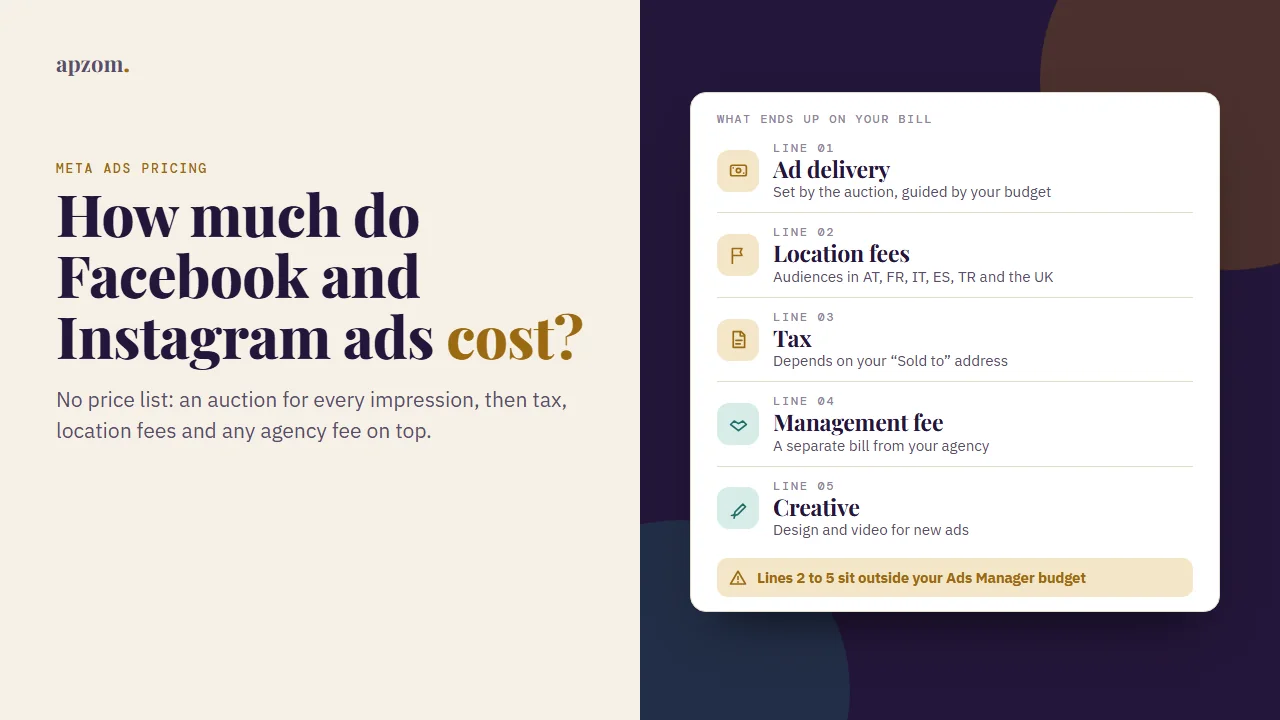
The short answer: Facebook and Instagram ads have no fixed price. You choose the budget, and Meta runs an auction every time it could show an ad. The winning ad is the one with the highest “total value”, which combines your bid, Meta’s estimate of whether the person will act, and the quality of the ad, so a relevant ad can beat a bigger bid. What you pay per thousand impressions (CPM) and per result depends on your audience, how many advertisers want the same people, your creative, placement, the result you optimise for and your landing page. Your bill then adds tax based on your billing address, a location fee if your ads reach people in six countries, and, if you use an agency, a separate management fee. Size a first test from the cost per result your business can afford, not from someone else’s average.
This guide is for business owners, marketers and finance teams anywhere in the world who are about to spend on Meta ads or are holding an agency quote. It covers the auction, what moves costs, billing, minimum budgets, currency, taxes and location fees by country, agency fees and test budgets. We checked every Meta rule here against Meta’s Business Help Centre and developer documentation on 21 November 2026.
Why there is no price list
Meta does not sell ads at a fixed rate. Its own pricing overview says “there isn’t a one-size-fits-all answer” to how much ads cost, and names the factors behind it: ad quality, bid strategy, performance goal, budget type (daily or lifetime) and objective. Its practical starting suggestion is modest: “start with at least $5 for your budget and to choose a duration over six days”.
We do not repeat the “average CPM” figures found online. Meta publishes no averages on the pages we checked, and an average from other accounts mixes countries, industries, objectives and dates, so it tells you little about yours. Two numbers matter:
- CPM: what you pay for 1,000 impressions. It is mainly set by the auction for your audience.
- Cost per result: total spend divided by the results you optimised for, such as leads, purchases or link clicks. It depends on CPM and on how many people who see the ad actually act.
If you are still deciding whether Meta or Google should get your first budget, start with our comparison of Google Ads vs Facebook Ads.
How the Meta ad auction decides what you pay
Each time there is a chance to show someone an ad, an auction decides which eligible ad they see. Meta’s help page on ad auctions says the winner is “the ad with the highest total value, subject to a price floor (minimum price)”, and that total value combines three factors.
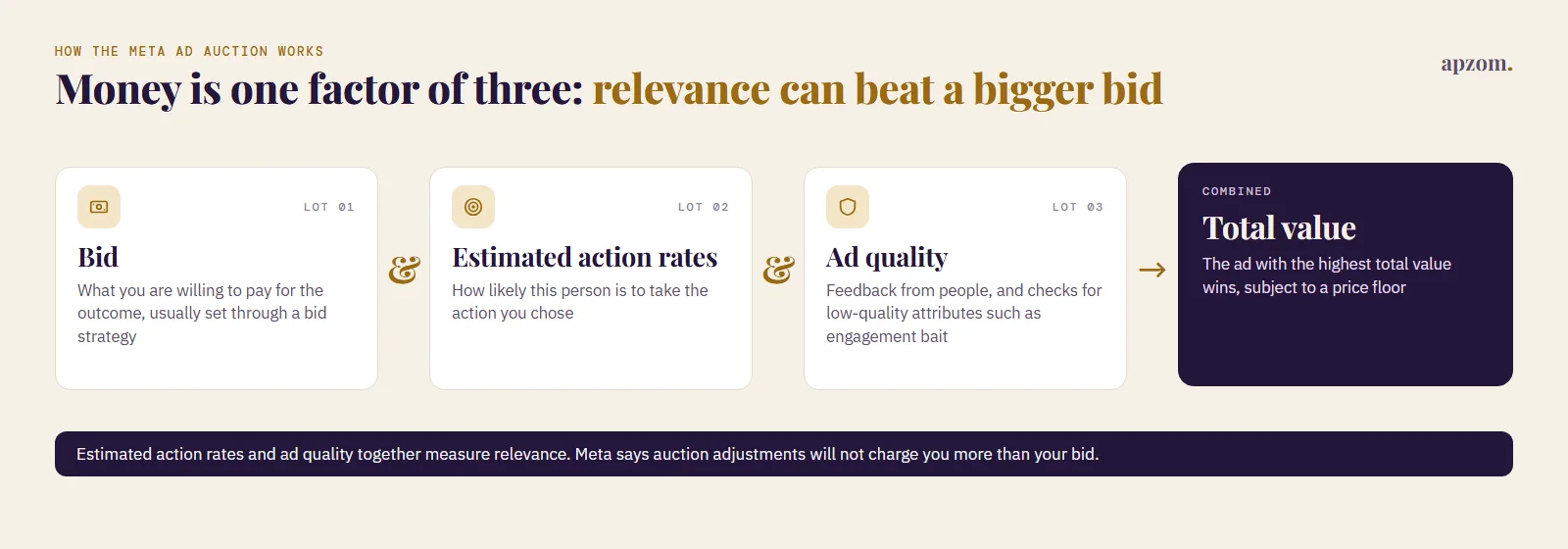
- Bid: what you are willing to pay to get your desired outcome.
- Estimated action rates: Meta’s estimate of the probability that showing your ad to this person leads to the outcome you chose, such as a lead or a purchase.
- Ad quality: a measure Meta builds from many sources, including feedback from people who view or hide the ad and assessments of low-quality attributes such as withholding information, sensationalised language and engagement bait.
Meta says estimated action rates and ad quality together measure relevance, and that “an ad that’s more relevant to a person could win an auction against ads with higher bids”. The same page says Meta may adjust auctions for several reasons, but that “such auction adjustments will not cause us to charge you more than your bid”.
Check relevance with ad relevance diagnostics
Ads Manager shows three rankings for each ad, comparing it with ads competing for the same audience: quality ranking, engagement rate ranking and conversion rate ranking. Meta’s help page says “Ads that are more relevant cost less and see more results”, that the rankings are not available for ads with fewer than 500 impressions, and that they are diagnostics, not inputs into the auction. A low quality ranking points at the creative; good engagement with poor conversion points at the offer, form or landing page.
What your bid strategy changes
Meta offers three types of bidding. Spend-based bidding (Highest volume or Highest value) spends your full budget to get as many results, or as much value, as it can. Goal-based bidding (Cost per result goal or ROAS goal) tries to keep the average cost or return near a target you set. Manual bidding (Bid cap) sets the maximum bid in every auction and is meant for advertisers who can calculate the right bid themselves. Meta notes that adherence to a cost per result goal is not guaranteed, and recommends 50 to 100 or more weekly conversions for best performance. A cost goal set far below what results really cost does not make them cheaper; your ads usually win fewer auctions, so you spend less and get fewer results.
What pushes CPM and cost per result up or down
Meta publishes no price per factor, so use this as a checklist for your own account. The logic follows from the auction: more advertisers competing for the same people raises the price of winning, and a more relevant ad lowers it.
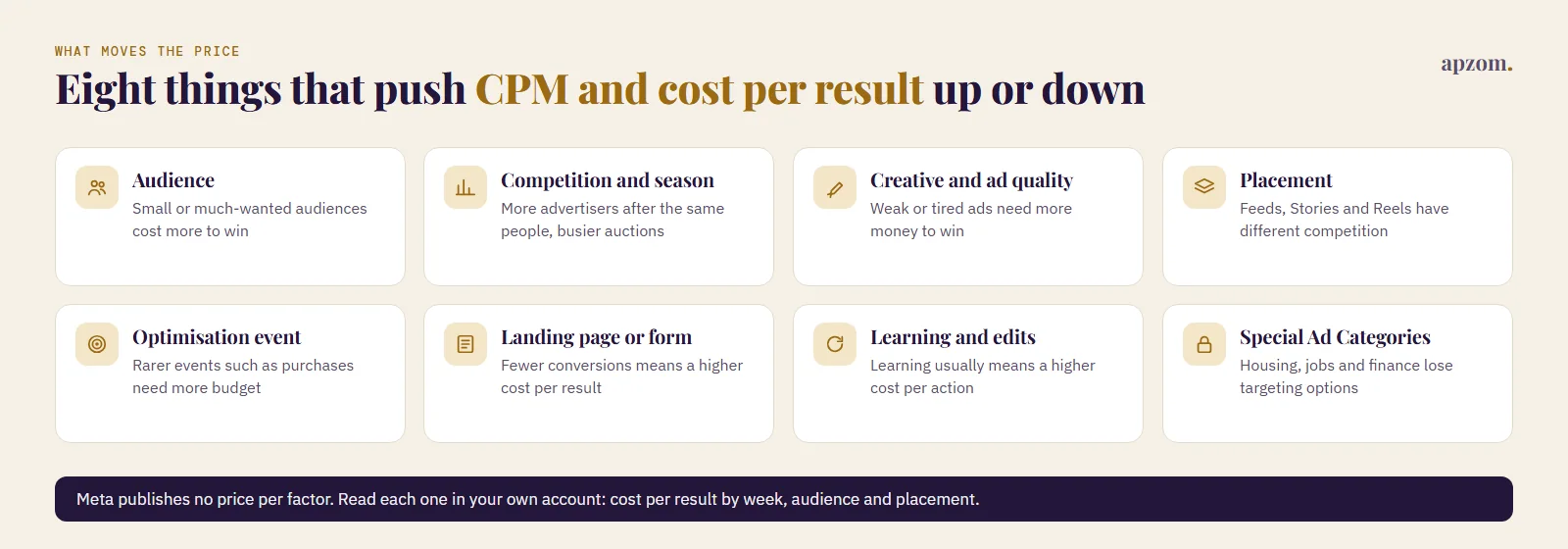
| Driver | Why it changes cost | What to check in your account |
|---|---|---|
| Audience | A small or heavily targeted audience gives the system fewer people to choose from; audiences many advertisers want cost more to win | Cost per result by audience, and whether a broader audience does as well |
| Competition and season | When more advertisers target the same people, for example around big shopping or holiday periods in your market, the auction is more crowded | CPM by week, compared with the same weeks last year if you have them |
| Creative and ad quality | Ad quality and estimated action rates are part of total value, so a weak or tired ad needs more money to win | Quality and engagement rankings, and frequency rising while results fall |
| Placement | Feeds, Stories, Reels and other placements have different audiences and competing ads, so costs differ | Cost per result by placement in your own reporting |
| Objective and optimisation event | Rarer events such as purchases need more budget than common ones such as landing page views, as Meta’s minimum budget page notes | Whether you have enough results each week for the event you chose |
| Landing page or form | Estimated action rates predict whether people convert; a slow or unclear page lowers conversions and raises cost per result | Conversion rate ranking, and the drop between link clicks and leads |
| Learning phase and edits | Meta says ad sets in learning are less stable and usually have a higher cost per action; significant edits restart learning | The Delivery column and the Last significant edit column |
| Special Ad Categories | Housing, employment and financial ads lose some targeting options for audiences in the US, Canada and certain European countries | Whether your campaign needs the category before you plan the audience |
Meta says an ad set usually leaves learning after about 50 results in the week after its last significant edit, so splitting a small budget across many ad sets keeps all of them in learning. For the post-click side, our guide to landing page best practices covers the page, and our guide to fixing low-quality Meta leads covers instant forms.
Special Ad Categories change who you can reach. For ads about housing, employment or financial products and services by advertisers based in or reaching the US, or reaching Canada and certain European countries, age, gender, postal code, exclusion targeting, lookalike and saved audiences are limited or unavailable, and city or pin-drop locations use an expanded radius. Since 21 January 2025 the financial products and services category has been required for advertisers based in the US or showing ads to people there. Ads about social issues, elections or politics can no longer be created in the European Union.
How Meta bills you
What you are charged for
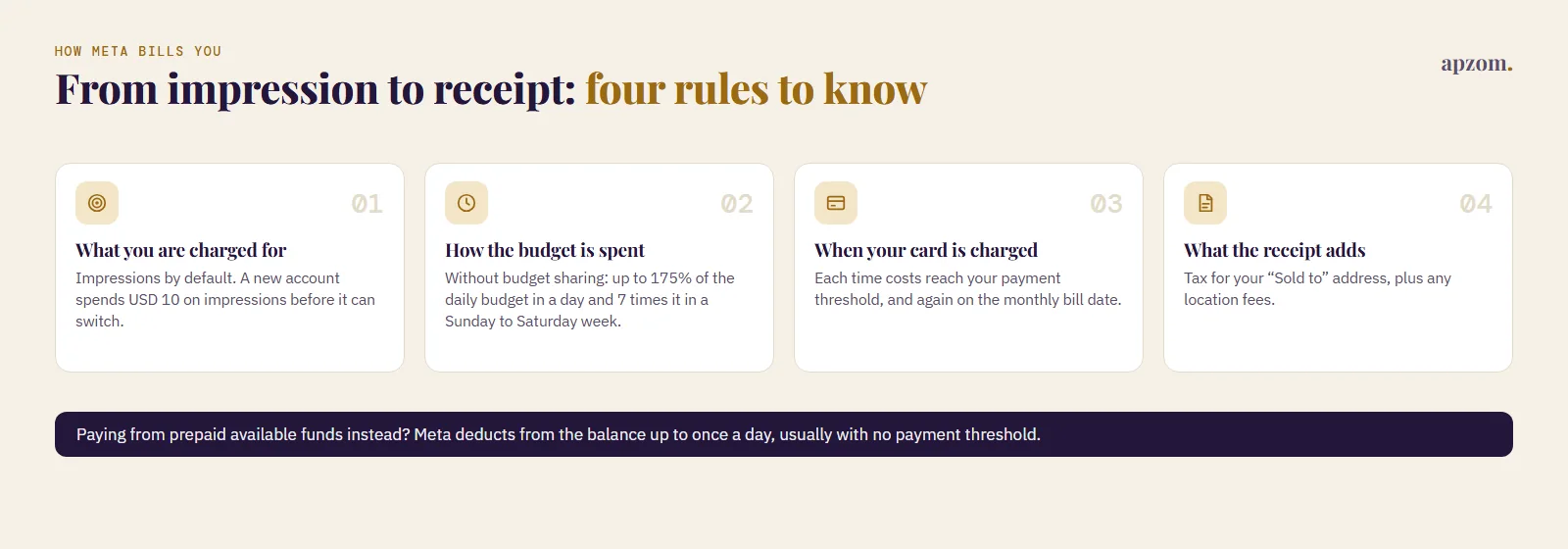
Meta’s billing page says “Usually, you’re charged based on the number of impressions that your ad receives unless specified otherwise during ad creation.” The “When you get charged” setting in the ad set lets you choose another event, such as link clicks, but only where your objective allows it. A brand-new ad account has to spend at least USD 10 being charged for impressions before it can switch to any other charge type.
How your budget is spent
A daily budget is an average over a week that runs from Sunday to Saturday, not a hard daily cap. On days with better opportunities, Meta may spend up to 75% over your daily budget, but it will not spend more than 175% of the daily budget in any one day, or more than seven times the daily budget in a week ending Saturday at midnight. With ad set budget sharing on, Meta may also share up to 20% of your flexible daily budget with other ad sets, so one day can reach 210%. A lifetime budget is a total for the whole schedule. Advantage+ campaign budget sets one budget for the campaign and moves it to the ad sets with the best opportunities, which means it may not spend equally on each ad set; Meta says it is best suited to campaigns with at least two ad sets.
When you are charged
With automatic billing (PayPal and most credit and debit cards), you are charged each time your costs reach your payment threshold, and again on your monthly bill date for anything left over. Meta sets a small threshold for new advertisers and may raise it as payments succeed, so being charged several times in a month is normal. In India, thresholds for automatic billing may differ because of the Reserve Bank of India’s eMandate rules for recurring card payments. With available funds (a prepaid balance), Meta deducts from your balance up to once a day.
Your receipts in Billing and payments show the final charges, fees and taxes. Meta notes that your final bill “may exceed your budget for a particular ad”, because it covers all ads and location fees in the billing period.
Minimum budgets and currency rules
Meta’s help page on minimum budgets says “Minimum budgets may vary by country and objective”, lists what it considers (business vertical, budget type, buying type, bid strategy, optimisation, currency and schedule), and says Ads Manager shows an alert if your budget is too low. Two rules there help with planning:
- If you use the cost per result goal bid strategy, your daily budget should be at least five times the goal. A goal of USD 5 means a daily budget of at least USD 25.
- If a budget is too small for the event you want, Meta suggests optimising for an event that is easier and cheaper to achieve.
Meta’s developer reference for ad sets lists minimum daily budgets in US dollars for lowest-cost bidding: 0.50 when charged for impressions, 2.50 for clicks, likes or video views, and 40 for low-frequency actions such as app installs. It doubles them for ad accounts from a listed group of countries that includes the United States, United Kingdom, Canada, Australia, Japan, Singapore and several EU countries, and says other currencies have their own limits. These are technical floors, not recommendations; the alert in your Ads Manager is what applies to you.
Your ad account has one currency. Meta accepts many, including US dollars, pounds, euros, Indian rupees, UAE dirhams, Australian dollars and Canadian dollars. For some countries, including Brazil, India and Poland, the business country and the currency must match. You can change currency once every 60 days if you have no current balance, but doing so creates a new ad account: the old one closes, its ads stop, and they are billed in the old currency. Pick the currency for your books before launch.
Not sure what your Meta ads should cost? Ask for a Free Growth Audit and Quote. We work out the cost per result your margins can carry, check your ad account, billing set-up, tracking and creative, and tell you what a realistic test budget looks like for your market.
Taxes and location fees by country
Tax on Meta ads depends on the “Sold to” address on your ad account and, in some countries, on which Meta company issues your receipt (the “Sold by” entity). Meta’s taxes page covers dozens of countries; here are the main ones. Meta gives no tax advice and neither do we; confirm the treatment with your accountant.
| Your “Sold to” address | What Meta’s help page says |
|---|---|
| Ireland | VAT is added at the local rate, for business or personal purchases |
| EU or UK, business purchase, receipt from Meta Platforms Ireland | No VAT is added, but you must self-assess VAT at your local rate |
| EU or UK, business purchase, receipt from a local Meta office | VAT is added; if you are VAT-registered you can probably recover it. This applies to business addresses in Belgium, Denmark, France, Germany, the Netherlands, Norway, Spain, Sweden, Poland and the UK |
| EU or UK, not for a business purpose | VAT is added at the local rate |
| India | Ads are sold by Meta India in rupees; GST and tax deducted at source (TDS) are added, whether you buy for business or personal purposes |
| Australia | If the seller is outside Australia, GST is added unless you are a GST-registered business that gives Meta your ABN; if the seller is Facebook Australia, GST is added either way |
| United Arab Emirates | VAT is added if you have not added your Tax Registration Number (TRN) to the ad account |
| Canada (Quebec) | Quebec sales tax is added if your QST number is not on the account; federal GST or HST may also apply |
In India, entering a GSTIN is not mandatory, but Meta says that if you are registered for GST and want input tax credit, you should enter the GSTIN of your main state of operations or headquarters. And because the amount you are charged includes TDS, you still pay that TDS to the government; once you send Meta the TDS certificate, Meta refunds it as an ad credit. If your country is not on Meta’s list, the page says information is not available for it yet.
Location fees for audiences in six countries
Location fees are separate from tax. Meta adds them when your ads are delivered to people in a country with a digital services tax or a similar levy. On 21 November 2026, Meta’s help page listed six: Austria 5%, France 3%, Italy 3%, Spain 3%, Türkiye 5% and the United Kingdom 2%. The fee depends on where your audience is, not where your business is, so a US or Indian advertiser reaching people in the UK pays it too. It sits on top of your budget: Meta’s own example is USD 100 of ads delivered in Italy, charged as USD 100 plus a USD 3 location fee. The fee appears as its own line on your invoice or statement.
If you do not sell in those countries, Meta suggests adding them as excluded locations in your ad account’s audience controls, but says it cannot guarantee that exclusions will reduce the fees, and the exclusions do not apply to Special Ad Category campaigns. Meta also says the list of countries and rates may change.
Ad spend vs the agency management fee
If someone manages your ads, you pay two bills: ad spend to Meta, with tax and location fees added, and the management fee to the agency or freelancer. Keep them apart so you can change one without the other.
The safest set-up is your own ad account in your own business portfolio, paid with your own payment method, with the agency given partner access. Our guide to giving an agency access to your Meta business portfolio shows how.
Meta does not set agency fees. Fee models (flat monthly, percentage of spend, hybrid, tiered, hourly, performance-based) and how to compare quotes work as they do for Google Ads, and our guide to Google Ads management cost explains them. What differs on Meta is where the work goes:
- Creative. Ad quality and estimated action rates are part of the auction, so in our view producing new ads regularly is part of the cost of running Meta well. Ask how many new ads the fee includes, and whether design and video are extra.
- Tracking. Meta optimises on the events you send it. Setting up the Meta Pixel and Conversions API correctly is often a one-off cost.
- Lead quality. Cheap leads that never answer are not cheap. Someone needs to check leads against your CRM and feed the result back.
Ask four questions about any Meta quote. Is ad spend charged to my ad account and card? Is a percentage fee calculated before or after tax and location fees? How many new ads a month are included? Who owns the ad account, Page and pixel if we part ways?
How to set a test budget
A test budget should be big enough for Meta’s system to learn from and small enough that losing it would not hurt. This method uses your own numbers and two Meta rules: about 50 results a week to leave the learning phase, and a daily budget of at least five times any cost per result goal.
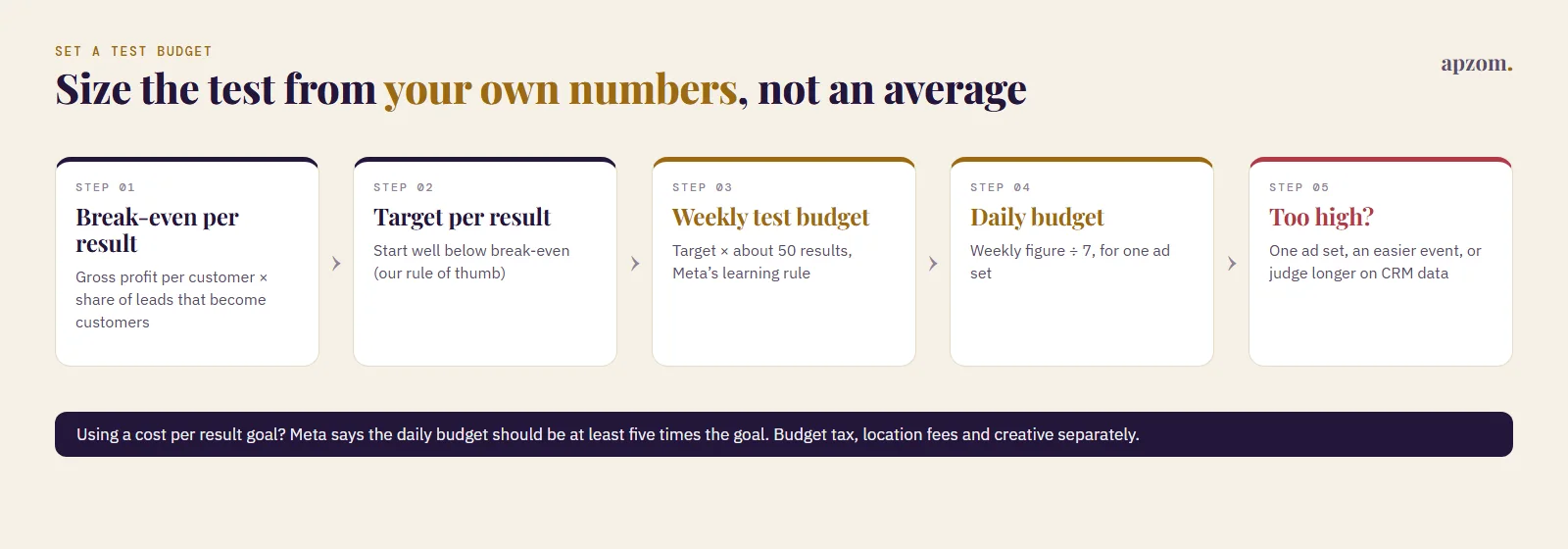
- Work out the most you can pay per result. Take the gross profit from an average new customer and multiply it by the share of leads that become customers. Illustrative example, not a benchmark: if a customer brings USD 600 of gross profit and one lead in ten becomes a customer, a lead is worth up to USD 60 to you before you make a loss.
- Pick a target below that. Our rule of thumb is to start with a target well under break-even, because early results are less stable. In the example, that might be USD 30 per lead.
- Size the weekly budget from the learning rule. Multiply your target cost per result by 50. In the example, 50 leads at USD 30 is USD 1,500 a week.
- Turn it into a daily budget. Divide the weekly figure by seven: about USD 215 a day for one ad set.
- If that is more than you can spend, change the plan, not the maths. Run one ad set instead of several, optimise for an event that happens more often (Meta’s own suggestion), or accept that the ad set may stay in “Learning limited” and judge it over a longer period on your CRM data.
- Check the floor and add the extras. With a cost per result goal, keep the daily budget at least five times the goal, and fix any minimum-budget alert. Budget separately for tax, location fees, creative production and any management fee.
- Give it time and judge on customers. Avoid significant edits while the ad set learns. Our guide to Meta ads for local businesses sets out the set-up, testing and scaling stages, and our guide to reducing cost per lead shows what to fix first when the number is too high.
Tag links with UTM parameters and compare Ads Manager’s results with the enquiries and sales in your records.
Common mistakes
- Planning from an “average CPM”. It comes from another audience, country and objective; plan from your own cost per result.
- Forgetting the extras. Tax, location fees and the management fee are not inside your Ads Manager budget.
- Splitting a small budget across many ad sets. None of them reaches about 50 results a week, so all of them stay less stable.
- Running tired creative. Falling rankings make every impression harder to win.
- Changing currency mid-campaign. It creates a new ad account and closes the old one.
- Letting the agency own the ad account. Your billing history and data should stay with your business.
How Apzom can help
Apzom Digital plans and runs Facebook and Instagram campaigns with a budget you can defend: a target cost per result from your margins, a test sized to Meta’s learning rules, pixel and Conversions API tracking, creative testing, and reporting on enquiries and customers. Our published Meta ads proof is lead volume for two property clients: HillTown Group, “600+ leads every month from Meta ads, for 12 months running”, and Kingston Flats, “560+ Meta leads every month since June 2025” (see the HillTown Group and Kingston Flats case studies). Those pages do not publish spend or cost per lead, so neither do we; we have not published a Meta ad cost case study yet. See our Meta ads management service. We work with clients worldwide, remotely, from our base in Ahmedabad, India.
Get a Free Growth Audit and Quote for your Facebook and Instagram ads. Send us your website, your markets and what a customer is worth to you. We send back a written plan: a target cost per result, a test budget sized to Meta’s learning rules, the extras to budget for in your country, and a separate quote for managing it if you want us to.
No obligation and no promised results. Prefer to talk first? Contact us or read our guide to Meta ads for local businesses.
Frequently asked questions
How much should I spend on Facebook ads per day?
Start from the cost per result you can afford, multiply it by about 50 results a week, and divide by seven. If that figure is too high, run one ad set or optimise for an event that happens more often. Meta’s suggested starting point (at least $5 for your budget, with a duration over six days) is enough to learn the tools, not to judge a lead campaign.
Are Instagram ads cheaper than Facebook ads?
Meta does not publish separate prices. Instagram and Facebook placements use the same auction and the same budget, and costs differ by placement because the audiences and competing ads differ. Compare cost per result by placement in your own account after a few weeks.
Do I pay if nobody clicks my ad?
Usually yes, because the default is to charge for impressions. Depending on your objective, you can choose to be charged for another event, such as link clicks, in the ad set’s “When you get charged” setting. A new ad account must first spend USD 10 on impression charges.
Why did my CPM suddenly go up?
The usual causes are more advertisers competing for your audience (often around busy seasons in your market), tired creative with falling quality rankings, a narrower audience, or edits that restarted learning. Check CPM by week, the relevance diagnostics and the Last significant edit column before changing the budget.