
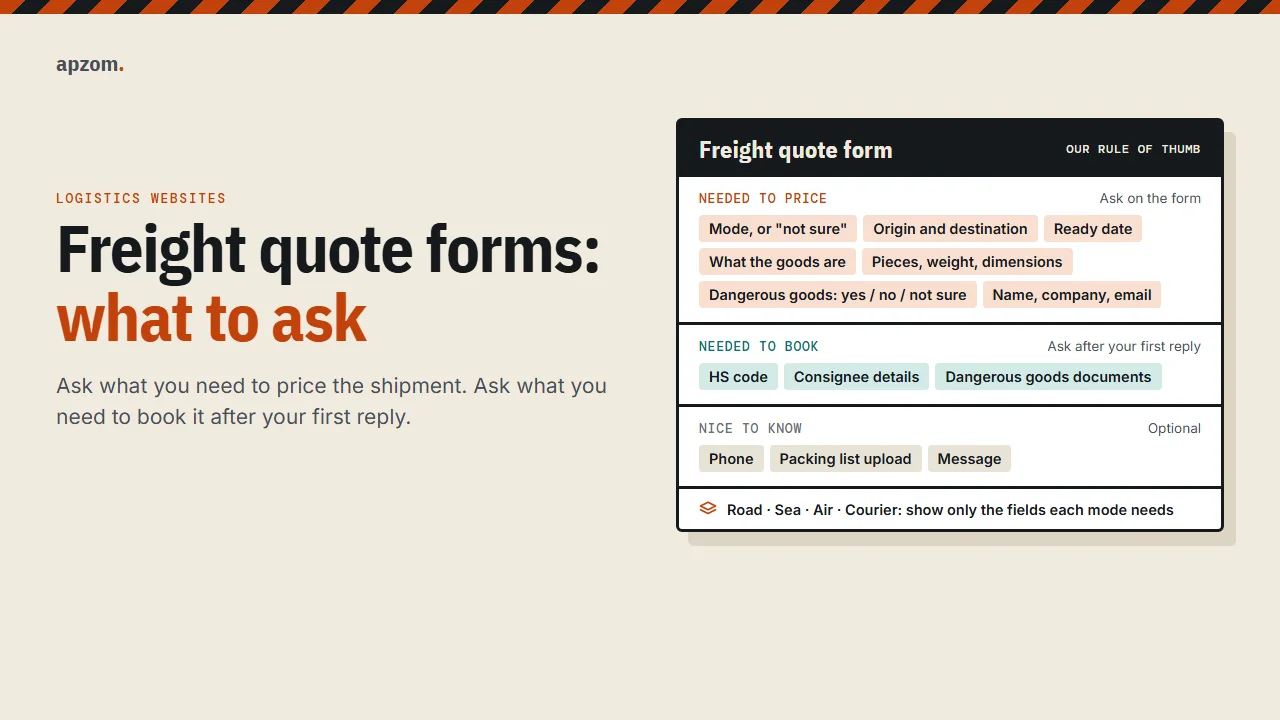
The short answer: A freight quote form should ask only what your team needs to price the shipment: the mode (or “not sure”), origin and destination, a ready date, what the goods are, the pieces with their weight and dimensions, and whether anything is dangerous. Details needed to book rather than to price, such as commodity codes, consignee details and dangerous goods paperwork, can wait until after your first reply. Show different fields for road, sea, air and courier, let people choose metric or imperial units, make Incoterms an optional dropdown with “not sure”, accept a packing list upload, link a privacy notice that says who you share data with, and confirm the request on a page that repeats what was asked.
This guide is for freight forwarders, trucking and courier companies, customs brokers and the web teams who build their sites, anywhere in the world. It gives a field-by-field quote form spec for FTL and LTL road, FCL and LCL sea, air and courier shipments, plus Incoterms, units, dangerous goods, layout, validation, uploads, privacy notices by country and what happens after Submit. We checked the trade terms, dangerous goods rules, web standards and privacy laws against official sources on 21 November 2026.
Why a freight quote form is not a contact form
A contact form starts a conversation; our guide to contact form best practices covers that job, from labels and spam layers to consent wording and tracking. A quote form has a harder job: your pricing desk has to turn it into a rate, which depends on the lane, mode, cargo, dates and who pays for each part of the journey.
So the test for each field changes from “would our first reply change?” to “can we price this without it?”. Sort every field into one of three groups. This is our rule of thumb, not an industry standard:
- Needed to price. Without it the reply has to be a question, so ask it on the form.
- Needed to book. You need it before the shipment moves, not to quote. Ask after your first reply.
- Nice to know. It helps you sell but does not change the price. Make it optional or ask on the call.
A form with only name and email forces the reply “what are you shipping?”, which adds a round of emails before any price. A form with 30 required fields loses the buyer who just wants a price for two pallets to Rotterdam. Our logistics marketing guide explains where the quote request sits in the wider RFQ process; this article is the build spec for the form itself.
The fields every mode shares
Put these on every version of the form, with the easy questions first.
| Field | Group | Why | Format |
|---|---|---|---|
| Mode | Needed to price | Decides which fields appear next | Road, Sea, Air, Courier, “Not sure, advise me” |
| Origin and destination | Needed to price | The lane | Country, then city, port or airport (see below) |
| Ready date | Needed to price | Rates and space change by date | Date picker, plus “Flexible” |
| What the goods are | Needed to price | Some cargo needs special handling | Plain text: “cotton T-shirts in cartons”, not a code |
| Pieces, weight, dimensions | Needed to price | Most rates are calculated from these | Rows per piece type (see units section) |
| Dangerous goods | Needed to price | Changes carriers, routes and paperwork | Yes, No, Not sure |
| Name, company, email | Needed to price | The reply channel | Company optional for one-off shippers |
| Phone | Nice to know | Only if you call before quoting | Optional, accepts a plus sign and country code |
| Files and message | Nice to know | Saves retyping; room for special requests | Optional upload and free text |
HS codes, consignee details, insurance values and payment terms are missing on purpose. They are needed to book, not to quote.
For one real example of a lean form, our ARKS Infinity Logistics case study describes the quote form on that freight forwarder’s website as a nine-field form: name, company, email, phone, origin, destination, commodity, service required and shipment details. The case study publishes no lead or conversion figures, and the mode-by-mode spec below is our general guidance, not a record of that build.
Field by field, mode by mode
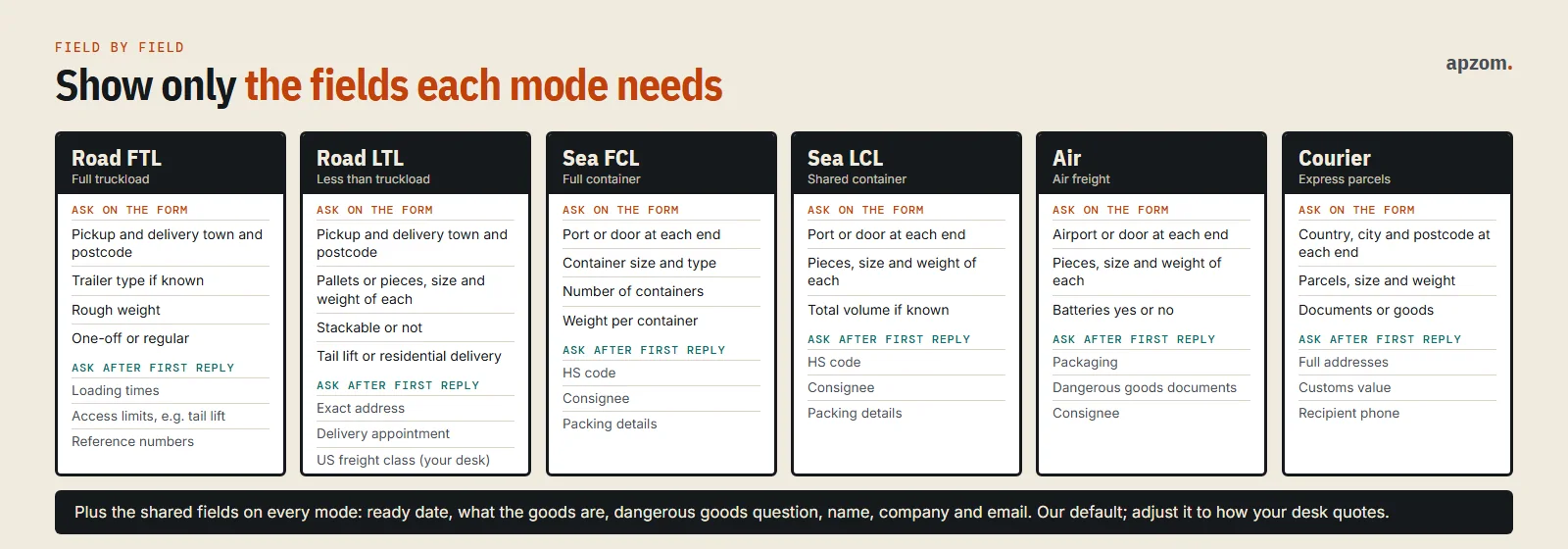
Once someone picks a mode, show only the fields that mode needs. The table is our default; adjust it to how your pricing desk actually quotes.
| Mode | Ask on the form | Ask after the first reply |
|---|---|---|
| Road, full truckload (FTL) | Pickup and delivery town and postcode, trailer type if known, rough weight, one-off or regular | Loading times, access limits such as tail lift, reference numbers |
| Road, less than truckload (LTL) | Pickup and delivery town and postcode, pallets or pieces with size and weight of each, stackable or not, tail lift or residential delivery | Exact address, delivery appointment, US freight class (worked out by your desk) |
| Sea, full container (FCL) | Port or door at each end, container size and type, number of containers, weight per container | HS code, consignee, packing details |
| Sea, shared container (LCL) | Port or door at each end, pieces with size and weight of each, total volume if known | HS code, consignee, packing details |
| Air freight | Airport or door at each end, pieces with size and weight of each, batteries yes or no | Packaging, dangerous goods documents, consignee |
| Courier and express | Pickup and delivery country, city and postcode, parcels with size and weight, documents or goods | Full addresses, customs value, recipient phone |
Road: FTL and LTL
For a full truckload you sell the truck, so ask what kind and how often; regular lanes are often priced differently from one-off moves. For less than truckload you sell space, so ask for pallets or pieces, the size and weight of each, and whether they stack. Also ask whether either end needs a tail lift (liftgate) or is a residential or limited-access site: LTL carriers charge these as extra services in their rules tariffs (XPO’s tariff, for example, has an item for residential and limited access pickup or delivery), so a quote that misses them is wrong. In the US, LTL carriers price with freight classes from the National Motor Freight Classification (NMFC). Do not ask the shipper to pick a class. The National Motor Freight Traffic Association (NMFTA) introduced a new standard scale of 13 density breaks in 2025, from class 400 for freight under 1 pound per cubic foot to class 50 for 50 pounds or more, and its advice to shippers is to measure “down to the inch” and include pallets and packaging. Collect accurate dimensions and let your team work out the class.
Sea: FCL and LCL
For a full container, ask for size, type and number of containers, using the names carriers use. Maersk, for example, lists 20-foot and 40-foot dry containers, 40-foot and 45-foot high cubes, reefers, open tops and flat racks. Add “Not sure” for buyers who know their cargo but not the equipment, and ask whether each end is a port or a door, because door service adds road legs and customs steps. For a shared container, ask for the pieces and the size and weight of each, with an optional total volume. Commodity codes can wait: the World Customs Organization says its Harmonized System identifies goods by a six-digit code and is used by more than 200 countries and economies for their customs tariffs, and few buyers asking for a first rate have that code to hand.
Air freight
IATA’s guidance says air carriers can charge by actual or volumetric weight, that “the general rule is to divide the volume of the shipment in cubic centimeters by 6000”, and that whichever is higher is used for pricing. So the form needs the size of each piece, not just a total weight. Ask about batteries as a separate question. IATA’s lithium battery page says that despite the rules, “many shipments are incorrectly labeled or mishandled”, and that lithium batteries can be carried by air depending on configuration and watt-hour rating. “Does the shipment contain batteries, or products with batteries inside?” catches cargo a buyer would not think of as dangerous.
Courier and express parcels
Keep it short: country, city and postcode at each end, parcels with the size and weight of each, and documents or goods, because goods crossing a border need a customs description and value. Courier companies publish their own volumetric rules, which can differ from the air freight rule, so do not show a divisor unless it is the one your contract uses.
Incoterms: ask, but make it easy
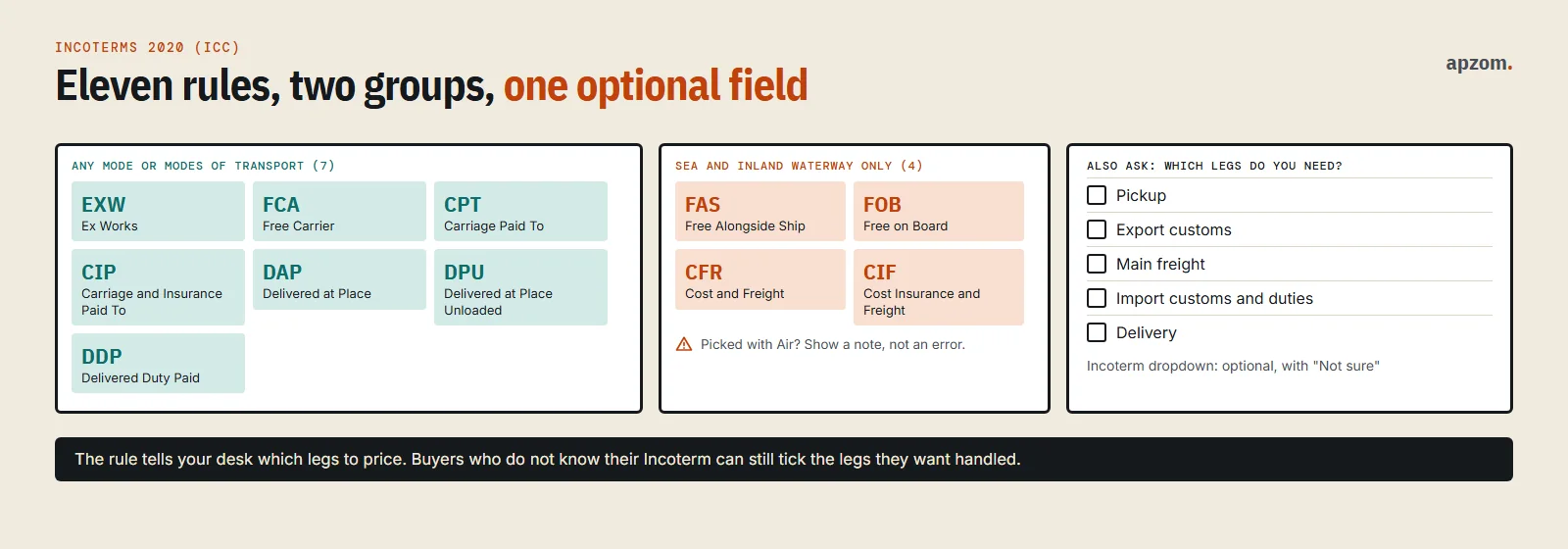
Incoterms are the International Chamber of Commerce (ICC) rules that say whether the seller or the buyer arranges and pays for each part of the journey. ICC describes Incoterms 2020 as “a set of eleven three-letter trade terms”, in force since 1 January 2020 and still its most recent version. For a quote, the rule tells you which legs to price: pickup, export clearance, main freight, import clearance and delivery.
| ICC group | Rules |
|---|---|
| Any mode or modes of transport | EXW (Ex Works), FCA (Free Carrier), CPT (Carriage Paid To), CIP (Carriage and Insurance Paid To), DAP (Delivered at Place), DPU (Delivered at Place Unloaded), DDP (Delivered Duty Paid) |
| Sea and inland waterway only | FAS (Free Alongside Ship), FOB (Free on Board), CFR (Cost and Freight), CIF (Cost Insurance and Freight) |
- Make Incoterms optional, with “Not sure”. A required field pushes first-time exporters to guess, and a wrong guess gives a wrong quote.
- Ask which legs they need as well. Add checkboxes for pickup, export customs, main freight, import customs and duties, and delivery. Buyers who do not know their Incoterm can still say what they want handled.
- Flag sea-only terms on other modes, gently. If someone picks Air and FOB, show a note, not an error. ICC’s guidance says FOB is “to be used only for maritime or inland waterway transportation” and that FCA is “the appropriate rule when goods are transported in containers or pallets”. Let them submit and clarify in your reply.
Weights, dimensions and units
Unit mistakes are where quote forms produce wrong prices. A buyer types 48 by 40 by 50 meaning inches into a form that assumes centimetres, and your desk prices a parcel instead of a pallet.
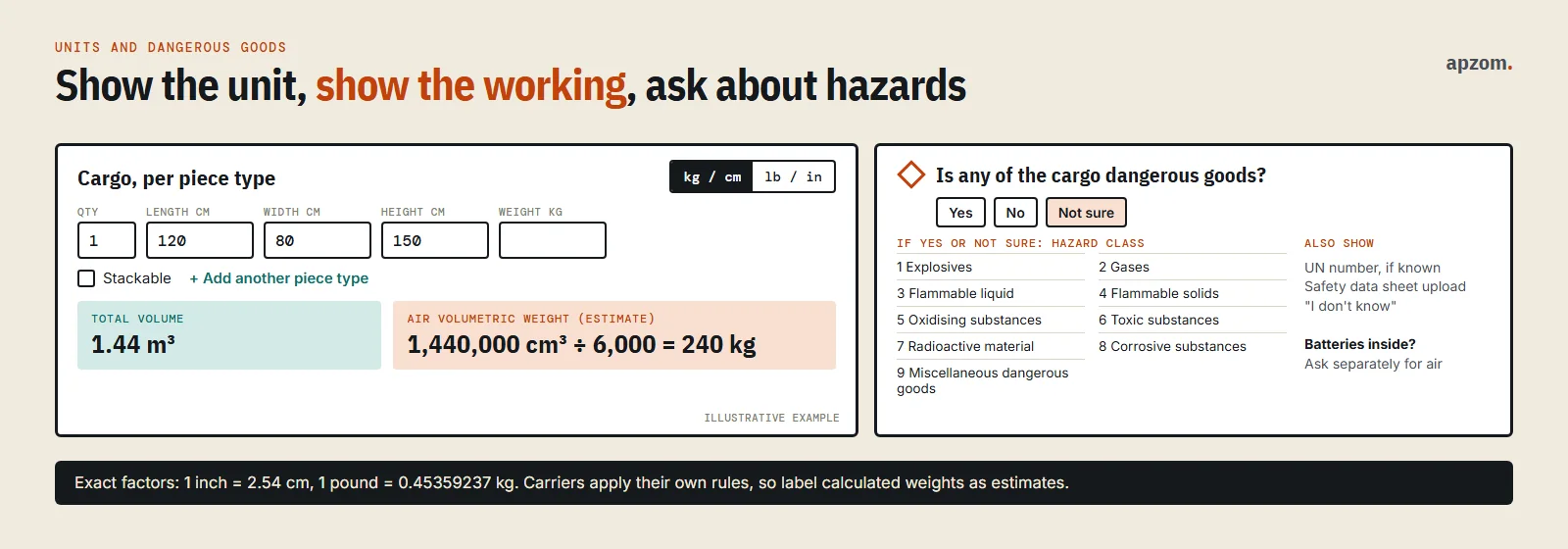
- One unit switch for the cargo block. kg and cm, or lb and in, chosen once, with the unit shown beside every field and stored with every number.
- Exact conversions. NIST, the US standards body, gives the inch as exactly 2.54 centimetres and the pound as exactly 0.45359237 kilograms. Convert on the server, keep the original entry and round only for display.
- Rows per piece type. Quantity, length, width, height and weight per piece, then totals. Per-piece sizes show whether goods fit an aircraft door or a pallet position; a total volume does not.
- A stackable tick box. It changes LTL and LCL pricing and costs one click.
- The right phone keyboard.
inputmode="decimal"brings up digits and the decimal separator for the user’s locale, which MDN notes is typically a point or a comma, so accept both on the server. - Show the working. Display total volume and an estimated air volumetric weight as people type. For example (illustrative), one pallet of 120 by 80 by 150 cm is 1.44 cubic metres, and 1,440,000 divided by 6,000 gives 240 kg. Label it an estimate, because carriers apply their own rules.
- Warn, do not block, on odd values. A 2,000 kg parcel is probably a typo; ask them to check, but let them submit.
Dangerous goods: one honest question, then detail
Ask everyone one question: “Is any of the cargo classed as dangerous goods or hazardous materials?” with Yes, No and Not sure. Only for Yes or Not sure, show the detail: UN number if known, hazard class, and an optional upload for the safety data sheet.
For the class, use the nine UN class names the UK Health and Safety Executive lists: 1 Explosives, 2 Gases, 3 Flammable liquid, 4 Flammable solids, 5 Oxidising substances, 6 Toxic substances, 7 Radioactive material, 8 Corrosive substances, 9 Miscellaneous dangerous goods, plus “I don’t know”. Do not classify goods through the form: GOV.UK says the consignor or sender is responsible for classifying, packaging and marking dangerous goods.
The rules differ by mode, so do not write form copy that suggests one set covers everything:
- Sea: the IMDG Code, which the International Maritime Organization says has been mandatory under the SOLAS Convention since 1 January 2004, with some parts still recommendatory.
- Air: the IATA Dangerous Goods Regulations, which IATA describes as a field manual version of the ICAO Technical Instructions and, for IATA airlines, somewhat stricter.
- Road in Europe: ADR, the agreement GOV.UK names for international carriage of dangerous goods by road.
- United States: the Hazardous Materials Regulations in 49 CFR, which PHMSA says cover hazardous materials moved in commerce by aircraft, railcar, vessel and motor vehicle.
If you do not handle some classes, say so beside the question, for example “We do not carry Class 1 or Class 7 cargo”.
Does your quote form make buyers wait for an extra email before you can price? Ask for a Free Growth Audit. We go through your freight quote form mode by mode, test it on a phone with metric and imperial entries, check the dangerous goods, Incoterms and upload logic, the privacy notice and where requests end up, and tell you what we would keep, change or ask later.
Origin and destination: formats that work worldwide
Build each location as country first, then a field whose label changes by mode: city and postcode for courier and road, port or airport for sea and air, with a “door or port” choice at each end.
- Ports. Let people type a port or city name and suggest matches. Store the UN/LOCODE behind the scenes: UNECE’s five-character code, where two letters are the ISO 3166-1 country code and three identify the place. Never ask the buyer to type it.
- Postcodes. Optional unless you price by postcode. Address formats differ by country, and a strict postcode pattern blocks buyers whose addresses do not fit it.
- Phone numbers. Accept a plus sign, country code and spaces. The ITU’s E.164 recommendation allows up to 15 digits for international numbers, so a ten-digit rule rejects valid numbers.
- Autocomplete. Tag the buyer’s own contact fields with HTML autocomplete tokens:
name,organization,emailandtel, which the WHATWG HTML standard defines as a full telephone number, including country code. Origin and destination are often not the buyer’s own address, so do not tag them as one.
One step or several?
A courier form fits on one screen. A sea or air form with piece rows, Incoterms and dangerous goods questions is easier in steps. Our rule of thumb: split when a mode needs more than about eight visible fields, in this order: the lane (mode, origin, destination, ready date), the cargo (pieces, dangerous goods, batteries, upload), the service (legs, optional Incoterm, one-off or regular) and finally contact details with the privacy notice.
The W3C Web Accessibility Initiative’s multi-page forms tutorial says to divide long forms into “a series of logical steps or stages”, to show progress in the page title and main heading, as in its example “Shipping Address (Step 2 of 4)”, and to save data already entered. WCAG 2.2 criterion 3.3.7, Redundant Entry, asks that information people already entered in the same process is filled in for them or available to select, with a few exceptions. If you save partly completed forms to follow up with people who stop at step 2, say so in your privacy notice first.
Validation that helps people finish
- Check on the server too. Browser checks can be skipped; your desk should never get a request with no destination.
- Label every field. WCAG 2.2 criterion 3.3.2 asks for labels or instructions when content requires input. Placeholder text is not a label.
- Describe errors in words. Criterion 3.3.1 asks that the field in error is identified and described in text, and 3.3.3 asks for a suggested fix when you know one: “Ready date is in the past. Did you mean next year?”
- Keep what people typed. An error that clears ten rows of pallet sizes loses the request.
- Make buttons big enough to tap. Criterion 2.5.8 sets a minimum target of 24 by 24 CSS pixels, with exceptions. Add-row and remove-row buttons are often smaller.
File uploads for packing lists and safety data sheets
Let buyers attach a packing list or safety data sheet, and keep the upload optional. An upload is also a way into your server, so follow the OWASP File Upload Cheat Sheet: allow only the extensions you need (such as PDF, XLSX and CSV), validate the file type rather than trusting the Content-Type header, rename files, set a size limit, store them outside the web root or on another server, and scan them where you can. If your form plugin cannot do this, say “Send your packing list in reply to our email” instead.
Spam protection
Start with checks real buyers never see: a hidden honeypot field, a time check and server-side validation. The ARKS Infinity case study records that its form filters spam with a honeypot rather than a CAPTCHA. Add an invisible challenge only if spam still gets through. Our contact form guide compares the options and their privacy trade-offs.
Privacy notice and consent, by country
To price a lane you may send the buyer’s details to carriers, overseas agents and customs brokers in other countries, so your notice should say so. These points are brief and are not legal advice; check your markets with a qualified adviser.
| Market | What the notice at the form must cover |
|---|---|
| EU (GDPR) | Article 13: at the time the data is obtained, who you are, the purposes and legal basis, the recipients or categories of recipients, any intended transfer outside the EU, retention and rights. |
| UK (UK GDPR) | The ICO says to provide privacy information “at the time you collect their personal data” and suggests layered and just-in-time notices; it notes its guidance is under review after the Data (Use and Access) Act. |
| India (DPDP Act 2023) | Rule 3 of the DPDP Rules 2025: a notice that stands on its own, in clear and plain language, listing the personal data and the specific purpose and explaining how to withdraw consent. Rule 1(4) brings it into force eighteen months after the Rules were published in November 2025, so about May 2027; confirm with India’s Ministry of Electronics and IT. |
| US, Canada, Australia, UAE | Rules differ by state and country; our contact form guide has the table. |
Two points apply almost everywhere. Quoting and marketing are different purposes, so use a separate, unticked box if you want to add quote requesters to a newsletter. And name recipients honestly: “carriers, agents and customs brokers needed to price and move your shipment, including outside your country” is clearer than “trusted partners”.
What happens after Submit
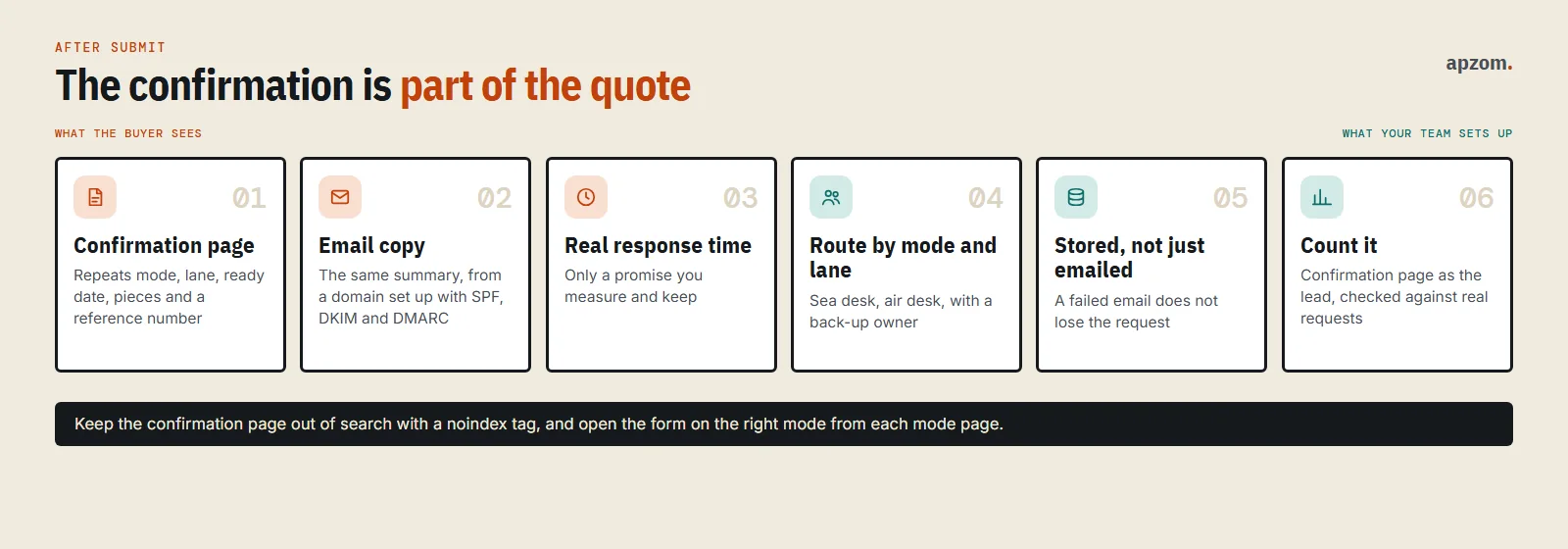
- A confirmation page that repeats the request: mode, lane, ready date, piece count and a reference number, so mistakes show at once. Keep it out of search with a noindex tag.
- An email copy of the same summary. Our guide to SPF, DKIM and DMARC explains how to keep form emails out of spam.
- A response time only if it is real. “A pricing specialist will reply within one working day” helps only if you measure and meet it. Our speed to lead guide covers setting targets.
- Routing by mode and lane, with a back-up owner for holidays and time zones.
- Storage that does not depend on email. The ARKS Infinity case study describes this design: every submission is stored in the WordPress admin as well as emailed, so a failed email does not lose the enquiry.
- Tracking. Count the confirmation page as the lead and compare it with the requests your team actually received; the contact form guide shows the GA4 set-up.
Finally, put the form where buyers decide: open it on Sea from the sea freight page and on Air from the air page, and keep a “Get a quote” button in the header. Our landing page best practices cover the page around the form, and the CRO audit checklist scores the whole quote journey.
Common mistakes
- One long form for every mode. A courier buyer should never see container types.
- Requiring codes buyers do not have. HS codes, UN/LOCODEs and freight classes are your team’s job at quote stage.
- Numbers without visible units. A pricing error waiting to happen.
- A required Incoterm. It forces guesses; offer “Not sure” and ask which legs they need.
- No dangerous goods or battery question. Undeclared cargo surfaces later, at the carrier.
How Apzom can help
Apzom Digital designs and builds quote forms and the pages around them for logistics firms: mode-specific fields, unit and dangerous goods logic, accessible multi-step layouts, safe uploads, confirmation pages, routing, storage and tracking. Our ARKS Infinity Logistics case study shows a 51-page website we built from scratch for a freight forwarding and customs advisory firm, including its quote form; it claims no lead or revenue results, and neither do we. See our website development services and conversion rate optimization work. We work with clients worldwide, remotely, from our base in Ahmedabad, India.
Get a Free Growth Audit and Quote for your freight quote form. Send us the page with your form, the modes and lanes you quote and how requests reach your pricing desk today. We send back a written plan: the field list for each mode, unit and dangerous goods handling, the confirmation and routing set-up, the notice wording to check with your adviser and tracking, with a quote if you want us to build it.
No obligation, and no promised number of requests or shipments. Prefer to talk first? Contact us or see our website development services.
Frequently asked questions
What fields should a freight quote form have?
Mode (or “not sure”), origin, destination, ready date, a plain description of the goods, pieces with weight and dimensions, a dangerous goods question, and name, company and email. Add mode-specific fields, such as container type for FCL or pallets for LTL, only when that mode is chosen.
Should a freight quote form ask for Incoterms?
Yes, as an optional dropdown with “Not sure”, next to checkboxes for the legs the buyer wants handled. A required field pushes buyers to guess.
How do we handle metric and imperial units?
Let the buyer choose kg and cm or lb and in once, show the unit beside every field, store it with the value and convert on the server with exact factors: 2.54 cm to the inch and 0.45359237 kg to the pound.