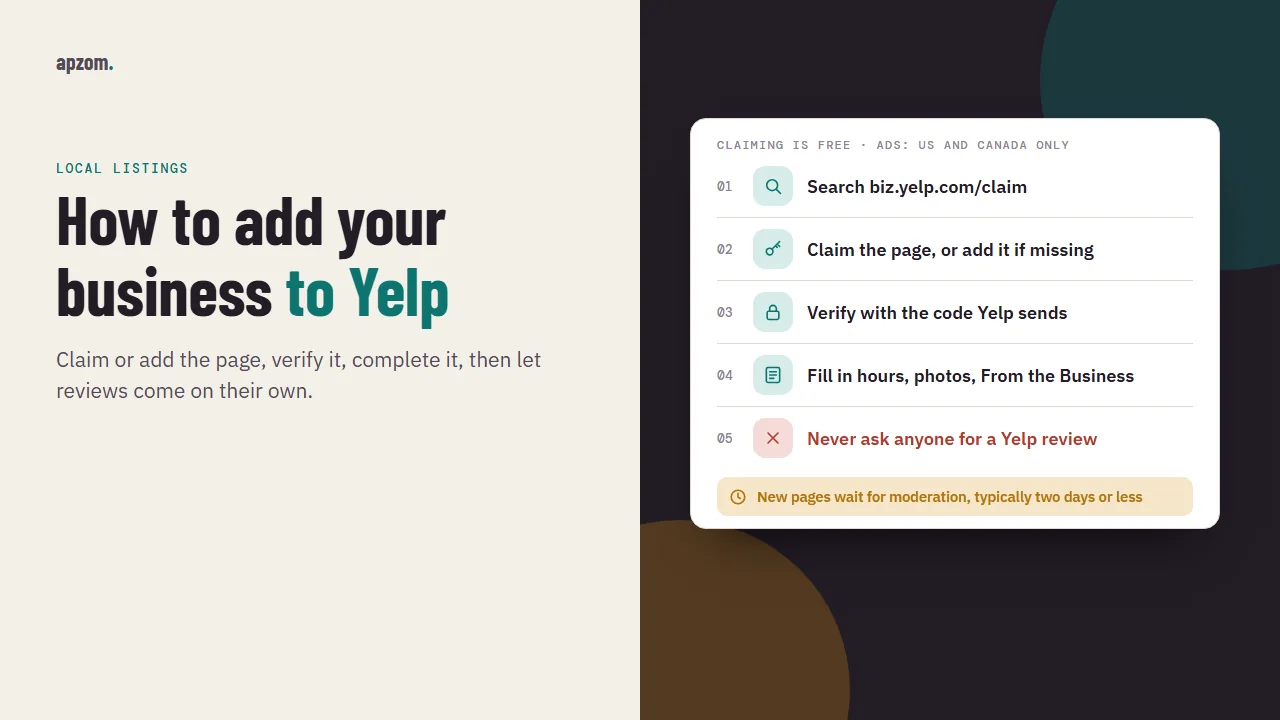
The short answer: Go to biz.yelp.com/claim (or open the Yelp for Business app), search for your business name, and either claim the page that already exists or choose to add your business if none does. Verify with the code Yelp sends to the phone number or email it offers you, then fill in your hours, website, photos and “From the Business” details. Claiming is free. After that, do not ask anyone for a Yelp review: Yelp’s Content Guidelines say businesses should never ask, and its software filters reviews it suspects were solicited. Yelp sells advertising and gives live support only in the US and Canada, so outside those two countries a claimed, accurate page is worth a few minutes of effort, but rarely more.
This guide is for owners and marketers of local businesses anywhere in the world who have found their business on Yelp, or who want to add it, and are unsure whether it is worth the time. It covers claiming or adding a page, verification, what to fill in, Yelp’s review rules, free and paid features, and whether a business outside the US should bother. We checked Yelp’s Business Help Center, Yelp’s Content Guidelines and Trust and Safety pages, Apple’s Maps acknowledgements and the US Federal Trade Commission’s review rule against official sources on 19 November 2026.
Before you start
Anyone can add a business to Yelp, not only its owner, so many businesses already have a Yelp page they have never seen.
Have these ready before you begin:
- Your business details exactly as they appear elsewhere. The same name, address and phone number you use on your Google Business Profile, Bing Places and Apple Maps listings. Our local SEO checklist explains why matching details across listings matters.
- Access to the business phone line or business email. Yelp verifies you with a code, so you need to receive a call, text or email at a contact Yelp associates with the business.
- An email address you check regularly, as Yelp’s claim guide recommends, and a few photos you own of your premises or work.
Check that your business is eligible
Not every business belongs on Yelp. Yelp’s Help Center says it is “mostly focused on traditional brick-and-mortar businesses and local service providers”, and also lists mobile businesses, government services, parks and attractions. It tries not to list e-commerce businesses, businesses that primarily serve commercial customers, direct sellers and lead-generation businesses. That matters if you run a B2B firm: a manufacturer or a software company selling to other companies may find Yelp will not list it.
Two other eligibility rules catch people out. Yelp typically does not show businesses in search that are more than one month from opening, although you can add one as soon as there is verifiable information about it. And a business without premises that customers visit, such as a plumber or a mobile dog groomer, should set a service area (Yelp limits it to a 50-mile radius) rather than creating several pages for different towns.
Step 1: search for your business on Yelp for Business
Go to biz.yelp.com/claim, or download the Yelp for Business app, and type your business name and location. Yelp’s Help Center calls this “the easiest way to claim your business page”.
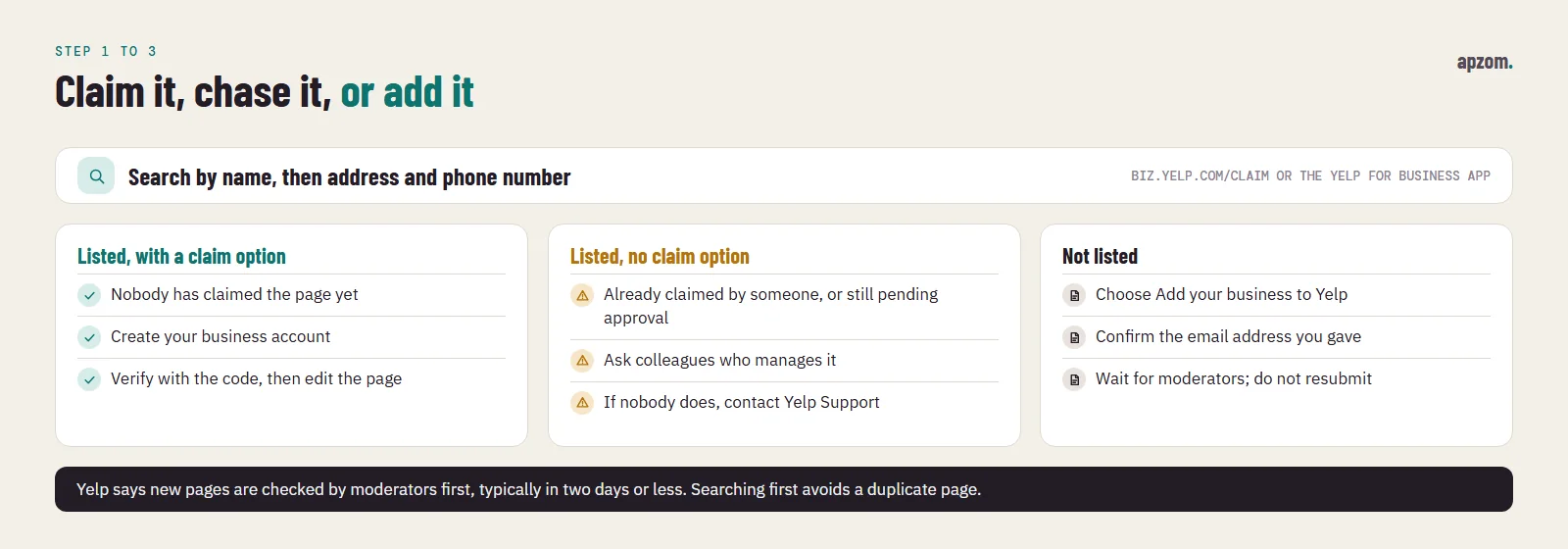
You will land in one of three situations:
| What you see | What it means | What to do |
|---|---|---|
| Your business, with an option to claim it | The page exists and nobody has claimed it | Claim it (Step 2) |
| Your business, with no option to claim it | Someone has already claimed it, or the page was submitted recently and is still pending approval | Find out who in your company claimed it; if nobody did, contact Yelp Support |
| No match | There is no page yet | Add your business (Step 3) |
Search carefully before you add anything: try any old name, the street address and the phone number. Yelp’s help page on adding a business starts with “Search for your business to make sure it’s not already listed”.
Step 2: claim your page and verify it
If your business is listed and unclaimed, select it and follow the prompts. You create a business account with your details and email address, then verify that you work for the business.
Yelp’s claim guide says you verify by entering a code, and that you can choose to get it by email, by text or by a call to the number listed on your page. The Help Center describes phone verification, and says that if you cannot claim your business that way, you will be prompted to submit a report to Yelp’s Support team with details of your business and the time of your attempt. In practice, the options you see depend on the details already on the page, so check that the phone number listed there is one you can answer before you start.
Yelp says claiming is free and that a claimed page “does not mean that the business is an advertiser”. Once you have claimed one page, you can claim further locations from Account Settings, under Additional Options, with “Add another location”.
How to check it worked: your business page shows that it has been claimed, and you can open it in your Yelp for Business account and edit the details. Yelp’s DOs and DON’Ts page says claiming gets you “a visible checkmark”.
Keep it claimed. Yelp says a claimed page may be switched back to unclaimed after a period of inactivity, and its claim guide puts that at not logging in to your Yelp for Business account for 90 days. Put a monthly login on someone’s calendar, so a missed reminder never takes you past 90 days.
Step 3: add your business if it is not listed
If there is no page, choose “Add your business to Yelp” on biz.yelp.com, enter your business information and click Add business. Yelp says you will need to confirm the email address you give to complete the submission.
New pages are not published straight away. Yelp says business additions “must first be evaluated by our moderators before they appear in search results”, which typically takes two days or less, depending on whether Yelp can independently verify the information. You get an email if the submission is accepted. Yelp may reject a submission if it cannot confirm the business or the business is not eligible.
While you wait, do not submit the same business again. Yelp’s help page asks people not to, and a second submission only creates a second page to merge later. If you have several locations, add each one as its own page: Yelp says each location should have a separate page, and new locations also go through moderation.
Step 4: complete your page
Yelp’s claim guide says businesses that provide detailed information are more likely to get calls and website clicks (Yelp’s claim, not something we have measured).
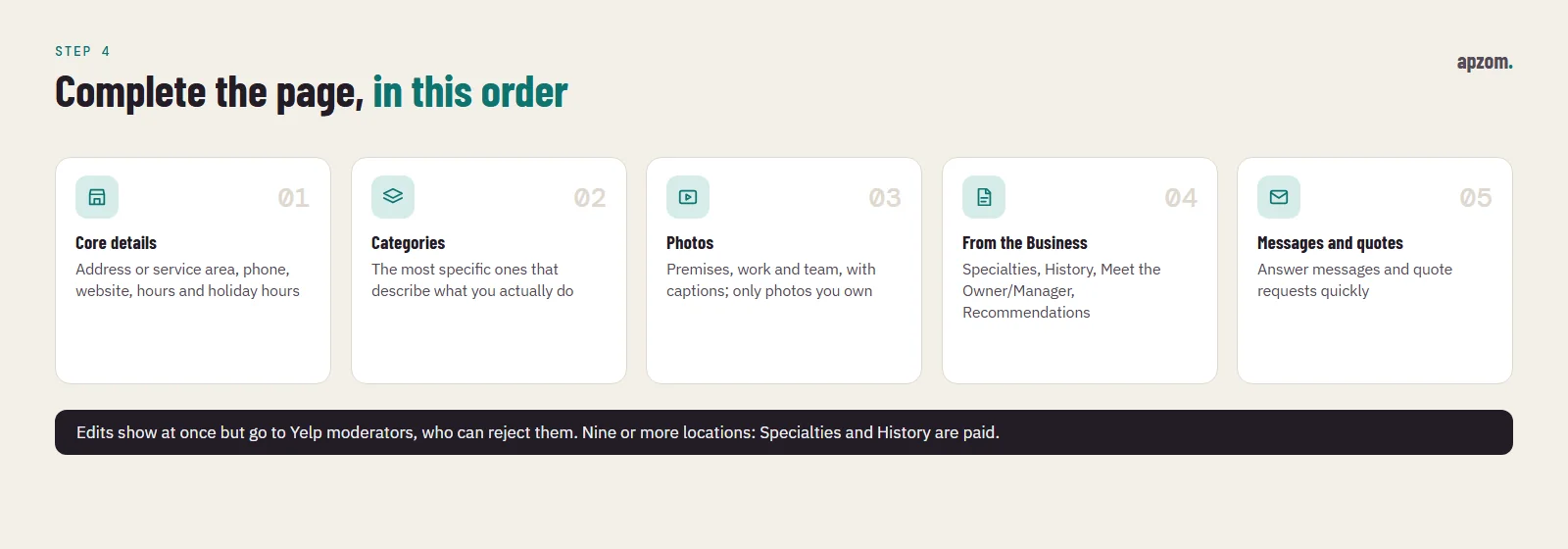
Work through these, in this order:
- Core details. Address or service area, phone number, website and opening hours, including holiday hours. These are the facts customers check before they call or visit.
- Categories. Choose the categories that describe what you actually do, so your page appears in relevant searches. Pick the most specific ones rather than every loosely related category.
- Photos. Yelp says you can upload unlimited photos with captions. Show the premises, the work and the team.
- From the Business. This section holds Specialties, History, Meet the Owner/Manager and Recommendations. Describe what you do best and who you serve in plain words. Yelp says that for businesses with nine or more locations, Specialties and History are now paid products.
- Messages and quotes. Yelp’s free page lets customers send messages and request quotes. Answer them quickly; our guide to speed to lead explains why response time matters.
Your edits appear on the page immediately, but Yelp says they are also submitted to its moderators and “could be subsequently rejected”. If a change does not stick, check it against Yelp’s guidelines and resubmit it correctly rather than repeatedly.
For service-area businesses: set a service area instead of a street address. Yelp says it avoids adding a home address to a business page unless the owner specifically asks, and that a mobile business should use one service area rather than several pages in different places.
Yelp’s review rules: why you must not ask
This surprises owners used to Google. On Google you may ask every customer for a review, as long as you ask them all the same way; our guide to getting more Google reviews covers that. Yelp is stricter.
Yelp’s Content Guidelines say: “Businesses should never ask customers to write reviews.” Its DOs and DON’Ts page for business owners spells out what that includes:
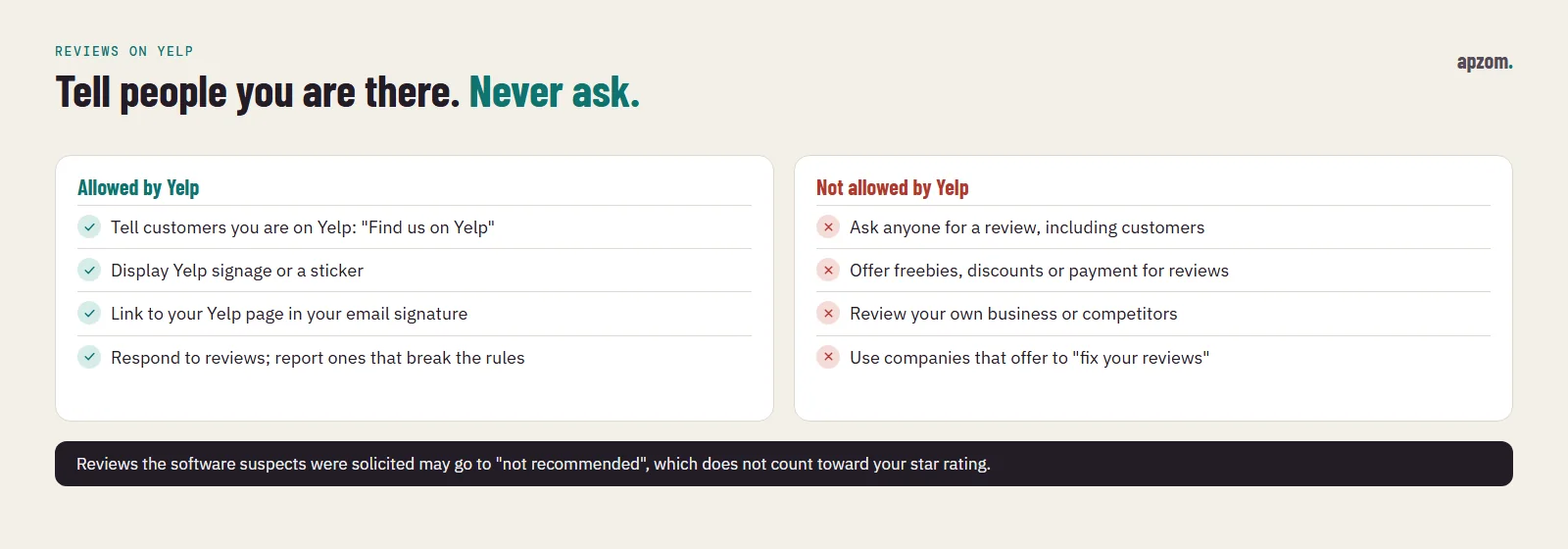
- Do not ask anyone to write a review, including friends, family and customers. A “Review us on Yelp” card, QR code, email or receipt line is asking.
- Do not offer freebies, discounts or payment in exchange for reviews.
- Do not write reviews of your own business or of competitors.
- Do not work with companies that offer to “fix your reviews”.
- Do not pressure, pay, bully or sue people into changing or removing critical reviews.
What you can do, according to the same page: tell customers you are on Yelp (“Find us on Yelp”, without asking for a review), display free Yelp signage, respond to reviews, and report reviews that break Yelp’s Content Guidelines. Other Yelp help pages add linking to your Yelp page in your email signature and a “Find us on Yelp” sticker.
How the recommendation software treats reviews
Yelp runs automated recommendation software on every review. Yelp says it evaluates each review on “hundreds of signals of quality, reliability, and user activity on Yelp”. Among the things it looks for, Yelp lists conflicts of interest, solicited reviews (“reviews that it suspects the business owner or an employee asked for”), reliability (reviews from less active users it does not know enough about) and usefulness.
Reviews the software does not recommend are still visible through a link at the bottom of your page, but Yelp says they “don’t factor into the business’s overall star rating or review count”. So asking for reviews can backfire twice: the reviews you prompted may not count, and the customers you asked may feel pressured.
Yelp says the software treats reviews of advertisers and non-advertisers “exactly the same”, and that no employee can override its decisions. Yelp says a genuine review is sometimes filtered because the software does not know enough about the reviewer yet, and that this can change over time.
Consumer Alerts
If Yelp finds evidence of review manipulation, it can place a Consumer Alert, which it describes as “a warning message displayed over the reviews” on your page. The alert types on Yelp’s Trust and Safety page include a Compensated Activity Alert, used when Yelp has evidence that someone offered cash or other incentives in exchange for a review, a Suspicious Review Activity Alert, for patterns such as many reviews from a single IP address or from users connected to a group that coordinates fake reviews, and a Questionable Legal Threats Alert, for businesses that may be using legal threats to silence reviewers.
Replying to and reporting reviews
Once your page is claimed, Yelp lets you respond to a review publicly or with a direct message. Its DOs and DON’Ts page says its own study found that responding to critical reviews increases the chance that the reviewer upgrades their rating. Our guide to online reputation management has reply patterns that work on any platform.
To report a review that breaks Yelp’s guidelines, open it in the Reviews section of your business account, select the three-dot More Options button and choose Report Review. Yelp says moderators will evaluate it against its Content Guidelines, which may take several days, and that it generally lets users stand behind what they write. A review you simply disagree with is unlikely to be removed.
The law is separate from Yelp’s rules
Laws on fake reviews apply alongside Yelp’s rules. In the US, the Federal Trade Commission’s rule on consumer reviews and testimonials (16 CFR Part 465) makes it unlawful to buy fake reviews, to offer incentives conditioned on a review “expressing a particular sentiment, whether positive or negative”, and to suppress reviews through groundless legal threats or intimidation. The UK, the EU and Australia have their own rules; our Google reviews guide summarises them by country. None of this is legal advice.
Not sure your Yelp, Google, Bing and Apple listings agree? Ask for a Free Growth Audit. We find every listing for your business, check the name, address, phone, hours and categories on each, flag duplicates and unclaimed pages, and check that your review requests follow each platform’s rules.
Free and paid: what you get
The free Yelp Business Page is enough for most businesses. Yelp’s pricing page for US local businesses, checked on 19 November 2026, lists these plans:
| Plan | What Yelp says it adds | Price shown (US, USD) |
|---|---|---|
| Yelp Business Page | 20+ free features: be found in search, receive quote requests, respond to reviews and messages | Free |
| Yelp Ads | Ad placements in Yelp search and on competitors’ pages, targeting by location and keyword, performance tracking | From $150 a month |
| Upgrade Package | Business highlights, a call-to-action button, logo, photo slideshow, posts, and no competitor ads on your page | $180 a month |
| Yelp Ads and Upgrade Package | Both, plus the option to display a verified licence | From $270 a month |
Yelp notes that minimum budgets are subject to change, and its Upgrade Package page mentions a 14-day free trial (terms apply). Treat these as Yelp’s list prices on that date, not a quote. Yelp’s performance claims on these pages, such as “4x more leads”, are Yelp’s own marketing figures; we have not tested them.
Two limits matter for a worldwide reader. First, these are US prices in US dollars, not prices for other countries. Second, Yelp’s Help Center says: “Currently, Yelp only offers Yelp Advertising in the U.S. and Canada.” Outside those two countries there is no Yelp advertising to buy, so the free page is your whole Yelp presence.
Our rule of thumb: for a US or Canadian business, run Yelp Ads only after your free page is complete and has some recommended reviews, set a small test budget, and judge it on enquiries you can trace, not on views. Our guide to measuring marketing ROI shows how to compare it with your other channels.
Does Yelp matter outside the US?
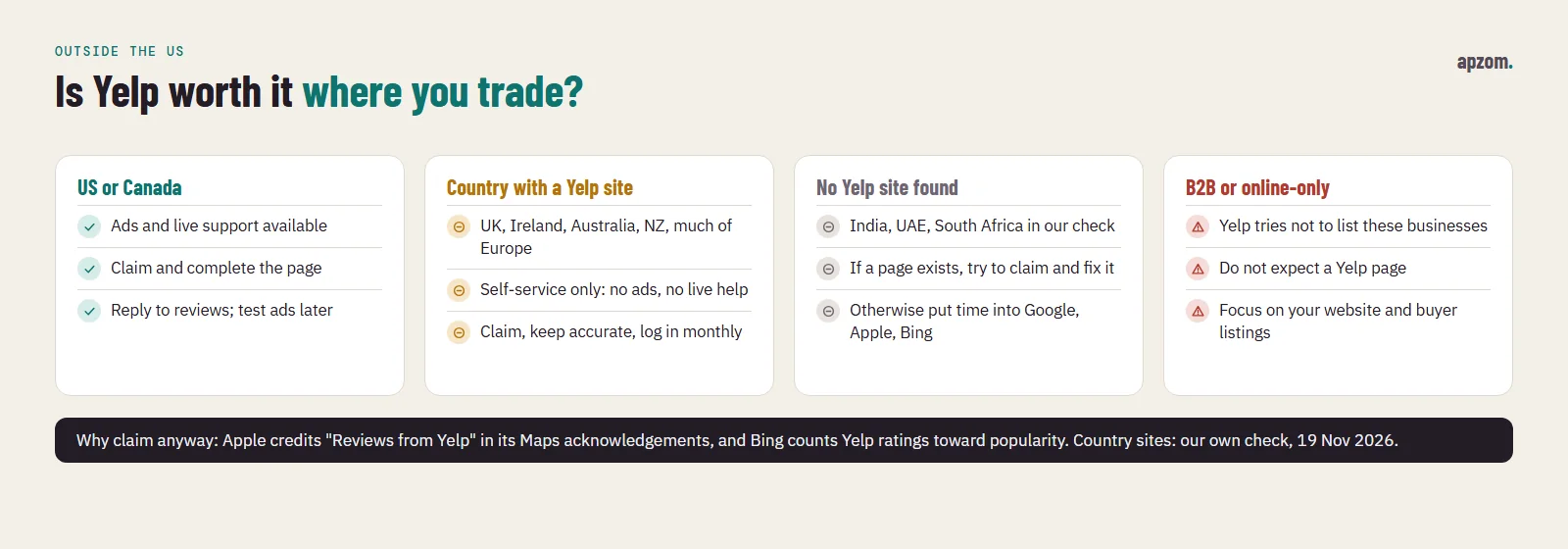
Yelp is a US company, and its paid products and live support are limited to the US and Canada. Yelp’s Help Center says that “Yelp is not available in all countries”, that phone and chat support for business owners is not available outside the US and Canada, and that live assistance with adding a page, updating business information or claiming a page “is also currently not supported” outside those two countries. Support outside them is limited to self-service help on account closure, page removal, personal data deletion and reporting content.
Which countries have a Yelp site
We could not find a current, official list of the countries where Yelp operates; Yelp’s help pages say only that it is not available everywhere. So on 19 November 2026 we ran our own check: we opened the home page of each Yelp country web address and recorded whether it loaded a local Yelp city page or redirected to yelp.com. This is our observation on that date, not a list published by Yelp. These loaded a local Yelp city page:
| Region | Yelp country sites that loaded on 19 November 2026 |
|---|---|
| North America | United States, Canada, Mexico |
| UK and Ireland | United Kingdom, Ireland |
| Europe | Germany, France, Italy, Spain, Portugal, Netherlands, Belgium, Austria, Switzerland, Denmark, Sweden, Norway, Finland, Poland, Czech Republic, Turkey |
| Asia-Pacific | Australia, New Zealand, Japan, Singapore, Hong Kong, Taiwan, Malaysia, Philippines |
| Latin America | Brazil, Chile, Argentina |
The Yelp addresses we tried for India, the United Arab Emirates and South Africa redirected to yelp.com instead of a local site. A site that loads shows Yelp still runs it, not how many people use it, and the support and advertising limits above still apply. Yelp does not publish a list of the countries where businesses can be added, so if you are outside these countries, the quickest test is to search for your city and business on biz.yelp.com/claim.
Why a non-US business might still claim its page
Two other platforms credit or refer to Yelp reviews, which is the strongest reason to keep your Yelp page accurate even where few customers browse Yelp itself.
- Apple Maps. Apple’s Maps acknowledgements page credits “Reviews from Yelp” among its data providers. Apple does not say on that page in which countries Yelp reviews appear on place cards, so check your own place card in the Maps app. Our guide to adding your business to Apple Maps covers Apple Business, where you manage the rest of your place card.
- Bing. Microsoft’s Bing Places help says positive reviews and ratings on sites such as Yelp and TripAdvisor make a listing more popular. Our Bing Places guide explains the rest of Bing’s listing process.
An unclaimed page can also carry wrong hours or an old phone number that customers and other platforms pick up. Claiming lets you fix them.
Our recommendation by market
| Where you trade | What we suggest |
|---|---|
| United States or Canada | Claim and complete your page, reply to reviews, and consider Yelp Ads once the free page is in good shape |
| A country with a Yelp site (UK, Ireland, Australia, New Zealand, much of Europe, parts of Asia and Latin America) | Claim and complete your page, log in monthly to keep it claimed, and reply to reviews; put review-building effort into Google first |
| A country without a Yelp site (for example India or the UAE, in our check) | If a page already exists for you, try to claim it and correct it; otherwise spend the time on Google Business Profile, Apple Maps and Bing Places |
| Any country, B2B or online-only business | Yelp may not list you at all; focus on your own website and the listings your buyers use |
In every row, do the Google work first; our Google Business Profile optimization checklist has the details.
How to measure whether Yelp is working
Yelp for Business shows user views and the customer leads Yelp generates for a claimed page. Check those against your own records:
- Ask new customers how they found you, and record “Yelp” as its own answer in your CRM or booking system.
- Check your analytics for visits referred by yelp.com or your country’s Yelp domain, and the enquiries they produce.
- Review it every quarter. If Yelp brings few enquiries in your market, keep the page accurate and stop there.
Common mistakes
- Adding a new page instead of claiming the existing one. Search by name, address and phone number first; duplicates split your reviews.
- Asking for Yelp reviews. Cards, QR codes, receipt lines and follow-up emails that ask for a Yelp review all break Yelp’s guidelines, and solicited reviews may not count.
- Offering a discount or gift for a review. Yelp bans it, and a Compensated Activity Alert can follow.
- Letting the page lapse. Yelp may show a page as unclaimed after 90 days without a login, so log in at least once a month.
- Creating a page per town. A mobile business should set one service area; Yelp wants one page per real location.
- Copying a different name, address or phone number from your other listings. Keep Yelp identical to Google, Bing and Apple.
How Apzom can help
Apzom Digital sets up and maintains business listings as part of our local SEO services: finding and claiming existing pages on Yelp, Google, Bing and Apple Maps, correcting details so they match, completing each page, and setting up a review process that follows each platform’s rules (including Yelp’s rule against asking). We also help businesses reply to reviews through our online reputation management service. We have not published a Yelp case study yet, so we will not quote results we cannot prove. We work with clients worldwide, remotely, from our base in Ahmedabad, India.
Get a Free Growth Audit of your local listings. Send us your business name, address and the countries you serve. We send back a written list of the listings to claim, fix or merge, which platforms are worth your time in your market, and a quote if you want us to do the work.
No obligation, and no promised rankings or ratings. Prefer to talk first? Contact us or read our local SEO checklist.
Frequently asked questions
Is it free to add a business to Yelp?
Yes. Yelp says there is no charge to create or claim a Yelp Business Page, and new pages typically pass moderation in two days or less. Yelp Ads and the Upgrade Package are paid, and Yelp says it offers advertising only in the US and Canada.
Can I ask my customers to leave a Yelp review?
No. Yelp’s Content Guidelines say businesses should never ask. You may tell customers you are on Yelp, for example with a “Find Us on Yelp” sticker, as long as you do not ask for a review.
Why are some of my reviews “not recommended”?
Yelp’s software may not recommend reviews from less active users, or reviews it suspects were solicited or written by someone with a conflict of interest. Not-recommended reviews do not count towards your star rating, and Yelp says no employee can override the software.
Can I add my business to Yelp from India, the UAE or another country without a Yelp site?
Yelp does not publish a list of countries where businesses can be added, and its live help for adding or claiming pages is limited to the US and Canada. Try searching for your business and city on biz.yelp.com/claim. If Yelp does not accept it, spend the time on Google Business Profile, Apple Maps and Bing Places instead.
Can I remove my business from Yelp?
Usually not. Yelp’s Help Center says it generally does not remove business pages, and that closing your business account does not remove the page. If your personal information appears on a page, you can ask Yelp Support to remove it.
Does a Yelp page help my Google rankings?
Google does not publish any statement that Yelp reviews affect its local rankings, so we do not claim they do. A Yelp page is still a public page about your business that customers can find, and Apple credits Yelp for reviews in its Maps acknowledgements while Microsoft’s Bing Places help counts Yelp reviews and ratings towards a listing’s popularity, so keeping it accurate is sensible.