The short answer: A website usually fails to generate leads for one of five reasons: the enquiry path is broken or not being counted, the wrong people are arriving, visitors do not understand or believe the offer, asking is too much effort, or enquiries arrive and nobody answers them well. Test them in that order and stop at the first one that fails. The order matters because each test depends on the one before it, and because the first check takes twenty minutes and costs nothing, while a redesign can cost months.
This guide is for owners and marketers at service businesses, whether you sell to homeowners, patients or other companies, who have a website that looks fine and a phone that does not ring. It is a diagnosis rather than a list of tips, and it assumes you can log in to your own site and analytics. Apzom Digital sells website and conversion work, so read this knowing we have an interest. Several of the fixes below cost nothing, and you may find you do not need us.
What to take from this guide
- Start with the boring test. Send yourself an enquiry through every route on the site before you change anything else.
- Low numbers mislead. On a few hundred visits a month, a run of bad months can be pure chance.
- Traffic is not one number. Blog visitors reading an old article will not behave like people on your service page.
- A redesign only fixes some of these. It will not repair a form that emails the wrong address, or a message that says nothing specific.
Before you start: is the number big enough to judge?
We are not going to give you a benchmark conversion rate, because we have not found a reliable one that applies across industries, offers and traffic sources. Your own trend is more useful, but only when there is enough of it.
Here is the arithmetic, using a hypothetical site. Suppose 200 people a month reach your service pages and, on average, 1% enquire. That is an average of two enquiries a month. If enquiries arrive at random around that average, a simple Poisson calculation says you would still get zero enquiries in about one month in seven, and five or more in roughly one month in twenty. Nothing about the website has changed in either case.
So at low volumes, look at three to six months together, and do not read a change from two enquiries to three as proof of anything. Fix things that are clearly broken and be cautious about claiming the fix worked.
The five tests, in order
Work from the top. If a test fails, fix it before moving on, because later tests cannot be trusted until earlier ones pass. It is pointless to study your conversion rate if half your enquiries are not being counted.
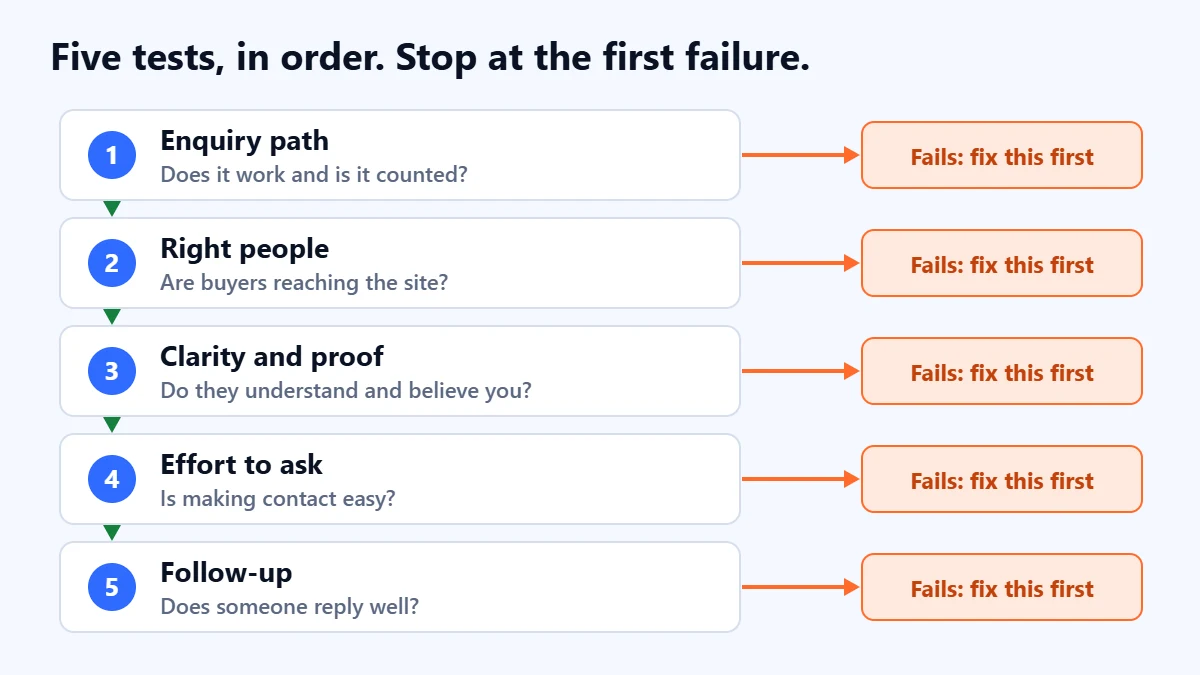
Test 1: does the enquiry path work, and is it counted?
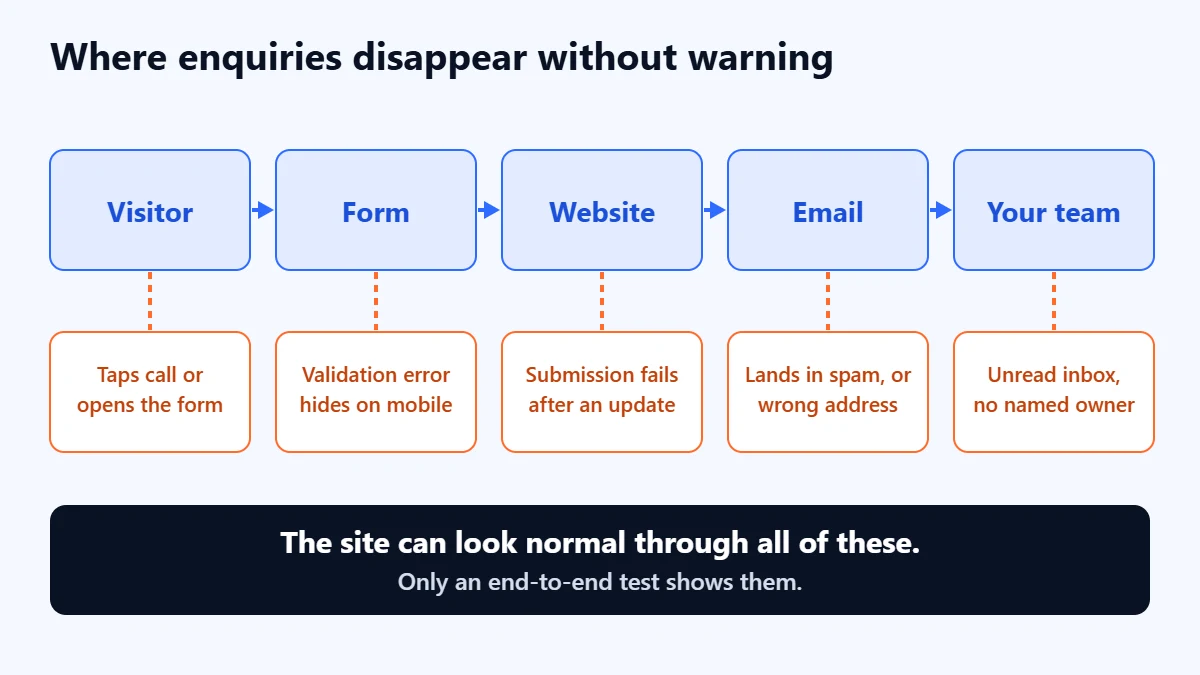
This is the test people skip because it feels too simple. Enquiries can vanish at several points between the visitor and the person who should reply, and most of those failures are silent. The site looks fine, the form says thank you, and nothing arrives.
Use a phone on mobile data as well as your office computer, and run this end-to-end check. It takes about twenty minutes:
- Submit every form on the site from your phone, then again from a computer.
- Enter a wrong value on purpose and see whether the error message is clear.
- Confirm that a thank-you page or message appears after a real submission.
- Confirm the email arrived, and check the spam folder of whoever receives it.
- Tap every phone number, WhatsApp link and email link.
- Check your analytics recorded one lead, rather than none or two.
- Ask whether a named person would have seen and answered it today.
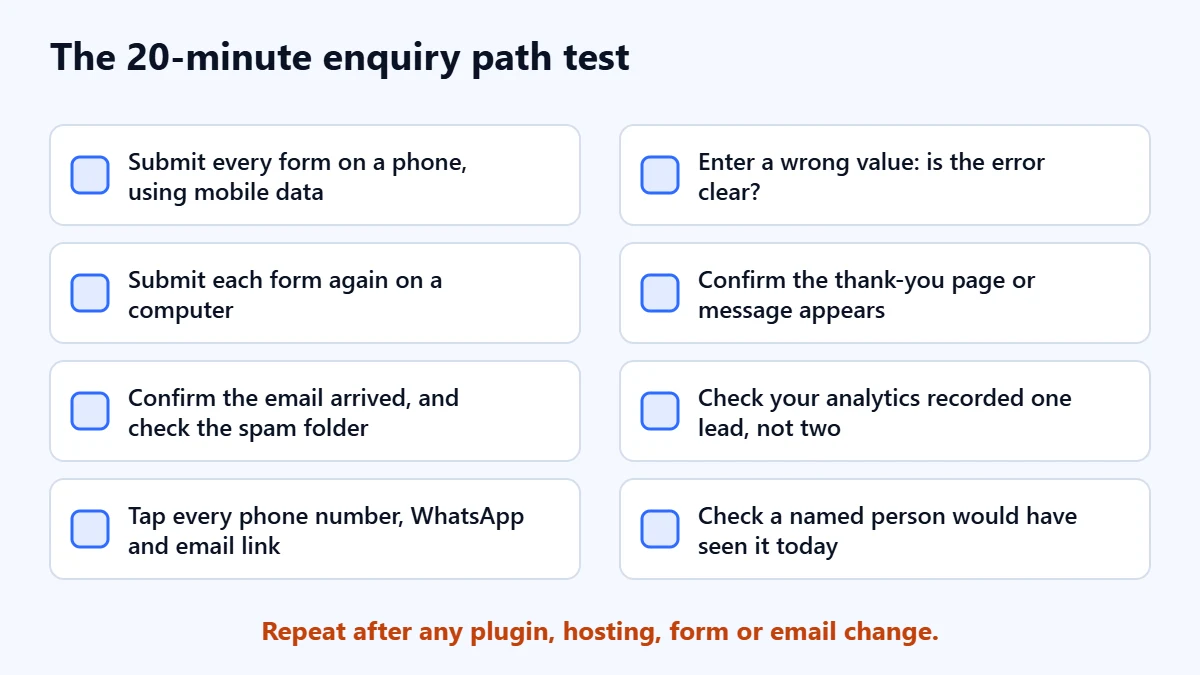
Repeat this after any plugin, hosting, form or email change, because those are the moments when a working path quietly stops working.
Email is a common weak point, because form notifications often come from your web server rather than your normal mail system. Google’s sender guidelines require SPF or DKIM authentication for mail to personal Gmail accounts, and mail that fails those checks may be limited, blocked or marked as spam. Our guide to SPF, DKIM and DMARC explains how to check your domain.
Then compare what you count with what you received
Take the last 30 days. Count the real enquiries in your inbox, then look at what Google Analytics reports. If the numbers differ widely in either direction, you cannot trust your conversion data yet. Too few usually means a broken tag or a form that does not reach a confirmation page. Too many often means spam, or a tag that fires on a button click whether or not the form was completed.
In GA4, the cleanest setup for most forms is a key event based on the page people see after a successful submission. Google’s key event tutorial walks through creating a generate_lead event from a confirmation page view. Marking an event as a key event does not change historic data, so your count starts from the day you set it up. Our GA4 setup guide covers the steps. Remember that calls, WhatsApp messages and emails will not appear unless you track them separately, so a site with few form fills may be generating leads through a route you are not measuring.
Test 2: are the right people arriving?
A site can have healthy traffic and no buyers. Before judging your pages, find out who is actually reaching them.
- Isolate commercial pages. In GA4, look at sessions landing on your service, pricing and contact pages separately from blog posts. A site with 10,000 monthly visits and 150 of them on service pages has a very different problem from the headline number.
- Read your search queries. In the Search Console Performance report, export your top queries for the last three months and mark each as buyer, researcher, brand, or unrelated. Queries such as “cost”, “near me”, “agency” and “hire” tend to signal buyers. “What is” and “free template” tend not to.
- Check location. If you serve one city or country, see how much of your traffic comes from where you actually work.
- Check your paid traffic separately. If you run ads, a poor search-term match can fill your analytics with people who were never going to enquire. Our guide to improving Google Ads lead quality covers that in detail.
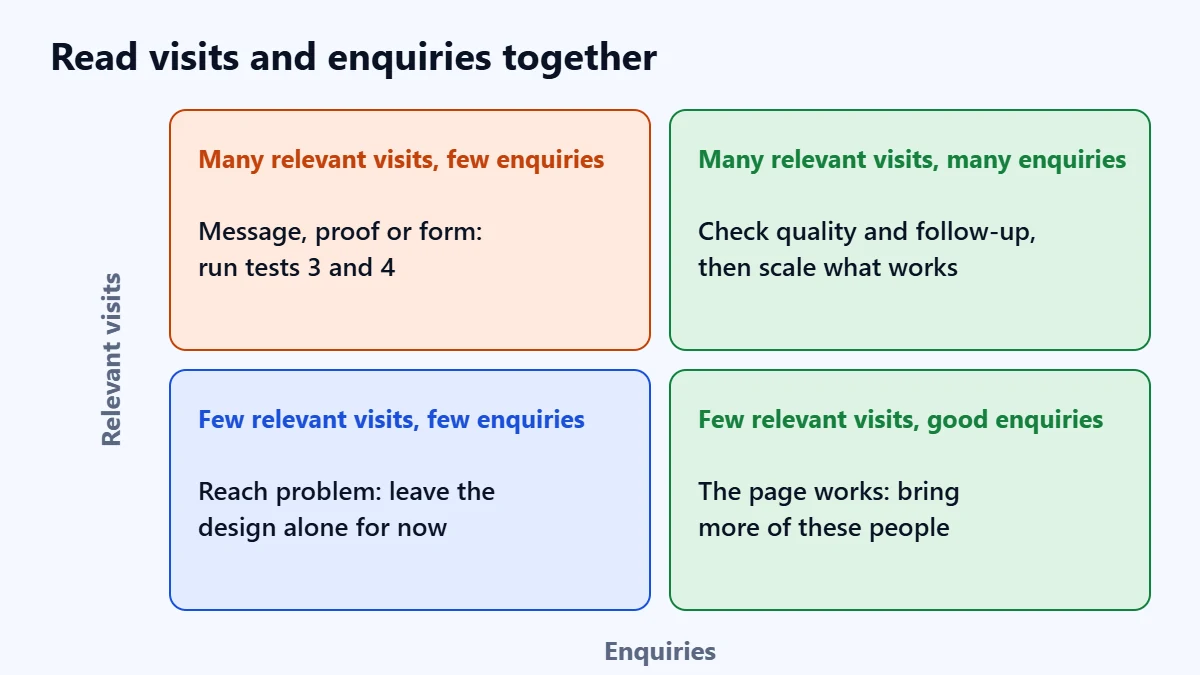
If this test fails, you have a reach problem and no amount of page editing will fix it. Very few qualified visitors means the next step is SEO, paid search or a referral channel. Our guides on keyword research and SEO versus Google Ads are the place to start.
Test 3: do visitors understand and believe you?
Now you know the right people are arriving and leaving without enquiring. Open your most-visited service page on a phone and ask someone who does not know your business to look at it for ten seconds, then answer these questions:
- What does this company sell?
- Who is it for?
- Where does it work?
- What should I do next?
If they hesitate, your message is the problem. Replace general claims with specifics. “Quality solutions tailored to your needs” could describe anyone, while “Commercial roofing repairs across Pune, usually quoted within two working days” tells a buyer whether to keep reading. Only make a claim like that if it is true and you can keep it.
Then look for proof a stranger could check: named clients who have agreed to be named, real project photographs, and reviews on a platform you do not control. If you do not have much yet, say what you do have. A plain account of your process and who does the work is better than invented statistics, which careful buyers tend to notice.
Business buyers also look for signs that you are a real, reachable company. In Nielsen Norman Group’s 2019 study with 20 business professionals, participants expected to find a phone number, email and address, and hiding them made companies seem less available. A small qualitative study from 2019 is not the last word, but this costs almost nothing to fix.
Not sure which test your site is failing? Ask for a Free Growth Audit. We check your enquiry path, tracking, traffic and key pages, and tell you what we would fix first.
Test 4: is asking too much effort?
Sometimes people understand you, trust you and still leave, because making contact is harder or riskier than it should be.
- Find the next step. Every service page should say what happens next and offer a way to do it without scrolling back to the top. The next step should match how ready the visitor is. A person comparing options may ask a question when they would not book a call.
- Cut the form. The same Nielsen Norman Group guidance suggests limiting a contact form to three to five fields and asking only for what you need to reply. Add a field only if it changes how you respond. If your sales team needs a budget question to filter leads, it may be worth the lost enquiries; a fax number never is.
- Offer more than a form. That research also found people treat forms as a barrier and recommended offering one in addition to a phone number, never as a replacement. Tap-to-call on mobile is an easy win.
- Remove the worry. Say what happens after they submit, when they will hear back, and that you will not add them to a mailing list unless they ask.
- Make it usable. Every field needs a label that stays visible, which is also an accessibility requirement under WCAG. Try completing the form on your own phone and with an error, and see whether you can tell what went wrong.
- Check speed where it hurts. Google’s Core Web Vitals targets are a Largest Contentful Paint within 2.5 seconds, Interaction to Next Paint of 200 milliseconds or less, and Cumulative Layout Shift of 0.1 or less. Passing them will not create demand, but a page that jumps while someone tries to tap a button loses people who already wanted to contact you. Our Core Web Vitals guide explains the fixes.
If you run ads to a page, our landing page guide goes further into layout and offers.
Test 5: what happens after someone enquires?
A website can be generating leads that the business is not converting, and the owner experiences that as “the website does not work”. Look at your last 20 enquiries. How long did each wait for a first reply? How many attempts were made? Who was responsible? What happened to the ones nobody could reach?
Nielsen Norman Group found most users expect an answer to a form submission within 24 hours. A 2011 Harvard Business Review article by Oldroyd, McElheran and Elkington argued that most companies were not responding to online enquiries nearly fast enough. You will see precise multipliers from that research quoted around the web. We could not check them against the full text, which is behind a paywall, so we are not repeating them here. It is also old, and one author ran a sales software company, so treat it as a strong prompt rather than a measurement of your market.
You do not need software to fix this. Decide who answers enquiries, set a target for first reply that you can really meet, send an automatic confirmation that sets expectations, and agree how many attempts to make before closing a lead.
Symptoms and where to look first
| What you are seeing | Most likely test | First action |
|---|---|---|
| Enquiries stopped suddenly | Test 1 | Send a test enquiry today, then check recent site, plugin or email changes |
| Analytics shows conversions but the inbox is empty | Test 1 | Check whether the tag fires on a button click, and look for spam |
| Traffic is up, enquiries flat | Test 2 | Check which pages gained the traffic and which queries sent it |
| Plenty of service-page visits, almost no enquiries | Tests 3 and 4 | Run the ten-second test, then shorten the form |
| Enquiries arrive but are poor | Test 2, and your offer | Label the last 50, then see who you are attracting and why |
| Good enquiries, few become customers | Test 5 | Measure time to first reply and number of attempts |
| Almost no visitors at all | Test 2 | Treat it as a reach problem and leave the design alone for now |
Do you need a new website?
Probably not as a first step. A rebuild is justified when your site cannot be edited without great difficulty, cannot be made fast or mobile-friendly, or misrepresents what the business has become. It is a poor answer to a broken form, unqualified traffic or slow follow-up, and a new design carries an old unclear message straight across. If you do rebuild, our website redesign SEO checklist will help you avoid losing the search visibility you already have, and a clear website brief will keep the project focused on enquiries.
Common mistakes
- Changing several things at once. On a low-traffic site you will not be able to tell which one helped.
- Running A/B tests without the traffic for them. With a handful of conversions a month, a test may never reach a meaningful result. Make the clear improvements and watch the trend instead.
- Trusting a single month. See the arithmetic at the top of this guide.
- Copying a competitor’s site. You cannot see whether theirs is working.
- Measuring leads and never asking if they were any good. Our guide to measuring marketing ROI explains what to track beyond the form count.
Frequently asked questions
Why do I get website traffic but no leads?
Usually for one of three reasons: the traffic is reaching content rather than service pages, it comes from people who are not buyers, or the service pages do not make the offer and next step clear. Start by confirming your forms work, then split traffic by landing page and search query.
What is a good website conversion rate for leads?
We do not quote one. Published benchmarks vary widely and mix different industries, traffic sources and definitions of a conversion. Measure your own rate on service pages over several months, and judge changes against that.
How long does it take to fix a website that is not generating leads?
A broken form or tag can be fixed the same day. Message and form changes take days or weeks to make, and longer to measure on a low-traffic site. Building qualified traffic through SEO usually takes months. We cannot promise an outcome, because it depends on your market, offer and starting point.
Should I add a chatbot or popup to get more leads?
Not before the five tests pass. A chatbot adds another channel that someone has to answer, and a popup adds friction. If your tests point to a specific need, such as out-of-hours questions, try one change and measure it.
Get your Free Growth Audit and Quote. Tell us what the site is meant to do and where the enquiries stop. We review your search visibility, paid media and website, and reply with what we would fix first and a realistic view of cost and timeline.
No obligation and no guaranteed results. Prefer to talk first? Contact us or see our conversion rate optimisation service.