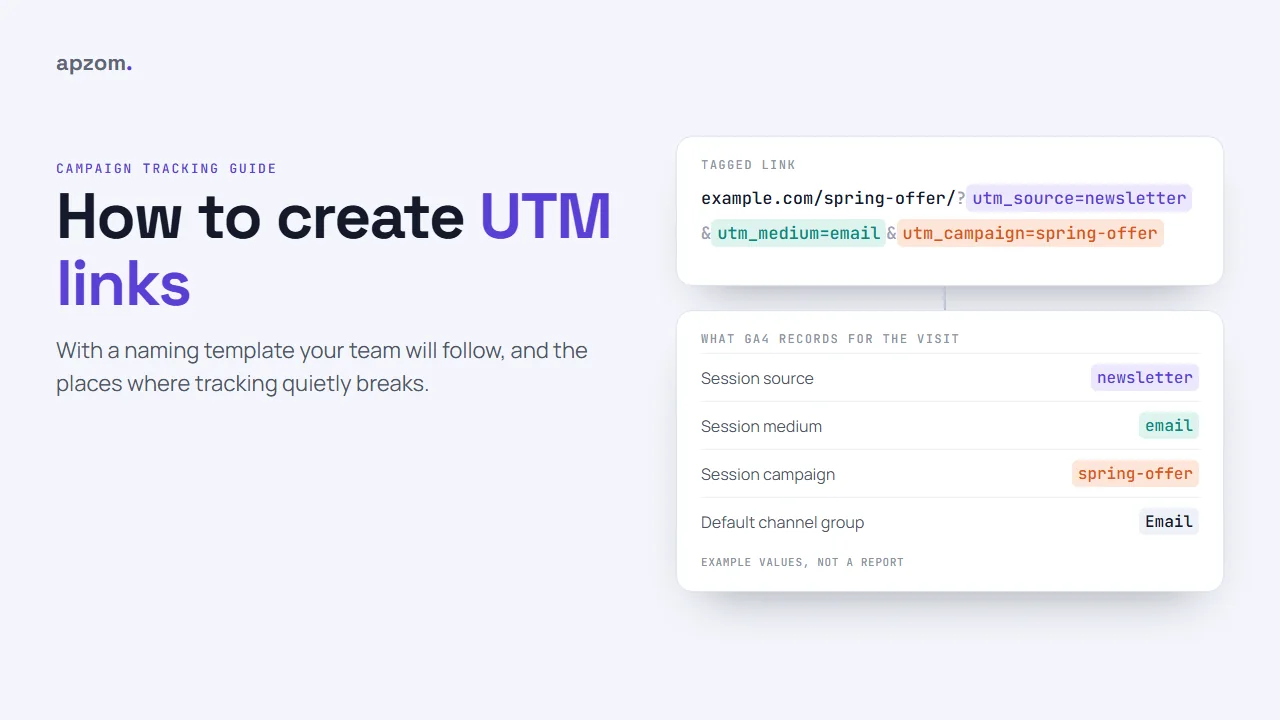
The short answer: A UTM link is a normal web address with a few tags added to the end, such as ?utm_source=newsletter&utm_medium=email&utm_campaign=spring-offer, that tell Google Analytics where a visit came from. To create one, take the page URL, add utm_source (who sent the visit), utm_medium (what type of link it is) and utm_campaign (which campaign), and build it with Google’s free Campaign URL Builder or a spreadsheet. The part most teams get wrong is not the building but the naming: agree a short list of lowercase values, use medium values that match Google Analytics 4’s channel rules, never tag links inside your own website, and test every link before you send it.
This guide is for small business owners, marketers and assistants anywhere in the world who send emails, social posts, QR codes, ads or partner links and want to see which ones bring visitors and enquiries. It explains what each UTM parameter does, gives you a naming template your whole team can follow, shows how to build links three ways, and maps the places where UTM tracking quietly breaks. It assumes you already have Google Analytics 4 (GA4) installed; if not, start with our guide to setting up Google Analytics 4.
What a UTM link is, and why it matters
When someone clicks a link to your website, analytics tools try to work out where they came from. Often they can: a visit from Google search or from another website’s link is recognised automatically. But many visits arrive with little or no information. Clicks from email apps, messaging apps, PDFs, QR codes and some social apps often show up as “direct” traffic or under a vague referral, and you cannot tell your newsletter from a WhatsApp forward.
UTM parameters fix that by putting the information in the link itself. They are short name-and-value pairs added after a question mark at the end of the address. The name UTM comes from Urchin Tracking Module, the analytics product Google bought and turned into Google Analytics, and many other analytics tools read the same tags.
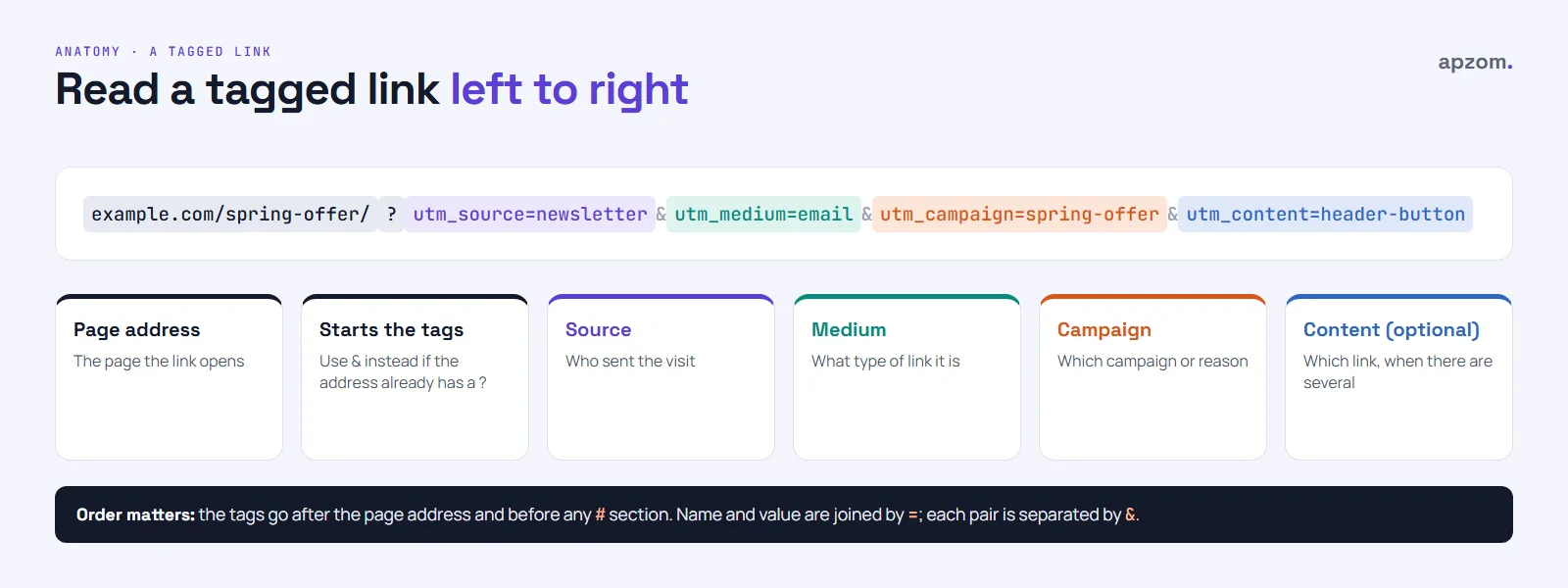
A tagged link has four parts:
- The page address, such as
https://www.example.com/spring-offer/. - A question mark, which starts the query string. If the address already contains a question mark, add your tags with an ampersand (
&) instead. - The UTM parameters, each written as
name=valueand separated by&. - Anything after a hash (
#), if there is one, must come after the parameters. Under the URL standard (RFC 3986), the query string comes before the fragment, so a tag placed after#is not part of the query string and is not reliably read.
The UTM parameters and what each one does
| Parameter | What it records | Example value | Use it? |
|---|---|---|---|
| utm_source | Who sent the visit: the site, platform, publication or list | newsletter, facebook, partner-name | Always |
| utm_medium | The type of link or channel | email, social, paid-social, qr, referral | Always |
| utm_campaign | The campaign, promotion or reason for the link | spring-offer, webinar-march | Always |
| utm_content | Which link or version, when one campaign has several | header-button, image-link, version-b | When you compare links |
| utm_term | The keyword, mainly for paid search without auto-tagging | plumber-near-me | Rarely |
| utm_id | A campaign ID, used when you import campaign cost or other data | spring-2026-01 | Only if you need it |
GA4 also accepts three newer parameters (utm_source_platform, utm_creative_format and utm_marketing_tactic). Most small businesses do not need them, and Google Analytics Help says two of them, utm_creative_format and utm_marketing_tactic, are not currently reported, so this guide leaves all three out of the template.
Framework 1: a naming template your team will follow
UTM values are free text, so without rules the same campaign ends up recorded five different ways. Google Analytics Help says parameter values are case-sensitive, so Email and email appear as two separate rows in your source and medium reports (GA4’s channel rules ignore case, but your campaign reports do not), and spring_offer is not spring-offer. A naming template is a short, written list of allowed values that everyone uses. Keep it in one shared spreadsheet.
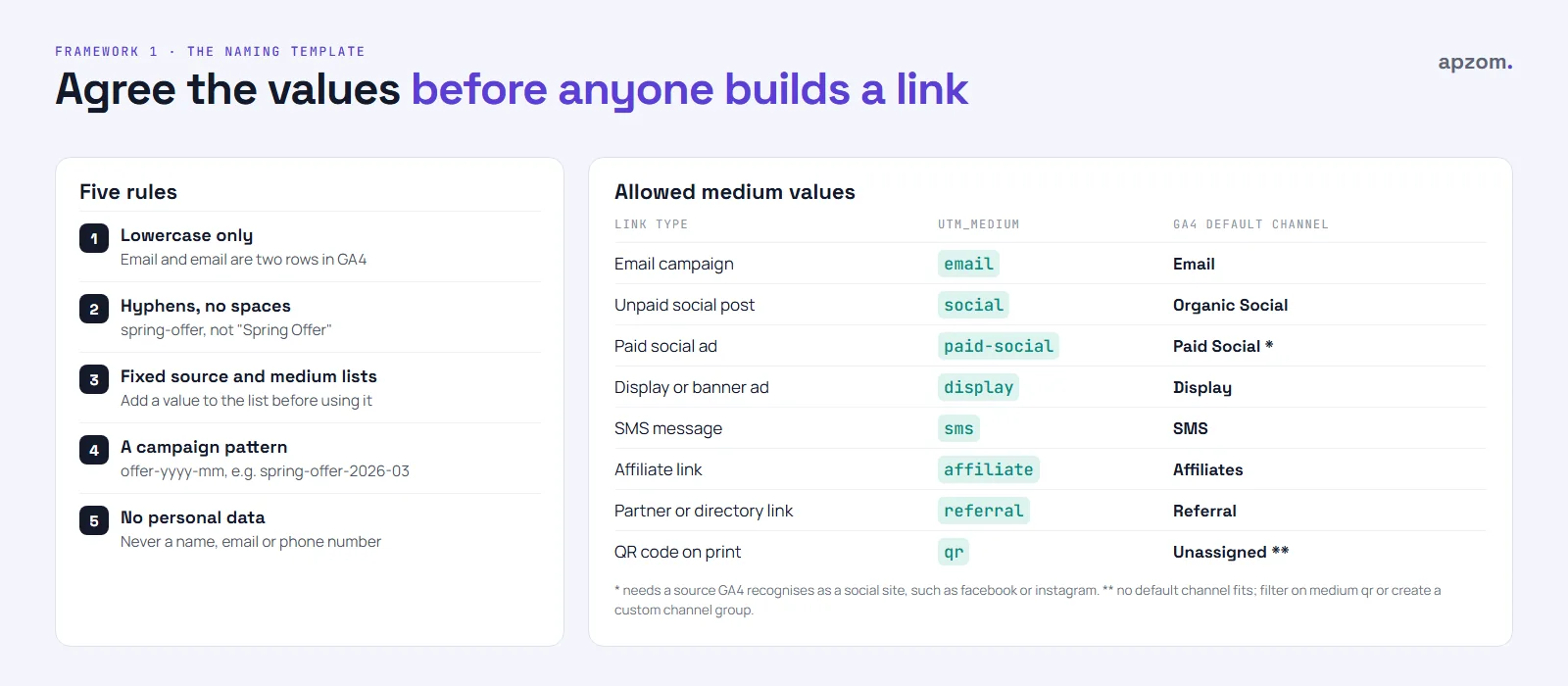
The rules that make a template work:
- Lowercase only. No capital letters anywhere in a value.
- Hyphens between words, no spaces. Spaces turn into
%20or+in links and are easy to get wrong. Pick hyphens and use them everywhere. - A fixed list for source and medium. New values are added to the list first, then used. Nobody invents a medium on the day.
- A campaign pattern. For example,
topic-monthoroffer-yyyy-mm, such asspring-offer-2026-03. Dates in campaign names make reports easier to sort later. - utm_content describes the link, not the person.
header-buttonorfooter-link, never a name or email address. - Never use
ai-assistantas a medium. Since May 2026, GA4 sets that medium itself for visits from recognised AI assistants, which it groups in a new AI Assistant channel. Using it by hand would mix your campaigns into that channel. - No personal information, ever. Google Analytics Help says plainly: “Be sure not to include PII in custom campaign parameters.” No names, email addresses or phone numbers.
- Keep values short. GA4 publishes no separate limit for UTM values, but it records the full page address only up to 1,000 characters.
Medium values that match GA4’s channels
GA4 sorts visits into default channel groups, such as Email, Organic Social and Paid Social, using rules based mainly on the source and medium values. If your medium matches those rules, your traffic lands in the right channel automatically. If it does not, it can end up as “Unassigned”. These are the values we recommend, and the GA4 rule each one meets:
| Link type | utm_medium | utm_source examples | GA4 default channel |
|---|---|---|---|
| Newsletter or email campaign | newsletter, welcome-series | Email (medium is email) | |
| Unpaid social post or bio link | social | facebook, instagram, linkedin | Organic Social (medium is social) |
| Paid social ad (when you tag it yourself) | paid-social | facebook, instagram, linkedin | Paid Social (social source, and a medium starting with “paid”) |
| Display or banner ad | display | the site or network name | Display (medium is display) |
| SMS or text message | sms | sms-list | SMS (medium is sms) |
| Affiliate link | affiliate | the affiliate’s name | Affiliates (medium is affiliate) |
| Partner or directory link | referral | the partner’s site name | Referral (medium is referral) |
| QR code on print | qr | flyer, shop-window, packaging | Unassigned unless you create a custom channel group |
QR codes are the one case where no default channel fits. You can still see them clearly by filtering on medium qr, or you can create a custom channel group in GA4 that groups them.
For Paid Social, the source also has to be one GA4 recognises as a social site, such as facebook, instagram or linkedin. A made-up source such as fb-ads-team may fall into another channel. Since June 2026, GA4’s Source Group dimension merges variants such as fb and facebook, but Session source / medium still shows the raw values, so your template still matters.
How to create a UTM link: three ways
Option 1: Google’s Campaign URL Builder
The simplest way is Google’s free Campaign URL Builder, part of Google Analytics’ developer tools. Search for “Campaign URL Builder” and use the version for websites.
- Paste the page address into website URL.
- Fill in campaign source, campaign medium and campaign name from your template. The builder requires source and medium, plus either a campaign name or a campaign ID; we recommend always using the name.
- Add campaign content if you want to compare links in the same campaign.
- Copy the generated URL and add it to your log sheet. The builder puts the tags before any
#section for you and turns spaces into+. Leave the option to set campaign parameters in the fragment portion of the URL (marked “not recommended”) unticked.
Option 2: a spreadsheet formula
If you create links often, a spreadsheet keeps them consistent. Put the page address in column A, then source, medium, campaign and content in columns B to E, and use a formula like this one in column F (it works in Google Sheets and Excel):
=IF(A2="","",IFERROR(LEFT(A2,FIND("#",A2)-1),A2)&IF(ISNUMBER(FIND("?",IFERROR(LEFT(A2,FIND("#",A2)-1),A2))),"&","?")&"utm_source="&LOWER(B2)&"&utm_medium="&LOWER(C2)&"&utm_campaign="&LOWER(D2)&IF(E2="","","&utm_content="&LOWER(E2))&IFERROR(MID(A2,FIND("#",A2),LEN(A2)),""))The formula adds ? or & depending on whether the address already has a query string, keeps any # section at the end, lowercases the values, skips utm_content when it is empty and leaves the cell blank when there is no address. Values must follow your template: no spaces, &, ? or #. If your spreadsheet uses commas as the decimal separator, type semicolons instead of commas between the arguments. Use data validation (a dropdown) on the source and medium columns so people can only pick values from your template.
Option 3: inside the ad platforms
For ads, let the platform do most of the work.
- Google Ads: check that auto-tagging is on (in Google Ads, Admin, then Account settings, then Auto-tagging: “Tag the URL that people click through from my ad”) and link Google Ads to GA4. Auto-tagging adds a click identifier (gclid) that passes campaign, ad group and keyword details to GA4 more completely than manual tags, and Google strongly recommends it. If you add manual UTM tags as well, GA4 gives auto-tagging priority. Unlike the old Universal Analytics, GA4 has no setting that lets manual tags override it; only utm_content and utm_term still fill GA4’s manual content and term dimensions.
- Meta (Facebook and Instagram): at ad level, under Tracking, add your tags in the URL parameters field (or use Build a URL parameter) rather than editing the website address. Meta says none of the parameters should be left empty. Meta offers dynamic parameters, such as
{{campaign.name}}and{{ad.name}}, that fill in the names automatically. Dynamic values copy your campaign and ad names exactly, including capitals and spaces (shown as%20), so name campaigns in Ads Manager using your template. Values in the URL parameters field override the same parameters typed into the website URL. - Meta: before you publish. Two cautions from Meta’s Help Center: name-based dynamic parameters keep the name the campaign had when it was first published, and changing URL parameters after launch can send the ad set back into the learning phase, so set them before you publish. Meta also adds its own click identifier (fbclid) to clicks, and since January 2024 it may add its own source and medium (such as Facebook or Instagram, and paid) to ad traffic.
- Microsoft Advertising: auto-tagging adds the Microsoft click ID (msclkid). A separate option (Campaigns, then Settings, then Account level options, then Auto-tagging of UTM and Add UTM tags to my destination URLs) adds UTM tags for you and lets you replace or keep tags you added yourself. Microsoft warns that hand-typed UTMs plus auto-tagging can create duplicates, so pick one.
On any platform that fills in UTMs for you, its campaign names become your utm_campaign values, so name campaigns from your template.
Framework 2: where UTM tracking breaks
Most UTM problems are not about building the link. They happen because of where the link is used, or what happens to it on the way. These are six common causes, and the ones to check first.
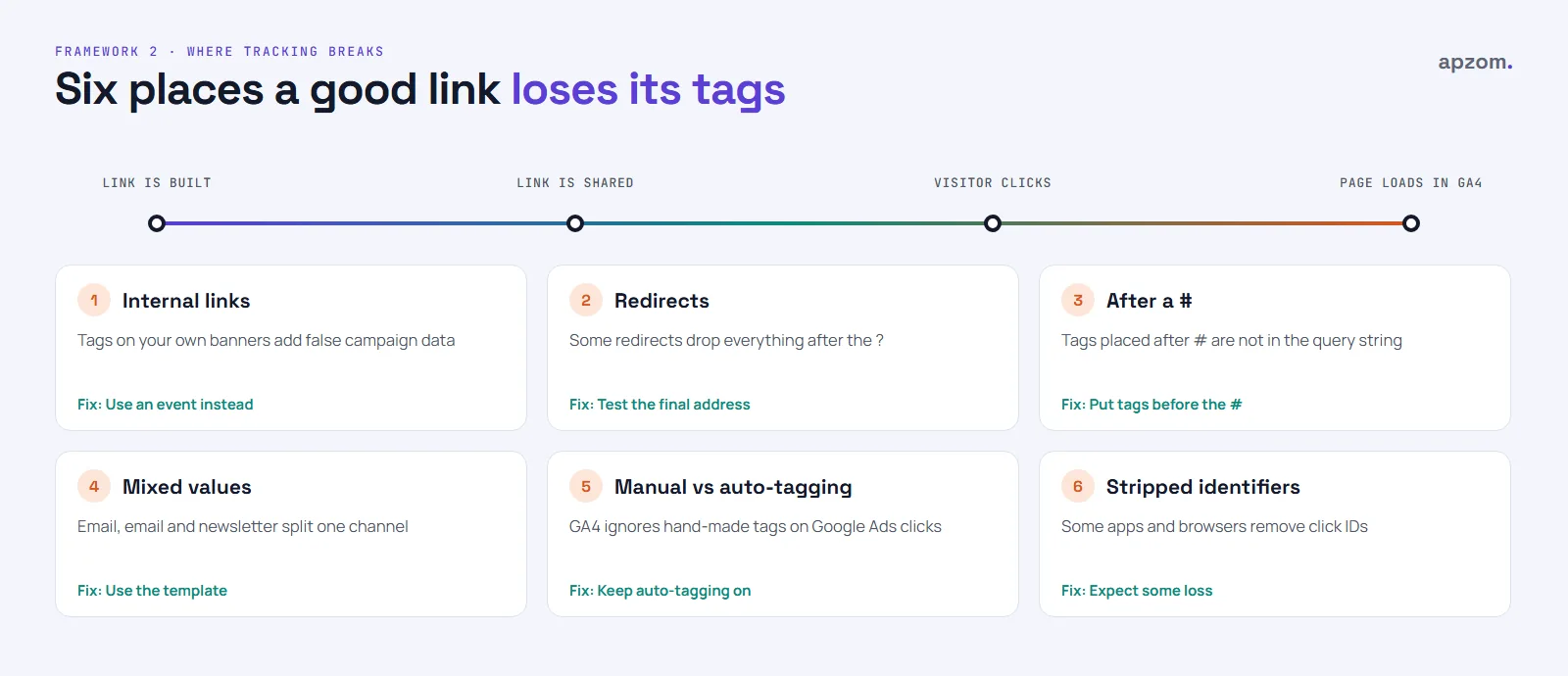
- Tags on internal links. Our rule: never add UTM tags to links from one page of your website to another, such as a homepage banner pointing to an offer page. The old warning came from Universal Analytics, which started a new session whenever campaign values changed. GA4 no longer does that, but a tagged internal link still writes false campaign data into your reports, and Google Analytics Help notes that later visits that start as direct are given the user’s last UTM values. So a visitor who found you through search can end up credited to your own banner. Use a GA4 event, or simply the page path, to measure internal banners instead.
- Redirects that drop the tags. If a link goes through a redirect (an old URL, a short link, a “www” redirect or a redirect from http to https), check that the parameters survive to the final page. Google Analytics Help lists redirects that strip UTM parameters as one cause of “(direct) / (none)” traffic.
- Tags after a hash. As above, parameters must come before any
#in the address. - Inconsistent values.
Email,email,e-mailandnewsletteras a medium split one channel into four rows. The template fixes this. - Manual tags on auto-tagged ads. On Google Ads clicks, GA4 uses the auto-tagging data, so hand-made source, medium and campaign tags are ignored there, as long as Google Ads is linked to GA4. Leave auto-tagging on, and use manual tags only where you need them, for example for another analytics tool or a CRM.
- Stripped click identifiers. Some browsers and apps remove known tracking identifiers from links. Apple’s Link Tracking Protection, for example, removes user- or click-level tracking parameters in Mail, Messages and Safari Private Browsing, while Apple’s WebKit team says campaign-attribution parameters are allowed to pass through. Apple does not publish its list, and Firefox’s strict mode strips some click identifiers too. UTM values describe a campaign, not a person, so they are not the main target, but expect some loss of attribution and do not treat any report as a perfect count.
Traffic landing in “direct” or “Unassigned”? Ask for a free growth audit and quote, and tell us you want your campaign tracking checked: UTM naming, auto-tagging, redirects and GA4 key events.
Test every link before you send it
A minute of testing can save a whole campaign’s data. Before an email, post or print run goes out:
- Click the final link yourself, from the place it will be used if you can (send a test email; scan the printed QR code).
- Check the address bar. The tags should still be there on the page that loads, after any redirects.
- Open the link in a private or incognito window, accept analytics cookies if your site asks, then open GA4’s Realtime report and look for your visit. If your own visits are filtered out as internal traffic, ask a colleague outside the office to click, or check the next day in Traffic acquisition.
- Check the page works: the right page, no error, and the form or offer the campaign promises.
- Log it. Add the link, its values, the date and the person who created it to your log sheet.
Where to see your UTM data in GA4
In GA4, go to Reports, then Acquisition, then Traffic acquisition. The default view groups visits by channel; change the dimension to Session source / medium or Session campaign to see your tags. Traffic acquisition shows the source of each session. User acquisition shows how new users first found you, which is useful for campaigns that aim to bring in new people.
To see which campaigns produce enquiries, not only visits, make sure your enquiry form or thank-you page is recorded as a key event, then look at the key events column in the same report. Our guide to measuring marketing ROI explains how to turn that into a view of what each campaign returns, and our landing page best practices cover the page the link points to.
If you see “(not set)” or “(direct) / (none)”, GA4 did not receive source information for those sessions. A spike in direct traffic on the day you sent a newsletter is often a sign that the email links were not tagged, or that the tags were lost.
A shared UTM log: the habit that keeps it working
The template sets the rules; the log keeps the record. One shared sheet, with a tab for the allowed values and a tab for every link created, is enough for most small teams.
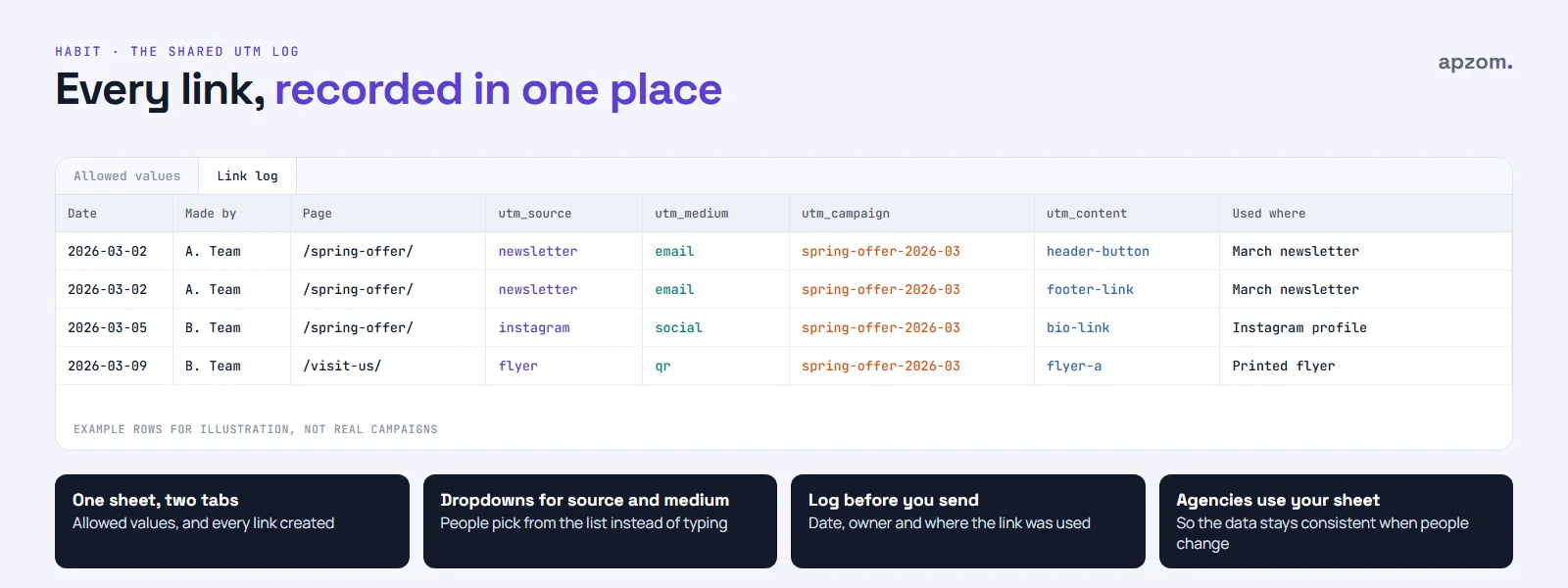
Record, for each link: the date, who made it, the page address, source, medium, campaign, content, the full tagged link, where it was used, and a short note (for example, “printed on 500 flyers”). When someone asks in six months what autumn-flyer-b was, the answer is in the sheet. If your business works with an agency, ask them to use your sheet and your values, so the data stays consistent when people change.
Common UTM mistakes and fixes
| Mistake | What you see in GA4 | Fix |
|---|---|---|
| Capital letters or mixed spellings | One campaign split across several rows | Lowercase values from the template only |
| Tagging internal links | Visits credited to your own banners instead of the real source | Remove the tags; use an event for banner clicks |
| Invented medium values | Traffic in “Unassigned” | Use the medium values that match GA4’s channel rules |
| Missing utm_source or utm_medium | Campaign data incomplete or “(not set)” | Always fill in source, medium and campaign |
| Personal data in a tag | A policy breach, and data you should not hold | Describe the link, never the person |
| Tags lost in a redirect | Visits show as direct or referral | Test the final address before sending |
| No log | Nobody remembers what a campaign name means | Log every link in one shared sheet |
How Apzom can help
Apzom Digital sets up campaign tracking as part of our performance marketing work: a UTM template matched to your channels, auto-tagging and conversion tracking on your ad accounts, and GA4 reports your team can read. If your traffic is landing in “direct” or “Unassigned”, or your platforms and GA4 tell different stories, a tracking review is a sensible first step. We also handle Google Ads management and Meta ads management with tracking set up from day one.
We work with clients worldwide, remotely, from our base in Ahmedabad, India.
Ask for a free growth audit and quote. Mention campaign tracking, and we can include a look at how your emails, social posts, QR codes and ads are tagged, whether the tags reach your pages, and whether GA4 records the enquiries they bring.
No obligation and no guaranteed results. Prefer to talk first? Contact us or see our performance marketing service.
Frequently asked questions
Are UTM parameters bad for SEO?
Not if you use them only on links from other places to your site, such as emails, social posts and ads. Do not use them on internal links. Your pages should have a canonical URL without tags. Most SEO plugins add a canonical tag, but check your page source to confirm it points to the clean address.
Do I need UTM tags on Google Ads if auto-tagging is on?
Usually not for GA4. Auto-tagging passes more detail than manual tags. Some businesses add UTM tags as well so that other analytics tools or a CRM can read the campaign; if you do, keep the auto-tagging on.
Which UTM parameters are required?
Always use utm_source, utm_medium and utm_campaign. Without source and medium in particular, GA4 cannot place the visit in the right channel. utm_content and utm_term are optional.
Can I shorten a UTM link?
Yes. A link shortener or a QR code generator can hide a long tagged link, as long as the redirect keeps the parameters. Test the short link and check the tags are still there on the final page.
Should I tag links in my Google Business Profile?
It is a common practice, so that visits from the profile can be separated from other Google traffic. Google does not publish a rule for this, so it is a convention, not a requirement. Ours is utm_source=google&utm_medium=organic&utm_campaign=gbp-listing: using organic as the medium keeps those visits in GA4’s Organic Search channel. Since June 2026 you can also link GA4 to your Business Profile in GA4’s Admin and import profile actions, such as calls and website clicks. Whatever you choose, keep it consistent and record it in your log.
Can UTM tags track phone calls or offline sales?
Not by themselves. They record the visit. Calls from the website, form submissions and bookings need to be set up as key events in GA4, and offline sales need a CRM or your ad platforms’ offline conversion tools.