The short answer: start with Google Ads when people already search for what you sell and want it soon, such as an emergency plumber, an accountant or a supplier of industrial parts. Start with Facebook and Instagram ads (Meta ads) when people do not search for your product yet but would want it if they saw it, such as a new restaurant, a property launch or a product people have never heard of. Run one channel properly for about twelve weeks, judge it on qualified enquiries and customers in your own records rather than on each platform’s dashboard, and add the second channel only when the first one is measured and working.
This guide is for business owners and marketing leads anywhere in the world who have budget for one paid channel now and need to choose. It explains how the two platforms really differ, a simple search test you can run in ten minutes, which channel usually comes first for eight common kinds of business, a twelve-week test plan, how to compare results fairly when each platform counts conversions its own way, and the rules in the US, UK, EU, India, the UAE and elsewhere that can change the answer. Google’s and Meta’s official help, policy and developer pages were checked on 27 October 2026.
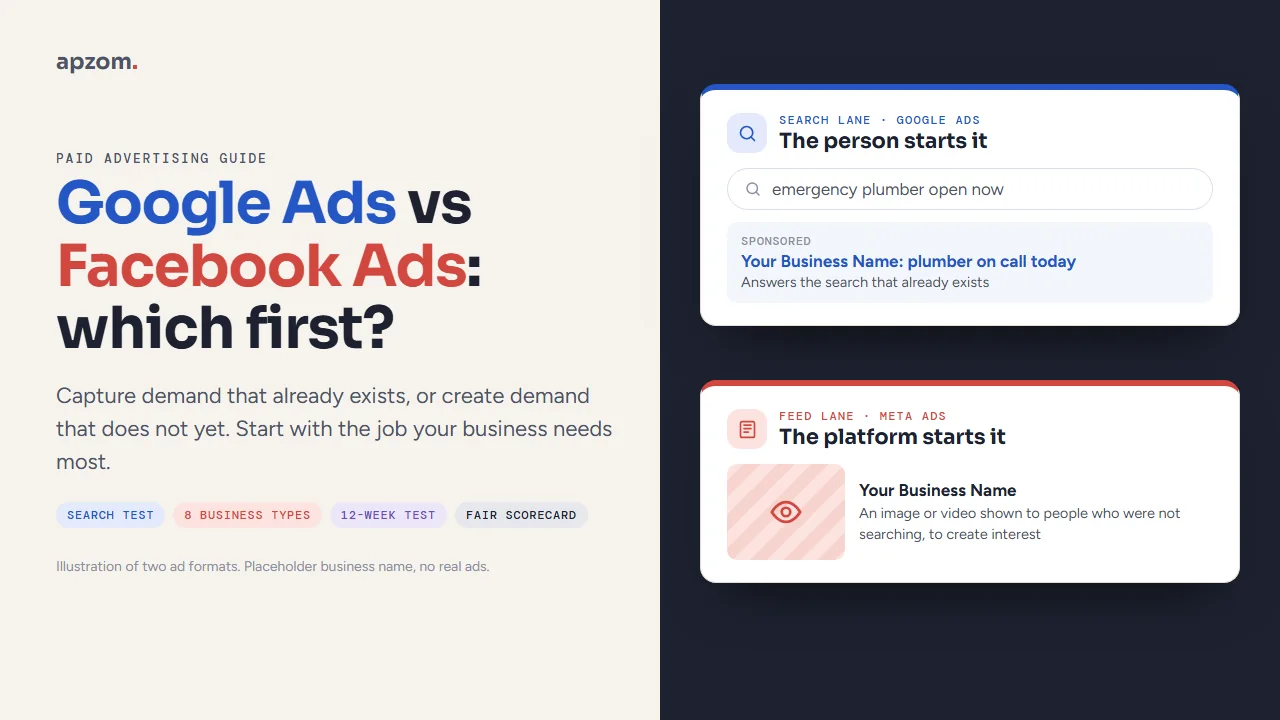
How Google Ads and Meta ads really differ
“Facebook Ads” is the old name people still search for. Today the ads are bought in Meta Ads Manager, and one campaign can show across Facebook, Instagram, Messenger, Threads and Meta’s Audience Network of partner apps (Meta for Business). Google Ads can show ads on Google Search, the Shopping tab, Maps, YouTube, Gmail, Discover, Google Play and the Display Network of partner sites and apps (Google Ads Help).
The deeper difference is not the size of either platform. It is what starts the ad.
- On Google Search, the person starts it. Someone types “boiler repair near me” or “CNC machining supplier” and your ad can appear because of what they asked for. You choose keywords, and the search itself tells you what the person wants.
- On Meta, the platform starts it. Nobody types a query. Meta’s system shows your ad to people it predicts will respond, based on your targeting choices, your creative and how people react. You are interrupting someone who was looking at something else.
| Question | Google Ads (Search) | Meta ads (Facebook, Instagram) |
|---|---|---|
| What triggers the ad | A search that matches your keywords | Meta’s prediction that a person may respond |
| What the person is doing | Looking for an answer or a supplier | Scrolling, watching or messaging friends |
| What you control most | Keywords, negative keywords, ad text, landing page | Creative (image, video, words), offer, audience signals |
| What sells | Relevance and a clear answer to the search | An image or video that stops the scroll, then a clear offer |
| Lead capture | Calls, forms on your website, lead form assets | Instant Forms in the app, messages, your website |
| Creative workload | Mostly text; refresh when results fall | New images and videos regularly, because people tire of the same ad |
| Default way of counting results | Conversions counted up to 30 days after a click | A set window after a click (1, 7 or 28 days) and, if chosen, 1 day after a view |
Google also sells non-search campaigns, such as Demand Gen, YouTube video and Display (which Google expects to finish moving into Demand Gen by 2027), that work more like Meta: they show ads to people who are not searching. When this guide says “Google Ads first”, it means Search (and Performance Max with search inventory) first, because that is where Google’s real difference lies.
Demand capture or demand creation: the idea behind the choice
The most useful way we know to make this decision is to ask what job the money has to do. This is our working framing, not an official term from either platform.
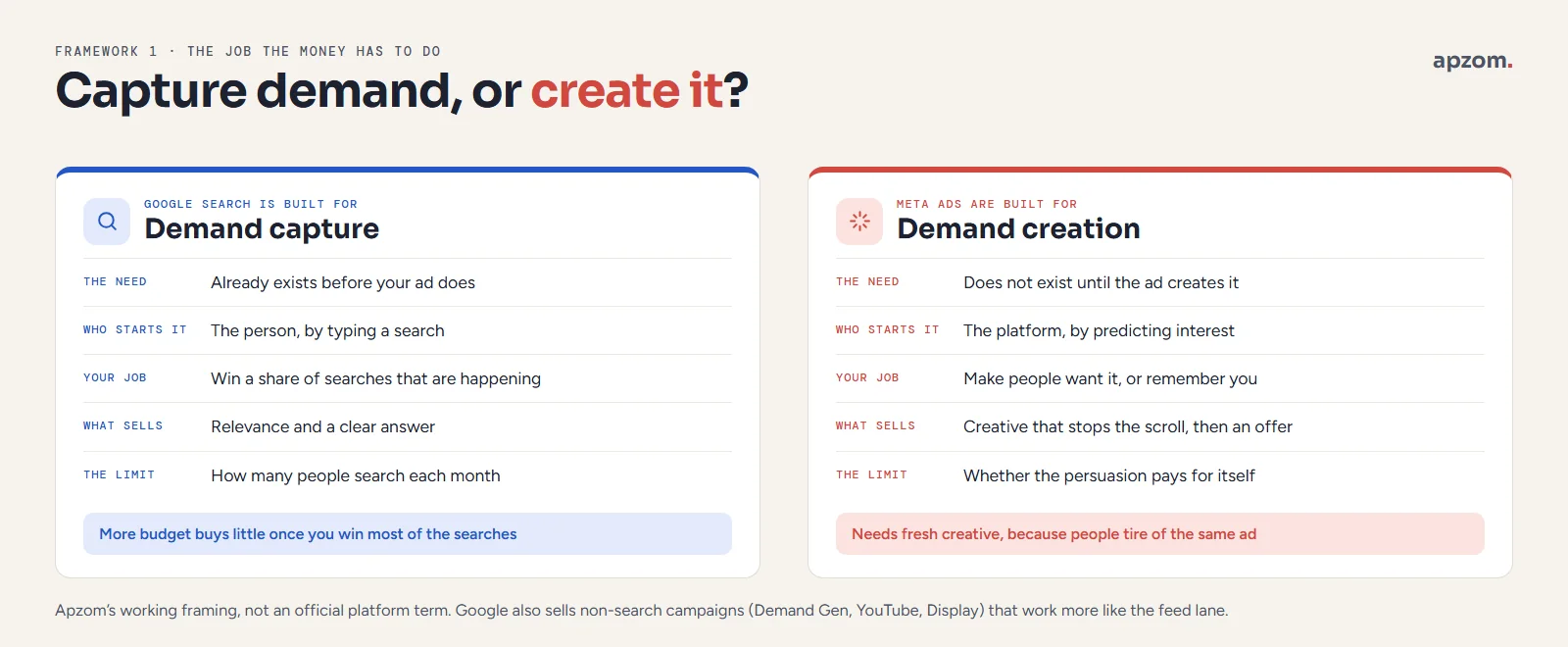
- Demand capture means being in front of people who already want what you sell. Google Search is built for this: Google pitches Search ads as a way to “reach people searching for the products or services you offer”. The demand exists before your ad does. Your job is to win a share of it.
- Demand creation means making people want something they were not looking for, or reminding them you exist before they need you. Meta is built for this. Meta pitches its ads as a way to reach customers “as they connect with people and find communities”, in other words while they are doing something else. The demand does not exist until your ad creates it.
Neither is better. A business that only captures demand is limited by how many people search each month; once you win most of those searches, more budget buys little. A business that only creates demand pays to persuade people, and the persuasion must be strong enough to pay for itself. Most businesses that grow end up doing both. The question is which job comes first for you.
The ten-minute search test
Before you read any comparison table, do this.
- Write down five ways a customer would describe what you sell, in their words, not yours. “Leaking tap fixed today”, not “plumbing solutions”.
- Search each one on Google in a private browser window, in the town or country you sell to.
- Note what you see: ads at the top, a map with local businesses, shopping results, or only articles and directories.
- Open the Google autocomplete suggestions as you type and note any that match buyer language (“price”, “near me”, “supplier”, “cost”, “book”).
- Optional, and longer: ask your last ten customers how they found you, if you do not already record it.
What the result tells you. If several of your phrases show ads from competitors and buyer-language suggestions, people search for what you sell and competitors are paying to reach them. That is a strong sign for Google first. If the searches show only articles, or nothing relevant, either people do not search for it yet or they use words you have not found. That points to Meta first, or to more research before you spend.
The test is rough, but it is real evidence from the market you sell in, which is more than most comparison articles give you. Our keyword research guide explains how to take it further with free tools.
Five questions that decide which channel comes first
1. Do people search before they buy?
This is the search test above. If yes, Google Search is usually the faster route to enquiries, because you are answering people who already want something.
2. How urgent is the need?
Urgent needs (a burst pipe, a locked-out driver, a court date) are searched for and bought quickly. Nobody waits to see an Instagram ad. The more urgent the need, the stronger the case for Google first.
3. Does your product sell by being seen?
Food, interiors, fashion, travel, property and events are easier to want when you can see them. A good photo or short video does work on Meta that a text ad on Google cannot. If your product looks ordinary in a picture, as most accountancy and industrial services do, Meta has less to work with.
4. Can you produce new creative every few weeks?
Meta ads run on images and video, and people tire of seeing the same ad. If you cannot produce new creative regularly, from your phone if need be, Meta results tend to fade. Google Search ads are mostly text and need less creative work, though they still need care with keywords and landing pages.
5. Can you measure a real enquiry?
Both platforms need conversion tracking to optimise well, and both learn from the conversions you send them. Meta says an ad set stays in its “learning phase” until it gets about 50 optimisation events in the week after its last significant edit (Meta Business Help Centre). Google’s Smart Bidding shows a “Learning” status after a new bid strategy or a big change, which Google says never lasts more than 7 days (Google Ads Help), although results can take one to two conversion cycles to settle. Our Meta ads guide explains how to plan budgets around learning. If you can only count a handful of enquiries a month, choose the channel and the conversion goal that give you enough signal, and fix tracking before you spend more.
Which channel first for eight kinds of business
These are starting points based on how each kind of buyer behaves. They are not rules. Your search test and your own enquiry data override them.
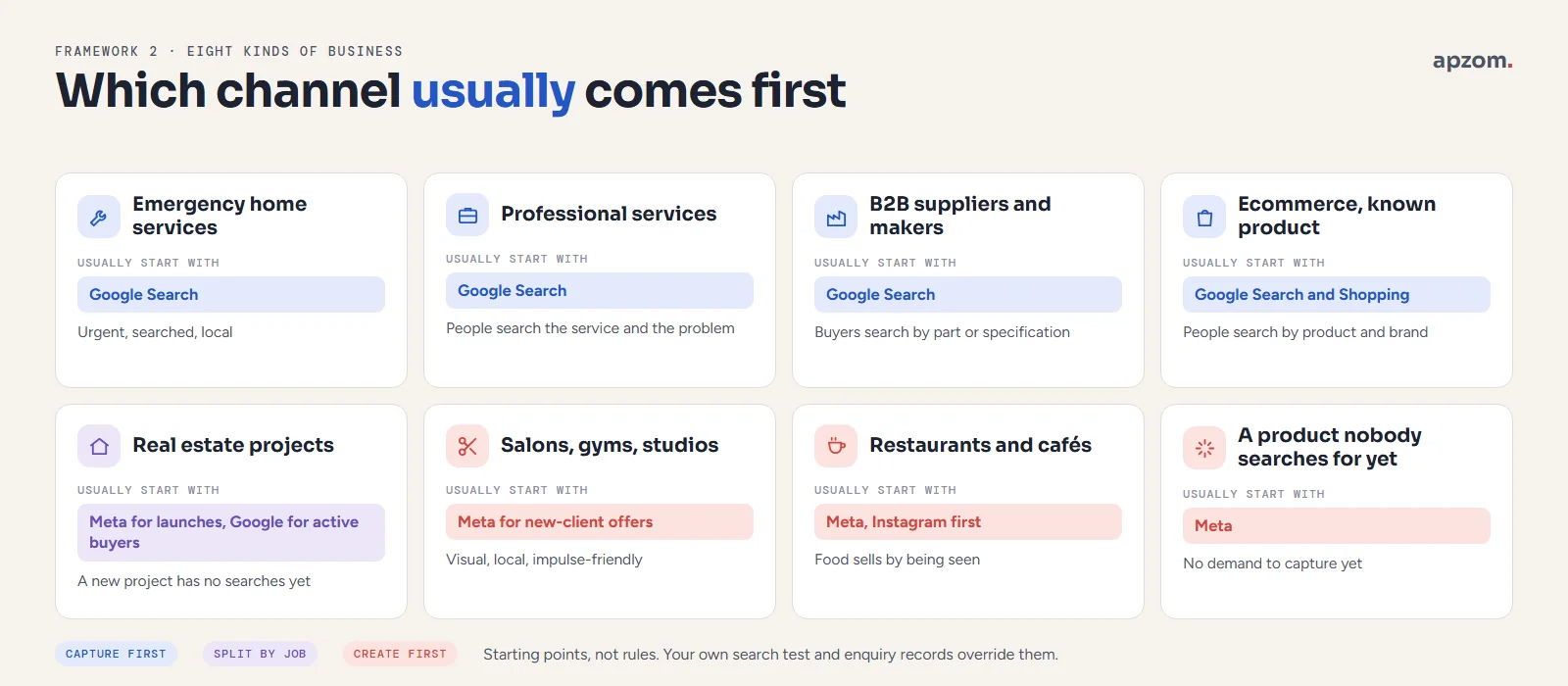
| Kind of business | Usually start with | Why | Add next |
|---|---|---|---|
| Emergency home services (plumbing, locksmiths, HVAC repair) | Google Search, plus Local Services Ads where available (Google is moving them into Google Ads as pay-per-lead Performance Max campaigns from 2026) | Urgent, searched, local | Meta for seasonal offers and reviews |
| Professional services (law, accounting, consulting) | Google Search | People search for the service and the problem | Meta or LinkedIn for remarketing and content |
| B2B suppliers and manufacturers | Google Search | Buyers search by part, process or specification | YouTube or remarketing for long buying cycles |
| Restaurants and cafés | Meta (Instagram first) | Food sells by being seen, and much “near me” demand can be met for free on Google Maps through your Business Profile | Google Search for bookings, events, catering |
| Salons, gyms, studios | Meta for new-client offers | Visual, local, impulse-friendly | Google Search for “near me” and service searches |
| Real estate projects and developments | Meta for launches; Google Search for active buyers | A new project has no searches yet, but buyers do search for areas and property types | The other one, judged on site visits and qualified leads |
| Ecommerce with a known product | Google (Search and Shopping) | People search by product and brand | Meta to find new customers and for remarketing |
| A new product or category nobody searches for | Meta | There is no demand to capture yet | Google Search once people start searching for your name or category |
Two notes on this table. First, a strong Google Business Profile is free and can bring local calls and visits without ad spend; set it up before you spend (our Google Business Profile checklist shows how). Second, some industries have extra rules on both platforms, covered further down, and those can change the answer.
Not sure which channel should come first for your business? A Paid Channel Plan checks how your customers search, what your tracking can measure today, and which of Google Ads or Meta ads should get your first budget.
Run one channel properly for twelve weeks
This is not the setup plan in our Google Ads guide; it is how to judge whichever channel you start with. Splitting a small budget across two channels from day one usually means neither gets enough data to learn, and you cannot tell which one worked. A better plan for most small budgets is one channel, one clear goal and twelve weeks.
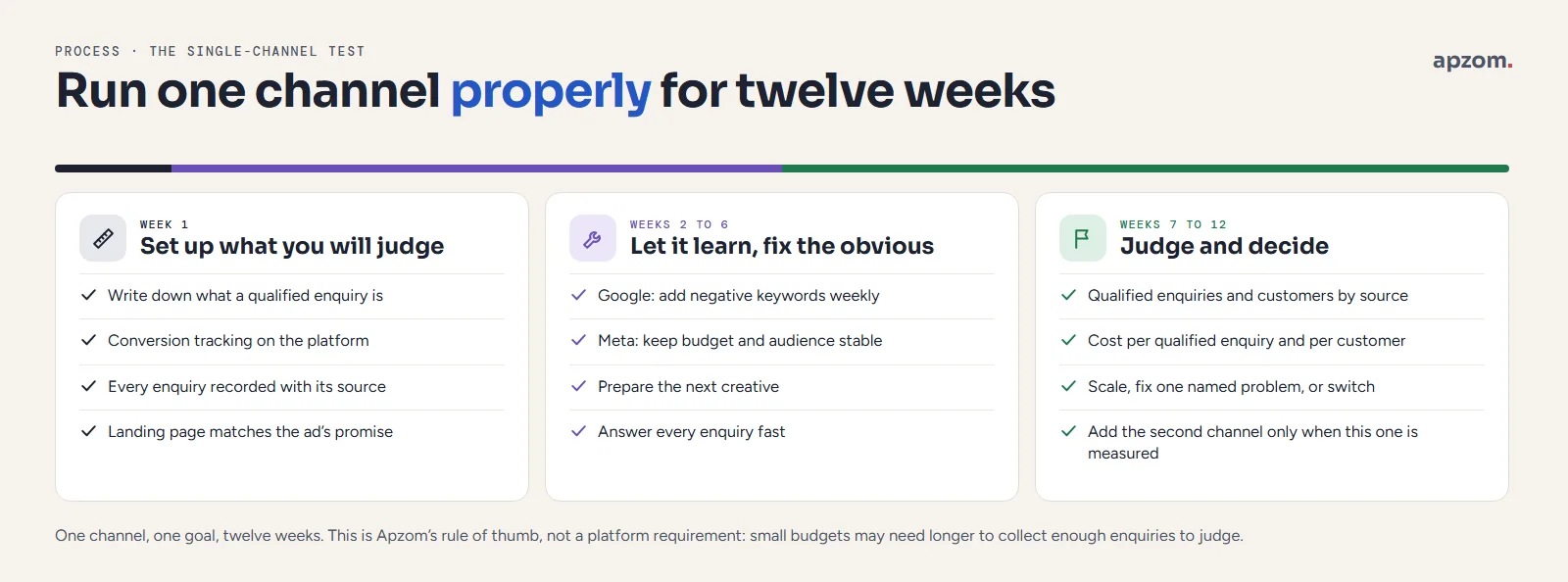
Week 1: set up what you will judge it on
- Decide what a qualified enquiry is for you (a call longer than a minute, a form with a real phone number, a booked visit) and write it down.
- Set up conversion tracking on the platform, and a simple record of every enquiry with its source in a spreadsheet or CRM.
- Check your landing page answers the ad’s promise. Our conversion rate optimization guide covers the basics.
Weeks 2 to 6: let it learn, fix the obvious
- On Google, add negative keywords for irrelevant searches every week.
- On Meta, keep the campaign stable while it learns, and do not change the budget or audience every few days. Prepare your next creative.
- Answer every enquiry fast. Speed of response often matters more than the ad.
Weeks 7 to 12: judge and decide
- Count qualified enquiries and customers by source from your own records.
- Work out cost per qualified enquiry and cost per customer, using what you actually paid.
- Decide one of three things: scale this channel, fix one named problem and run another six weeks, or stop and test the other channel with what you learned.
Twelve weeks is our rule of thumb, not a platform requirement. Very small budgets may need longer to collect enough enquiries to judge. Very urgent, high-volume searches may show a clear answer sooner. The setup and budget steps for each platform are in our Google Ads setup guide and Meta ads guide.
How to compare results fairly
When you run both, you will notice something odd: the two dashboards together claim more conversions than you actually received. That is normal, and it is the reason to judge both channels in your own records.
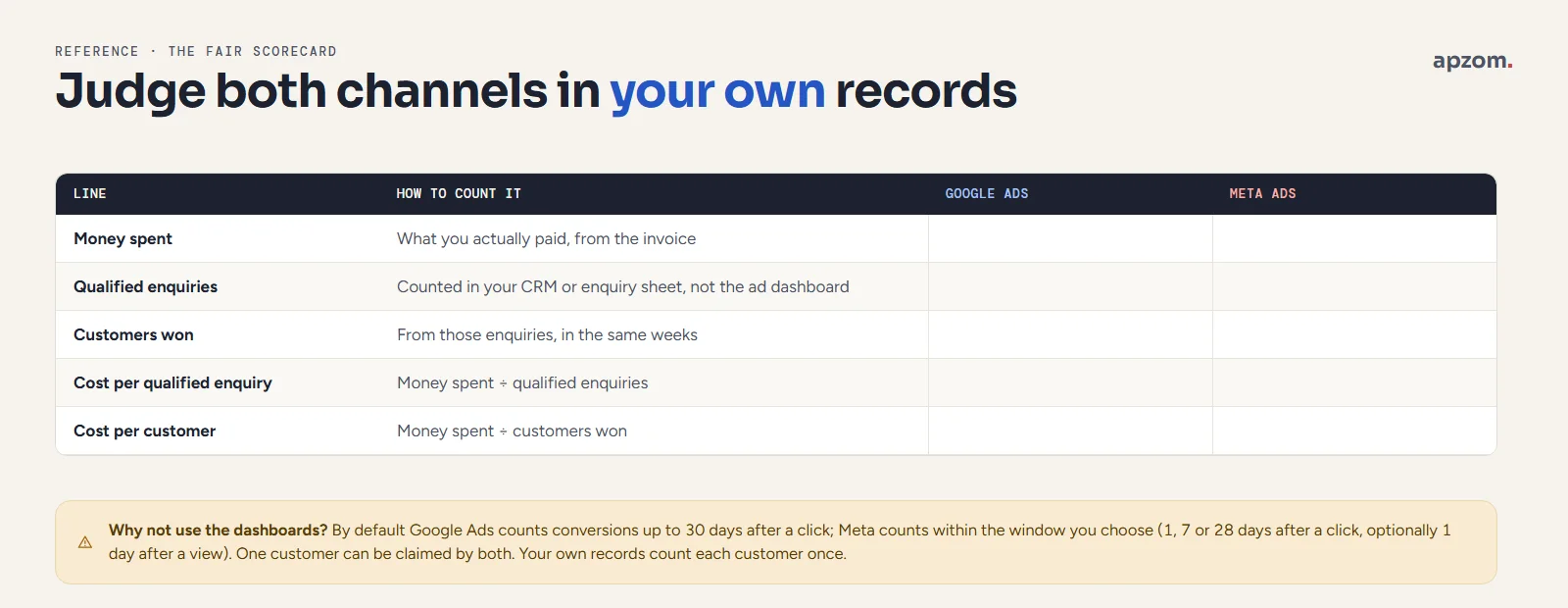
- They count different windows. By default Google Ads counts a conversion up to 30 days after a click (Google Ads Help). Meta credits conversions within the attribution window you choose: 1, 7 or 28 days after a click, and optionally 1 day after someone viewed or engaged with your ad without clicking (since 12 January 2026, Meta’s reporting API no longer returns 7-day-view or 28-day-view results, according to Meta for Developers; from March 2026 Meta counts only link clicks as click-through). Check the setting in Ads Manager when you build each ad set. A person who saw a Meta ad, then searched and clicked a Google ad, can be counted by both.
- They credit differently. Google Ads uses data-driven attribution by default for most conversion actions (Google Ads Help), which shares credit between the ad interactions before a conversion. Each platform only sees its own ads, so neither knows about the other.
- Your records are the referee. Your CRM, booking system or enquiry spreadsheet counts each customer once. Ask every enquiry how they heard of you, record the first and last source you can see, and compare cost per qualified enquiry over the same weeks.
A fair scorecard has five lines for each channel: money spent, qualified enquiries in your records, customers won, cost per qualified enquiry and cost per customer. Platform numbers such as clicks, reach or “results” are useful for running the campaign, not for choosing between channels. Our marketing ROI guide explains why Google Ads, Meta and Google Analytics show different numbers, and how to reconcile them.
Rules that can change the answer
Both platforms have their own policies, and every country has advertising law that applies on both. A few rules matter most for this choice.
- Housing, employment and financial products. Meta treats these as special ad categories for ads aimed at the US, Canada and Europe: age is fixed at 18 to 65+, gender cannot be chosen, and location targeting needs a minimum radius (Meta for Developers, Special Ad Categories). In the US and Canada, Google does not allow housing, employment or consumer-finance ads to target by gender, age, parental status, marital status or ZIP or postal code (Google Advertising Policies Help, personalized advertising). If you sell property, jobs or loans in those markets, plan for broader targeting on both platforms.
- Consent in the EEA, UK and Switzerland. Google’s EU user consent policy requires valid consent from users in the EEA, the UK and Switzerland for cookies and ad personalisation, and since March 2024 Google has required consent signals (usually sent through Consent Mode) for EEA traffic to keep using personalisation, remarketing and some measurement. The same privacy laws apply to Meta’s tracking tools on your site. You can expect smaller audiences and fewer measured conversions than in markets without these rules.
- Political and social issue ads in the EU. Google (Google blog) and Meta (Meta newsroom, from 6 October 2025) stopped serving political, electoral and social issue ads in the EU because of the EU regulation on political advertising (TTPA), which applied from October 2025. If your campaigns touch these topics, neither platform is available for them there.
- Honest advertising law applies everywhere. In the UK the CAP Code, enforced by the Advertising Standards Authority, covers paid search and paid social ads. In the US, the Federal Trade Commission says ad claims must be truthful, not deceptive or unfair, and backed by evidence. In India the ASCI Code covers ads in all media, including digital. In the UAE, individuals who publish advertising content on social media need an Advertiser Permit; check with the UAE National Media Authority whether your business’s paid ads need one. In Australia, Canada and other markets, check the local advertising regulator’s code as well. The platform approving your ad does not make it legal.
What we can and cannot show you
Our published proof for paid advertising is on Meta. HillTown Group has received “600+ leads every month from Meta ads, for 12 months running”, and Kingston Flats “560+ Meta leads every month since June 2025” (see the HillTown Group and Kingston Flats case studies). Both are property businesses, which fits the table above: a development needs to create demand before people can search for it.
We have not published a Google Ads case study yet, so we will not show you one, and those Meta numbers say nothing about how Google Ads would have performed for those clients. They are lead counts, not sales or return on spend.
Common mistakes
- Choosing by audience size. “Everyone is on Facebook” and “everyone uses Google” are both true and both useless. What matters is whether the people you reach are ready to buy.
- Splitting a small budget from day one. Two half-funded channels rarely produce a clear answer.
- Boosting posts and calling it a test. A boosted post is usually set up for engagement, not a lead or sales objective. Use Ads Manager with a lead or sales objective.
- Running Google ads on your brand name only and calling it success. People searching your name would often have found you anyway.
- Judging Meta by clicks and Google by conversions. Use the same scorecard for both.
- Changing everything every few days. Both platforms need stable campaigns to learn.
- Ignoring the free channels. A Google Business Profile, reviews and a site that loads fast make every paid click worth more. If you are still deciding between paid and organic search, read SEO vs Google Ads.
How Apzom can help
We plan and run paid campaigns across both platforms, and we start by working out which one should come first for your business. Our performance marketing service covers the plan, tracking and reporting, with Google Ads management and Meta ads management for the day-to-day work. Before any spend, we check that your tracking counts real enquiries, so the decision is made on your numbers, not ours. If you are hiring help, our guide to Google Ads management fees explains how agencies charge.
We work with clients worldwide, remotely, from our base in Ahmedabad, India.
Request a Paid Channel Plan. We run the search test for your market, review any existing Google Ads or Meta accounts and your conversion tracking, and recommend which channel to start with, what to measure and how to judge it after twelve weeks. You get a written plan and, if you want us to run it, a scoped quote.
No obligation and no guaranteed results. Prefer to talk first? Contact us or see all our services.
Frequently asked questions
Is Google Ads or Facebook Ads better for a small business?
Neither is better in general. Google Search ads suit businesses whose customers search for what they sell, especially when the need is urgent. Facebook and Instagram ads suit products that sell by being seen, or that people do not search for yet. Run the ten-minute search test in this guide to see which describes your business.
Is Facebook Ads cheaper than Google Ads?
Click prices vary by country, industry and competition on both platforms, and a cheaper click is not a cheaper customer. A person searching for your service is usually closer to buying than a person scrolling a feed. Compare cost per qualified enquiry and cost per customer from your own records, not cost per click. We do not quote typical prices because we know of no independent source that measures them reliably.
Should I run Google Ads and Facebook Ads at the same time?
Yes, once you have the budget and the tracking to judge both. Many businesses use Google Search to capture demand and Meta to create it and to remind past visitors. With a small budget, start with one, prove it over about twelve weeks, then add the other.
Which is better for B2B: Google Ads or Facebook Ads?
For most B2B suppliers Google Search comes first, because buyers search by product, part or problem. Meta can still work for remarketing, recruiting or reaching owners of small businesses. LinkedIn ads are another option for reaching people by job title, and are outside the scope of this guide.
Do I need a website for Google Ads or Meta ads?
Google Ads works best with a landing page that matches the search, although call ads and lead form assets reduce the need; lead form assets still require a privacy policy and an eligible business category. Meta can collect leads with Instant Forms inside Facebook and Instagram, so you can start without a website, but a simple, fast page usually helps people trust you.
How long should I test Google Ads or Facebook Ads before deciding?
We suggest about twelve weeks for one channel: one to set up tracking, five to let the campaign learn and fix the obvious, and six to judge. Low-budget campaigns may need longer to collect enough enquiries to judge fairly.
Can Apzom run Google Ads and Meta ads outside India?
Yes. We work with clients worldwide, remotely, from our base in Ahmedabad, India, and set up campaigns for the countries and languages you sell in.