The short answer: To add your business to Apple Maps, sign up for Apple Business at business.apple.com, which replaced Apple Business Connect in April 2026 and is free. Sign up as yourself with a work email, create your brand, then add your location: search for your existing place on Apple Maps or add a new one with its name and address. Place the pin on the right building, fill in your category, phone number, website and hours, and verify. Apple verifies existing places with a phone call and a 4-digit code; otherwise you verify your organisation with two methods, such as a business ID and official documents, which Apple reviews in up to 5 business days. Once approved, add photos, actions such as booking or ordering, and Showcases.
This guide is for owners and managers of local businesses in any country. It walks through each step as Apple describes it in October 2026, what changed when Apple Business Connect became Apple Business, how verification works, what you can add to your place card, and how long Apple takes to review each change.

Why Apple Maps matters
Apple Maps is built into every iPhone, iPad and Mac, so many customers see your business there before they ever open Google. Apple says Apple Business helps businesses reach customers across “Maps, Mail, Wallet, Siri and more”. Your place card on Apple Maps shows your hours, phone number, photos and, in many countries, ratings from Apple Maps users.
If you do not manage your place card, Apple shows whatever it has from other sources, and that can be out of date. Claiming it is free and puts you in control.
Apple Maps is one part of local search. Our local SEO checklist covers the rest, and our Google Business Profile checklist covers Google’s side in detail.
What changed: Apple Business Connect is now Apple Business
Apple announced Apple Business on 24 March 2026 and launched it on 14 April 2026. It brought together three older services, Apple Business Connect, Apple Business Manager and Apple Business Essentials, in one place at business.apple.com. The old Business Connect address redirects there, and existing Business Connect accounts and data moved across automatically.
A few of Apple’s own help pages and links still use the old Apple Business Connect name. If you follow one, you will end up in the same place.
Apple Business is free in more than 200 countries and regions. The paid extras are Ads on Maps, which is available only in the US and Canada, extra iCloud storage and AppleCare+ for Business. You do not need any of them to manage your listing.
Before you start
Have these ready:
- Your business name exactly as customers know it.
- Your address, and the exact building, so you can place the pin.
- A phone number with its country code, and your website.
- Your opening hours, including any special hours for holidays.
- A work email address and your own legal name. Apple asks the person signing up to use their real name, not a job title such as “Marketing Team”.
- Two ways to prove your organisation exists, in case you need them (see Step 4): for example a D-U-N-S Number or US EIN, access to your website’s DNS settings, or an official document such as a business licence, utility bill or lease.
- Your logo and good photos.
Step 1: sign up for Apple Business
- Go to business.apple.com and choose to sign up.
- Enter your details as a real, named person, with a work email and phone number.
- Choose the account type (see below).
- Agencies managing several businesses should choose the option for marketing agencies, then ask each client for access using the client’s Organization ID.
The two account types:
- A personal Apple Account, which is enough to manage your brand and locations on Apple Maps.
- An Apple Account for Work (a Managed Apple Account), which unlocks the rest of Apple Business, such as managing company devices.
You can also start from Apple Maps: search for your business, open its place card and look for the option to claim it.
Step 2: choose your route
The first framework is a simple decision: is your business already on Apple Maps, and does someone else already manage it?

| Your situation | What to do |
|---|---|
| Your business is on Apple Maps and nobody manages it | Add the location by searching for it, then verify by phone call |
| Your business is not on Apple Maps | Add a new location with its name and address, then verify your organisation |
| Another organisation already manages it | Use Request Transfer and attach a document such as a business licence or utility bill |
| You have many locations | Use bulk upload (added in October 2026), with up to 10,000 rows per file |
Step 3: add your location and brand
- In Apple Business, open your brand’s locations and choose Add Location.
- Search for your existing place, or add a new one by name and address.
- Drag the pin onto the right building. A pin on the wrong building sends customers to the wrong door.
- Enter your display name, primary category, status, phone number with country code, website and hours.
- Create your brand, with your brand name and logo, or choose an existing brand if you have several locations.
Step 4: verify
How you verify depends on whether your place is already on Apple Maps.
- The place is already on Apple Maps: Apple calls the phone number it has on record for the place. Enter the 4-digit code from the call to verify.
- A new place, or phone verification is not possible: verify your organisation with two of these methods: a business ID (a D-U-N-S Number or a US EIN), a DNS record added to your website’s domain, an app in App Store Connect, or official documents such as a business licence, utility bill, lease or permit.
Apple reviews organisation verification in up to 5 business days. Do not leave it unfinished: if your organisation is not approved within 60 days, Apple deletes it and its data.
If another organisation already manages your place, use Request Transfer and attach your documents. Apple reviews transfers in up to 5 business days.
Step 5: build your place card
Once your location is approved, make your place card as useful as possible. The second framework is the anatomy of a strong place card.

- Photos: up to 100, plus a cover photo. Show your entrance, inside, products or work.
- Logo, set at brand level.
- Actions: buttons that let customers book, order, reserve or do something else through a partner or your website.
- Special hours for holidays and closures.
- “Good to Know” details, such as accessibility, payment options and other facts about your place.
- Showcases: short, timed promotions with a photo and text, such as a seasonal offer or a new service.
Every change is reviewed by Apple before it appears. The third framework is a review-time planner, so you know how far ahead to make changes.

| What you change | Apple’s maximum review time |
|---|---|
| Photos | 3 business days |
| Actions | 3 business days |
| Showcases | 3 calendar days |
| Brand name and logo | 5 business days |
| Organisation verification | 5 business days |
| Disputed display-name changes | 5 business days |
| Location transfers | 5 business days |
| Bulk uploads | 5 business days |
| Branded Mail | 7 business days |
Plan Showcases for holidays and events at least a few days before you need them to appear.
No time to set up Apple Maps, Google and the rest? A Local Listings Check reviews your business on Google, Bing and Apple Maps and shows what is missing, wrong or inconsistent.
After you go live
- Check your place card in Apple Maps on an iPhone or Mac, and on the web at maps.apple.com.
- Use Insights in Apple Business to see how people find and use your place card.
- Keep details current, especially hours, special hours and phone numbers.
- Ratings. Apple Maps users can rate places with a like or dislike for different aspects, such as food or service, and add photos. Apple’s ratings are not available in every country. Our guide on how to get more Google reviews covers asking customers for reviews fairly.
- Extras, if they fit: Branded Mail shows your brand name and logo next to your emails in Apple Mail (it needs email authentication set up on a business domain), Tap to Pay branding, and Ads on Maps in the US and Canada.
Keep Apple, Google and Bing consistent
The fourth framework is a consistency check. Customers and search engines both lose trust when your details differ from one platform to the next.
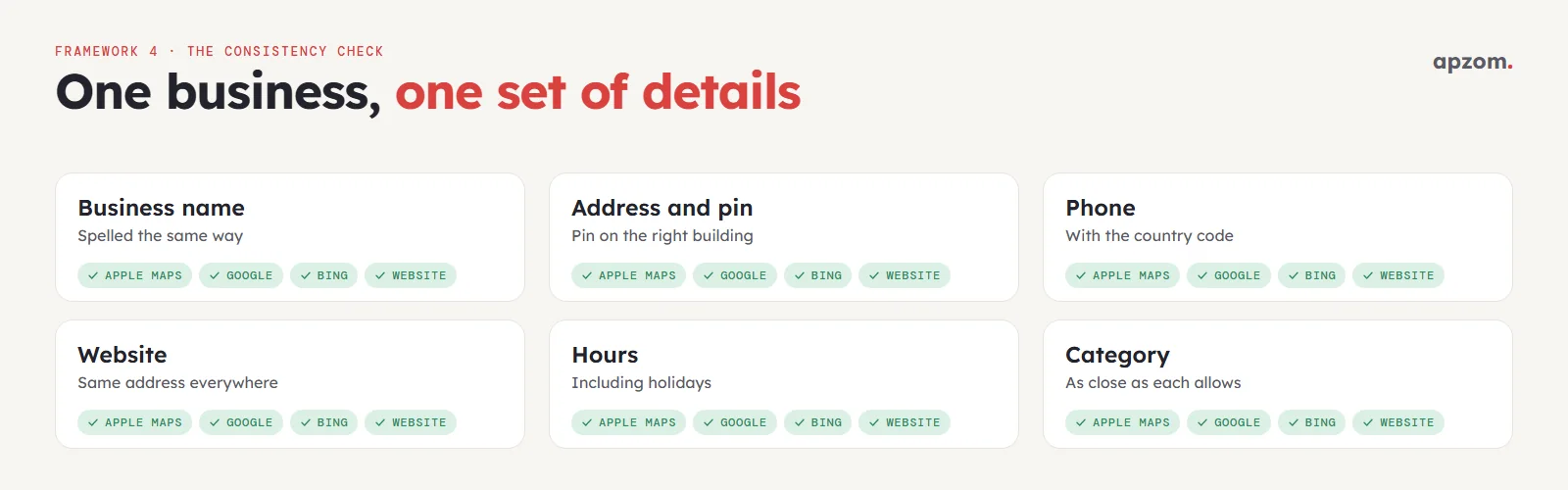
Once a month, or whenever something changes, check that your name, address, phone number, website, hours and categories match across Apple Maps, Google and Bing. Our guide on how to add your business to Bing Places walks through Microsoft’s process.
How Apzom can help
Our local SEO services include setting up and checking your listings on Apple Maps, Google and Bing, fixing wrong details and keeping them consistent. We do the same for multi-location businesses as part of our SEO services, and our SEO methodology explains how we work. We work with clients worldwide, remotely, from our base in Ahmedabad, India.
Request a Local Listings Check. We review your Google Business Profile, Bing Places and Apple Maps listings for every location, check names, addresses, phone numbers, hours, categories, photos and duplicates, and give you a prioritised list of fixes, or make them for you.
No obligation. Prefer to talk first? Contact us or see all our services.
Frequently asked questions
Is it free to add a business to Apple Maps?
Yes. Apple Business, which you use to manage your listing, is free in more than 200 countries and regions. Paid extras such as Ads on Maps are optional.
What happened to Apple Business Connect?
Apple replaced it with Apple Business in April 2026, combining it with Apple Business Manager and Apple Business Essentials at business.apple.com. Existing accounts and data moved across automatically.
How long does Apple Maps verification take?
A phone call with a 4-digit code verifies an existing place straight away. Organisation verification is reviewed in up to 5 business days, and changes such as photos and actions in up to 3 business days.
Do I need an iPhone to add my business to Apple Maps?
No. You manage your listing at business.apple.com in a web browser. You can check your place card on the web at maps.apple.com.
Can a business without a shop or office be on Apple Maps?
Apple has said businesses without a physical location are eligible for Apple Business. Its guide does not describe a way to hide an address, so check the options available when you add your location.
Can an agency manage Apple Maps listings for clients?
Yes. Apple Business has an option for marketing agencies, and each client grants access using their Organization ID.
Why is my Apple Maps listing not updating?
Every change goes through Apple’s review, which can take up to 3 to 7 business days depending on the change. If your organisation is not yet verified, changes will not appear at all.
Can Apzom manage Apple Maps listings for businesses outside India?
Yes. We work with clients worldwide, remotely, from our base in Ahmedabad, India, and manage listings on Apple Maps, Google and Bing for single and multi-location businesses.