The short answer: SEO for a SaaS company works best when every important page answers one buyer question. Build a page-type map: feature and category pages for “software that does X”, use-case and industry pages for “X for [job or industry]”, integration pages for “[your product] + [tool they already use]”, honest comparison and alternatives pages for buyers choosing between products, templates and free tools for people solving the problem today, and documentation for existing users. Start with the pages closest to a purchase (comparisons, alternatives, integrations, pricing), make sure search engines can render your JavaScript site, keep comparisons fair and evidenced, and measure SEO by trials, demos and paying customers rather than traffic.
This guide is for founders, marketers and product teams at software-as-a-service companies anywhere in the world. It explains the page types that bring in buyers, what each page needs, the rules for comparison pages (search guidelines and advertising law), when programmatic pages cross into spam, the technical problems common on SaaS sites, and how to measure results. It assumes you already have a product and a website; it is not a guide to keyword tools.
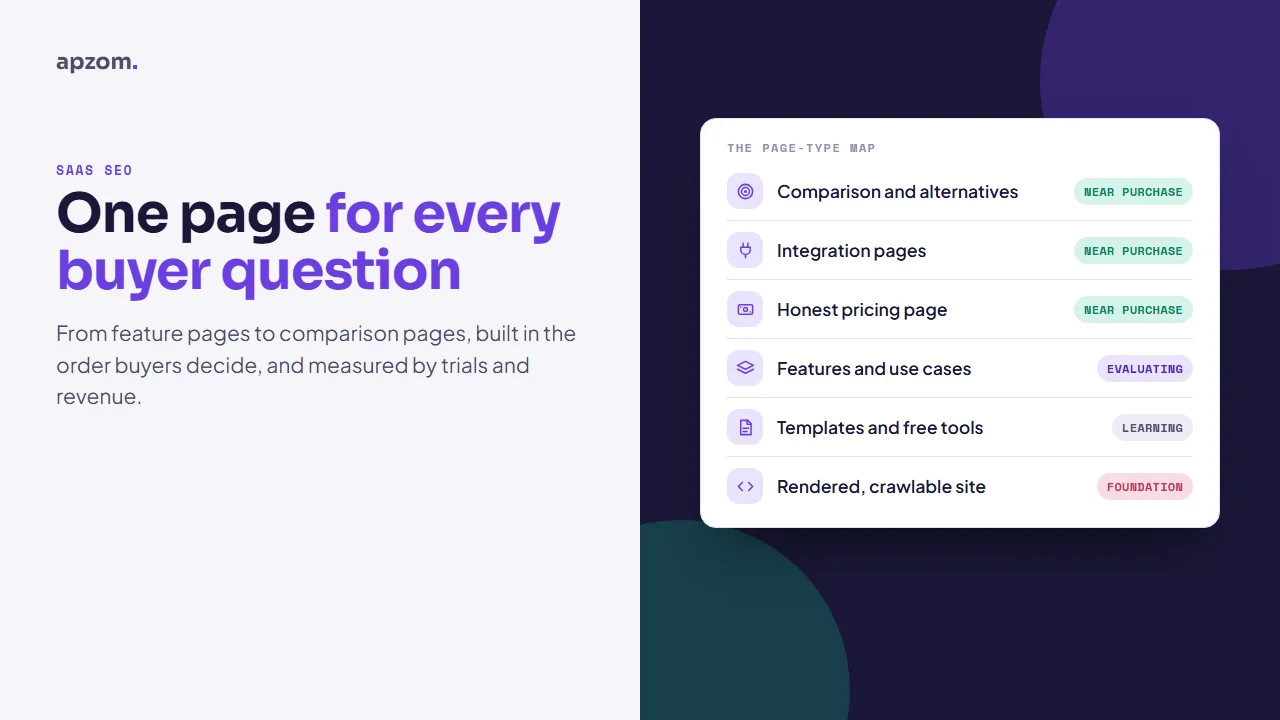
Framework 1: the SaaS page-type map
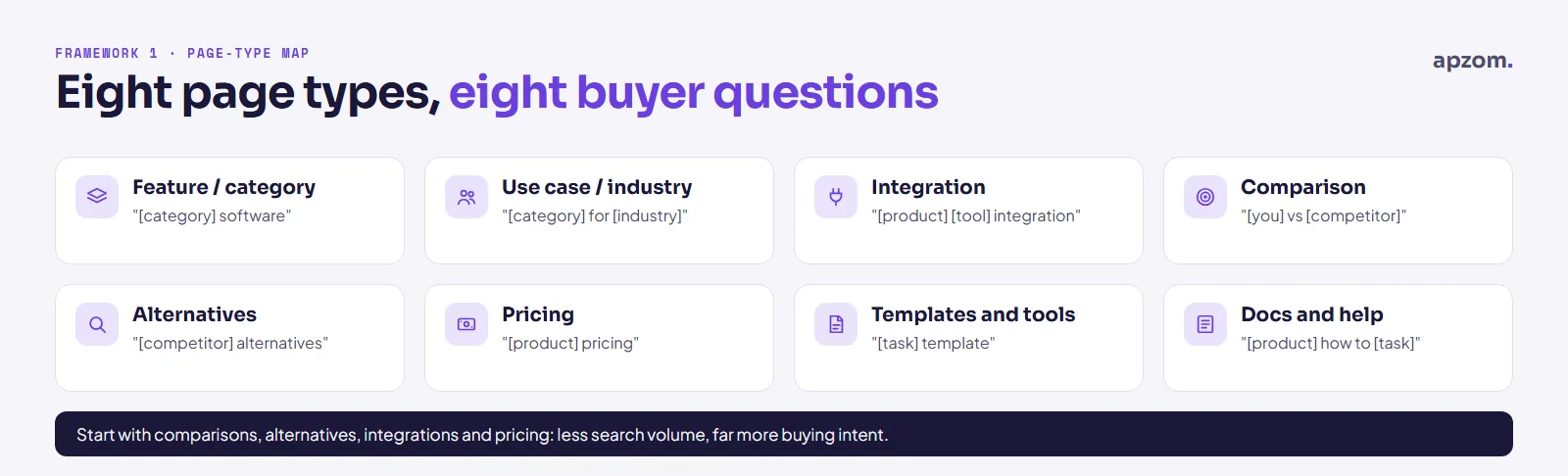
| Page type | The searcher’s question | Example search pattern | What the page must show | Usual next step |
|---|---|---|---|---|
| Category or feature page | “Is there software that does this?” | “[category] software”, “[feature] tool” | What the feature does, who it is for, screenshots, limits, pricing link | Trial or demo |
| Use-case or industry page | “Does it work for my job or industry?” | “[category] for [industry or role]” | The specific workflow, the problems it solves for that buyer, proof from that buyer type if you have it | Trial or demo |
| Integration page | “Does it work with what we already use?” | “[your product] [other tool] integration” | What syncs, in which direction, set-up steps, limits, who maintains it | Trial, docs |
| Comparison page | “Which of these two is better for me?” | “[you] vs [competitor]” | A fair, dated, evidenced comparison, including where the other product is better | Trial, pricing |
| Alternatives page | “What else could I use?” | “[competitor] alternatives” | Honest reasons people switch, several options, who each suits | Trial, comparison |
| Pricing page | “What will it cost?” | “[your product] pricing” | Plans, limits, what counts toward usage, annual vs monthly, taxes | Trial, sales |
| Templates and free tools | “How do I do this task now?” | “[task] template”, “[task] calculator” | Something genuinely usable without signing up | Sign-up, later |
| Documentation and help | “How do I do this in the product?” | “[product] how to [task]” | Accurate, current steps | Activation, retention |
The order matters. Pages near the bottom of the buying journey (comparison, alternatives, integration, pricing) usually have less search volume but far more buying intent, so they are where most SaaS companies should start.
Feature, use-case and industry pages
Write one page per feature or use case that buyers actually search for, not one per item on your release notes. Each page should:
- Say plainly what the feature does and who it is for in the first lines.
- Show it: real screenshots or short videos of the product, not illustrations of an imaginary interface.
- Explain the limits (plans, usage caps, supported regions), because buyers will find them anyway.
- Link to pricing, the relevant integration pages and documentation.
Industry and role pages are only worth building when the workflow really differs: a “CRM for real estate agents” page that explains listings, viewings and portal leads is useful; the same page with the industry name swapped is not, and at scale it can look like doorway pages to search engines (see the spam section below).
Integration pages
Integration pages often match very specific buying intent, because the searcher has already chosen two tools and wants to know if they work together. A useful integration page answers:
- What data syncs, in which direction, and how often.
- How to set it up, in steps, with any plan requirements.
- What it cannot do.
- Whether you, the other company or a third-party connector maintains it.
- The next step: a link to the docs, or a trial with the integration switched on.
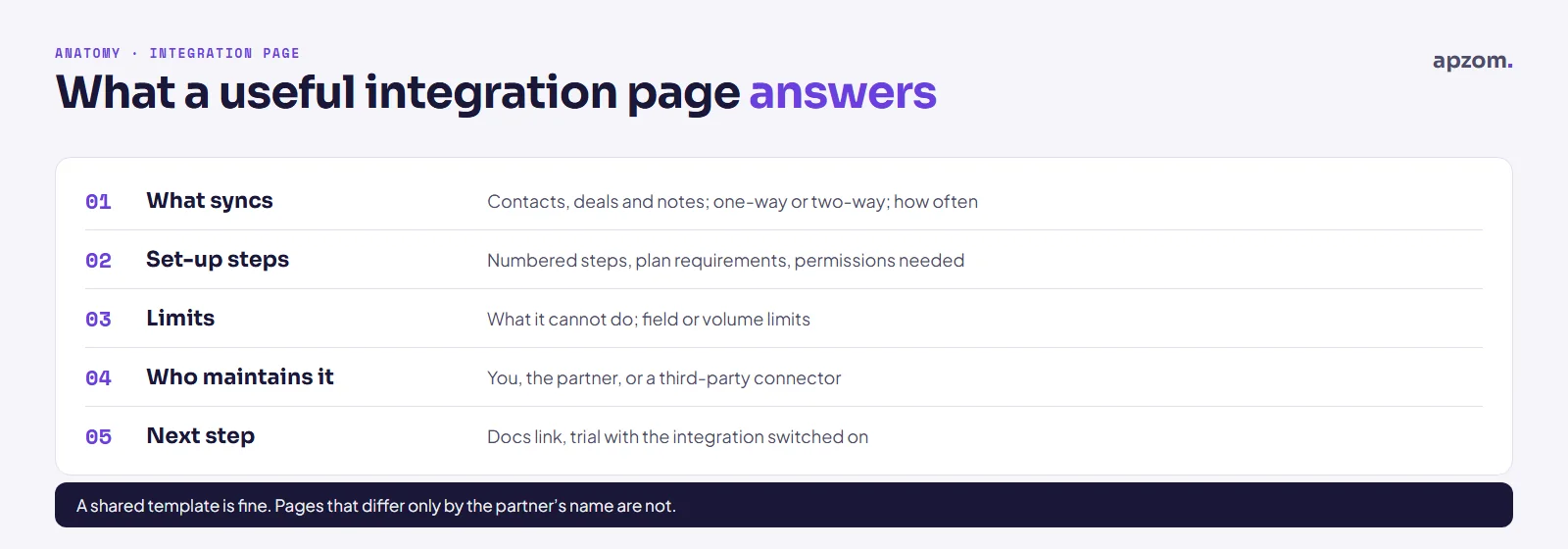
If you have dozens of integrations, a template is fine, but each page needs its own specific content (what syncs, set-up, limits). Hundreds of near-identical pages with only the partner’s name changed are the kind of scaled content search engines treat as spam.
Missing the pages buyers search for before they choose? Ask for a Free Growth Audit. We map your feature, integration, comparison and pricing pages against what buyers search for, check how search engines render your site, and tell you what to build or fix first.
Framework 2: honest comparison and alternatives pages
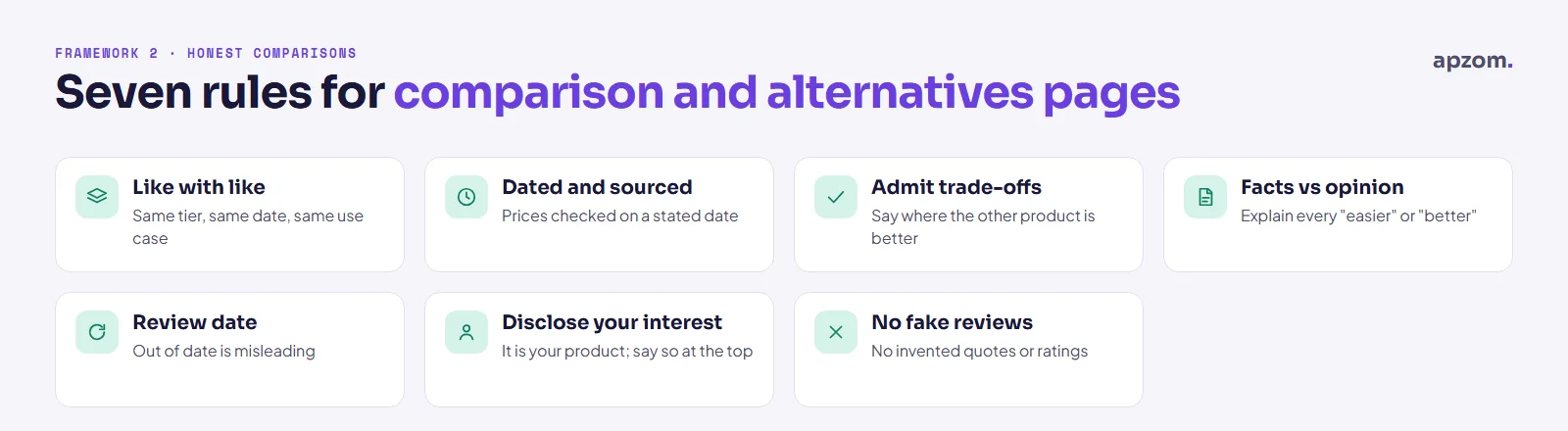
Comparison pages convert well and attract scrutiny: from buyers, from competitors and, in some countries, from advertising regulators. Two sets of rules apply.
Search guidelines. Google’s guidance on writing high-quality reviews asks review and comparison content to “explain what sets something apart from its competitors” and to “discuss the benefits and drawbacks” based on your own research. On your own “[you] vs [competitor]” page, that means showing where the competitor is stronger too, with evidence such as tested features, screenshots and dated prices, not just a table of ticks in your favour.
Advertising law. Comparative advertising is allowed in the main markets, with conditions. In the US, the FTC has encouraged naming competitors since its 1979 policy statement on comparative advertising, provided the comparison is truthful and not deceptive. In the UK, the CAP Code allows comparisons with identifiable competitors if they compare products meeting the same needs or intended for the same purpose, and objectively compare material, relevant, verifiable and representative features; it also bars denigrating competitors and misusing their trade marks. In the EU, Article 4 of Directive 2006/114/EC sets similar conditions. Other countries have their own rules, so check locally. This is general information, not legal advice.
A practical checklist for every comparison or alternatives page:
- Compare like with like: the same plan tier, the same date, the same use case.
- Date it and source it: “Pricing checked on [date] from each company’s pricing page.”
- Say where the other product is better. Buyers trust comparisons that admit trade-offs, and a balanced, evidenced comparison is harder to challenge as misleading.
- Separate facts from opinion. Features and prices are facts; “easier to use” is an opinion, so explain why you say it.
- Keep it updated. Set a review date; an out-of-date comparison is a misleading one.
- Disclose your interest. It is your product; say so near the top.
- No fake reviews or invented customer quotes. In the US, the FTC’s rule on consumer reviews and testimonials (16 CFR Part 465, in force since October 2024) bans fake reviews and testimonials, paying or rewarding people for reviews that express a particular sentiment, reviews by officers or managers (and testimonials from staff) without a clear disclosure of the relationship, company-controlled sites that pretend to be independent review sites, and unfair suppression of negative reviews. The UK CAP Code and EU consumer law also prohibit fake reviews.
Pricing, trials and trust pages
Pricing page. “[product] pricing” is one of the most valuable searches you can rank for, because the searcher is already considering you. Show real prices where you can rather than only “contact sales”, explain plan limits and what counts toward usage, say whether prices include tax, and keep the page indexable. If you sell only through sales, explain what the price depends on.
Free trials and sign-ups. Keep sign-up, login and app URLs out of the index (noindex), but link to sign-up clearly from every marketing page, and record which landing page each trial started on so you can see which pages produce customers.
Security and compliance pages. B2B buyers search for “[product] security”, “[product] GDPR” or “[product] SOC 2” before they sign. A clear security page (data location, certifications you actually hold, your data processing agreement, sub-processors) answers them; never claim a certification you do not have.
Partner marketplaces and review sites. Your listing in a partner’s app marketplace often ranks for “[partner] + [your product]”, and third-party review sites often rank for “[you] vs [competitor]”. Keep those listings accurate and current: they are part of your search presence even though you do not control the page.
International. If you sell in several countries or languages, use one URL per language or region, with hreflang annotations and a canonical per version, and localise pricing and currency pages rather than only translating them.
Templates, free tools and documentation
Templates, calculators and free tools attract people solving the problem right now, many of whom are not ready to buy. They work when the tool is genuinely useful without a sign-up, related to what your product does, and linked to the product page that does the job at scale.
Documentation is SEO too. Many SaaS companies hide help content on a separate platform that search engines struggle to crawl, or behind a login. Public, well-structured docs help existing users find answers and show prospects how the product really works.
Programmatic pages and spam policies
Many SaaS sites generate pages at scale: integrations, templates, locations, “X vs Y” combinations. Google’s spam policies define scaled content abuse as generating many pages “for the primary purpose of manipulating search rankings and not helping users”, however they are produced, whether by people, templates or AI. Pages built to rank for many similar searches and funnel people to one destination are what Google calls doorway abuse (Google Search Central, Spam policies for Google web search). Google does not ban AI-assisted or templated pages as such; it targets pages made at scale without adding value for users.
Google’s spam policies also changed in 2026: the rules formerly called “site reputation abuse” now appear as the “site reputation policy”, with different enforcement inside the EEA from 30 August 2026, and Google has clarified that attempts to manipulate its AI-generated answers are covered too. If you host third-party content (partner pages, guest posts, coupon or review sections), check the current policy.
A simple test before publishing a page set: would each page still be worth publishing if search engines did not exist? If the only difference between pages is a swapped name, merge them into one better page.
Technical SEO for SaaS sites
Many SaaS marketing sites are built as JavaScript single-page apps. Google’s JavaScript SEO basics page says it is fine to use JavaScript to add links and content, as long as the basics are right:
- Use real links:
<a href="...">elements, not click handlers on buttons or divs, so search engines can find your pages. - Use real URLs: History API routes rather than
#fragmentURLs for different pages. - Return proper errors: a missing page should return a 404 status or a noindex, not a “page not found” message on a 200 page (a soft 404).
- Consider server-side rendering or pre-rendering for important marketing pages. Google still recommends it, because, in Google’s words, “not all bots can run JavaScript”.
Other common SaaS problems to check:
- Marketing site, app, blog and docs on different platforms or subdomains, with inconsistent navigation, duplicate pages or no links between them.
- Login pages, app screens and staging sites that are accidentally indexable.
- Pricing and plan pages that change without anyone updating comparison pages, FAQs or structured data.
- Slow pages from heavy scripts, chat widgets and tracking tags; our guide to Core Web Vitals explains what to measure.
Structured data. See our guide to schema markup for small businesses for the basics. Google still supports the Software app rich result. Its markup needs a name, a price (0 if the app is free) and a genuine aggregate rating or review. Do not paste in your G2 or Capterra average: Google’s review snippet rules say “Don’t aggregate reviews or ratings from other websites”, and a rule added in July 2026 also excludes fake or undisclosed incentivised reviews. Organization markup on your home page helps search engines connect your brand, logo and profiles. FAQ rich results stopped showing in Google Search on 7 May 2026, so keep FAQs only where they help readers.
AI search and answer engines
Google’s “AI features and your website” page says “There are no additional requirements to appear in AI Overviews or AI Mode”, and its May 2026 guide to optimising for generative AI features calls this “still SEO”. That guide also says Google Search ignores llms.txt files and does not need content split into small “chunks”. What matters is the same as for classic search, and especially relevant to SaaS: clear, specific, evidenced pages that answer the comparisons and “does it integrate with” questions buyers ask, because those are the complex questions AI answers try to handle.
Let the crawlers in. Check your robots.txt and any CDN or firewall bot-blocking rules, so the search and AI crawlers you want can reach your marketing pages and docs. Security tools sometimes block them by default.
Measure trials and revenue, not traffic
Connect SEO to the product funnel:
- Track sign-ups, trials, demo requests and paid conversions by landing page and by page type, in your analytics and CRM. Our guides to GA4 set-up and Google Tag Manager cover the set-up.
- Use Search Console to see which queries and pages bring impressions and clicks, and which comparison or integration searches you appear for but do not win.
- Report by page type: comparisons, integrations and features usually convert differently from blog posts, so judge each type against its job.
Framework 3: what to build first
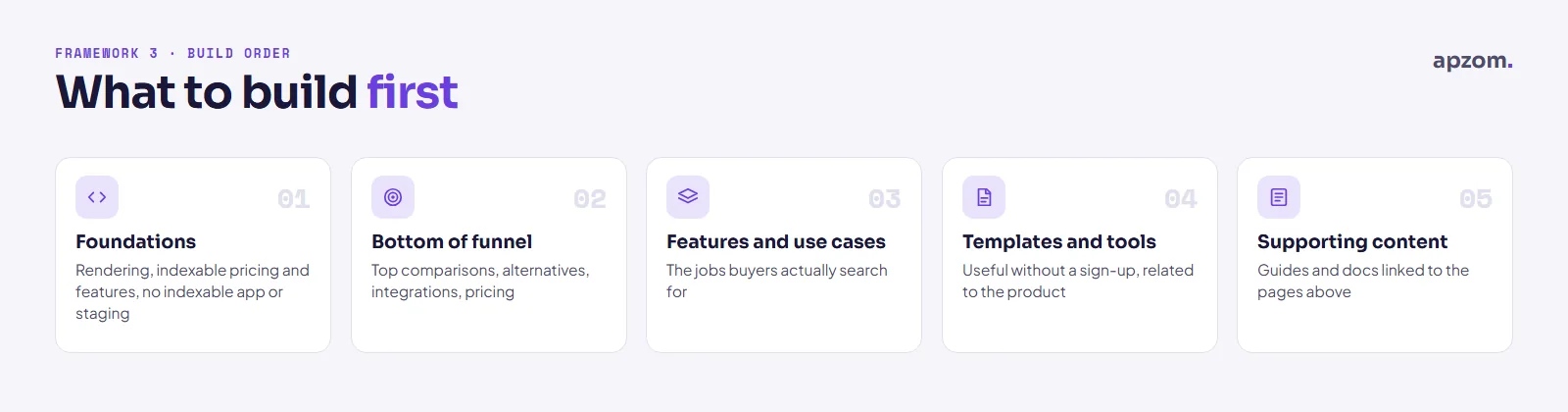
- Fix the foundations: crawlable links and URLs, indexable pricing and feature pages, no indexable app or staging pages.
- Bottom-of-funnel pages: your top comparison and alternatives pages, your most-used integrations, an honest pricing page.
- Feature and use-case pages for the jobs buyers search for.
- Templates and free tools that are related to your product.
- Supporting content and docs, linked to the pages above.
Common mistakes
- Starting with top-of-funnel blog posts while comparison, integration and pricing pages are missing or thin.
- One-sided comparison pages that pretend the competitor has no strengths.
- Hundreds of templated pages with only a name changed.
- Content search engines cannot reach: pages behind a login, links that are not real links, or routes that only work in the browser.
- Measuring traffic instead of trials, demos and revenue.
- Out-of-date pricing and feature claims, on your pages and in comparisons.
How Apzom can help
Apzom Digital’s SEO services can follow the page-type map in this guide: we audit your current pages and rendering, plan the comparison, integration, feature and use-case pages your buyers search for, and connect SEO to sign-ups and trials in your analytics. We have not published a SaaS case study yet, so we will not promise rankings or trial numbers; we can review your site and tell you which pages to build or fix first. Our GEO and AI search work covers visibility in answer engines.
We work with clients worldwide, remotely, from our base in Ahmedabad, India.
Frequently asked questions
Is it legal to name a competitor on my website?
In the US, UK and EU, generally yes, if the comparison is truthful, fair and verifiable, compares products that meet the same need, and does not denigrate the competitor or misuse its trade marks. Rules vary by country, so take legal advice before publishing a comparison campaign.
Should my blog and docs be on a subdomain or a subfolder?
Google’s documentation does not say that a subfolder ranks better than a subdomain. Choose by how you will run it: who maintains the platform, whether navigation and links between the blog, docs and product pages stay consistent, and whether everything is crawlable. What matters most is that the sections link to each other properly.
How long does SaaS SEO take to work?
Bottom-of-funnel pages such as comparisons and integrations can start bringing qualified visits within months if your site is already crawled and trusted; broader content usually takes longer. There is no guaranteed timeline.
Do I need a separate page for every integration?
Only for integrations people search for or ask about. For the rest, a well-organised integrations directory with short entries is fine. Each page you publish should have specific, useful content.
Should I gate templates and tools behind an email form?
Usually not for SEO: search engines cannot see content behind a form, and many visitors leave. Offer the tool openly and invite people to sign up for something extra.
Get your Free Growth Audit and Quote. We review your SaaS site’s page types, rendering, comparison pages and sign-up tracking, and send a plain-English plan ranked by how close each page is to a purchase.
No obligation and no guaranteed rankings. Prefer to talk first? Contact us or see our SEO services.