
The short answer: A click-to-WhatsApp ad is a Facebook or Instagram ad whose button opens a WhatsApp chat with your business instead of a website. To run one, link a WhatsApp Business number to your Facebook Page, create an Engagement or Leads campaign in Meta Ads Manager with WhatsApp as the messaging destination, and write a pre-filled message that tells you which ad the person tapped. The ad is the easy part. The result depends on what happens in the chat: a greeting, away message and quick replies ready before launch, a person who answers within an agreed time, a short qualifying script, and a weekly count of qualified leads rather than chats started.
This guide is for business owners, marketing leads and the people who answer the chats at service businesses anywhere in the world. It covers how the ads work, whether you need the free WhatsApp Business app or the paid WhatsApp Business Platform, what messaging costs as Meta states it today, the campaign set-up, the inbox set-up, a response workflow and qualifying script, how to measure results, and the consent rules that apply. We checked Meta’s documentation, WhatsApp’s Help Center and the WhatsApp Business Messaging Policy against official sources on 23 November 2026. Menu names and prices change, so check the current screens before you rely on any one label.
How a click-to-WhatsApp ad works
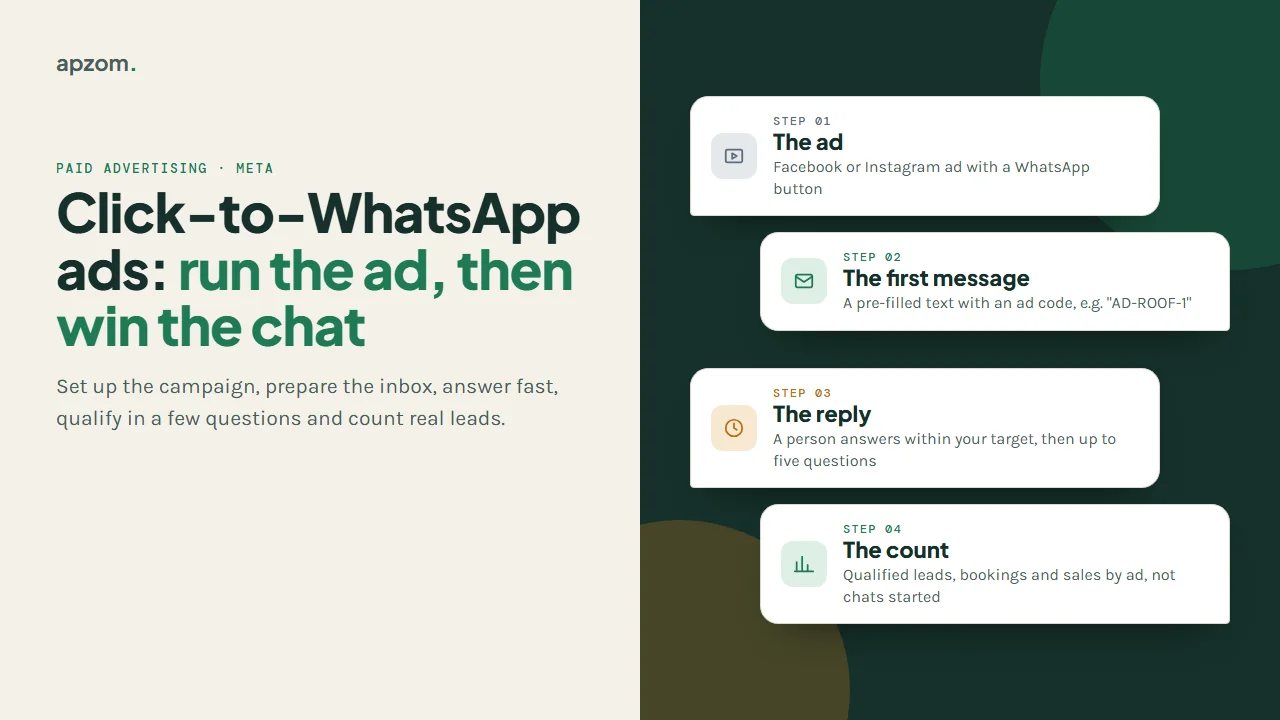
The person sees your ad in Facebook or Instagram and taps the button. WhatsApp opens on their phone with a chat to your business and a message already typed for them. Meta’s Marketing API documentation gives the default text as “Hello! Can I get more info on this?”, and you can replace it with your own. When they press send, the conversation has started and your business can reply.
Three things follow from this design.
- You pay Meta for the ad in its normal auction. Our guide to how much Facebook and Instagram ads cost explains the auction, billing and tax.
- Messaging costs depend on the WhatsApp product. Replies from the free WhatsApp Business app cost nothing extra; Platform messages are priced per message, with a free window for chats from ads.
- The chat replaces the landing page. Your first replies must answer the question, show you are a real business and ask for the next step.
These ads suit businesses whose customers prefer to message and whose questions need a short conversation before a booking or quote. They suit a business badly when nobody can reply within the working day. Our guide to Facebook and Instagram ads for local businesses compares WhatsApp with instant forms, websites and calls as destinations if you are still choosing.
WhatsApp Business app or Platform: which you need
You can run click-to-WhatsApp ads with either product. The choice decides what the chats cost, how many people can answer them and what you can measure.
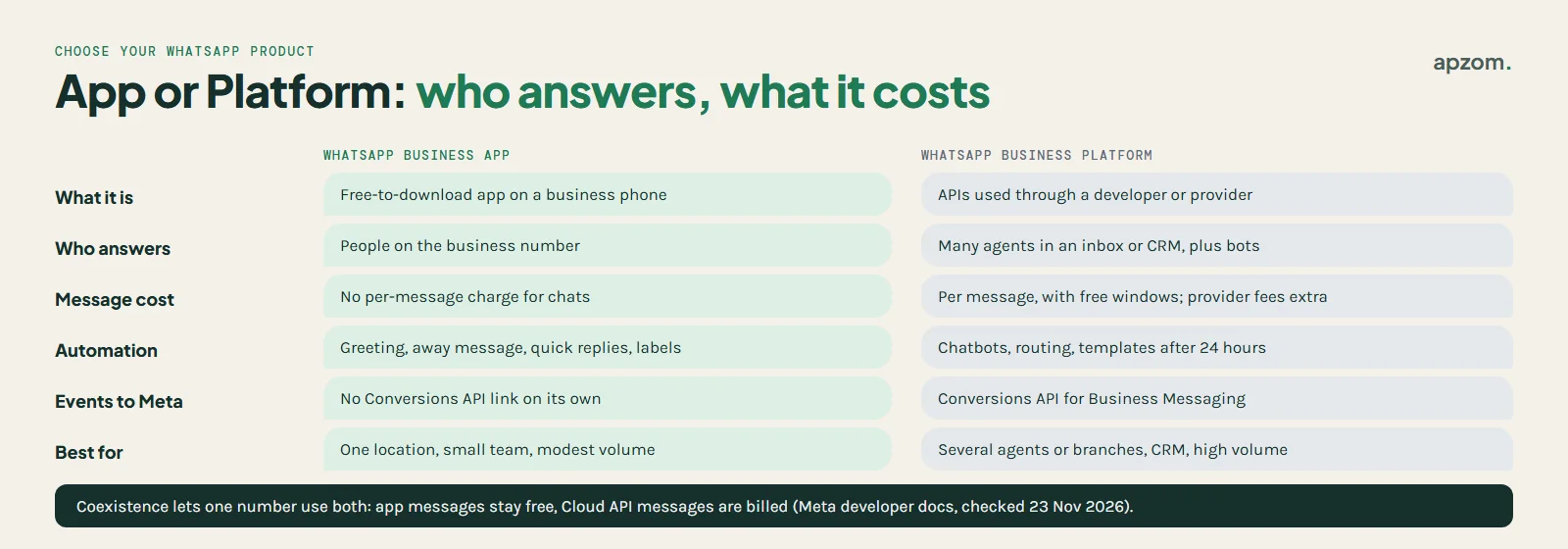
| Feature | WhatsApp Business app | WhatsApp Business Platform |
|---|---|---|
| What it is | A free-to-download app for a business phone | A set of APIs, used through a developer or a Business Solution Provider |
| Who answers | People using the app on the business number | Any number of agents in an inbox or CRM tool, plus automation |
| Messaging cost | No per-message charge for chats; business broadcasts are a paid feature | Per-message pricing, with free windows described below |
| Automation | Greeting, away message, quick replies, labels | Chatbots, routing, CRM integration, templates outside the 24-hour window |
| Sending events back to Meta | No Conversions API connection on its own | Conversions API for Business Messaging can send leads and purchases |
| Best for | One location, a small team, modest chat volume | Several agents or branches, high volume, or a CRM that must record every chat |
WhatsApp’s Help Center describes the app as “a free-to-download app” built “with the small business owner in mind”. Meta describes the Platform as a set of APIs rather than an app, which is why most businesses reach it through a provider. The provider’s own fees sit on top of Meta’s message charges, so ask for both when you compare quotes. One caveat: Meta announced in April 2025 that business broadcasts in the app would become a paid feature.
You do not have to choose forever. Meta’s developer documentation describes “coexistence”: a business keeps the WhatsApp Business app and connects the same number to the Cloud API through a Solution Partner or Tech Provider. Messages sent from the app stay free; messages sent through the Cloud API are billed. Some app features change, for example broadcast lists become read-only, so read Meta’s current list first.
Our rule of thumb: start with the app if one or two people will answer and you get a manageable number of chats a day. Move to the Platform when chats are missed because people share one phone, when you need the chats in your CRM, or when you want Meta to optimise for leads and sales that happen inside WhatsApp.
What messaging costs on the Platform
Meta’s pricing page for the WhatsApp Business Platform says: “Meta charges on a per-message basis, aligned to industry standards.” The per-message model replaced the older per-conversation model on 1 July 2025, so ignore guides that still talk about paying per conversation. Four rules matter for chats from ads.
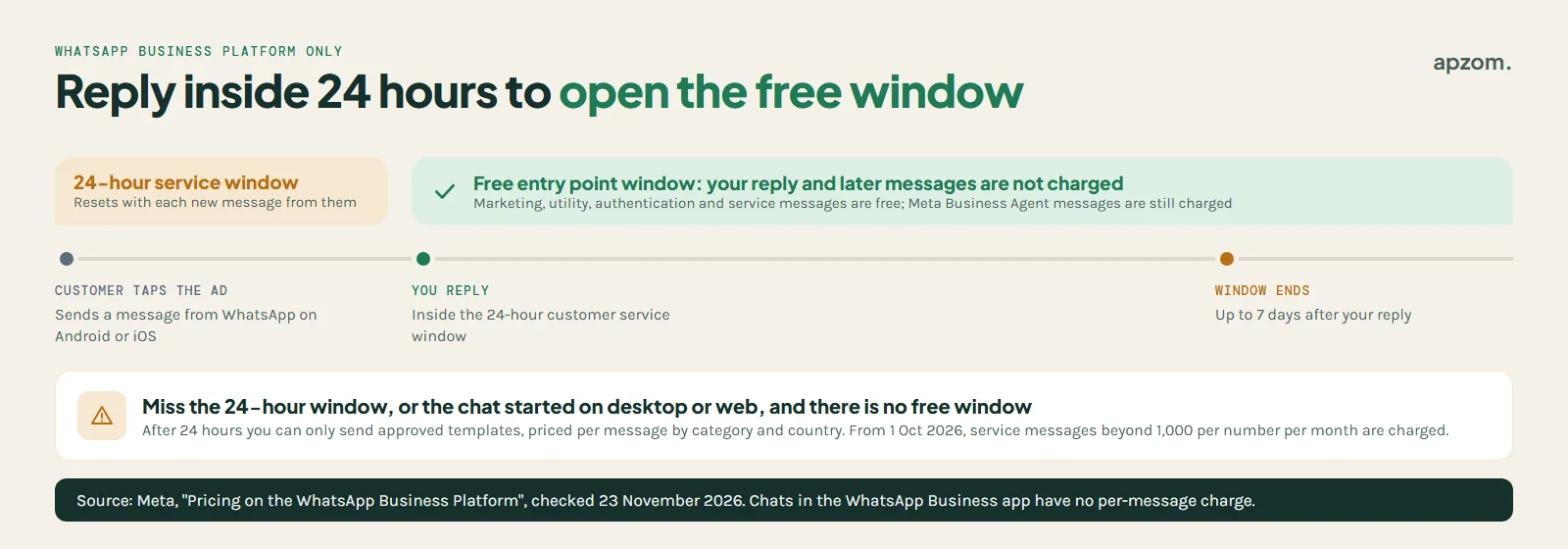
- The 24-hour customer service window. Meta’s page says that when a user messages you, “a 24-hour timer called a customer service window starts”, and each new message from them resets it. Inside the window you can send ordinary free-form replies. Outside it you can only send pre-approved template messages.
- The free entry point window. If the person messages you from a click-to-WhatsApp ad on the WhatsApp Android or iOS app, and you reply within the customer service window, Meta says that reply is not charged and opens a free entry point window from the moment you replied. Meta’s page says “The FEP window may remain open for up to 7 days.” During it, Meta does not charge for marketing, utility, authentication or service messages (its Meta Business Agent messages are still charged). Chats started on WhatsApp desktop or web do not qualify.
- Service messages have a free tier, not unlimited free use. From 1 October 2026, Meta again charges for service messages beyond a free tier of 1,000 per business phone number per month, and it now charges for utility messages sent in reply to customers inside an open service window. Meta’s pricing update says the free entry point window is unchanged, so messages inside it stay free apart from Meta Business Agent messages.
- Rates vary by country and category. Template prices depend on the message category and the recipient’s country code, and Meta says it changes prices only on the first day of a quarter. Check Meta’s current rate card and your provider’s fees before you budget; we do not quote prices because they change too often.
The practical lesson: on the Platform, reply inside 24 hours, or the free window never opens and later messages must be paid templates.
Set up the campaign
Before you start
You need a WhatsApp Business account on a number you control, a Facebook Page, and the WhatsApp number linked to that Page. Meta’s Marketing API documentation lists “A Facebook page with WhatsApp number linked” as a requirement, and Meta’s Business Help Center article “How to connect or disconnect your Page and WhatsApp” has the current steps. If your agency runs the ads, give it access through your business portfolio rather than handing over passwords; our guide on giving an agency access to your Meta Business portfolio shows how to keep ownership.
In Meta Ads Manager
- Choose an objective. Meta’s Marketing API documentation lists Engagement, Leads, Sales and Traffic as the objectives that support ads that click to WhatsApp. Engagement can optimise for conversations, and Leads optimises for conversations. For most service businesses, start with Engagement or Leads and a goal of maximising conversations. Sales can optimise for purchases inside WhatsApp only when purchase events are sent back through the Conversions API for Business Messaging, described in the measurement section.
- Set the conversion location. In the ad set’s Conversion section, pick the messaging option and select WhatsApp. WhatsApp’s own guide calls the option Messaging apps; some accounts show it as Message destinations. Confirm that the WhatsApp number shown is the one your team answers.
- Pick placements. Meta’s documentation says these ads can publish to Facebook, Instagram and Messenger. WhatsApp’s Help Center says the WhatsApp Status and Channels placements are only available in Ads Manager.
- Set the audience, budget and schedule. Run the ads during the hours your team can reply, or make sure the away message and next-morning routine below are ready before the ads run overnight.
- Write the ad and its message setup. Meta’s documentation describes a greeting, a pre-filled message the customer sends, and ice breakers, which are suggested questions the person can tap. Fill these in deliberately, as the next section explains.
From the WhatsApp Business app
You can also create the ad inside the app: WhatsApp’s Help Center gives the path as Tools, then Advertise. You choose a photo, catalog item or status, then a budget, duration and audience. WhatsApp says that without a linked Facebook Page the ads deliver to Facebook only. The app is quicker; Ads Manager gives more control over objectives, placements and reporting.
Write a pre-filled message that identifies the ad
Our suggestion: replace the default pre-filled text with a short message that names the offer, such as “Hi, I’d like the free roof inspection (AD-ROOF-1)”. The person can edit it, but most will send it as written. In the WhatsApp Business app, which has no Conversions API connection of its own, that code is often the only way to tell which ad started a chat. Use one code per ad or offer and keep a list of what each code means.
Keep the ad honest: if a bot answers first, say “Chat with us on WhatsApp”, not “Talk to our expert now”.
Prepare the inbox before you spend
A chat that waits hours for a first reply costs the same to buy as one answered in a minute. Set these up in the WhatsApp Business app before the first ad runs. The steps below are from WhatsApp’s Help Center; Platform providers have equivalents in their own inbox tools.
- Greeting message. Tools, then Greeting message, then turn on Send greeting message. WhatsApp sends it when someone messages you for the first time, or after 14 days without messages in that chat. WhatsApp also says greeting messages are turned off automatically when Meta Business Agent is connected. Test the ad’s own greeting and the app greeting together so a new contact does not receive two different welcomes.
- Away message. Tools, then Away message. You can send it always, on a custom schedule or outside business hours; the last option only appears once you have set business hours in your business profile. Say when a person will reply, not just that you are away.
- Quick replies. Tools, then Quick replies. You can store up to 50 and insert one by typing “/” in the message box. WhatsApp notes that media files are not supported in quick replies on Web or Desktop. Write one for each qualifying question, your prices or price ranges if you publish them, your address and hours, and the booking link.
- Labels or lists. Tag each chat with its stage, for example New, Qualified, Booked, Won and Not a fit. WhatsApp is folding labels into a newer lists feature, so the menu depends on your app version.
- Business profile. Fill in the address, hours, website and description.
Planning click-to-WhatsApp ads? Ask for a Free Growth Audit. We review your Meta campaign plan, the WhatsApp set-up (app or Platform), your greeting, away message and quick replies, and how chats are counted, and tell you what we would change before you spend, including whether the free app is enough for now.
A response workflow and qualifying script
What follows is our suggestion, not a Meta rule or an industry standard; adapt it to your business. For why response time matters and targets for every type of lead, read our guide to speed to lead; this section covers only the WhatsApp chat.
Who answers, and when
- Name one inbox owner per shift. “Everyone keeps an eye on it” means nobody does.
- Set a first-reply target. Our working target for chats from ads is a human reply within 15 minutes during business hours, which matches the target in our speed-to-lead guide. Out of hours, the away message replies at once and a person replies at the start of the next working day.
- On the Platform, never let the 24-hour window close unanswered. Once it closes, you can only send a paid template, and the free entry point window will not open.
- Escalate missed chats. If a chat has no human reply after the target, it moves to a second person.
A five-question qualifying script
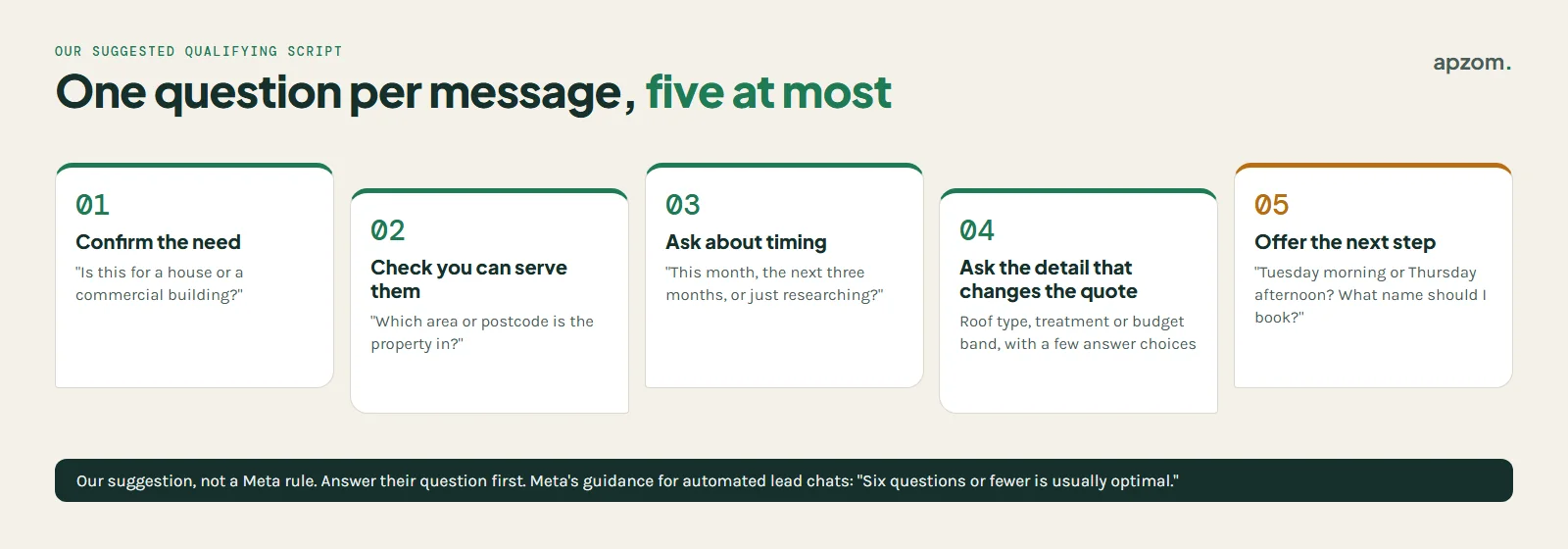
Ask one question per message and stop once you can book or quote. Meta’s own guidance for automated lead chats says “Six questions or fewer is usually optimal”, and we aim for fewer.
- Confirm the need. “Thanks for messaging us about the roof inspection. Is this for a house or a commercial building?”
- Check you can serve them. “Which area or postcode is the property in?” Ask this early, so you do not waste their time if you cannot help.
- Ask about timing. “When are you hoping to get this done: this month, in the next three months, or just researching?”
- Ask the one detail that changes the quote. For a roofer it might be the type of roof; for a clinic, the treatment; for a property project, the budget band. Use a question with a few answer choices.
- Offer the next step. “We have inspection slots on Tuesday morning and Thursday afternoon. Which suits you, and what name should I book it under?”
Then label the chat and add one line of notes. If the person goes quiet, follow up once inside the 24-hour window, and stop when someone says no.
When automation answers first
Chatbots and Meta’s own AI tools can greet people and ask the first questions, but WhatsApp’s Business Messaging Policy requires that automated chats have “prompt, clear, and direct escalation paths” to a human, such as an in-chat transfer to an agent, a phone number or an email. Say how to reach a human in the first automated message, and test the handover on a weekend.
Measure what the chats produce
What Ads Manager counts
Ads Manager reports messaging conversations started and the cost per conversation started. It is a delivery signal, not a lead count: it includes people who sent the pre-filled text and never replied again, and Meta applies its own rules for when a conversation counts as started. Check the metric’s current definition in Ads Manager before you compare it with your own numbers.
What you should count
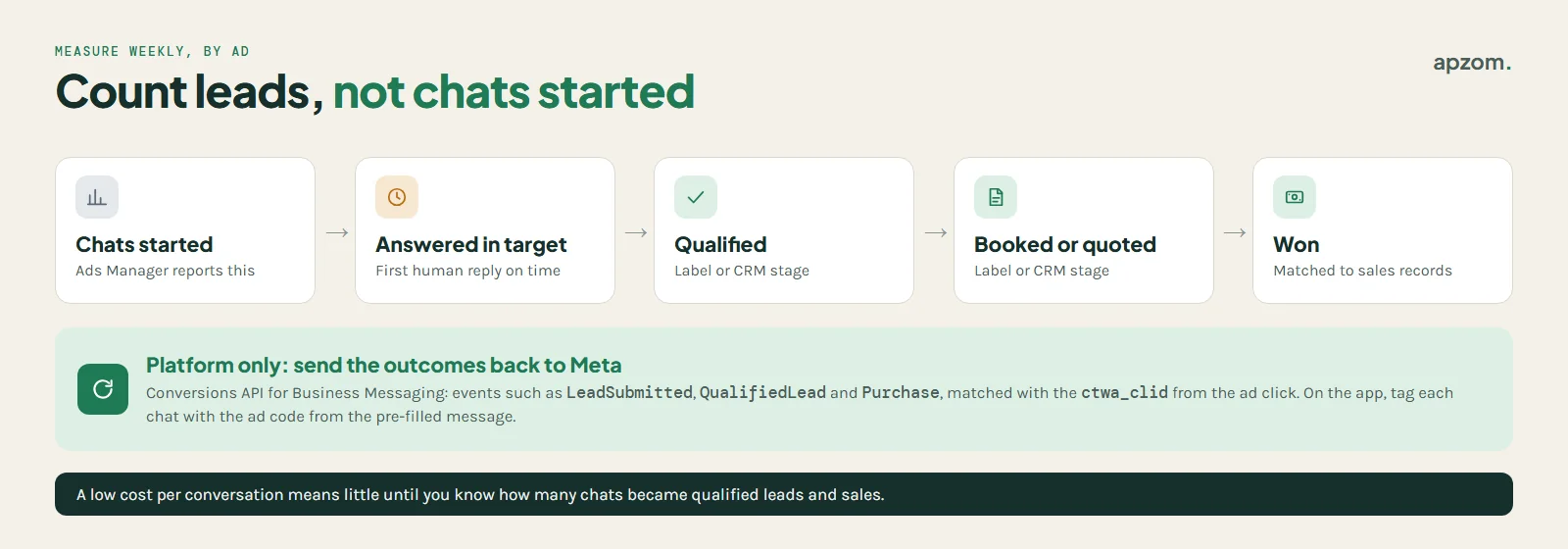
Count the steps after the chat yourself, once a week, by ad or pre-filled code:
| Stage | How to count it in the app | How to count it on the Platform |
|---|---|---|
| Chats started | New chats with an ad code | Conversations tagged with the ad referral |
| Answered within target | Spot-check first-reply times | Report from the inbox tool |
| Qualified | Chats labelled Qualified | CRM stage or a QualifiedLead event |
| Booked or quoted | Chats labelled Booked | CRM stage |
| Won | Matched to your sales records | Purchase event or CRM stage |
The qualified, booked and won rows decide whether a campaign works. Our guide on how to reduce cost per lead explains how to judge cost against lead quality.
Send chat outcomes back to Meta (Platform only)
Meta’s Conversions API for Business Messaging lets a business on the WhatsApp Business Platform, directly or through its provider, send events from chats back to Meta. Meta’s documentation says WhatsApp events use the ctwa_clid, an identifier that is “unique per click” on the ad, with the WhatsApp Business account ID and an action source of business_messaging. Supported events include LeadSubmitted, QualifiedLead and Purchase. Meta says this API “enables access to purchase optimization for ads that click to Messenger and ads that click to WhatsApp only”. This is how you teach Meta to find customers, not just chatters, and it needs the Platform.
If you also run website conversions, our guide to setting up the Meta Pixel and Conversions API covers the website side. The idea of feeding lead quality back to Meta is the same one we explain for instant forms in our guide to low-quality leads from Meta lead ads.
Consent, privacy and WhatsApp’s rules
Two layers apply to every chat: WhatsApp’s own policy, wherever you are, and the data and marketing laws where your customer lives. This is a summary of what we checked on 23 November 2026, not legal advice.
WhatsApp Business Messaging Policy
The policy, last updated on 23 September 2026, says: “You may only contact people on WhatsApp if: (a) they have given you their mobile phone number or username”, and they have opted in to receive later messages or calls from you. It also says:
- You choose the opt-in method and are responsible for it; WhatsApp recommends separate opt-ins by message type.
- You must respect every request to block, stop or opt out, “either on or off WhatsApp”.
- Automated chats need a clear way to reach a human.
- You must not message about regulated verticals on the WhatsApp Business app, and selling through catalogs also falls under the Meta Commerce Policy.
- You must not share information from one customer’s chat with another customer, and you must not ask people to share full payment card numbers.
- People can block or report you, and WhatsApp may limit how many messages you can send based on that feedback.
Replying to someone who messaged you from an ad is expected. Adding them to promotional broadcasts or templates is a separate decision: ask in the chat, record the answer, and market only to people who said yes.
Country notes
- EU and UK: the GDPR and UK GDPR let you use a person’s details to take steps they asked for before a contract (Article 6(1)(b)), which covers answering their enquiry. Marketing messages later need their own lawful basis and must follow the ePrivacy and PECR rules on electronic marketing; ask an adviser how they apply to WhatsApp in your market.
- Canada: Canada’s Anti-Spam Legislation defines an electronic address to include “an instant messaging account”, so commercial WhatsApp messages fall under its consent, identification and unsubscribe rules.
- Australia: the ACMA lists instant messages alongside email and texts in its spam guidance. Commercial messages need consent, must identify you and must offer a way to unsubscribe.
- India: the Digital Personal Data Protection Rules were notified on 14 November 2025 with an eighteen-month phased compliance period. Once the phased obligations apply, the Rules require a clear, separate consent notice that explains why you collect personal data, so plan for it now.
- United States, UAE and elsewhere: follow WhatsApp’s opt-in rules and take advice on local privacy and marketing laws before sending promotions at scale.
Our guide to speed to lead covers the call and text rules by country if your team calls WhatsApp leads back by phone.
Common mistakes
- Launching before the inbox is ready. No greeting, no away message and no owner means the first night’s chats go cold.
- Keeping the default pre-filled text. “Hello! Can I get more info on this?” tells you nothing about which ad or offer the person saw.
- Missing the 24-hour window on the Platform. A Monday reply to a Friday-evening chat may need a paid template and loses the free entry point window.
- Judging campaigns on conversations started. Count qualified leads, bookings and sales by ad.
- Using a bot with no way to reach a person. WhatsApp’s policy requires a clear escalation path.
- Treating a chat as marketing consent. Ask before you add anyone to broadcasts or promotional templates.
How Apzom can help
Apzom Digital plans and runs Meta ads for businesses that sell through conversations: campaign structure, ad creative, the WhatsApp message setup, greeting and quick-reply scripts, qualifying questions, chat labels and a weekly report on qualified leads. We have not published a click-to-WhatsApp ads case study yet, so we will not show you WhatsApp figures we cannot prove. Our published Meta ads work is for two Ahmedabad property projects: HillTown Group, with 600+ leads every month from Meta ads, for 12 months running, and Kingston Flats, with 560+ Meta leads every month since June 2025. Those case studies count leads; they are not WhatsApp results and do not claim sales. See our Meta ads management service for how we work. We work with clients worldwide, remotely, from our base in Ahmedabad, India.
Get a Free Growth Audit for your WhatsApp ads. Tell us what you sell, who answers your chats today and how you track enquiries. We send back a written plan for the campaign, the message setup, a qualifying script, chat labels and a weekly lead report, with a quote if you want us to run it.
No obligation, and no promised number of leads or sales. Prefer to talk first? Contact us or read our speed to lead guide.
Frequently asked questions
Do click-to-WhatsApp ads cost extra to message?
The ad is paid for in Meta’s normal auction. Replies from the WhatsApp Business app have no per-message charge. On the WhatsApp Business Platform, Meta charges per message, but if a person messages you from the ad on the WhatsApp mobile app and you reply within 24 hours, Meta says a free entry point window opens that may stay open for up to 7 days. Provider fees are extra.
Do I need the WhatsApp Business API to run these ads?
No. You can run them with the free WhatsApp Business app, and even create them inside it. You need the Platform (the API) when several people must answer, chats must reach your CRM, or you want to send leads and purchases back to Meta.
Why does Ads Manager show more conversations than we have leads?
Ads Manager counts chats started, including people who sent only the pre-filled message and never answered. Count qualified leads yourself with labels or your CRM, and use an ad code in the pre-filled message.
Can I send promotions to everyone who messaged us from an ad?
Not automatically. WhatsApp’s policy requires an opt-in to receive messages from you and says you must respect every opt-out. Many countries add their own consent rules for marketing messages. Ask in the chat whether they want offers, record the answer and message only those who agreed.