
The short answer: A good abandoned cart sequence is three emails: a plain reminder about an hour after the shopper leaves, a second email about a day later that answers the questions that stop people buying (delivery cost, delivery time, returns, sizing or fit), and a last reminder two to three days after abandonment, which is the only place a discount might go. Every email links straight back to the saved cart, shows the items, stops the moment the order is placed, and is sent only to people your consent rules allow. Shopify has this built in; WooCommerce core does not, so you need an extension. Judge the sequence on recovered orders and revenue against unsubscribes, not on open rates.
This guide is for owners and marketers of online shops anywhere in the world, on Shopify, WooCommerce or another platform, who want to set up cart reminders or fix ones that are not working. It covers timing, what each email says, a discount test, Shopify and WooCommerce setup, consent in the UK, EU, US, Canada and Australia, and measurement. We checked the platform features, prices and legal points against official sources on 21 November 2026. The legal section is a summary, not legal advice.
First, know which abandonment you can email
“Abandoned cart” is used loosely for three different moments, and platforms treat them differently. Shopify’s marketing automations name all three: “Convert abandoned product browse” for people who viewed a product but did not add it to the cart, “Recover abandoned cart” for people who added products but did not start checkout, and “Recover abandoned checkout” for people who started checkout but did not complete an order.
The practical difference is simple: you can only email someone whose address you have. A logged-in customer or a known subscriber can be reminded about a cart. An anonymous visitor who never typed an email address cannot. That is why most recovery emails go to checkout abandoners. Shopify’s Help Center says a checkout counts as abandoned when it stays incomplete for “more than ten minutes” after the customer has provided their email information.
How common is abandonment? The Baymard Institute, a UX research firm, puts the average documented online cart abandonment rate at 70.22%. That figure is third-party research: Baymard says it is the unweighted average of 50 published studies from 2006 to 2025 (page updated 28 October 2026). In the same research, once US shoppers who were “just browsing” are left out, the most common reasons given for abandoning were extra costs such as shipping, taxes and fees being too high (40%) and delivery that was too slow (20%). We could not find a recovery-rate benchmark whose method we could check, so this guide gives none. Measure your own, as described at the end.
Emails will not fix a checkout that surprises people with costs or forces them to create an account. Fix those first; our CRO audit checklist covers the form and checkout checks.
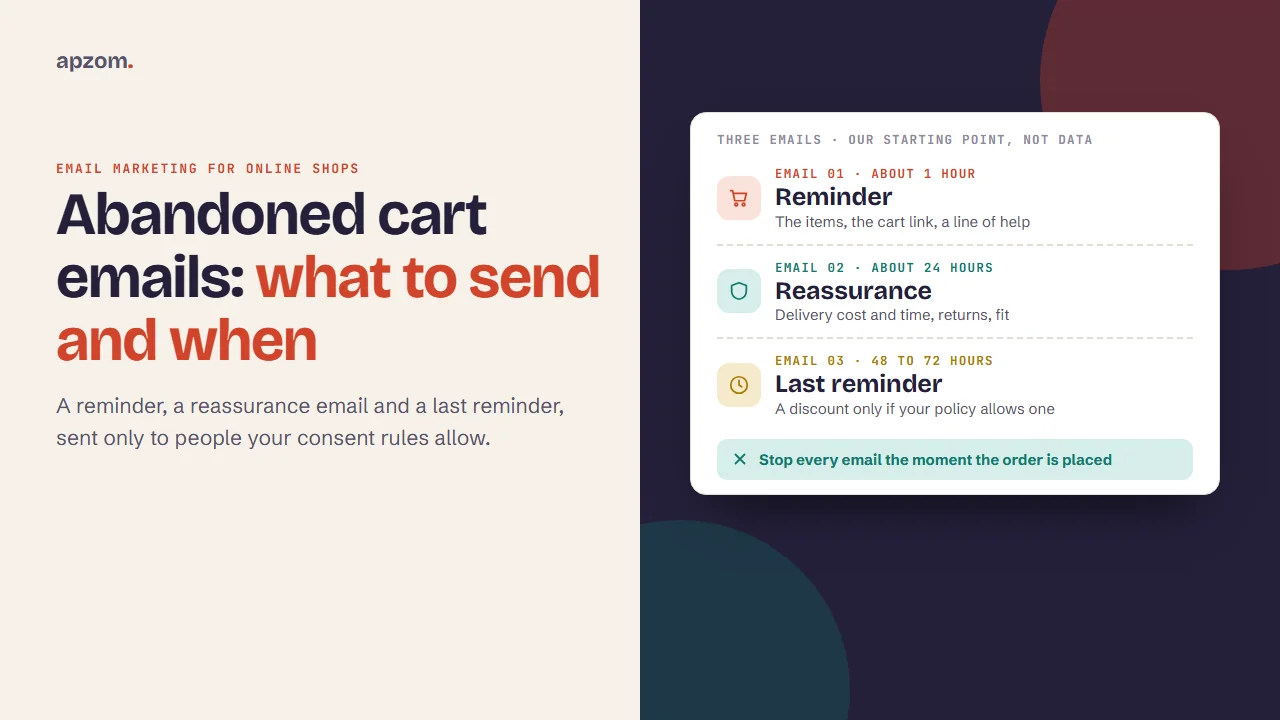
The three-email sequence: a starting point
The timings below are our rule of thumb for a first version, not data from a study. Start here, then change one thing at a time and compare recovered orders.
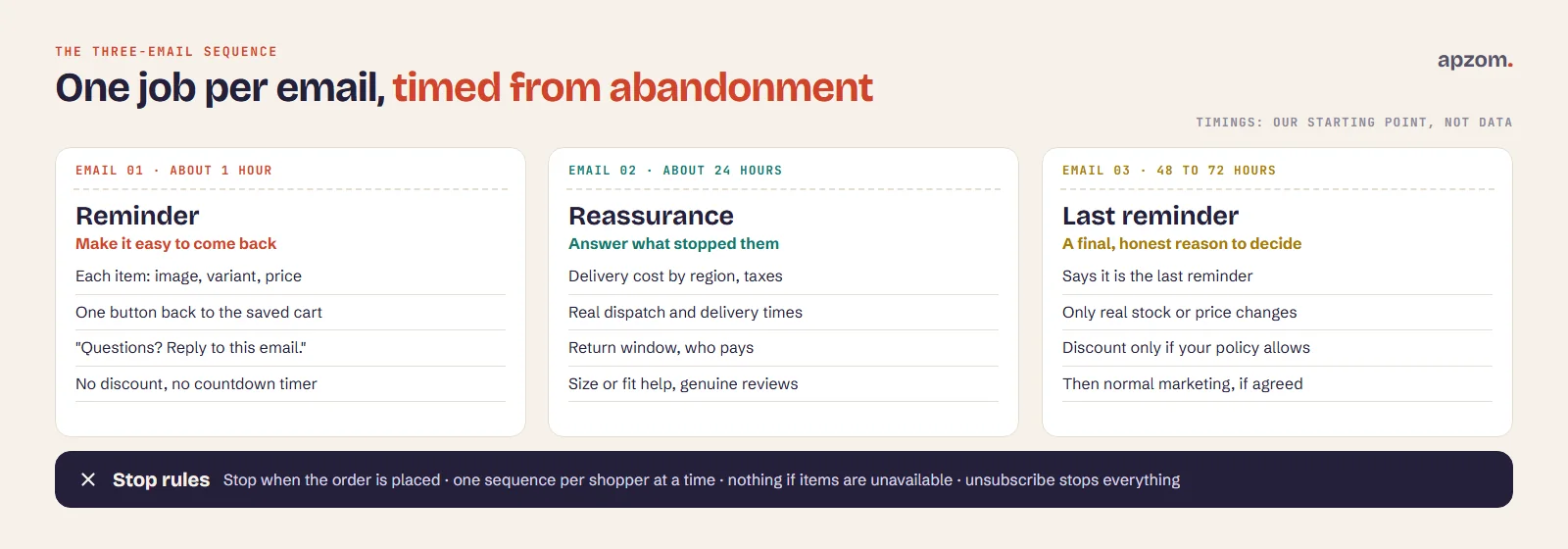
| When to send (our starting point) | Its one job | What goes in it | |
|---|---|---|---|
| 1. Reminder | About 1 hour after abandonment | Make it easy to come back | The items, the cart link, a short line of help |
| 2. Reassurance | About 24 hours after abandonment | Answer the question that stopped them | Delivery cost and time, returns, sizing or fit, reviews, a reply-to address |
| 3. Last reminder | About 48 to 72 hours after abandonment | Give a final, honest reason to decide | The items again, any genuine stock or price change, the discount only if your policy allows one |
Why these timings
Email 1 goes out while the shopper still remembers the cart and may simply have been interrupted. Platforms differ: AutomateWoo’s default abandonment timeout is 15 minutes, and when you add a second abandoned checkout automation in Shopify, Shopify says it “defaults to a 10 hour wait time”. Either is a reasonable start; what matters is that you test it.
Email 2 arrives a day later, after the shopper may have compared prices. Email 3 closes the sequence: after about three days, more reminders about one cart feel like pressure, so stop and let your normal marketing take over for people who agreed to it.
Email 1: the reminder
Keep it short. The subject line says what the email is: “Your cart is saved”. Show each item with image, variant and price, one button back to the cart, and a line such as “Questions about sizing or delivery? Reply to this email.” No discount, no countdown timer, no other products.
Email 2: the reassurance
This is where most recovery is won or lost, because it answers the reasons people actually leave. Use your real policies, written plainly:
- Total cost: delivery price by region, and whether taxes or duties are included at checkout. Baymard’s research lists extra costs being too high as the most common reason given for abandoning.
- Delivery time: your real dispatch and delivery times, not your best case.
- Returns: the return window and who pays for return shipping.
- Fit or suitability: a size guide, compatibility notes or the one question most people ask about that product.
- Proof: genuine reviews of the item in the cart, if you collect them. Never invent or edit reviews.
Email 3: the last reminder
Say it is the last reminder. If something has genuinely changed (confirmed low stock, a price change, a holiday delivery cut-off), say so. Never invent scarcity. If your discount policy allows one, this is the only email in the sequence where it appears (see “Should you offer a discount?” below).
Stop rules
Set these before you switch anything on:
- Stop every remaining email when the order is placed, whether the shopper used your link or came back on their own.
- Do not start a new sequence for the same shopper while one is still running.
- Send nothing if the items are no longer available.
- Stop at once when someone unsubscribes, and keep that preference for every marketing email, not just this sequence.
What goes in every cart email
Each email in the sequence needs the same basic parts:
- A clear sender name and a reply-to address that a person reads.
- A subject line that matches the content. In the US, CAN-SPAM prohibits deceptive subject lines, and a misleading one damages trust everywhere.
- The items, with image, variant and price, and one button back to the saved cart. Shopify warns that “Anyone who opens the abandoned checkout link can continue that checkout”, so never forward a recovery link to anyone except the shopper who left it.
- Help, not pressure: delivery, returns and contact details.
- Your business identity and postal address, and an unsubscribe link, if the email counts as marketing in the countries you send to (most cart reminders do; see the legal section).
- Tracked links. Tag the button with UTM parameters so you can see recovered sessions in your analytics. Our guide to creating UTM links has a naming template.
Send from a domain with SPF, DKIM and DMARC set up, or the reminders may land in spam. Our guide to SPF, DKIM and DMARC explains how.
Should you offer a discount?
A discount in a cart email can recover an order today and cost you margin on every order after it. If shoppers learn that leaving a cart brings a code, some will leave carts on purpose. That is a risk to watch for, not a measured rate; we have no verified figure for it.
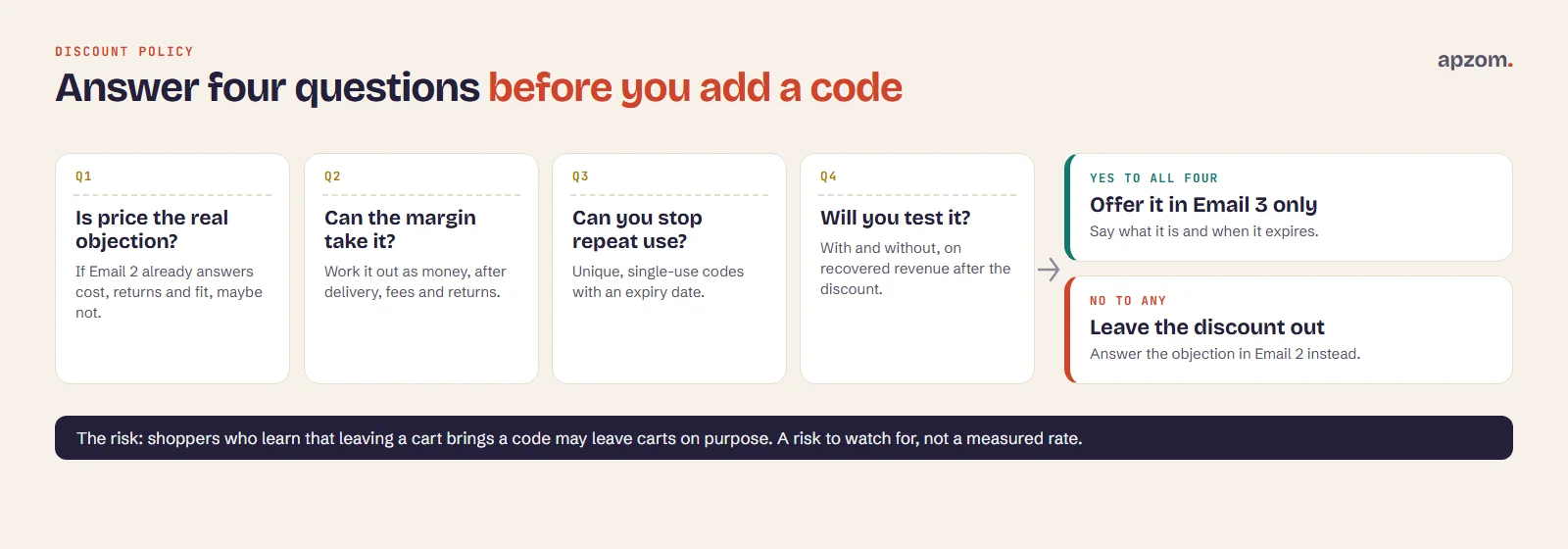
Answer four questions before you add one. If the answer to any of them is no, leave the discount out and answer the objection in Email 2 instead.
- Is price the real objection? If your Email 2 already answers delivery cost, returns and fit, many shoppers who still do not buy were not going to buy at any price you would offer.
- Can the margin take it? Work out the discount as money, not a percentage, after delivery, payment fees and returns. If a 10% code wipes out the profit on a low-margin item, do not offer it on that item.
- Can you stop repeat use? Use unique, single-use codes with an expiry date, and do not send a discount to someone who received one for an abandoned cart recently.
- Will you test it? Run the sequence with and without the discount and compare recovered revenue after the discount, not just orders.
If you do offer one, put it only in Email 3, say plainly what it is and when it expires, and exclude products you never discount. On Shopify, note that when a recovery discount is applied automatically, Shopify’s Help Center says any discount code the customer entered before abandoning “is replaced by the checkout recovery discount code”.
Not sure your cart reminders are working, or legal where you sell? Ask for a Free Growth Audit. We review your checkout, consent wording, reminder timing, copy and discount rules, and tell you what we would change first, including whether you need a new tool at all.
How to set it up in Shopify
Shopify has abandoned checkout emails built in, and it is moving stores to a newer version in the Shopify Messaging app. Shopify’s marketing automations need the Basic plan or higher, and Shopify says abandoned checkout emails do not count towards your monthly emails sent with Shopify Messaging (SMS and WhatsApp messages are charged).
- Check which version you have. The legacy abandoned checkout email lives under Settings > Checkout. Shopify says you can keep using it “until it’s removed”, and that switching to the new automation is permanent.
- Turn on the new automation. In your Shopify admin, go to Apps > Messaging > Automations, click View templates, choose the Abandoned checkout template, edit it if you want, then click Turn on automation. There are also Recover abandoned cart and Convert abandoned product browse templates for the earlier stages.
- Choose who receives it. Shopify says the abandoned checkout automation “is only sent to customers that are subscribed to email marketing” by default. In the email editor you can change the To: field to All customers. Read the legal section before you do; in several countries the default is the safer choice.
- Fix your consent wording. Shopify’s Help Center says that if your store sends abandoned cart reminders, “you need to change the information that displays next to the consent checkbox”. Edit it under Settings > Checkout, in the Marketing opt-in section. There you also choose the regions where the checkbox is preselected; select no regions and it is never preselected.
- Set the timing and add the later emails. Shopify says a new automation carries over your previous abandoned checkout settings, and you can use Shopify Flow to edit the automation’s workflow, “including the wait time”. A second abandoned checkout automation defaults to a 10-hour wait and to subscribed customers only. Flow’s Wait step can delay actions for up to 90 days. Shopify’s Help Center does not give a step-by-step recipe for a three-email series, so build Emails 2 and 3 in Flow, then test that they stop after a purchase before you go live.
- Add a discount only if your policy allows one. Shopify says you can add a discount to the abandoned checkout email in the Messaging editor.
- Test with a real checkout. Leave a checkout with your own address and confirm each email arrives on time, the link restores the cart, and nothing arrives after you complete the order.
Shopify lists cases where the email is not sent, including a purchase before it goes out, no items still available, an all-free checkout, a Shop app checkout and a payment blocked as high risk; the automation covers only the Online Store and Buy Button channels. The list also includes a customer who “hasn’t previously completed a purchase and subscribed to marketing”, so if you switch to All customers, test with a new, unsubscribed address first.
To review results, use Orders > Abandoned checkouts (each shows a recovery status) and the Automations page in Shopify Messaging, which reports reach, sessions, orders, conversion rate and sales per automation. Shopify deletes abandoned checkouts older than three months from the admin, so export them if you want a longer record.
Choosing between the two platforms in the first place? Our Shopify vs WooCommerce comparison covers total cost and control.
How to set it up in WooCommerce
WooCommerce core does not send abandoned cart emails. WooCommerce 11.0 included an experimental, opt-in abandoned cart recovery email, but WooCommerce’s GitHub repository shows it was removed in version 11.2 (pull request 67726, merged 27 August 2026). The pull request says the update removes the feature’s settings and queued emails. When we checked on 21 November 2026, the current WooCommerce version was 11.3.1, and a later proposal for a new cart recovery email had been closed without being merged. So you need an extension or your email platform’s integration.
One option is AutomateWoo, an extension listed “by Woo” in the official WooCommerce Marketplace. On 21 November 2026 its page showed $159 for the 1-year plan (USD). Its abandoned cart feature, according to the official listing and documentation:
- Cart tracking: turn it on under AutomateWoo > Settings > Carts. The default abandonment timeout is 15 minutes.
- Guest capture: AutomateWoo can capture a guest’s email during checkout before the order is submitted (“pre-submit data capture”, under AutomateWoo > Settings > General, off by default), with an optional setting to require cookie consent first.
- Triggers and timing: workflows use the Cart Abandoned trigger (registered-user and guest versions) and can be delayed after it fires. The documentation says each workflow runs only once per stored cart, so in practice each email in your sequence is its own workflow with its own delay.
- Consent mode: the listing says AutomateWoo “lets you choose opt-in or opt-out mode for your workflows” and adds an unsubscribe link to non-transactional emails.
- Recovery status: carts are marked Recovered when an order is placed after the cart was abandoned, which you can filter under AutomateWoo > Carts.
Other recovery extensions and email platform integrations exist. Check five things before you buy:
- Does it capture guest emails, and can that capture wait for cookie consent where you need it?
- Can it send three emails with separate delays and stop all of them after an order?
- Can it send only to people who opted in, by region if needed?
- Does it create unique, expiring coupon codes?
- Does it report recovered orders and revenue, not just opens?
Test on a staging copy first, because cart tracking touches checkout.
Is a cart reminder marketing or a transactional email?
Transactional or service messages often need no marketing consent; marketing emails do in most countries. The short answer: treat a cart reminder as marketing unless a qualified adviser in your market tells you otherwise. The shopper has not agreed to buy anything yet, and most reminders encourage a purchase. Treating a cart reminder as marketing is our reading of the official guidance, not a ruling from any regulator: none of the guidance we checked gives an abandoned cart example. The table is our summary of the official sources, checked 21 November 2026; it is not legal advice.
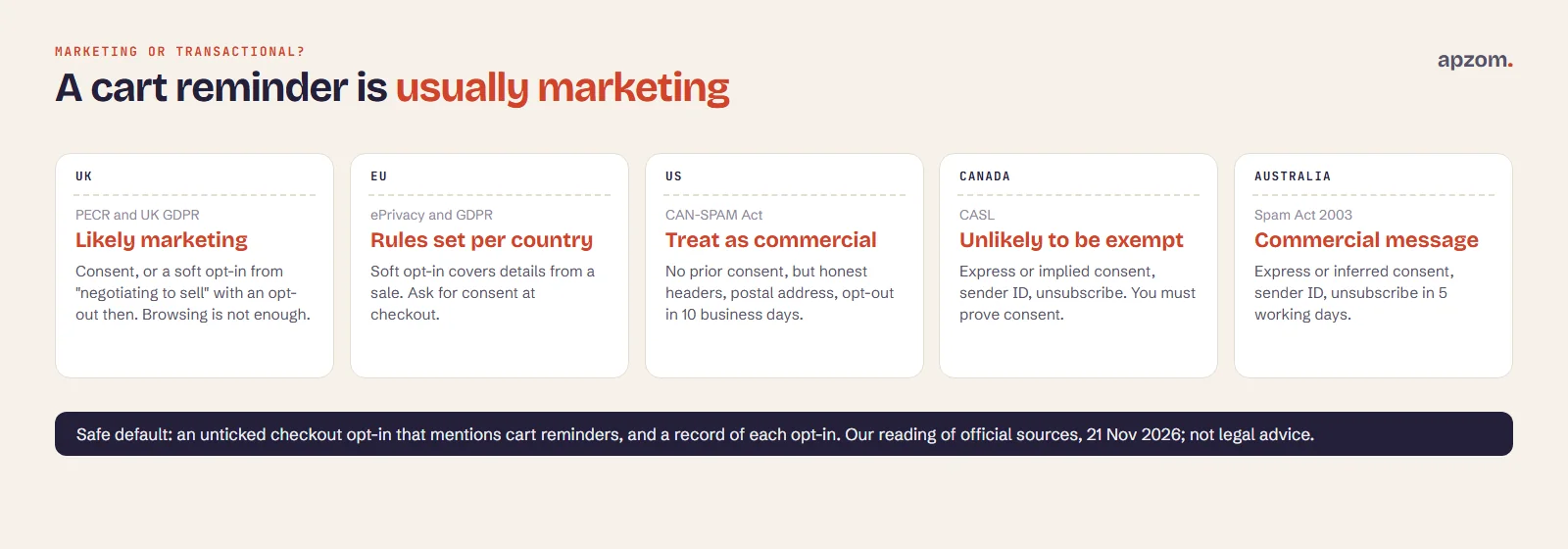
| Market | Law | How a cart reminder is likely treated | What that means in practice |
|---|---|---|---|
| UK | PECR and UK GDPR | The ICO describes service messages as not promotional, and says one with direct marketing elements counts as direct marketing. In our reading, a reminder that encourages a purchase is likely marketing. | Consent, or the soft opt-in if the details were collected while “negotiating to sell” and an opt-out was offered then. The ICO says browsing alone is not enough. |
| EU | ePrivacy Directive and GDPR | Each member state applies the ePrivacy rules in its own law. The soft opt-in (Article 13(2)) covers details obtained in the context of a sale. | Check the country. Asking for consent at checkout is the safe default. |
| US | CAN-SPAM Act | The FTC judges a message by its primary purpose. Transactional messages facilitate or confirm a transaction the recipient “already has agreed to”; in our reading, an unfinished cart is not one. | No prior consent needed, but treat it as commercial: accurate headers, honest subject line, postal address, opt-out honoured within 10 business days. |
| Canada | CASL | Messages that solely facilitate, complete or confirm a transaction the person “previously agreed to enter into” are exempt from the consent rule only. In our reading, a reminder to finish a purchase is unlikely to fit. | Express or implied consent, sender identification and an unsubscribe link. The sender must prove consent. |
| Australia | Spam Act 2003 | Commercial messages need consent, express or inferred. In our reading, a reminder that encourages a purchase is a commercial message. | Consent, sender identification and an unsubscribe honoured within 5 working days. |
A few points from the sources behind the table:
- UK: the ICO says “simply using a neutral tone doesn’t necessarily avoid messages being direct marketing”. Its guidance has no abandoned cart example, so whether starting a checkout counts as “negotiating to sell” is not settled. In our reading, a shopper who entered their email at checkout and saw an opt-out there is a stronger case than one whose email was captured before they submitted anything.
- US: under the FTC’s guidance, when an email mixes commercial and transactional content, it is treated as commercial if its subject line would lead the recipient to think it is a commercial message. The FTC lists penalties of up to $53,088 for each email that breaks the law.
- Canada: CASL does not say whether a started checkout counts as an “inquiry” for implied consent, so do not rely on it without advice; express consent at checkout removes the doubt.
For the full consent rules by country, including India, see our guide to email marketing for small businesses, which also covers welcome and re-engagement sequences.
The practical default for a shop that sells internationally: an unticked checkout opt-in that mentions cart reminders, cart emails only to people who ticked it (or who qualify for a soft opt-in you have checked), business details and an unsubscribe link in every email, and a record of when and where each person opted in.
How to measure an abandoned cart sequence
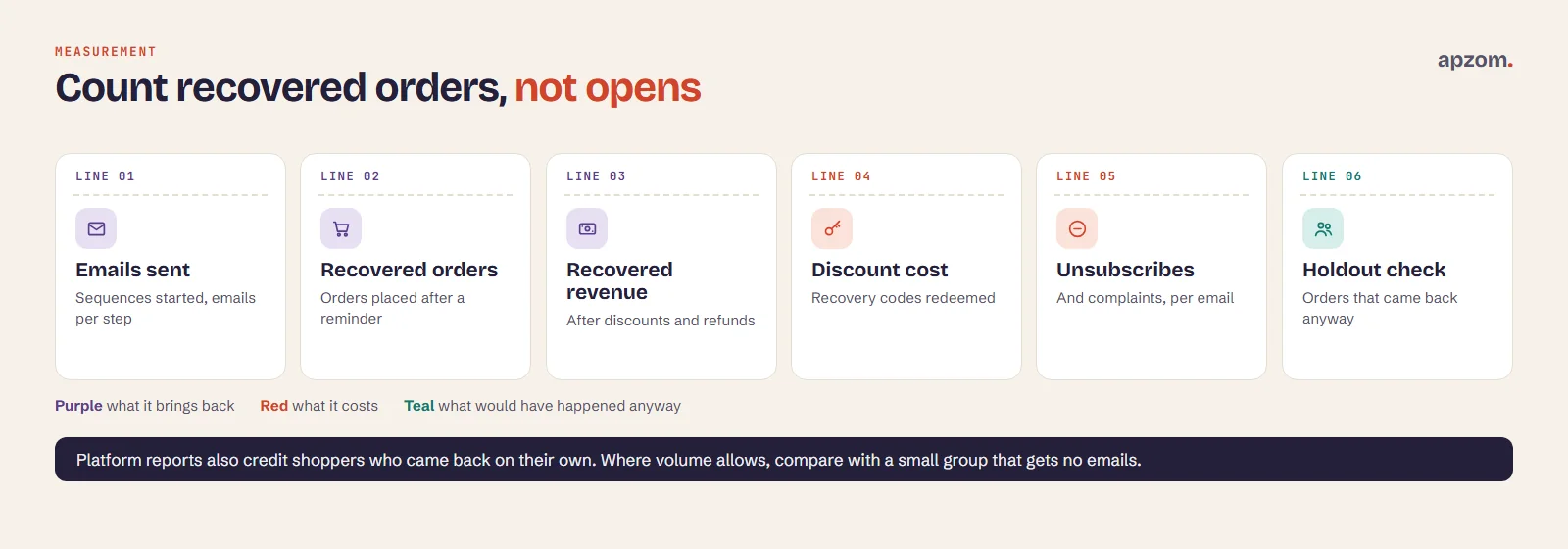
Open rates tell you little about sales. Judge the sequence on what it brings back and what it costs you.
| Measure | How to count it | Where to find it |
|---|---|---|
| Emails sent | Sequences started, and emails sent at each step | Your automation report |
| Recovered orders | Orders placed after a cart reminder was sent | Shopify: Abandoned checkouts (recovery status) and the Automations page; AutomateWoo: Carts filtered by Recovered |
| Recovered revenue | Value of those orders, after discounts and refunds | Platform report, checked against your orders |
| Discount cost | Value of recovery codes redeemed | Your discount code report |
| Unsubscribes and complaints | Per email in the sequence | Your email platform |
| Orders that would have happened anyway | Compare against a holdout group that gets no emails, if your volume allows | Your own test |
Platform reports credit orders from shoppers who would have come back anyway: Shopify counts a checkout as recovered whether the customer clicked the link or returned on their own. With enough orders, hold back a small group that gets no emails and compare. If you have too few orders, our guide to A/B testing with low traffic explains how to test with few visitors or orders. To put the result into profit terms, see how to measure marketing ROI.
If one email brings few orders but most of the unsubscribes, cut it or change it.
Common mistakes
- Sending to everyone because the software allows it. A switch such as “All customers” does not make the email legal in every country you sell to.
- Discounting in the first email. It teaches shoppers to wait, and it gives away margin on orders that would have come back for a reminder.
- No stop rule. Customers who already bought keep getting “You forgot something”.
- Fake urgency. Resetting countdown timers and untrue stock warnings mislead shoppers.
How Apzom can help
Apzom Digital’s email marketing service sets up abandoned cart sequences on Shopify, WooCommerce and the main email platforms: the timing and copy, consent wording at checkout, discount rules, stop rules, tracking and a simple recovery report. We have not published an ecommerce case study yet, so we will not promise you a recovery rate; we can review your current checkout and reminders and tell you what we would fix first. For the wider picture, see our ecommerce marketing guide. We work with clients worldwide, remotely, from our base in Ahmedabad, India.
Get a Free Growth Audit and Quote for your cart recovery. Tell us your platform, the countries you sell to and what you send today. We send back a written plan for the three emails, the timing, the consent wording, the discount rules and the recovery report, with a quote if you want us to set it up.
No obligation, and no promised recovery rate. Prefer to talk first? Contact us or read our guide to email marketing for small businesses.
Frequently asked questions
How many abandoned cart emails should I send?
Three is a sensible start: a reminder after about an hour, a reassurance email after about a day, and a last reminder after two to three days. That is our rule of thumb, not a standard.
When should the first abandoned cart email go out?
About an hour after the shopper leaves is our starting point, not a standard. Test two timings and keep the one that recovers more orders.
Do I need consent to send abandoned cart emails?
In most markets, yes, because a reminder that encourages a purchase usually counts as marketing. The UK and EU need consent or a soft opt-in that genuinely applies; Canada and Australia need consent; the US does not require prior consent but the email must follow CAN-SPAM’s rules. This is not legal advice.
Should abandoned cart emails include a discount?
Only if price is the real objection, the margin allows it, and you can stop repeat use with unique, expiring codes. If you add one, put it in the last email only and test the sequence with and without it.
Does WooCommerce have abandoned cart emails built in?
No. An experimental version appeared in WooCommerce 11.0 and was removed in 11.2. You need an extension such as AutomateWoo or your email platform’s WooCommerce integration.
What is a good abandoned cart recovery rate?
We found no published benchmark whose method we could check, so we quote none. Track your own recovered orders and revenue per email.