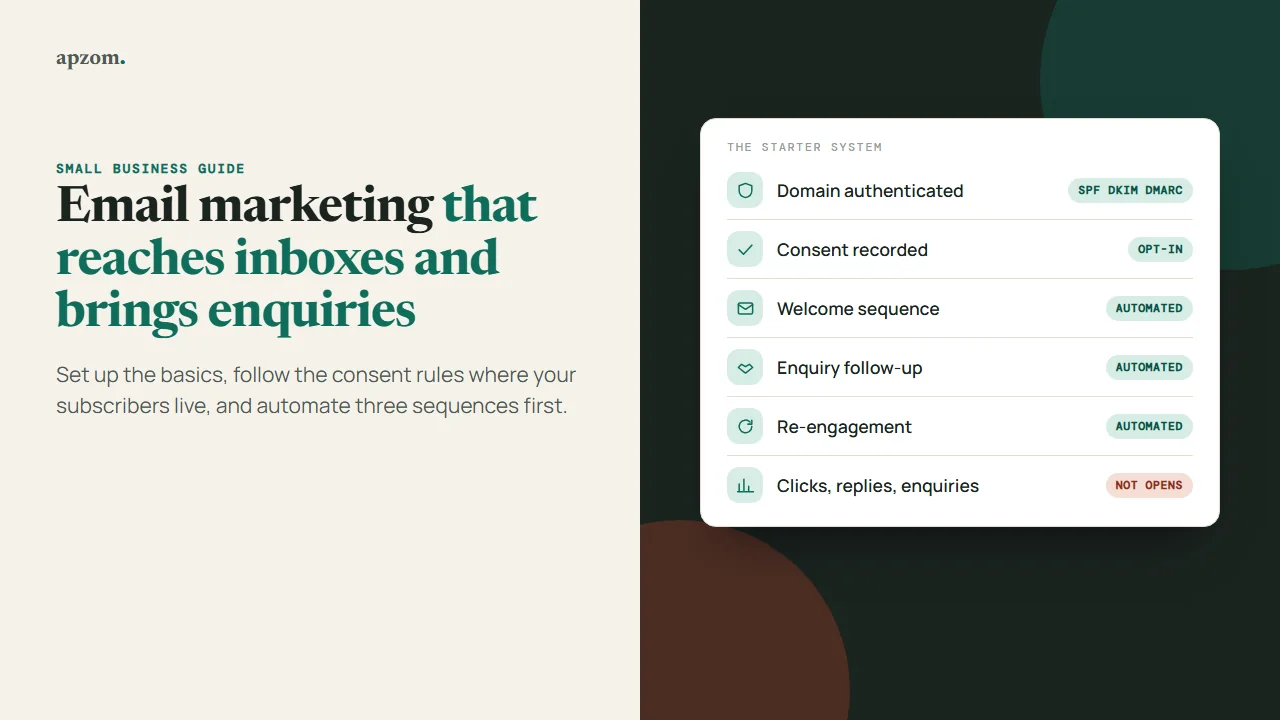
The short answer: To start email marketing as a small business, choose an email platform, send from an address on your own domain with SPF, DKIM and DMARC set up, and build your list only from people who agreed to hear from you, through a sign-up form on your website and at checkout or enquiry. Then set up three automated sequences before you write any newsletter: a welcome sequence for new subscribers, a follow-up sequence for new enquiries, and a re-engagement sequence for people who have gone quiet. After that, send one useful regular email, monthly or fortnightly, and judge results by clicks, replies and enquiries rather than open rates. Check the consent rules for each country you send to: they differ between the US, the EU, the UK, Canada, Australia and India.
This guide is for owners and marketers of small and medium businesses anywhere in the world who want email to bring in enquiries and repeat sales without breaking the rules or landing in spam. It covers what to set up first, consent rules by country, three starter sequences with what to put in each email, what to send in a regular newsletter, how to measure results, and the mistakes that most often hurt deliverability. It does not recommend a particular email platform; the set-up steps are the same in most of them.
Before you start
You need five things in place before your first campaign:
- A domain you own and an address on it, such as hello@yourbusiness.com. Sending from a free mailbox (a gmail.com or outlook.com address) through an email platform is likely to fail authentication checks.
- An email platform (also called an email service provider, or ESP). Most offer a free or low-cost starting plan; compare the features you need, not the brand.
- A way for people to join: a sign-up form on your website, a tick box at checkout or in your enquiry form, or a QR code at your premises. Never buy or rent a list.
- A privacy notice that explains what you collect and why, linked from every sign-up form. Our website brief guide covers privacy requirements by country.
- Tracking that tells you which emails lead to enquiries or sales: UTM links on every link, and the key events you already measure in Google Analytics 4.
Framework 1: the set-up checklist
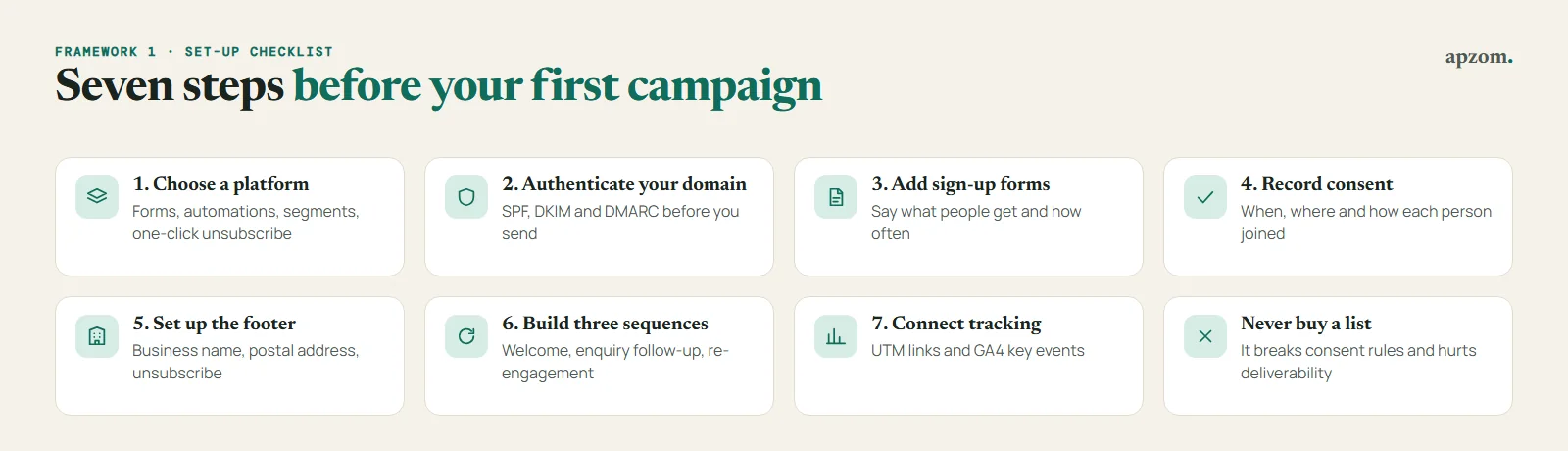
- Choose a platform that offers sign-up forms, automations (sequences triggered by an action), list segmentation, and one-click unsubscribe. Check where it stores data if you have customers in the EU or UK.
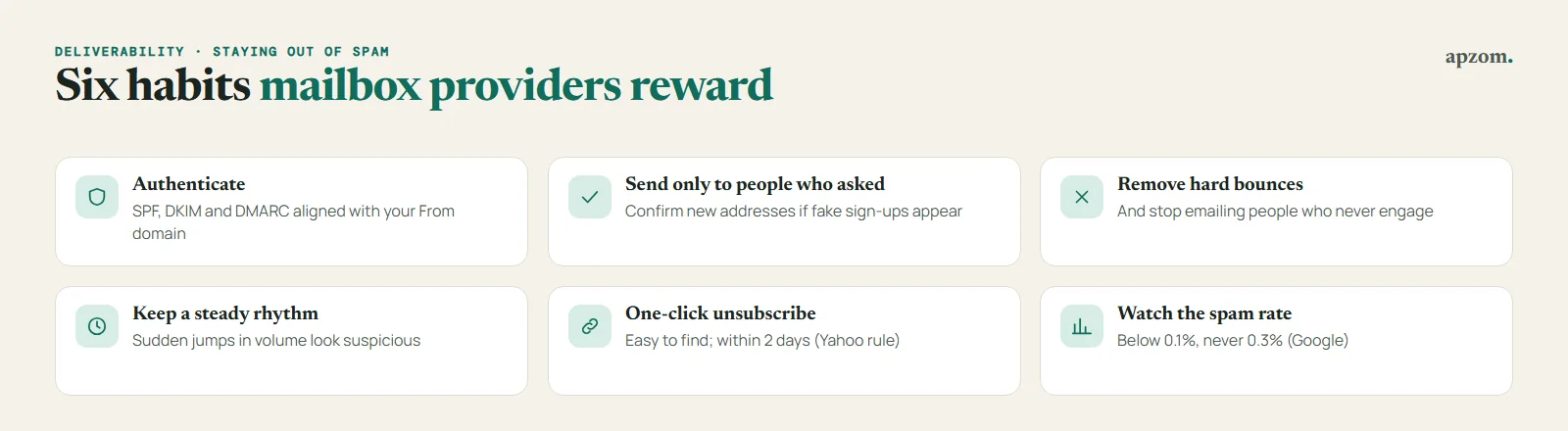
- Authenticate your domain. Publish SPF, DKIM and DMARC records for your domain, using the values your email platform gives you. Gmail (around 5,000 a day), Outlook.com (5,000 or more a day) and Yahoo (bulk senders, no published threshold) require all three, and Gmail expects at least SPF or DKIM from everyone. Our guide to SPF, DKIM and DMARC walks through each record.
- Add your sign-up forms and say clearly what people will receive and how often. If you offer an incentive, such as a guide or a discount, say that it comes with marketing emails.
- Record consent. Your platform should store when and where each person signed up. Before importing an existing contact list, check how and when each person gave their address; import only those with consent (or the soft opt-in where it applies), tag them by source and date, and leave the rest out. Under the GDPR, if you rely on consent you must be able to show that the person consented (Article 7(1)), so keep the form, the date and the wording they agreed to. Australia’s regulator, ACMA, also puts the burden of proving consent on the sender.
- Set up your footer with your business name, a postal address and an unsubscribe link in every marketing email. The US requires a postal address; Canada requires contact information including a mailing address; the EU, UK and Australia require you to identify yourself and offer an opt-out (see the next section).
- Build the three sequences below, and test each one by signing up yourself.
- Connect tracking: add UTM tags to every link and check that enquiries from email show up in your analytics.
Consent rules by country
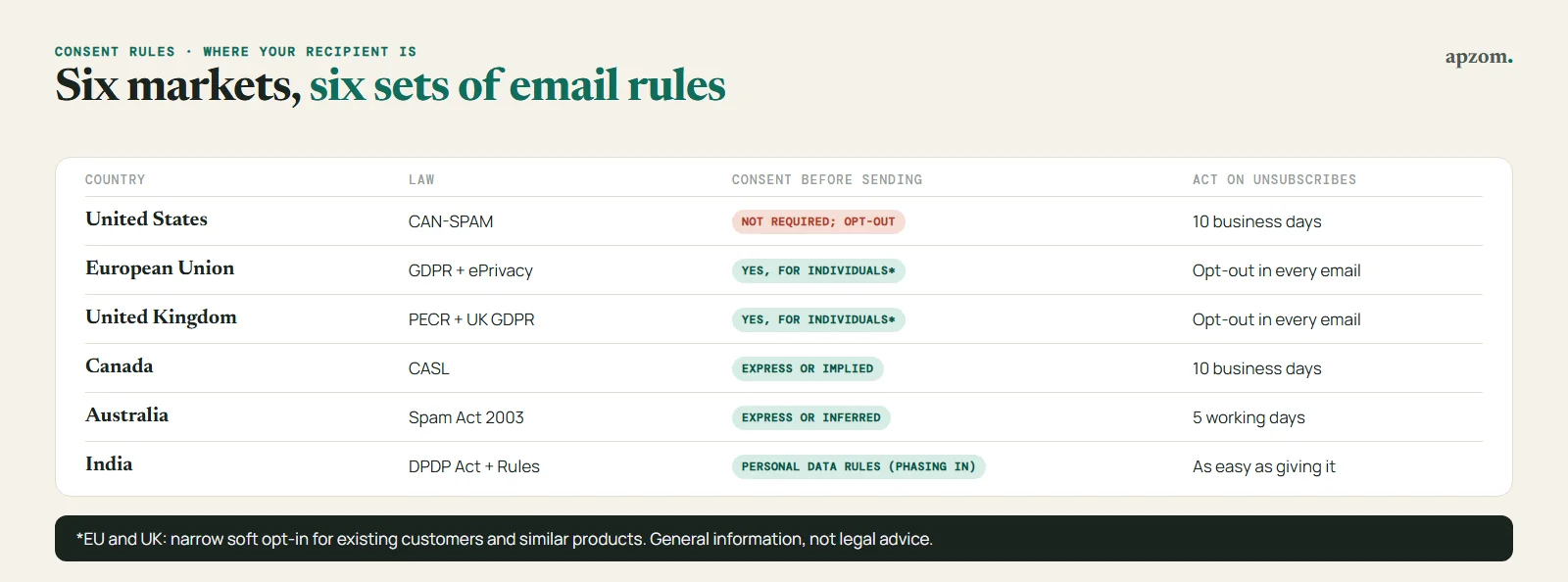
This section is general information, not legal advice. The rule that matters is usually the one where your recipient is, not where your business is.
| Country | Law | Consent before sending? | What every email needs | Unsubscribes |
|---|---|---|---|---|
| United States | CAN-SPAM Act | No prior consent required, but recipients must be able to opt out; the FTC says there is no exception for business-to-business email | Accurate header and subject line, identified as an ad where it is one, your valid physical postal address, a clear way to opt out | Honour within 10 business days |
| European Union | GDPR and the ePrivacy Directive (Article 13), applied through each country’s law | Yes, for individuals, with a narrow exception for existing customers and similar products; rules for business addresses vary by country | Clear identity of the sender and a valid opt-out address | Free and easy opt-out in every message |
| United Kingdom | PECR (regulation 22) and UK GDPR | Yes, for individuals and sole traders, unless the “soft opt-in” applies; emails to companies do not need consent but must identify you and offer an opt-out | Your identity and a valid address for opting out | Free and simple opt-out in every message |
| Canada | CASL | Yes: express consent, or implied consent, such as for up to 2 years after a purchase or 6 months after an enquiry | Identification of the sender, contact information and an unsubscribe mechanism | Process within 10 business days |
| Australia | Spam Act 2003 | Yes: express or inferred consent; a single purchase does not by itself create inferred consent | Identification of the sender and a functional unsubscribe | Honour within 5 working days |
| India | Digital Personal Data Protection Act 2023 and Rules 2025 | No email-specific anti-spam law found; the DPDP Act’s consent and notice rules for personal data are being phased in over 18 months from November 2025 | A clear notice of what data you collect and why, once the rules apply | Let people withdraw consent as easily as they gave it |
A few details that catch small businesses out:
- The EU and UK “existing customer” exception (soft opt-in) only covers people who bought, or negotiated to buy, from you; only your own similar products and services; and only if you offered a clear opt-out when you collected their details and in every email since. Since 5 February 2026, UK charities have their own version of the soft opt-in, under changes made by the Data (Use and Access) Act 2025.
- UK penalties went up on the same date: breaches of the email marketing rules can now attract fines at the higher UK GDPR level, up to £17.5 million or 4% of worldwide turnover, whichever is higher.
- Australia: you cannot email someone to ask for their consent, because that request is itself a commercial message.
- US penalties: the FTC’s maximum civil penalty is $53,088 for each email that breaks CAN-SPAM, and the FTC says it did not raise the figure for 2026.
- Canada: CASL penalties can reach C$10 million per violation for a business.
A safe default for a business that sells internationally: collect clear, opt-in consent (an unticked box or a sign-up form), keep a record of it, identify your business and postal address in every email, include a one-click unsubscribe, and act on unsubscribes within 2 days. That meets or exceeds the basic requirements in each of the countries above, though some have extra rules for particular cases.
Not sure your email set-up is compliant and reaching inboxes? Ask for a Free Growth Audit. We check your domain authentication, sign-up forms, consent records and sequences, and tell you what to fix first.
Framework 2: three sequences to set up first
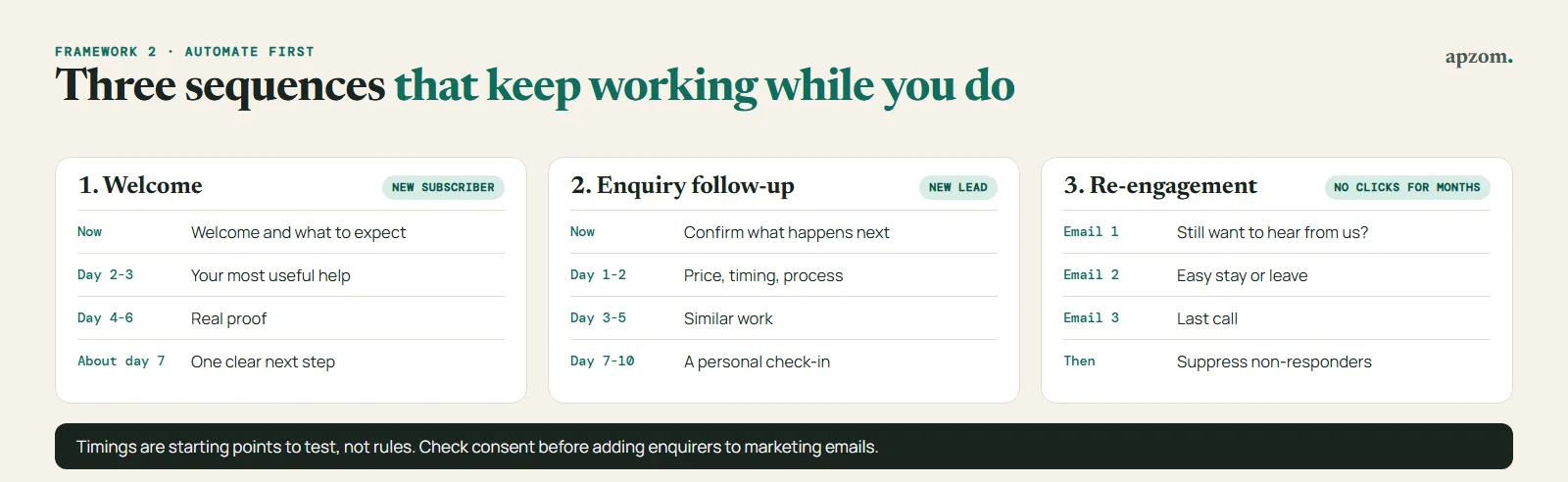
A sequence (or automation) is a series of emails sent automatically after someone does something, such as signing up or sending an enquiry. Sequences keep working while you run the business, so they usually deserve your time before a newsletter does. The timings below are starting points to test, not rules.
1. The welcome sequence (new subscribers)
| When | What it does | |
|---|---|---|
| 1. Welcome | Straight away | Deliver anything you promised, say what they will get and how often, and introduce your business in two or three sentences |
| 2. Your best help | 2 to 3 days later | Send your most useful guide, checklist or answer to the question customers ask most |
| 3. Proof | 4 to 6 days later | Show real proof: a case study, reviews or before-and-after photos you have permission to use |
| 4. The offer | About a week later | One clear next step: book a call, request a quote, visit the shop, with no fake urgency |
2. The enquiry follow-up sequence (new leads)
This is for people who sent an enquiry or requested a quote, and it should support your sales follow-up, not replace it. Check that your form or CRM records the consent you need before adding enquirers to marketing emails; in some countries, a one-off enquiry only allows you to reply to that enquiry.
| When | What it does | |
|---|---|---|
| 1. Confirmation | Straight away | Confirm what they asked for, what happens next and when, and who will contact them |
| 2. Answers | 1 to 2 days later | Answer the three questions people usually ask before buying: price range, timing, process |
| 3. Proof | 3 to 5 days later | Show work similar to what they asked about |
| 4. Check-in | 7 to 10 days later | A short, personal-sounding note asking if they have any questions, from a real person who reads replies |
A pure confirmation or reply to someone’s request is a transactional or service message; the consent rules above apply mainly to marketing. Emails 2 to 4 here contain promotion, so treat them as marketing.
3. The re-engagement sequence (quiet subscribers)
People who have not clicked anything for several months drag down your sender reputation and inflate your list size. Send them two or three emails asking whether they still want to hear from you, with an easy way to stay or leave. Remove or suppress those who do not respond. A smaller list of people who want your emails usually performs better than a large list of people who ignore them.
What to send in your regular email
Once the sequences run, add one regular email. Monthly is a sensible start for most small businesses; fortnightly or weekly only if you have enough genuinely useful things to say. Each email should have one main purpose and one main link.
Ideas that work for most service and product businesses:
- An answer to a real customer question you heard this month.
- A short case study or example of a recent job, with the customer’s permission.
- A seasonal checklist your customers can use (tax deadlines, maintenance schedules, planning for a busy season).
- Something new: a product, service, opening hours, team member or price change.
- A useful link to a guide on your website, so the email sends people to the page where they can act.
Write subject lines that say what is inside. Avoid capitals, false “Re:” or “Fwd:” prefixes and anything misleading; false or misleading subject lines are illegal in the US under CAN-SPAM, and they erode trust everywhere.
How to measure results
Open rates are no longer a reliable measure. Apple’s Mail Privacy Protection, introduced in 2021 with iOS 15 and macOS Monterey, “prevents senders from seeing if you’ve opened the email message they sent you”, in Apple’s words, and Apple Mail downloads remote content in the background by default. Other providers also load images for their own reasons. Treat open rates as a rough signal at best, and judge your emails by what people do.
| Measure | What it tells you | Watch for |
|---|---|---|
| Click rate | How many people found the email worth acting on | Which links and topics get clicks |
| Replies | Whether the email starts conversations | Reply-worthy questions in your emails |
| Enquiries, bookings or sales from email | Whether email makes money | UTM-tagged links and GA4 key events |
| Unsubscribes | Whether the content or frequency matches what people signed up for | A rise after a particular type of email |
| Spam complaints | Whether people feel they did not ask for this | Google asks senders to keep the spam rate in Postmaster Tools below 0.1% and never to reach 0.3% |
| Bounces | Whether your list is accurate | Remove addresses that hard-bounce |
Deliverability: staying out of spam
Authentication is only part of it. The big mailbox providers also look at how people react to your email:
- Gmail treats anyone sending close to 5,000 messages a day to personal Gmail accounts as a bulk sender, permanently. Bulk senders need SPF, DKIM and DMARC, one-click unsubscribe on marketing emails and a spam rate below 0.3%. Google says that starting November 2025 Gmail is “ramping up its enforcement”, and it recommends processing unsubscribes within 48 hours.
- Yahoo has similar rules for bulk senders and requires unsubscribe requests to be honoured within 2 days.
- Outlook.com has required SPF, DKIM and DMARC since 5 May 2025 from domains sending 5,000 or more emails a day to its consumer addresses. Microsoft first routed non-compliant mail to Junk, and its support page now describes rejecting it with the error 550 5.7.515.
Practices that help every sender, large or small:
- Send only to people who asked for your emails, and confirm new addresses (double opt-in) if you get many fake or mistyped sign-ups.
- Remove addresses that hard-bounce, and stop emailing people who have not engaged for months.
- Keep a steady sending pattern; sudden jumps in volume look suspicious. With a new domain or platform, Google advises starting with a low sending volume to engaged users.
- Offer a preference centre (topics or frequency) as well as unsubscribe, and use a reply-to address someone reads.
- Make unsubscribing easy and quick. People who cannot find the link press “report spam” instead.
Common mistakes
- Buying or scraping a list. It breaks consent rules in many countries and damages your sender reputation everywhere.
- Sending from a free mailbox or an unauthenticated domain. Set up SPF, DKIM and DMARC first.
- Adding every enquirer and customer to the newsletter without checking the consent rule for their country.
- Hiding the unsubscribe link. People who cannot unsubscribe press “report spam” instead, which hurts you more.
- Judging success by open rates. Use clicks, replies and enquiries.
- Sending only offers. Useful emails earn the right to the occasional offer.
- Never cleaning the list. Suppress addresses that bounce and people who have not engaged for months.
How Apzom can help
Apzom Digital’s email marketing service sets up the parts in this guide: domain authentication, consent-based sign-up forms, the three starter sequences, and tracking that connects email to enquiries in your analytics. We have not published an email marketing case study yet, so we will not promise you open or click rates; we can review your current set-up and tell you what to fix first. Our guide to CRO covers the landing pages your emails send people to.
We work with clients worldwide, remotely, from our base in Ahmedabad, India.
Frequently asked questions
How often should a small business send marketing emails?
Start monthly, plus the automated sequences. Increase frequency only if you have useful things to say and your unsubscribe and complaint rates stay low.
Can I email people who gave me their business card?
It depends on where they are. In the US, CAN-SPAM does not require prior consent, but every email must follow its rules and include an opt-out. In Canada, CASL can treat a business card as consent only for messages related to the person’s role, and only if they did not say otherwise; In the UK, PECR does not require consent to email someone at their work address at a limited company or other corporate body, but you must identify yourself and give a working opt-out, and UK GDPR still applies to their personal data. A card from a sole trader or partnership in the UK, or from an individual in the EU, is generally not consent to marketing, and EU rules for business addresses vary by country. The safest approach anywhere is to ask, for example with a follow-up email that is not itself promotional where that is allowed, or by inviting them to sign up.
Do I need double opt-in?
None of the laws covered above requires double opt-in (sending a confirmation email before adding someone). But the GDPR and Australia’s regulator put the burden of proving consent on you, and Google and Yahoo recommend confirming addresses. Double opt-in gives you that proof and a cleaner list, at the cost of losing some people who never click the confirmation.
Which email marketing platform should I use?
Choose on features (forms, automations, segmentation, one-click unsubscribe, domain authentication, data location) and on what you will pay at the list size you expect in a year, not today. Check what the free plan really includes: free plans are often limited to a few hundred contacts, and some leave out the automations this guide relies on (Kit’s free plan, for example, does not include sequences). Make sure you can export your list at any time.
Is it legal to email existing customers about new products?
In the US, yes, if you follow CAN-SPAM. In the EU and UK, usually yes under the soft opt-in, if the products are similar to what they bought and you gave them a clear chance to opt out when you collected their details and in every message. In Canada, implied consent from a purchase lasts 2 years. In Australia, a single purchase alone does not create inferred consent, so ask for consent at checkout.
Get your Free Growth Audit and Quote. We review your email platform, domain authentication, sign-up and consent flow, sequences and tracking, and send a plain-English plan to turn email into enquiries, with your list and accounts kept in your business’s name.
No obligation and no guaranteed results. Prefer to talk first? Contact us or see our email marketing service.