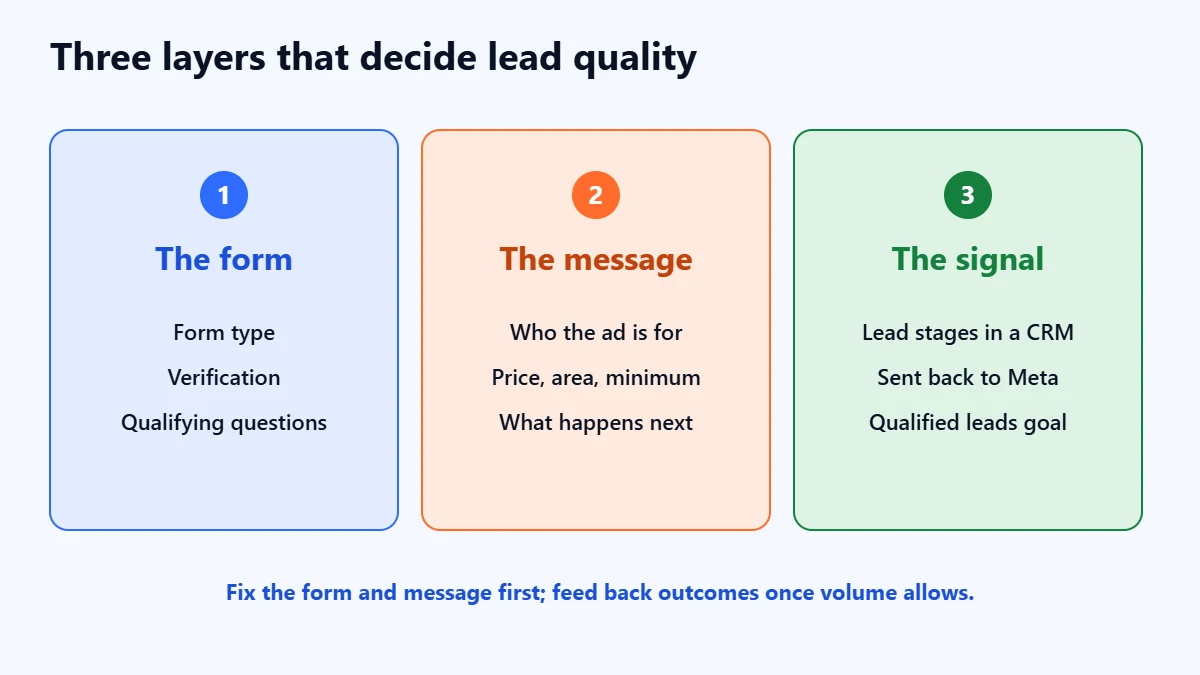
The short answer: Meta lead ads bring weak leads mostly because the default instant form is built to make submitting effortless, and the default goal finds people who submit forms, not people who buy. You fix it in three layers. First, make the form ask for a little commitment: the Higher intent form type, phone verification, and one or two questions that sort buyers from browsers. Second, say clearly in the ad who it is for. Third, once you have the volume, tell Meta which leads turned into real opportunities, so it can optimise for qualified leads rather than form fills. Expect fewer leads at a higher cost each, and judge the change on cost per qualified lead.
This guide is for businesses running Facebook and Instagram lead ads with instant forms, whether you manage them yourself or pay someone to, and who are tired of numbers that do not answer, people who do not remember enquiring, and enquiries for things you do not sell. Setting names follow Meta’s Business Help Centre as checked in November 2026; Meta renames and moves them often, so expect small differences in Ads Manager. We are an agency that manages Meta ads, so read this knowing we have an interest. Everything here can be done in your own account.

What to take from this guide
- The defaults favour volume. “More volume” is the default form type, and it is designed for quick submission on mobile, with details prefilled from the person’s profile.
- Friction is a filter. A review screen, SMS verification or a required qualifying question costs you some leads, mostly the ones you did not want.
- Your targeting may be a suggestion. With Advantage+ audience, age, gender and interests are treated as suggestions unless you set them as limits.
- Feeding back outcomes has entry requirements. Meta’s developer documentation for its CRM-based optimisation asks for at least 200 leads a month and daily uploads, so many smaller advertisers need to start with the form.
Why instant forms attract weak leads
An instant form opens inside Facebook or Instagram, with the person’s name, email and phone number already filled in from their profile. Submitting can take a couple of taps. That is the appeal, and it is also the problem: someone mildly curious, scrolling at speed, can become a lead without reading your offer. On a website form they would have had to visit a page and type their details, which filters out a lot of casual interest before it reaches you.
Then the campaign learns. The “Maximise number of leads” goal, Meta says, targets the people most likely to share their contact details. If your form makes sharing easy and asks nothing else, the system gets very good at finding people who share details easily. It has no way of knowing that half of them never pick up the phone.
First, find out what kind of bad you have
“Bad leads” covers several different problems. Export your last 50 to 100 leads and give each one a single label: qualified, unreachable (wrong number, no answer after several attempts), wrong fit (a real person you cannot serve), not ready, or lost by us (nobody followed up properly). Our guide to Google Ads lead quality explains this labelling step in detail, and it works the same way for Meta.
The labels point to different fixes. Unreachable leads point to the form. Wrong-fit leads point to the questions and the ad. Not-ready leads point to the offer. Lost-by-us leads point to your follow-up, and no setting in Ads Manager will fix those.
Fix 1: choose the form type deliberately
Meta offers three instant form types. The choice matters more than most settings in the campaign.
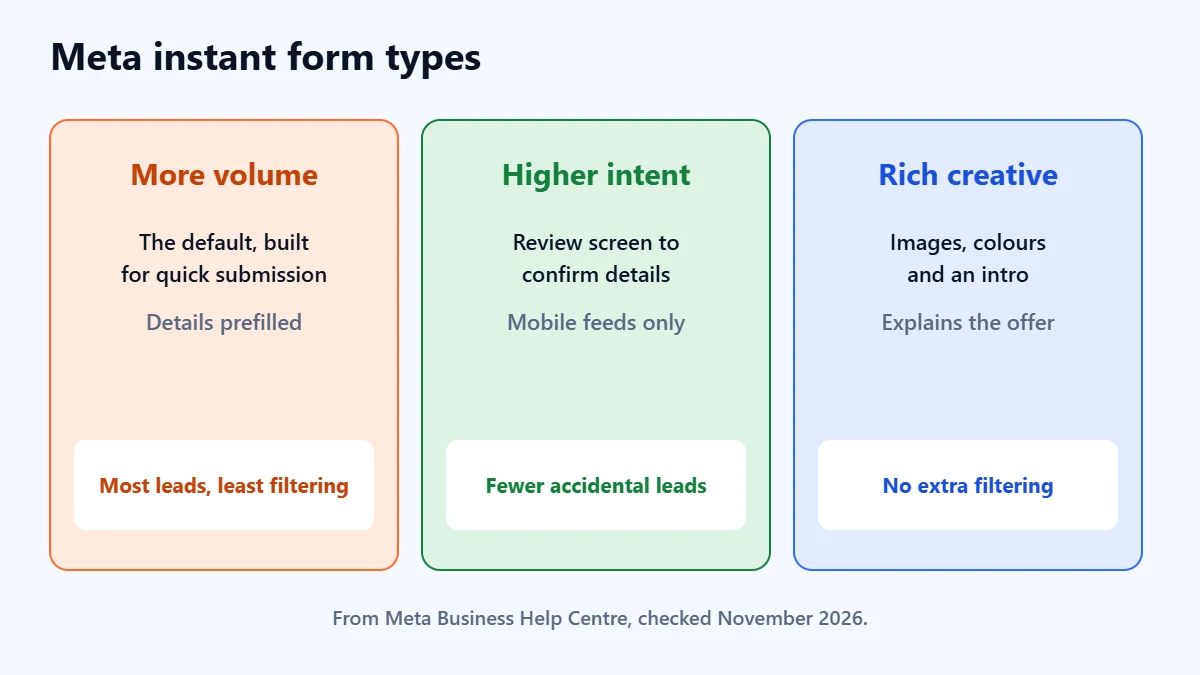
| Form type | What Meta says it does | When it suits |
|---|---|---|
| More volume | The default. Built for quick submission on mobile and more leads. | Low-value enquiries you can sort cheaply, such as a brochure request |
| Higher intent | Adds wording under the contact fields saying the business may follow up, and a review screen where people confirm their details. Delivered only in Facebook Feed and Instagram feed on mobile. | Most service businesses that call or visit their leads |
| Rich creative | Adds custom colours, images and text, with a required intro section. | Offers that need more explaining before someone enquires |
In our judgement, Higher intent is the better starting point for any business where a lead costs real time to follow up. The review screen does not stop a determined time-waster, but it does stop a lot of accidental and half-attentive submissions. Because it runs only in mobile feeds, check that the narrower placement still leaves you enough reach.
Fix 2: add the right friction
Each of these asks a little more of the person enquiring. Add them one or two at a time, so you can see what each one costs you in volume.
Verify phone numbers
If unreachable numbers are your biggest group, turn on SMS verification. In the form, make phone number a required field and tick “Require SMS verification to submit form”. Meta’s help page says it sends a one-time code by WhatsApp or SMS, choosing automatically, and the person has to enter it before the form submits. A few details are worth knowing:
- Landlines cannot verify. People who enter a landline cannot submit the form, so they are not counted as leads. If your customers often give office landlines, test carefully.
- Verification lasts 180 days. A number verified in the last 180 days is not asked again.
- It is not available everywhere. Meta lists advertisers based in Iraq, Morocco, Nigeria, Pakistan, Sri Lanka and Uzbekistan as excluded at the time of checking.
- It may already be on. Meta says it can be switched on by default for eligible advertisers, so check before assuming it is not.
Ask for a work email, if you sell to businesses
Under Quality filters, “Require work email address” blocks free personal addresses such as Gmail, Hotmail and Yahoo. For a business-to-business offer this removes a lot of personal-interest enquiries in one step. It also removes sole traders and small firms who genuinely use a personal address, and Meta warns it may reduce volume and change your cost per lead. Our B2B lead generation guide covers the wider trade-offs.
Ask one or two qualifying questions
Custom questions are where you sort buyers from browsers. Meta’s help page lists multiple choice, short answer, conditional answers, a shop locator and appointment requests, and a form needs at least one custom question, with up to 15 questions in total. Multiple choice is the most useful for filtering, and Meta suggests using ranges for answers.
The example below is hypothetical, for a roofing firm in Pune. Each question has a last answer that marks someone as not ready or not a fit: “Just researching”, “Something else” and “Outside these areas”.
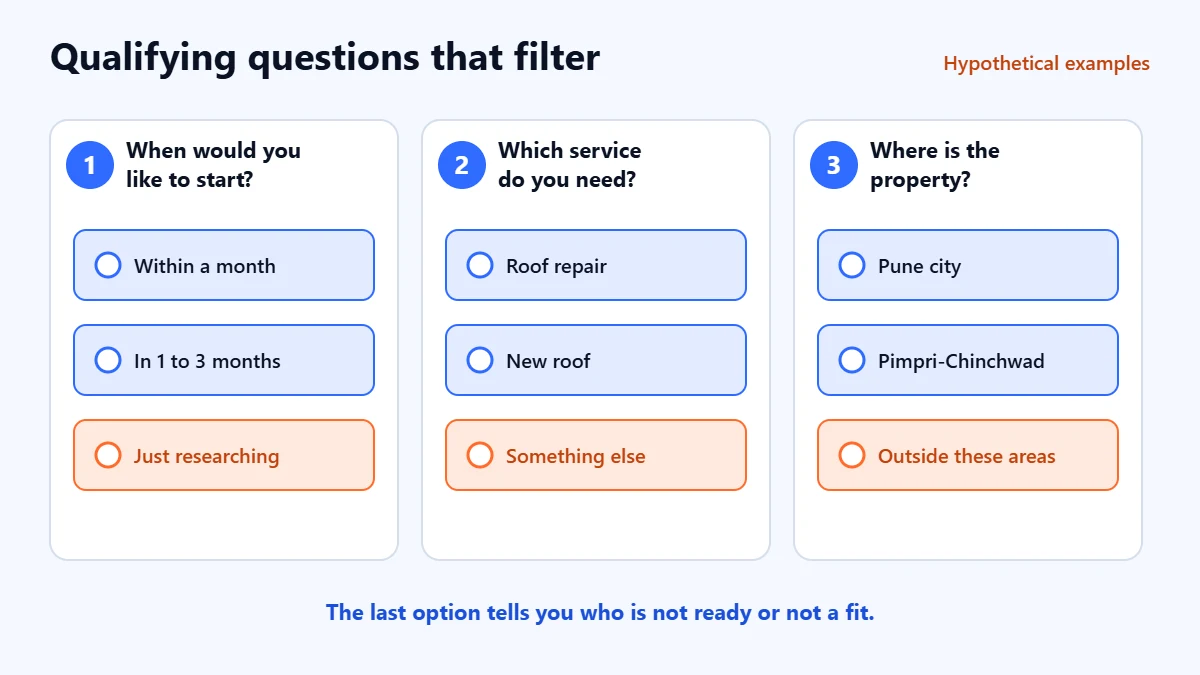
- Timing: “When would you like to start?” with options such as “Within a month”, “In 1 to 3 months”, “Just researching”. You will still get researchers, but you will know who they are.
- Fit: “Which service do you need?” with only the services you sell, plus “Something else”. Wrong-fit leads tend to pick the last option.
- Area or size: a service area, a property type or a budget range. Conditional answers, uploaded as a CSV file, let later answers change based on earlier ones, such as a district list that depends on the city chosen.
Meta’s lead ads guidance also lists things a form must not ask for, including financial information such as income or credit score, government ID numbers, health information, criminal history, and questions about religion, politics, race or ethnicity, sexual orientation or trade union membership. Check the current list before writing a question that goes anywhere near those areas, and ask only for what you will use. Privacy law in your customers’ country still applies; Meta describes a privacy policy link as optional but recommended, and in our view you should always add one.
Want someone to look at your forms and leads with you? Ask for a Free Growth Audit. We review your form type, questions, targeting and follow-up, then tell you which change is most likely to improve the leads you keep.
Fix 3: let the ad do some filtering
The cheapest filter is the one that stops the wrong person tapping at all. Say who the offer is for and what it involves: “For homeowners in Pune”, “Projects from ₹5 lakh”, “Free site visit, then a written quote”. The form’s intro screen and the text above the questions can repeat it. A price, a minimum or a clear area will lower your click-through rate. That is the point.
Be wary of offers that attract everyone, such as a giveaway or a “free” anything without context. They can be useful for building an audience, but they make poor lead generation for a service that needs a conversation.
Fix 4: check what your targeting really does
Many advertisers believe their audience is narrower than it is. With Advantage+ audience, Meta’s help page separates audience controls from suggestions. Location, minimum age, excluded custom audiences and language are controls, and Meta will not go outside them. Age ranges, gender, detailed targeting and custom audiences are suggestions, which Meta may go beyond if it expects better results. If your wrong-fit leads are, say, too young, set the minimum age as a control rather than relying on an age suggestion.
Location is the control that matters most for local service businesses. If your labels show leads from outside the area you serve, check the location setting before anything else. Our guide to Meta ads for local businesses covers local targeting in more detail.
If you advertise housing, jobs, or financial products and services, your campaign has to use a special ad category. In or reaching the United States, Canada and some European countries, Meta limits or removes options such as age, gender, postcode targeting and lookalike audiences for those categories. You cannot target your way out of weak leads in those categories, so the form and the message carry more of the load.
Fix 5: tell Meta which leads were good
The form fixes reduce bad leads. This fix changes what the system looks for. Meta’s “Maximise number of qualified leads” goal, which its developer documentation still calls conversion leads, uses outcomes from your CRM to target people likely to go on to convert, not just to submit. It works through the Conversions API for CRM: you send Meta the lead ID for each lead, which Meta recommends, or identifiers such as email or phone, along with the stage it reached in your sales process.
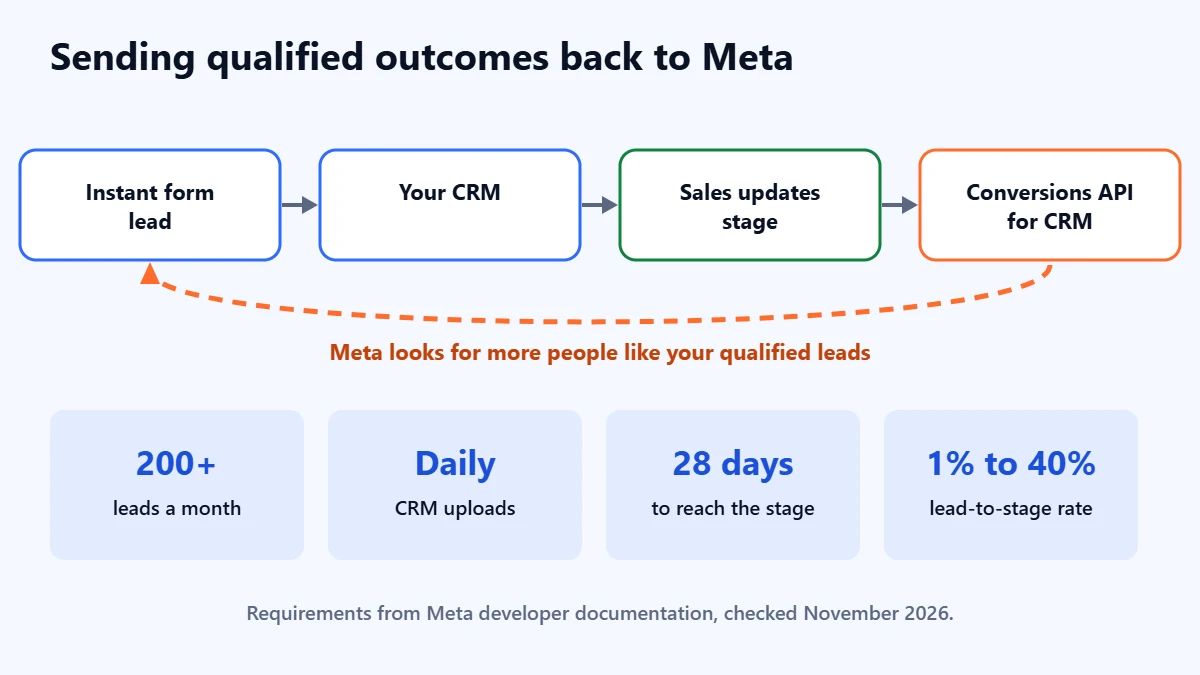
Meta’s developer documentation sets out the requirements, as checked in November 2026:
- Leads from instant forms, with a business portfolio and a CRM connected through Events Manager, a direct integration or a partner.
- At least 200 leads a month.
- CRM data uploaded at least daily, with an event for every lead status change while the campaign is learning.
- A stage reached within 28 days of the lead, with a conversion rate from lead to that stage of between 1% and 40%. Choose a stage like “qualified” or “appointment booked”, not “contract signed” if that takes months.
- Patience. Meta describes a learning phase of about two to four weeks.
Meta’s help page also says that from April 2026, the qualified leads goal cannot be chosen for new campaigns without a Conversions API integration. If an agency or a plugin set up your lead tracking some time ago, check that it still sends what Meta now expects. Our Meta Pixel and Conversions API guide covers the website side of the setup.
Which stage of this are you ready for?
The ladder below is our reading of Meta’s requirements, not a Meta rule.
| Your situation | Optimise for | Focus on |
|---|---|---|
| Fewer than about 200 leads a month, no CRM | Leads, with a Higher intent form and verification | Labelling leads in a spreadsheet and fixing the form and ad |
| Fewer than 200 leads a month, with a CRM | Leads, as above | Recording a consistent stage for every lead, ready for later |
| 200 or more leads a month, CRM updated daily, a stage reached within 28 days | Qualified leads, through the Conversions API for CRM | Keeping stage updates accurate and timely |
Fix 6: do not lose the good leads you already get
Some “bad” leads are good leads who heard from you too late. Meta says leads can be downloaded for 90 days after submission and recommends connecting a CRM so you do not lose access. Do not rely on someone remembering to download a CSV each week. Connect the form to your CRM or email so each lead arrives immediately, and use Meta’s Lead Ads Testing Tool to submit a test lead and confirm it reaches the right person. Then decide who calls each lead and how quickly.
If your customers prefer to chat, Meta also offers lead ads that open Messenger, Instagram Direct or WhatsApp, including an automated chat that asks qualifying questions before contact details. That suits businesses that can answer messages quickly every day, and frustrates leads when nobody does.
What each fix costs you
| Fix | Best for | What you give up |
|---|---|---|
| Higher intent form | Accidental and half-attentive submissions | Some volume; desktop and non-feed placements |
| SMS verification | Wrong and fake numbers | Landline users and some genuine people who do not finish |
| Work email required | Personal-interest enquiries on B2B offers | Small firms using personal addresses |
| Qualifying questions | Wrong fit and not ready | Some volume; you also learn who is who |
| Clearer ad copy | Wrong fit before the tap | Click-through rate |
| Qualified leads goal | Teaching Meta who your buyers are | Setup effort, volume requirements and a learning period |
Our published case studies include Meta ads for two Ahmedabad property projects that report lead volumes of more than 500 a month. They report lead counts only, not quality or sales, which is exactly the gap this guide is about. Volume is the easy part to show; whether the leads were worth calling is what you need to measure.
Common mistakes
- Judging on cost per lead. Every fix here raises it. Track cost per qualified lead, or you will undo the fixes that worked.
- Adding every filter at once. You will not know which one cut your volume, and you may cut too far.
- Asking ten questions. One or two good ones filter better than a long form people abandon.
- Treating “qualified” loosely. If your sales team marks leads qualified inconsistently, the qualified leads goal learns the inconsistency.
- Blaming Meta for slow follow-up. A lead called a week later often does not remember the ad. Check your response times before your settings.
- Forgetting the website option. For some offers, sending people to a good landing page produces fewer, better-informed leads. Test both and compare cost per qualified lead.
Frequently asked questions
Why are my Facebook leads not answering the phone?
Usually because the form made it too easy to submit without real interest, the number was wrong, or the follow-up came too late. Turn on SMS verification, try the Higher intent form type, and check how quickly your team calls. We do not quote a figure for how common this is, because we have not found a reliable published one.
Are Facebook lead ads worse than sending people to a website?
Not necessarily. Instant forms usually bring more leads at a lower cost each, often with lower intent. A website asks more effort and often brings fewer, better-informed leads. Which wins depends on your offer, so compare cost per qualified lead, not cost per lead.
Will the Higher intent form type lower my lead volume?
Probably, because it adds a step and runs only in mobile feeds. The question is whether the leads you lose were ones you wanted. Run it long enough for your team to work the leads, then compare.
Can I use the qualified leads goal with a small budget?
Meta’s documentation asks for at least 200 leads a month, so many small advertisers cannot use it yet. Improve the form and the ad first, and start recording a consistent stage for every lead so you are ready if your volume grows.
Can Apzom guarantee better leads from Meta ads?
No. Nobody can honestly guarantee lead quality or sales. We can find which kind of bad lead you have and what is most likely to reduce it; our Meta ads management page explains how we work.
Get your Free Growth Audit and Quote. We review your instant forms, questions, targeting, tracking and lead handling, then send a plain-English list of what to fix first. We will ask for standard access to your ad account; you stay the owner.
No obligation and no guaranteed results. Prefer to talk first? Contact us or see our Meta ads management service.