The short answer: An attribution model is the rule that decides which marketing touchpoints get credit when someone becomes a lead or a customer. In Google Analytics 4 and Google Ads today, you choose between data-driven attribution, which shares credit based on your own data, and last click, which gives all the credit to the final click. The older first click, linear, time decay and position-based models are no longer supported in Google Ads, where conversion actions that used them were moved to data-driven. No model shows the full truth. Use one consistently, check it against your own lead records, and never add up the conversions different platforms claim.
This guide is for business owners and marketers who want to understand why their reports give credit where they do, and how much to trust them. It follows Analytics Help and Google Ads Help as checked in November 2026. Apzom Digital runs paid and organic campaigns, so read this knowing we have an interest. Nothing here depends on hiring anyone.
What to take from this guide
- A model is a rule, not a fact. The same customer journey gives different answers under different models.
- Google now offers two main choices. Data-driven or last click, in both GA4 and Google Ads.
- Changing the model in GA4 rewrites the past. Google says the reporting model applies to historical as well as future data.
- Your own records are the tiebreaker. Platforms each see part of the journey, and each tends to credit itself.
What an attribution model actually does
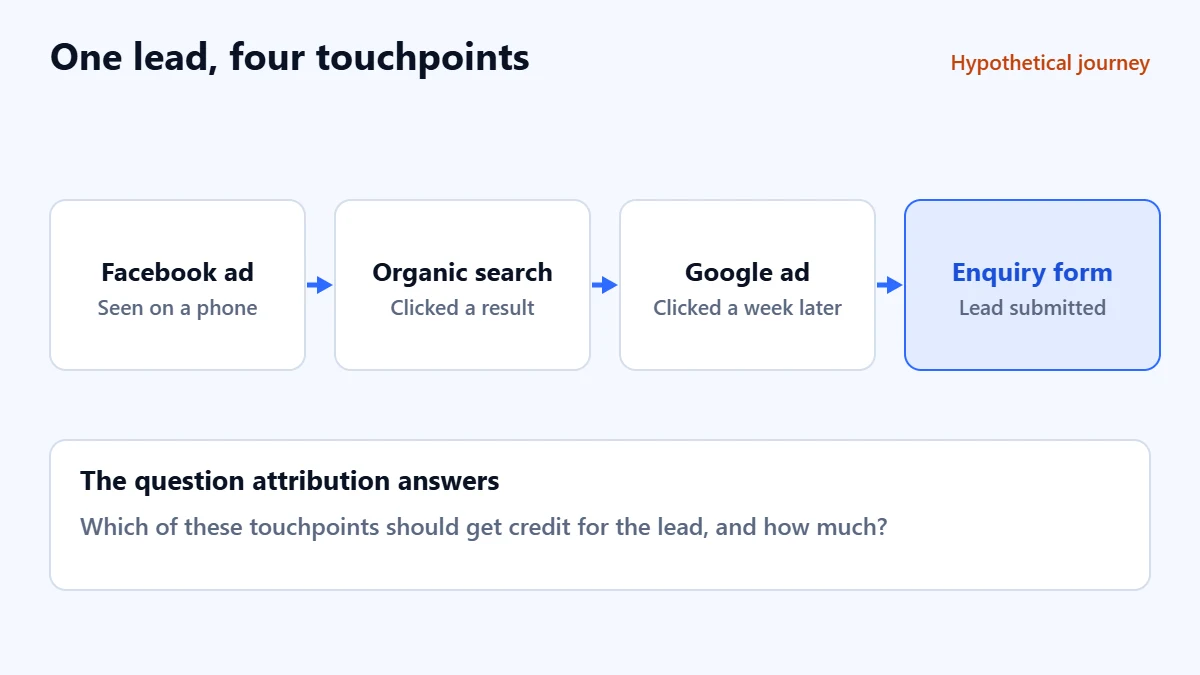
Few people buy after one interaction. Here is a hypothetical but typical journey for a service business. Someone sees a Facebook ad, later searches for the service and clicks an organic result, comes back a week later through a Google ad, and then fills in the enquiry form. Four touchpoints, one lead. The attribution model decides how the credit for that lead is shared out.
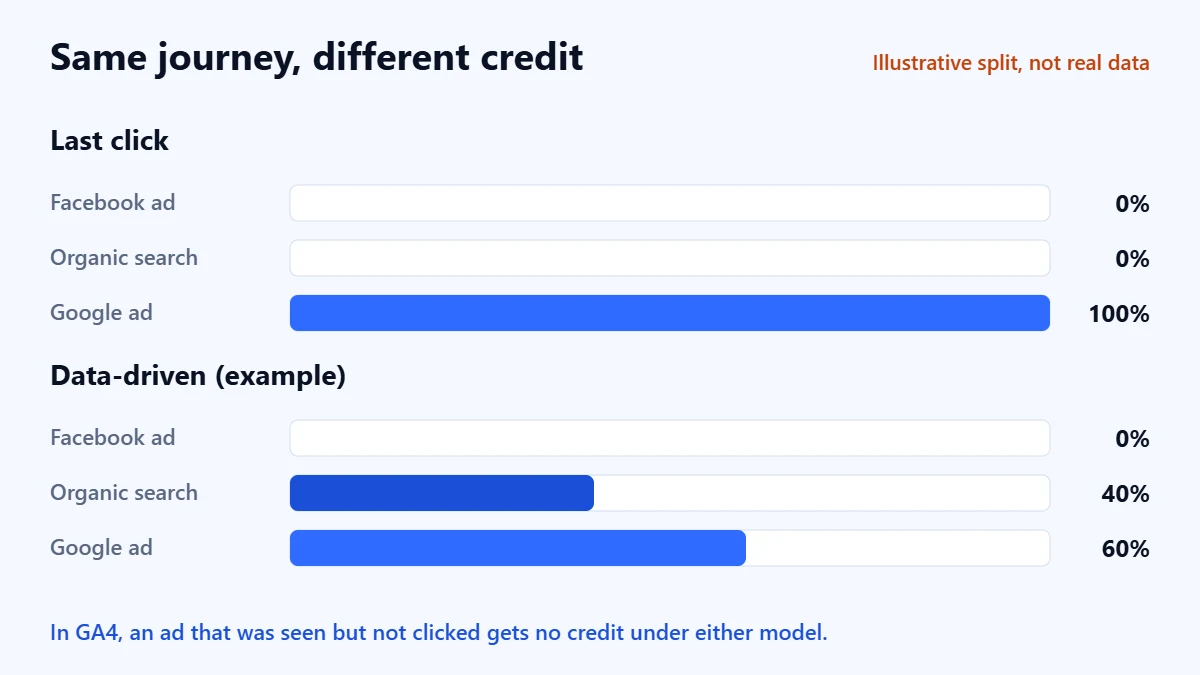
Under last click, the Google ad gets all of it. Under data-driven attribution, credit is shared between the touchpoints according to how much each has contributed to conversions in your own data. Google says GA4’s data-driven model calculates the contribution of each click interaction, so in GA4 the Facebook ad in this example would receive credit only if the person clicked it. Meta’s own reports would count it in their own way.
Which models you can use now
| Where | Model | What Google says it does |
|---|---|---|
| GA4, paid and organic channels | Data-driven (recommended) | Distributes credit based on your property’s data for each key event |
| GA4, paid and organic channels | Last click | Ignores direct traffic and gives all credit to the last interaction before the key event |
| GA4, Google paid channels | Last click | Gives all credit to the last Google Ads click, falling back to paid and organic last click if there was none |
| Google Ads | Data-driven | The default for most conversion actions, based on your account’s past data |
| Google Ads | Last click | Gives all credit to the last-clicked ad and keyword |
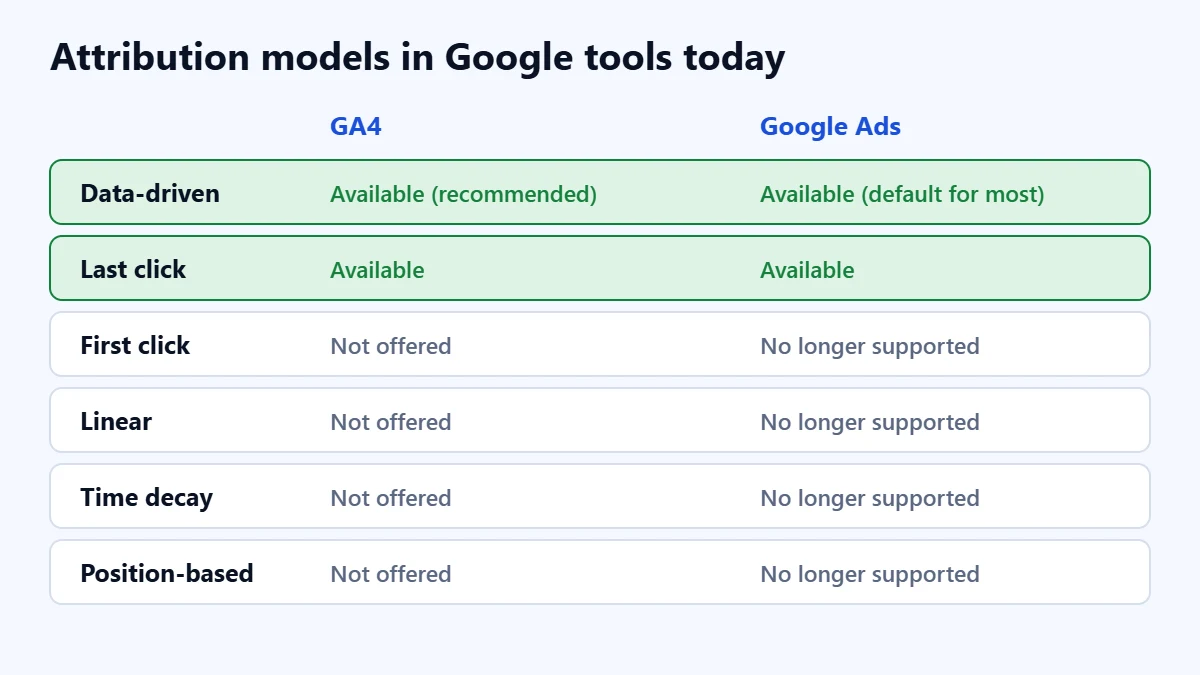
Google Ads Help states that the first click, linear, time decay and position-based models are no longer supported, and that conversion actions which used them were upgraded to data-driven attribution. If an old guide, or an old agency report, refers to those models, it was written for a version of the tools that no longer exists.
Three settings that change what you see
The reporting model
In GA4 you set this under Admin, in the attribution settings, and you need Marketer access or above. Google says a change to the reporting model applies to historical and future data, and is reflected in key event reports and explorations that use event-scoped traffic dimensions such as source and medium. In practice, last month’s channel figures can change after someone edits this setting. A report should note any change, as our guide to what a marketing report should include explains.
The lookback window
This is how far back a touchpoint can be and still receive credit. Google says that in GA4 the default is 30 days for acquisition key events such as first visits, with a 7-day option, and 90 days for all other key events, with shorter options available. Changes to the lookback window apply going forward. If your customers take months to decide, early touchpoints may fall outside the window and receive no credit at all.
How direct traffic is treated
GA4’s paid and organic last click model ignores direct traffic. So if someone found you through a search, then later typed your address and enquired, the search gets the credit, not the direct visit. That is usually sensible, but it means “direct” in your reports is not the whole story of people who came back on their own.
Not sure your tracking gives credit to the right channels? Ask for a Free Growth Audit. We review your analytics, conversion tracking and attribution settings, and tell you what we would change first.
Why every platform says it did best
Each advertising platform measures the journey from its own side, with its own windows and rules, and counts conversions it believes it influenced. When two platforms both touched the same customer, both may claim the lead. Add their figures together and you will often get more leads than you actually received. Our guide to measuring marketing ROI explains why the numbers never fully match and how to compare them sensibly.
A practical approach for most businesses
You do not need a sophisticated attribution system to make good decisions. In our judgement, this order works for most small and mid-sized businesses:
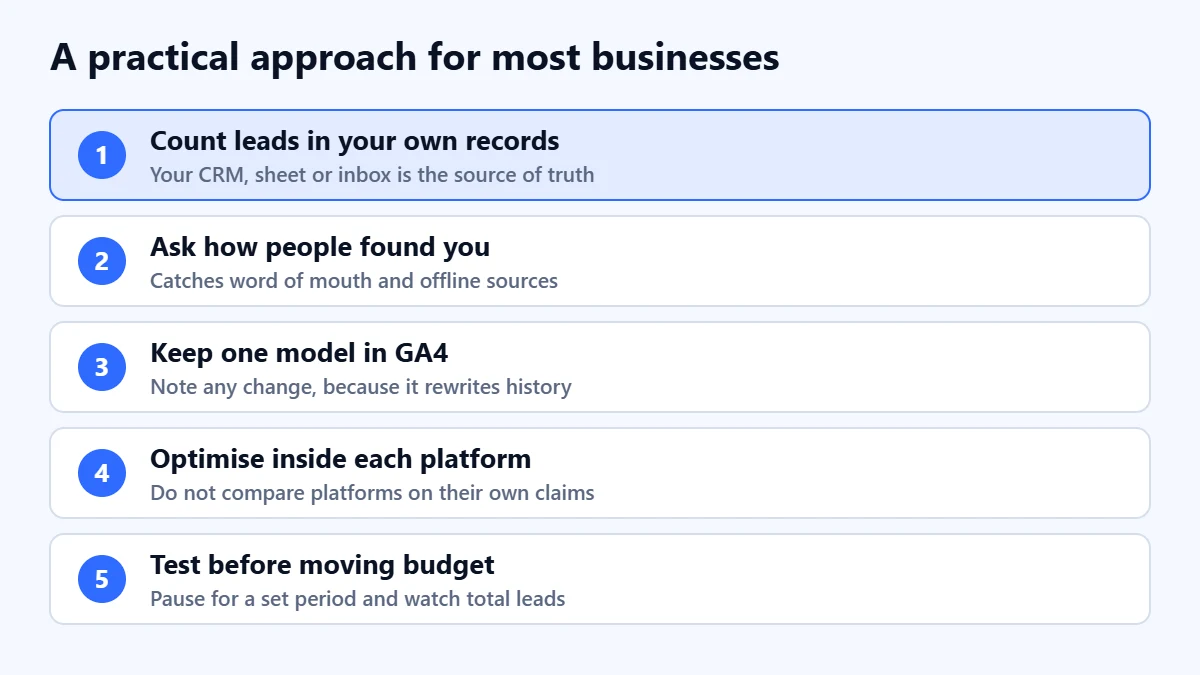
- Count leads in your own records. Your CRM, spreadsheet or inbox is the source of truth for how many enquiries you received. Our guide to setting up GA4 shows how to track them as key events.
- Ask how people found you. A simple question on the form or the first call catches word of mouth, offline adverts and podcasts that no tool tracks.
- Keep one model in GA4, and note any change. Data-driven is Google’s recommendation. Whichever you choose, consistency matters more than the model.
- Use each platform’s figures to optimise inside that platform. They are useful for comparing campaigns within Google Ads or within Meta. They are not a fair way to compare Google with Meta.
- Test before moving large budgets. If a channel looks weak in attribution reports, pause or reduce it for a fixed period and watch your total leads, rather than trusting one report.
If you use UTM links on emails, social posts and offline QR codes, traffic is labelled correctly from the start. Our guide to creating UTM links covers a naming system.
Common mistakes
- Adding up platform conversions. Each platform claims its own share, so the total overstates reality.
- Cutting a channel because it never gets the last click. Channels that introduce people to your business can look weak under last click and still matter.
- Changing the model mid-year without telling anyone. In GA4 it changes historical figures, so comparisons break.
- Treating data-driven as exact. It is a model based on your data, and it needs enough of it to be meaningful.
- Ignoring what no tool can see. Referrals, offline conversations and repeat customers often fall outside tracked paths.
Frequently asked questions
What is the best attribution model?
There is no single best model. Data-driven attribution is Google’s recommendation for GA4 and the default for most Google Ads conversion actions. Last click is simpler to explain and still supported. Choose one, use it consistently, and check it against your own records.
Can I still use first click or linear attribution?
Not in Google Ads, which says those models are no longer supported, and GA4’s model settings now offer only data-driven and last click options. You can still look at how people first arrived using GA4’s user acquisition reports, which is a different question from crediting a conversion.
Why do Google Ads and GA4 show different numbers for the same campaign?
They can use different models, windows and dates. Google Ads reports conversions against the date of the ad rather than the day the conversion happened, and each tool counts within its own settings. Compare trends, not exact totals, and use your own lead records to settle disagreements.
Does attribution matter for a small business?
Less than getting the basics right. If you track enquiries reliably, ask people how they found you and use consistent settings, you can make sound budget decisions without advanced attribution tools.
Get your Free Growth Audit and Quote. We review your tracking, channels and reporting, then send a plain-English list of what we would fix first and how we would measure it.
No obligation and no guaranteed results. Prefer to talk first? Contact us or see our performance marketing service.