The short answer: Conversion rate optimization (CRO) is the work of finding out why visitors who could become customers do not, fixing the causes, and measuring whether more of the right people now call, book, enquire or buy. A “conversion” is whatever action matters to your business, and your conversion rate is the share of visits that end in that action. For most small businesses, CRO is research first and testing second: you get more from fixing the leaks that analytics, session recordings and customer questions reveal than from A/B testing button colours, because a valid test needs far more traffic than most small sites get.
This guide is for owners and marketing leads of small and mid-sized businesses anywhere in the world, whether you sell services, run a local business, sell to other businesses or run a small online store. It explains what CRO is, where conversions usually leak, which methods your traffic can actually support, the honest-persuasion rules that differ by country, and a 30-day plan you can start this month. Platform details were checked against Google and Microsoft documentation and against regulators’ own pages on 25 October 2026.
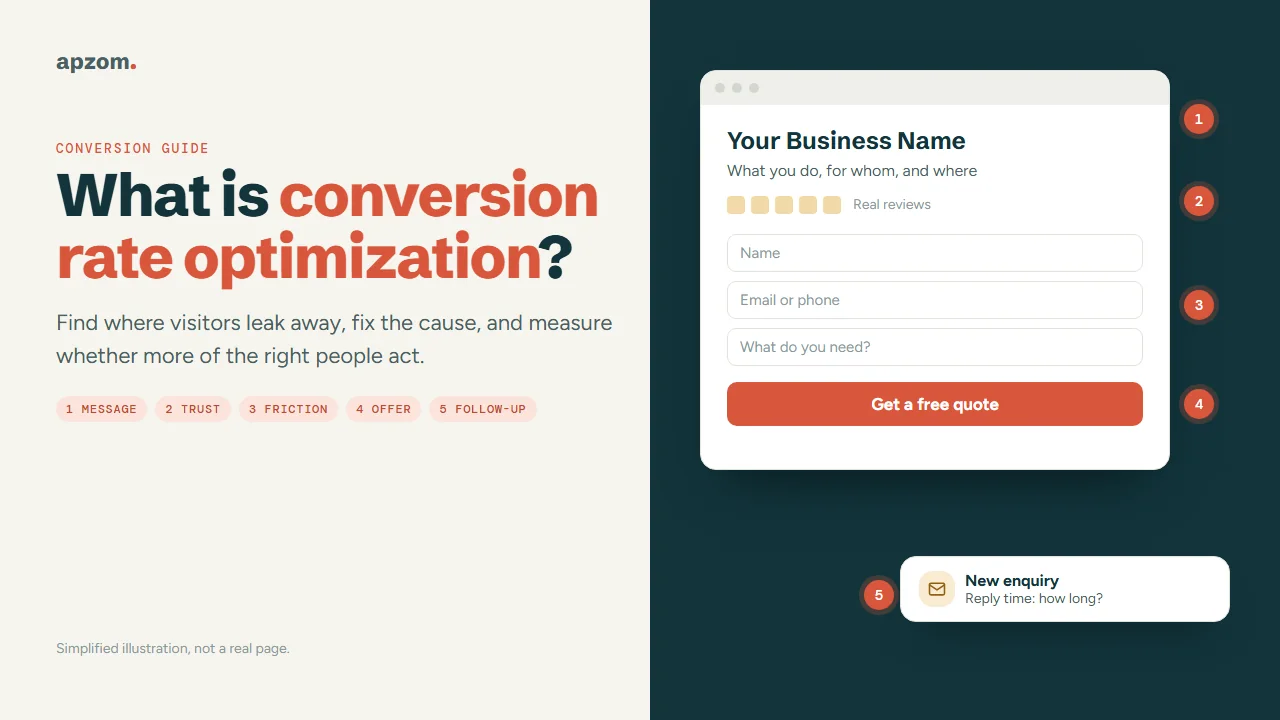
What conversion rate optimization means
A conversion is a visitor doing the thing your website exists for. For a dentist or a law firm, that is usually a booking or an enquiry. For a manufacturer, a request for a quote. For a shop, a purchase. Smaller actions, such as clicking a phone number or starting a form, are useful signals, but they are steps towards the conversion, not the conversion itself.
Your conversion rate is conversions divided by visits (or by visitors), shown as a percentage. If 2,000 visits to your service pages produce 40 enquiries in a month, the conversion rate is 2%. In Google Analytics 4, the closest built-in measures are session key event rate (the share of sessions in which a key event happened) and user key event rate (the share of users who triggered one). Google renamed “conversions” to “key events” in GA4 in 2024, so older guides use the old word; “conversions” now means key events used to measure Google Ads campaigns.
CRO is the process of raising that rate by removing the reasons people leave, without paying for more traffic. It matters most when you already pay for visits, through Google Ads, Meta ads or months of SEO work. A page that converts 2% instead of 1% gives you twice the enquiries from the same budget.
What CRO is not:
- Not a list of “best practice” tweaks. A green button that worked on someone else’s site tells you nothing about yours.
- Not only A/B testing. Testing is one tool, and for small sites often the wrong one (see the Traffic Ladder below).
- Not a way to trick people. Fake countdown timers, invented scarcity and pre-ticked boxes may lift a number for a while, but in many countries they break consumer law (see the rules section).
- Not a substitute for a good offer. If the price, the product or the service area is wrong for the visitor, no page design fixes it.
Before you optimize anything: get one number you trust
Many small business websites cannot answer a simple question: how many real enquiries did the website produce last month, and from which pages? Until you can, any change you make is a guess, and any “improvement” you see may be a tracking fault.
Set up one trustworthy conversion first:
- Decide what counts. Pick the one or two actions that produce revenue: a submitted enquiry form, a completed booking, a purchase, a tracked call. Treat clicks on email or phone links as signals, not as conversions, because many are accidental or never connect.
- Track it reliably. In GA4, mark that event as a key event in the Admin settings. A standard GA4 property can mark up to 30 key events, so keep the list short. For forms, GA4’s enhanced measurement collects form_start and form_submit events by default, but automatic form tracking cannot always tell a successful submission from a failed one. Test it on your own forms; many sites track a thank-you page, or an event the form fires only on success, instead.
- Check it against reality. For two weeks, compare GA4’s count with the enquiries that actually arrived in your inbox or CRM. If GA4 says 60 and you received 35, find the gap before you change any page. Common causes are spam submissions, double-firing events and thank-you pages that load on their own.
- Note lead quality. Mark each real enquiry as good, poor or spam. A change that doubles form submissions but fills the inbox with poor leads is not an improvement.
If visitors from the EEA, the UK or Switzerland reach your site, your analytics and ads tags also need to respect their consent choices. Since March 2024, Google has required sites to collect consent from users in the EEA and send consent signals (Consent Mode) to keep using its measurement and ad personalisation features, and Google’s EU user consent policy covers the EEA, the UK and Switzerland. That is a Google requirement; the legal duty comes from privacy law. A consent banner also changes what you can see, so expect GA4 to show fewer visits than really happened.
Our guide on how to measure marketing ROI covers turning conversions into revenue and cost figures, and how to track AI search traffic in GA4 explains the newer AI Assistant channel if you want to see those visits separately.
The Leak Map: five places conversions get lost
When a page does not convert, most causes fall into one of five places. We call this the Leak Map. Work through it in order, because the earlier leaks are usually bigger and cheaper to fix.
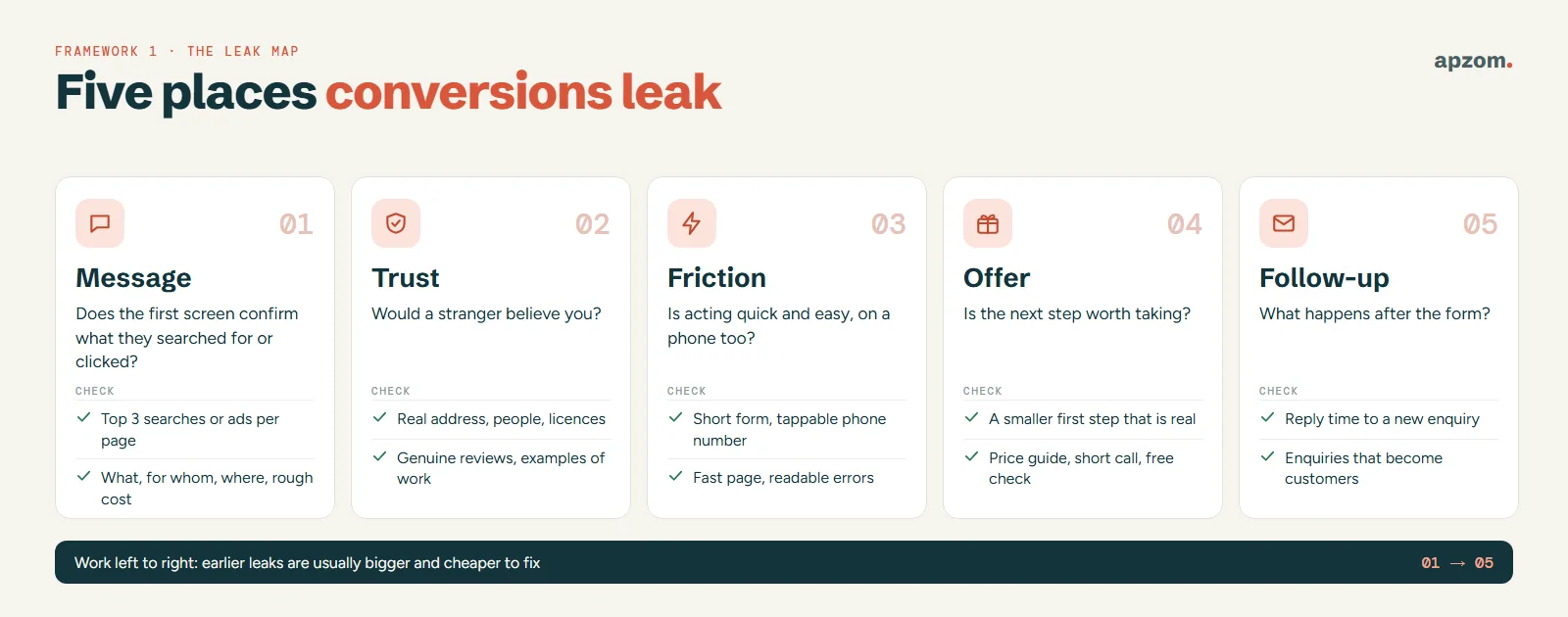
1. Message: does the page answer what the visitor came for?
A visitor arrives with a question in their head, shaped by the ad they clicked or the search they typed. If someone searched “emergency plumber open now” and lands on a homepage about bathroom renovations, they leave, however good the design. For each important landing page, write down the top three searches or ads that send people there, then check that the first screen confirms, in plain words, that they are in the right place: what you do, for whom, where and roughly what it costs or how it works.
Google Ads makes this visible: “landing page experience”, meaning how relevant and useful your page is to people who click your ad, is one of the three parts of Quality Score, alongside expected click-through rate and ad relevance. Google describes Quality Score as a diagnostic tool, not an input in the ad auction, but a low landing page rating is a useful warning. Our Google Ads setup guide shows how to read it.
2. Trust: does the visitor believe you?
People do not contact a business they doubt. Trust on a small business site is built by specific, checkable things: a real address and phone number, named people, licences or registrations where your trade has them, real reviews, clear prices or price ranges, and examples of work. Vague claims (“best in town”, “trusted by thousands”) do the opposite. Our guide on getting more Google reviews covers collecting reviews without breaking platform rules.
3. Friction: is it easy to act?
Friction is anything that makes acting slower or harder than it needs to be:
- forms that ask for more than you need at first contact;
- slow pages, especially on phones;
- a phone number that is an image, so it cannot be tapped;
- pop-ups that cover the content on a small screen;
- booking tools that send people to another site with a different look;
- error messages that clear the whole form.
Speed has published targets. Google’s Core Web Vitals call a page “good” when Largest Contentful Paint is 2.5 seconds or less, Interaction to Next Paint is 200 milliseconds or less and Cumulative Layout Shift is 0.1 or less, measured at the 75th percentile of page visits, separately for mobile and desktop. Our technical SEO audit guide shows where to find these numbers for your site.
Accessibility is friction too. If people cannot use your form with a keyboard, read low-contrast text or understand an error message, they cannot convert. The W3C’s Web Content Accessibility Guidelines (WCAG 2.2, a W3C Recommendation since October 2023) are the reference standard, and in some places accessibility is now a legal duty for certain businesses (see the rules section).
4. Offer: is the next step worth taking?
Sometimes the page is clear, trusted and fast, and people still do not act because the next step asks too much. “Request a proposal” feels like a big commitment for someone still comparing options. A smaller, genuinely useful step, such as a price guide, a 15-minute call, a free check of a specific problem or a sample, often brings in more of the right people. The offer must be real: if you advertise a free audit, deliver one.
5. Follow-up: what happens after the form?
Many CRO guides stop at the form, yet for service businesses follow-up can matter as much as the page. A form submission is not a customer. If enquiries wait two days for a reply, go to an inbox nobody checks at weekends, or get a generic auto-reply, many of those people book with someone else. Measure how long it takes you to reply to a new enquiry and how many enquiries become paying customers. A faster, more personal reply can raise sales from the same traffic without touching the website.
Traffic coming in, but few enquiries? A Conversion Leak Review checks your tracking, your top landing pages and your forms against the five leaks in this guide, and tells you which one to fix first.
The Traffic Ladder: which CRO methods your traffic supports
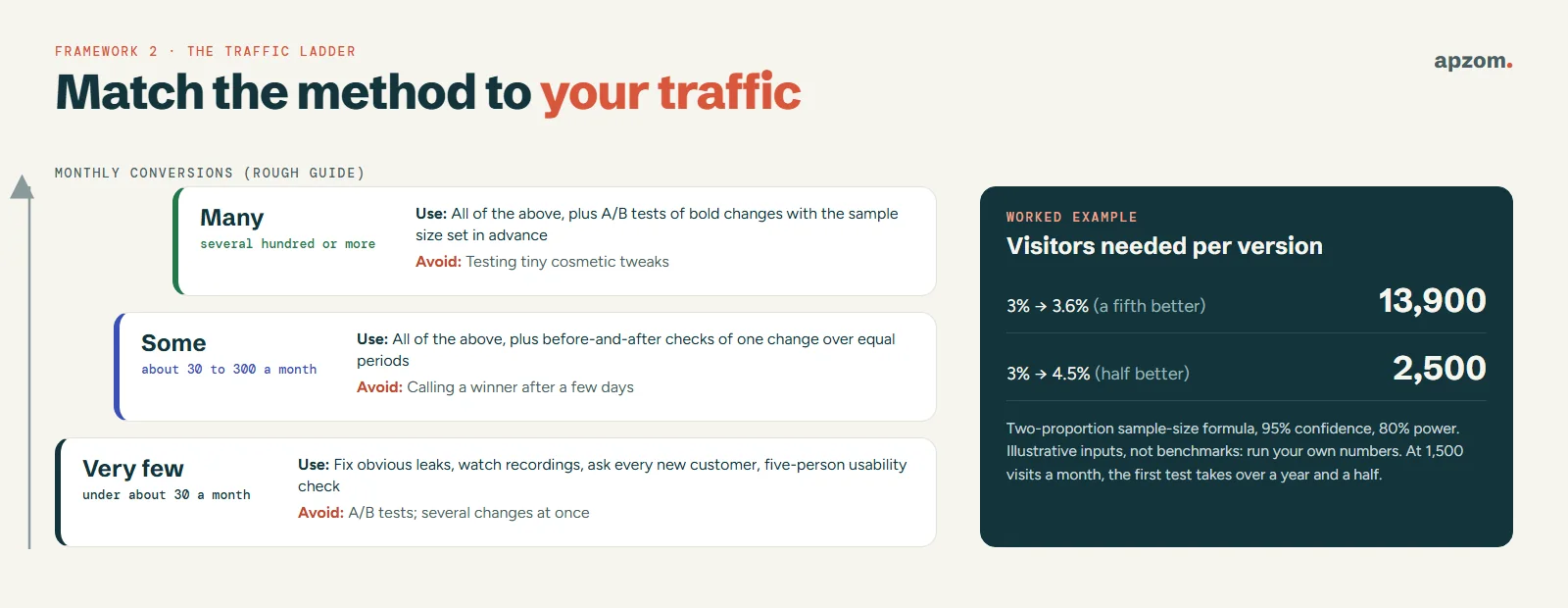
Much CRO advice is written for websites with large traffic. On a site with modest traffic, A/B testing usually cannot give a reliable answer, and treating an unreliable result as proof is worse than not testing. Pick your method by how many conversions you get, not by what large companies do.
Why small sites usually cannot A/B test
An A/B test shows different versions of a page to different visitors and compares results. To trust the result, you need enough visitors to tell a real difference from random chance, and the smaller the difference you want to detect, the more visitors you need.
Here is a worked example, with the method stated so you can check it. Suppose your page converts at 3%, and you want to detect whether a new version lifts that by a fifth, to 3.6%. Using the standard sample-size formula for comparing two proportions, with the usual settings (95% confidence and 80% power), you need about 13,900 visitors for each version, so about 27,800 in total. If the page gets 1,500 visits a month, that test would take more than a year and a half. If you only want to detect a much bigger lift, from 3% to 4.5%, you need about 2,500 visitors per version, roughly 5,000 in total. These are illustrative inputs, not benchmarks: run your own numbers with any two-proportion sample-size calculator before you start a test.
Two more rules follow from the same statistics. Decide the sample size or test length before you start, and do not stop the test the moment one version looks ahead: if you check results repeatedly and stop as soon as they look significant, the chance of a false “winner” rises well above the level you planned. Statisticians have documented this since 1969, and researchers have shown it for online A/B tests. And test one meaningful change at a time, not ten small ones.
What to do instead, by rung
| Your monthly conversions (rough guide) | Methods that give useful answers | What to avoid |
|---|---|---|
| Very few (under about 30) | Fix obvious leaks from the Leak Map; watch session recordings; ask every new customer what nearly stopped them; run a five-person usability check | A/B tests, and changing several things at once |
| Some (about 30 to 300) | All of the above, plus before-and-after comparisons of one change at a time over equal periods, checked against the same months last year if you are seasonal | Calling a winner from a few days of data |
| Many (several hundred or more) | All of the above, plus A/B tests of bold changes (new offer, new page structure), with the sample size worked out in advance | Testing tiny cosmetic tweaks |
The ranges are a rough guide from the sample-size maths above, not fixed thresholds. The real limit is whether your traffic can detect the size of change you care about in a few weeks.
Free research tools that work at any traffic level
- Session recordings and heatmaps. Microsoft Clarity is free and records how real visitors scroll, click and move through your pages. It masks sensitive content by default (its Balanced mode masks numbers and email addresses, and input boxes are masked in every mode). Since 31 October 2025 it needs a valid consent signal for visits from the EEA, the UK and Switzerland, and Microsoft says it should not be used on sites aimed at under-18s. Watch 20 to 30 recordings of visitors who did not convert and note where they hesitate, rage-click or leave.
- GA4 explorations. The Funnel exploration shows where people drop out between steps (for example, service page to contact page to thank-you page), and the Path exploration shows where they go instead.
- Customer questions. Ask new customers, on the phone or in a short email: “What nearly stopped you contacting us?” and “What did you want to know that the website did not tell you?” Five honest answers can explain more than a month of data.
- Your inbox and phone. The questions people repeat before buying are the things your page should answer.
If you do run tests, follow Google Search Central’s guidance on website testing to keep the effect on search low: do not show Googlebot different content from what people see (cloaking), put rel=”canonical” on variant URLs pointing to the original rather than using noindex, send users to variants with a temporary (302) redirect rather than a 301, and run the test only as long as necessary, then remove its elements. If you used Google Optimize in the past, note that it stopped working on 30 September 2023.
The research-first CRO cycle
Whatever rung you are on, CRO runs as a cycle of four steps. This is also how our own conversion rate optimization service works (see How Apzom can help below).
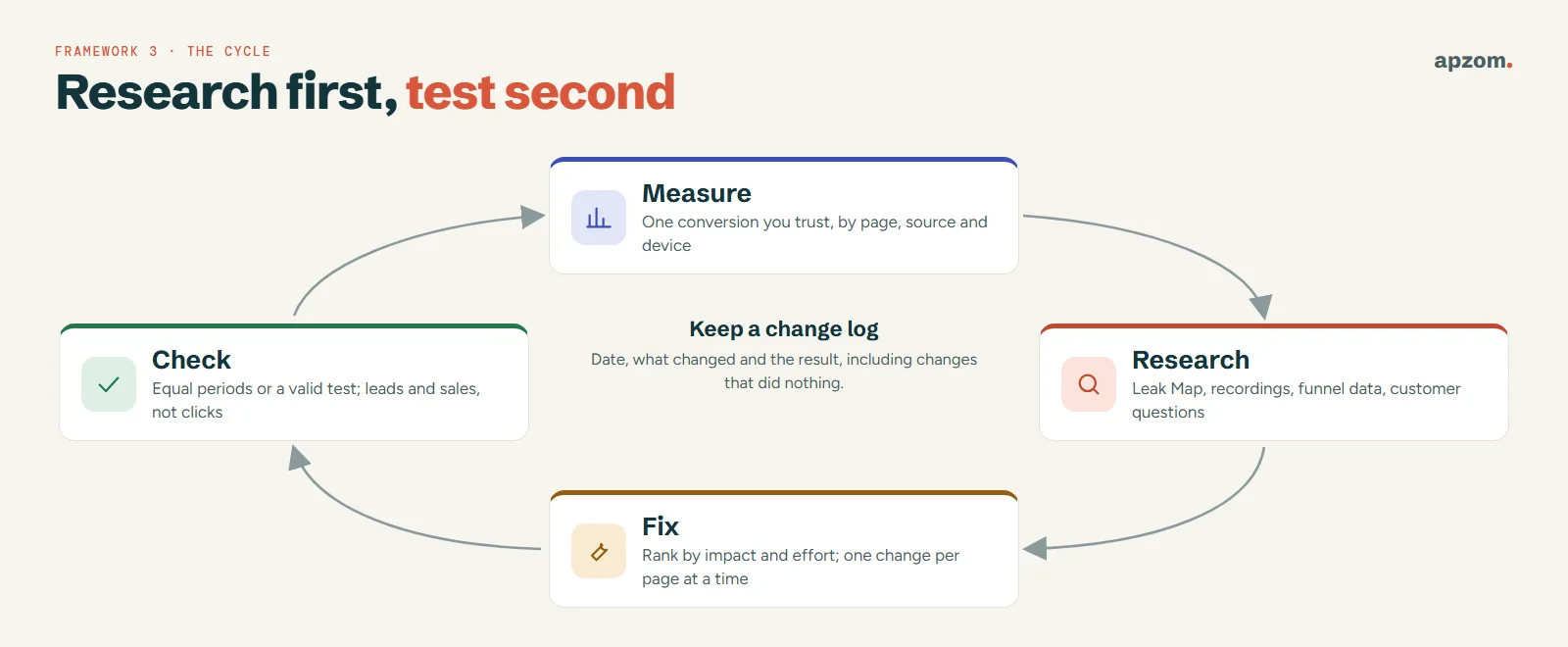
- Measure. Get the trustworthy conversion number above, broken down by landing page, traffic source and device. Phones and computers often convert very differently, and the gap tells you where to look.
- Research. Use the Leak Map with recordings, funnel data and customer questions to find why people leave. Write each finding down with its evidence, for example (an invented illustration) “8 of 25 recordings on the contact page scroll past the form looking for prices”.
- Fix. Rank fixes by likely impact and effort. Clear message and trust fixes usually come first, because they are cheap and affect every visitor. Make one meaningful change at a time on any one page, so you know what caused any change in results.
- Check. Compare equal periods before and after, or run a test if your traffic supports it. Check lead quality and sales, not just form submissions. Keep a simple log of every change, the date and the result, including the ones that did nothing, so you do not repeat them.
Honest persuasion: the rules by country
Some common “conversion tactics” are illegal in many places, and regulators have become more active. These are the main rules to know. This is general information, not legal advice; check with a qualified adviser in each market you sell to.
| Market | What the rules cover |
|---|---|
| US | The FTC’s staff report “Bringing Dark Patterns to Light” (2022) describes manipulative designs, including false scarcity and urgency; its rule on consumer reviews and testimonials, in force since 21 October 2024, bans fake reviews and testimonials and buying reviews |
| UK | Under the Digital Markets, Competition and Consumers Act 2024, from 6 April 2025 the CMA can decide breaches itself and fine businesses up to 10% of global turnover (or £300,000 if higher); its list of banned practices includes false limited-time claims and fake reviews, and the Act also bans drip pricing |
| EU | The Unfair Commercial Practices Directive always bans falsely claiming a product is available only for a very limited time to push an immediate decision; Article 25 of the Digital Services Act bars online platforms from interface designs that deceive or manipulate users |
| India | The Central Consumer Protection Authority’s Guidelines for Prevention and Regulation of Dark Patterns, 2023 list 13 specified dark patterns, including false urgency; in June 2025 the CCPA advised e-commerce platforms to self-audit for them |
| Australia | The Australian Consumer Law already prohibits misleading or deceptive conduct; the Competition and Consumer Amendment (Unfair Trading Practices) Act 2026 bans unfair trading practices and subscription traps from 1 July 2027 and adds drip-pricing rules |
| UAE | Federal Law No. 15 of 2020 on Consumer Protection, as amended in 2023, prohibits advertising misleading prices or describing goods and services with false data |
In practice, that means:
- Countdown timers only when the deadline is real and the offer really ends.
- “Only 2 left” only when it is true at that moment.
- Reviews and testimonials must be genuine, unedited in meaning, and not paid for or filtered to hide the bad ones.
- Prices shown with any compulsory fees included where the law requires it.
- Consent boxes never pre-ticked for marketing.
- Cancelling or saying no should be as easy as signing up. That is good practice everywhere; specific subscription-trap rules differ by country (for example, the UK’s 2024 Act and Australia’s rules from 1 July 2027).
Accessibility law is also widening. The European Accessibility Act has applied since 28 June 2025 to newly placed products and services in its scope, including e-commerce, with an exemption for microenterprises that provide services (fewer than 10 employees and no more than €2 million turnover or balance sheet). The EU is also expected to propose a Digital Fairness Act aimed at manipulative online design; it had not been proposed when we checked. An accessible form is both the law in more places and a form more people can complete.
How to read your results honestly
- Compare like with like. Same days of the week, same length of period, same traffic sources. A change made in a busy month will look like a win for reasons that have nothing to do with the page.
- Watch the denominator. If an ad campaign pauses, traffic falls and the conversion rate can rise while total enquiries fall. Track both the rate and the count.
- Segment by device and source. A page can improve on phones and get worse on computers. Paid and organic visitors often behave differently.
- Count leads and sales, not clicks. Use your CRM or a simple spreadsheet to follow enquiries through to paying customers.
- Ignore conversion rate benchmarks. Published “average conversion rates” mix industries, countries, offers and definitions of a conversion. Your own baseline, measured honestly, is the only useful comparison.
- Expect some changes to do nothing. That is a result too. Log it and move on.
A 30-day CRO plan for a small business
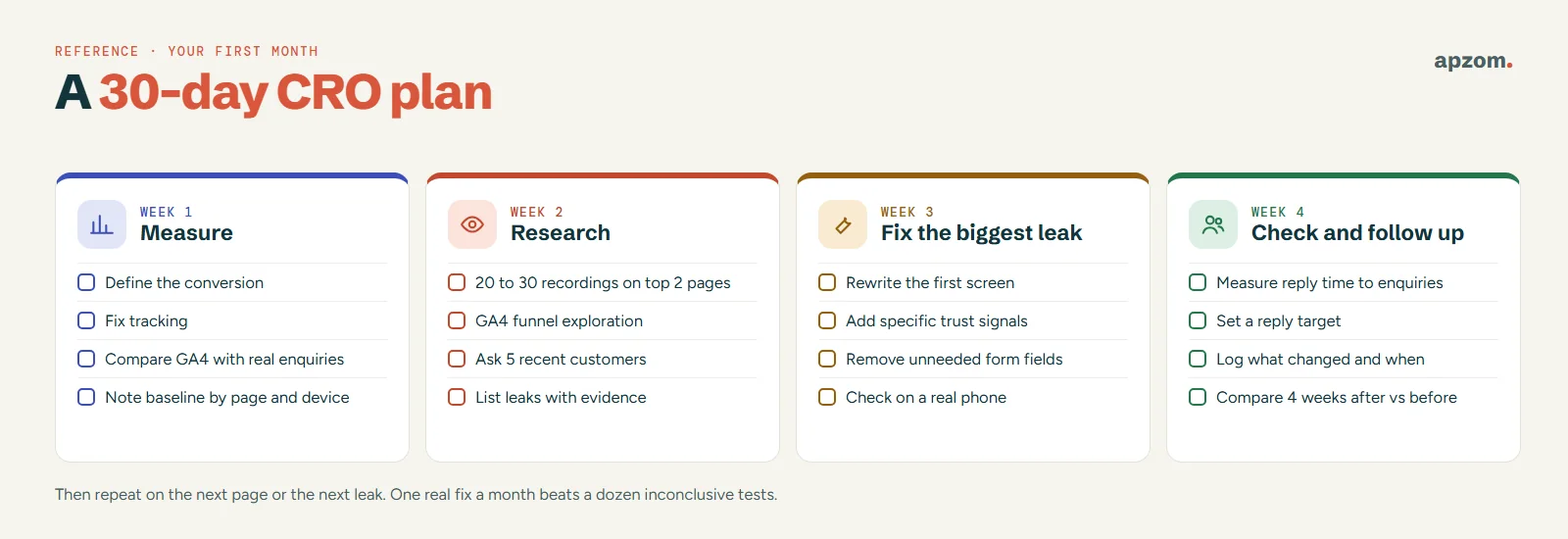
- Week 1: measure. Define your conversion, fix tracking, and compare GA4 with real enquiries. Note your baseline conversion rate and enquiry count by page and device.
- Week 2: research. Watch 20 to 30 recordings of non-converting visits on your top two landing pages, look at the GA4 funnel, and ask five recent customers what nearly stopped them.
- Week 3: fix the biggest leak. Rewrite the first screen of your most visited landing page so it matches what visitors searched for, add specific trust signals, and remove fields your form does not need. Check the page on a real phone.
- Week 4: check and follow up. Measure your reply time to new enquiries and set a target. Write down what changed and when, then compare the next four weeks with the four before the change.
Then repeat the cycle on the next page or the next leak. A small site that fixes one real leak a month usually learns more than one that runs a dozen inconclusive tests.
Common CRO mistakes
- Changing things before tracking works. You cannot tell if a change helped.
- Copying another site’s “winning” test. Their visitors, offer and traffic are not yours.
- Declaring winners early. A few days of data on a small site is mostly noise.
- Counting the wrong conversion. Clicks on a phone link are not calls; form starts are not enquiries.
- Optimising for volume, not quality. More leads you cannot sell to cost time.
- Using fake urgency or fake reviews. They can break the law and damage trust you cannot easily rebuild.
- Ignoring follow-up. The website did its job; the lead was lost in the inbox.
How Apzom can help
Our conversion rate optimization service follows the same cycle as this guide: we measure a trustworthy baseline, find the leaks with analytics, recordings and form data, rebuild the pages or forms that cause them, and test only where your traffic supports a valid answer. We can run it alongside performance marketing, Google Ads management or Meta ads management, so the pages you pay to send people to are ready for them, and with website development when the fix needs a rebuilt page.
We have not published client results for CRO yet, so we will not show you a conversion-rate case study or promise a percentage lift. You can see the work we have published on our case studies page.
We work with clients worldwide, remotely, from our base in Ahmedabad, India.
Request a Conversion Leak Review. We check that your conversion tracking matches the enquiries you really receive, review your most visited landing pages on phone and computer for message, trust, friction and offer problems, look at how quickly enquiries get a reply, and tell you which methods your traffic can support. You get a prioritised list of fixes, or we make them for you.
No obligation and no guaranteed conversion lift. Prefer to talk first? Contact us or see all our services.
Frequently asked questions
What is a good conversion rate?
There is no single good number. It depends on your industry, offer, price, traffic source and what you count as a conversion. A specialist B2B supplier with a high price may convert a small share of visits and still do well, while a low-cost local service should convert more. Measure your own baseline honestly and aim to improve it.
How long does CRO take to show results?
Fixing a clear leak, such as a broken form or a page that does not match the ads sending traffic to it, can show results within weeks. Changes that need testing take as long as your traffic needs to reach a reliable sample, which on a small site can be months. Be wary of anyone who promises a fixed lift in a fixed time.
Is CRO worth it for a small business with low traffic?
Yes, but in a different form. With low traffic you get the most from research and fixing obvious problems, plus faster follow-up of enquiries, rather than from A/B tests. Every visitor is more valuable when you have fewer of them.
What is the difference between CRO and SEO?
SEO brings more people from search to your site; CRO helps more of the people who arrive take action. They work best together: more traffic to a page that does not convert wastes effort, and a page that converts well but gets no visitors earns nothing. Our SEO vs Google Ads guide explains how the traffic side fits together.
Do I need paid tools to start CRO?
No. GA4, Google Search Console and Microsoft Clarity are free and cover measurement, search data and session recordings for most small businesses. Paid testing and survey tools help once your traffic is large enough to use them.
Is A/B testing bad for SEO?
Following Google’s testing guidance keeps the risk low: no cloaking, rel=”canonical” on variant URLs, temporary (302) redirects and tests that end once you have the answer. Google notes that small changes often have little or no impact on a page’s snippet or ranking, but it does not promise zero impact.
Does CRO apply to online stores too?
Yes. The same Leak Map applies, with extra checkout steps to examine, such as delivery costs, payment options and guest checkout. Our ecommerce marketing guide covers the store-specific side.