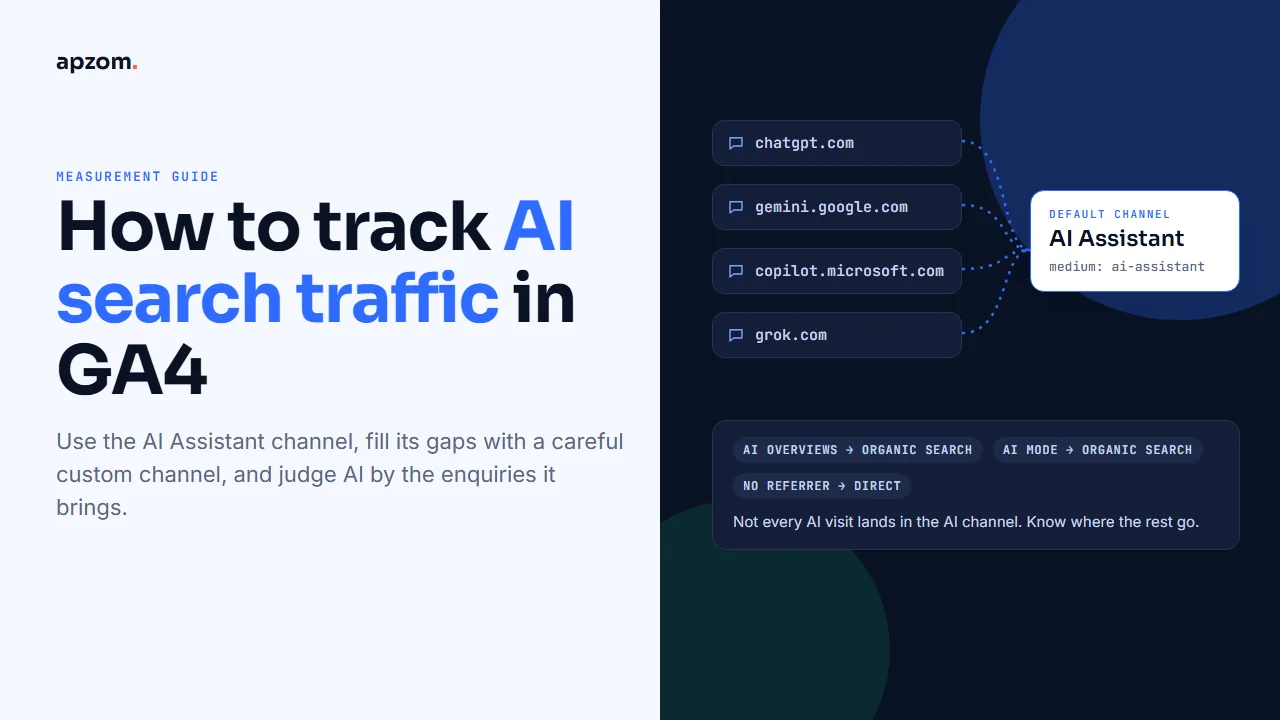
The short answer: Google Analytics 4 now tracks AI search traffic for you. Since May 2026, GA4 has a default channel called AI Assistant: when a visit comes from an AI assistant on Google’s list, such as ChatGPT, Gemini, DeepSeek, Copilot or Grok, GA4 gives it the medium “ai-assistant” and puts it in that channel. Open Reports > Acquisition > Traffic acquisition to see it. Three gaps remain. Visits from Google’s AI Overviews and AI Mode count as Organic Search, so you need Search Console’s Generative AI report for those. Some AI apps send no referrer, so their visits show as Direct. And Google does not publish its list of AI assistants. A custom channel group with a careful regex fills the last gap and splits AI traffic by assistant. Then measure key events, not just visits.
This guide is for business owners, marketers and analysts who use GA4, in any country. It explains how GA4 classifies AI traffic in 2026, how to see it, how to build a custom AI channel that does not catch the wrong sources, what Search Console and Bing now show about AI features, and how to judge whether AI traffic brings enquiries.
Why AI traffic is hard to measure
People now ask AI assistants and AI search features questions they used to type into a search engine. When an answer cites a website and someone clicks, that visit can reach your analytics in several ways:
- With a referrer from the assistant’s website, such as chatgpt.com or gemini.google.com. GA4 can recognise these.
- From inside Google Search, through AI Overviews or AI Mode. These arrive as Google organic visits.
- With no referrer at all, typically from native apps. These look like direct visits.
- With tracking parameters that some assistants add to links.
No single report shows all of them, so measuring AI traffic means combining a few views.
Framework 1: where AI visits land in GA4
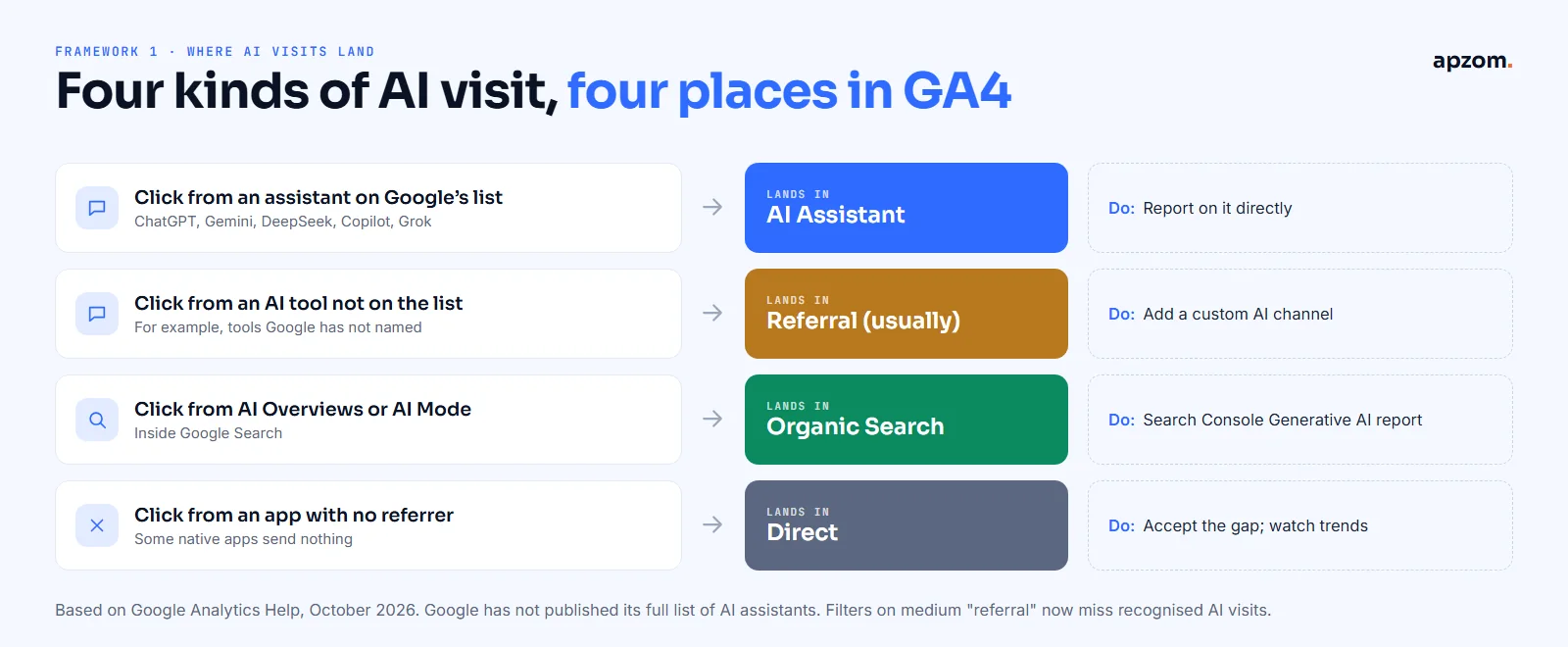
The first framework maps each kind of AI visit to the place it appears in GA4, and what you can do about it.
| Kind of AI visit | Where it lands in GA4 | What to do |
|---|---|---|
| A click from an AI assistant on Google’s list (Google names ChatGPT, Gemini, DeepSeek, Copilot and Grok) | AI Assistant channel (medium “ai-assistant”) | Report on it directly |
| A click from an AI tool not on Google’s list | Usually Referral | Add a custom AI channel (below) |
| A click from Google’s AI Overviews or AI Mode | Organic Search | Use Search Console’s Generative AI report for impressions |
| A click from an app that sends no referrer | Direct | Accept the gap; watch Direct trends alongside AI |
| A click on an ad inside an AI product | Depends on the ad platform’s tagging | Tag paid links with UTM parameters |
Two details matter:
- Filters on medium “referral” now miss AI traffic. Recognised AI visits have the medium “ai-assistant”, not “referral”. Reports or explorations built before May 2026 that look for AI sources inside Referral will undercount.
- Google has not published its list of AI assistants. Its downloadable list of default channel sources has search, social, shopping and video sites, but no AI category. Google’s help page names ChatGPT, Gemini, DeepSeek, Copilot and Grok, and its May 2026 announcement also mentions Claude. Do not assume any other assistant is on the list.
Step 1: see the AI Assistant channel
- In GA4, open Reports > Acquisition > Traffic acquisition.
- The table’s first column is Session default channel group. Look for AI Assistant.
- To see which assistants, change the primary dimension to Session source / medium and filter to the medium “ai-assistant”.
- Add your key events columns (see Step 4) to see whether these visits lead to enquiries, bookings or sales.
The channel only exists from May 2026. Google has not said whether earlier data was reclassified, so compare periods after that date.
Step 2: build a custom AI channel for the full picture
The default channel is a good start, but you cannot edit it and you cannot see its list. A custom channel group lets you choose exactly which sources count as AI and split them by assistant. It is a reporting setting, so you do not need to change your tracking code or Google Tag Manager.
The second framework is the build, in Google’s own order.
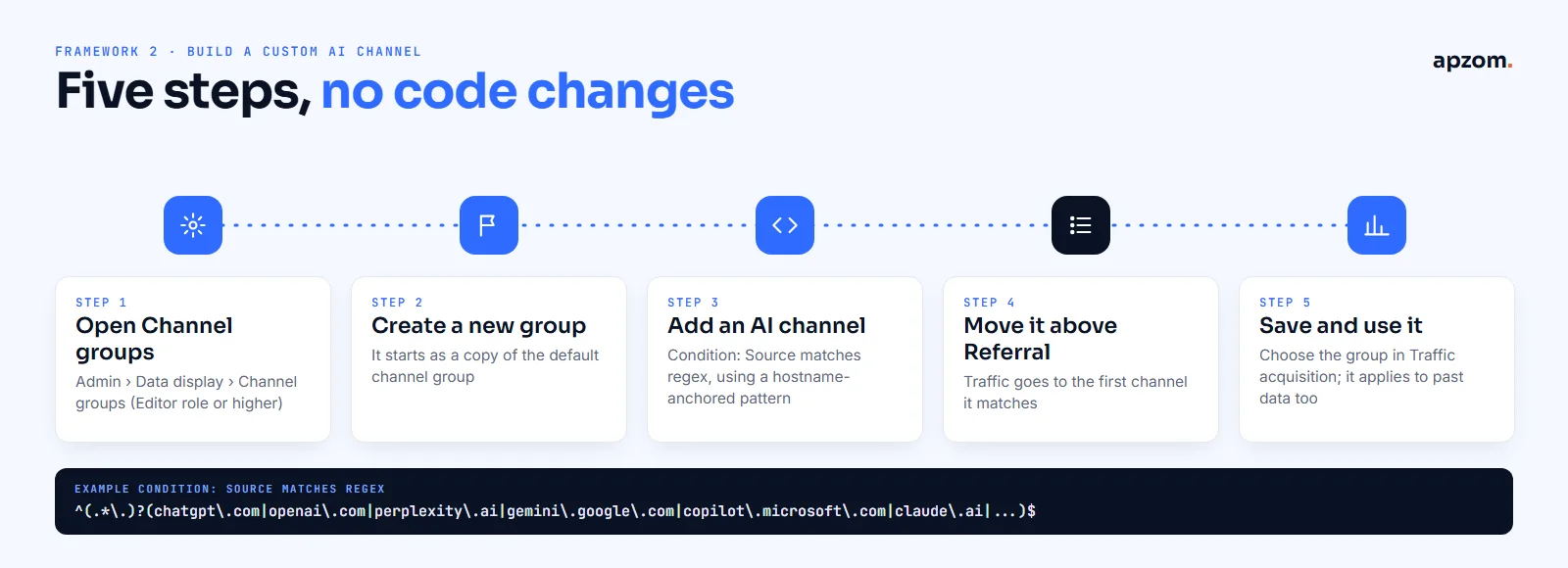
- In Admin, under Data display, click Channel groups. You need the Editor role or higher.
- Create a new channel group. It starts as a copy of the default group.
- Add a channel named, for example, “AI assistants”, with the condition Source matches regex and the regex below.
- Reorder so your AI channel sits above Referral. Google’s help explains that traffic is included in the first channel whose definition it matches, and its own AI example tells you to put the AI channel above Referral.
- Save, then choose your new group in the Traffic acquisition report.
Custom channel groups apply to your reports retroactively, so you can see past data through the new definitions straight away. A standard GA4 property can have two custom channel groups, with up to 50 channels each.
A safer regex for AI sources
^(.*\.)?(chatgpt\.com|openai\.com|perplexity\.ai|gemini\.google\.com|copilot\.microsoft\.com|claude\.ai|chat\.deepseek\.com|grok\.com|meta\.ai|chat\.mistral\.ai)$This version matches only whole hostnames, so it will not catch unrelated sources that happen to contain the letters “ai” or “gpt”. Google’s help page includes an example AI regex, but it starts with a pattern that would also match sources such as mail or video sites, so we do not recommend copying it as it is.
What each domain is based on:
- Named by Google as AI assistants in GA4: ChatGPT, Gemini, Copilot, DeepSeek and Grok (and Claude in Google’s announcement). Google does not give their domains.
- Checked on 23 October 2026: chatgpt.com, gemini.google.com, copilot.microsoft.com and grok.com all send their origin to other websites when someone clicks a link, so GA4 can see them as the source.
- Reported by analysts but not verified by us: perplexity.ai, claude.ai, chat.deepseek.com, meta.ai and chat.mistral.ai, plus openai.com (old ChatGPT links now redirect to chatgpt.com). Keep them in the list, and check your own Session source data to see what actually arrives.
Do not add google or bing to this regex. AI Overviews and AI Mode visits arrive as google / organic and cannot be separated from other Google search visits in GA4.
Review the regex every few months. Google’s own help says to update your expression when the assistants you want to measure change.
Step 3: measure what GA4 cannot see
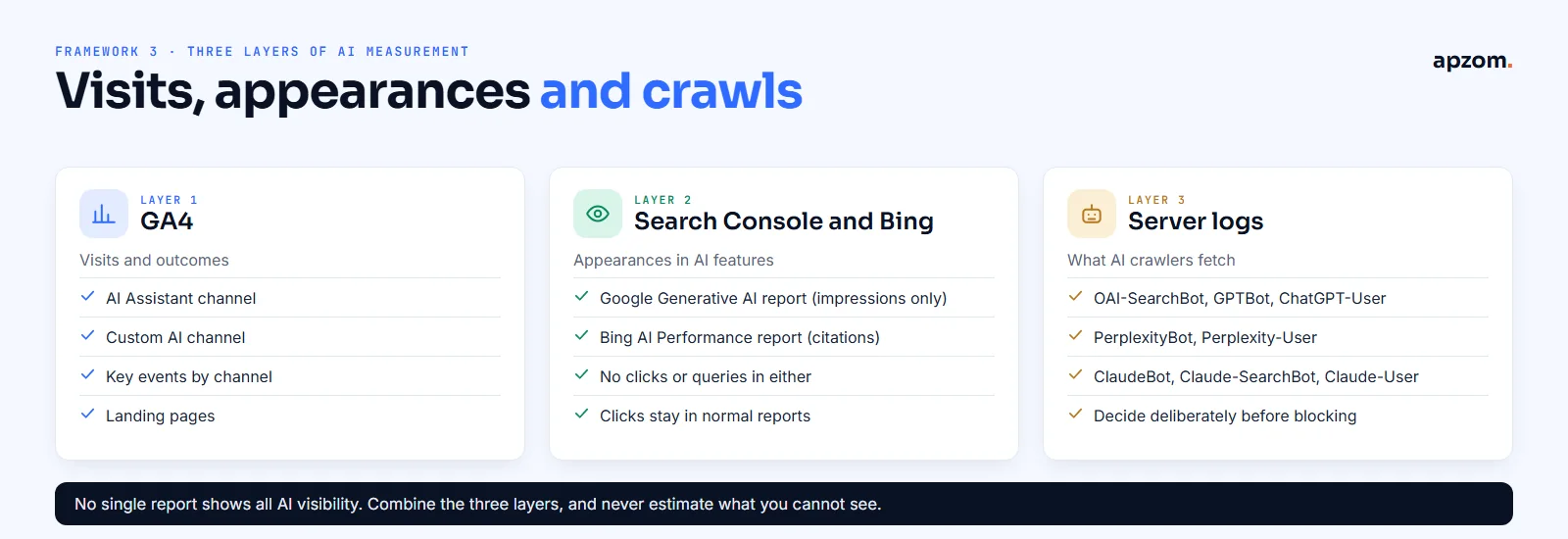
The third framework gives AI visibility three layers of measurement. GA4 counts visits; the search engines’ own reports show appearances in AI features; server logs show what AI crawlers fetch.
Google Search Console: the Generative AI report
Search Console now has a Generative AI performance report, available to all sites since 31 August 2026. It shows how often your pages appear in AI Overviews and AI Mode. It reports impressions only: no clicks and no queries. Clicks from these features still appear in the normal Performance report, counted with other web search results, and in GA4 as Organic Search. Our guide on how to use Google Search Console explains the reports.
Search Console also added a Search generative AI setting, under Settings, that lets a site exclude itself from AI Overviews, AI Mode and Discover AI features. Most businesses that want AI visibility should leave it on.
Bing Webmaster Tools: the AI Performance report
Since February 2026, Bing Webmaster Tools has an AI Performance report showing when your pages are cited in Copilot and Bing’s AI answers, which pages are cited and the grounding queries. Like Google’s report, it does not show clicks.
Server logs: AI crawlers
Your server logs show which AI crawlers fetch your pages. The main ones, by their owners’ own descriptions:
| Crawler | Owner | What it does |
|---|---|---|
| OAI-SearchBot | OpenAI | Crawls for ChatGPT search results |
| GPTBot | OpenAI | Crawls for model training |
| ChatGPT-User | OpenAI | Fetches pages when a user asks ChatGPT to; OpenAI says robots.txt rules may not apply |
| PerplexityBot | Perplexity | Crawls for Perplexity’s search results; Perplexity says it is not used to train AI models |
| Perplexity-User | Perplexity | Fetches pages for user questions; Perplexity says it generally ignores robots.txt rules |
| ClaudeBot, Claude-SearchBot, Claude-User | Anthropic | Training, search indexing and user-requested fetches respectively |
| Google-Extended | A robots.txt token, not a separate crawler. Google says it does not affect whether a site is included in Google Search; it controls use of your content for some Google AI training |
Blocking an AI search crawler can remove you from that assistant’s answers, so decide deliberately.
Not sure what AI search sends you, or whether it converts? An AI Visibility and Tracking Review sets up the AI channel, key events and reports, and shows which pages AI assistants already cite.
Step 4: measure enquiries, not just visits
AI visits are only worth tracking if you know what they lead to. Mark the actions that matter as key events in GA4: enquiry form submissions, calls, bookings or purchases. Google renamed conversions to key events in 2024. A standard property can have up to 30 key events.
Then compare channels on outcomes:
- Key events and key event rate for AI Assistant (or your custom AI channel), compared with Organic Search, Paid Search and Referral.
- Engaged sessions and engagement rate, to see whether AI visitors read the page.
- The landing pages AI visitors arrive on, which shows what the assistants cite.
GA4’s channel reports use “paid and organic channels last click” attribution, which ignores direct visits when giving credit. If someone first arrives from ChatGPT and comes back directly a few days later to enquire, the enquiry can still be credited to the AI visit. Our guide on how to measure marketing ROI covers judging channels by profit rather than clicks.
Framework 4: a monthly AI traffic review
The fourth framework is a short monthly routine.
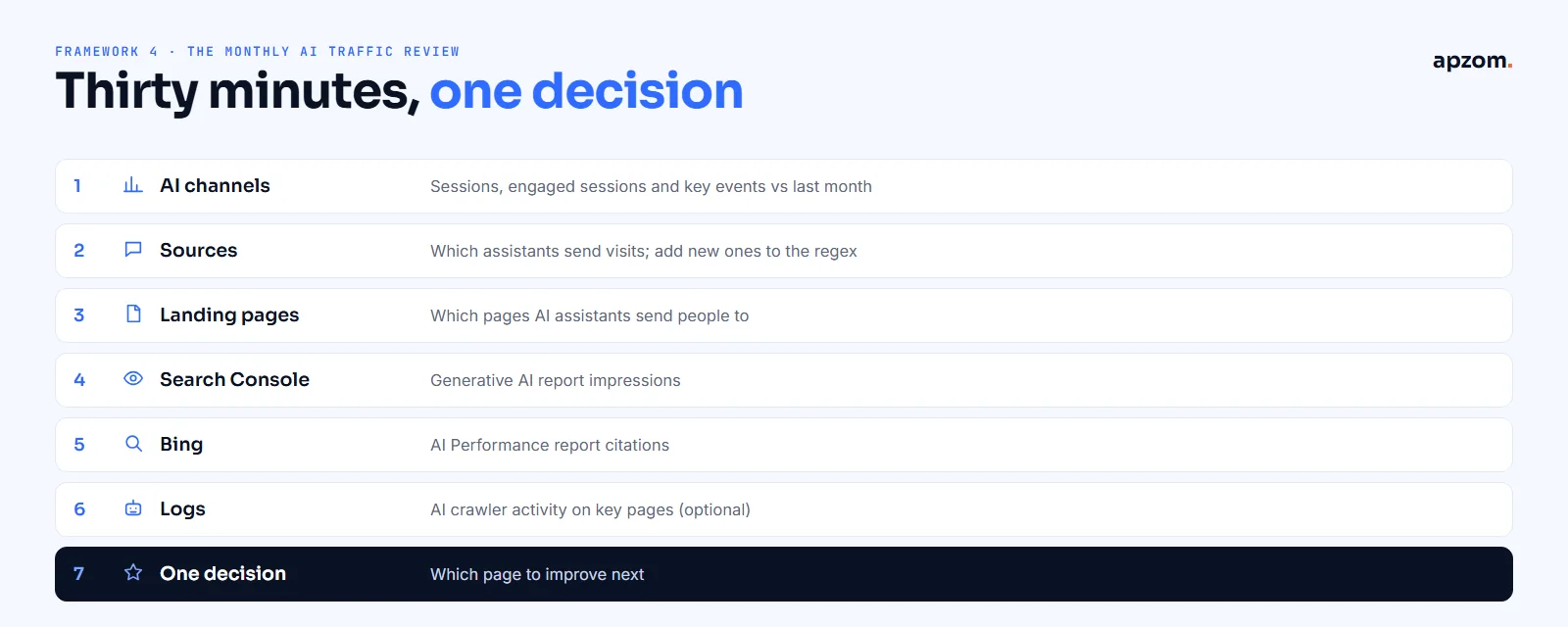
- AI Assistant and custom AI channel: sessions, engaged sessions and key events, compared with last month.
- Sources: which assistants send visits. Add any new AI source you see to the regex.
- Landing pages: which pages AI assistants send people to.
- Search Console: Generative AI report impressions for AI Overviews and AI Mode.
- Bing: AI Performance report citations.
- Logs (optional): AI crawler activity on your key pages.
- One decision: which page to improve, based on what gets cited and what converts.
Expect small numbers at first. For most businesses, AI assistants still send far fewer visits than Google search. No vendor-neutral official figure exists for the share of web traffic that comes from AI assistants, so be wary of articles that quote one without a clear source and method.
Common mistakes
- Looking for AI traffic only in Referral, where recognised AI visits no longer appear.
- Copying a regex that catches unrelated sources containing “ai”.
- Treating AI Overviews and AI Mode clicks as missing, when they are counted in Organic Search.
- Adding google or bing to an AI regex.
- Placing the custom AI channel below Referral.
- Counting visits without key events.
- Expecting AI traffic to replace search traffic overnight.
What this means for AI visibility
Tracking shows you which pages AI assistants already cite and send people to. Improving that visibility is a content and authority task: clear, specific, well-sourced pages that answer real questions, and a consistent identity across the web. Google says there is no special markup needed for its AI features. Our guide on what GEO is explains the approach, and our schema markup guide explains what structured data can and cannot do.
How Apzom can help
Our GEO services and AEO services help businesses become visible in AI answers, measured honestly with the reports in this guide. Our performance marketing and conversion rate optimisation work sets up GA4 key events and channel groups so you can see which channels bring enquiries, and our SEO services cover the search foundations AI systems rely on. We work with clients worldwide, remotely, from our base in Ahmedabad, India.
We will not promise citations in ChatGPT, Gemini, Perplexity or Copilot. We will show you where AI traffic comes from, what it leads to and which pages to improve.
Request an AI Visibility and Tracking Review. We check your GA4 channels and key events, build an AI channel group that does not catch the wrong sources, review Search Console’s Generative AI report and Bing’s AI Performance report, and show which pages AI assistants send people to and what to improve.
No obligation and no promised AI citations. Prefer to talk first? Contact us or see all our services.
Frequently asked questions
Does GA4 track ChatGPT traffic?
Yes. Since May 2026, GA4 puts visits from AI assistants on Google’s list, including ChatGPT, into a default channel called AI Assistant, with the medium “ai-assistant”. Visits from some AI apps may arrive without a referrer and show as Direct.
How do I see AI traffic in GA4?
Open Reports > Acquisition > Traffic acquisition and look for the AI Assistant channel. For a full split by assistant, create a custom channel group in Admin > Data display > Channel groups with a regex for AI sources, placed above Referral.
Is traffic from Google AI Overviews counted as AI traffic?
No. GA4 counts clicks from AI Overviews and AI Mode as Organic Search. Search Console’s Generative AI report shows how often your pages appear there, as impressions only.
Why does some AI traffic show as Direct?
Some apps do not pass a referrer when someone taps a link, so GA4 cannot tell where the visit came from. Cloudflare has reported this for the Claude app and believes other native apps behave the same way.
Do I need Google Tag Manager to track AI traffic?
No. The AI Assistant channel is built in, and custom channel groups are a reporting setting in GA4 Admin. You only need tags for the key events you want to measure.
Do custom channel groups change past data?
They apply to your reports retroactively, so you can see historical traffic through the new definitions. They do not change the data GA4 collected.
How much traffic comes from AI assistants?
It varies widely by site and industry, and no official vendor-neutral figure exists. Measure your own with the AI Assistant channel and compare it with Organic Search.
Can Apzom set up AI traffic tracking for businesses outside India?
Yes. We work with clients worldwide, remotely, from our base in Ahmedabad, India, and set up GA4, Search Console and Bing Webmaster Tools reporting for any market.