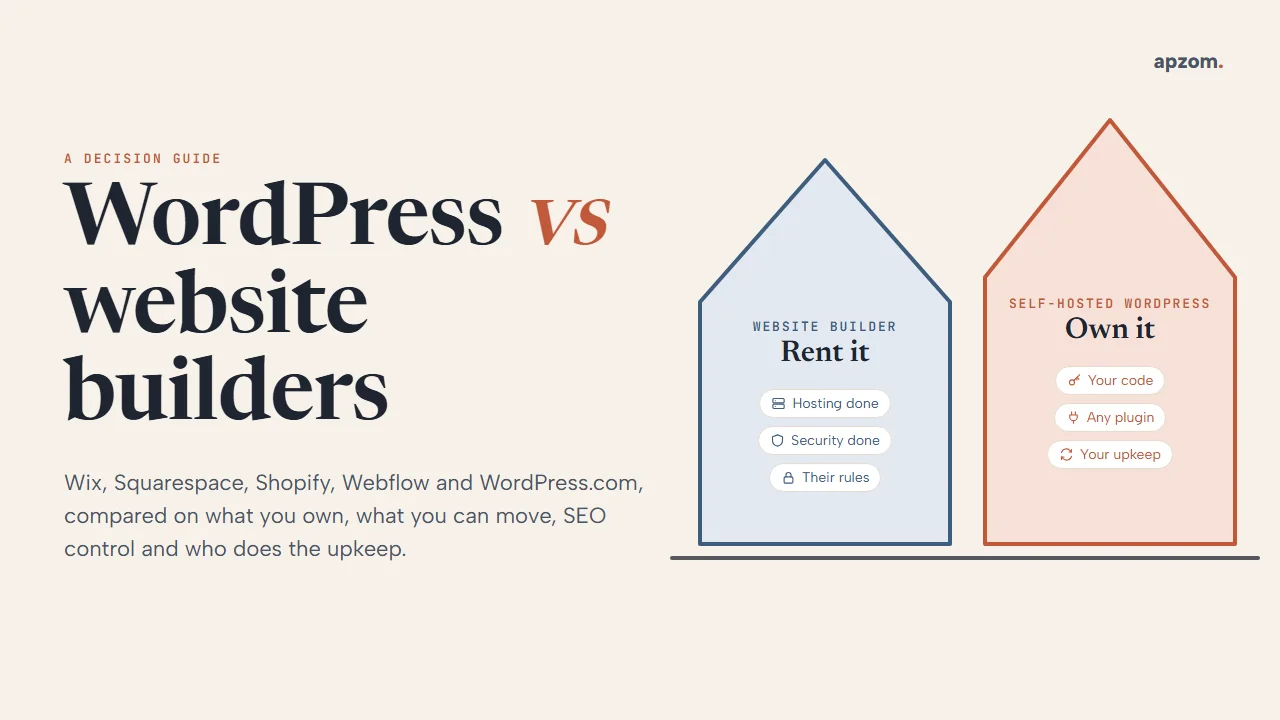
The short answer: A website builder such as Wix, Squarespace, Shopify, Webflow or WordPress.com is like renting a furnished flat: quick to move into, with the hosting, security and updates handled for you, but you live by the landlord’s rules and cannot take the fittings with you. Self-hosted WordPress is like owning a house: more work and more decisions, but full control, and you can move it to another host or developer whenever you like. Builders suit simple sites, tests and very small budgets. Self-hosted WordPress usually suits businesses that need to win search traffic, add custom features or keep full ownership as they grow.
This guide is for business owners and marketing managers anywhere in the world who are choosing a platform for a new website or wondering whether to move. It compares the options on four things that matter more than the monthly price: what you own, what you can take with you, how much control you have over SEO, and who does the upkeep. For prices, see our guide to how much a website costs.
WordPress is by far the most widely used option. W3Techs, which tracks the technology behind websites, reported on 14 October 2026 that WordPress runs 40.0% of all websites, and 58.5% of the sites where it can identify the content management system. The same report shows Shopify at 5.4%, Wix at 4.2%, Squarespace at 2.4% and Webflow at 0.8% of all websites. W3Techs counts self-hosted WordPress and WordPress.com together. Popular does not mean right for you, but it does mean a large pool of developers, themes and plugins.
First, two kinds of “WordPress”
The name causes confusion, so it is worth clearing up first.
- WordPress (the software, from WordPress.org) is free, open-source software. It is licensed under the GPL (version 2 or later), so anyone can use, change and share it. You install it on hosting you choose, and you or your developer control everything.
- WordPress.com is a hosted service run by Automattic that uses the WordPress software. It works more like a builder: you pay a plan and the company runs the hosting. Its support pages say installing plugins is available on all paid plans, while free sites cannot install them.
In this guide, “WordPress” means self-hosted WordPress unless we say WordPress.com.
Framework 1: the ownership stack
A website is not one thing. It has six layers, and the question “do I own my website?” has a different answer for each one.
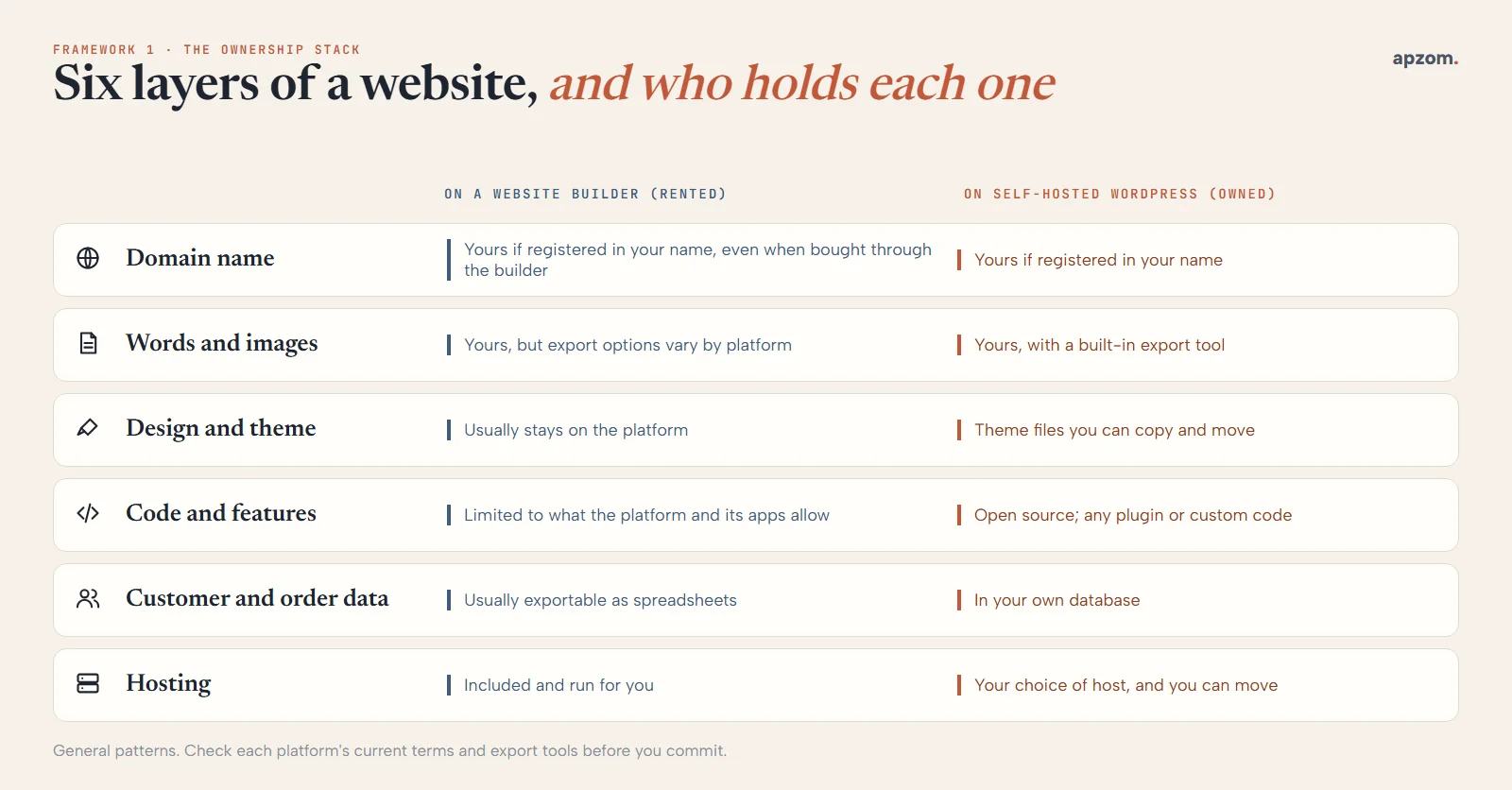
| Layer | On a website builder | On self-hosted WordPress |
|---|---|---|
| Domain name | Yours if it is registered in your name, even when bought through the builder | Yours if it is registered in your name |
| Words and images | Yours, but how easily you can export them varies by platform | Yours, with a built-in export tool |
| Design and theme | Usually stays on the platform | Theme files you can copy and move |
| Code and features | Limited to what the platform and its apps allow | Open source; any plugin or custom code |
| Customer and order data | Usually exportable as spreadsheets | Stored in your own database |
| Hosting | Included and run for you | Your choice of host, and you can move |
Whichever platform you choose, register the domain in your own name, with an email address you control. It is the one layer that makes every other move possible.
If you bought the domain through a builder, you can usually transfer it to another registrar later. Under ICANN’s current transfer policy, a registrar may refuse a transfer within 60 days of a new registration or a previous transfer, so do not leave a move to the last minute. You can also keep the domain with an independent registrar and connect it to the builder; Wix and Squarespace both support this.
Framework 2: the exit test
Before you choose a platform, ask: “If we leave in three years, what comes with us?” Here is what each platform’s own help pages say.
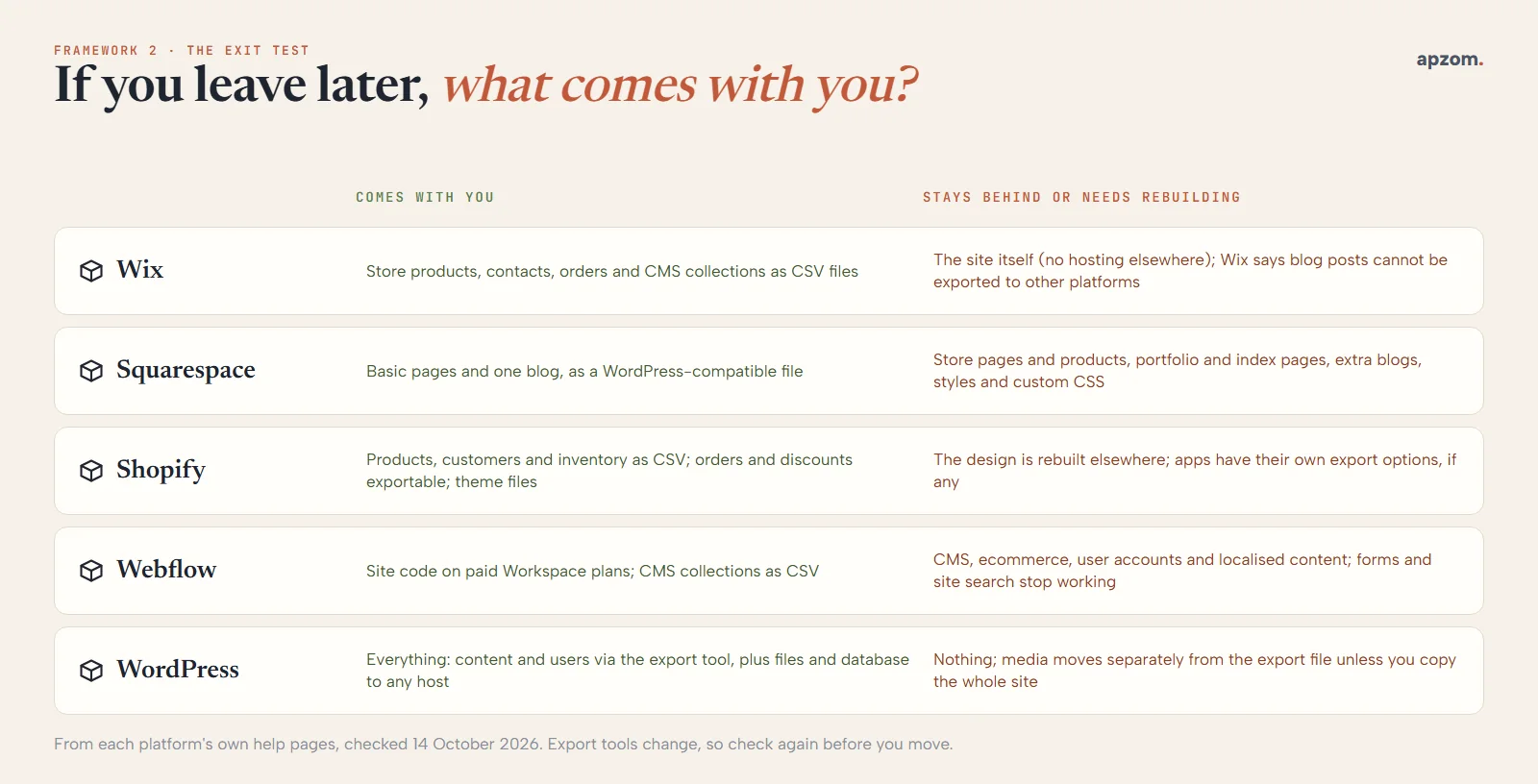
| Platform | What comes with you | What stays behind |
|---|---|---|
| Wix | Store products, contacts, orders and CMS collections as CSV files | The site itself: Wix does not support hosting a Wix site elsewhere, and Wix says blog posts cannot be exported to other platforms |
| Squarespace | Basic pages and one blog, in a WordPress-compatible export file | Store pages and products, portfolio and index pages, extra blogs, styles and custom CSS |
| Shopify | Products, customers and inventory as CSV files; orders and discounts can be exported; theme files as a download | Your design is rebuilt elsewhere; check each app you added for its own export options |
| Webflow | Site code on paid Workspace plans; CMS collections as CSV files | The code export leaves out CMS, ecommerce, user accounts and localised content, and forms and site search stop working |
| Self-hosted WordPress | Everything: content and users through the built-in export, plus the full files and database to move to any host | Nothing, though media files move separately from the export file unless you copy the whole site |
The practical point: on most builders, moving away means rebuilding the design and re-creating pages by hand, even when some content can be exported. Plan for that cost before you start, not when you want to leave.
Not sure which platform fits? A Website Platform Review looks at what your site needs to do, who will look after it and how you might grow, and recommends a platform, including a builder if that suits you better.
SEO control: what you can and cannot change
All the major platforms can produce a site that ranks. The difference is how much control you have when you need to change something.
| Control | Wix | Squarespace | Shopify | Webflow | Self-hosted WordPress |
|---|---|---|---|---|---|
| Titles, descriptions and page slugs | Yes | Yes | Yes | Yes | Yes |
| URL structure | Blog prefix such as /post/ can be renamed, not removed | Page slugs editable | Folders such as /products/ and /collections/ are fixed; only the last part changes | Page and collection slugs editable | Full control |
| 301 redirects | Redirect manager (needs a custom domain) | URL mappings | URL redirects | Paid site plans | Plugins or server rules |
| robots.txt | Editable | Not editable; a toggle blocks known AI crawlers | Editable through a theme template, which Shopify calls an unsupported customisation | Paid site plans | Fully editable |
This table comes from each platform’s own help pages, checked on 14 October 2026.
Speed is not where WordPress wins by default. HTTP Archive’s Core Web Vitals technology report for August 2026 shows the share of sites passing all three Core Web Vitals on mobile: Wix 81.2%, Shopify 76.5%, Squarespace 72.1%, Webflow 71.2% and WordPress 48.7%. These are averages across millions of very different sites, not a controlled test. Many WordPress sites run on cheap hosting with heavy themes and too many plugins, and a well-built WordPress site can pass comfortably. WordPress puts speed in your hands, for better or worse. Speed also affects how many visitors become enquiries, which is what conversion rate optimization works on.
For most small sites, the platform matters less than the content, the structure of the pages and the links pointing to them, which is where most SEO work goes. The platform starts to matter when you have hundreds of pages, need a specific URL structure, or need to fix a technical problem quickly. If you are planning a move between platforms, our website redesign SEO checklist covers redirects and the checks that protect your rankings.
Framework 3: the upkeep split
The biggest real difference between a builder and self-hosted WordPress is not the price. It is who does the maintenance.
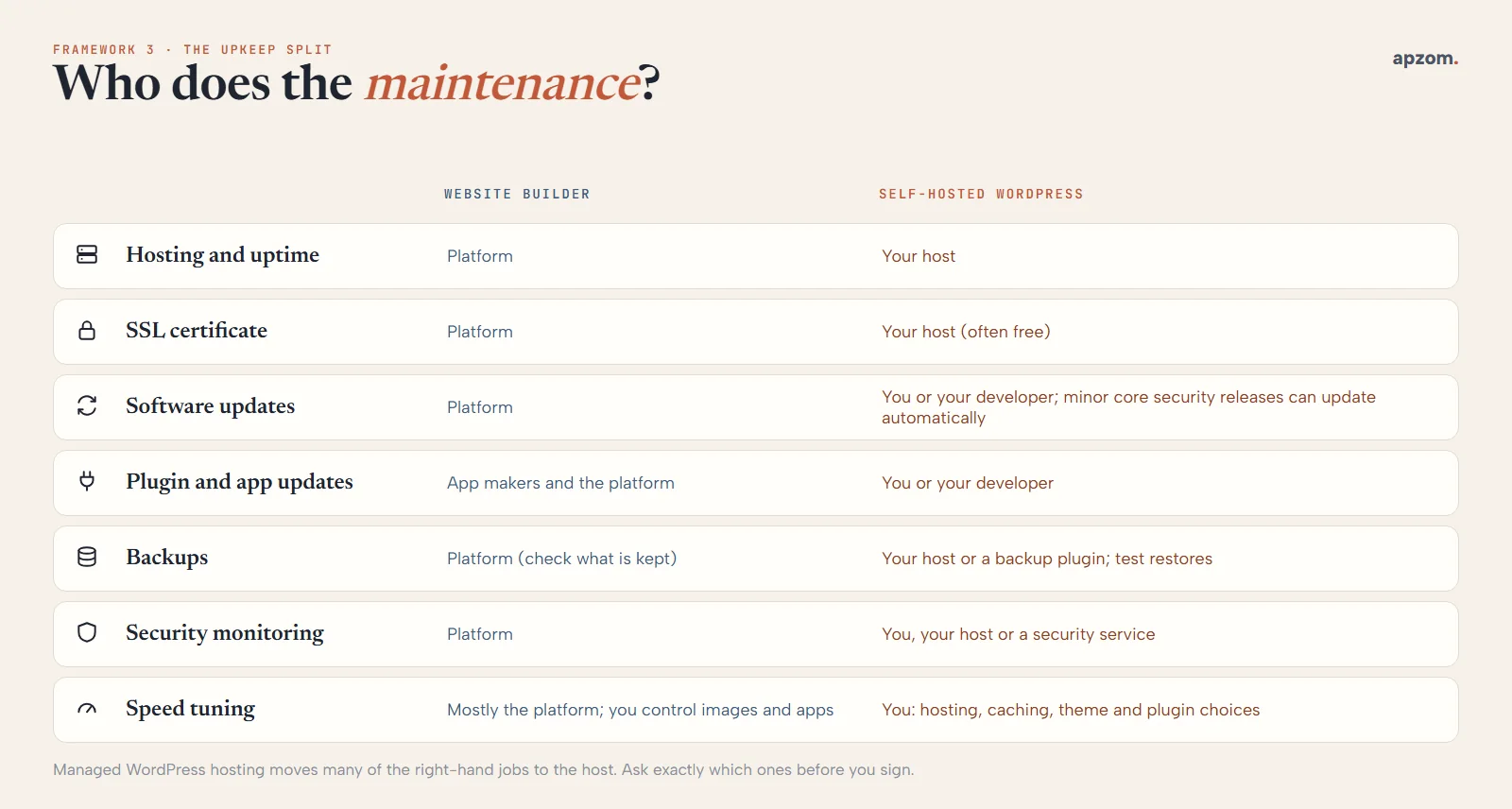
| Job | Website builder | Self-hosted WordPress |
|---|---|---|
| Hosting and uptime | The platform | Your host |
| SSL certificate | The platform | Your host, often free |
| Software updates | The platform | You or your developer; minor core security releases can update automatically |
| Plugin and app updates | App makers and the platform | You or your developer |
| Backups | The platform (check what is kept and for how long) | Your host or a backup plugin; test that restores work |
| Security monitoring | The platform | You, your host or a security service |
| Speed | Mostly the platform; you control images and apps | You: hosting, caching, theme and plugin choices |
Most WordPress security problems come from add-ons, not the core software. Patchstack, a WordPress security company, counted 11,334 new vulnerabilities in the WordPress ecosystem during 2025 in its 2026 report: 91% in plugins, 9% in themes and just 6 in WordPress core. WordPress applies minor and security updates to the core software automatically by default. So the risk is manageable: use fewer, well-maintained plugins, keep them updated, and delete what you do not use. On the builder side, Wix, Squarespace and Shopify issue SSL certificates automatically, and Shopify and Wix say they meet PCI DSS Level 1 for card payments.
Managed WordPress hosting moves many of these jobs to the host. If you choose WordPress and nobody on your team will look after it, budget for a maintenance plan from your developer or host. An unmaintained WordPress site is a real risk.
Ecommerce: Shopify, WooCommerce or something else?
For an online shop, the choice is usually Shopify or WordPress with WooCommerce. Shopify is a hosted platform: quick to launch, with hosting, security and payment compliance handled for you. It charges extra transaction fees if you do not use Shopify Payments, and its URL folders are fixed. WooCommerce is a free, open-source plugin for WordPress, with paid extensions for extra features. You get full control and can change host whenever you like, but you or your developer look after the shop. Wix, Squarespace and Webflow can sell online too, but check the exit test above first: Wix exports physical products only, and Squarespace’s export leaves store pages and products behind. Choosing the platform is only the start: our guide for ecommerce brands covers how shops grow profit after launch.
Accessibility and the rules that apply to every platform
No platform makes a site accessible or legally compliant on its own. Your theme, content, images, forms and checkout all matter.
In the EU, the European Accessibility Act has applied since 28 June 2025. It covers ecommerce services among other things, including businesses outside the EU that sell to EU consumers, while microenterprises providing services (fewer than 10 staff and no more than EUR 2 million in annual turnover) are exempt. The UK, US, Canada, Australia, the UAE and India have their own disability and equality laws. Whatever your platform, build to the Web Content Accessibility Guidelines (WCAG) and test forms and checkout with a keyboard and a screen reader.
Framework 4: five questions to decide
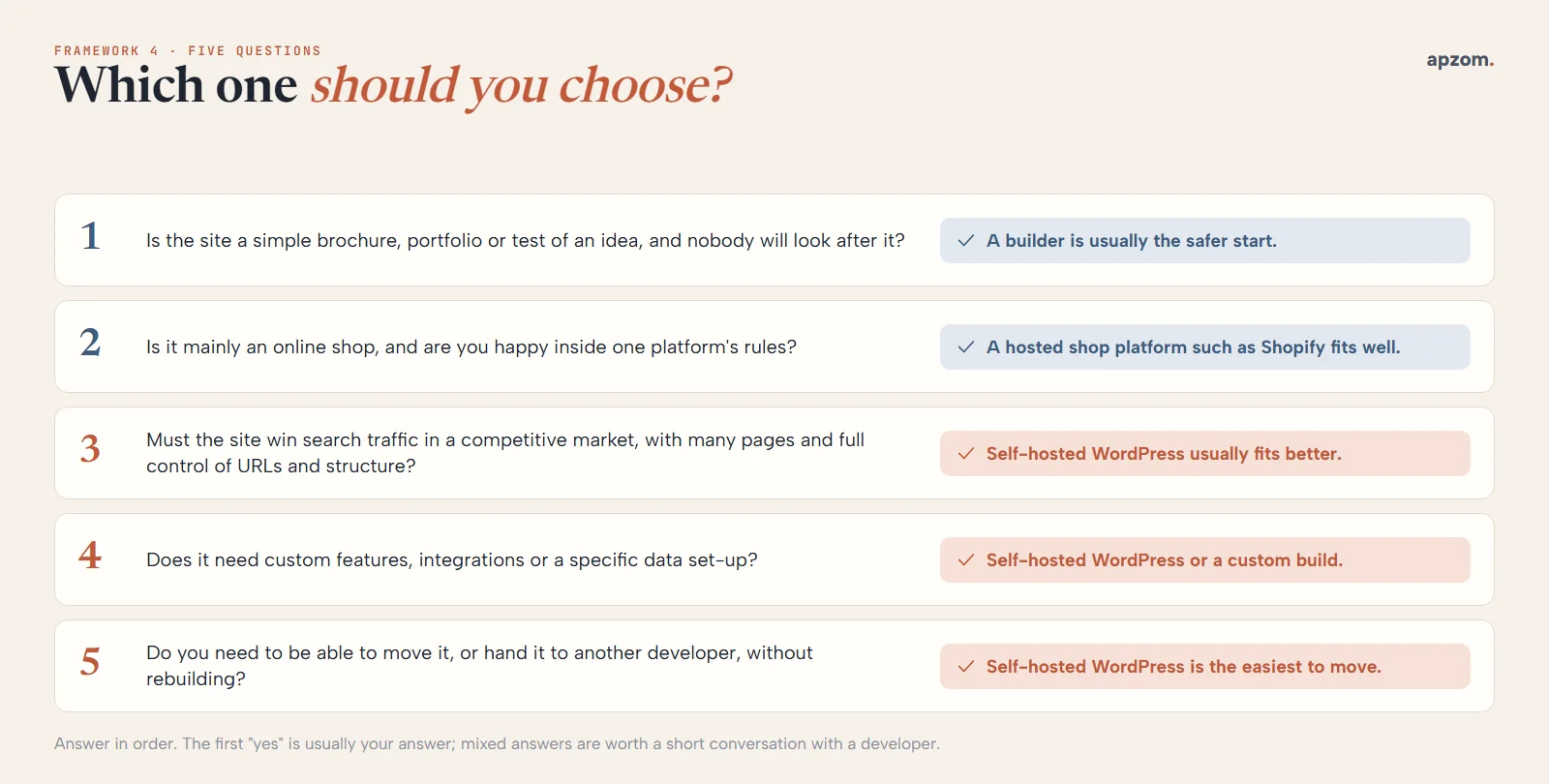
- Is the site a simple brochure, portfolio or a test of an idea, and nobody will look after it? A builder is usually the safer start.
- Is it mainly an online shop, and are you happy to work inside one platform’s rules? A hosted shop platform such as Shopify fits well.
- Must the site win search traffic in a competitive market, with many pages and full control of URLs and structure? Self-hosted WordPress usually fits better.
- Does it need custom features, integrations with other systems or a specific data set-up? Self-hosted WordPress or a custom build.
- Do you need to be able to move it, or hand it to another developer, without rebuilding? Self-hosted WordPress is the easiest to move.
Answer in order. The first “yes” is usually your answer. If your answers are mixed, it is worth a short conversation with a developer before you commit. Our guide on how to choose a digital marketing agency lists questions worth asking any provider.
When to switch, and when to stay
Do not move platforms just because another one is popular. Moving costs time and carries SEO risk. It is usually worth moving when:
- You keep hitting a limit you cannot work around, such as a URL structure, a feature or an integration.
- Paid apps and add-ons now cost more than running the site yourself would.
- You need to own and move the site, for example before selling the business or changing agencies.
It is usually worth staying when the site does its job, brings in enquiries and the limits do not affect you.
How Apzom can help
Apzom Digital builds business websites on WordPress, and online shops on WordPress with WooCommerce. We plan the structure, content and SEO from the start so the site is built to win enquiries, and we hand it over so your own team can manage it. We recommend that the domain and hosting account are in your name, so you can move whenever you like. Ongoing maintenance can be arranged if nobody on your side will look after the site. If you are moving from a builder, we preserve URLs where we can and set up redirects where they must change. See our website development and ecommerce development services. We work with clients worldwide, remotely, from our base in Ahmedabad, India.
Our builds are on WordPress, so read our view of the builders as an informed outsider’s. If a builder is the better choice for you, we will say so.
Request a Website Platform Review. Tell us what the site must do and who will maintain it. We will compare the options for your case, list what a move would involve, including redirects and content, and say plainly whether WordPress or a builder fits better.
No obligation. Prefer to talk first? Contact us or see our website development service.
Frequently asked questions
Is WordPress better than a website builder?
Neither is better for everyone. Builders are quicker and handle the upkeep for you; self-hosted WordPress gives you more control and is easier to move. For a business site that must win search traffic or grow over years, WordPress usually fits better. For a simple site nobody will maintain, a builder is often the safer choice.
Is Wix or Squarespace good for SEO?
Both can produce sites that rank, and both let you edit titles, descriptions and URLs and set up redirects. The limits show up on larger sites: Wix’s blog prefix can be renamed but not removed, and Squarespace does not let you edit robots.txt. For most small sites those limits make little difference.
Can I move my website from Wix to WordPress?
Yes, but expect to rebuild rather than transfer. Wix does not support hosting a Wix site elsewhere and says blog posts cannot be exported to other platforms, so pages and posts have to be copied across. Products, contacts, orders and CMS collections can be exported as CSV files. Set up a 301 redirect from every old URL to its new one.
Is WordPress free?
The WordPress software is free and open source. You still pay for a domain name, hosting, and often a premium theme, plugins and someone to maintain it.
Is WordPress safe?
It can be, if someone maintains it. WordPress updates its core software automatically for minor and security releases by default. Most vulnerabilities are found in plugins and themes, so keep them few, reputable and up to date, and use good hosting with tested backups.
What is the difference between WordPress.com and WordPress.org?
WordPress.org is where you get the free WordPress software to install on hosting you choose. WordPress.com is a hosted service by Automattic that runs WordPress for you on paid plans, more like a website builder.
Should I use Shopify or WordPress for an online shop?
Shopify is quicker to set up and handles the hosting and security. WordPress with WooCommerce gives you more control and no platform lock-in, but you or your developer look after it. Choose by how much control you need and who will maintain the shop.
Does Apzom build websites for businesses outside India?
Yes. We work with clients worldwide, remotely, from our base in Ahmedabad, India.