
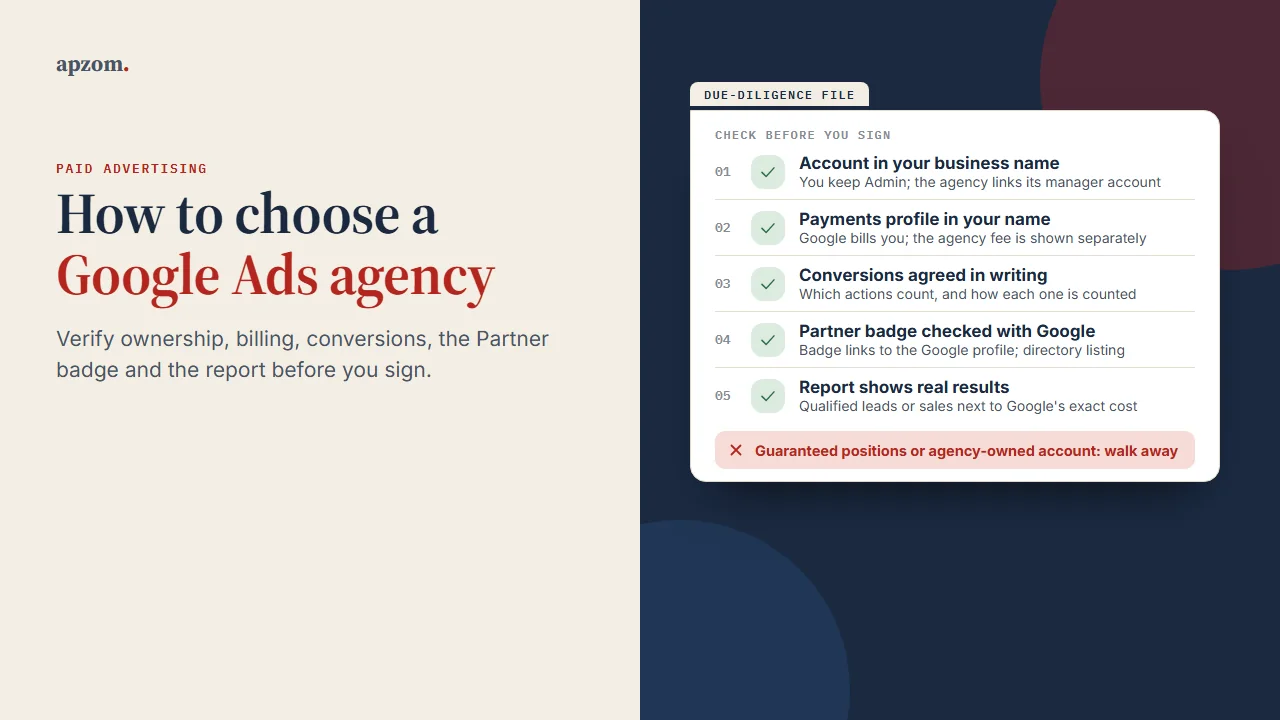
The short answer: Choose a Google Ads agency on things you can verify, not things you are told. Before you sign, make sure the Google Ads account and its payments profile are in your business’s name, with the agency linked through its manager account and you keeping Admin access. Agree in writing which conversions count as results. Confirm any Google Partner or Premier Partner claim in Google’s own Partners directory. Ask for a sample report that shows qualified leads or sales next to Google’s exact cost. Read the contract’s notice period and exit terms. Walk away from any agency that guarantees ad positions or results, wants to own your account, mixes its fee into Google’s cost, or reports only clicks and impressions.
This guide is for business owners, founders and marketing managers anywhere in the world who are hiring a Google Ads (PPC) agency or freelancer for the first time, or replacing one. It covers the PPC-specific checks a general agency checklist leaves out: who owns the account and pays Google, how to verify a Partner badge, how to agree conversion definitions, what a useful report contains, the questions to ask in the first call, the contract terms that matter, and the red flags. We checked every rule here against official sources (Google Ads Help, Google’s Partners and advertising policy pages, and the GDPR text) on 23 November 2026.
What this guide adds to a general agency checklist
Our guide on how to choose a digital marketing agency covers the general process: the brief, agency types, proposals and contracts. This guide goes deeper for paid search: the account set-up you start with, the definition of a result, and the evidence you can check yourself inside Google Ads.
Fee models are in how much Google Ads management costs, and the steps for granting access in how to give an agency access to your Google accounts.
Check 1: Decide what the agency is accountable for
A Google Ads hire can fail on a definition rather than on skill: the agency reports “conversions”, the business counts real enquiries, and the two numbers never match. Fix this before you compare anyone.
A Google Ads conversion is whatever the account is set up to count. Google Ads Help says primary conversion actions appear in the “Conversions” column and are used for bidding, while secondary actions are reported in “All conversions” and are not used for bidding (except inside a custom goal). That means an account that counts page views or button clicks as primary conversions will both report and bid towards them.
How each action is counted matters too. Google’s help page on conversion counting options says “Every” counts every conversion after an ad interaction, while “One” counts only one per ad click. Google gives the example of tracking every sale but “only one, unique lead per ad click”, and says “Every” is the default for website actions. A lead account left on the default can count two form submissions after one click as two leads.
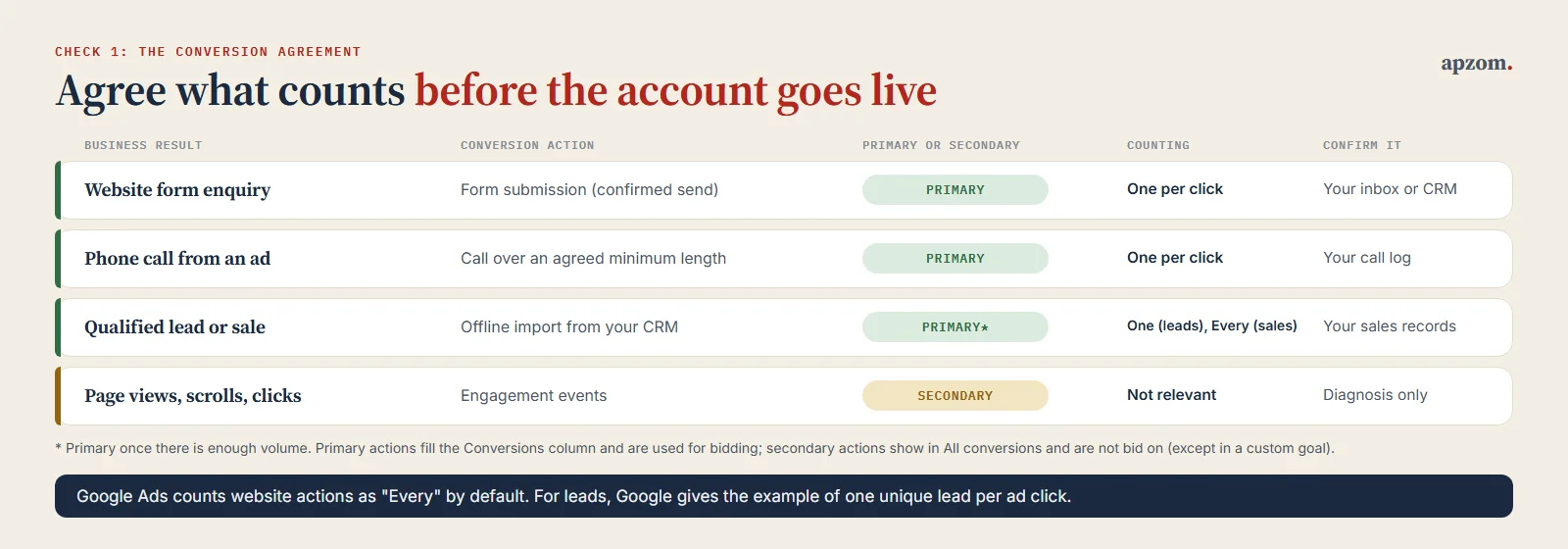
Write a one-page conversion agreement with the agency before the account goes live: the business result in your words, then how Google Ads will count it.
| Business result | Conversion action | Primary or secondary | Counting | How you confirm it is real |
|---|---|---|---|---|
| A sales enquiry from the website form | Form submission (thank-you page or confirmed send) | Primary | One per click | Matched against enquiries in your inbox or CRM each month |
| A phone call from an ad | Call from ads or website call, over an agreed minimum length | Primary | One per click | Compared with your call log |
| A qualified lead or a closed sale | Offline conversion imported from your CRM | Primary once volume allows | One (leads) or Every (sales) | Comes from your own sales records |
| Page views, scrolls, clicks on a phone number | Engagement events | Secondary or not tracked | Not relevant | Used for diagnosis only |
Thresholds such as minimum call length are yours to set. Ask each agency to fill in the table; one that cannot explain which actions it would bid on, and why, is telling you how it will spend your budget. Our guides to tracking phone calls from Google Ads and importing offline conversions from your CRM cover the set-up, and our guide to improving Google Ads lead quality shows what to do when the counted leads are poor.
Check 2: Verify a Partner badge in Google’s own records
Check any Google Partner or Premier Partner badge, and know what it does and does not tell you.
What the badges require
Google Ads Help’s page on becoming a Google Partner lists three requirements, which it says are checked daily:
| Requirement | Google Partner | Premier Partner |
|---|---|---|
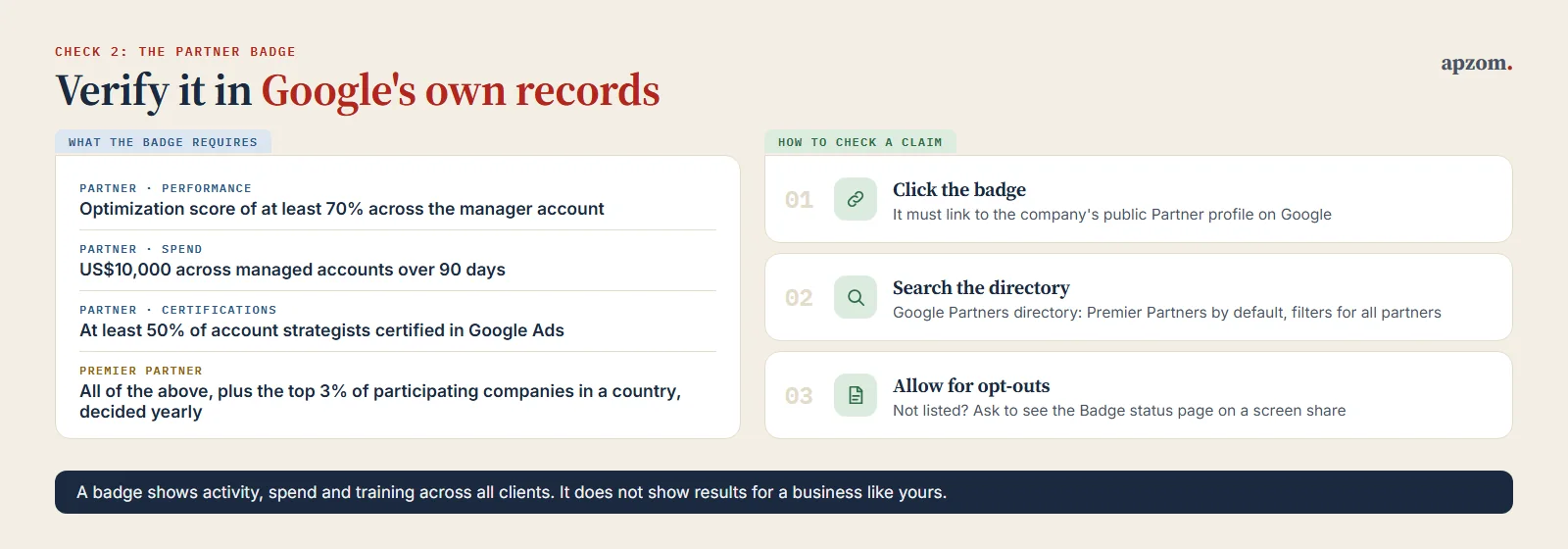
| Performance | A minimum optimization score of 70% across the manager account | Meets all Partner requirements |
| Spend | US$10,000 in ad spend across managed accounts over 90 days | Meets all Partner requirements |
| Certifications | At least 50% of account strategists certified in Google Ads (capped at 100 users), plus one certification in each product area with US$500 or more in 90-day spend | Meets all Partner requirements |
| Ranking | Not applicable | The top 3% of participating companies in a country, decided each year |
Google says the factors for Premier Partner status include, but are not limited to, growth of existing clients, new client growth, client retention, product diversification and annual ad spend, and that the evaluation is approximate and Premier status may not be available in every country. A company that stops meeting the requirements has a 60-day grace period before it loses its benefits, according to Google’s “Check your Google Partner status” page.
How to check a claim
- Click the badge on the agency’s website. Google’s badge guidelines say a badge shown online “must link to your company’s Partner public company profile page”, and that websites must use Google’s badge HTML snippet. Google’s advertiser guide confirms that a certified company’s badge takes you to its profile on Google. A badge that is a plain image, or that opens a page on the agency’s own site, is worth a question.
- Search the Google Partners directory. Google points advertisers to its Google Partners directory for a list of current Partners and Premier Partners. Google Ads Help says the directory shows Premier Partners by default, with filters for all partners, regions and certifications.
- Allow for opt-outs. Partners are listed only if they are opted in, which is the default, and they can opt out. If an agency says it is a Partner but is missing from the directory, ask it to show its Badge status page in its manager account on a screen share.
What the badge does not prove
A badge shows activity, spend and training across all the agency’s clients, not results for a business like yours; Google’s “Work with a Google Partner” page says actual results “will vary by advertiser”. The 70% optimization score requirement is also worth understanding: Google says applying or dismissing recommendations changes the score, so ask how the agency decides which recommendations to accept. Our guide to Google Ads optimization score explains why a higher score is not always a better account. A capable freelancer or a small agency without a badge can still be the right choice; judge them on the other checks in this guide.
Check 3: Settle ownership and billing before anything else
This is the hardest check to fix later. Your account holds your conversion history, audiences and search-term data; if the agency controls it, leaving can mean starting again.
The account and the manager link
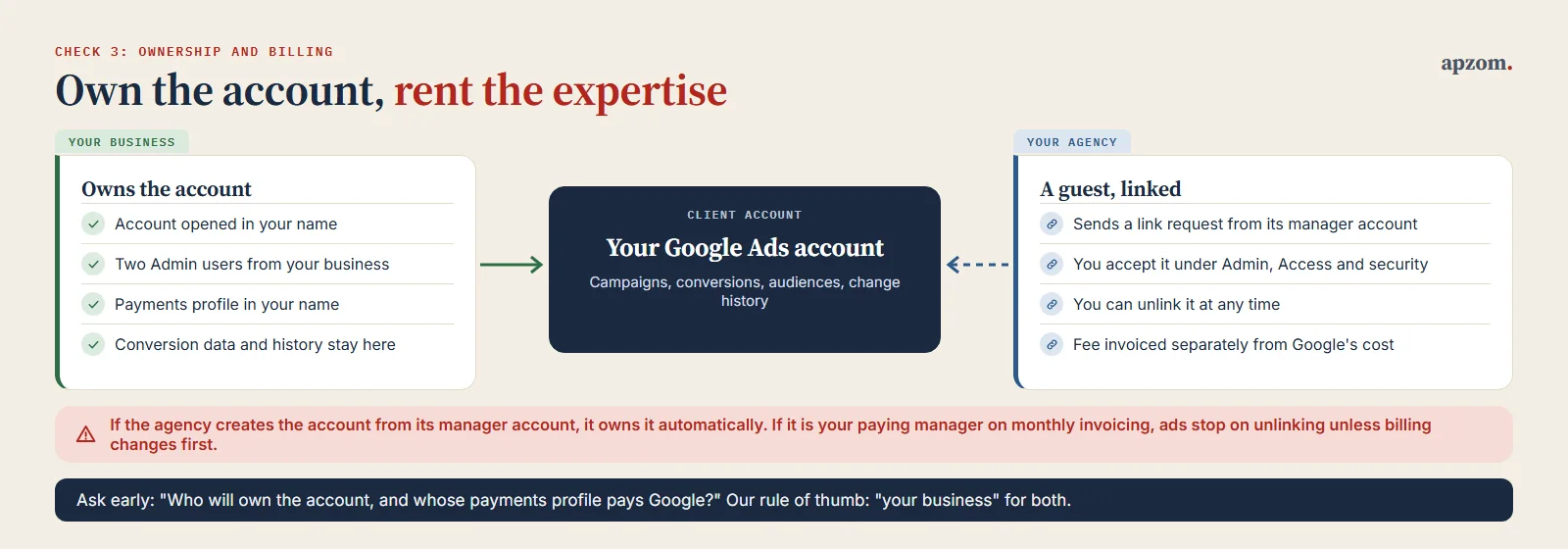
The safest set-up is an account your business opened, in your name, with at least one person from your business holding Admin access through a Google account the business controls. Google Ads Help lists five access levels: Admin, Standard, Read-only, Billing and Email-only. Admin users can give access, change access levels, accept manager link requests and unlink manager accounts. Google also suggests adding at least one more administrator, so one person’s absence does not lock you out of your tags.
An agency should then link its own manager account to yours. The agency sends a request using your customer ID, and an admin on your account accepts it under Admin, then Access and security, then Managers. Watch one detail in Google’s help page on ownership of client accounts: “If a manager creates a new account, the manager will automatically become the owner of that account”, while linking an existing account gives ownership only if the client account enables it. Google adds that “A client account can only have one owner”, that the client account “still owns its data”, and that the client can remove ownership access by unlinking. Google’s advertiser guide expects an agency to set up a separate account for you; what matters is who owns it. Ask: “Who will own the account, and whose payments profile pays Google?” Our rule of thumb: the answer should be “your business” for both, and opening the account yourself is the simplest route.
If an agency already created your account, first make sure someone in your business has Admin access on the account itself and that billing is in your name; then the agency’s ownership can be removed by unlinking, or moved to another manager account (such as a new agency’s) by an admin on the owning manager account. Our Google Ads audit checklist starts with these ownership checks.
Who pays Google
The payments profile is separate from user access. Google Ads Help describes it as the place that stores “your legal, payment and tax information”, including the name and address of the person or company legally responsible for the profile. The cleanest arrangement is a payments profile in your business’s name with your own payment method, so Google bills you directly and you see every charge.
Some agencies pay Google and re-bill clients, for example through consolidated billing, where several accounts on monthly invoicing share one invoice paid by a “paying manager” account; Google says it “isn’t available to media agencies” or to advertisers in France. If the agency’s manager account is your paying manager, Google’s help page on unlinking warns that “the account will stop serving after you unlink it” unless billing is changed first. Agency billing is not wrong in itself, but write down who owns the account, how Google’s cost appears on your invoice, and how billing moves to you if you leave.
Check 4: Ask for the report before you hear the pitch
Ask every shortlisted agency for a sample monthly report with client details removed. It shows what the agency thinks matters.
Your minimum rights under Google’s policies
Google’s third-party transparency requirements apply to agencies managing Google Ads for clients. Where a monthly report is required, it must “include data on costs, clicks, and impressions at the Google advertising account level”, and cost must be “the exact amount charged by Google, exclusive of any fees”. An agency can meet this instead by letting you sign in to your own account to see the data. Agencies must also give you your customer ID on request, make reasonable efforts to provide other relevant information you ask for, and disclose any separate management fee in writing before your first purchase and on every invoice.
That is the floor. A good report puts platform numbers next to business numbers:
| Business metrics (what you care about) | Platform metrics (how Google Ads got there) |
|---|---|
| Qualified enquiries or sales, from your own records | Conversions as counted in Google Ads |
| Cost per qualified enquiry or sale, using Google’s exact cost | Cost, clicks, impressions, click-through rate |
| Revenue or pipeline value, where you track it | Conversion value, return on ad spend |
| Agency fee shown separately from Google’s cost | Impression share, search terms, top changes made |
Ask how the agency reconciles the two columns. If Google Ads shows 60 conversions and your CRM shows 25 real enquiries (an illustrative example), the gap is not a failure if the agency explains and fixes it; silence is. Our guide to what a marketing report should include has a one-page template, and our guide to measuring marketing ROI covers the revenue side.
Evidence you can check yourself
Google Ads change history shows what was changed and when over the past two years, with the email address of the person who made each change in the interface. You do not need to judge every change; just confirm the work in the report happened.
Comparing Google Ads agencies, or unsure about the one you have? Ask for a Free Growth Audit. We check who owns your Google Ads account and payments profile, which conversions it bids on and how they are counted, and whether your reports match the enquiries you actually receive.
Check 5: Questions to ask in the first call
Ask every agency the same questions and write down how specific each answer is.
| Question | A good answer sounds like | A worrying answer sounds like |
|---|---|---|
| Who will own the Google Ads account and the payments profile? | Your business, with your Admin login, our manager account linked | We use our own account for all clients |
| Which conversions will you bid on, and how are they counted? | A named list, primary versus secondary, one per click for leads | All conversions, we track everything |
| How will you check that conversions match real enquiries? | Monthly reconciliation with your CRM or inbox, and offline imports when volume allows | Google’s numbers are accurate |
| What will you change in the first 30, 60 and 90 days? | Tracking first, then structure, search terms and tests | We will optimise everything |
| Which automated features and recommendations will you turn on? | Each one explained, with how they review it | We apply what Google recommends |
| What is your fee, and how does it appear on the invoice? | Fee in writing, shown separately from Google’s cost | It is included in the budget |
| Are you a Google Partner, and can we see it? | A badge that links to the Google profile, or an honest no | A badge image with no link |
| What do we get when we leave? | The account stays yours, plus a written handover | We would need to discuss that |
Also ask who will work on your account and how often. An agency that cannot share client names can still walk you through, on a screen share, how it would audit your account: a better test of skill than a slide of results.
Check 6: Look at how the fee works, not only how much it is
Fee models and prices are in our guide to Google Ads management costs. Here, check three things: the fee is in writing and disclosed on every invoice, as Google’s transparency requirements ask, ideally as its own line next to Google’s cost; you know whether the agency adds anything to Google’s cost when it re-bills you (a disclosed markup is a pricing choice, a hidden one inside “ad spend” is a red flag); and the model fits your goal, since a percentage-of-spend fee rewards higher spend unless it is paired with a results target.
Check 7: Read the contract for a clean exit
A Google Ads contract should make leaving easy. Look for these clauses:
- Term and notice. A clear minimum term, if any, and a notice period you can live with. A long lock-in for a first engagement, with no exit for poor performance, is a reason to negotiate.
- Account ownership. The account, payments profile, conversion actions, Google tag and Google Analytics 4 property belong to your business, and the agency’s access is a link or user role you can remove.
- No hostage accounts. The agency cannot keep access, pause campaigns or withhold the account over a billing dispute; disputes are handled under the contract, not in the account.
- Handover. A written list of what you get when the agency leaves: campaign notes, negative keyword lists, the conversion agreement, any scripts or rules it set up, and the ad creative and landing pages you paid for.
- Personal data. In the EU and UK, an agency that processes your customers’ personal data for you is usually a processor, and Article 28 of the GDPR (and the UK GDPR) requires a written contract that includes returning or deleting the data at the end of the service. In the US, Australia, Canada, the UAE and India, privacy rules differ by country and, in places, by state, province or free zone, so ask your lawyer which apply to the customer data you share.
Ask for the agency’s standard contract early, so you can compare terms before prices.
Red flags
Google’s advertiser guide to working with third parties lists warning signs including hiding cost and performance data, guaranteeing ad placement, claiming to be from Google, harassing or bullying you into signing up, claiming ads affect organic ranking, and deceptive pricing. It says “It’s not possible to guarantee a specific ad position”, because position is decided in an auction for each search. With the account risks from the checks above:
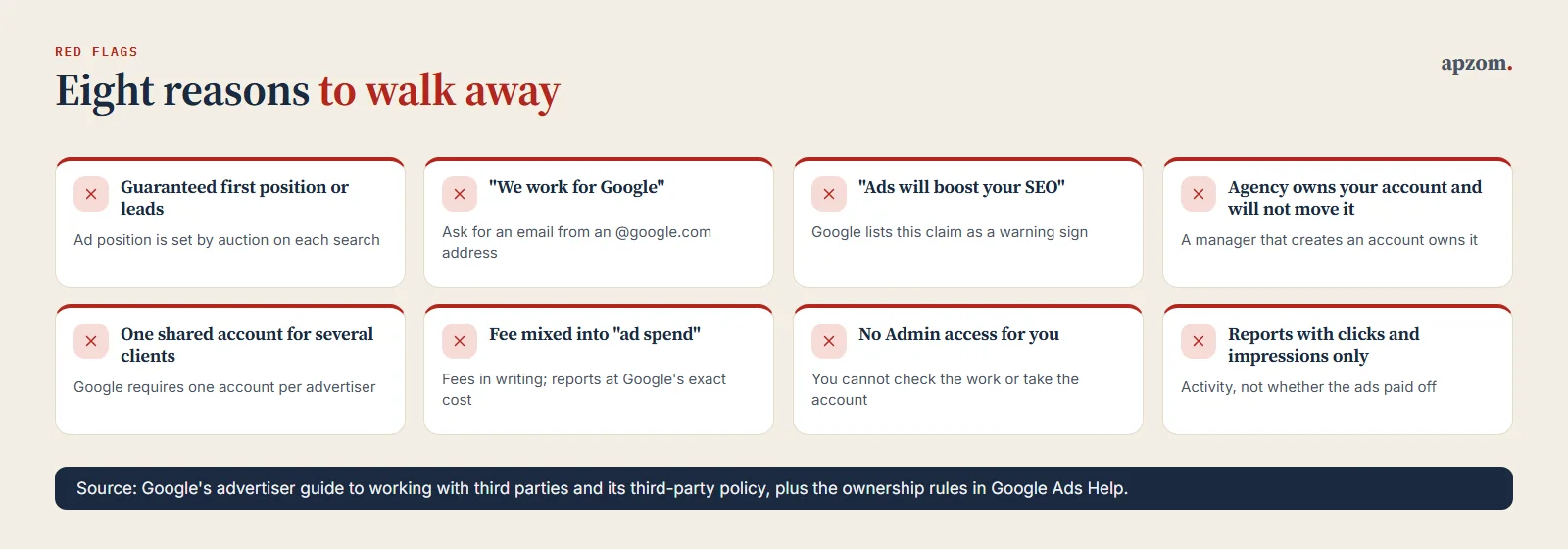
| Red flag | Why it matters |
|---|---|
| Guaranteed first position or leads | Ad position is decided by auction on each search; nobody can promise it |
| “We work for Google” or “Google sent us” | Google says to ask for an email from an @google.com address, and that @gmail.com addresses prove nothing |
| “Ads will boost your SEO” | Google lists claims that advertising affects organic ranking as a warning sign |
| The agency owns your account and will not move it | A manager that creates an account becomes its owner; only an admin on that manager can move ownership |
| A shared account for several clients | Google requires a separate account for each advertiser |
| The fee is mixed into “ad spend” | Google requires fees in writing and reports to show Google’s exact cost |
| No Admin access for you | You cannot check the work or take the account with you |
| Reports with clicks and impressions only | They show activity, not whether the ads paid off |
If you think an agency has broken Google’s third-party policy, Google asks you to try to resolve it with the agency first, then report it through Google’s complaint form.
The first 30 days: confirm you chose well
In the first month after signing:
- Check access. Under Admin, then Access and security, confirm your own Admin users, the agency’s manager link and nobody you do not recognise.
- Check billing. Confirm the payments profile is in your business’s name, or that the written billing arrangement matches what you see.
- Test a conversion. Submit a test enquiry and make a short test call, then confirm each is recorded once, in the right action.
- Read change history. Make sure the work described in the first report appears in the account.
- Reconcile the first report. Compare Google’s conversions with your real enquiries, and ask about any gap.
For a fuller review later, use our 25-point Google Ads audit checklist.
Common mistakes
- Choosing on the badge alone. A Partner badge shows activity and training across all clients, not results for you.
- Letting the agency open and own the account. It saves a little time and can cost you the account’s history later.
- Never writing down what a conversion is. Without a definition, every report is an argument.
- Accepting Google’s conversion count as your lead count. Reconcile it with your own records every month.
- Signing before reading the exit terms. The notice period and handover list matter most when you leave.
How Apzom can help
Apzom Digital manages Google Ads with the account and payments profile in your business’s name, our manager account linked as a guest, a written conversion agreement before spend changes, and reports that put qualified enquiries next to Google’s exact cost. We have not published a Google Ads case study yet, so we will not quote Google Ads results we cannot show you. Our published paid-media results come from Meta ads, not Google Ads: HillTown Group, with “600+ leads every month from Meta ads, for 12 months running”, and Kingston Flats, with “560+ Meta leads every month since June 2025”, both on our case studies page. We do not claim Google Partner status on this site, so judge us on the checks in this guide, as you would anyone else. See our Google Ads management service. We work with clients worldwide, remotely, from our base in Ahmedabad, India.
Get a Free Growth Audit and Quote for your Google Ads. Send us your customer ID and how you count a good lead or sale today. We send back a written review: ownership and billing, conversion set-up, what your reports leave out, and a fee in writing if you want us to manage the account.
No obligation, no guaranteed positions or results. Prefer to talk first? Contact us or read our Google Ads audit checklist.
Frequently asked questions
Should I only hire a Google Partner or Premier Partner?
No. The badge signals activity and training, not results for a business like yours. An agency or freelancer without one can be a better fit if it passes the other checks.
How do I check whether an agency is really a Google Partner?
Click the badge on its website: it must link to the company’s public Partner profile on Google. You can also search the Google Partners directory; partners can opt out, so if one is missing, ask to see its Badge status page on a screen share.
Can an agency own my Google Ads account?
Its manager account becomes the owner automatically if it creates the account. Avoid this by opening the account yourself and accepting the agency’s link request. The client account still owns its data and can remove an owner by unlinking, but if the agency’s manager is your paying manager, change billing first or the ads stop.
What should a Google Ads agency report include?
Google’s policies set the minimum: cost, clicks and impressions at account level at Google’s exact charge, or direct access to your account. A useful report adds qualified enquiries or sales from your own records, cost per qualified result, the fee, the main changes and next steps.
What should I do if my current agency will not hand over my account?
Ask in writing for Admin access on the account itself for someone in your business, and for billing to move to your own payments profile before anything is unlinked. Google says only one manager can own a client account and that an admin on the owning manager account can move ownership to another manager, such as your new agency’s; once you are an admin with your own billing, unlinking removes the old agency’s ownership. Google’s transparency requirements entitle you to your customer ID, and Google has a form to report a third-party policy violation once you have tried to resolve it directly.