The short answer: A good holiday marketing plan for a small business is mostly about timing, not clever ideas. Pick the three or four dates your own customers care about, which may be Diwali, Eid, Boxing Day or Singles’ Day rather than Black Friday, and work backwards from each one. Set your budgets about four to six weeks out, put holiday hours on your Google Business Profile early, launch ads a few days before you need them because platforms review them first, clean your email list before peak volume, and make sure every “was” price and countdown is true. Then measure each date against the same period last year.
This checklist is for owners and marketing leads of small businesses anywhere: shops, online stores, restaurants, salons, studios and service firms. It is written for a worldwide reader, with dates and rules labelled by market (US, UK, EU, Australia and Canada, UAE and India), and its platform rules and laws were checked against the platforms’ help pages and official government and regulator sources on 24 October 2026. It is practical guidance, not legal advice.
Why most holiday marketing goes wrong
Search for “holiday marketing ideas” and you will find lists of fifty ideas: gift guides, themed posts, giveaways, festive emails. The ideas are rarely the problem. The problems that cost small businesses money in the busy season are usually much more ordinary:
- The ad is still in review on the morning the sale starts.
- Google shows normal opening hours on a day the shop is closed, and customers turn up to a locked door.
- The big email goes to spam, because the list has not been cleaned and the sending domain is not set up for bulk mail.
- The “was” price is not real, or the countdown timer restarts every day, which is now a legal risk in several markets.
- Nobody can say afterwards what worked, because nothing was set up to measure it.
Each of these is a deadline or a rule, and each one is easy to fix if you know about it early. That is what this checklist is for.
Step 1: choose the dates that matter to your customers
The first framework is a date map. Do not copy a US retail calendar. List the dates when your customers actually change what they buy, when they buy it, or when they need you to be open. For most small businesses that is three to five dates a season, not fifteen.
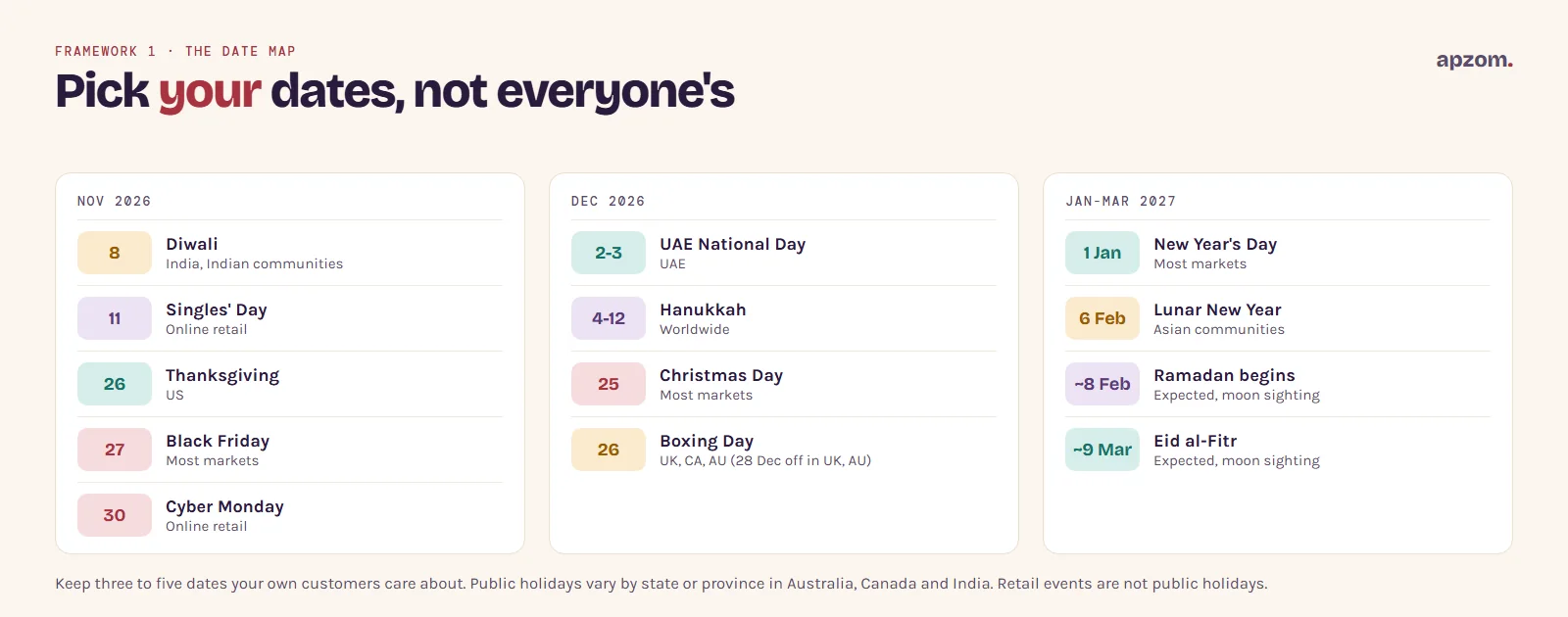
These are the main dates in late 2026 and early 2027 across the markets this guide covers. Retail events such as Black Friday are not public holidays, but they change what customers expect.
| Date | Occasion | Where it matters most |
|---|---|---|
| Sunday 8 November 2026 | Diwali | India and Indian communities worldwide (UK, US, Canada, Australia, UAE) |
| Wednesday 11 November 2026 | Singles’ Day | Online retail, especially in Asia |
| Thursday 26 November 2026 | Thanksgiving | US (public holiday) |
| Friday 27 November 2026 | Black Friday | Started in the US; now widely promoted online in most markets (retail event) |
| Monday 30 November 2026 | Cyber Monday | Online retail in most markets (retail event) |
| Wednesday 2 and Thursday 3 December 2026 | UAE National Day (Eid Al Etihad) | UAE (public holiday) |
| Friday 4 to Saturday 12 December 2026 | Hanukkah | Jewish communities worldwide |
| Friday 25 December 2026 | Christmas Day | Public holiday in the US, UK, EU, Australia, Canada and India |
| Saturday 26 December 2026 | Boxing Day | UK, Canada and Australia; in 2026 the UK and Australia also have Monday 28 December as a public holiday (in Australia, check your state) |
| Friday 1 January 2027 | New Year’s Day | Public holiday in most markets; Scotland also has a substitute holiday on Monday 4 January 2027 |
| Saturday 6 February 2027 | Lunar New Year | Chinese and other Asian communities worldwide |
| Expected from about 8 February 2027 | Ramadan begins | UAE, India and Muslim communities worldwide; trading hours and buying patterns change |
| Expected about 9 or 10 March 2027 | Eid al-Fitr | UAE, India and Muslim communities worldwide |
Public holiday dates were checked against government calendars, and religious dates against calendar references. Ramadan and Eid depend on the sighting of the moon, so treat those two as estimates until they are announced. Public holidays also vary by state or province in Australia, Canada and India, so check your own region.
For each date you keep, write one line: what changes for your customers, and what you will do. For example (illustrative), a salon might write “Diwali week: more bookings for the days before; open late on Thursday and Friday; closed on the day.” A B2B firm might write “Christmas to New Year: decision-makers away; pause lead ads from 20 December; restart on 4 January.”
Step 2: work backwards from each date
The second framework is a backward plan. Start from the day the offer goes live and count back. Where a platform sets a lead time, the “Why” column gives it from the platform’s own help pages; the other timings are our planning advice.
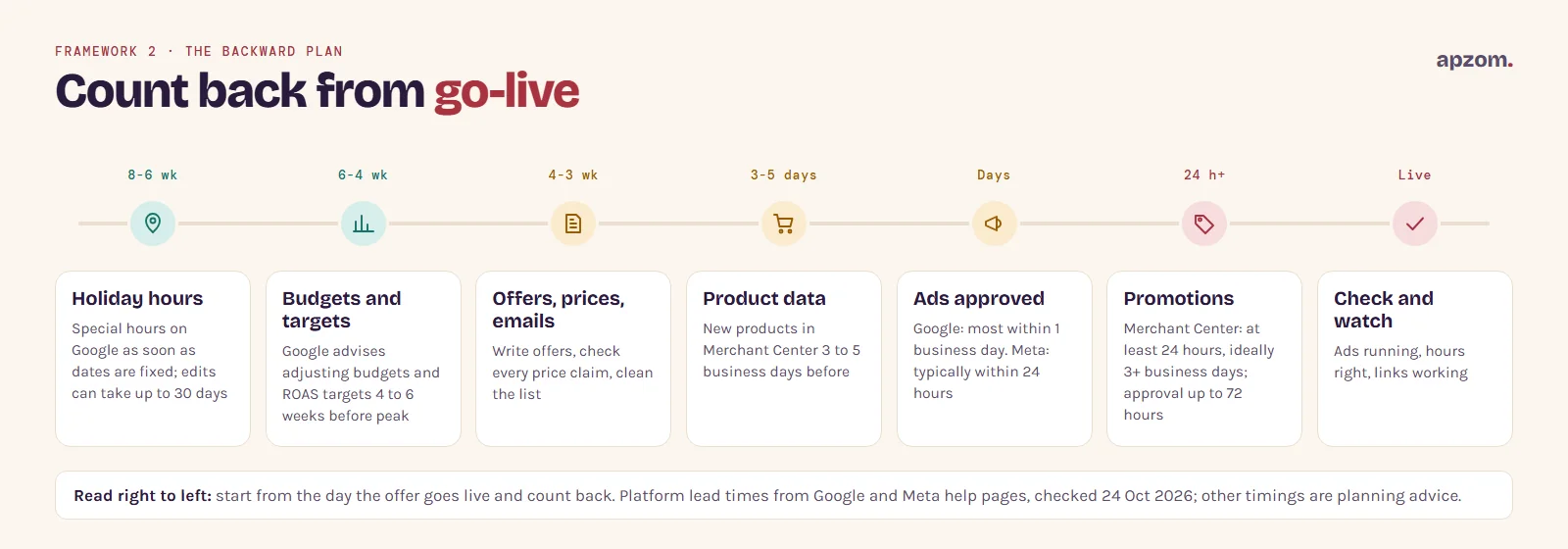
| When | What to do | Why |
|---|---|---|
| 6 to 8 weeks before, or as soon as your dates are fixed | Set holiday hours on your Google Business Profile | Google usually reviews edits within 10 minutes, but says it can take up to 30 days |
| 4 to 6 weeks before | Decide budgets and targets for paid ads | Google’s own holiday advice is to adjust budgets and ROAS (return on ad spend) targets 4 to 6 weeks before peak season |
| 3 to 4 weeks before | Write offers, check every price claim, plan emails, clean your email list | Gives you time to fix anything that fails the rules in Step 4 |
| 3 to 5 business days before | Upload new products to Google Merchant Center | Google advises this lead time for sales events, and no earlier than 30 days ahead |
| A few days before | Create new ads with a future start date and check they show as approved before the day | Google says most ads are reviewed within one business day; Meta says review is typically completed within 24 hours but can take longer |
| At least 24 hours before, ideally 3 or more business days | Submit Merchant Center promotions | Google asks for as early as possible and at least 24 hours before the start; approval can take up to 72 hours and reviews happen on weekdays |
| On the day | Check ads are running, hours are right and links work | Catch problems while you can still fix them |
| Within a week after | Review the results and write down what to repeat | Next year’s plan starts here |
If your main date is about four weeks away, you are still in time for everything except the earliest steps.
Step 3: the channel checklist
Google Business Profile
- Add special hours for every changed day. Use special hours, not your regular hours, so your normal week returns by itself afterwards. Google says it is a good idea to confirm hours for official holidays even when they are the same as usual, and on listed holidays a warning may appear on your profile telling searchers your hours might differ. Our step-by-step guide covers how to change your business hours on Google, including holiday hours.
- Post your offer. Business Profile offer posts need a title and start and end dates, and can include a coupon code, a link and terms. Posts are reviewed against Google’s content policies.
- Ask December customers for reviews. A busy season brings more customers who can leave one. Our guide on how to get more Google reviews covers the rules.
- Keep other listings the same. If you are also on Apple Maps or Bing Places, change their hours too.
Google Ads
- Launch early. Most ads are reviewed within one business day, but more complex reviews take longer.
- Use seasonality adjustments only for short, big events. They tell Smart Bidding to expect a large change in conversion rate. Google calls them “ideal for short events of 1-7 days” and warns they may not work as well for periods longer than 14 days. Smart Bidding already handles normal seasonal change on its own.
- Use promotion assets with the right occasion. Promotion assets have an optional occasion field, including Black Friday, Cyber Monday, Singles Day, Diwali, Christmas, Hanukkah, Boxing Day and New Year’s, each with its own date window. The Ramadan, Eid al-Fitr and National Day occasions can be used on any date.
- Check what Google may write for you. In eligible Search and Performance Max campaigns with location assets, Google can pull deals from your landing pages into ads (automated promotions), and the feature formerly called automatically created assets is now “text customization” inside AI Max. Both can be switched off. Check them before your offer ends, so an expired deal does not keep showing.
- New to Google Ads? Our Google Ads guide for small businesses covers the setup.
Meta (Facebook and Instagram)
- Submit ads at least a few days early. Meta says review is typically completed within 24 hours, although it may take longer in some cases.
- Refresh creative for each date rather than running one festive ad for two months.
- Our guide to Facebook and Instagram ads for local businesses covers audiences and setup.
Online store and Google Shopping
- Check product data early. New products for a sales event should be in Merchant Center 3 to 5 business days before it.
- Submit promotions at least 24 hours before they start. Google says approval typically completes within 24 hours of the start time but can take up to 72 hours, and reviews happen during weekday business hours.
- Check your market. Merchant Center promotions show in Australia, Brazil, Canada, France, Germany, India, Italy, Japan, South Korea, Spain, the Netherlands, the UK and the US. The UAE is not on Google’s list.
- Check stock and delivery cut-off dates on your site. A clear “order by” date on the product page prevents most December complaints.
Website
- Put opening hours, delivery cut-offs and returns rules for the season in one easy-to-find place.
- Test the checkout or booking form on a phone before the busy weeks, not during them.
- Make sure the page each ad links to says the same offer as the ad.
Busy season coming and no plan yet? A Holiday Campaign Review checks your dates, deadlines, offers and tracking against your market’s rules and gives you a backward plan you can follow.
Step 4: make every offer honest
The third framework is the honest offer test. Holiday sales are where price claims get checked most, and several markets have tightened the rules recently. Before any offer goes live, ask three questions: is the “was” price real, is the deadline real, and is the price the customer sees the price they pay?
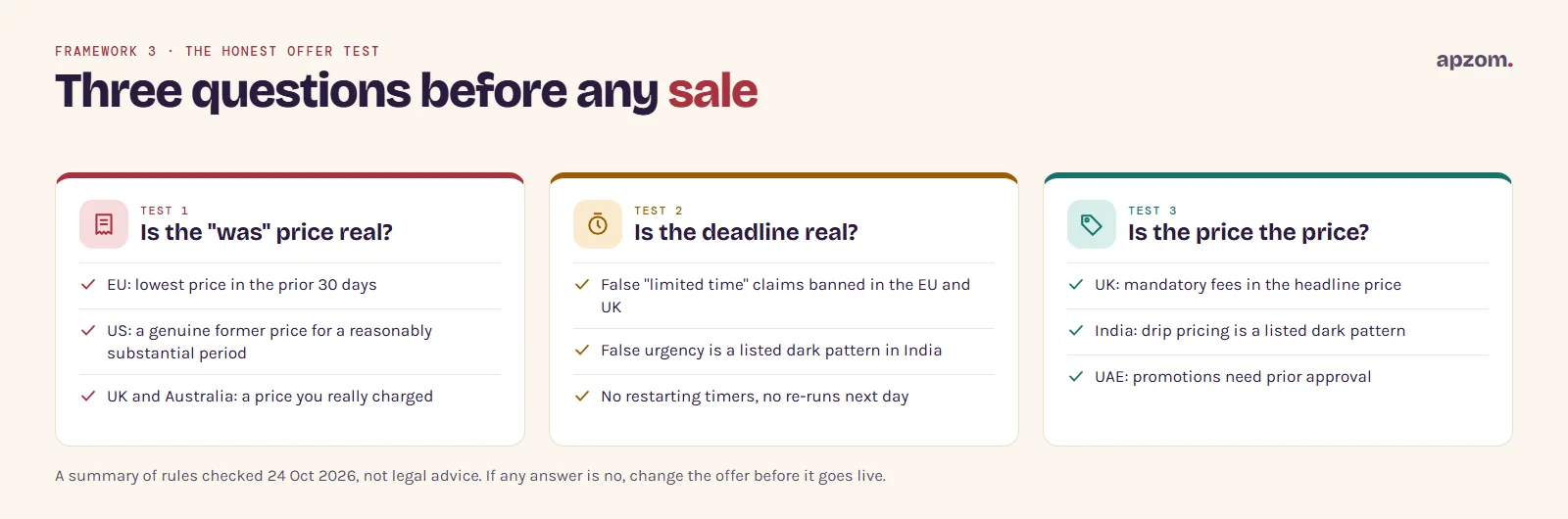
| Market | What the rules say |
|---|---|
| EU | When you announce a price reduction, the earlier price you show must be the lowest price you charged in at least the 30 days before it (Price Indication Directive, Article 6a). The EU Court of Justice ruled in September 2024 that a percentage discount must be calculated from that price |
| UK | The consumer protection rules of the Digital Markets, Competition and Consumers Act 2024 have applied since April 2025, and the CMA (Competition and Markets Authority) can now fine businesses directly, up to 10% of global turnover or £300,000, whichever is higher. Mandatory fees must be in the headline price. The trading standards guide to pricing practices (updated April 2026) says a “was” price should be recent, genuine, charged in the same place, and charged for at least as long as the sale runs |
| US | Under the FTC Guides Against Deceptive Pricing, a “former price” must be one the item was actually offered at for a reasonably substantial period. The FTC’s fees rule (since May 2025) requires total prices but covers only live-event tickets and short-term lodging |
| Australia | The ACCC (Australian Competition and Consumer Commission) says a was/now or strike-through price is likely to mislead if the product was not genuinely sold at the “was” price. Keep records that support it |
| UAE | Federal Law No. 15 of 2020 on Consumer Protection bans misleading price advertising, and general discounts and promotions need prior approval. In Dubai this goes through the Department of Economy and Tourism, so check your emirate’s permit rules before a sale |
| India | The Consumer Protection Act 2019 and the CCPA’s dark patterns guidelines (2023) ban false urgency and drip pricing, among other practices |
Countdown timers and “only today” claims
In both the EU and the UK, falsely saying an offer is available for only a very limited time to push people into buying is banned outright. In May 2026, the UK High Court confirmed a settlement in which a mattress retailer, Emma Sleep, admitted that its countdown timers, “high demand” messages and discount claims broke consumer law, and gave undertakings not to run “limited time” deals when similar deals continue afterwards.
The practical rule is simple: show a countdown only if the offer really ends then, do not restart it, and do not re-run the same deal the next day under a new name.
Step 5: get your emails delivered at peak volume
The holiday email is often the biggest send of the year, and that is exactly when the mailbox providers’ bulk sender rules bite.
- Gmail (since February 2024, for senders of more than 5,000 messages a day to Gmail accounts): authenticate with SPF, DKIM and DMARC, offer one-click unsubscribe, and keep your spam complaint rate below 0.3%. Gmail’s FAQ asks senders to process unsubscribes within 48 hours, and Google says it has been increasing enforcement since November 2025, including rejecting non-compliant mail.
- Yahoo (since February 2024): similar rules, with unsubscribes honoured within 2 days and the spam rate below 0.3%.
- Microsoft Outlook.com (since May 2025, for domains sending more than 5,000 emails a day): SPF and DKIM must pass and a DMARC record is needed. Mail that does not comply goes to junk and can be rejected.
Even if you send fewer than 5,000 emails a day, these are good practice. Clean the list before the season (remove addresses that bounced or have not opened in a long time), and do not suddenly email old contacts who never agreed to hear from you.
Consent rules by market
| Market | Marketing email rules in brief |
|---|---|
| US | CAN-SPAM: consent is not required, but every email needs a working opt-out, your physical postal address and honest subject lines. Honour opt-outs within 10 business days |
| UK | PECR: emails and texts to individuals need consent, unless the “soft opt-in” applies to existing customers who bought something similar and were offered an opt-out. Corporate subscribers can be emailed if they can opt out. Fines can now reach £17.5 million or 4% of global turnover |
| EU | ePrivacy rules: prior consent for marketing to individuals, with a limited exception for your existing customers’ similar products |
| Canada | CASL: express or implied consent, sender identification, and unsubscribes processed within 10 business days |
| Australia | Spam Act 2003: consent, identify yourself, and honour unsubscribes within 5 working days |
| UAE | Telemarketing calls are limited to 9am to 6pm, and telemarketing calls and messages must not reach numbers on the Do Not Call Register. We did not find a UAE rule specific to marketing email, so check with an adviser |
| India | Promotional SMS and calls need registration and consent under TRAI’s rules. The main consent duties of the DPDP Rules 2025 apply from 13 May 2027 |
Our email marketing team can set up authentication, list cleaning and consent records if you are not sure where you stand.
Step 6: measure each date properly
The fourth framework is the season review. Without it, next year’s plan is guesswork. Set it up before the season, not after.
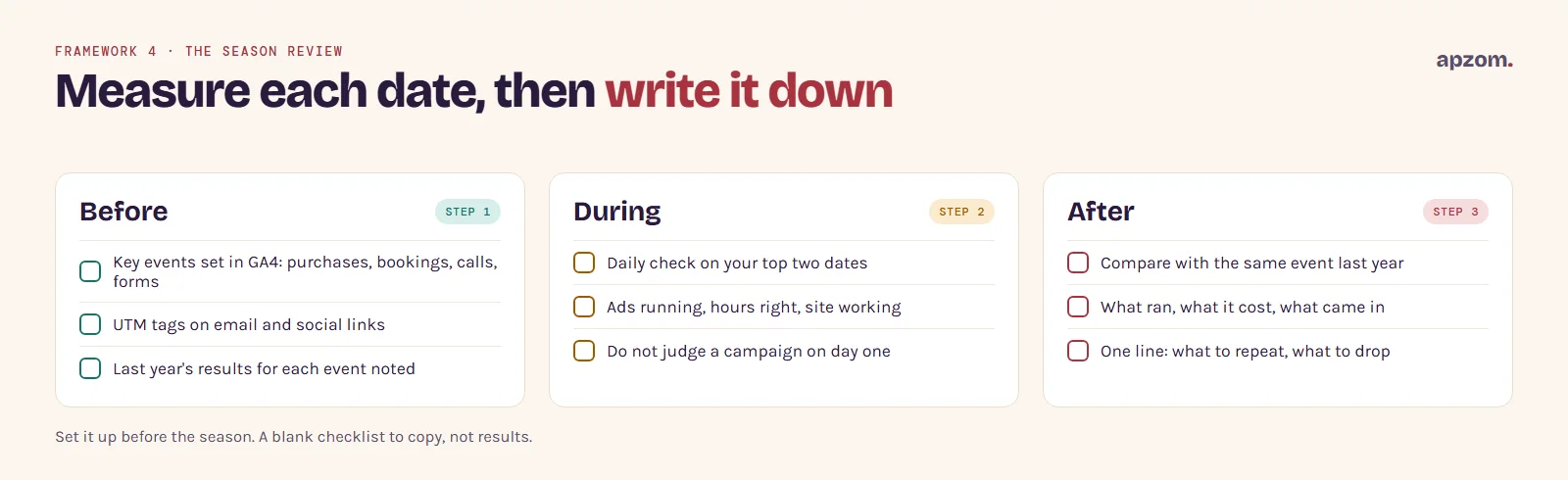
- Before: make sure the actions that matter (purchases, bookings, calls, form enquiries) are recorded as key events in Google Analytics 4. Add UTM tags to email and social links so each campaign shows separately.
- During: check daily on your top two dates that ads are running, hours are right and the site works. Do not judge a campaign on its first day.
- After: compare each event with the same event last year (Black Friday with last year’s Black Friday, Diwali week with last year’s Diwali week), not with the week before or the same calendar dates, because many of these dates move. Write down for each date: what you ran, what it cost, what came in, and what you would change.
Our guide on how to measure marketing ROI explains how to judge whether the season paid for itself.
Common holiday marketing mistakes
- Planning around one US date when your customers celebrate something else.
- Changing regular hours on Google for a holiday and forgetting to change them back.
- Launching ads on the morning of the sale.
- Using a “was” price that was never really charged, or a countdown that restarts.
- Sending the biggest email of the year from a domain that is not authenticated.
- Running the same offer for two months, so nobody believes it is special.
- Judging results against the previous week instead of the same event last year.
How Apzom can help
We plan and run seasonal campaigns across Google Ads, Meta ads, email and local search, working backwards from your dates and checking every offer against the rules in your market. We have not published a retail or ecommerce case study yet, so we will not show you one. Our published client work is on our case studies page, and you can see the full range of our digital marketing services. We work with clients worldwide, remotely, from our base in Ahmedabad, India.
Request a Holiday Campaign Review. We look at the dates that matter to your customers, your Google Business Profile hours, your Google Ads, Meta and email plans, your offer wording against the rules in your market, and how you will measure the results. You get a dated plan with the lead time for each step, or we run it for you.
No obligation and no guaranteed sales. Prefer to talk first? Contact us or see all our services.
Frequently asked questions
When should a small business start holiday marketing?
Start about six weeks before your main date. Google advises adjusting ad budgets and targets four to six weeks before peak season. Holiday hours, ads and promotions can be done later, but each has a lead time for review.
What are the best holiday marketing ideas for a small business?
The ones tied to a date your customers care about: a real offer, clear opening hours, a reminder email to past customers, an offer post on your Google Business Profile and a short, well-timed ad campaign. Timing and honesty matter more than novelty.
How early should I submit holiday ads?
Google says most ads are reviewed within one business day, and Meta says review is typically completed within 24 hours but can take longer. Create them a few days early with a future start date, and check they show as approved before the day.
Is Black Friday worth it for a small business?
Only if your customers expect it and you can make a real offer without losing money. Many service businesses do better with a date their own customers care about, or with a simple “book before the holidays” message.
Can I use a countdown timer on my holiday sale?
Only if the offer genuinely ends when the timer says. False “limited time” claims are banned in the EU and the UK, and misleading urgency is a listed dark pattern in India.
How do I show holiday opening hours on Google?
Add special hours in your Google Business Profile for each changed or closed day. Our guide on changing your business hours on Google has the steps.
Do the Gmail sender rules apply to small businesses?
The strict rules apply to senders of more than 5,000 messages a day to Gmail accounts, but every sender needs authenticated, wanted email to reach the inbox. Set up SPF, DKIM and DMARC, and include an easy unsubscribe.
Can Apzom run holiday campaigns for businesses outside India?
Yes. We work with clients worldwide, remotely, from Ahmedabad, and we plan around your market’s dates and rules.