The short answer: Facebook and Instagram ads, run through Meta’s Ads Manager, can bring a local business enquiries within days, not months. They work best when you show a clear offer to people near you, send them to a simple form or page, and contact every lead quickly. They work badly when you boost random posts, target too narrowly, judge results by likes, or let leads sit for days. This guide shows how to set up Meta ads for a local business step by step, what to spend, and how to tell whether they are working.
This guide is for owners and marketers at local service businesses, clinics, fitness studios, shops, restaurants and property businesses in any country. It covers when Meta ads make sense, choosing the right campaign objective, targeting people near you, writing ads that stop the scroll, handling leads, the rules that apply to some industries, budgets and testing, and measurement. If you are still choosing between channels, our guide to SEO vs Google Ads explains how search compares.
When Meta ads make sense for a local business
Google search ads reach people who are already looking for what you sell. Meta ads are different: they reach people who were not searching, while they scroll Facebook and Instagram. That makes them good at creating demand and weaker at catching people who need you right now.
| Meta ads work well when | Meta ads struggle when |
|---|---|
| You have a clear, visual offer, such as a first class, a consultation or a seasonal deal | People only need you in an emergency, such as a burst pipe or a locked door |
| Your customers live in a defined area around you | Your service area is tiny and very few people live in it |
| You can contact leads quickly and follow up | Nobody has time to call or message leads the same day |
| Your product or result is easy to show in a photo or short video | Your service is hard to explain without a conversation, and you have no good visuals |
| You want to stay visible to people who visited your website | You expect ads alone to make up for a weak website or poor reviews |
Many local businesses get the best results by combining the two: search to catch people who are ready, and Meta ads to build demand and remind people who are not ready yet.
Step 1: choose the right campaign objective
When you create a campaign in Ads Manager, Meta asks you to choose an objective. The objective tells Meta which people to find. This is the first framework we use: start from what you want people to do.
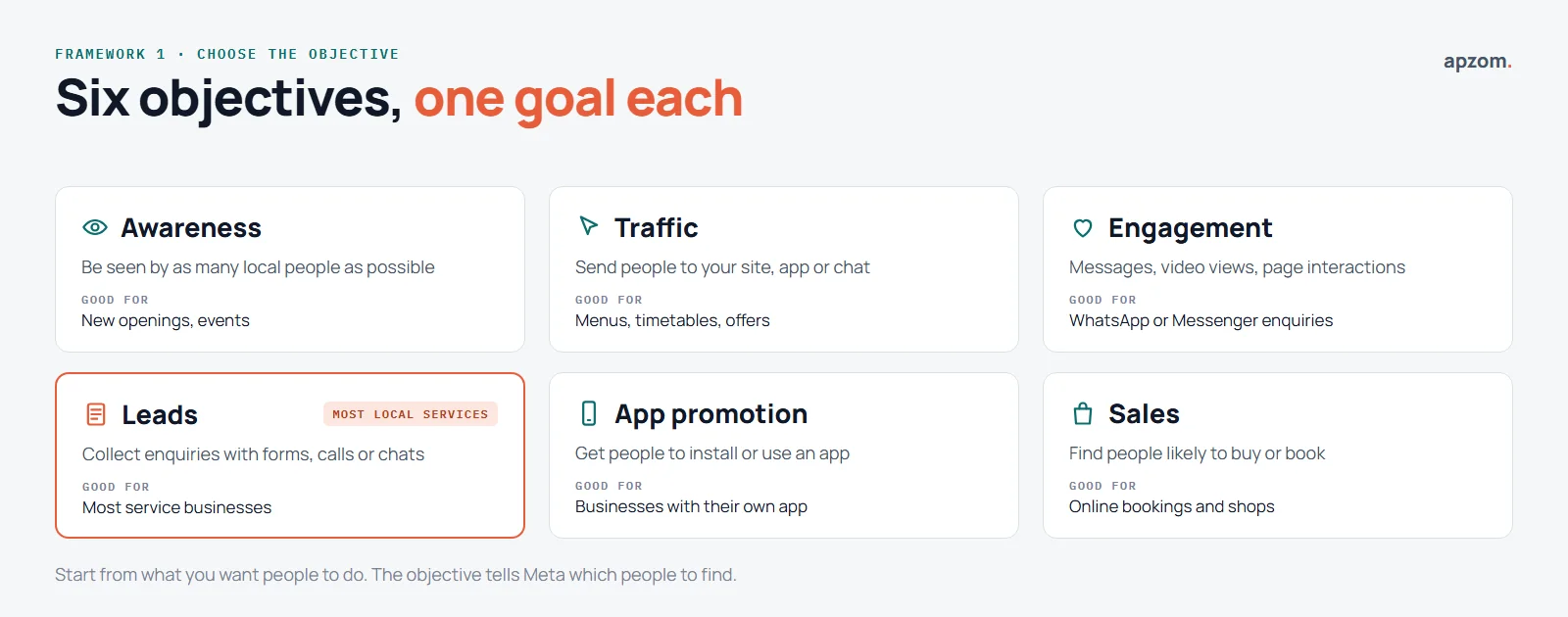
Meta’s Business Help Centre lists six objectives: Awareness, Traffic, Engagement, Leads, App promotion and Sales.
| Objective | Choose it when you want | Local example |
|---|---|---|
| Awareness | As many local people as possible to see you | A new opening or an event. Shops with several branches can turn on store location features here. |
| Traffic | People to visit your website, app or chat | Sending people to a menu, timetable or offer page |
| Engagement | Messages, video views or page interactions | Starting WhatsApp or Messenger conversations |
| Leads | Enquiries through messages, phone calls or sign-up forms | Most service businesses: clinics, trades, studios, property |
| App promotion | People to install or use your app | Businesses with their own booking app |
| Sales | People likely to buy or book online | Online bookings, gift cards or an online shop |
For most local service businesses, Leads is the right starting point.
The “Boost post” button is the quickest way to spend money on Meta, but it gives you fewer choices than a full campaign in Ads Manager. Boosting can help a good post reach more local people, but for enquiries, set up a proper campaign with the right objective.
Step 2: target people near you
The second framework is the local targeting map: three rings, each with a different job.
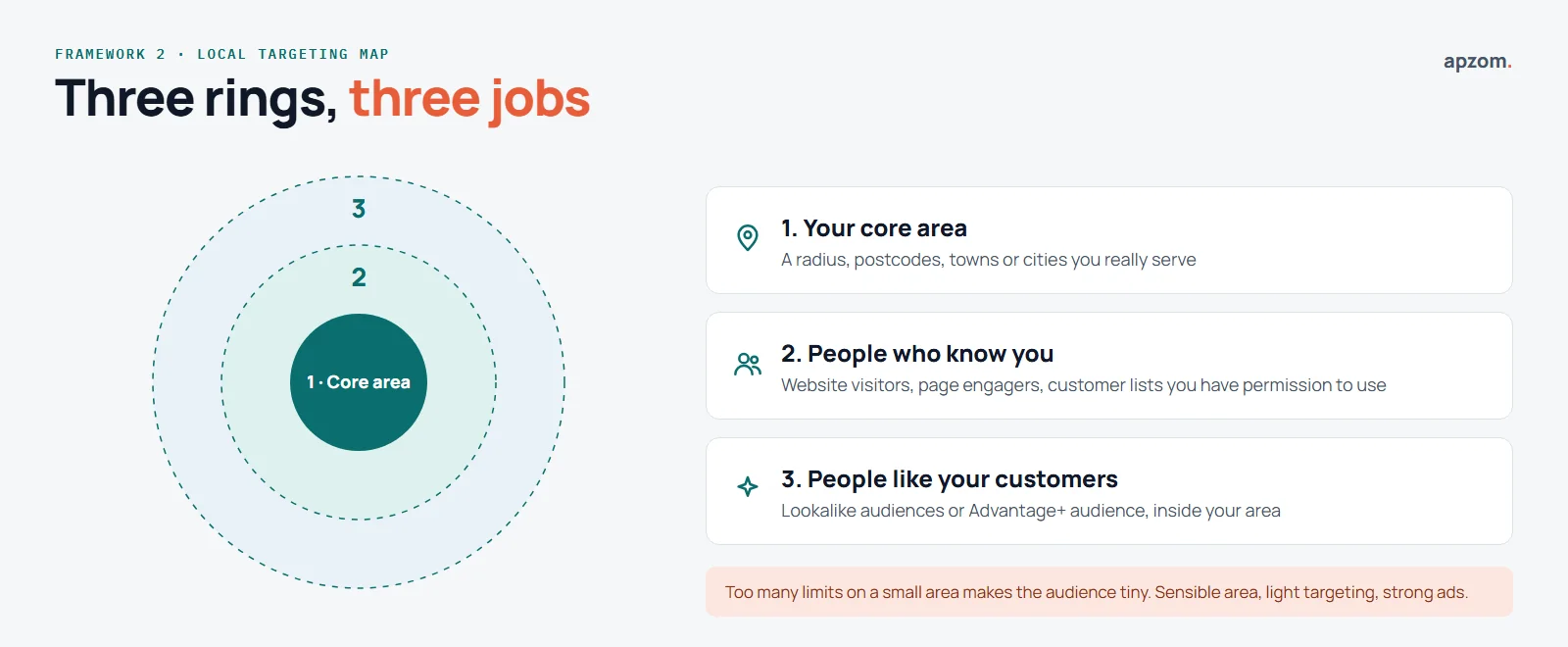
- Your core area. Target a radius around your location or the postcodes, towns or cities you serve. Keep it realistic: how far will customers actually travel, or how far will you travel to them?
- People who already know you. Custom audiences built from your website visitors (using the Meta Pixel), people who engaged with your Facebook or Instagram page, and customer lists you have permission to use.
- People like your customers. Let Meta find similar people, either through lookalike audiences or Meta’s automated Advantage+ audience, within your area.
Meta lets you target countries, regions, cities, postcodes (up to 50,000 of them) or a radius around a dropped pin. Meta says radius limits vary by location type, and that you cannot set a radius when you target postcodes, states, regions or countries. Watch one setting: when you pick a city or region, a box labelled “Reach more people likely to respond to your ads” may be ticked by default. Meta says to untick it if you only want to reach your selected area. Meta also notes that location targeting is not completely accurate, so expect a few enquiries from just outside your area.
A common mistake is stacking so many interests and age limits on top of a small area that the audience is tiny. For most local businesses, a sensible area with light targeting, and strong ads, works better than very narrow targeting.
Step 3: make ads that stop the scroll
People scroll fast. Your ad has a second or two to show it is relevant. The third framework is a five-part creative checklist.
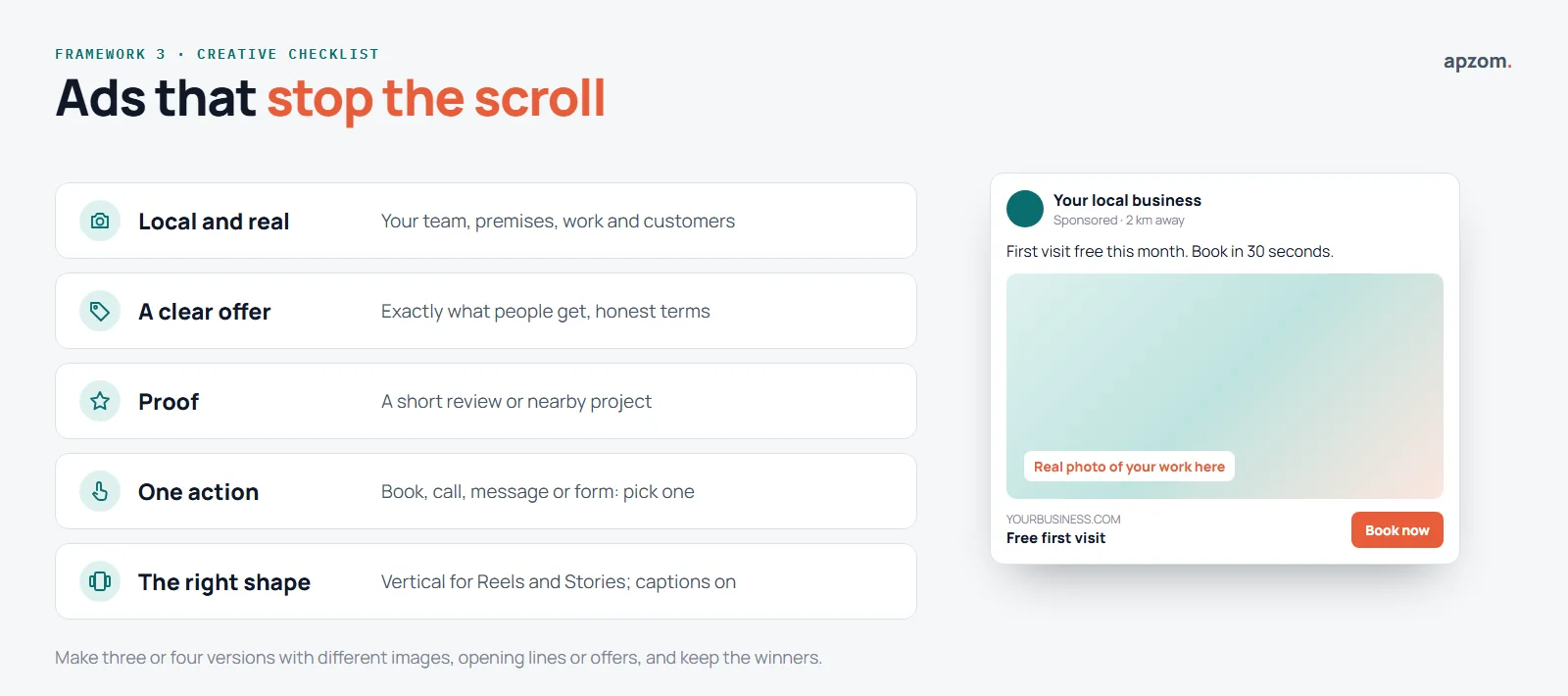
- Local and real. Use your own photos and videos: your team, your premises, your work, your customers (with permission). Stock photos look like every other ad.
- A clear offer. Say exactly what people get: a free consultation, a first-visit price, a seasonal service. Make the terms honest and easy to find.
- Proof. A short review, a before-and-after where the rules allow it, a project you completed nearby.
- One action. Book, call, message or fill in a form. Not all four.
- The right shape. Vertical video for Reels and Stories, and square or portrait images for feeds. Make the first few seconds of any video work without sound, with captions.
Make three or four versions with different images, opening lines or offers, so you can see which works best in your area.
Spending on Meta ads but not sure they pay? A Meta Ads Review checks your objective, targeting, creative, lead handling and tracking, and shows where money is being wasted.
Step 4: decide where leads go, and answer them fast
You can send people to your website, to a Meta lead form (instant form) that opens inside Facebook or Instagram, to WhatsApp or Messenger, or to a phone call.
| Where leads go | Good for | Watch out for |
|---|---|---|
| Lead form (instant form) | Lots of enquiries quickly, easy on mobile | Lower intent; ask a qualifying question or use the higher-intent form type |
| Your website | Showing more detail, prices and reviews; better tracking | Slow or confusing pages lose people |
| WhatsApp or Messenger | Quick conversations, common in many markets | Someone must reply quickly, every day |
| Phone call | Urgent or high-value services | Calls outside opening hours go unanswered |
Meta offers three kinds of lead ads: calling, instant forms and click-to-message ads that open Messenger, Instagram or WhatsApp. Instant forms come in three types: More volume (the default), Higher intent, which adds a review screen so people confirm their details before submitting, and Rich creative. Meta says higher intent forms only run in Facebook and Instagram feeds on mobile. You can download leads from Ads Manager or Meta Business Suite, or connect your CRM directly or through a third-party tool.
Meta marks a privacy policy link on instant forms as optional but recommends one. Privacy laws such as the GDPR, the UK GDPR and India’s DPDP Act generally require you to tell people how you will use their details, so add a clear privacy policy and only ask for what you need.
Whatever you choose, speed matters most. A lead who hears from you the same day, while they still remember your ad, is far more likely to become a customer than one you call next week. Connect lead forms to your CRM or email so leads arrive instantly, and decide who calls them and when.
Rules that apply to some industries
Some businesses face extra rules on Meta. Check these before you plan a campaign.
- Special Ad Categories. If you advertise housing, employment, financial products and services, or social issues, elections or politics, you must choose a Special Ad Category. For advertisers based in or reaching the US, and advertisers reaching Canada and certain countries in Europe, Meta limits or removes targeting by age, gender and postal code, as well as exclusions, lookalike audiences and saved audiences. Audiences based on a city or a dropped pin also include an expanded radius. Since 21 January 2025, financial products and services campaigns aimed at the US must use this category. This matters for estate agents, property developers, recruiters, mortgage brokers and lenders.
- Political and social issue ads in the EU. Meta says advertisers can no longer create or edit ads about social issues, elections or politics in the European Union.
- Sensitive data. Meta’s rules say health, financial and children’s information must not be sent through the Meta Pixel or other business tools. From 2 September 2025, Meta began restricting custom conversions that may suggest such information, such as a health condition or a credit score. Clinics, pharmacies and financial firms should check their tracking set-up carefully.
- Creator and influencer posts. Branded content on Facebook and Instagram must use Meta’s branded content tool, which adds a “Paid partnership” label. The US Federal Trade Commission advises adding your own disclosure as well. The UK’s Advertising Standards Authority prefers labels that clearly say “Ad”. In India, ASCI advises upfront, prominent labels such as “Ad”, alongside platform tools such as “Paid partnership”.
- Ad review. Meta says most ads are reviewed within 24 hours, mostly by automated systems, and that ads can be reviewed again after they go live. Make honest claims you can back up.
Step 5: set a budget and give it time
Meta does not publish a single minimum budget. It says minimums vary by country and objective. A few rules from Meta’s own help pages are worth knowing:
- A daily budget is an average, not a hard cap. On days with better opportunities, Meta may spend up to 75% over your daily budget, but it will not spend more than seven times your daily budget in a week ending Saturday at midnight.
- A lifetime budget is a hard cap for the whole campaign.
- The learning phase. Meta says an ad set usually leaves its learning phase after about 50 results in the week after its last significant edit. If it is not getting enough results, Ads Manager shows “Learning limited”. On a small local budget, that means fewer ad sets with more budget each, and fewer edits.
- Tax may be added. Meta says taxes may apply depending on the country of your ad account’s billing address. In India, Meta adds GST and deducts tax at source when you are charged for ads.
We suggest local businesses think in three stages:
- Set-up and learning (first two weeks). Get tracking right, launch a few ad versions and avoid changing things every day.
- Testing (weeks three to six). Keep the ads and audiences that bring good leads, pause the rest, and try new creative.
- Scaling (after that). Increase the budget gradually on what works, and keep refreshing ads before people get tired of them.
Set a monthly amount you are comfortable testing for at least two to three months, and judge it by customers won, not clicks.
Step 6: measure what matters
The fourth framework is the lead-to-customer scorecard. Ads Manager shows you clicks and cost per lead. Those numbers are useful, but they do not tell you whether you made money.
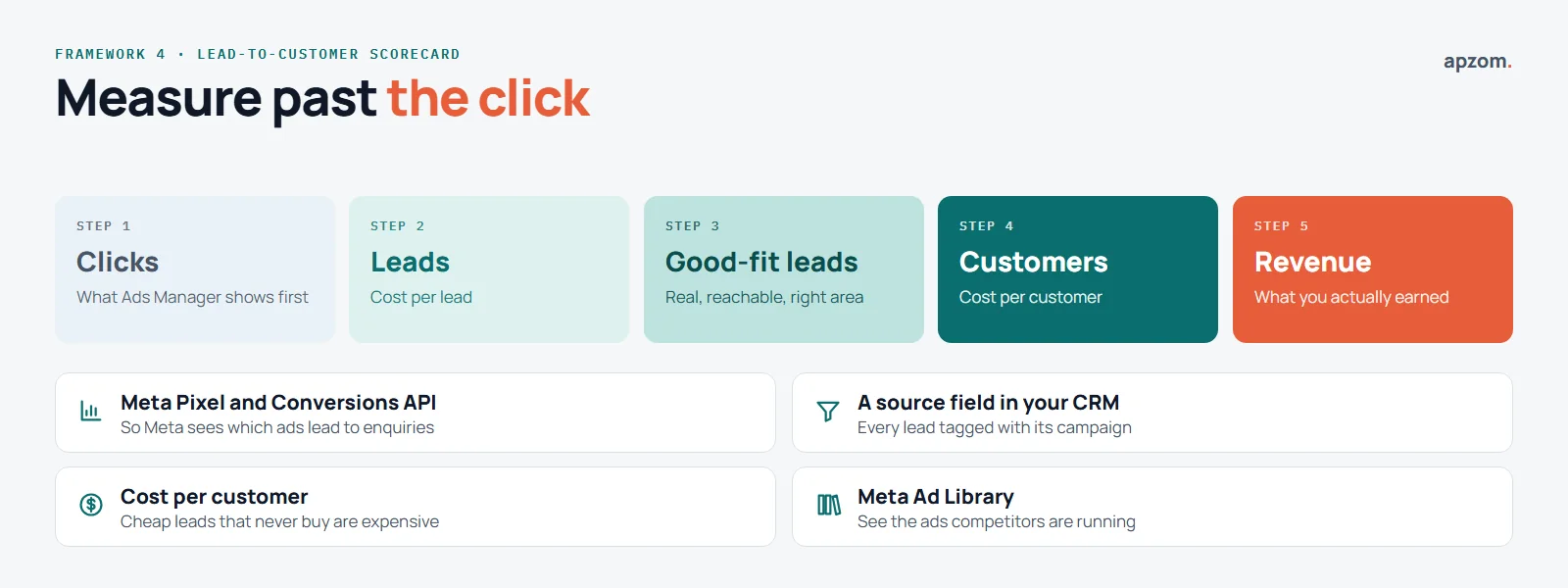
- Install the Meta Pixel on your website, and ideally the Conversions API too, so Meta can see which ads lead to enquiries and bookings.
- Track lead quality: of the leads you got, how many were real, reachable and a good fit?
- Track customers and revenue by campaign. Add a simple “source” field in your CRM or spreadsheet.
- Work out cost per customer, not just cost per lead. A campaign with cheaper leads that never buy is more expensive than it looks.
- Check your competitors’ ads. Meta’s Ad Library lets you search the ads currently running across Facebook and Instagram, and it can be searched without an account.
Meta describes the Conversions API as a direct connection between your marketing data and its ad systems. It can also send events from your shop, phone or chat, not just your website. That matters for local businesses, where many customers end up calling or walking in.
Common mistakes to avoid
- Boosting posts at random with no goal.
- Choosing an objective that does not match what you want, such as engagement when you need enquiries.
- Targeting a tiny audience with too many limits.
- Changing ads, budgets and audiences every day, so nothing settles.
- Leaving leads unanswered for days.
- Judging success by likes, reach or cost per click.
- Running the same ad for months until people ignore it.
How Apzom can help
Our Meta ads work for two Ahmedabad property projects is on our case studies page. For HillTown Group, an Ahmedabad property developer, Meta ads delivered 600+ leads every month for 12 months running. For Kingston Flats, a residential project in Odhav, Ahmedabad, they have delivered 560+ leads every month since June 2025. These are lead counts: neither case study claims sales, bookings or return on ad spend. Every campaign starts with an audit, then moves through structure, testing and scaling, with lead form design and qualification so your team gets leads worth calling.
We work with clients worldwide, remotely, from our base in Ahmedabad, India. Our Meta ads management covers strategy, campaign set-up, creative, lead handling and reporting, and it works alongside our Google Ads management, social media marketing and conversion rate optimisation. We will not promise a number of leads, because results depend on your offer, your market and how quickly leads are answered. If you are comparing agencies, our guide on how to choose a digital marketing agency may help.
Request a Meta Ads Review. We look at your campaigns or your plan: objectives, local targeting, special ad category rules, creative, lead forms, follow-up speed, Pixel and Conversions API set-up, and how leads turn into customers. You get a prioritised list of what to fix first.
No obligation and no guaranteed lead numbers. Prefer to talk first? Contact us or see all our services.
Frequently asked questions
Do Facebook ads work for local businesses?
They can, especially for businesses with a clear offer, a defined local area and someone to follow up leads quickly. They are less suited to emergency services that people only look for when they need them.
How much should a local business spend on Facebook ads?
It depends on your market, offer and goals. Set a monthly amount you are comfortable testing for two to three months, then judge it by cost per customer, not cost per click.
Is boosting a post the same as running an ad?
Boosting is a simple way to promote a post, but it offers fewer options than a full campaign in Ads Manager. For enquiries and sales, set up a campaign with the right objective.
Should I use Meta lead forms or send people to my website?
Lead forms usually bring more enquiries at a lower cost per lead, but often lower intent. A website can bring fewer but better-informed leads. Many businesses test both and compare cost per customer.
How long do Meta ads take to work?
Ads can start bringing results within days, but Meta needs time to learn which people respond. Meta says an ad set usually leaves its learning phase after about 50 results in the week after its last significant edit. Avoid changing campaigns every day, and give a test at least a few weeks.
Do I need the Meta Pixel?
If you send people to your website, yes. The Pixel, ideally with the Conversions API, lets Meta see which ads lead to enquiries or bookings, so it can find more people like them and so you can measure results.
Can I target people by postcode on Facebook?
Usually, yes. Meta lets you target countries, regions, cities, postcodes or a radius around a dropped pin. But if your ads fall into a Special Ad Category, such as housing, employment or financial services, Meta limits postcode, age and gender targeting for advertisers based in or reaching the US, and advertisers reaching Canada and certain countries in Europe.
Can Apzom manage Meta ads outside India?
Yes. We work with clients worldwide, remotely, from our base in Ahmedabad, India, and plan campaigns around your market, language and the rules that apply where you advertise.